Infinity Omni-Plus V1382TIR - Security Camera Digital Watchdog - Free user manual and instructions
Find the device manual for free Infinity Omni-Plus V1382TIR Digital Watchdog in PDF.


| Product Type | Vandal Dome Camera |
| Image Device | Super HAD II CCD 1/3" |
| Effective Pixels | 768(H) x 494(V) |
| Scanning System | 525 lines, 2:1 Interlace |
| Minimum Illumination | 0.0 Lux (IR LED On) |
| Lens | 2.9 ~ 8.5mm OMNI-Focus Lens |
| Horizontal Resolution | 580 TV Lines |
| Video Output | VBS 1.0Vp-p (75 Ohm load) |
| S/N Ratio | 50dB |
| OSD Control | Yes |
| Functions | EWDR, STAR-LIGHT, 3D-DNR, DIS, Motion Detection, 6 Privacy Zones |
| Power Requirement | 12VDC / 24VAC |
| Power Consumption (LED Off) | 12VDC: 1.96W (163.3mA) / 24VAC: 2.2W (91.7mA) |
| Power Consumption (LED On) | 12VDC: 4.4W (366.7mA) / 24VAC: 3.0W (125mA) |
| Operating Temperature | -10°C to 55°C (14°F to 131°F) |
| Humidity | Less than 90% |
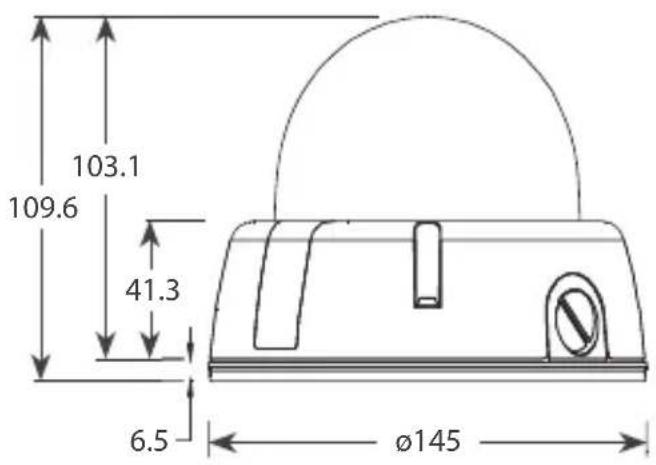
| Dimensions (Diameter x Height) | 109.6 x 145mm (4.31 x 5.71in) |
| IP Rating | IP66 |
| Mount | Surface |
| Warranty | 5 years labor and parts |
| Cleaning | Soft cloth with mild detergent |
| Safety Precautions | Do not open or modify; keep away from moisture, high temperature, electric/magnetic fields |
Frequently Asked Questions - Infinity Omni-Plus V1382TIR Digital Watchdog
User questions about Infinity Omni-Plus V1382TIR Digital Watchdog
0 question about this device. Answer the ones you know or ask your own.
Ask a new question about this device
Download the instructions for your Security Camera in PDF format for free! Find your manual Infinity Omni-Plus V1382TIR - Digital Watchdog and take your electronic device back in hand. On this page are published all the documents necessary for the use of your device. Infinity Omni-Plus V1382TIR by Digital Watchdog.
USER MANUAL Infinity Omni-Plus V1382TIR Digital Watchdog
V1362DIR / V1363TIR / V1382TIR Vandal Dome Camera
User Manual
natural_image
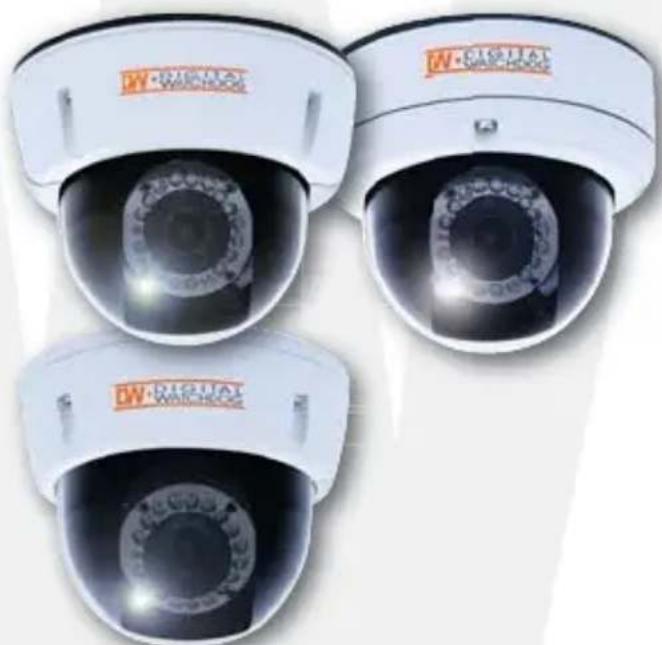
Three identical white surveillance cameras with red 'W-QUAL WATCHOUT' branding, shown from different angles (no text or symbols on the cameras themselves)ABOUT MANUAL
Before installing and using the camera, please read this manual carefully. Be sure to keep it handy for future reference.
PRECAUTIONS
■ Do not open or modify.
- Do not open the case except during maintenance and installation, for it may be dangerous and can cause damages.
■ Do not put objects into the unit.
- Keep metal objects and flammable substances from entering the camera. It can cause fire, short-circuits, or other damages.
■ Be careful when handling the unit.
■ To prevent damages, do not drop the camera or subject it to shock or vibration.
- Do not install near electric or magnetic fields.
■ Protect from humidity and dust.
■ Protect from high temperature.
- Be careful when installing near the ceiling of a kitchen or a boiler room, as the temperature may rise to high levels.
■ Cleaning
To remove dirt from the case, moisten a soft cloth with a soft detergent solution and wipe.
■ Mounting Surface
The material of the mounting surface must be strong enough to support the camera.
TROUBSHOOTING
Before sending your camera out for repair, check the items below. If the problem persists after checking these items, contact your service center.
■ No Video
Is the coaxial cable attached securely? Is the power and voltage within operational specification? Has the Iris of the lens been adjusted correctly based on specification levels? Is there adequate illumination?
■ Out-of-Focus Video
Is the lens in focus? Is the lens dirty? Dirt or fingerprints on the lens can adversely affect the image. Gently wipe any dirt or fingerprints off the lens with cleaning fluid (commercially available) and a soft cloth or lens cleaning paper.
WARNING : TO PREVENT THE RISK OF FIRE OR ELECTRIC SHOCK, DO NOT EXPOSE THIS APPLIANCE TO RAIN OR MOISTURE.
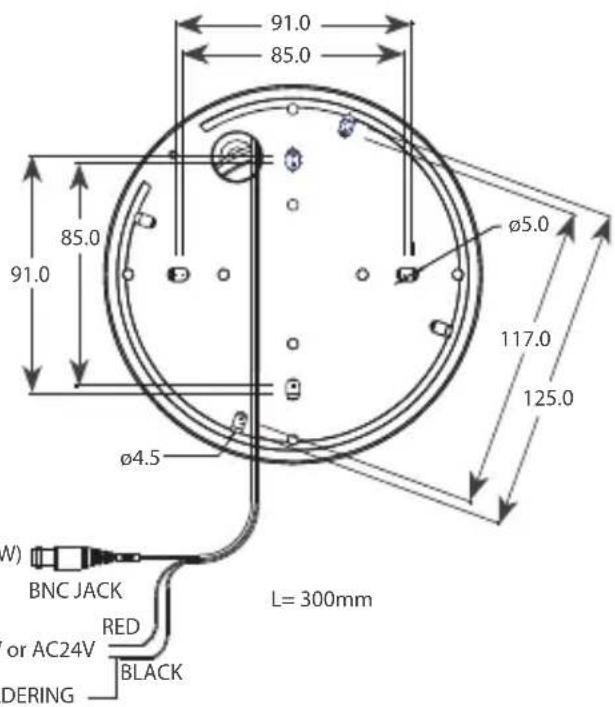
DIMENSIONS IN MILLIMETERS\*
INSTALLATION\*
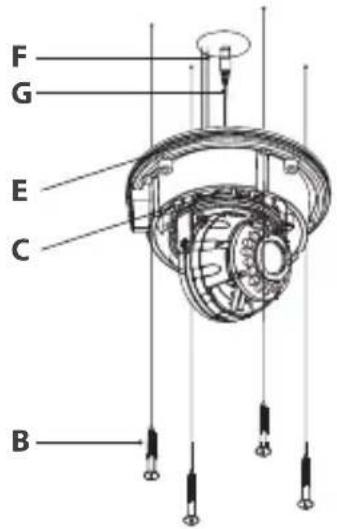
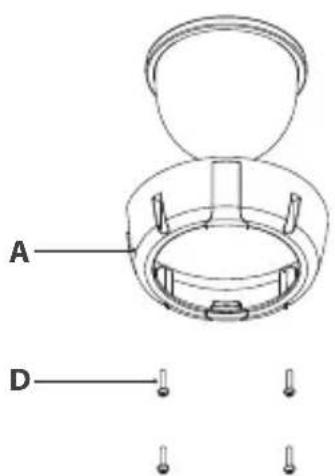
- Loosen the Fixing Screw (D), using a screw driver.
- Separate the Upper Case (A) and the Base (E).
- Detach the Gimbal (C) from the Base (E).
- Cut a hole in the ceiling for routing the cables.
- Place the Base (E) horizontally against the ceiling and drill the screw holes at the two marked positions.
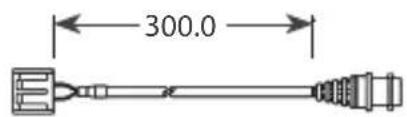
- Pass the Power Cable (F) and Video Cable (G) from the camera unit through the cable hole in the ceiling.
- Align the screw holes of the camera unit with the holes in the ceiling. Secure the camera to the ceiling with the two screws.
- Fix Gimbal (C) to the Base (E).
- Install and adjust the camera unit.
- Adjust the dome liner to show the lens through the camera window, and then fix it to the Base (E).
- Attach the Upper Case (A) with the Base (E) and tighten the Fixing Screws (D).
CONNECTION\*
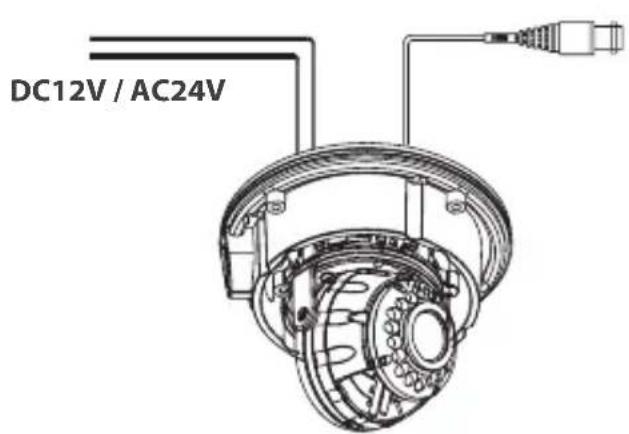
DC12V


natural_image
Isometric line drawing of a rectangular box with internal compartments (no text or symbols)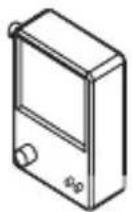
CAUTION : CHECK FOR POLARITY WHEN USING A DC12V POWER SUPPLY.
CAMERA SETTINGS\*
■ LENS ADJUSTMENT
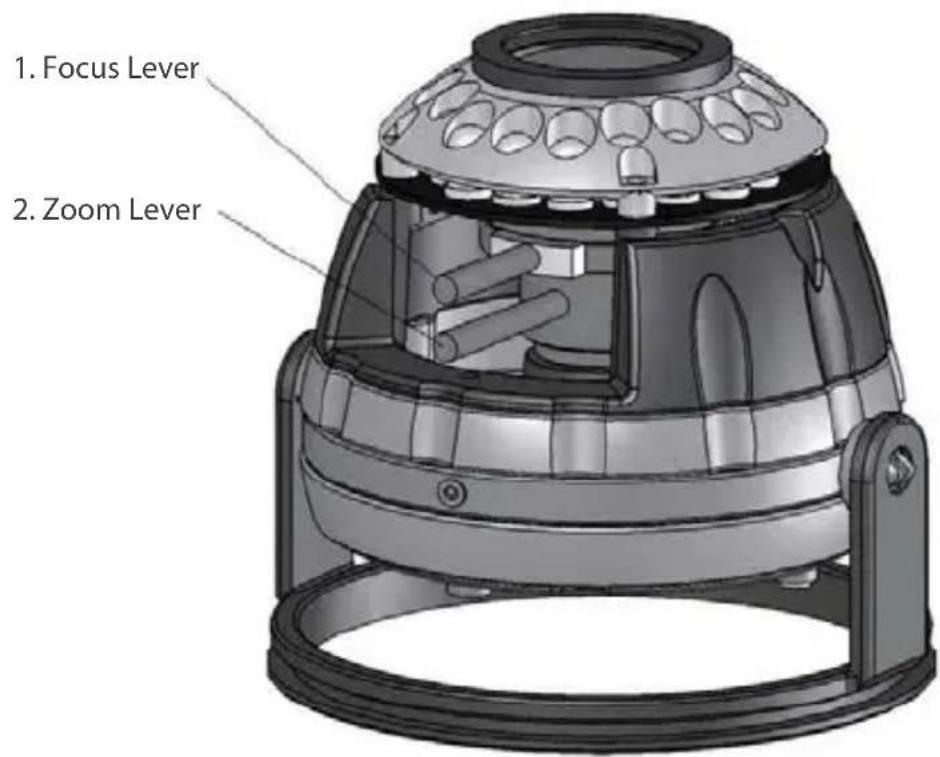
- Set the zoom level to the desired position by moving the Zoom Lever.
- Set the focus, using the Focus Lever.
CAMERA SETTING FOR SIDE OSD CONTROL BOARD\*
V1362DIR, V1363TIR, V1382TIR
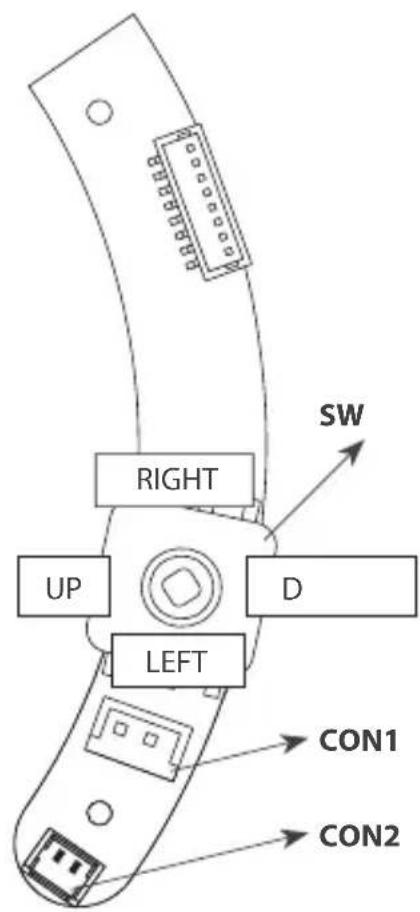
FUNCTIONAL OF CONTROL BOARD
[1] SW Functional control of O.S.D(On Screen Display)
[2] CON1 Second Video output connector
[3] CON2 RS-485 connector
OWN
REMOTE CONTROL\*
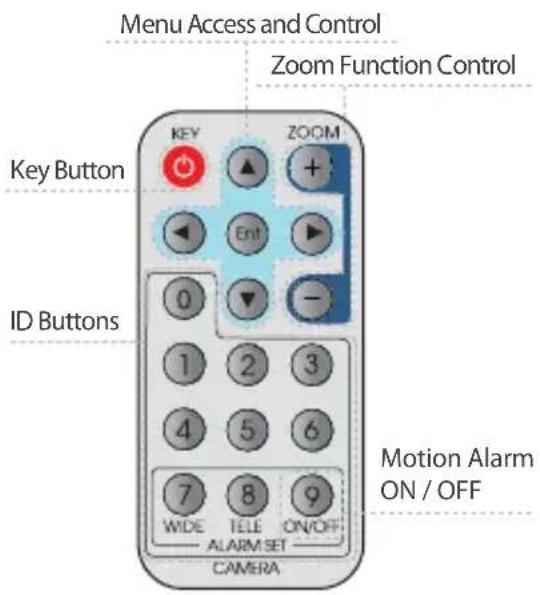
NOTE : PRESS [KEY] + [ID] (DEFAULT IS "001" FORID=1) PRESS [ENT] TO ACCESS THE MENU NOTE : THE CAMERA ID IS A 3-DIGIT NUMBER.
■ REMOTE CONTROL Instructions
- Set the Camera iD in the OSD menu. The default setting is 001. NOTE: If the Camera ID is modified, you must reset the power for the new settings to apply. Once you reset the power, the camera will recognize the new Camera ID.
- If you press the KEY Button, the camera display will turn into the standby image. NOTE: The LED flickers for approximately 20 seconds.
- Input the same number used as the Camera ID to the Remote Controller. After the number has been input, the LED light will turn on, and the remote controller will be ready to use. NOTE: The ID number is 3 digits.
- The ZOOM In (+) and ZOOM Out (-) Keys are used to control the zoom of your camera lens and to select the zoom area of alarm function. Select the area where you wish to observe the movement of objects.
- Select the zoom range by pressing the WIDE (7) Key. Save the zoom range by pressing the TELE (8) Key. NOTE: If the zoom range is smaller than the alarm standby range, the zoom range setting will not be saved.
MODULE OSD MENU ^* (V1362DIR)
| EXPOSURE | COLOR | DAY&NIGHT | |||
 | BRIGHTNESSSHUTTERBLCAGC |  | — WB MODE |  | — D&N MODE |
| FUNCTION | MOTION | PRIVACY | |||
 | MIRRORSHARPNESSGAMMASLCHMEDRC |  | — ALARM |  | MMASK 2MASK 3MASK 4COLOR SET |
| SYNC | SETUP | EXIT | |||
 | — SYNC |  | CAMERA IDTITLE EDITTITLE RESETTITLE POSITIONDPC SETLANGUAGEPC CONT. |  | EXITSAVE & EXITFACTORY RESET |
ASK 1
OSD MENU ^* (V1362DIR)
| EXPOSURE | |
| BRIGHTNESS | MANUAL (ELC LEVEL: 0 ~ 100) / DC (DC LEVEL: 0 ~ 31) |
| SHUTTER1/60, 1/100FLC, 1/120 ~ 1/100000 | |
| BLC | OFF / ONBLC (Back Light Compensation) |
| AGC | OFF / 12dB ~ 36dBAGC (Auto Gain Control) |
| EXIT JUMP | EXIT / SAVE&EXIT / FACTORY SET |
| COLOR | |
| WB MODE | AWC / ATW / MANUAL / PUSHLOCK (AWC is recommended.) |
| R-Y GAIN | 0 ~ 255 |
| B-Y GAIN 0 ~ 255 | |
| DAY & NIGHT | |
| Day & Night Mode | AUTO / COLOR / BWCOLOR --> BW: Switching from COLOR to BW; If the number is higher, the camera will only switch during a super low light condition.BW --> COLOR: wBtching from BW to COLOR; This number should be always lower than COLOR --> BWRead Time: Time interval to switch from COLOR to BW |
| COLOR: | |
| BW: BURST (OFF/ON); When the burst is OFF, the picture will have less noise. | |
| EXIT JUMP | EXIT / SAVE&EXIT / FACTORY SET |
| FUNCTION | |
| MIRROROFF/ MIRROR | |
| SHARPNESS0 ~ 49 | |
| GAMMA USER / 0.45 / 0.6 / 1.00 | |
| SLC | OFF / ON (0 ~ 50)SLC (Side Light Compensation) |
| HME | OFF / ON (0 ~ 55)HME (Highlight Masking Exposure) |
| DISOFF /ON | DIS (Digital Image Stabilizer) |
| EXIT JUMP | EXIT / SAVE&EXIT / FACTORY SET |
| MOTION (OMNI-Plus Cameras Only) | |
| MOTION | OFF / ON |
| SET WINDOW | |
| ALL SET (Set the Entire Screen) | |
| ALL CLEAR (Clear the Entire Screen) | |
| SENSITIVITY (0 ~ 55) | |
| SHOW INDICATOR (OFF / ICON / TRACE) | |
| DELAY OUT(1 ~ 15)Motion Alarm Zoom-In Delay | |
| EXIT JUMP | EXIT / SAVE&EXIT / FACTORY SET |
| PRIVACY | |
| MASK 1OFF / ON | |
| MASK 2OFF / ON | |
| MASK 3 OFF / ON | |
| MASK 4OFF / ON | |
| COLOR SET | BLACK / GRAY / COLOR 1~6 |
| EXIT JUMP | EXIT / SAVE&EXIT / FACTORY SET |
| SYNC | |
| SYNC MODE | INTERNAL / AUTO |
| V-PHASE0 ~ 199 | |
| EXIT JUMP | EXIT / SAVE&EXIT / FACTORY SET |
| SETUP | |
| CAMERA ID 0 ~ 255 | |
| TITLE EDIT | |
| TITLE RESET | |
| TITLE POS. | |
| DPC | OFF / AUTODPC ( Dead Pixel Cancellation) |
| LANGUAGEEnglish / Chinese | |
| PC CONT.OFF / ON | |
| EXIT JUMP | EXIT / SAVE&EXIT / FACTORY SET |
| EXIT | |
| EXIT Exit the menu | |
| SAVE&EXIT | Exit the menu and save the setting |
| FACTORY SET | Reset the menu setting to factory default |
MODULE OSD MENU ^* (V1363TIR)
| EXPOSURE | COLOR | DAY&NIGHT | |||
 | BRIGHTNESSSHUTTERBLC / HMEAGCSTARLIGHTNIGHT-UP |  | WB MODER-Y GAINB-Y GAIN |  | D&N MODEC_SUPA_SUP |
| FUNCTION | MOTION | PRIVACY | |||
 | MIRRORSHARPNESSGAMMAFREEZENEGATIVED-ZOOM3D DNRDRC |  | — MOTION |  | — PRIVACY |
| SYNC | SETUP | EXIT | |||
 | —SYNC TITLE EDIT |  | PC CONTROLLANGUAGEMONITOROSD COLOROMNI LENS |  | EXITSAVE & EXITFACTORY RESET |
OSD MENU\*
(V1363TIR)
| EXPOSURE | |
| BRIGHTNESS0 ~ 100 | |
| SHUTTER1/60, FLK, 1/250 ~ | 1/100000 |
| BLC/HME | OFF / BLC / HME |
| AGC | HIGH / MIDDLE / LOW / OFFAGC (Auto Gain Control) |
| STARLIGHT | AUTO (x2 ~ x256) / OFF |
| NIGHT-UP | NORMAL / HIGH |
| EXIT JUMP | EXIT / SAVE & EXIT / FACTORY SET |
| COLOR | |
| WB MODE | AWC / AWT / PUSH LOCK / MANUAL / INDOOR / OUTDOOR |
| R-Y GAIN | 0 ~ 100 |
| B-Y GAIN 0 ~ 100 | |
| EXIT JUMP | EXIT / SAVE & EXIT / FACTORY SET |
| DAY & NIGHT | |
| Day & Night Mode | AUTO: READ TIME(3~63) / S-LEVEL(0~100) / E-LEVEL(0~100)COLOR --> BW: Switching from COLOR to BW; If the number is higher, the camerawill only switch during a super low light conditionBW --> COLOR: Switching from BW to COLOR; This number should be always lower thanCOLOR --> BW.Read Time: Time interval to switch from COLOR to BW. |
| COLOR | |
| B&W Mode: BURST (OFF / ON); There is less noise when the BURST is OFF.SMART IR (OFF / ON) | |
| C-SUP | Color Suppression: Color will be reduced at low illumination, if the C-SUP Level is set higher. 0 ~ 63 |
| A-SUP | Aperture Suppression: The sharpness of the edges will be reduced at low illumination, ifA-SUP level is set higher. 0 ~ 15 |
| EXIT JUMP | EXIT / SAVE & EXIT / FACTORY SET |
| FUNCTION | |
| MIRROR | OFF / MIRROR / V-FLIP / ROTATE |
| SHARPNESS0 ~ 31 | |
| GAMMA 0.05 ~ 1.00 / USER | |
| FREEZEOFF / ON | |
| NEGATIVEOFF / ON | |
| D-ZOOM | OFF / ON (x1.0 ~ x32 PTZ) |
| 3D-DNR | ON (0~100) / OFF3D Digital Noise Reduction |
| DRC | OFF / INDOOR / OUTDOORDynamic Range Compressor |
| EXIT JUMP | EXIT / SAVE & EXIT / FACTORY SET |
| MOTION (OMNI-Plus Cameras Only) | |
| MOTION | OFF |
| ONAREA SELECT (AREA 1~4)AREA SET (POSITION / SIZE)SENSITIVITY (0~40)MOTION TRACE (OFF / ON)MOTION VIEW (OFF / ON)RETURN | |
| EXIT JUMP | EXIT / SAVE & EXIT / FACTORY SET |
| PRIVACY | |
| PRIVACY | OFF |
| ONAREA SELECT (1~8)AREA SET (POSITION / SIZE)COLOR (0~15)RETURN | |
| EXIT JUMP | EXIT / SAVE & EXIT / FACTORY SET |
| SYNC | |
| SYNCINTERNAL / LINE | |
| EXIT JUMP | EXIT / SAVE & EXIT / FACTORY SET |
| SETUP | |
| TITLE EDIT | OFF / ON |
| PC CONTROL(RS485 Control) | CAM ID / ID DISPLAY (OFF/ON) / BAUDRATE (2400 / 4800 / 9600)The protocol is PELCO-D. |
| LANGUAGE | ENG / KOR / JPN / CHN1 / CHN2 / RUS / FRAN / SPAN / ITAL |
| MONITOR | CRT / LCDSelect LCD only if the camera is directly connected to the LCD monitor. |
| OSD COLOR | 0 ~ 15 |
| OMNI LENS | OFF (OMNI-Plus Cameras Only) |
| ONJALARM / READ TIME / ALARM ZOOM / STAND BY / RETURN | |
| DEFECT | WHITE DEFECT CANCEL MODE |
| EXIT JUMP | EXIT / SAVE & EXIT / FACTORY SET |
| EXIT | |
| EXIT | |
| SAVE & EXIT | |
| FACTORY SET | |
MODULE OSD MENU ^* (V1382TIR)
| EXPOSURE | COLOR | DAY&NIGHT | |||
 | BRIGHTNESSSHUTTERBLCAGCMAX_DRSTARLIGHT |  | WB MODER-Y GAINB-Y GAIN |  | D&N MODEC_SUPA_SUP |
| FUNCTION | MOTION | PRIVACY | |||
 | MIRRORSHARPNESSGAMMAFREEZENEGATIVE3D DNRD-ZOOMSLCHMEDIS |  | — MOTION MASK 1 |  | MASK 2MASK 3MASK 4MASK 5MASK 6 |
| SYNC | SETUP | EXIT | |||
 | — SYNC |  | CAMERA IDTITLEDPCMONITORLANGUAGEBAUDRATEOMNI LENS |  | EXITSAVE & EXITFACTORY RESET |
OSD MENU\*
(V1382TIR)
| EXPOSURE | |
| BRIGHTNESS0 ~ 99 | |
| SHUTTER1/60, 1/100FLC, 1/120~1/100000 | |
| BLC | OFF / ONBLC (Back Light Compensation) |
| AGC | HIGH / MIDDLE / LOW / OFFAGC (Auto Gain Control) |
| MAX_DR | OFF / ON (0~20) (Electronic Wide Dynamic Range) |
| STARLIGHT | AUTO (x2 ~ x256) / OFF (x32 is recommended for low light application.) |
| EXIT JUMP | EXIT / SAVE & EXIT / FACTORY SET |
| COLOR | |
| WB MODE | AWC / ATW / MANUAL / PUSHLOCK (AWC is recommended.) |
| R-Y GAIN | 0 ~ 255 |
| B-Y GAIN 0 ~ 255 | |
| EXIT JUMP | EXIT / SAVE & EXIT / FACTORY SET |
| DAY & NIGHT | |
| Day & Night Mode | AUTO / COLOR / BW / EX-CONTCOLOR --> BW: Switching from COLOR to BW; If the number is higher, the camera will only switch during a super low light condition.BW --> COLOR: Switching from BW to COLOR; This number should be always lower than COLOR --> BW.Read Time: Time interval to switch from COLOR to BW. |
| COLOR | |
| BW: BURST (OFF/ON); When the BURST is OFF, the picture will have less noise. | |
| C-SUP | Color Suppression: Color will be reduced at low illumination, if the C_SUP Level is higher/0 ~ 100. (Not available when 3D-DNR is ON.) |
| A-SUP | Aperture Suppression: Edge sharpness will be reduced at low illumination, if A_SUP Level is higher/0 ~ 100. (Not available when 3D-DNR is ON.) |
| EXIT JUMP | EXIT / SAVE & EXIT / FACTORY SET |
| FUNCTION | |
| MIRROR | OFF/MIRROR/V-FLIP/ROTATE |
| SHARPNESS0 ~ 49 | |
| GAMMA 0.05 ~ 1.00 / USER | |
| FREEZEOFF / ON | |
| NEGATIVEOFF/ ON | |
| 3D-DNR | OFF / LOW / MIDDLE / HIGH3D DNR (3D Digital Noise Reduction) |
| D-ZOOM | OFF / ON(x1.0 ~ x3.0 Digital PTZ) |
| SLC | OFF / ONSLC (Side Light Compensation) |
| HME | OFF / ONHME (Highlight Masking Exposure) |
| DISOFF /ON | DIS (Digital Image Stabilizer) |
| EXIT JUMPEXIT / | SAVE&EXIT / FACTORY SET |
| MOTION (OMNI-Plus Cameras Only) | |
| MOTION | OFF / ON |
| SET WINDOW | |
| ALL SET (Set the Entire Screen) | |
| ALL CLEAR (Clear the Entire Screen) | |
| SENSITIVITY (1 ~ 120) | |
| SHOW INDICATOR (OFF / ICON / TRACE) | |
| DELAY OUT (1 ~ 15)Motion Alarm Zoom-In Delay | |
| EXIT JUMP | EXIT / SAVE&EXIT / FACTORY SET |
| PRIVACY | |
| PRIVACY | MASK 1 OFF / ON ↓ |
| MASK 2 OFF / ON ↓ | |
| MASK 3 OFF / ON ↓ | |
| MASK 4 OFF / ON ↓ | |
| MASK 5 OFF / ON ↓ | |
| MASK 6 OFF / ON ↓ | |
| EXIT JUMP | EXIT / SAVE&EXIT / FACTORY SET |
| SYNC | |
| SYNC MODE | INTERNAL / AUTO |
| V-PHASE0 ~ 199 | |
| EXIT JUMP | EXIT / SAVE & EXIT / FACTORY SET |
| SETUP | |
| CAMERA ID 0 ~ 254 | |
| TITLEOFF / ON | |
| DPC | OFF / AUTODPC (Dead Pixels Cancellation) |
| MONITOR | CRT / LCD (Select LCD only if the camera is directly connected to LCD monitor.) |
| LANGUAGEEnglish / Chinese | |
| BAUDRATE | 2400 / 4800 / 9600 / 14400 / 19200 / 38400The protocol is PELCO-D. It is fixed and cannot be changed.) |
| OMNI LENS | OFF / 1 ~ 10 (OMNI-Plus Cameras Only) |
| EXIT JUMP | EXIT / SAVE & EXIT / FACTORY SET |
| EXIT | |
| EXIT Exit the menu | |
| SAVE&EXIT | Exit the menu and save the setting |
| FACTORY SET | Reset the menu setting to factory default |
SPECIFICATIONS*
| Model V1362DIR | ||
| Camera TYPE Color/BW | Vandal Dome Camera | |
| Mount Surface | ||
| Image | Device | Super HAD II CCD |
| Size 1/3" | ||
| Pixels-Total | 811(H) X 508(V) | |
| Pixels-Effective | 768(H) X 494(V) | |
| Scanning | System | 525 line, 2:1 Interlace |
| Horizontal Frequency Internal Mode | 15,734Hz | |
| Vertical Frequency Internal Mode | 59.94Hz | |
| Min. Scene Illumination | IR-LED On | 0.0 Lux |
| Functions | BLC | ON / OFF (Area Setting) |
| AGC | ON / OFF (Gain Adjust) | |
| AWB | ATW / AWC / MANUAL / PUSHLOCK | |
| Mirror | ON / OFF | |
| Motion Detection | ON / OFF | |
| Privacy Zone | 4 Programmable Zone / Size | |
| Lens | Focal Length | 3.3 ~ 12mm Varifocal Auto Iris Lens |
| Resolution | Horizontal | 540 TV Lines |
| Video Output | VBS 1.0Vp-p | VBS 1.0Vp-p(75 Load) |
| S/N Ratio | S/N Ratio | 50dB |
| OSD | OSD | YES |
| Environmental Conditions | Operating Temperature | -10°C ~ 55°C (14°F ~ 131°F) |
| Humidity | Less than 90% | |
| Power | Power Requirement | 12VDC / 24VAC |
| Power Consumption | 12VDC: 1.96W, 163.3mA / 24VAC: 2.2W, 91.7mA | |
| 12VDC: 4.4W, 366.7mA / 24VAC: 3.0W, 125mA (LED ON) | ||
| Physical Specification | Dimensions(φ x H) | 109.6 X 145mm, 4.31 X 5.71in |
| IP Rating | IP66 | |
SPECIFICATIONS*
| Model V1363TIR | ||
| Camera TYPE Color/BW | Vandal Dome Camera | |
| Mount Surface | ||
| Image | Device | Super HAD II CCD |
| Size 1/3" | ||
| Pixels-Total | 811(H) X 508(V) | |
| Pixels-Effective | 768(H) X 494(V) | |
| Scanning | System | 525 line, 2:1 Interlace |
| Horizontal Frequency Internal Mode | 15.734Hz | |
| Horizontal Frequency Line-Lock Mode | 15.750Hz | |
| Vertical Frequency Internal Mode | 59.94Hz | |
| Vertical Frequency Line-Lock Mode | 60Hz | |
| Min. Scene Illumination | IR-LED On | 0.0 Lux |
| Functions | STAR-LIGHT | OFF / AUTO (x2 ~ x256) |
| 3D-DNR OFF / ON | ||
| AGC | OFF / LOW / MIDDLE / HIGH | |
| AWB | ATW / AWC / INDOOR / OUTDOOR / MANUAL / PUSHLOCK | |
| Motion Detection | OFF / ON (Area / Sensitivity) | |
| Privacy Zone | 8 Programmable Zone / Size | |
| Lens | Focal Length | 3.3 ~ 12mm Varifocal Auto Iris Lens |
| Resolution | Horizontal | 560TV Lines |
| Video Output | VBS 1.0Vp-p | VBS 1.0Vp-p (75 Load) |
| S/N Ratio | S/N Ratio | 52dB |
| OSD | OSD | YES |
| Environmental Conditions | Operating Temperature | -10°C ~ 55°C (14°F ~ 131°F) |
| Humidity | Less than 90% | |
| Power | Power Requirement | 12VDC / 24VAC |
| Power Consumption | 12VDC: 1.96W, 163.3mA / 24VAC: 2.2W, 91.7mA | |
| 12VDC: 4.4W, 366.7mA / 24VAC: 3.0W, 125mA (LED ON) | ||
| Physical Specification | Dimensions(φ x H) | 109.6 X 145mm, 4.31 X 5.71in |
| IP Rating | IP66 | |
SPECIFICATIONS*
| Model V1382TIR | ||
| Camera TYPE Color/BW | Vandal Dome Camera | |
| Mount Surface | ||
| Image | Device | Super HAD II CCD |
| Size 1/3" | ||
| Pixels-Total | 811(H) X 508(V) | |
| Pixels-Effective | 768(H) X 494(V) | |
| Scanning | System | 525 line, 2:1 Interlace |
| Horizontal Frequency Internal Mode | 15,734Hz | |
| Vertical Frequency Internal Mode | 59.94Hz | |
| Min. Scene Illumination | IR-LED On | 0.0 Lux |
| Functions | EWDR | ON / OFF |
| STAR-LIGHT | OFF / AUTO (x2 ~ x256) | |
| 3D-DNR | OFF / LOW / MIDDLE / HIGH | |
| DIS ON / OFF | ||
| Motion Detection | ON / OFF (Area / Sensitivity) | |
| Privacy Zone | 6 Programmable Zone / Size | |
| Lens | Focal Length | 2.9 ~ 8.5mm OMNI-Focus Lens |
| Resolution | Horizontal | 580 TV Lines |
| Video Output | VBS 1.0Vp-p | VBS 1.0Vp-p (75 Load) |
| S/N Ratio | S/N Ratio | 50dB |
| OSD | OSD | YES |
| Environmental Conditions | Operating Temperature | -10°C ~ 55°C (14°F ~ 131°F) |
| Humidity | Less than 90% | |
| Power | Power Requirement | 12VDC / 24VAC |
| Power Consumption | 12VDC: 1.96W, 163.3mA / 24VAC: 2.2W, 91.7mA | |
| 12VDC: 4.4W, 366.7mA / 24VAC: 3.0W, 125mA (LED ON) | ||
| Physical Specification | Dimensions(φ x H) | 109.6 X 145mm, 4.31 X 5.71in |
| IP Rating | IP66 | |
WARRANTY INFORMATION\*
Digital Watchdog (referred to as "the Warrantor") warrants the Camera Series against defects in materials or workmanship as follows.
LABOR : For the initial five (5) years from the date of original purchase, if the camera is determined to be defective, the Warrantor will repair or replace the unit, with new or refurbished product at its option, at no charge.
PARTS : In addition, the Warrantor will supply replacement parts for the initial five (5) years.
To obtain warranty or out of warranty service, please contact a Technical Support Representative at 1-866-446-3595 Monday through Friday from 8:30AM to 8:00PM EST.
A purchase receipt or other proof of the original purchase date is required before warranty service is rendered. This warranty only covers failures due to defects in materials and workmanship which arise during normal use. This warranty does not cover damage which occurs in shipment or failures which are caused by products not supplied by the Warrantor or failures which result from accident, misuse, abuse, neglect, mishandling, misapplication, alteration, modification, faulty installation, set-up adjustments, improper antenna, inadequate signal pickup, maladjustment of consumer controls, improper operation, power line surge, improper voltage supply, lightning damage, rental use of the product or service by anyone other than an authorized repair facility or damage that is attributable to acts of God.
LIMITS AND EXCLUSIONS\*
There are no express warranties except as listed above. The Warrantor will not be liable for incidental or consequential damages, including without limitation or damage to recording media, resulting from the use of these products or arising out of any breach of the warranty. All express and implied warranties, including the warranties of merchantability and fitness for particular purpose, are limited to the applicable warranty period set forth above.
Some States do not allow the exclusion or limitation of incidental or consequential damages or limitations on how long an implied warranty lasts, so the exclusions or limitations listed above may not apply to you. This warranty gives you specific legal rights, and you may also have other rights that vary from state to state.
If the problem is not handled to your satisfaction, then write to the Address listed on the next page.
Service calls which do not involve defective materials or workmanship as determined by the Warrantor, in its sole discretion, are not covered. Costs of such service calls are the responsibility of the purchaser.
DW•DIGITAL WATCHDOG
Everything's Digital
5436 W Crenshaw St. Tampa, FL 33634
Tel: 866-446-3595 / 813-888-9555
Fax: 813-888-9262
www.Digital-Watchdog.com
technicalsupport@dwcc.tv
Technical Support Hours: Monday-Friday
8:30am to 8:00pm EST
- V1362DIR / V1363TIR / V1382TIR Vandal Dome Camera
- ABOUT MANUAL
- PRECAUTIONS
- TROUBSHOOTING
- ■ No Video
- ■ Out-of-Focus Video
- DIMENSIONS IN MILLIMETERS\*
- INSTALLATION\*
- CONNECTION\*
- CAMERA SETTINGS\*
- ■ LENS ADJUSTMENT
- CAMERA SETTING FOR SIDE OSD CONTROL BOARD\*
- FUNCTIONAL OF CONTROL BOARD
- REMOTE CONTROL\*
- ■ REMOTE CONTROL Instructions
- OSD MENU\*
- (V1363TIR)
- (V1382TIR)
- WARRANTY INFORMATION\*
- LIMITS AND EXCLUSIONS\*
- DW•DIGITAL WATCHDOG
Brand : Digital Watchdog
Model : Infinity Omni-Plus V1382TIR
Category : Security Camera