Universal HD over Coax DWC-V8553TIR - Security Camera Digital Watchdog - Free user manual and instructions
Find the device manual for free Universal HD over Coax DWC-V8553TIR Digital Watchdog in PDF.


User questions about Universal HD over Coax DWC-V8553TIR Digital Watchdog
0 question about this device. Answer the ones you know or ask your own.
Ask a new question about this device
Download the instructions for your Security Camera in PDF format for free! Find your manual Universal HD over Coax DWC-V8553TIR - Digital Watchdog and take your electronic device back in hand. On this page are published all the documents necessary for the use of your device. Universal HD over Coax DWC-V8553TIR by Digital Watchdog.
USER MANUAL Universal HD over Coax DWC-V8553TIR Digital Watchdog
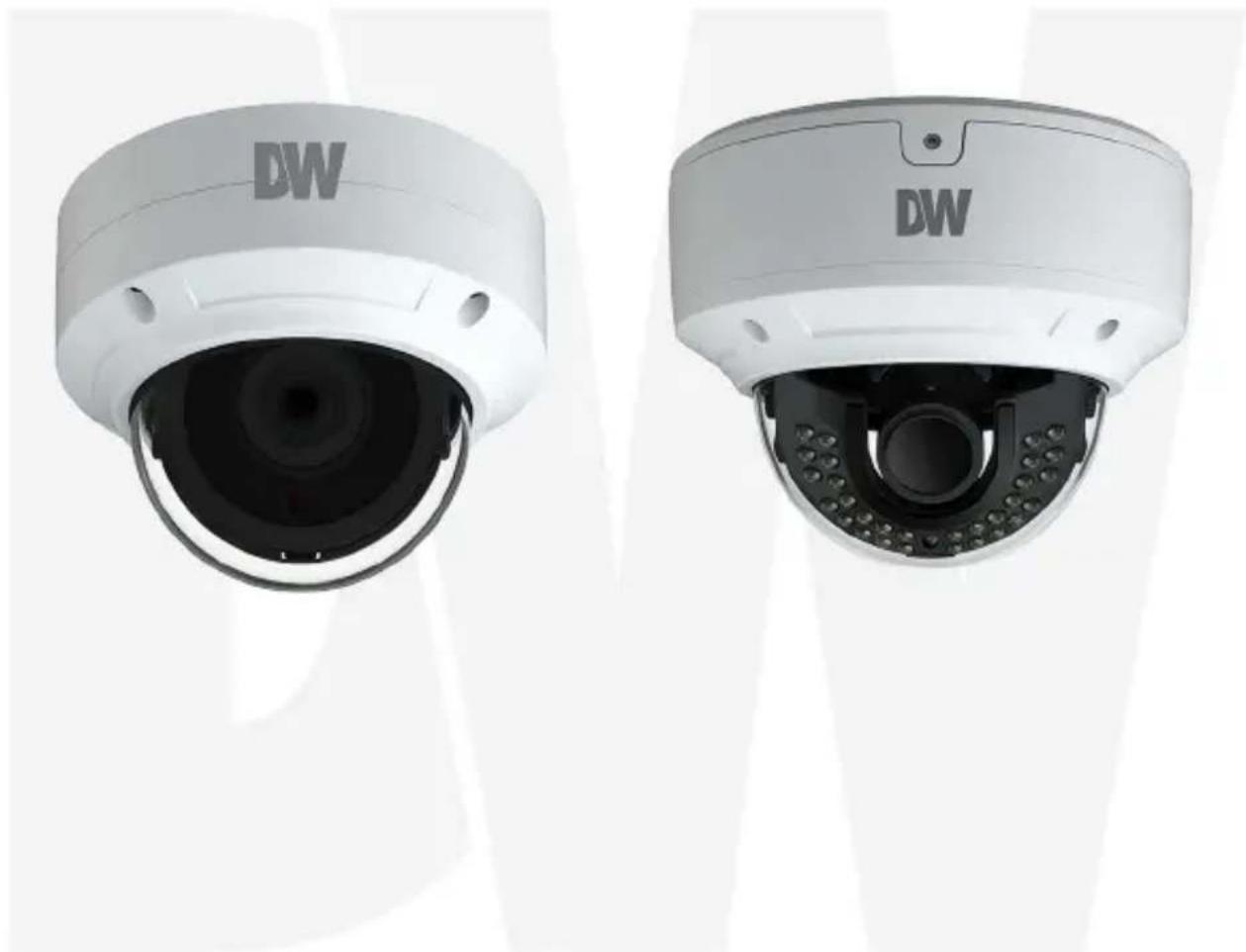
Universal HD over Coax® 5MP Vandal Dome Camera
DWC-V8553TIR/ DWC-V8563TIR
natural_image
Two white wall-mounted security camera units with 'DW' branding, shown from different angles (no text or symbols on the devices themselves)User's Manual Ver. 11/18
Before installing and using the camera, please read this manual carefully. Be sure to keep it handy for future reference.
Table of Contents
1 FEATURES....3
2 DIMENSIONS....4
2.1 DWC-V8553TIR....4
2.2 DWC-V8553TIR....5
3 PRODUCT ACCESSORIES....6
4 INSTALLATION....7
5 CHANGING THE CAMERA'S SIGNAL......8
6 CONNECTING TO DVR/ENCODER....9
7 ADJUSTING THE CAMERA ANGLES....10
8 OSD MENU TREE....11
8.1 LENS....11
8.2 EXPOSURE....11
8.3 WHITE BALANCE....12
8.4 DAY&NIGHT....12
8.5 ADJUST....13
8.6 AUTO-FOCUS....14
9 TROUBLESHOOTING....15
10 SPECIFICATIONS....16
10.1 DWC-V8553TIR....16
10.2 DWC-V8563TIR....17
11 LIMITS & EXCLUSIONS....18
12 WARRANTY INFORMATION....19
1 FEATURES
■ Universal HD over Coax ^® Technology supports HD-Analog, HD-TVI, HD-CVI and all analog to 960H signals
■ 5MP 1/2.7" image sensor at 20fps / 4MP at real-time 30fps
■ 2.8mm fixed lens (DWC-V8553TIR model)
■ 2.8\~12mm varifocal lens with motorized zoom and focus (DWC-V8563TIR model)
■ Digital Wide Dynamic Range (D-WDR)
■ OSD control via Coaxial (UTC)
■ 100' range IR
■ 3D digital noise reduction
■ True day/night with mechanical IR cut filter
■ Auto gain control (AGC)
■ Backlight compensation (BLC)
■ Auto white balance (AWB)
■ IP66 certified weather and tamper resistant
■ IK-10 impact resistant
■ 5 year warranty
2 DIMENSIONS
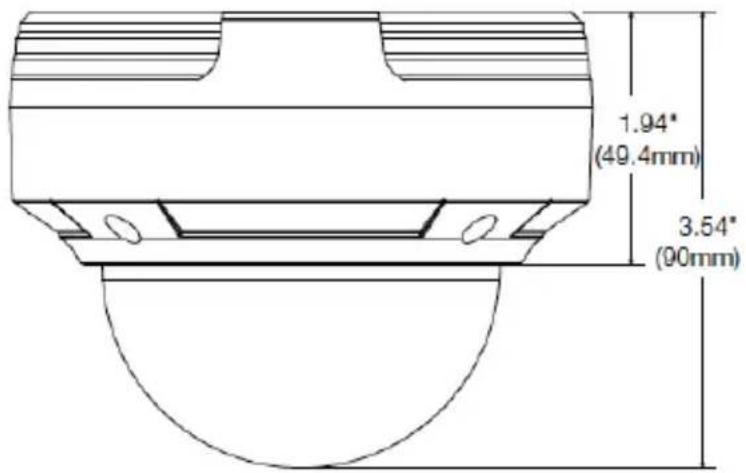
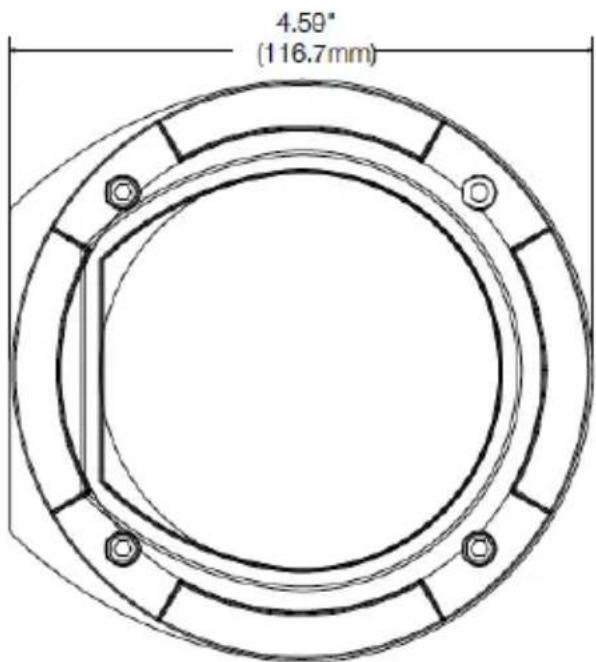
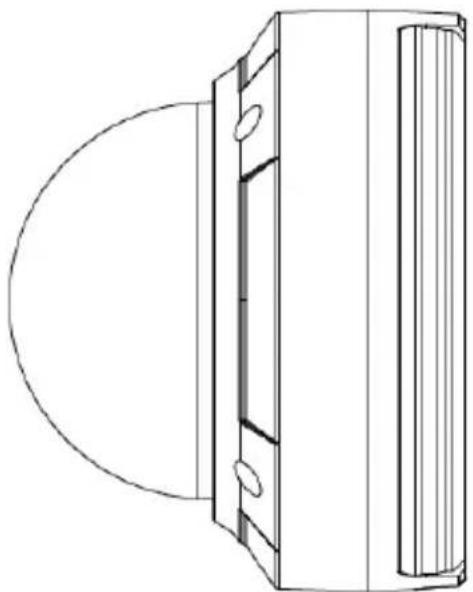
2.1 DWC-V8553TIR
natural_image
Technical line drawing of a mechanical component with a circular base and vertical side panel (no text or symbols)2.2 DWC-V8553TIR
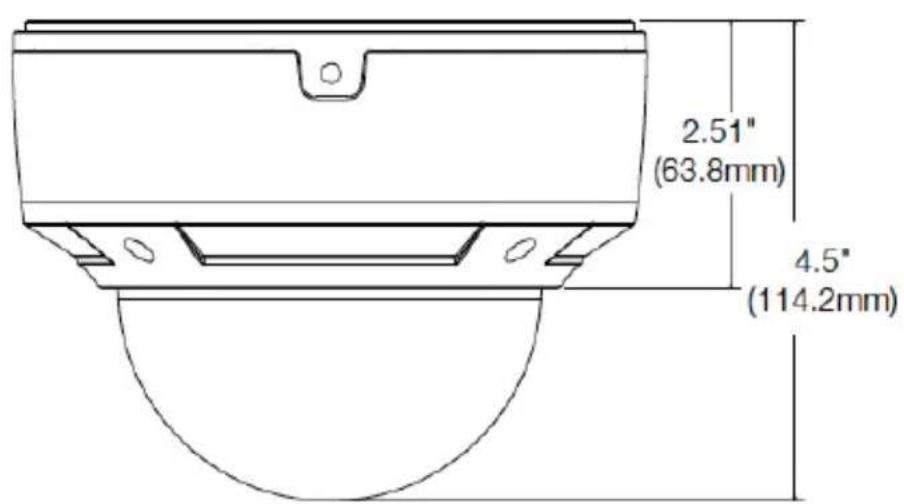
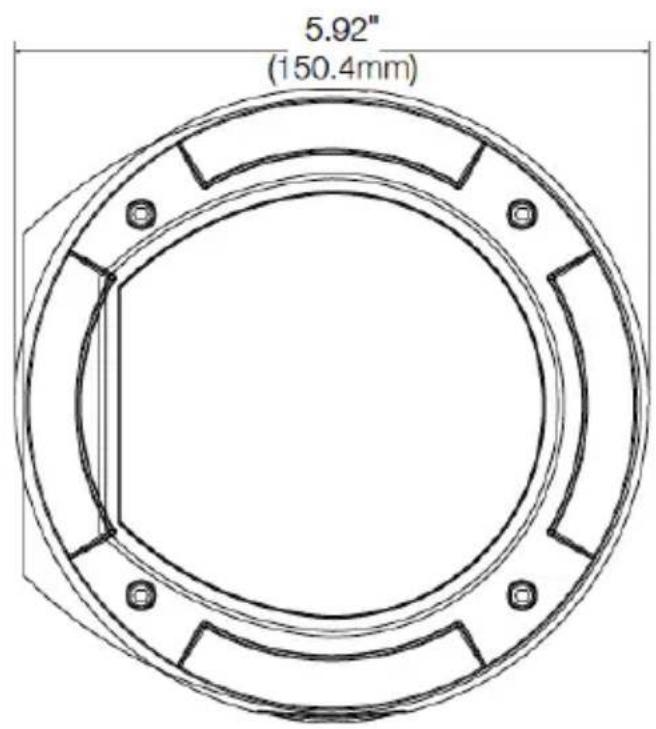
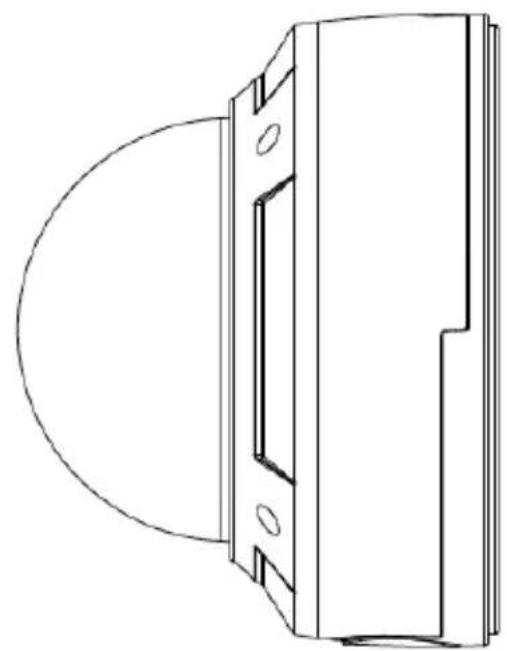
natural_image
Technical line drawing of a mechanical component with a circular base and rectangular housing (no text or symbols)3 PRODUCT ACCESSORIES
Please check if all of the camera parts and accessories are included in the package before proceeding.
| WHAT'S IN THE BOX | |||||
| QSG Manual |  | 1 Set | Tapping Screws PA 4x35 - 4pcs | 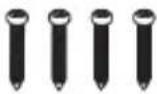 | 1 Set |
| Mounting Template | 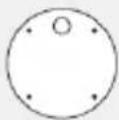 | 1 Set | Plastic Plugs - 4pcs | 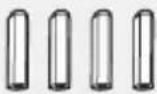 | 1 Set |
| Rubber Plug | 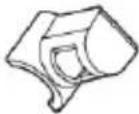 | 1 Set | Torx Wrench | 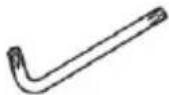 | 1 Set |
4 INSTALLATION
-
The mounting surface must withstand three times the weight of your camera.
-
Do not let the cables get caught in improper places for the electric line cover can be damaged. This may cause a short or fire.
-
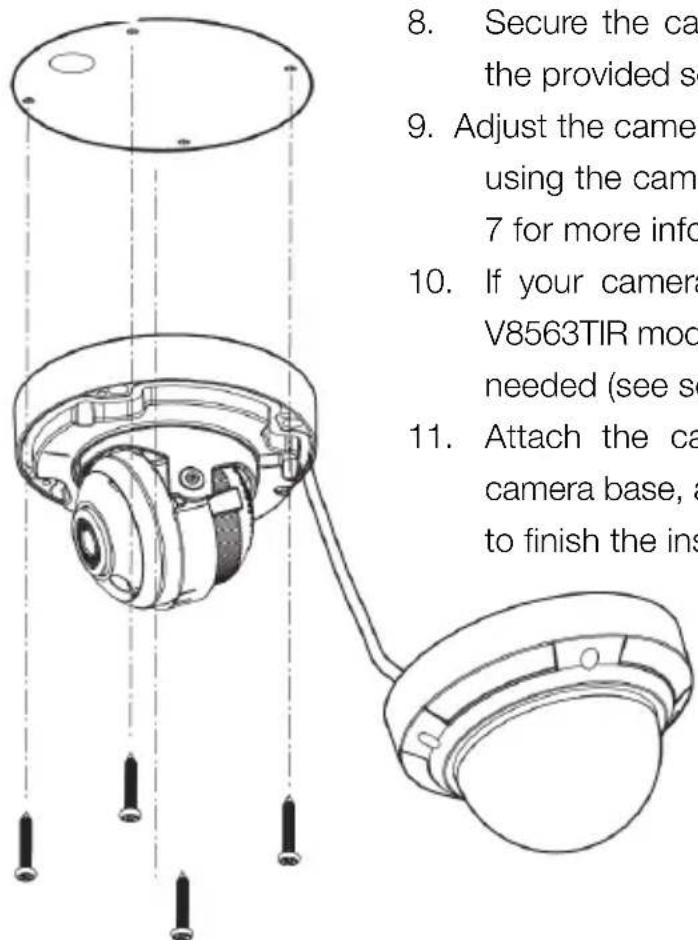
For the installation process, remove the camera's dome cover by loosening the screws at the base of the dome.
-
Using the mounting template, sheet or the camera itself, mark and drill the necessary holes in the wall or ceiling.
-
Do not remove the protective film until the installation I completed.
-
Pass wires through the mounting bracket and make all necessary connections. Connect the BNC and power cables to the camera. Connect the camera to a DVR or encoder.
-
The cameras support three analog signals: HD-Analog, HD-TVI and HD-CVI. See section 5 for more information on how to change the signal.
NOTE: The camera's factory default resolution is 4MP at 30fps. However, the camera can display video up to 5MP resolution at 20fps. In order to change the camera's resolution, go to the camera's OSD menu > ADJUST > OUTPUT MODE.
-
Secure the camera to the mounting surface with the provided screws.
-
Adjust the camera to obtain an optimum angle by using the camera's three axis gimbal. See section 7 for more information.
-
If your camera supports a varifocal lens (DWC-V8563TIR models), adjust the zoom and focus as needed (see section 7).
-
Attach the camera's dome cover back to the camera base, and remove the protection file softly to finish the installation.
5 CHANGING THE CAMERA'S SIGNAL
The camera supports three analog signals: HD-Analog, HD-TVI, HD-CVI and analog signal up to 960H.
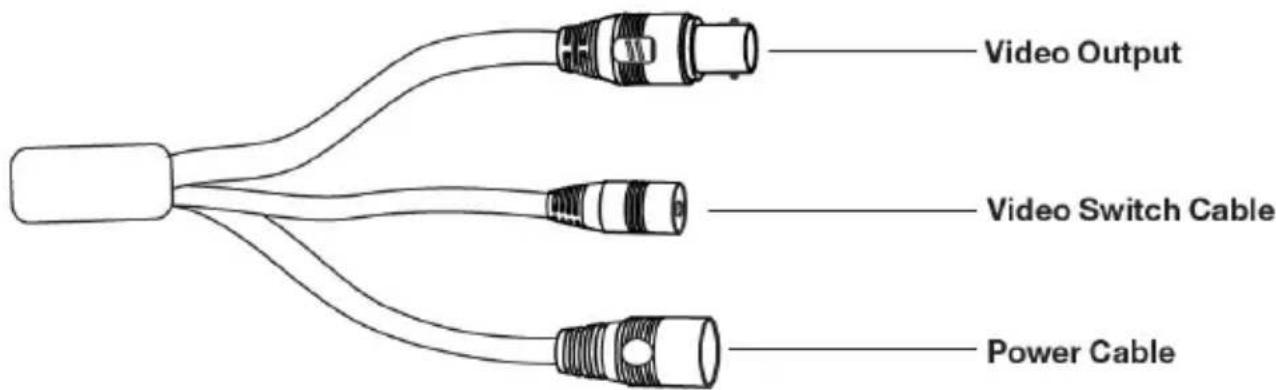
In order to switch the camera's signal between the available options, locate the button switch on the signal cable. The video outputs will recycle by holding and pressing the button in the video switch cable for 5 seconds.
NOTE: The camera's factory default resolution is 4MP at 30fps. However, the camera can display video up to 5MP resolution at 20fps. In order to change the camera's resolution, go to the camera's OSD menu > ADJUST > OUTPUT MODE.
6 CONNECTING TO DVR/ENCODER
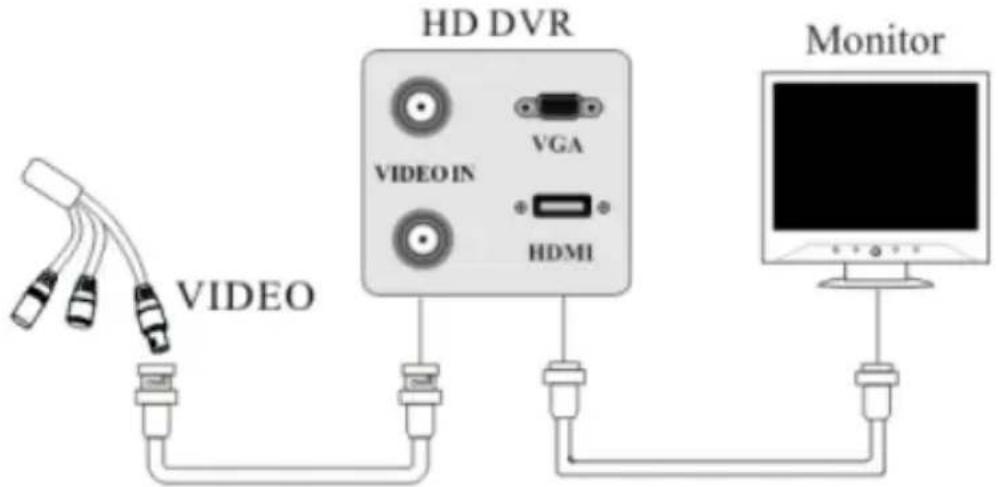
Use the diagram below to connect to a Universal DVR or CRT Monitor properly.
flowchart
graph TD
    A["VIDEO"] --> B["HD DVR"]
    B --> C["Monitor"]
    D["VIDEO IN"] --> B
    E["VGA"] --> B
    F["HDMI"] --> B
    G["3.2V/4.1V"] --> B
    H["6.5V/7.5V"] --> B
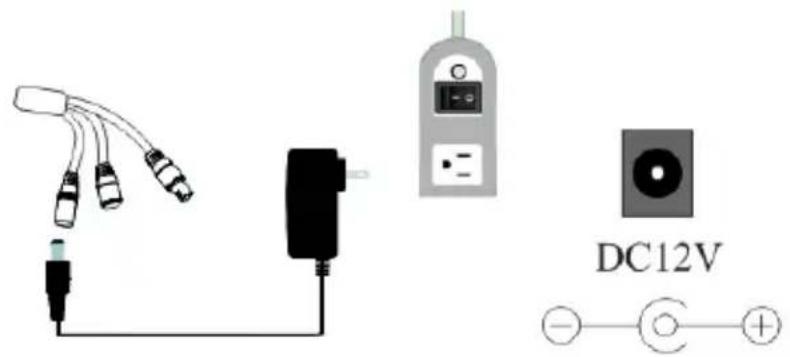
Use the diagram below to connect the camera to a proper power supply.
Power requirements: DC12V
Power consumption: IR LEDs on: < 4W
IR LEDs off: < 1W
CAUTION! The camera supports DC power supply only
7 ADJUSTING THE CAMERA ANGLES
Adjust the camera to obtain an optimum angle by using the camera's bracket. The camera's max angles are:
Pan: 0^ 355^
Tilt: 0^ 67^
■ Rotation: 0^ 355^
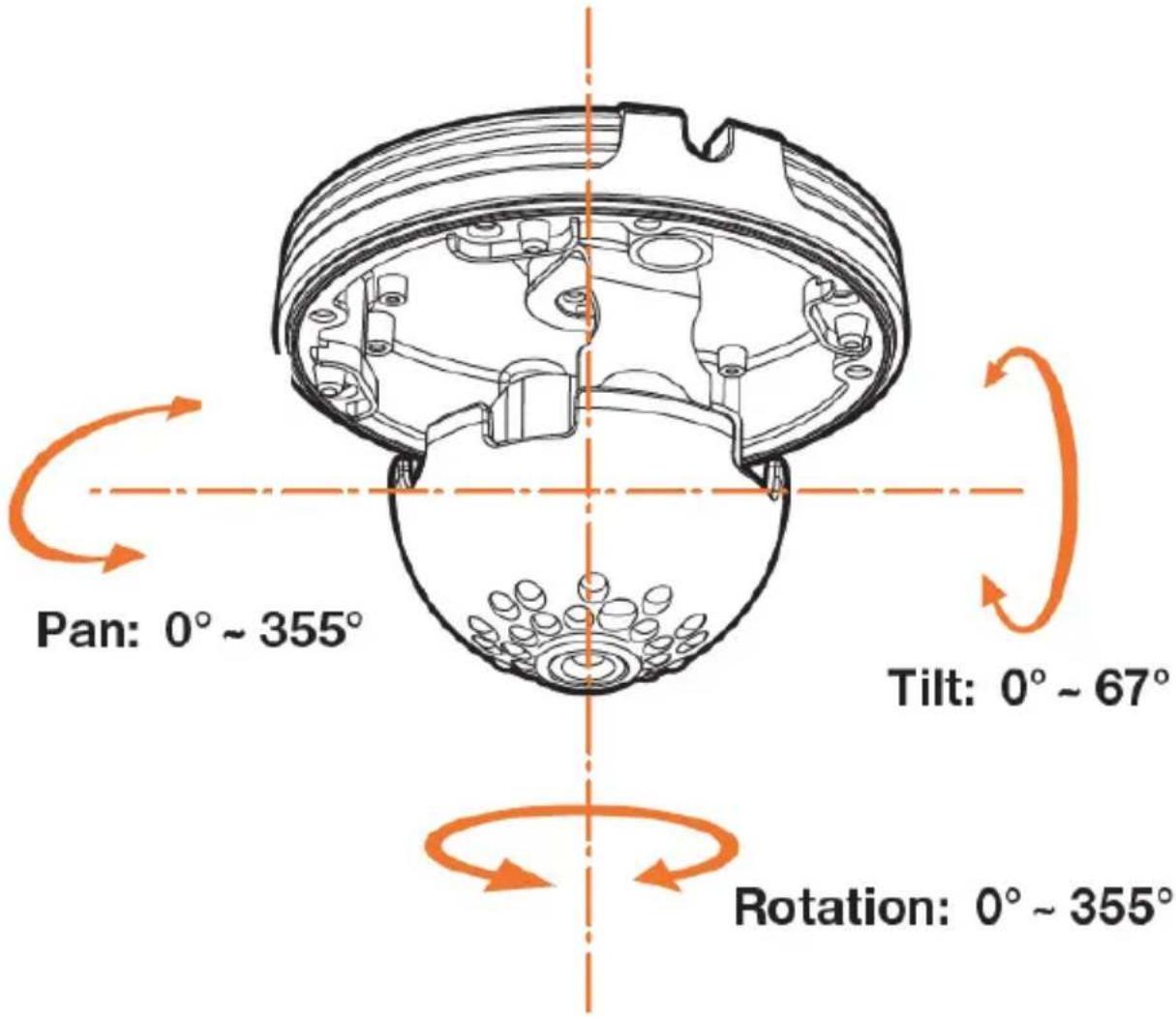
If your camera supports a varifocal lens (DWC-V8563TIR models only), you can adjust the camera's zoom and focus from the camera's OSD menu via UTC. See section 8.6 Auto Focus for more information.
8 OSD MENU TREE
This camera supports Up the Coax communications (UTC). This means that all control over the camera's OSD menu and settings can be done directly from the DVR itself. Please note that the DVR must also support UTC in order to control and setup the camera remotely.
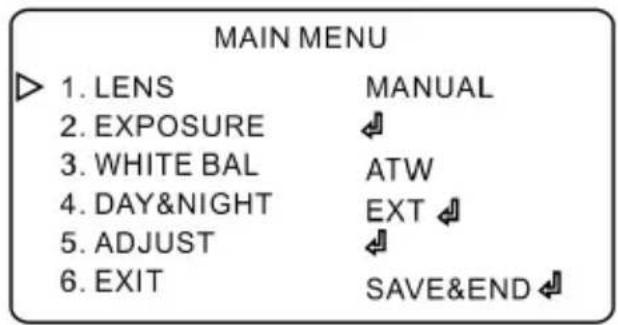
8.1 LENS
Adjust the camera's lens between DC and manual options. Manual mode supports the fixed board lens or the manual iris lens.
When you are done, go to SAVE&END to shave the new settings.
8.2 EXPOSURE
SHUTTER: Set the shutter speed to manual or auto.
If manual is selected, set the shutter speed to one of the options from: 1/30\~1/50000.
Select FLK if the camera is experiencing some flickering in the image.
AGC (Auto Gain Control): AGC enhances the picture brightness in low light conditions. A higher level AGC setting makes the images brighter, however, it could increase the amount of noise. Set the AGC values from 0 to 15.
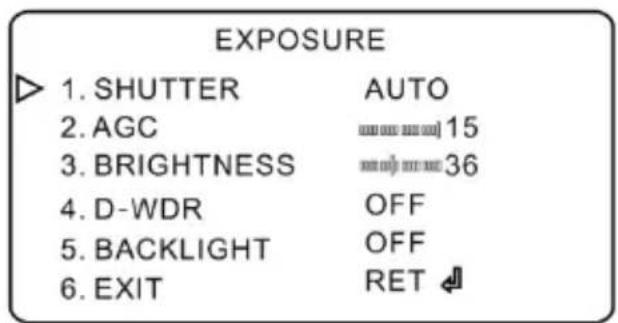
Brightness: Set the brightness level of the
camera's image. The range of brightness value is from 0 to 255.
D-WDR: Digital wide dynamic range. You can enable or disable it here. WDR can adjust the camera to provide a better image when there are both very bright and very dark areas simultaneously in the field of the view by lowering the brightness of the bright area and increasing the brightness of the dark area.
BLC (Backlight Compensation): If BLC is selected, the auto exposure will be set automatically according to the scene so that the object in a dark scene will be seen clearly.
EXT: Select to Return to the previous menu or SAVE&END to save all changes.
8.3 WHITE BALANCE
The camera's white balance can be set to AWT or AWC.
ATW: The camera will constantly adjust the white balance automatically, compensating for temperature changes between 2200\~10500K.
AWC→SET: Fix the white balance values according to the current color temperature settings in the camera's view. The camera will not monitor the color temperature changes and remain set to the current settings.
8.4 DAY&NIGHT
The camera supports multiple setup potions for the camera's transition between color and B/W modes.
EXT: If selected, the camera will switch between color and B/W mode based on an external illuminator. If selected, enter the sub-menu to adjust the delay time for the camera switching between B/W and color modes.
AUTO: If selected, the camera will switch between color and B/W when the lighting in the camera's view changes beyond a specific level.
COLOR: If selected, the camera will remain in color mode regardless of external illumination or lighting levels in the camera's view.
B/W: If selected, the camera will remain in B/W mode regardless of external illumination or lighting levels in the camera's view. When selected, IR Smart function can be enabled to get a clearer image in B/W.
8.5 ADJUST
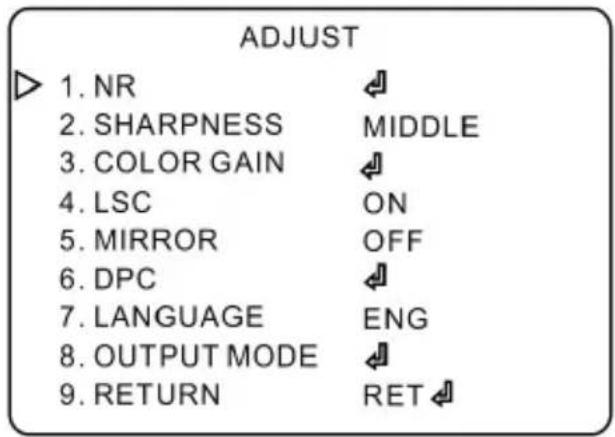
NR (Noise Reduction): You can adjust the camera's digital noise reduction settings to 2DNR and 3DNR. Digital noise reduction helps decrease digital noise in low lightning and make the image more thorough. Increasing the value of the digital noise reduction will make improve the digital noise reduction effect but it may also reduce the image resolution.
Sharpness: Set the image's sharpness. The higher the value, the sharper the image will appear, but it may also increase digital noise in the image.
Color Gain: Set the level of color gain (including blue gain and red gain).
LSC: Lens Shading Correction. Please enable or disable it as needed.
Mirror: Mirror, V-Flip, Rotate and OFF are optional.
DPC: Defect Pixel Correction. Enable live DPC or white DPC as needed.
Language: Select one of 13 languages supported in the camera.
Output Mode: HD-TVI, HD-Analog, CVBS or HD-CVI video output can be selectable. Please choose the right video output signal as needed.
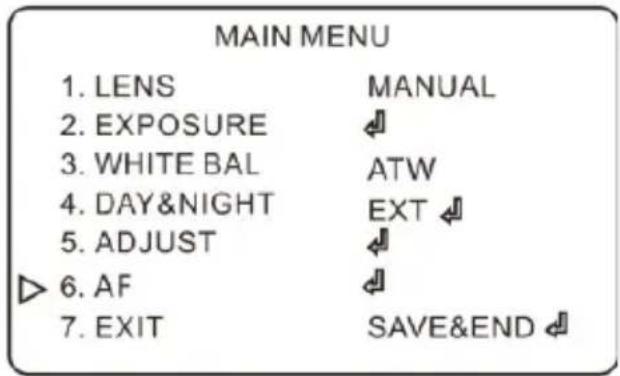
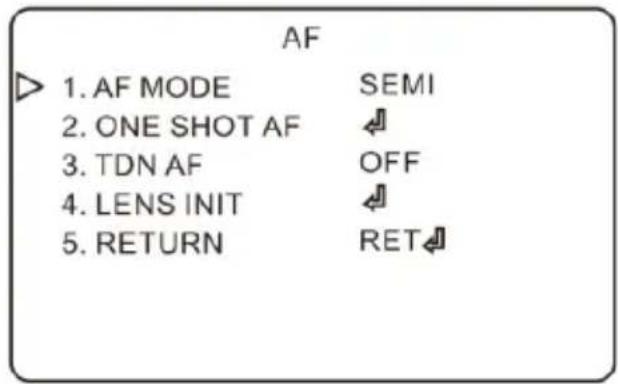
8.6 AUTO-FOCUS
For motorized zoom cameras (DWC-V8563TIR models), auto focus function can be adjusted. For DWC-V8553TIR models, please skip this section.
AF Mode: Select from: SEMI, AUTO or MANUAL.
ONE SHOT AF: Select this option to focus the camera instantly based on the current settings and view.
TDN AF: If enabled, the lens will automatically focus when the system switches between day (color) and night (B/W) mode.
LENS INIT: Select this option to restart the lens.
9 TROUBLESHOOTING
Before sending your camera for repair, check the following or contact our technical specialist.
FOR NO VIDEO
Check the coaxial cable and make sure it is connected securely.
Check the power supply and make sure the camera has the proper voltage and current.
FOR OUT-OF-FOCUS VIDEO
Check the Front case cover and the lens for dirt or fingerprints. Use a soft cloth and gently clean.
The use of a field test monitor is recommended.
10 SPECIFICATIONS
10.1 DWC-V8553TIR
| IMAGE | |
| Image sensor | 5MP 1/2.7* CMOS sensor |
| Active pixels | 2592(H) x 1944(V) |
| Scanning system | CMOS line-by-line |
| Frequency | 60Hz/50Hz |
| Signal technology | Universal HD over Coax® Technology supports HD-Analog, HD-TVI, HD-CVI and all analog to 960H signal |
| Resolution | 5MP: 2560 x 1936 @ 20fps4MP: 2560 x 1440 @ 30fps |
| Minimum scene illumination | 0.01 lux (color) |
| 0 lux (B&W) | |
| Video output | HD-Analog, HD-TVI and HD-CVI 5MP at 20fps, 4MP at 30fpsAnalog up to 96CH at 30fps |
| LENS | |
| Focal length | 2.8mm, F1.2 |
| Lens type | Fixed lens |
| Field of view (FoV) | 91° |
| IR distance | 100ft range |
| OPERATIONAL | |
| Shutter mode | Auto, manual |
| Shutter speed | 1 / 60s ~ 1 / 100000s |
| Backlight (BLC) | Yes |
| Wide Dynamic Range (WDR) | D-WDR |
| 3D digital noise reduction | Digital noise reduction |
| White balance | Yes |
| Day / night | True day/night |
| Mirror / flip | Yes |
| Auto gain control | Auto |
| Sharpness | Yes |
| Up the Coax (UTC) camera control | UTC camera control |
| ENVIRONMENTAL | |
| Operating temperature | -22°F ~ 122°F (-30°C ~ 50°C) |
| Operating humidity | 10 % ~ 90 % humidity |
| IP rating | IP66 certified weather and tamper resistant |
| IK rating | IK10 rated impact resistant |
| Other certifications | CE, FCC, RoHS |
| ELECTRICAL | |
| Power requirements | DC12V |
| Power consumption | IR ON : < 4W |
| IR OFF : < 1W | |
| MECHANICAL | |
| Material | Metal vandal housing, polycarbonate dome |
| Dimensions | 3.54" x 4.59" inch (90 x 116.7 mm) |
| Weight | 1.33 lb (0.605kg) |
10.2 DWC-V8563TIR
| IMAGE | |
| Image sensor | 5MP 1/2.7* CMOS sensor |
| Active pixels | 2592(H) x 1944(V) |
| Scanning system | CMOS line-by-line |
| Frequency | 60Hz/50Hz |
| Signal technology | Universal HD over Coax® Technology supports HD-Analog, HD-TVI, HD-CVI and all analog to 960H signal |
| Resolution | 5MP: 2560 x 1936 @ 20fps4MP: 2560 x 1440 @ 30fps |
| Minimum scene illumination | 0.01 lux (color) |
| 0 lux (B&W) | |
| Video output | HD-Analog, HD-TVI and HD-CVI 5MP at 20fps, 4MP at 30fpsAnalog up to 960H at 30fps |
| LENS | |
| Focal length | 2.8-12mm, F1.2 |
| Lens type | Varifocal lens with motorized zoom and focus |
| Field of view (FoV) | 91.2°~33.4° |
| IR distance | 100ft range |
| OPERATIONAL | |
| Shutter mode | Auto, manual |
| Shutter speed | 1/60s ~ 1 / 100000s |
| Backlight (BLC) | Yes |
| Wide Dynamic Range (WDR) | D-WDR |
| 3D digital noise reduction | Digital noise reduction |
| White balance | Yes |
| Day / night | True day/night |
| Mirror / flip | Yes |
| Auto gain control | Auto |
| Sharpness | Yes |
| Up the Coax (UTC) camera control | UTC camera control |
| ENVIRONMENTAL | |
| Operating temperature | -22°F ~ 122°F (-30°C ~ 50°C) |
| Operating humidity | 10% ~ 90% humidity |
| IP rating | IP66 certified weather and tamper resistant |
| IK rating | IK10 rated impact resistant |
| Other certifications | CE, FCC, RoHS |
| ELECTRICAL | |
| Power requirements | DC12V |
| Power consumption | IR ON : < 4W |
| IR OFF : < 1W | |
| MECHANICAL | |
| Material | Metal vandal housing, polycarbonate dome |
| Dimensions | 4.5" x 5.92" (114.2 x 150.4 mm) |
| Weight | 2.27 lb (1.030kg) |
11 LIMITS & EXCLUSIONS
There are no express warranties except as listed. The warrantor will not be liable for incidental or consequential damages (including damage to recording media without limitation) resulting from the use of these products or arising out of any breach of the warranty. All express and implied warranties, including the warranties of merchantability and fitness for particular purpose, are limited to the applicable warranty period set forth above.
Some states do not allow the exclusion or limitation of incidental or consequential damages, or limitations on how long an implied warranty lasts, so the exclusions or limitations listed above may not apply to you. This warranty gives you specific legal rights, and you may also have other rights that vary from state-to-state.
If the problem is not handled to your satisfaction, then write to the following address:
Digital Watchdog, Inc.
ATTN: RMA Department
5436 W. Crenshaw Street
Tampa, FL 33634
Service calls which do not involve defective materials or workmanship as determined by the warrantor, in its sole discretion, are not covered. Costs of such service calls are the responsibility of the purchaser.
12 WARRANTY INFORMATION
Digital Watchdog (referred to as “the Warrantor”) warrants the Digital Watchdog Camera against defects in materials or workmanship as follows:
LABOR: For the initial five (5) years and one (1) year on IR LED from the original purchase date, if the camera is determined to be defective, the Warrantor will repair or replace the unit with a new or refurbished product at its option at no charge.
PARTS: In addition, the Warrantor will supply replacement parts for the initial five (5) years and
one (1) year on IR LED.
To obtain warranty or out of warranty service, please contact a Technical Support Representative at 1+ (866)446-3595 Monday through Friday from 9:00AM to 8:00PM Eastern Standard Time.
A purchase receipt or other proof of the original purchase date is required before warranty service is rendered. This warranty only covers failures due to defects in materials and workmanship which arise during normal use. This warranty does not cover damage which occurs in shipment or failures which are caused by products not supplied by the Warrantor or
failures which result from accident, misuse, abuse, neglect, mishandling, misapplication, alteration, modification, faulty installation, set-up adjustments, improper antenna, inadequate
signal pickup, maladjustment of consumer controls, improper operation, power line surge, improper voltage supply, lightning damage, rental use of the product or service by anyone other
than an authorized repair facility or damage that is attributable to acts of God.

DIGITAL
WATCHDOG™
Complete Surveillance Solutions
East Coast Headquarters Office: 5436 W Crenshaw St, Tampa, FL 33634 West Coast Headquarters Office: 16220 Bloomfield Ave., Cerritos, CA 90703
PH: 866-446-35951 FAX: 813-888-9262
www.Digital-Watchdog.com Technical Support:
USA & Canada 1+ (866) 446-3595
International 1+ (813) 888-9555
French Canadian 1+ (514) 360-1309
Support Hours: Monday-Friday 9:00am to 8:00pm EST
- Universal HD over Coax® 5MP Vandal Dome Camera
- Table of Contents
- FEATURES
- DIMENSIONS
- DWC-V8553TIR
- DWC-V8553TIR
- PRODUCT ACCESSORIES
- INSTALLATION
- CHANGING THE CAMERA'S SIGNAL
- CONNECTING TO DVR/ENCODER
- ADJUSTING THE CAMERA ANGLES
- OSD MENU TREE
- LENS
- EXPOSURE
- WHITE BALANCE
- DAY&NIGHT
- ADJUST
- AUTO-FOCUS
- TROUBLESHOOTING
- FOR NO VIDEO
- FOR OUT-OF-FOCUS VIDEO
- SPECIFICATIONS
- DWC-V8553TIR
- LIMITS & EXCLUSIONS
- WARRANTY INFORMATION
- DIGITAL
- WATCHDOG™
- Complete Surveillance Solutions
Brand : Digital Watchdog
Model : Universal HD over Coax DWC-V8553TIR
Category : Security Camera