ICF9BLS - Range hood Euromaid - Free user manual and instructions
Find the device manual for free ICF9BLS Euromaid in PDF.


| Product Type | Range Hood |
| Brand | Euromaid |
| Model | ICF9BLS |
| Width | 90 cm |
| Height | 60 cm (adjustable) |
| Depth | 50 cm |
| Weight | 15 kg |
| Power Supply | 220-240 V, 50 Hz |
| Extraction Rate | 600 m³/h |
| Number of Speeds | 3 |
| Noise Level | < 65 dB |
| Lighting | LED (2 x 3 W) |
| Filter Type | Aluminum grease filter |
| Controls | Push buttons |
| Installation | Under cabinet or wall-mounted |
| Exhaust Duct | 150 mm diameter |
| Energy Class | A |
| Maintenance | Clean filters monthly, wash in dishwasher |
| Safety Features | Motor overload protection |
| Spare Parts | Filters, LED bulbs available |
| Warranty | 2 years |
Frequently Asked Questions - ICF9BLS Euromaid
User questions about ICF9BLS Euromaid
0 question about this device. Answer the ones you know or ask your own.
Ask a new question about this device
Download the instructions for your Range hood in PDF format for free! Find your manual ICF9BLS - Euromaid and take your electronic device back in hand. On this page are published all the documents necessary for the use of your device. ICF9BLS by Euromaid.
USER MANUAL ICF9BLS Euromaid
900mm Island Canopy Manual
MODEL
ICF9BLS

HOME APPLIANCES
CANOPY INSTALLATION AND OPERATION MANUAL
Dear Customer,
We thank you for choosing this quality appliance and hope you enjoy many years of reliable service.
Please ensure this manual is read carefully before installation and use. Keep this manual in a safe and accessible location should future reference be required.
Regards
Home Appliances
CONTENT
- . . . . . . . . . . . . . . . . . . . . . . . . . . . . . . . . . . . . . . . . . . . . . . . . . . . . . . . . . . . Notice
3....Feature
4....Installation
6.....Notice of installation - Safety Warning
7.....Use
8....Maintenance
9....Abnormity and Solution
NOTICE
- Thank you for choosing our cooker hood. Please read the instruction manual carefully before use.
- The installation work must be undertaken by a qualified and competent fitter.
- The manufacturer disclaims all liability for any damage or injury caused as a result of not following instructions for installation contained in the following text.
The cooker hood is used on 220/240v, 50Hz.
(2)FEATURE
- The cooker hood uses high quality materials, and is made with a streamlined design.
- Equipped with a large power low noise electric motor and centrifugal leaf, it produces strong suction, low noise, non stick grease filter and easy to clean.
- Special wind tunnel construction and oil collector design, free dirt will be absorbed in a second.
(3) INSTALLATION
-
The ceiling must can bear at least 40kgs weight, and the thickness of the ceiling must be 30MM, see pic 2, drill 1*170mm round hole in the ceiling.
-
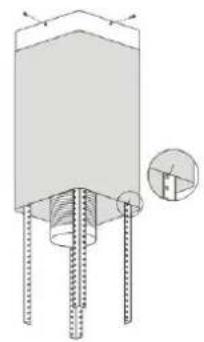
According to the hanging board, drill 12 holes in the ceiling, see pic 2, 12pcs of ST6*40mm big flat screws will be used to fix the hanging board on the ceiling, and then 8pcs of M4*10 screws and M4 nut with gasket will be used to connect the angle iron into the hanging board, see pic 1, calculated the length of the angle iron, and 16pcs M4*10 big flat screws and M4 nut with gasket will be used to connect the angle iron and another angle iron (the overlap length of angle iron can not less 100MM)
-
Let the one side of the extensible pipe go outside through the hole of 170MM, see pic 3.
-
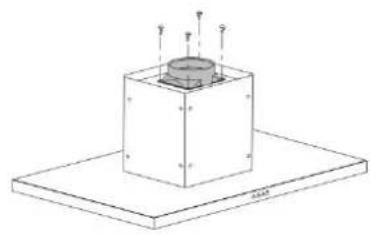
4pcs ST4*8 big flat screws will be used to connect the internal chimney into the hanging board, then put one the external chimney, two hooks will be used to put up the external chimney in order to the next installation, see pic 4.
-
4pcs ST4*8 big flat screws will be used to install the outlet, see pic 5.
-
Hold up the hood, 16pcs M4*10 big flat screws will be used to connect the hood body into angle iron, see pic 6.
-
Put the extensible pipe on the outlet; after ensure all the things ok, put down the hook, take from the external chimney, all the installation is finished, see pic7& 8.
Warning: Failure to install the screws or fixing device in accordance with these instructions may result in electrical hazards

natural_image
Technical diagram of a mechanical component with threaded pins and a magnified inset showing a circular detail (no text or symbols)④
natural_image
Isometric line drawing of a mechanical component with mounting holes and a central cylindrical feature (no text or symbols)⑤

natural_image
Technical line drawing of a mechanical assembly with no visible text or symbols⑥

natural_image
Technical line drawing of a mechanical assembly with a cylindrical component inserted into a housing (no text or symbols)⑦

text_image
Diagram showing a container with downward arrows indicating flow or movement, labeled with symbols like 'a', 'b', and 'c'.5
⑧
(4) NOTICE OF INSTALLATION
- Before installation, please ensure the area is clean to avoid suction of the remaining bits of broken wood and dust.
- It cannot share the same air ventilation tube with other appliance such as gas tube, warmer tube, and hot wind tube.
- The bending of ventilation tube should be ≥slant120^ , parallel or above the start point and should be connected to the external wall.
- After installation, make sure that the extractor is level to avoid grease collection at one end.

text_image
Right WrongPic5
(5) SAFETY WARNING
• Never let the children operate the machine
- The cooker hood is for home use only, not suitable for barbecue, Roast shop and other commercial purpose.
- Please ask the technical person to do the assembling.
- The cooker hood and its filter mesh should be clean regularly in order to keep in good working order.
- Before cleaning, please switch the power off at the main supply.
- Clean the cooker hood according to the instruction manual and keep the cooker hood from the danger of burning.
- If there is any fault with the appliance, please call the service department to arrange a service engineer.
CAUTION: Accessible parts may become hot when used with cooking appliances.
(6) USE
Electronic Button
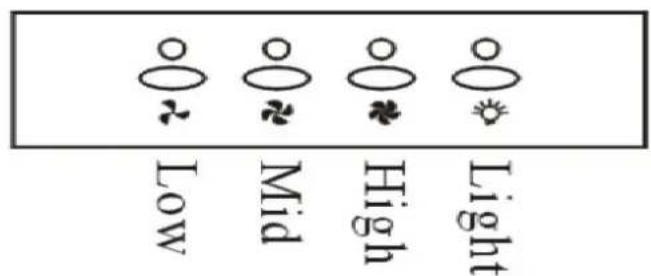
- Turn on the power; the buzzer will buzz five times. The sound shows that the appliance is powered.
- Push the low button, the indicating light 1 on, the buzzer will buzz once, and the motor runs at low speed. Push it again and the motor will stop.
- Push the middle button, the indicating light 2 on, the buzzer will buzz once, and the motor runs at mid speed. Push it again and the motor will stop
- Push the high button, the indicating light 3 on, the buzzer will buzz once, and motor runs on high speed. Push it again and the motor will stop
- Push the light button; the indicating light 4 on, and the two lighting lamps will come on. Push it again and the lamps will turn off, with every push the buzzer will buzz one time.
Indicatorlight


text_image
Low Mid High LightPic6A
Push button
- Push stop button, and the motor will stop.
- Push the Low button, the buzzer will buzz once, and the motor runs at low speed.
- Push the Mid button, the buzzer will buzz once, and the motor runs at mid speed.
- Push the High button, the buzzer will buzz once, and the motor runs at high speed.
- Push the light button and the two lights will come on. Push it again and the light will turn off.

text_image
Stop Low Mid High Light pic6C
text_image
Timer Lamp 88:00 Speed PowerLCD Electronic button
Pic 7
-
Plug the hood; LCD will display 24-hour system with blue backlight. Backlight will be extinguished after 30 seconds without any operation.
-
Press “ ” button once; lights will be on and LCD will show “ Lamp”. Press “ ” button again; lights will be off and “ Lamp” on LCD will disappear.
-
Press “” button once; the hood works at LOW speed and LCD will show
" " and " " button will be on. Press " " button again; the hood works at MEDIUM speed. Press " " button one more time; the hood works at HIGH speed. Press " " button again; the hood works at LOW speed again and it repeat. While pressing " " button; the " " button is always on. If you want to stop the hood now; press the " 🔊" button once.
-
When the hood is not working; press “💡” button once. The hood will work at the speed it works last time and LCD will show “Speec”. Press “💡” button again; the hood stop working and “Spee will disappear from LCD.
-
When both “💡” button and “💡” button don’t work; “💡” button is used for time-setting. Press “💡” button for 2 to 3 seconds; 📋 will be shown on LCD and 📋 flashes; which represents hour. Press “💡” button once the number adds by 01. Continue pressing “💡” button; it will display from 13;14... until 23. When LCD shows 23; it doesn’t work by
pressing “” button. Press “” button once; the number reduces by 01. When LCD shows 00; it doesn’t work by pressing “” button. After setting hour; you can start setting minute by pressing “” button again. on LCD flashes; which represents minutes. Press “” button once the number adds by 01. Continue pressing “” button; it will display from 01:02... until 59. When LCD shows 59; it doesn’t work by pressing “” button. Press “” button once; the number reduces by 01. When LCD shows 00; it doesn’t work by pressing “” button. After setting hour and minute; press “” to confirm.
When “” button doesn’t work; “ ” button is used for delay timer function. Delay timer function allows you to set the hoods automatically power off according to the delay timer you set from 1 minute to 60 minutes.
Press “clock” button once; it enters for delay timer setting and LCD shows. Press “clock” button once the number adds by 01. Continue
pressing "button; it will display from ; ;05:00 06:0007:00... until Press" button once; the number reduces
by 01. After setting delay timer you want; press “ ” button to confirm. If you set delay timer as 05:00; the LCD display will show from 05:00; 04:59... until 00:01 00:00. When LCD shows 00:00; the hood will automatically power off and LCD display will only show 24-hour system with blue backlight. After 30 seconds without operation; blue backlight will disappear. But please note the Lamp is not under control of delay timer. Next time; if you want to use delay timer function and you press “ ” button without any change on time. The hood will automatically count time down from your previous setting after 5 seconds.
LCD Touch control

text_image
+ Add - 8:8:88 Timer LightPic 8
-
Power on: Switch on the power supply, and the backlight is lit, displaying "24-hour system". The output is then blocked up, and the soot machine enters standby status. The backlight disappear automatically 30 seconds later under the condition of none operation.
-
Press "Indicator" key: Press the indicator key once, the indicator is lit, and ⑤ on the LCD screen is lit. Press it for a second time, of the indicator and the LCD screen will distinguish and it will be repeated again and again.
-
Power on position and increase key +, the motor is provided with three positions, i.e. low, medium and high.
-
Press + key once, the ■ is displayed on the display screen, and the motor starts operation. The ■ is the low position (power on position.)
-
Press + key once more at the low position, the ■ is displayed on the display screen, and the ■ is the medium position.
-
Press + key once more at the medium position, the ■■■ is displayed on the display screen, and the ■■■ is the high position.
-
Go on pressing + key at the high position, the ■■■ is still displayed on the display screen, and the motor works normally. It is still at high position at this time.
-
Power on position and decrease key “—”
-
Press “—” key once, the motor is adjusted to a lower position, and the LCD screen displays that position in the meantime; If it is decreased continuously to none position, then, it is the power off position (namely, the motor stops operation.)
-
Timer key " '
-
The timer key is the timer setting key if the timer key doesn't work at both the position and indicator.
Long press timer key ⚙ for 2-3 seconds, time segment 88:88, and the first two hour bit segment flash, use +key for the digit increase, and use -key for the digit decrease. Namely: The variable is 01 each time it is pressed; the hour segment is with the largest digit of 23. If it exceeds 23, +key is null and void. If it is equal to 00, then, the — key is null and void.
Press the timer key for the 2^nd time segment, and the last two minute bit segment flash, use +key for the digit increase, and use — key for the digit decrease. Namely: The variable is 01 each time it is pressed; the minute segment is with the largest digit of 59. If it exceeds 59, +key is null and void. If it is equal to 00, then, the -key is null and void.
Press the timer key 📋 for the 3 ^rd time, and it is the time setting exit and confirm key.
Long press timer key ☐ for 2-3 seconds under this operation mode, and it is for the hour setting; Press it for the 2^rd time: Setting for the minute; Press it for the 3^rd time: For the time setting exit and confirm, and it will be repeated again and again (if the 1^st time pressing doesn't exceed 2 seconds, then it can't run this operating procedure.)
- The timer key is the timer if the timer key works at either the position or the indicator.
It is provided with three kinds of time segment, and they are 5min/15min/30min/timer cancel in sequence, and the 1^st time is 5min, the 2^nd time is 15min, the 3^rd time is 30min, the 4^th time is timer cancel, the 5^th time is 5min, and the 6^th time is 15min ..., and it will be repeated again and again.
Example: Let the setting time be 15min, the display is 00:15, 00:14, ...00:1, with 0:00 displays per minute, and once "00:00" appears, the motor position and the indicator power supply will be cut off automatically, (the display screen displays "24-hour system", the output is blocked up, and the soot machine enters standby status, and the backlight will be put out automatically 30 seconds later.)
☐ Time segment change over, 5 seconds later, it starts to decrease gradually (example: 15min is changed over to 30min, with a delay of 5 seconds, and 00: 30 on the display screen starts to decrease gradually).
(7) MAINTENANCE
7.1 The cleaning of the carbon grease filter mesh
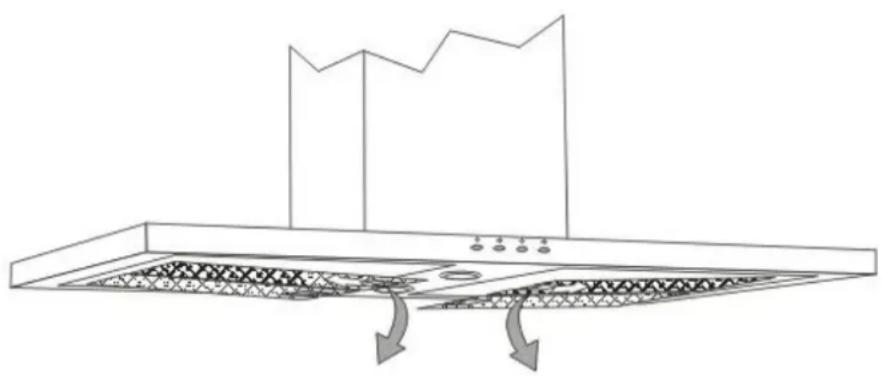
The filter mesh is made of high-density stainless steel. Please do not use the corrosive detergent on it. Keeping this filter clean will keep the appliance running correctly. Please strictly follow the guidelines below.
Method 1: Put the mesh into 40-50 c clean water, pour on detergent, and soak for 2-3 mins. Wear gloves and clean with a soft brush.
Please do not apply too much pressure, as the mesh is delicate and will damage easy.
Method 2: If instructed to do so, it can be put into a dishwasher, set the temperature at around 60 degrees.
natural_image
Line drawing of a kitchen chimney with ventilation grilles and airflow arrows (no text or symbols)7.2 Notice of cleaning cooker hood
A. To protect the main body from corrosion over a long period of time, the cooker hood should be cleaned with hot water plus non corrosive detergent every one month.
B. Please do not use abrasive detergent for it will damage the body.
C. Keep the motor and other spare parts free from water, as this will cause damage to the appliance.
D. Before cleaning the appliance please remember to cut off power
E. The carbon filter shouldn't be exposed to heat.
F. Please don't tear open the fixed bar around the carbon filter
G. If the supply cord is damaged, it must be replaced by the manufacturer, its service agent or similarly qualified persons in order to avoid a hazard.
(8) ABNORMITY AND SOLUTION
8.1 LED light replacing
Remove the filters, and push the light downwards, and unplug the wiring connector.

natural_image
Technical line drawing of a ceiling-mounted appliance with two curved pipes and two circular base components (no text or symbols)8.2 Some solution
| Fault | Cause | Solution | |
| Light on, but motor does not work | The leaf blocked | Get rid of the blocking | |
| The capacitor damaged | Replace capacitor | ||
| The motor jammed bearing damaged | Replace motor | ||
| The internal with of motor off or a bad smell from the motor | Replace motor | ||
| Light does not work, motor does not work | Beside the above mentioned, check the following: | ||
| Light damaged | Replace lights | ||
| Power cord looses | Connect the wires as per the electric diagram | ||
| Oil leakage | One way valve and the air ventilation entrance are not tightly sealed | Take down the one way valve and seal with glue | |
| Leakage from the connection of U-shaped section and cover | Take U-shaped section down and seal with soap or paint | ||
| Shake of the body | The leaf damaged and causes shaking | Replace the leaf | |
| The motor is not tightly hanged | Lock the motor tightly | ||
| The body is not tightly hanged | Fixed the body tightly | ||
| Insufficient suction | The distance between the body and the gas top too long | Readjust the distance | |
| Too much ventilation from open doors or windows | Choose a new place and resemble the machine | ||
| The machine inclines | The fixing screw not tight enough | Tighten the hanging screw and make it horizontal | |
| The hanging screw not tight enough | Tighten the hanging screw and make it horizontal | ||