B126-1A1-WHD3 - Power strip Tripp Lite - Free user manual and instructions
Find the device manual for free B126-1A1-WHD3 Tripp Lite in PDF.


| Product Type | Power Strip |
| Brand | Tripp Lite |
| Model | B126-1A1-WHD3 |
| Number of Outlets | 8 |
| Input Voltage | 100-120V AC |
| Maximum Current | 15A |
| Maximum Power | 1800W |
| Surge Protection | Yes, 1080 Joules |
| Power Cord Length | 6 ft (1.8 m) |
| Dimensions (W x D x H) | 12 x 2.5 x 1.5 in (30.5 x 6.4 x 3.8 cm) |
| Weight | 1.5 lb (0.68 kg) |
| Mounting | Desktop or wall-mountable |
| Power Indicator | Yes, illuminated switch |
| Overload Protection | 15A resettable circuit breaker |
| Certifications | UL, cUL, NOM |
| Operating Temperature | 32°F to 122°F (0°C to 50°C) |
| Cleaning Instructions | Wipe with dry cloth; do not use liquids |
| Warranty | Lifetime limited warranty |
| Replacement Parts | Contact Tripp Lite support for any replacement |
| Repairability | No user-serviceable parts; professional repair only |
Frequently Asked Questions - B126-1A1-WHD3 Tripp Lite
User questions about B126-1A1-WHD3 Tripp Lite
0 question about this device. Answer the ones you know or ask your own.
Ask a new question about this device
Download the instructions for your Power strip in PDF format for free! Find your manual B126-1A1-WHD3 - Tripp Lite and take your electronic device back in hand. On this page are published all the documents necessary for the use of your device. B126-1A1-WHD3 by Tripp Lite.
USER MANUAL B126-1A1-WHD3 Tripp Lite
Register your product today and be automatically entered to win an ISOBAR surge protector in our monthly drawing!
www.tripplite.com/warranty
text_image
QR code image containing encoded data, no visible human-readable text
text_image
TRIPP·LITE
1111 W. 35th Street, Chicago, IL 60609 USA • www.tripplite.com/support
Copyright © 2019 Tripp Lite. All rights reserved.
Package Contents
• Transmitter and Receiver Units
- IR-IN (Rx) Cable
- IR-OUT (Tx) Cable
• (x2) External Power Supplies (Input: 100-240V, 50/60 Hz, 0.35A; Output: 5V 2A)
• (x4) Antennas
- Mounting Hardware
- Owner's Manual
*Includes NEMA 1-15P (North America), CEE 7/16 Schuko (Europe), BS 1363 (UK) and AS/NZS 3112 (Australia) plugs
Optional Accessories
• P568-Series High-Speed HDMI Cables
Product Features
- Wirelessly extend a 1080p (60 Hz) signal up to 165 ft. / 50 m
- IR control functionality lets you control your HDMI source device remotely
- All-in-one wireless solution—no cabling infrastructure needed
• Transmits high-definition video and stereo audio
• AES 128 encryption ensures your transmission is protected - Uses a 5 GHz wireless frequency for faster data transmission and reduced interference from other wireless sources
• HDMI 1.3 and HDCP 1.2 compatible
• Supports up to 24-bit Deep Color (8 bits per channel)
• Supports 300 MHz / 3.4 Gbps per channel bandwidth (10.2 Gbps total) - Plug-and-play functionality:
o No software or drivers required
o Supports point-to-point connection
- External power supplies include North American, UK, European and Australian plug adapters
System Requirements
- HDMI source device, such as a Blu-ray™ player
• HDMI display device, such as a television or projector
Indicators and Connections
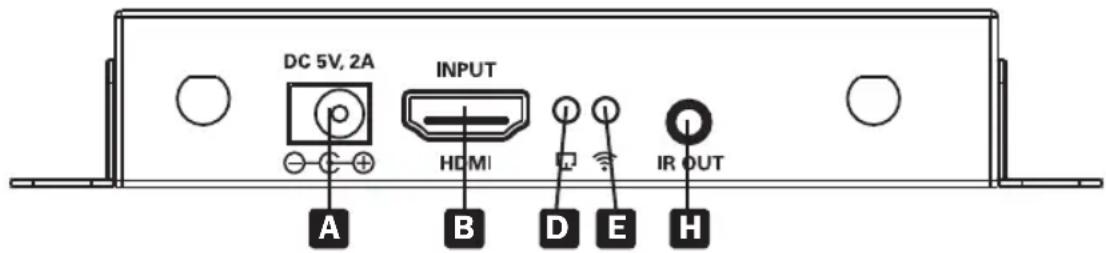
HDMI TX Back Panel
text_image
DC 5V, 2A INPUT HDMI IR OUT A B D E HHDMI RX Back Panel
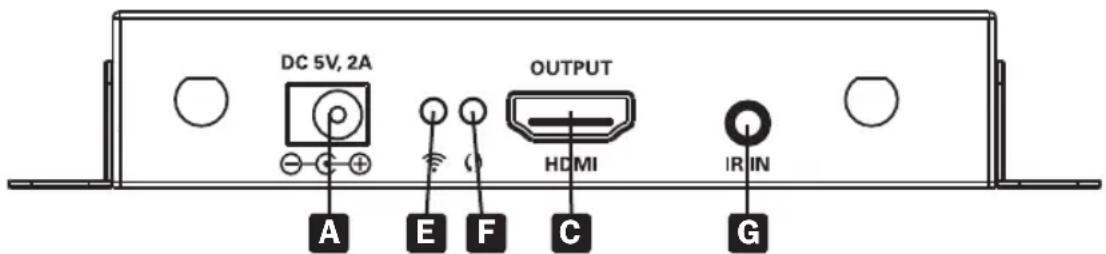
text_image
DC 5V, 2A OUTPUT HDMI I R IN A E F C GA Power Input: Connect included power supply adapter for power
B HDMI Input: Connect to HDMI source with HDMI cable
C HDMI Output: Connect to HDMI display with HDMI cable
D Signal Indicator LED: Green LED remains solid to indicate HDMI signal
E Wireless Indicator LED: LED will illuminate green when HDMI signal is obtained; will blink when data is transmitting
F Data Transmission LED: Green LED will blink slowly when connection is building and will blink quickly when it is successfully connected and transmitting data
G IR-IN (Rx) Port: Connect included IR-IN (Rx) cable
Note: Be sure the source remote control is within the required range of IR receiver
H IR-OUT (Tx) Port: Connect included IR-OUT (Tx) cable
Note: IR Blaster cable should be placed close to source device for best results
Installation
Notes:
- Ensure all equipment being connected is powered off prior to installation.
- For best results, position the IR transmitter near the HDMI source and IR receiver near the display.
- If the wireless signal is obstructed by walls (especially brick or glass) or other sources of interference, the quality and distance of the signal will likely be reduced.
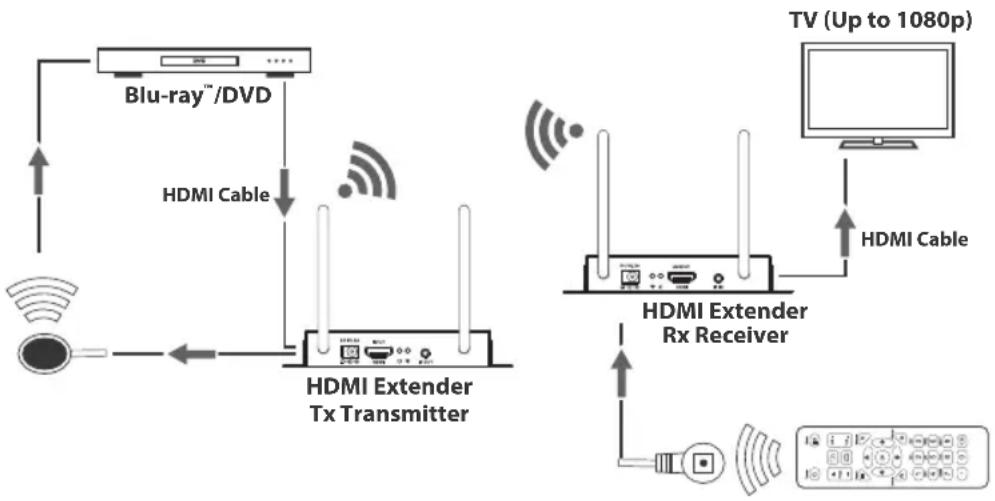
flowchart
graph TD
    A["Blu-ray™/DVD"] -->|HDMI Cable| B["HDMI Extender Tx Transmitter"]
    B --> C["HDMI Extender Rx Receiver"]
    C --> D["TV (Up to 1080p)"]
    D --> E["HDMI Cable"]
    E --> C
    C --> F["Radio System"]
    F --> G["Signal Line"]
    G --> H["Wireless Signal Line"]
    H --> I["Radio System"]
- Optional: Attach the included mounting hardware to the transmitter and receiver units, then mount them to a desired location.
- Connect the HDMI source device to the HDMI Input port on the transmitter unit using an HDMI cable, such as Tripp Lite's P568-Series High-Speed HDMI Cables.
- Connect the IR-OUT (Tx) cable to the IR-OUT port on the transmitter unit.
Note: IR-OUT (Tx) cable has IR-OUT marked on the bottom of the IR bulb. Place the bulb of the IR-OUT (Tx) cable in an area with a direct line of sight to the HDMI source device (e.g. Blu-ray player). - Connect the external power supply to the transmitter unit, and plug it into a Tripp Lite Surge Protector, Uninterruptible Power Supply (UPS) or Power Distribution Unit (PDU).
- Connect the HDMI display to the HDMI Output port on the receiver unit using a P568-Series High-Speed HDMI Cable.
- Connect the IR-IN (Rx) extension cable to the IR-IN port on the receiver unit.
Note: IR Receiver cable has IR-IN marked on the bottom of the IR bulb. Place the bulb of the IR receiver cable in the general area you will be using the source device's remote control. - Connect the external power supply to the receiver unit, and plug it into a Tripp Lite Surge Protector, Uninterruptible Power Supply (UPS) or Power Distribution Unit (PDU).
- Turn on power to the connected equipment.
Troubleshooting
If you are unable to get an acceptable image after following the installation instructions, try the troubleshooting tips below.
-
Are the external power supplies included with the product connected and plugged into a working power source? For the product to function properly, the transmitter and receiver must be connected to and receiving power from an external power supply.
-
Was the power to the HDMI source turned off prior to installation? If not, restart.
-
What resolution are you trying to reach? See the Product Features and Installation sections in this manual for details on maximum distance and resolution. If you are not able to get an acceptable image, try lowering your computer's video resolution or adjusting the refresh rate.
-
Does your HDMI display show a message saying "Waiting for Connection"? If so, please check to make sure the power supply adapters are properly connected and the power indicator LEDs are illuminated solid blue.
-
Does your HDMI display show a message saying "Please Check the TX Input Signal"? Ensure the HDMI signal connection LED on the transmitter unit is illuminated solid green. If the LED is not illuminating solid, connect the source device directly to the display device to see if the issue is with the source, display or HDMI cable you are using.
-
Are your transmitter and receiver units not connecting to each other? If the wireless connection LEDs are not blinking correctly, restart either the transmitter or receiver unit, then reconnect the HDMI connector or cable. Also, make sure the transmitter and receiver units have a direct line of sight to each other. If the line of sight between the units is blocked by windows or walls, or there is no direct line of sight, the Transmitter and Receiver units will not be able to establish a connection.
-
Is the Wi-Fi indicator on the transmitter unit on and there is no output signal on the display? Ensure the HDMI signal connection LED on the receiver unit is illuminated solid green. If the LED is not illuminating solid, connect the source device directly to the display device to see if the issue is with the source, display or HDMI cable you are using.
-
Is the HDMI display transmitting a choppy picture? If so, ensure the position of the transmitter and receiver units are in the required range, then restart the transmitter or receiver. If this does not work, check for other signal disturbances in between the transmitter and receiver.
-
Test your cables to ensure they are working properly.
-
Are the transmitter and/or receiver units located in an area that exposes them to elevated temperatures? If the product is overheating, it will not function properly.
Specifications
| Input Port HDMI (Female), 3.5 mm (Female) | |
| Output Port HDMI (Female), 3.5 mm (Female) | |
| IR Frequency 20-60 Hz Wide Range | |
| Transmission Distance 165 ft. / 50 m | |
| Maximum Transfer Rate 10.2 Gbps | |
| Transmission Method 5 GHz Wireless Transmission | |
| External Power 5V 2A | |
| Power Consumption TX: 7W; RX: 5W | |
| HDMI Version 1.3 | |
| HDCP Version 1.2 | |
| Max Video Resolutions 1920 x 1080 / 1080p @ 60 Hz | |
| MTBF >30.000 hours | |
| Operating Temperature 32 to 122 °F / 0 to 50 °C | |
| Storage Temperature 14 to 158 °F / -10 to 70 °C | |
| Humidity | 0 to 90% RH, Non-Condensing |
| TX & RX Unit Dimension (H x W x D) | 0.36 x 0.25 x 0.07 in. / 110 x 75 x 22 mm |
| TX & RX Unit Weight | 0.68 lb. / 310 g |
Warranty and Product Registration
1-Year Limited Warranty
TRIPP LITE warrants its products to be free from defects in materials and workmanship for a period of one (1) year from the date of initial purchase. TRIPP LITE's obligation under this warranty is limited to repairing or replacing (at its sole option) any such defective products. To obtain service under this warranty, you must obtain a Returned Material Authorization (RMA) number from TRIPP LITE or an authorized TRIPP LITE service center. Products must be returned to TRIPP LITE or an authorized TRIPP LITE service center with transportation charges prepaid and must be accompanied by a brief description of the problem encountered and proof of date and place of purchase. This warranty does not apply to equipment, which has been damaged by accident, negligence or misapplication or has been altered or modified in any way.
EXCEPT AS PROVIDED HEREIN, TRIPP LITE MAKES NO WARRANTIES, EXPRESS OR IMPLIED, INCLUDING WARRANTIES OF MERCHANTABILITY AND FITNESS FOR A PARTICULAR PURPOSE.
Some states do not permit limitation or exclusion of implied warranties; therefore, the aforesaid limitation(s) or exclusion(s) may not apply to the purchaser.
EXCEPT AS PROVIDED ABOVE, IN NO EVENT WILL TRIPP LITE BE LIABLE FOR DIRECT, INDIRECT, SPECIAL, INCIDENTAL OR CONSEQUENTIAL DAMAGES ARISING OUT OF THE USE OF THIS PRODUCT, EVEN IF ADVISED OF THE POSSIBILITY OF SUCH DAMAGE. Specifically, TRIPP LITE is not liable for any costs, such as lost profits or revenue, loss of equipment, loss of use of equipment, loss of software, loss of data, costs of substitutes, claims by third parties, or otherwise.
Product Registration
Visit www.tripplite.com/warranty today to register your new Tripp Lite product. You'll be automatically entered into a drawing for a chance to win a FREE Tripp Lite product!*
* No purchase necessary. Void where prohibited. Some restrictions apply. See website for details.
FCC Notice, Class B
This device complies with part 15 of the FCC Rules. Operation is subject to the following two conditions: (1) This device may not cause harmful interference, and (2) this device must accept any interference received, including interference that may cause undesired operation.
Note: This equipment has been tested and found to comply with the limits for a Class B digital device, pursuant to part 15 of the FCC Rules. These limits are designed to provide reasonable protection against harmful interference in a residential installation. This equipment generates, uses and can radiate radio frequency energy and, if not installed and used in accordance with the instructions, may cause harmful interference to radio communications. However, there is no guarantee that interference will not occur in a particular installation. If this equipment does cause harmful interference to radio or television reception, which can be determined by turning the equipment off and on, the user is encouraged to try to correct the interference by one or more of the following measures:
- Reorient or relocate the receiving antenna.
- Increase the separation between the equipment and receiver.
- Connect the equipment into an outlet on a circuit different from that to which the receiver is connected.
- Consult the dealer or an experienced radio/TV technician for help.
Any changes or modifications to this equipment not expressly approved by Tripp Lite could void the user's authority to operate this equipment.
WEEE Compliance Information for Tripp Lite Customers and Recyclers (European Union)

Under the Waste Electrical and Electronic Equipment (WEEE) Directive and implementing regulations, when customers buy new electrical and electronic equipment from Tripp Lite they are entitled to:
- Send old equipment for recycling on a one-for-one, like-for-like basis (this varies depending on the country)
- Send the new equipment back for recycling when this ultimately becomes waste
Use of this equipment in life support applications where failure of this equipment can reasonably be expected to cause the failure of the life support equipment or to significantly affect its safety or effectiveness is not recommended.
Tripp Lite has a policy of continuous improvement. Specifications are subject to change without notice. Photos and illustrations may differ slightly from actual products.

text_image
TRIPP·LITE
1111 W. 35th Street, Chicago, IL 60609 USA • www.tripplite.com/support