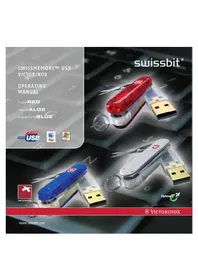
SwissMemory Flight 53986 - USB Drive Victorinox - Free user manual and instructions
Find the device manual for free SwissMemory Flight 53986 Victorinox in PDF.


| Product Type | USB Flash Drive with Multi-Tool |
| Brand | Victorinox |
| Model | SwissMemory Flight 53986 |
| Storage Capacity | 128 MB / 256 MB / 512 MB / 1 GB |
| Interface | USB 2.0 High-Speed, USB 1.1 Full Speed compliant |
| Data Transfer Rate | Up to 8 MB/s (via USB 2.0 port) |
| Compatible Operating Systems | Windows 98SE/ME/2000/XP, Mac OS 9.0+, Linux Kernel 2.4+ |
| Tools Included | Ball-point pen, LED light, key ring, nail file with screwdriver, scissors, knife, detachable USB drive |
| LED Light | Activated by pressing Cross/Shield Logo; battery replaceable |
| Power Supply | USB port (4.4 – 5.25 VDC) |
| Current Consumption | 150 – 200 mA (write/read) |
| Standards | CE, FCC Class B, USB 2.0 Hi-Speed |
| Data Retention | At least 10 years |
| Additional Software | Travel it Easy™ (Windows 2000/XP) for password protection, synchronization, and Lost & Found |
| Maintenance | Oil hinge mechanisms occasionally; avoid alcohol or flammable cleaners; remove USB and battery before water cleaning |
| Safety Warning | Knife and scissors are sharp; keep away from children; do not use for prying |
| Warranty – Knife Body | Lifetime against material and production defects |
| Warranty – USB Drive | 2 years against material defects |
| Environmental Protection | Dispose of lithium battery, knife body, and USB drive at appropriate collection points |
| Dimensions (approx.) | 91 mm x 25 mm x 20 mm (closed) |
| Weight (approx.) | 80 g |
Frequently Asked Questions - SwissMemory Flight 53986 Victorinox
User questions about SwissMemory Flight 53986 Victorinox
0 question about this device. Answer the ones you know or ask your own.
Ask a new question about this device
Download the instructions for your USB Drive in PDF format for free! Find your manual SwissMemory Flight 53986 - Victorinox and take your electronic device back in hand. On this page are published all the documents necessary for the use of your device. SwissMemory Flight 53986 by Victorinox.
USER MANUAL SwissMemory Flight 53986 Victorinox
This product is designed with a detachable USB drive for airline travel purposes. This product may be transported on an airplane; however, the knife portion must be checked with your luggage. Only the USB portion of this product may be carried on your person, or in carry-on items. Optional flight versions of the knife body are available that provide USB drive protection, and do not contain the knife blade, scissors, and nail file/screwdriver.

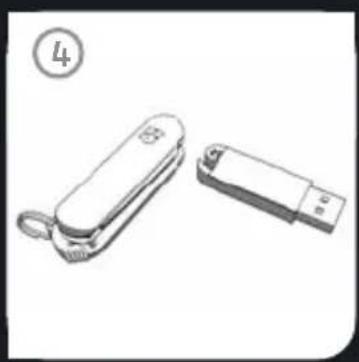
INTRODUCTION
With the SWISSMEMORY™ USB Victorinox you have acquired a quality Swiss product. To use this device anywhere and have many years' service from it, please follow the instructions below.
1. THE SWISSMEMORY™ USB VICTORINOX*
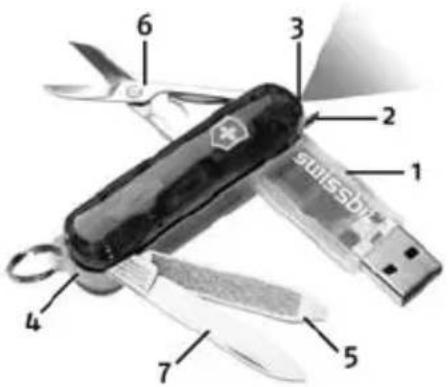
The SWISSMEMORY™ USB Victorinox contains the following tools:
- Ball-point pen
- LED light
- Safety cap with key ring
- Nail file with screwdriver
6.Scissors -
Knife
-
Detachable USB drive (also referred to as "device")
FLIGHT VERSION*
- Detachable USB drive
- Ball-point pen
- LED light
- Safety cap with key ring attached
* Availability of colors and product features may vary by country and region.
1.1 THE INDIVIDUAL COMPONENTS
1.1.1 USB DRIVE
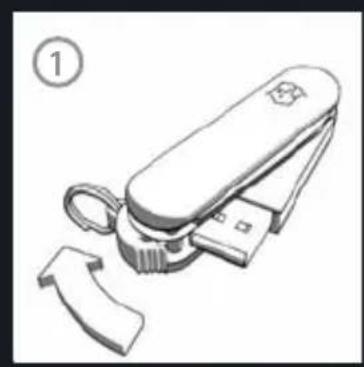
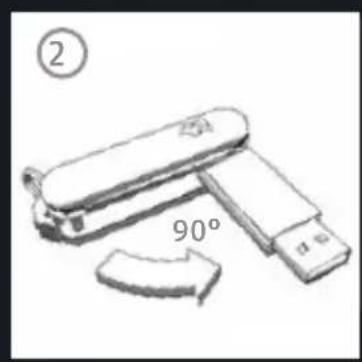
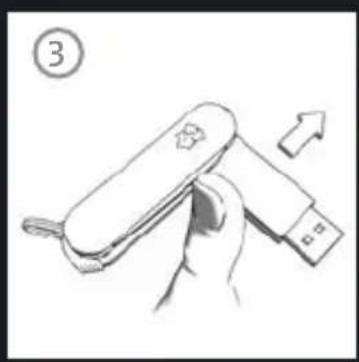
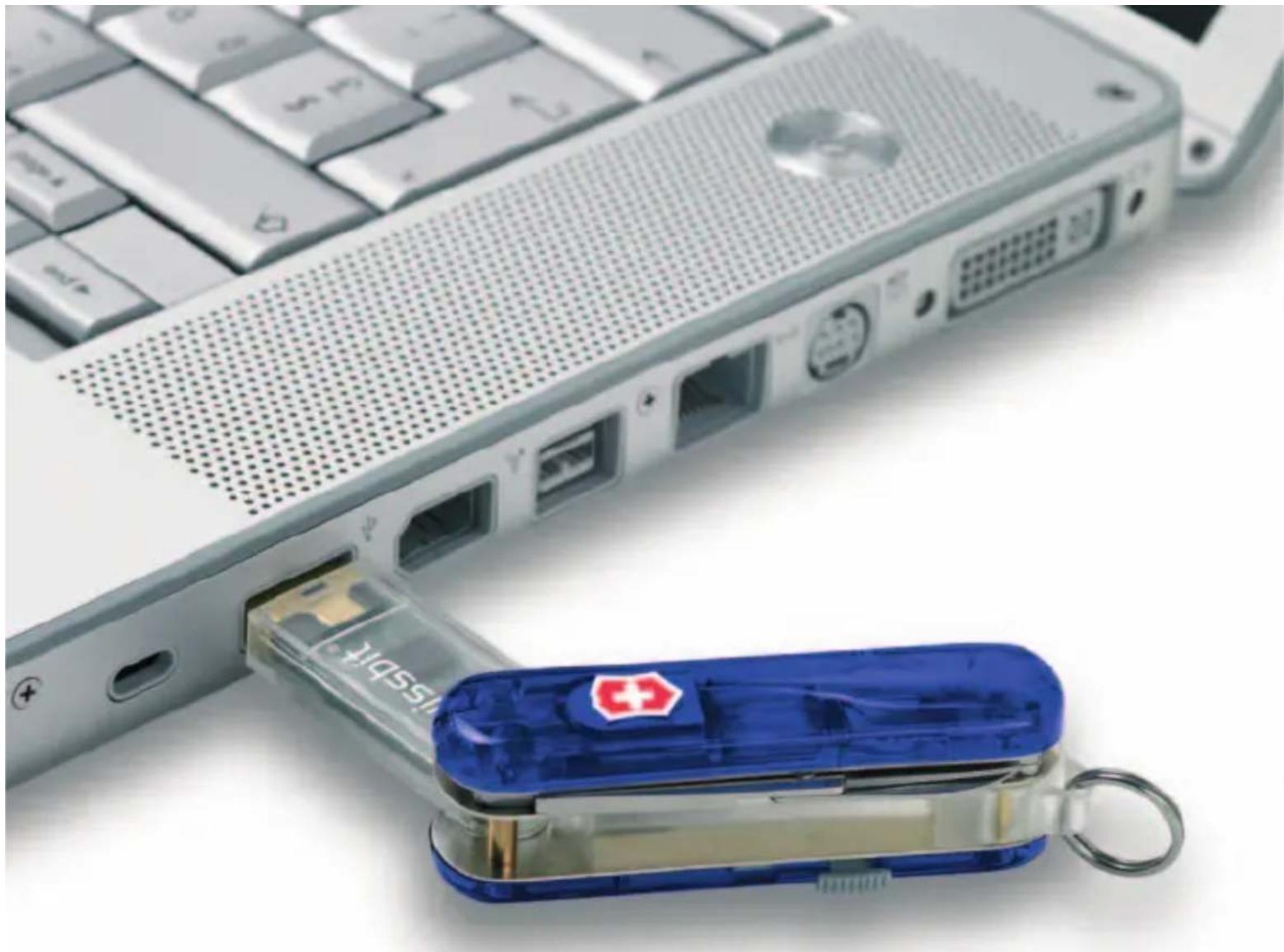
To remove the USB drive, slide the safety cap attached to the key ring to the side of the unit, rotate the USB drive to a 90° angle relative to the body of the unit and slide it upwards until the USB drive unclips. On replacing the USB drive, take special care to ensure that the logos on the body of the unit and the USB drive both face the same way. Further information on how to use the USB drive is given in section 2.
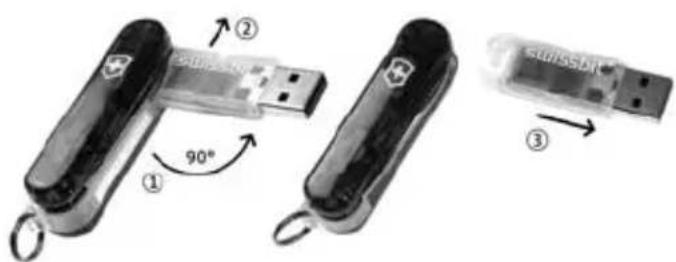
SWISSMEMORY™ USB VICTORINOX
1.1.2 KNIFE/SCISSORS/FILE
You can use these tools simply by pulling them out of the side of the unit.
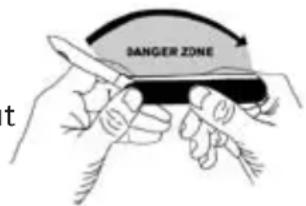
WARNING!
The knife and scissor blades are dangerous tools if not used properly and with care. Any use of the knife and scissor blades other than for cutting is considered improper use. Do not use the knife or scissor blades for prying or as a screwdriver. Do not use the knife or scissors if the blade is dull, bent, chipped or otherwise damaged. When handling the knife, direct the sharp edge away from you and others, and do not pick up by the blade. Be careful when closing the blade into the knife body. Keep out of the reach of children.
1.1.3 LED LIGHT
To activate the light, press the Cross/Shield Logo. To replace the battery, insert a paperclip into the opening next to the battery. The battery will then be pushed out of the other side of the unit.
1.1.4 BALL-POINT PEN
Press the small gray slide on the side of the unit inwards until the lock mechanism frees
itself, then slide it upwards until the ink cartridge has slid out to its furthest extent. For ease of use, slide out the nail file. To replace the cartridge simply pull it out.
1.2 MAINTENANCE INSTRUCTIONS
Remove the USB drive and battery from the body of the unit and half open the knife, the scissors and the nail file. Introduce a small drop of oil into the hinge mechanisms. If any of the tools stick, put the complete unit into warm water and open and close the tools several times, AFTER first removing the USB drive and battery. Re-oil the unit after it has been thoroughly dried out. Then reinsert battery and USB drive.
2. INSTRUCTIONS FOR USE OF THE USB DRIVE
In the following section you can familiarize yourself with how to use the USB drive. Please carefully follow the safety instructions below.
2.1 SAFETY INSTRUCTIONS
- The interface is designed solely for connection to separated extra-low voltage (SELV) equipment.
-
Interventions into the USB drive may only be performed by authorized service technicians.
-
The USB drive can only be opened and repaired by authorized service technicians.
- When cleaning the body of the knife, avoid cleaning sprays and all kinds of solutions containing alcohol or other flammable substances on to the USB drive.
- Avoid overheating the USB drive as this can shorten the lifetime of the product.
- Check the USB ports of the computer to be used for any damage and slide the USB drive back into the body of the unit when not in use.
- Protect your USB drive from high humidity, direct sunlight and very high or very low temperatures.
- Do not smoke in the direct vicinity of the USB drive.
- Do not place any fluids on or near the USB drive.
- If the USB drive is moved from a colder to warmer environment, it may be subject to condensation. Wait until the temperature of the USB drive has adjusted and it is totally dry before using it.
- Dispose of lithium battery, knife body and USB drive by taking these parts back to the sales outlet or an appropriate waste disposal center. Do not place lithium battery in trash.
CE THE CE In the form supplied, the USB drive
fulfils the requirements of the European directive 89/336/EWG for electromagnetic compatibility and the European directive 73/23/EWG for low-voltage devices.
FCC DECLARATION OF CONFORMITY REGARDING USB DRIVE
This device complies with Part 15 of the FCC Rules. Operation is subject to the following two conditions:
- This device may not cause harmful interference, and
- this device must accept any interference received, including interference that may cause undesired operation.
Product Type: USB Flash Memory
Product Name: SWISSMEMORY™ USB Victorinox
Model: 128MB/256MB/512MB/1GB
For the respective Model please refer to the printing on the USB drive body.
NAME OF RESPONSIBLE PARTY
Swissbit NA, Inc.
18 Willett Avenue, Suite 203
SWISSMEMORY™ USB VICTORINOX
Port Chester, N.Y. 10573
U.S.A.
Phone No.: (914) 935-1400 (USA)
FCC CLASS B COMPLIANCE STATEMENT
The USB drive has been tested and found to comply with the limits for a “Class B” digital device, pursuant to Part 15 of the FCC rules. These limits are designed to provide reasonable protection against harmful interference in a residential installation. This USB drive generates, uses and can radiate radio frequency energy and, if not installed and used in strict accordance with the instructions in this manual, may cause harmful interference to radio communications. However, there is no guarantee that interference will not occur in a particular installation. If this USB drive does cause harmful interference to radio or television reception, which can be determined by turning the USB drive off and on, the user is encouraged to try to correct the interference by one or more of the following measures:
- Reorient or relocate the receiving antenna.
-
Increase the separation between equipment and the receiver.
-
Connect the equipment into an outlet on a circuit different from that to which the receiver is connected.
- Consult the dealer or an experienced radio/TV technician for help.
Changes or modifications not expressly approved by Swissbit NA, Inc. may void the user's authority to operate the USB drive. Swissbit NA, Inc. is not responsible for any radio or television interference caused by unauthorized modifications of the USB drive or the substitution or attachment of connecting cables and equipment other than those specified by Swissbit NA, Inc. The correction of interferences caused by such unauthorized modification, substitution or attachment will be the responsibility of the user. The use of shielded I/O cables is required when connecting the USB drive to any and all optional peripheral or host devices. Failure to do so may violate FCC rules.
2.2 INSTALLATION
For this USB drive to work flawlessly in your system, and to avoid any unnecessary loss of data, please follow the instructions below:
2.2.1 INSTALLATION WITH WINDOWS® 2000/ME OR WINDOWS® XP
No additional driver is necessary. These Windows® systems already contain a driver that supports the SWISSMEMORY™ USB Victorinox. Simply plug the USB drive into a USB port on your PC or laptop. An icon for a new memory storage device will appear in your "My Computer" window.
2.2.2 INSTALLATION WITH WINDOWS® 98SE
You can use the CD supplied with the appropriate driver or you can download the driver from the Swissbit website (www.swissbit.com) and decompress it. Then plug the SWISSMEMORY™ USB Victorinox into a USB port on your computer. The "Add New Hardware Wizard" is then opened. Please follow the steps below to install the driver:
- Click on "Next" in the "Add New Hardware" window.
- Choose the "Search for the Best Driver for Your Device" option then click on "Next".
- Follow the instructions on screen.
- Click on "Finish" to complete the installation.
- You will see a new memory storage device icon in your "My Computer" window.
2.2.3 INSTALLATION WITH MAC OS 9.0 AND ABOVE No additional driver is necessary. The system supports the SWISSMEMORY™ USB Victorinox. Simply plug the USB drive into a USB port in your computer. An icon will appear on the desktop. Drivers for MAC OS 8.6 are available from Apple (www.apple.com).
2.3 REMOVAL OF USB DRIVE
To avoid any loss of data, please wait until the LED lights up before removing the storage device.
2.3.1 REMOVAL FROM SYSTEMS WITH WINDOWS® 98SE/WINDOWS® ME OR WINDOWS® 2000
It is essential that the USB drive is deactivated before removal. By double clicking on the memory storage device icon on the task bar, you can deactivate the "USB Mass Storage Device". After double clicking this icon, a window called "Remove and Deactivate Hardware" will appear on your screen. Select the relevant USB device and click on "Deactivate". If the USB drive has not been deactivated before removal, a warning window appears.
SWISSMEMORY™ USB VICTORINOX
2.3.2 REMOVAL WITH WINDOWS® XP
As soon as the LED lights up, you can pull out the device. If the LED flashes, that means that data are being transmitted. DO NOT disconnect at this point, as that may lead to a loss of data. It is always a good idea to ensure a safe removal of the USB drive by selecting the "Safely Remove Hardware" icon in the task bar.
2.3.3 REMOVAL WITH MAC OS 9.0 AND ABOVE
Close all the applications that are running with the USB drive. Activate the "SWISSMEMORY" desktop symbol and choose "Special/File" from the drop-down menu. Then click on "Deactivate/Eject SWISSMEMORY" and you can then remove the USB drive. If the USB drive has not been deactivated before removal, or an application with the USB drive is still running, a warning window appears.
2.4 PERFORMANCE PARAMETERS
- USB 2.0 high-speed device, USB 1.1 full speed compliant
- Data transfer rate from up to 8MB per second via a USB 2.0 port (Speed depends on the computer, operating system and application)
-
Supports the energy saving mode when connected to a mobile device.
-
Compatible with Windows® 98SE, ME, 2000/2000 SP4 and XP operating systems as well as MAC OS 9.0 and above and Linux Kernel 2.4 and above
- LED lights up when the device is in operation and flashes during the data transfer.
- Can be used any time and in any place with Plug & Play.
- Travel it Easy™ Software (only compatible with Windows® 2000/XP)
- Data remains stable for at least ten years.
- Automatic bad block management
- Error Correction (ECC) on the fly
- Voltage supplied through the USB connection of the operating computer, 4.4 - 5.25 VDC
- Current consumption: write/read 150 - 200 mA
- Norms and standards: CE, FCC, USB 2.0 Hi-Speed
- Actual usable memory capacity of USB drive may vary. 1MB equals 1 million bytes; 1GB equals 1 billion bytes. Formatting and other functions will use some drive capacity.
2.4.1 TRAVEL-IT-EASY™ SOFTWARE
The Travel it Easy™ software stored on the USB drive guarantees a multitude of add-on functions and converts the USB storage medium into
your pocket-size office. The password protection enables data to be provided with or without password depending on the individual preference. The USB function Lost & Found is exempt from password protection. It is a feature which is applied with "Travel it Easy" for the very first time for an USB storage device. The user fills in a simple form entering his or her personal data. A Lost & Found HTML file is then automatically filed on the storage device and can be read by anybody. With the function "My Documents Synchronization", the user can select the appropriate folders in "My Files" on the PC and synchronize these with the USB drive. This procedure is very easy. The user can also synchronize with Outlook Express. Internet favorites can be stored on the USB drive and synchronized with the PC when connected. Thanks to Travel it Easy™ surfing in the Internet without leaving a trace is also possible. The software also features a menu bar which displays at one glance, depending on the selection made, how much storage capacity is available at any time. You will find further information on how to use these and other functions in the Help File of the software. Open the removable storage device and double-click the file TravellItEasy.exe.
Travel it Easy™ is exclusively Windows® 2000 (Service Pack 4 is recommended) and XP compatible. The administration rights at the PC are coupled to the USB drive.
LIMITED WARRANTIES
Swissbit extends the following warranties with respect to the Swiss Army Knife Body (everything except the USB drive) and the USB drive (collectively referred to as the "product"). The following warranties are not assignable, and therefore apply only to the original purchaser.
THE FOLLOWING WARRANTIES ARE IN LIEU OF ANY OTHER WARRANTIES, EITHER EXPRESS OR IMPLIED, INCLUDING WITHOUT LIMITATION ANY WARRANTIES OF MERCHANTABILITY OR FITNESS FOR A PARTICULAR PURPOSE OR TITLE AGAINST INFRINGEMENT, WHICH OTHER WARRANTIES ARE EXPRESSLY EXCLUDED AND DISCLAIMED. SWISSBIT SHALL NOT BE LIABLE FOR LOSS OF PROFITS OR ANY SPECIAL, INCIDENTAL OR CONSEQUENTIAL DAMAGES EVEN IF SWISSBIT HAS BEEN ADVISED OF THE POSSIBILITY OF SUCH LOSSES OR DAMAGES. IN NO EVENT SHALL SWISSBIT LIABILITY EXCEED THE ORIGINAL PURCHASE PRICE OF THE PRODUCT.
SWISSMEMORY™ USB VICTORINOX
For purposes of the foregoing warranties and limitations on warranties, the term "Swissbit" refers to and includes Swissbit, and all of its subsidiaries and affiliates, including but not limited to Swissbit NA, Inc., Swissbit Germany AG, Swissbit AG, Swissbit Japan, Inc.
SWISS ARMY KNIFE BODY
Swissbit warrants the body of the knife against all material and production defects for the lifetime of the body of the knife, subject to all of the terms and conditions herein.
This warranty does not cover abuse, misuse or normal wear and tear.
USB DRIVE
Swissbit extends a two-year warranty on the USB drive against all material defects that result from production.
USA, CANADA, AND MEXICO CUSTOMERS ONLY: SOME STATES DO NOT ALLOW THE EXCLUSION OR LIMITATION OF INCIDENTAL OR CONSEQUENTIAL DAMAGES, SO THESE LIMITATIONS MAY NOT APPLY TO YOU. THESE WARRANTIES GIVE YOU SPECIFIC LEGAL RIGHTS AND YOU MAY ALSO HAVE OTHER RIGHTS THAT VARY FROM STATE TO STATE.
For warranty confirmation and product registration visit us at www.swissbitna.com/registration
For technical support contact us at support@swissbitna.com or 512.302.3300 (USA)
For further information, please visit: www.swissbit.com
© Swissbit 2005
All rights reserved, in particular in the event of a patent being granted or registration of a petty patent or registered design. Subject to changes in terms of delivery scope and technical specifications. All hardware and software names are trade names and/or trademarks of the respective manufacturer.
Copyright Swissbit. All rights reserved. Patents pending. Windows® is a registered trademark of Microsoft Corporation. USB and the USB logotype are registered trademarks.
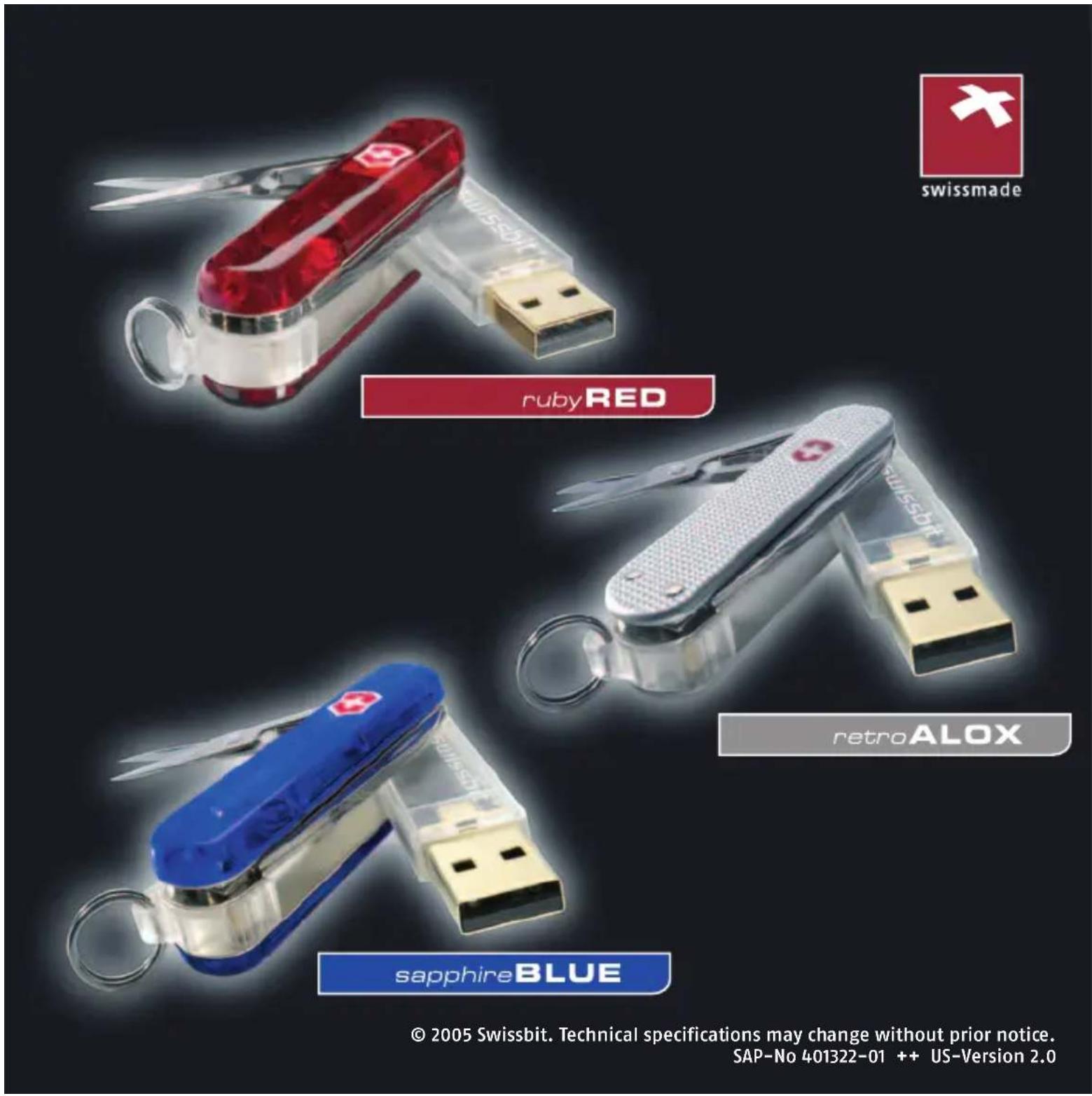

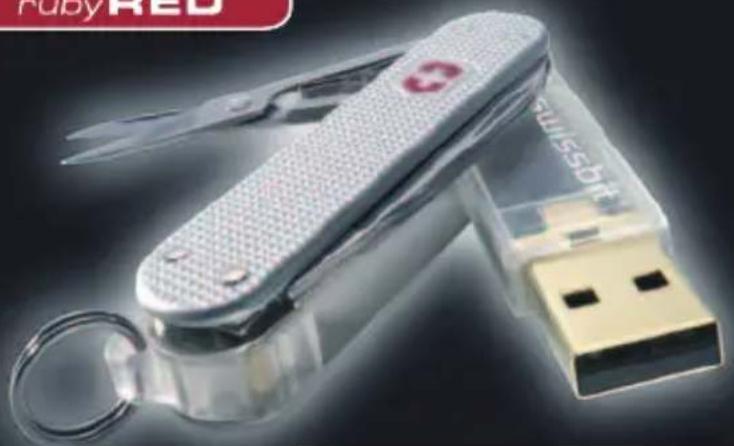
sapphireBLUE



- INTRODUCTION
- THE SWISSMEMORY™ USB VICTORINOX
- FLIGHT VERSION
- 1.1 THE INDIVIDUAL COMPONENTS
- 1.1.1 USB DRIVE
- SWISSMEMORY™ USB VICTORINOX
- 1.1.2 KNIFE/SCISSORS/FILE
- WARNING
- 1.1.3 LED LIGHT
- 1.1.4 BALL-POINT PEN
- 1.2 MAINTENANCE INSTRUCTIONS
- INSTRUCTIONS FOR USE OF THE USB DRIVE
- 2.1 SAFETY INSTRUCTIONS
- FCC DECLARATION OF CONFORMITY REGARDING USB DRIVE
- FCC CLASS B COMPLIANCE STATEMENT
- 2.2 INSTALLATION
- 2.2.1 INSTALLATION WITH WINDOWS® 2000/ME OR WINDOWS® XP
- 2.2.2 INSTALLATION WITH WINDOWS® 98SE
- 2.3 REMOVAL OF USB DRIVE
- 2.3.1 REMOVAL FROM SYSTEMS WITH WINDOWS® 98SE/WINDOWS® ME OR WINDOWS® 2000
- 2.3.2 REMOVAL WITH WINDOWS® XP
- 2.3.3 REMOVAL WITH MAC OS 9.0 AND ABOVE
- 2.4 PERFORMANCE PARAMETERS
- 2.4.1 TRAVEL-IT-EASY™ SOFTWARE
- LIMITED WARRANTIES
- SWISS ARMY KNIFE BODY
- USB DRIVE
- © SWISSBIT 2005
- SAPPHIREBLUE
Brand : Victorinox
Model : SwissMemory Flight 53986
Category : USB Drive