
VM-2DP - KVM switch Kramer - Free user manual and instructions
Find the device manual for free VM-2DP Kramer in PDF.


| Product Type | 1:2 DisplayPort Distributor (often used as KVM switch with appropriate cables) |
| Input | 1 DisplayPort (DP) connector |
| Outputs | 2 DisplayPort (DP) connectors |
| Bandwidth | Up to 2.7 Gbps per lane, total 10.8 Gbps over four lanes |
| Maximum Resolution | 2560x1600 pixels |
| HDCP Compliance | HDCP 1.3 |
| DisplayPort Standard | DisplayPort 1.1a |
| EDID Handling | I-EDIDPro™ Kramer Intelligent EDID Processing™ |
| Controls | EDID SELECT button, Output selection via LEDs |
| Indicator LEDs | IN, OUT 1, OUT 2, ON (green) |
| Power Source | 5V DC, 90mA |
| Power Adapter | Included (5V DC input) |
| Operating Temperature | 0° to +55°C (32° to 131°F) |
| Storage Temperature | -45° to +72°C (-49° to 162°F) |
| Humidity | 10% to 90% RHL non-condensing |
| Dimensions (W x D x H) | 12 cm x 7.15 cm x 2.44 cm (4.7" x 2.81" x 0.96") |
| Weight | 0.3 kg (0.67 lbs) approx. |
| Accessories Included | Power supply, bracket installation kit, rubber feet, quick start sheet, user manual |
| Optional Accessories | Kramer DisplayPort cables, rack adapters (RK-3T, RK-6T, RK-9T) |
| Warranty | Three years (labor and parts) for first customer purchase |
Frequently Asked Questions - VM-2DP Kramer
User questions about VM-2DP Kramer
0 question about this device. Answer the ones you know or ask your own.
Ask a new question about this device
Download the instructions for your KVM switch in PDF format for free! Find your manual VM-2DP - Kramer and take your electronic device back in hand. On this page are published all the documents necessary for the use of your device. VM-2DP by Kramer.
USER MANUAL VM-2DP Kramer
This page guides you through a basic installation and first-time use of your .VM-2DP For more detailed information, see the VM-2D manual. You can download the latest Kramer user manuals at http:details.kinastrectilecs.onics.com
Step 1: Check what's in the box

The VM220RplayPort Distributor
1 power adapter (5V DC input)
4 rubber feet

1 Quick start sheet
1 User Manual

natural_image
Illustration of a cardboard box with a yellow interior and a small logo on the front face (no text or symbols)It's a good idea to save the original box and packaging materials in case your Kramer product needs to be returned to the factory for service.
Step 2: Install the VM-2DP
Mount the machine in a rack (using the RK-3T, RK-6T or RK-9T rack adapters) or place on the table.
Step 3: Connect the inputs and outputs
Always switch OFF the power on each device before connecting it to your . VM-2DP

For best results, we recommend that you always use Kramer high-performance cables to connect your AV equipment to the VM-2DP.
Step 4: Connect the power
Connect the 5V DC power adapter to the power socket and connect the adapter to the mains electricity.
After connecting your VM2Dct its power and then switch on the power on each device.

Step 5: Operate the VM-2DP
Acquire the EDID
- Connect the power.
- Connect the output(s) from which you want to acquire the EDID.
-
Press and hold the EDID SETUP button to select the desired EDID.
The OUT LEDs illuminate in the following cycle: OUT 1, OUT 2 and both blink (default). -
Release the button when reaching the desired set up.
The EDID is now acquired.
To restore the default EDID, disconnect the outputs and repeat the above procedure
Contents
1 Introduction 1
2 Getting Started 2
2.1 Achieving the Best Performance 2
3 Overview 3
3.1 About DisplayPort 3
3.2 About HDCP 4
3.3 Defining EDID 4
4 Your VM-2DP 1:2 DisplayPort Distributor 5
5 Connecting the VM-2DP 1:2 DisplayPort Distributor 6
5.1 Acquiring the EDID 7
6 Technical Specifications 8
Figures
Figure 1: VM-2DP 1:2 DisplayPort Distributor 5
Figure 2: Connecting a VM-2DP 1:2 DisplayPort Distributor 6
1 Introduction
Welcome to Kramer Electronics! Since 1981, Kramer Electronics has been providing a world of unique, creative, and affordable solutions to the vast range of problems that confront the video, audio, presentation, and broadcasting professional on a daily basis. In recent years, we have redesigned and upgraded most of our line, making the best even better! Our 1,000-plus different models now appear in 11 groups that are clearly defined by function.
Our 1,000-plus different models now appear in 11 groups that are clearly defined by function: GROUP 1: Distribution Amplifiers; GROUP 2: Switchers and Matrix Switchers; GROUP 3: Control Systems; GROUP 4: Format/Standards Converters; GROUP 5: Range Extenders and Repeaters; GROUP 6: Specialty AV Products; GROUP 7: Scan Converters and Scalers; GROUP 8: Cables and Connectors; GROUP 9: Room Connectivity; GROUP 10: Accessories and Rack Adapters; GROUP 11: Sierra Products
Congratulations on purchasing your Kramer DigiTOOLS ^® VM-2DP 1:2 DisplayPort Distributor. The VM-2DP is ideal for:
• Home theater, presentation and multimedia applications
- Rental and staging
The package includes the VM-2DP 1:2 DisplayPort Distributor together with those items described in the check what's in the box section of the quick start and listed in the Accessories spec.
2 Getting Started
We recommend that you:
- Unpack the equipment carefully and save the original box and packaging materials for possible future shipment
• Review the contents of this user manual
• Use Kramer high-performance high-resolution cables
• Use only the power cord that is supplied with this machine

Go to http://www.kramerelectronics.com to check for up-to-date user manuals, application programs (where appropriate), and to check if firmware upgrades are available.
2.1 Achieving the Best Performance
To achieve the best performance:
- Use only good quality connection cables to avoid interference, deterioration in signal quality due to poor matching, and elevated noise levels (often associated with low quality cables)
- Avoid interference from neighboring electrical appliances that may adversely influence signal quality and position your Kramer VM-2DP away from moisture, excessive sunlight and dust

Caution: No operator serviceable parts inside the unit
Warning: Use only the Kramer Electronics input power wall adapter that is provided with the unit
Warning: Disconnect the power and unplug the unit from the wall before installing
3 Overview
The high-quality VM-2DP 1:2 DisplayPort Distributor takes a DisplayPort (DP) input signal and distributes it to two DisplayPort (DP) outputs. In particular, the VM-2DP features:
- One DisplayPort (DP) input, two DisplayPort (DP) outputs, two output status LEDs, an active input status LED, as well as an EDID select button
• Up to 2.7Gbps bandwidth per lane - A maximum resolution of 2560x1600 pixels and a total maximum bandwidth of 10.8Gbps over four lanes
- I-EDIDPro™ Kramer Intelligent EDID Processing™, an intelligent EDID handling and processing algorithm that ensures Plug and Play operation for DisplayPort systems
• Compliance to HDCP - High-resolution and rich colors and transports audio and multiple video streams
5V DC power
3.1 About DisplayPort
DisplayPort (DP) is a digital display interface standard for the PC industry. It delivers the highest resolutions and sound quality.
In addition, DisplayPort:
- Provides a simple interface between a PC and a display, projector or TV
- Supports 1 to 4 data pairs ("lanes") at a transfer rate of 1.62Gb or 2.7Gb per second
- Has a maximum length of 15 meters for video transmission, at a resolution of 1080p/60Hz and 3 meters for full bandwidth transmission
- Video specs include a video path that supports 6 to 16 bits per color channel, a maximum resolution of 2560x1600 pixels and a total maximum bandwidth of 10.8Gbps over four lanes
- Is backward-compatible with HDMI, DVI (Digital Visual Interface) and VGA, via an appropriate adapter
• Version 1.1 supports HDCP (see section 3.2)
- Supports two-way communication over its auxiliary channel between the video source (for example, a PC) and the digital display, enabling new functionality such as automatic configuration and one-button play
- Replaces the interface needed between the PC and an external display, as well as the low voltage differential signaling (LVDS) interface in notebook computers, monitors, to connect to LCD panels
3.2 About HDCP
The High-Bandwidth Digital Content Protection (HDCP) standard developed by Intel protects digital video and audio signals transmitted over DVI or HDMI connections between two HDCP-enabled devices to eliminate the reproduction of copyrighted material. To protect copyright holders (such as movie studios) from having their programs copied and shared, the HDCP standard provides for the secure and encrypted transmission of digital signals.
3.3 Defining EDID
The Extended Display Identification Data (EDID) is a data-structure provided by a display, to describe its capabilities to a graphics card (that is connected to the display's source). The EDID enables the VM-2DP to "know" what kind of monitor is connected to the output. The EDID includes the manufacturer's name, the product type, the timing data supported by the display, the display size, luminance data and (for digital displays only) the pixel mapping data.
EDID is defined by a standard published by the Video Electronics Standards Association (VESA).
4 Your VM-2DP 1:2 DisplayPort Distributor

flowchart
graph TD
    A["EDID SELECT"] --> B["0"]
    C["CONNECTED OUT1 OUT2"] --> D["0"]
    E["ON"] --> F["0"]
    G["ON"] --> H["0"]
    I["5"] --> J["6"]
    K["6"] --> L["7"]
    M["7"] --> N["8"]
    O["9"] --> P["VM-2DP"]
Figure 1: VM-2DP 1:2 DisplayPort Distributor
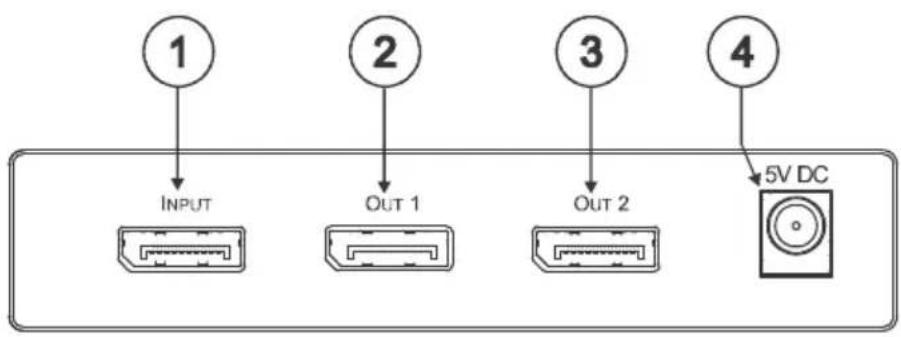
| # | Feature | Function |
| 1 | INPUT DisplayPort Connector | Connects to the DP source |
| 2 | OUT 1 DisplayPort Connector | Connects to the DP acceptor 1 |
| 3 | OUT 2 DisplayPort Connector | Connects to the DP acceptor 2 |
| 4 | 5V DC | +5V DC connector for powering the unit |
| 5 | EDID SELECT Button | Press to select the EDID |
| 6 | IN LED | Illuminates green when the input is selected |
| 7 | OUT 2 LED | Illuminates green when output 2 is selected |
| 8 | OUT 1 LED | Illuminates green when output 1 is selected |
| 9 | ON LED | Illuminates green when receiving power |
5 Connecting the VM-2DP 1:2 DisplayPort Distributor

Always switch OFF the power on each device before connecting it to your VM-2DP. After connecting your VM-2DP, connect its power and then switch on the power on each device.
To connect the VM-2DP, as the example in Figure 2 shows, do the following:
- Connect the DP source (for example, a PC with a DP output) to the INPUT DP connector.
- Connect the DP OUT connectors to up to two acceptors, as follows:
DP OUT 1 connector to a display
DP OUT 2 connector to a display
- Connect the 5V DC power adapter to the power socket and connect the adapter to the mains electricity.

flowchart
graph TD
    A["Computer Graphics Source"] -->|Display Port| B["DFTOOLiD"]
    B -->|Display Port| C["Display 1"]
    C -->|Display Port| D["Display 2"]
    D -->|Display Port| B
    B -->|Data Port| A
Figure 2: Connecting a VM-2DP 1:2 DisplayPort Distributor
5.1 Acquiring the EDID
Initially, the VM-2DP operates with the factory default EDID (the VM-2DP reads the EDID, which is stored in its non-volatile memory). This lets you connect the power before connecting one of the acceptors or sources.
The EDID is usually acquired once, when the machine is being set up in an installation. Once acquired, the EDID is saved in non-volatile memory and further acquisition is not necessary.
You can acquire the EDID from:
• One output (the relevant output blinks)
• The default EDID (both output LEDs blink)
When pressing the EDID SETUP button momentarily, the OUT LEDs indicate which type of EDID was last acquired. If the:
• OUT 1 LED illuminates, the OUT 1 EDID is stored in the non-volatile memory
• OUT 2 LED illuminates, the OUT 2 EDID is stored in the non-volatile memory
- OUT 1 and OUT 2 LEDs illuminate, the default EDID is stored in the non-volatile memory
To acquire the EDID, do the following:
- Connect the power.
- Connect the output or outputs from which you want to acquire the EDID.
- Press and hold the EDID SELECT button to select the desired EDID. The OUT LEDs illuminate in the following cycle: OUT 1, OUT 2 and both OUT 1 and OUT 2 blink (default).
- Release the button when reaching the desired set up. The EDID is now acquired.

If you set the machine to acquire the EDID from an output that is not connected, the default EDID is acquired.
6 Technical Specifications
| INPUT: | 1 DisplayPort Connector |
| OUTPUTS: | 2 DisplayPort Connectors |
| BANDWIDTH: | Supports up to 2.7Gbps bandwidth per lane and a total of 10.8Gps for all four lanes |
| COMPLIANCE WITH HDMI STANDARD: | Supports: DisplayPort 1.1a and HDCP 1.3 |
| CONTROLS: | Output select button and LEDs; EDID select button and LEDs |
| INDICATOR LEDs: | IN, OUT 1, OUT 2, and ON LEDs |
| POWER SOURCE: | 5V DC, 90mA |
| OPERATING TEMPERATURE: | 0° to +55°C (32° to 131°F) |
| STORAGE TEMPERATURE: | -45° to +72°C (-49° to 162°F) |
| HUMIDITY: | 10% to 90%, RHL non-condensing |
| DIMENSIONS: | 12cm x 7.15cm x 2.44cm (4.7" x 2.81" 0.96") W, D, H |
| WEIGHT: 0.3kg (0.67lbs) approx. | |
| ACCESSORIES: | Power supply, bracket installation kit |
| OPTIONS: | Kramer DisplayPort cablesRack adapters: RK-3T, RK-6T or RK-9T |
| Specifications are subject to change without noticeGo to our Web site at http://www.kramerelectronics.com to access the list of resolutions | |
LIMITED WARRANTY
We warrant this product free from defects in material and workmanship under the following terms.
HOW LONG IS THE WARRANTY
Labor and parts are warranted for three years from the date of the first customer purchase.
WHO IS PROTECTED?
Only the first purchase customer may enforce this warranty.
WHAT IS COVERED AND WHAT IS NOT COVERED
Except as below, this warranty covers all defects in material or workmanship in this product. The following are no covered by the warranty:
-
Any product which is not distributed by us or which is not purchased from an authorized Kramer dealer. If you are uncertain as to whether a dealer is authorized, please contact Kramer at one of the agents listed in the Web site www.kramerelectronics.com.
-
Any product, on which the serial number has been defaced, modified or removed, or on which the WARRANTY VOID IF TAMPERED Disturbed as otherwise, interfered with.
-
Damage, deterioration or malfunction resulting from:
i) Accident, misuse, abuse, neglect, fire, water, lightning or other acts of nature
ii) Product modification, or failure to follow instructions supplied with the product
iii) Repair or attempted repair by anyone not authorized by Kramer
iv) Any shipment of the product (claims must be presented to the carrier)
v) Removal or installation of the product
vi) Any other cause, which does not relate to a product defect
vii) Cartons, equipment enclosures, cables or accessories used in conjunction with the product
WHAT WE WILL PAY FOR AND WHAT WE WILL NOT PAY FOR
We will pay labor and material expenses for covered items. We will not pay for the following:
-
Removal or installations charges.
-
Costs of initial technical adjustments (set-up), including adjustment of user controls or programming. These costs are the responsibility of the Kramer dealer from whom the product was purchased.
-
Shipping charges.
HOW YOU CAN GET WARRANTY SERVICE
-
To obtain service on you product, you must take or ship it prepaid to any authorized Kramer service center.
-
Whenever warranty service is required, the original dated invoice (or a copy) must be presented as proof of warranty coverage, and should be included in any shipment of the product. Please also include in any mailing a contact name, company, address, and a description of the problem(s).
-
For the name of the nearest Kramer authorized service center, consult your authorized dealer.
LIMITATION OF IMPLIED WARRANTIES
All implied warranties, including warranties of merchantability and fitness for a particular purpose, are limited in duration to the length of this warranty.
EXCLUSION OF DAMAGES
The liability of Kramer for any effective products is limited to the repair or replacement of the product at our option. Kramer shall not be liable for:
-
Damage to other property caused by defects in this product, damages based upon inconvenience, loss of use of the product, loss of time, commercial loss; or:
-
Any other damages, whether incidental, consequential or otherwise. Some countries may not allow limitations on how long an implied warranty lasts and/or do not allow the exclusion or limitation of incidental or consequential damages, so the above limitations and exclusions may not apply to you.
This warranty gives you specific legal rights, and you may also have other rights, which vary from place to place.
NOTE: All products returned to Kramer for service must have prior approval. This may be obtained from your dealer.
This equipment has been tested to determine compliance with the requirements of:
EN-50081: "Electromagnetic compatibility (EMC);
generic emission standard.
Residential, coPartercial and light industry"
EN-50082: "Electromagnetic compatibility (EMC) generic immunity standard.
Part 1: Residential, commercial and light industry environment".
CFR-47: FCC* Rules and Regulations:
Part 15: "Radio frequency devices
Subpart B Unintentional radiators"
CAUTION!
Servicing the machines can only be done by an authorized Kramer technician. Any user who makes changes or modifications to the unit without the expressed approval of the manufacturer will void user authority to operate the equipment.
Use the supplied DC power supply to feed power to the machine.
Please use recommended interconnection cables to connect the machine to other components.
* FCC and CE approved using STP cable (for twisted pair products)

For the latest information on our products and a list of Kramer distributors, visit our Web site where updates to this user manual may be found.
We welcome your questions, comments, and feedback.
Web site: www.kramerelectronics.com
E-mail: info@kramerel.com



SAFETY WARNING
Disconnect the unit from the power supply before opening and servicing
- Step 1: Check what's in the box
- Step 2: Install the VM-2DP
- Step 3: Connect the inputs and outputs
- Step 4: Connect the power
- Step 5: Operate the VM-2DP
- Acquire the EDID
- Contents
- Figures
- Introduction
- Getting Started
- Achieving the Best Performance
- Overview
- About DisplayPort
- About HDCP
- Defining EDID
- Your VM-2DP 1:2 DisplayPort Distributor
- Connecting the VM-2DP 1:2 DisplayPort Distributor
- Acquiring the EDID
- Technical Specifications
- LIMITED WARRANTY
- WHO IS PROTECTED?
- WHAT IS COVERED AND WHAT IS NOT COVERED
- WHAT WE WILL PAY FOR AND WHAT WE WILL NOT PAY FOR
- HOW YOU CAN GET WARRANTY SERVICE
- LIMITATION OF IMPLIED WARRANTIES
- EXCLUSION OF DAMAGES
- CAUTION!
- SAFETY WARNING
Brand : Kramer
Model : VM-2DP
Category : KVM switch