
ThinkPad Ultrabay - DVD player LENOVO - Free user manual and instructions
Find the device manual for free ThinkPad Ultrabay LENOVO in PDF.


| Product Type | Internal DVD burner (ThinkPad Ultrabay) |
| Brand | Lenovo |
| Model | ThinkPad Ultrabay 9.5-mm DVD Burner IV |
| Form Factor | Ultrabay slim (9.5 mm height) |
| Disc Reading | DVD-ROM, DVD-RAM, DVD-RW, DVD-R, DVD+RW, DVD+R, CD-ROM, CD-R, CD-RW, CD audio |
| Disc Writing | DVD-RAM, DVD-RW, DVD-R, DVD+RW, DVD+R, CD-R, CD-RW, high-speed CD-RW |
| Recording Features | Buffer underrun prevention, multi-session support, bootable CD creation |
| Interface | ThinkPad Ultrabay (SATA) |
| Power Source | From computer via Ultrabay connector |
| Software Included | PowerDVD Create, PowerDVD (on Software and User Guide Disc) |
| Warranty | 1 year worldwide (Lenovo Limited Warranty) |
| Dimensions (approx) | 128 mm (W) x 129 mm (D) x 9.5 mm (H) |
| Weight (approx) | 150 g |
| Safety | Laser Class 1; complies with IEC 60825-1 |
| Manual Eject | Yes, via pinhole (requires straightened paper clip) |
| Eject Button | Yes, on front panel |
| Supported Operating Systems | Windows (as per software compatibility) |
| Package Contents | Drive, warranty poster, Software and User Guide Disc, laser safety information, Read This First |
| Care Instructions | Avoid direct sunlight, dust, humidity, high temperature, mechanical shock; use original packaging for transport |
| Recycling | Lenovo recycling program available (see www.lenovo.com/recycling) |
Frequently Asked Questions - ThinkPad Ultrabay LENOVO
User questions about ThinkPad Ultrabay LENOVO
0 question about this device. Answer the ones you know or ask your own.
Ask a new question about this device
Download the instructions for your DVD player in PDF format for free! Find your manual ThinkPad Ultrabay - LENOVO and take your electronic device back in hand. On this page are published all the documents necessary for the use of your device. ThinkPad Ultrabay by LENOVO.
USER MANUAL ThinkPad Ultrabay LENOVO
ThinkPad Ultrabay 9.5-mm DVD Burner IV User Guide
Note: Before installing the product, be sure to read the warranty information in Appendix B "Lenovo Limited Warranty" on page 13.
Contents
Safety information .... iii
Chapter 1. About the drive ..... 1
Product description. 1
Locating controls. 2
Software description 2
Chapter 2. Installing the drive. . . . . . 3
Before you begin. 3
Installing the drive 3
Installing software 3
Chapter 3. Using the drive ..... 5
Before you begin. 5
Loading a disc. 5
Manually opening the disc tray 5
Caring for the drive 6
Caring for a disc 6
Chapter 4. Troubleshooting ..... 9
Appendix A. Service and Support. . . 11
Online technical support ..... 11
Telephone technical support ..... 11
Appendix B. Lenovo Limited Warranty. 13
Part 1 - General Terms 13
Part 2 - Country-specific Terms ..... 15
Part 3 - Warranty Service Information. . . . . . 18
Appendix C. Electronic emission notices 21
Appendix D. Notices....23
Trademarks 23
Recycling information....23
Recycling information for Brazil ..... 24
Appendix E. Restriction of Hazardous Substances Directive (RoHS) ..... 25
European Union RoHS 25
China RoHS. 25
Turkish RoHS 25
Ukraine RoHS 25
India RoHS 25
Safety information
Before using the product, be sure to read the safety documentation that comes with the product.
Chapter 1. About the drive
This manual provides information about installing and using the ThinkPad® Ultrabay™ 9.5-mm DVD Burner IV (hereafter called the drive).
The appendices of this manual contain warranty information and legal notices.
Product description
This topic provides a brief product description of the drive:
The drive can:
- Read DVD, video CD, and audio CD media
- Record and read DVD-RAM, DVD-RW, DVD-R, DVD+R, and DVD+RW media
- Record CD-R, CD-RW, and high-speed CD-RW media by using the buffer underrun prevention technology
- Read multiple-session, CD-ROM extended architecture (CD-ROM XA) CD media, and Kodak photo CD media
The option package includes:
• ThinkPad Ultrabay 9.5-mm DVD Burner IV
- Warranty poster
- Software and User Guide Disc
• Laser Safety Information
- Read This First
Contact your place of purchase if any item is missing or damaged. Be sure to retain your proof of purchase and packing material. They might be required to receive warranty service.
Locating controls
The following figure shows the locations of the controls on the drive.

Figure 1. Locations of the controls on the drive
1 Eject button
Press this button to eject a DVD or CD disc. Attention: Before you press the Eject button, ensure that nothing is placed in front of the disc tray.
2 Manual eject hole
Used to manually eject a DVD or CD disc when the Eject button does not work. For more information, see "Manually opening the disc tray" on page 5.
Software description
The Software and User Guide Disc contains the following programs:
• PowerDVD Create
This program enables you to perform the following tasks:
- Add your own videos and create custom menus for DVD videos that you created
– Author data discs - Burn saved images to discs
- Copy discs
- Create audio CDs and MP3 CDs
- Create bootable CDs
- Create DVD-RAM, DVD-RW, DVD-R, DVD+RW, and DVD+R media that can be played on both the DVD player of your computer and stand-alone DVD players
- Edit and modify your own video
- Import and edit unprotected DVD discs
- Save disc images for later recording
– View and extract files from ISO disc images
Note: If you have an analog, USB, or IEEE 1394 capture device installed on your computer, you can use this program to record videos from a camera.
- PowerDVD
This program enables you to perform the following tasks:
- Play video files
- Play back DVD videos
Note: Lenovo reserves the right to change and update the optical software without notice. For more information, go to http://www.lenovo.com/support, and click Drivers & Software.
Chapter 2. Installing the drive
This chapter provides information on how to install the drive.
Before you begin
Before installing the drive, carefully read the following precautions:
- The drive is shipped with a static-protective package. Do not open the package until you are ready to install the drive.
- Limit your movement when installing the drive. Movement can cause static electricity to build up around you.
- Carefully handle the drive. Shaking or dropping the drive might damage the components inside the drive.
Installing the drive
To install the drive, do the following:
- Turn off the computer, and then disconnect the ac power adapter. Remove the battery and all cables from the computer.
- Remove the old drive. For instructions on how to remove the drive, see the User Guide that comes with your ThinkPad computer.
- Touch the static-protective package that contains the new drive to any unpainted surface for at least two seconds. Then, take the new drive out of the package.
- Install the new drive into the drive bay. For instructions on how to install the drive, see the User Guide that comes with your ThinkPad computer.
Installing software
After you have installed the drive on your computer, you can install the software on the Software and User Guide Disc. For detailed software information, see "Software description" on page 2.
To install the software, do the following:
- Save any open documents and exit all applications.
- Insert the Software and User Guide Disc and do one of the following:
- If the disc starts automatically, go to step 3.
- If the AutoPlay window opens, click Run ViewHtml.exe. Then, go to step 3.
-
If the disc does not start automatically, go into My Computer or Computer, browse the CD/DVD drive, and double-click ViewHtml.exe.
-
Select your language.
-
On the left side of the window, click Software.
-
Follow the instructions on the screen.
Chapter 3. Using the drive
This chapter provides information on how to use the drive.
Before you begin
Before you use the drive, be sure to read the following precautions:
- Do not move your computer while formatting or writing to a disc, as this might cause data errors.
- Minimize typing while formatting or writing to a disc, as this might cause data errors.
- Keep your computer on a flat surface when writing to a disc.
- Ensure that your computer is plugged into an outlet when using the drive. The disc might be damaged if the battery runs out while writing to a disc.
- Turn screensavers off. Using a screensaver might interrupt the formatting and writing process.
- Do not put your computer into hibernation or suspend mode while writing to a disc.
Note: The read and write results of the drive depends on the quality and characteristics of the DVD or CD media used.
Loading a disc
This topic provides instructions on how to load a disc.
To load a disc, do the following:
- Press the Eject button. The disc tray slides out of the drive.
- Place a disc in the disc tray with the label facing up.
- Close the disc tray by gently pushing the disc tray in until it latches.
Attention: Do not use force or insert foreign objects to open the disc tray. If the disc tray does not open when you press the Eject button, see "Manually opening the disc tray" on page 5.
Manually opening the disc tray
To manually open the disc tray, do the following:
- Turn off your computer.
- Straighten a paper clip with the straightened end extending at least 45 mm (1.8 inches).
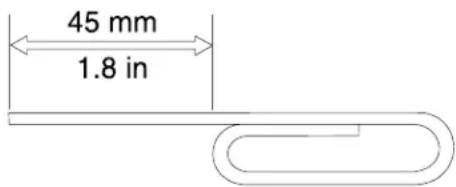
Figure 2. The straightened paper clip
- Insert the straightened end of the paper clip into the manual eject hole (see "Locating controls" on page 2), and push the paper clip into the hole until the disc tray opens.
Caring for the drive
To protect your drive, take the following precautions:
- Avoid exposing the drive to the following conditions:
- Direct sunlight
- Excessive dust
- High humidity
– High temperature - Mechanical vibration
- Placement on an inclined surface
- Sudden shock or dropping
-
Sudden temperature change
-
Do not insert foreign objects into the drive.
- Do not move the drive when it is in use. Movement might cause data error or damage the drive or disc.
- Do not move the drive when a disc is contained in the disc tray.
- Do not move the drive when the disc tray is not closed.
- Do not remove the drive cover or attempt to repair the drive.
- Do not stack objects on the drive.
Note: Keep the original packaging materials. If you need to ship the drive to a different location, use the original packaging materials to ensure that the drive is safely packaged for transportation.
Caring for a disc
Discs are high-density media that must be handled with care and kept clean to ensure that they remain readable and writable. Take the following precautions to extend the service life of your discs.
For handling:
- Do not bend or flex discs.
- Do not insert discs into the drive or packaging materials with force.
- Do not touch the surface of discs.
- Do not touch the recording area of a disc when handling bare media.
- Do not use discs that are cracked.
- Handle discs by the edges or the center hole.
- Remove discs from the disc tray when not in use.
For labeling:
- Do not attach labels to both sides of a disc.
- Do not write on the surface of discs.
- When labeling a disc, write only on the printed label side or the cartridge using a soft felt-tip marker.
For cleaning:
- Do not use commercial cleaners to clean discs.
- Do not use solvents to clean the disc surface.
- To remove dust or fingerprints, wipe discs from the center to the edge with a soft and lint-free cloth.
Attention: Using circular motion to wipe a disc can cause data loss.
For storing:
- Store discs in their original packaging.
- Store discs away from direct heat sources.
- Store discs out of direct sunlight, high temperatures, and high humidity.
Chapter 4. Troubleshooting
This chapter provides troubleshooting hints and tips to assist you when you experience problems with your drive. You might also need to refer to the publications that come with your computer.
If you encounter any of the following problems when using the drive, refer to the corresponding answers.
You cannot create a multi-session disc.
Make sure that there is enough space left on the disc for another session. Writing a session requires lead-in and lead-out space (about 15 MB) in addition to the space to accommodate the data that is recorded.
You cannot read from the CD or DVD disc after successfully writing to it.
Do the following:
- Try the CD or DVD disc with another CD or DVD player. If you can read the CD or DVD disc in another CD or DVD player or you can see previous sessions, this indicates that the directory information might be damaged. Check the documentation that comes with the CD or DVD player.
- You might have a damaged CD-R, CD-RW, DVD-R, DVD-RAM, or DVD-RW disc. Try a new disc or another brand of CD or DVD disc.
- Avoid writing at a speed slower than 1x unless required by your computer.
The DVD playback cannot resume after your computer resumes from suspend mode.
This is normal with some device drivers. The DVD playback will continue after you exit and restart the PowerDVD program.
DVD movies do not start automatically when you insert the disc into the drive.
You might have chosen to always start data discs in file only mode. Refer to the Microsoft® Windows® Help and Support program.
A message is displayed, indicating that there is a copy protection error, and playback stops when using the PowerDVD program.
Do one of the following:
- If an external monitor is connected, ensure that the external monitor is connected to a digital video output connector on your computer, such as a High Definition Multimedia Interface (HDMI), DisplayPort, or Digital Visual Interface (DVI) connector.
- Ensure that your graphics card and the Protected Media Path are working correctly when you are using the drive on Windows operating systems.
Appendix A. Service and Support
The following information describes the technical support that is available for your product, during the warranty period or throughout the life of your product. Refer to the Lenovo Limited Warranty for a full explanation of Lenovo warranty terms.
Online technical support
Online technical support is available during the lifetime of a product at: http://www.lenovo.com/support
Product replacement assistance or exchange of defective components also is available during the warranty period. In addition, if your option is installed in a Lenovo computer, you might be entitled to service at your location. A Lenovo technical support representative can help you determine the best alternative.
Telephone technical support
Installation and configuration support through the Customer Support Center will be available until 90 days after the option has been withdrawn from marketing. After that time, the support is cancelled, or made available for a fee, at Lenovo's discretion. Additional support is also available for a nominal fee.
Before contacting a Lenovo technical support representative, please have the following information available: option name and number, proof of purchase, computer manufacturer, model, serial number and manual, the exact wording of any error message, description of the problem, and the hardware and software configuration information for your system.
Your technical support representative might want to walk you through the problem while you are at your computer during the call.
Telephone numbers are subject to change without notice. The most up-to-date telephone list for Lenovo Support is always available at http://www.lenovo.com/support/phone. If the telephone number for your country or region is not listed, contact your Lenovo reseller or Lenovo marketing representative.
Appendix B. Lenovo Limited Warranty
L505-0010-02 08/2011
This Lenovo Limited Warranty consists of the following parts:
Part 1 - General Terms
Part 2 - Country-specific Terms
Part 3 - Warranty Service Information
The terms of Part 2 replace or modify terms of Part 1 as specified for a particular country.
Part 1 - General Terms
This Lenovo Limited Warranty applies only to Lenovo hardware products you purchased for your own use and not for resale. This Lenovo Limited Warranty is available in other languages at www.lenovo.com/warranty.
What this Warranty Covers
Lenovo warrants that each Lenovo hardware product that you purchase is free from defects in materials and workmanship under normal use during the warranty period. The warranty period for the product starts on the original date of purchase as shown on your sales receipt or invoice or as may be otherwise specified by Lenovo. The warranty period and type of warranty service that apply to your product are as specified in "Part 3 - Warranty Service Information" below. This warranty only applies to products in the country or region of purchase.
THIS WARRANTY IS YOUR EXCLUSIVE WARRANTY AND REPLACES ALL OTHER WARRANTIES OR CONDITIONS, EXPRESS OR IMPLIED, INCLUDING, BUT NOT LIMITED TO, ANY IMPLIED WARRANTIES OR CONDITIONS OF MERCHANTABILITY OR FITNESS FOR A PARTICULAR PURPOSE. AS SOME STATES OR JURISDICTIONS DO NOT ALLOW THE EXCLUSION OF EXPRESS OR IMPLIED WARRANTIES, THE ABOVE EXCLUSION MAY NOT APPLY TO YOU. IN THAT EVENT, SUCH WARRANTIES APPLY ONLY TO THE EXTENT AND FOR SUCH DURATION AS REQUIRED BY LAW AND ARE LIMITED IN DURATION TO THE WARRANTY PERIOD. AS SOME STATES OR JURISDICTIONS DO NOT ALLOW LIMITATIONS ON THE DURATION OF AN IMPLIED WARRANTY, THE ABOVE LIMITATION ON DURATION MAY NOT APPLY TO YOU.
How to Obtain Warranty Service
If the product does not function as warranted during the warranty period, you may obtain warranty service by contacting Lenovo or a Lenovo approved Service Provider. A list of approved Service Providers and their telephone numbers is available at: www.lenovo.com/support/phone.
Warranty service may not be available in all locations and may differ from location to location. Charges may apply outside a Service Provider's normal service area. Contact a local Service Provider for information specific to your location.
Customer Responsibilities for Warranty Service
Before warranty service is provided, you must take the following steps:
- follow the service request procedures specified by the Service Provider;
- backup or secure all programs and data contained in the product;
• provide the Service Provider with all system keys or passwords;
• provide the Service Provider with sufficient, free, and safe access to your facilities to perform service; - remove all data, including confidential information, proprietary information and personal information, from the product or, if you are unable to remove any such information, modify the information to prevent its access by another party or so that it is not personal data under applicable law. The Service Provider shall not be responsible for the loss or disclosure of any data, including confidential information, proprietary information, or personal information, on a product returned or accessed for warranty service;
- remove all features, parts, options, alterations, and attachments not covered by the warranty;
- ensure that the product or part is free of any legal restrictions that prevent its replacement;
- if you are not the owner of a product or part, obtain authorization from the owner for the Service Provider to provide warranty service.
What Your Service Provider Will Do to Correct Problems
When you contact a Service Provider, you must follow the specified problem determination and resolution procedures.
The Service Provider will attempt to diagnose and resolve your problem by telephone, e-mail or remote assistance. The Service Provider may direct you to download and install designated software updates.
Some problems may be resolved with a replacement part that you install yourself called a "Customer Replaceable Unit" or "CRU." If so, the Service Provider will ship the CRU to you for you to install.
If your problem cannot be resolved over the telephone; through the application of software updates or the installation of a CRU, the Service Provider will arrange for service under the type of warranty service designated for the product under "Part 3 - Warranty Service Information" below.
If the Service Provider determines that it is unable to repair your product, the Service Provider will replace it with one that is at least functionally equivalent.
If the Service Provider determines that it is unable to either repair or replace your product, your sole remedy under this Limited Warranty is to return the product to your place of purchase or to Lenovo for a refund of your purchase price.
Replacement Products and Parts
When warranty service involves the replacement of a product or part, the replaced product or part becomes Lenovo's property and the replacement product or part becomes your property. Only unaltered Lenovo products and parts are eligible for replacement. The replacement product or part provided by Lenovo may not be new, but it will be in good working order and at least functionally equivalent to the original product or part. The replacement product or part shall be warranted for the balance of the period remaining on the original product.
Use of Personal Contact Information
If you obtain service under this warranty, you authorize Lenovo to store, use and process information about your warranty service and your contact information, including name, phone numbers, address, and e-mail address. Lenovo may use this information to perform service under this warranty. We may contact you to inquire about your satisfaction with our warranty service or to notify you about any product recalls or safety issues. In accomplishing these purposes, you authorize Lenovo to transfer your information to any country where we do business and to provide it to entities acting on our behalf. We may also disclose it where required by law. Lenovo's privacy policy is available at www.lenovo.com/.
What this Warranty Does not Cover
This warranty does not cover the following:
- uninterrupted or error-free operation of a product;
- loss of, or damage to, your data by a product;
- any software programs, whether provided with the product or installed subsequently;
- failure or damage resulting from misuse, abuse, accident, modification, unsuitable physical or operating environment, natural disasters, power surges, improper maintenance, or use not in accordance with product information materials;
- damage caused by a non-authorized service provider;
- failure of, or damage caused by, any third party products, including those that Lenovo may provide or integrate into the Lenovo product at your request;
- any technical or other support, such as assistance with “how-to” questions and those regarding product set-up and installation;
- products or parts with an altered identification label or from which the identification label has been removed.
Limitation of Liability
Lenovo is responsible for loss or damage to your product only while it is in the Service Provider's possession or in transit, if the Service Provider is responsible for the transportation.
Neither Lenovo nor the Service Provider is responsible for loss or disclosure of any data, including confidential information, proprietary information, or personal information, contained in a product.
UNDER NO CIRCUMSTANCES, AND NOTWITHSTANDING THE FAILURE OF ESSENTIAL PURPOSE OF ANY REMEDY SET FORTH HEREIN, SHALL LENOVO, ITS AFFILIATES, SUPPLIERS, RESELLERS, OR SERVICE PROVIDERS BE LIABLE FOR ANY OF THE FOLLOWING EVEN IF INFORMED OF THEIR POSSIBILITY AND REGARDLESS OF WHETHER THE CLAIM IS BASED IN CONTRACT, WARRANTY, NEGLIGENCE, STRICT LIABILITY OR OTHER THEORY OF LIABILITY: 1) THIRD PARTY CLAIMS AGAINST YOU FOR DAMAGES; 2) LOSS, DAMAGE OR DISCLOSURE OF YOUR DATA; 3) SPECIAL, INCIDENTAL, PUNITIVE, INDIRECT OR CONSEQUENTIAL DAMAGES, INCLUDING BUT NOT LIMITED TO LOST PROFITS, BUSINESS REVENUE, GOODWILL OR ANTICIPATED SAVINGS. IN NO CASE SHALL THE TOTAL LIABILITY OF LENOVO, ITS AFFILIATESS, SUPPLIERS, RESELLERS OR SERVICE PROVIDERS FOR DAMAGES FROM ANY CAUSE EXCEED THE AMOUNT OF ACTUAL DIRECT DAMAGES, NOT TO EXCEED THE AMOUNT PAID FOR THE PRODUCT.
THE FOREGOING LIMITATIONS DO NOT APPLY TO DAMAGES FOR BODILY INJURY (INCLUDING DEATH), DAMAGE TO REAL PROPERTY OR DAMAGE TO TANGIBLE PERSONAL PROPERTY FOR WHICH LENOVO IS LIABLE UNDER LAW. AS SOME STATES OR JURISDICTIONS DO NOT ALLOW THE EXCLUSION OR LIMITATION OF INCIDENTAL OR CONSEQUENTIAL DAMAGES, THE ABOVE LIMITATION OR EXCLUSION MAY NOT APPLY TO YOU.
Your Other Rights
THIS WARRANTY GIVES YOU SPECIFIC LEGAL RIGHTS. YOU MAY HAVE OTHER RIGHTS ACCORDING TO THE APPLICABLE LAWS OF YOUR STATE OR JURISDICTION. YOU MAY ALSO HAVE OTHER RIGHTS UNDER A WRITTEN AGREEMENT WITH LENOVO. NOTHING IN THIS WARRANTY AFFECTS STATUTORY RIGHTS, INCLUDING RIGHTS OF CONSUMERS UNDER LAWS OR REGULATIONS GOVERNING THE SALE OF CONSUMER GOODS THAT CANNOT BE WAIVED OR LIMITED BY CONTRACT.
Part 2 - Country-specific Terms
Australia
“Lenovo” means Lenovo (Australia & New Zealand) Pty Limited ABN 70 112 394 411. Address: Level 10, North Tower, 1-5 Railway Street, Chatswood, NSW, 2067. Telephone: +61 2 8003 8200. Email: lensyd_au@lenovo.com
The following replaces the same section in Part 1:
What this Warranty Covers:
Lenovo warrants that each hardware product that you purchase is free from defects in materials and workmanship under normal use and conditions during the warranty period. If the product fails due to a covered defect during the warranty period, Lenovo will provide you a remedy under this Limited Warranty. The warranty period for the product starts on the original date of purchase specified on your sales receipt or invoice unless Lenovo informs you otherwise in writing. The warranty period and type of warranty service that apply to your product are set forth below in Part 3 - Warranty Service Information.
THE BENEFITS GIVEN BY THIS WARRANTY ARE IN ADDITION TO YOUR RIGHTS AND REMEDIES AT LAW, INCLUDING THOSE UNDER THE AUSTRALIAN CONSUMER LAW.
The following replaces the same section in Part 1:
Replacement Products and Parts:
When warranty service involves the replacement of a product or part, the replaced product or part becomes Lenovo's property and the replacement product or part becomes your property. Only unaltered Lenovo products and parts are eligible for replacement. The replacement product or part provided by Lenovo may not be new, but it will be in good working order and at least functionally equivalent to the original product or part. The replacement product or part shall be warranted for the balance of the period remaining on the original product. Products and parts presented for repair may be replaced by refurbished products or parts of the same type rather than being repaired. Refurbished parts may be used to repair the product; and repair of the product may result in loss of data, if the product is capable of retaining user-generated data.
The following is added to the same section in Part 1:
Use of Personal Contact Information:
Lenovo will not be able to perform our service under this warranty if you refuse to provide your information or do not wish us to transfer your information to our agent or contractor. You have the right to access your personal contact information and request correction of any errors in it pursuant to the Privacy Act 1988 by contacting Lenovo.
The following replaces the same section in Part 1:
Limitation of Liability:
Lenovo is responsible for loss or damage to your product only while it is in the Service Provider's possession or in transit, if the Service Provider is responsible for the transportation.
Neither Lenovo nor the Service Provider is responsible for loss or disclosure of any data, including confidential information, proprietary information, or personal information, contained in a product.
TO THE EXTENT PERMITTED BY LAW, UNDER NO CIRCUMSTANCES AND NOTWITHSTANDING THE FAILURE OF ESSENTIAL PURPOSE OF ANY REMEDY SET FORTH HEREIN, SHALL LENOVO, ITS AFFILIATES, SUPPLIERS, RESELLERS, OR SERVICE PROVIDERS BE LIABLE FOR ANY OF THE FOLLOWING EVEN IF INFORMED OF THEIR POSSIBILITY AND REGARDLESS OF WHETHER THE CLAIM IS BASED IN CONTRACT, WARRANTY, NEGLIGENCE, STRICT LIABILITY OR OTHER THEORY
OF LIABILITY: 1) THIRD PARTY CLAIMS AGAINST YOU FOR DAMAGES; 2) LOSS, DAMAGE OR DISCLOSURE OF YOUR DATA; 3) SPECIAL, INCIDENTAL, PUNITIVE, INDIRECT OR CONSEQUENTIAL DAMAGES, INCLUDING BUT NOT LIMITED TO LOST PROFITS, BUSINESS REVENUE, GOODWILL OR ANTICIPATED SAVINGS. IN NO CASE SHALL THE TOTAL LIABILITY OF LENOVO, ITS AFFILIATESS, SUPPLIERS, RESELLERS OR SERVICE PROVIDERS FOR DAMAGES FROM ANY CAUSE EXCEED THE AMOUNT OF ACTUAL DIRECT DAMAGES, NOT TO EXCEED THE AMOUNT PAID FOR THE PRODUCT.
THE FOREGOING LIMITATIONS DO NOT APPLY TO DAMAGES FOR BODILY INJURY (INCLUDING DEATH), DAMAGE TO REAL PROPERTY OR DAMAGE TO TANGIBLE PERSONAL PROPERTY FOR WHICH LENOVO IS LIABLE UNDER LAW.
The following replaces the same section in Part 1:
Your Other Rights:
THIS WARRANTY GIVES YOU SPECIFIC LEGAL RIGHTS. YOU ALSO HAVE OTHER RIGHTS AT LAW, INCLUDING UNDER THE AUSTRALIAN CONSUMER LAW. NOTHING IN THIS WARRANTY AFFECTS STATUTORY RIGHTS OR RIGHTS AT LAW, INCLUDING RIGHTS THAT CANNOT BE WAIVED OR LIMITED BY CONTRACT.
For example, our products come with guarantees that cannot be excluded under the Australian Consumer Law. You are entitled to a replacement or refund for a major failure and compensation for any other reasonably foreseeable loss or damage. You are also entitled to have the products repaired or replaced if the products fail to be of acceptable quality and the failure does not amount to a major failure.
New Zealand
The following is added to the same section in Part 1:
Use of Personal Information:
Lenovo will not be able to perform our service under this warranty if you refuse to provide your information or do not wish us to transfer your information to our agent or contractor. You have the right to access your personal information and request correction of any errors in it pursuant to the Privacy Act 1993 by contacting Lenovo (Australia & New Zealand) Pty Limited ABN 70 112 394 411. Address: Level 10, North Tower, 1-5 Railway Street, Chatswood, NSW, 2067. Telephone: 61 2 8003 8200. Email: lensyd_au@lenovo.com
Bangladesh, Cambodia, India, Indonesia, Nepal, Philippines, Vietnam and Sri Lanka
The following is added to Part 1:
Dispute Resolution
Disputes arising out of or in connection with this warranty shall be finally settled by arbitration held in Singapore. This warranty shall be governed, construed and enforced in accordance with the laws of Singapore, without regard to conflict of laws. If you acquired the product in India, disputes arising out of or in connection with this warranty shall be finally settled by arbitration held in Bangalore, India. Arbitration in Singapore shall be held in accordance with the Arbitration Rules of Singapore International Arbitration Center (“SIAC Rules”) then in effect. Arbitration in India shall be held in accordance with the laws of India then in effect. The arbitration award shall be final and binding on the parties without appeal. Any award shall be in writing and set forth the findings of fact and the conclusions of law. All arbitration proceedings, including all documents presented in such proceedings shall be conducted in the English language. The English language version of this warranty prevails over any other language version in such proceedings.
European Economic Area (EEA)
The following is added to Part 1:
Customers in the EEA may contact Lenovo at the following address: EMEA Service Organisation, Lenovo (International) B.V., Floor 2, Einsteinova 21, 851 01, Bratislava, Slovakia. Service under this warranty for Lenovo hardware products purchased in EEA countries may be obtained in any EEA country in which the product has been announced and made available by Lenovo.
Russia
The following is added to Part 1:
Product Service Life
The product service life is four (4) years from the original date of purchase.
Part 3 - Warranty Service Information
| Product Type | Country or Region of Purchase | Warranty Period | Type of Warranty Service |
| ThinkPad Ultrabay9.5-mm DVD Burner IV | Worldwide | 1 year | 1, 4 |
If required, your Service Provider will provide repair or exchange service depending on the type of warranty service specified for your product and the available service. Scheduling of service will depend upon the time of your call, parts availability, and other factors.
Types of Warranty Service
1. Customer Replaceable Unit ("CRU") Service
Under CRU Service, the Service Provider will ship CRUs to you at its cost for installation by you. CRU information and replacement instructions are shipped with your product and are available from Lenovo at any time upon request. CRUs that are easily installed by you are called "Self-service CRUs". "Optional-service CRUs" are CRUs that may require some technical skill and tools. Installation of Self-service CRUs is your responsibility. You may request that a Service Provider install Optional-service CRUs under one of the other types of warranty service designated for your product. An optional service offering may be available for purchase from a Service Provider or Lenovo under which Self-service CRUs would be installed for you. You may find a list of CRUs and their designation in the publication that was shipped with your product or at www.lenovo.com/CRUs. The requirement to return a defective CRU, if any, will be specified in the instructions shipped with a replacement CRU. When return is required: 1) return instructions, a prepaid return shipping label, and a container will be included with the replacement CRU; and 2) you may be charged for the replacement CRU if the Service Provider does not receive the defective CRU from you within thirty (30) days of your receipt of the replacement CRU.
2. On-site Service
Under On-Site Service, a Service Provider will either repair or exchange the product at your location. You must provide a suitable working area to allow disassembly and reassembly of the product. Some repairs may need to be completed at a service center. If so, the Service Provider will send the product to the service center at its expense.
3. Courier or Depot Service
Under Courier or Depot Service, your product will be repaired or exchanged at a designated service center, with shipping at the expense of the Service Provider. You are responsible for disconnecting the product and
packing it in a shipping container provided to you to return your product to a designated service center. A courier will pick up your product and deliver it to the designated service center. The service center will return the product to you at its expense.
4. Customer Carry-In Service
Under Customer Carry-In Service, your product will be repaired or exchanged after you deliver it to a designated service center at your risk and expense. After the product has been repaired or exchanged, it will be made available to you for collection. If you fail to collect the product, the Service Provider may dispose of the product as it sees fit, with no liability to you.
5. Mail-In Service
Under Mail-In Service, your product will be repaired or exchanged at a designated service center after you deliver it at your risk and expense. After the product has been repaired or exchanged, it will be returned to you at Lenovo's risk and expense, unless the Service Provider specifies otherwise.
6. Customer Two-Way Mail-In Service
Under Customer Two-Way Mail-In Service, your product will be repaired or exchanged after you deliver it to a designated service center at your risk and expense. After the product has been repaired or exchanged, it will be made available to you for return shipping at your risk and expense. If you fail to arrange return shipment, the Service Provider may dispose of the product as it sees fit, with no liability to you.
7. Product Exchange Service
Under Product Exchange Service, Lenovo will ship a replacement product to your location. You are responsible for its installation and verification of its operation. The replacement product becomes your property in exchange for the failed product, which becomes the property of Lenovo. You must pack the failed product in the shipping carton in which you received the replacement product and return it to Lenovo. Transportation charges, both ways, shall be at Lenovo's expense. If you fail to use the carton in which the replacement product was received, you may be responsible for any damage to the failed product occurring during shipment. You may be charged for the replacement product if Lenovo does not receive the failed product within thirty (30) days of your receipt of the replacement product.
Appendix C. Electronic emission notices
The following information refers to the ThinkPad Ultrabay 9.5-mm DVD Burner IV.
ThinkPad Ultrabay 9.5-mm DVD Burner IV - 0B47326
European Union - Compliance to the Electromagnetic Compatibility Directive
This product is in conformity with the protection requirements of EU Council Directive 2004/108/EC on the approximation of the laws of the Member States relating to electromagnetic compatibility. Lenovo cannot accept responsibility for any failure to satisfy the protection requirements resulting from a non-recommended modification of the product, including the installation of option cards from other manufacturers.
This product has been tested and found to comply with the limits for Class B Information Technology Equipment according to European Standard EN 55022. The limits for Class B equipment were derived for typical residential environments to provide reasonable protection against interference with licensed communication devices.
Lenovo, Einsteinova 21, 851 01 Bratislava, Slovakia

German Class B compliance statement
Korea Class B compliance statement
Lenovo product service information for Taiwan
台灣 Lenovo 產品服務資訊如下:
荷蘭商聯想股份有限公司台灣分公司
台北市信義區信義路五段七號十九樓之一
服務電話:0800-000-702
Appendix D. Notices
Lenovo may not offer the products, services, or features discussed in this document in all countries. Consult your local Lenovo representative for information on the products and services currently available in your area. Any reference to a Lenovo product, program, or service is not intended to state or imply that only that Lenovo product, program, or service may be used. Any functionally equivalent product, program, or service that does not infringe any Lenovo intellectual property right may be used instead. However, it is the user's responsibility to evaluate and verify the operation of any other product, program, or service.
Lenovo may have patents or pending patent applications covering subject matter described in this document. The furnishing of this document does not give you any license to these patents. You can send license inquiries, in writing, to:
Lenovo (United States), Inc.
1009 Think Place - Building One
Morrisville, NC 27560
U.S.A.
Attention: Lenovo Director of Licensing
LENOVO PROVIDES THIS PUBLICATION "AS IS" WITHOUT WARRANTY OF ANY KIND, EITHER EXPRESS OR IMPLIED, INCLUDING, BUT NOT LIMITED TO, THE IMPLIED WARRANTIES OF NON-INFRINGEMENT, MERCHANTABILITY OR FITNESS FOR A PARTICULAR PURPOSE. Some jurisdictions do not allow disclaimer of express or implied warranties in certain transactions, therefore, this statement may not apply to you.
This information could include technical inaccuracies or typographical errors. Changes are periodically made to the information herein; these changes will be incorporated in new editions of the publication. Lenovo may make improvements and/or changes in the product(s) and/or the program(s) described in this publication at any time without notice.
Trademarks
Lenovo, ThinkPad, and Ultrabay are trademarks of Lenovo in the United States, other countries, or both.
Microsoft and Windows are trademarks of the Microsoft group of companies.
Other company, product, or service names may be trademarks or service marks of others.
Recycling information
Lenovo encourages owners of information technology (IT) equipment to responsibly recycle their equipment when it is no longer needed. Lenovo offers a variety of programs and services to assist equipment owners in recycling their IT products. For information on recycling Lenovo products, go to: http://www.lenovo.com/recycling
Recycling and disposal information for Japan is available at: http://www.lenovo.com/recycling/japan
Recycling information for Brazil
Appendix E. Restriction of Hazardous Substances Directive (RoHS)
European Union RoHS
Lenovo products sold in the European Union, on or after 3 January 2013 meet the requirements of Directive 2011/65/EU on the restriction of the use of certain hazardous substances in electrical and electronic equipment (“RoHS recast” or “RoHS 2”).
For more information about Lenovo progress on RoHS, go to: http://www.lenovo.com/social_responsibility/us/en/RoHS_Communication.pdf
China RoHS
The information in the following table is applicable for products manufactured on or after March 1, 2007 for sale in the People's Republic of China.
The Lenovo product meets the requirements of the Republic of Turkey Directive on the Restriction of the Use of Certain Hazardous Substances in Electrical and Electronic Equipment (EEE).
RoHS compliant as per E-Waste (Management & Handling) Rules, 2011.
lenovo®
- Contents
- Safety information .... iii
- Chapter 1. About the drive ..... 1
- Chapter 2. Installing the drive. . . . . . 3
- Chapter 3. Using the drive ..... 5
- Chapter 4. Troubleshooting ..... 9
- Appendix A. Service and Support. . . 11
- Appendix B. Lenovo Limited Warranty. 13
- Appendix C. Electronic emission notices 21
- Appendix D. Notices....23
- Appendix E. Restriction of Hazardous Substances Directive (RoHS) ..... 25
- Safety information
- Chapter 1. About the drive
- Product description
- Locating controls
- Software description
- • PowerDVD Create
- - PowerDVD
- Chapter 2. Installing the drive
- Before you begin
- Installing the drive
- Installing software
- Chapter 3. Using the drive
- Loading a disc
- Manually opening the disc tray
- Caring for the drive
- Caring for a disc
- For handling:
- For labeling:
- For cleaning:
- For storing:
- Chapter 4. Troubleshooting
- Do the following:
- Do one of the following:
- Appendix A. Service and Support
- Online technical support
- Telephone technical support
- Appendix B. Lenovo Limited Warranty
- Part 1 - General Terms
- What this Warranty Covers
- How to Obtain Warranty Service
- Customer Responsibilities for Warranty Service
- What Your Service Provider Will Do to Correct Problems
- Replacement Products and Parts
- Use of Personal Contact Information
- What this Warranty Does not Cover
- Limitation of Liability
- Your Other Rights
- Part 2 - Country-specific Terms
- What this Warranty Covers:
- THE BENEFITS GIVEN BY THIS WARRANTY ARE IN ADDITION TO YOUR RIGHTS AND REMEDIES AT LAW, INCLUDING THOSE UNDER THE AUSTRALIAN CONSUMER LAW.
- Replacement Products and Parts:
- Use of Personal Contact Information:
- Limitation of Liability:
- New Zealand
- Use of Personal Information:
- Dispute Resolution
- European Economic Area (EEA)
- Russia
- Product Service Life
- Types of Warranty Service
- Customer Replaceable Unit ("CRU") Service
- On-site Service
- Courier or Depot Service
- Customer Carry-In Service
- Mail-In Service
- Customer Two-Way Mail-In Service
- Product Exchange Service
- Appendix C. Electronic emission notices
- Lenovo product service information for Taiwan
- Appendix D. Notices
- Trademarks
- Recycling information
- Recycling information for Brazil
- Appendix E. Restriction of Hazardous Substances Directive (RoHS)
- European Union RoHS
- China RoHS
Brand : LENOVO
Model : ThinkPad Ultrabay
Category : DVD player