
R-1871T - Microwaves SHARP - Free user manual and instructions
Find the device manual for free R-1871T SHARP in PDF.


| Product Type | Countertop Microwave Oven |
| Brand | Sharp |
| Model | R-1871T |
| Capacity | 1.6 cu. ft. (approx. 28 L) |
| Power Output | 900 W |
| Power Consumption | 1400 W |
| Dimensions (W x D x H) | 20.2 x 16.2 x 11.4 inches |
| Weight | 33.5 lbs (approx. 15.2 kg) |
| Voltage | 120 V / 60 Hz |
| Control Type | Electronic touch with dial |
| Display Type | LED Digital |
| Cooking Programs | Auto-cook, reheat, defrost, popcorn, beverage, dinner plate, pizza, potato, vegetable, sensor cooking |
| Clock Function | Yes |
| Child Lock | Yes |
| Interior Light | Yes |
| Turntable | Yes (12.4 inch glass) |
| Door Opening | Push-button, top hinge |
| Ventilation | Side vents |
| Cleaning | Wipe interior with damp cloth; do not use abrasive cleaners |
| Safety Features | Child lock, door interlock, auto shut-off |
| Spare Parts Availability | Turntable, fuse, door latch available from authorized service centers |
| Repairability | Designed for professional service; refer to manual for disassembly |
| Warranty | 1 year limited warranty |
Frequently Asked Questions - R-1871T SHARP
User questions about R-1871T SHARP
0 question about this device. Answer the ones you know or ask your own.
Ask a new question about this device
Download the instructions for your Microwaves in PDF format for free! Find your manual R-1871T - SHARP and take your electronic device back in hand. On this page are published all the documents necessary for the use of your device. R-1871T by SHARP.
USER MANUAL R-1871T SHARP
FOR CUSTOMER ASSISTANCE
To aid in reporting this microwave oven in case of loss or theft, please record below the model number and serial number located on the unit. We also suggest you record all the information listed and retain for future reference.
MODEL NUMBER ____ SERIAL NUMBER ____
DATE OF PURCHASE
DEALER TELEPHONE
SERVICER TELEPHONE
TO PHONE:
DIAL 1-800-BE-SHARP (237-4277) for :
SERVICE (for your nearest Sharp Authorized Servicer)
PARTS (for your authorized parts distributor)
ADDITIONAL CUSTOMER INFORMATION
DIAL 1-800-642-2122 for :
ACCESSORIES and COOKBOOK
TO WRITE:
Sharp Electronics Corporation
Customer Assistance Center
1300 Naperville Drive
Romeoville, IL 60446-1091
TO ACCESS INTERNET: www.sharp-usa.com
Please provide the following information when you write or call: model number, serial number, date of purchase, your complete mailing address (including zip code), your daytime telephone number (including area code) and description of the problem.
PRECAUTIONS TO AVOID POSSIBLE EXPOSURE TO EXCESSIVE MICROWAVE ENERGY
(a) Do not attempt to operate this oven with the door open since open-door operation can result in harmful exposure to microwave energy. It is important not to defeat or tamper with the safety interlocks.
(b) Do not place any object between the oven front face and the door or allow soil or cleaner residue to accumulate on sealing surfaces.
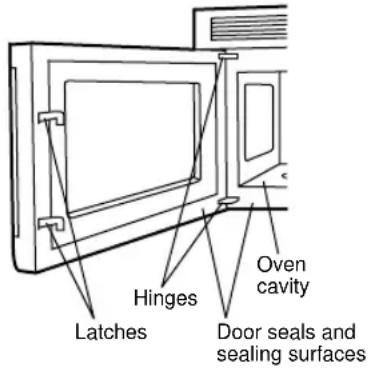
(c) Do not operate the oven if it is damaged. It is particularly important that the oven door close properly and that there is no damage to the: (1) door (bent), (2) hinges and latches (broken or loosened), (3) door seals and sealing surfaces.
(d) The oven should not be adjusted or repaired by anyone except properly qualified service personnel.
CONTENTS
For Customer Assistance..... Inside Front Cover
Precautions to Avoid Possible
Exposure to Excessive
Microwave Energy ...... Inside Front Cover
Contents.... 1
Consumer Limited Warranty 2
Product Information Card.... 2
Important Safety Instructions .... 3
Unpacking Instructions 4
Accessories 4
Grounding Instructions 4
Information You Need to Know.... 5-7
About Your Oven 5
About Food 5
About Microwave Cooking 6
About Safety 6
About Children and the Microwave 7
About Utensils and Coverings.... 7
Part Names 8
Touch-Control Panel....9
Before Operating.... 10
To Set the Clock 10
Stop/Clear 10
Manual Operation.... 10-11
Turntable On/Off 10
Hood Light/Hood Fan.... 11
Time Cooking Microwave.... 11
Keep Warm 11
Microwave Features.... 12-17
CompuDefrost.... 12
CompuDefrost Chart 12
Manual Defrost.... 13
Sensor Cooking 13
Instant Sensors 14
Instant Sensor Reheat 14
Instant Sensor Popcorn 14
Popcorn Chart.... 14
Instant Sensor Chart 14
Sensor Cook 15
Sensor Cook Chart 15
Sensor Cook Recipes 16-17
Manual Convection/Automatic Mix
Operation 18-22
Convection Cooking.... 18
To Cook with Convection 18
To Preheat and Cook with Convection ..... 18
To Broil.... 18
To Slow Cook.... 19
Automatic Mix Cooking 19
To Cook with Automatic Mix 19
To Preheat and Cook with Automatic Mix 19
Convection Automatic Mix Operation ..... 20-22
CompuBroil 20
CompuBroil Chart 20
CompuRoast 21
CompuRoast Chart 21
CompuBake 22
CompuBake Chart 22
Other Convenient Features 23-24
Multiple Sequence Cooking 23
More/Less Time Adjustment 23
Kitchen Timer.... 23
Minute Plus 23
Demonstration Mode.... 23
Help 23
Custom Help 24
-
Child Lock.... 24
-
Audible Signal Elimination.... 24
-
Auto Start 24
-
Language Selection 24
-
Weight/Temp Selection 24
Touch On 24
Cleaning and Care.... 25-26
Service Call Check 27
THE ULTIMATE ACCESSORY 27
COOKBOOK ORDER FORM 28
Specifications 28
Guia Auto-Touch.... Parte Interior de la
Cubierta Trasera
Auto-Touch Guide ...... Back Cover
INTERACTIVE COOKING SYSTEM
The Interactive Cooking System offers step-by-step instructions in the display for using the oven, from setting the clock to programming each feature. It also includes Custom Help for instructions on using Child Lock, Audible Signal Elimination, Auto Start and Help. There is a choice of English, Spanish or French and a choice of U.S. Customary Unit-pound or Metric-kilograms. Touch CUSTOM HELP and follow the directions displayed or check page 24.
CONSUMER LIMITED WARRANTY
SHARP ELECTRONICS CORPORATION warrants to the first consumer purchaser that this Sharp brand product (the "Product"), when shipped in its original container, will be free from defective workmanship and materials, and agrees that it will, at its option, either repair the defect or replace the defective Product or part thereof with a new or remanufactured equivalent at no charge to the purchaser for parts or labor for the period(s) set forth below.
This warranty does not apply to any appearance items of the Product nor to the additional excluded item(s) set forth below nor to any Product the exterior of which has been damaged or defaced, which has been subjected to misuse, abnormal service or handling, or which has been altered or modified in design or construction.
In order to enforce the rights under this limited warranty, the purchaser should follow the steps set forth below and provide proof of purchase to the servicer.
The limited warranty described herein is in addition to whatever implied warranties may be granted to purchasers by law. ALL IMPLIED WARRANTIES INCLUDING THE WARRANTIES OF MERCHANTABILITY AND FITNESS FOR USE ARE LIMITED TO THE PERIOD(S) FROM THE DATE OF PURCHASE SET FORTH BELOW. Some states do not allow limitations on how long an implied warranty lasts, so the above limitation may not apply to you.
Neither the sales personnel of the seller nor any other person is authorized to make any warranties other than those described herein, or to extend the duration of any warranties beyond the time period described above on behalf of Sharp.
The warranties described herein shall be the sole and exclusive warranties granted by Sharp and shall be the sole and exclusive remedy available to the purchaser. Correction of defects, in the manner and for the period of time described herein, shall constitute complete fulfillment of all liabilities and responsibilities of Sharp to the purchaser with respect to the Product, and shall constitute full satisfaction of all claims, whether based on contract, negligence, strict liability or otherwise. In no event shall Sharp be liable, or in any way responsible, for any damages or defects in the Product which were caused by repairs or attempted repairs performed by anyone other than an authorized servicer. Nor shall Sharp be liable or in any way responsible for any incidental or consequential economic or property damage. Some states do not allow the exclusion of incidental or consequential damages, so the above exclusion may not apply to you.
THIS WARRANTY GIVES YOU SPECIFIC LEGAL RIGHTS. YOU MAY ALSO HAVE OTHER RIGHTS WHICH VARY FROM STATE TO STATE.
Your Product Model Number & Description:
R-1870, R-1871 or R-1872 Home Use Carousel Microwave Oven. (Be sure to have this information available when you need service for your Product.)
Warranty Period for this Product:
One (1) year parts and labor in-home service. The warranty period continues for an additional six (6) years, for a total of seven (7) years, with respect to the magnetron tube in the Product for parts only. Labor and the servicer trip charge are not provided free of charge for this additional period.
Additional Item(s) Excluded from Warranty Coverage (if any):
Non-functional accessories, turntable and light bulbs.
Where to Obtain Service:
From a Sharp Authorized Servicer located In the United States. Be sure to have Proof of Purchase available. For in-home service, the servicer will come to the unit's location. If it is necessary to remove the unit for repair, the servicer will reinstall the unit at no extra charge, provided it was installed according to Sharp's Installation Instructions. To find the location of the nearest Sharp Authorized Servicer, call Sharp toll free at 1-800-BE-SHARP (1-800-237-4277).
TO OBTAIN SUPPLY, ACCESSORY OR PRODUCT INFORMATION, CALL 1-800-BE-SHARP OR VISIT www.sharp-usa.com. SAVE THE PROOF OF PURCHASE AS IT IS NEEDED SHOULD YOUR OVEN EVER REQUIRE WARRANTY SERVICE.
PRODUCT INFORMATION CARD
The product information card should be completed within ten days of purchase and returned. We will keep it on file and help you access the information in case of loss, damage or theft. This will also enable us to contact you in the unlikely event that any adjustments or modifications are ever required for your oven.
IMPORTANT SAFETY INSTRUCTIONS
When using electrical appliances basic safety precautions should be followed, including the following:
WARNING - To reduce the risk of burns, electric shock, fire, injury to persons or exposure to excessive microwave energy:
- Read all instructions before using the appliance.
- Read and follow the specific "PRECAUTIONS TO AVOID POSSIBLE EXPOSURE TO EXCESSIVE MICROWAVE ENERGY" on inside front cover.
- This appliance must be grounded. Connect only to properly grounded outlet. See "GROUNDING INSTRUCTIONS" on page 4 and INSTALLATION INSTRUCTIONS.
- Install or locate this appliance only in accordance with the provided installation instructions.
- Some products such as whole eggs and sealed containers — for example, closed glass jars — may explode and should not be heated in this oven.
- Stir liquids briskly before, during and after heating to avoid eruption. Be careful.
- Use this appliance only for its intended use as described in this manual. Do not use corrosive chemicals or vapors in this appliance. This type of oven is specifically designed to heat, cook or dry food. It is not designed for industrial or laboratory use.
- As with any appliance, close supervision is necessary when used by children.
- Do not operate this appliance if it has a damaged cord or plug, if it is not working properly or if it has been damaged or dropped.
- This appliance should be serviced only by qualified service personnel. Contact nearest Sharp Authorized Servicer for examination, repair or adjustment.
- Do not cover or block any openings on the appliance.
- Do not store or use this appliance outdoors. Do not use this product near water—for
example, near a kitchen sink, in a wet basement or near a swimming pool, and the like.
- Do not immerse cord or plug in water.
- Keep cord away from heated surfaces.
- Do not let cord hang over edge of table or counter.
-
See door surface cleaning instructions on page 25.
-
To reduce the risk of fire in the oven cavity:
a. Do not overcook food. Carefully attend appliance if paper, plastic or other combustible materials are placed inside the oven to facilitate cooking.
b. Remove wire twist-ties from paper or plastic bags before placing bag in oven.
c. If materials inside the oven should ignite, keep oven door closed, turn oven off and disconnect the power cord or shut off power at the fuse or circuit breaker panel.
d. Do not use the cavity for storage purposes. Do not leave paper products, cooking utensils or food in the cavity when not in use.
-
Clean ventilation openings and grease filters frequently—Grease should not be allowed to accumulate on ventilation openings, hood (louver) or grease filters.
-
Use care when cleaning the louver and the grease filters. Corrosive cleaning agents, such as lye-based oven cleaners, may damage the louver and the grease filters.
-
When flaming food under the hood, turn the fan on.
-
This appliance is suitable for use above both gas and electric cooking equipment 36" wide or less.
SAVE THESE INSTRUCTIONS
UNPACKING INSTRUCTIONS
Unpacking and Examining Your Oven
Carefully remove oven from carton. SAVE THE CARTON AS IT MAY MAKE INSTALLATION EASIER.
Remove:
- all packing materials from inside the oven cavity; however, DO NOT REMOVE THE WAVEGUIDE COVER, which is located on the ceiling in the oven cavity. Check to see that there are Installation Instructions, Wall Template and Top Template. Read enclosures and SAVE the Operation Manual.
- the feature sticker from the outside of the door, if there is one.
Check the oven for any damage, such as misaligned or bent door, damaged door
seals and sealing surfaces, broken or loose door hinges and latches and dents inside the cavity or on the door. If there is any damage, do not operate the oven and contact your dealer or SHARP AUTHORIZED SERVICER.
See Installation Instructions for more details.
OPTIONAL ACCESSORIES
Two optional accessories are available for this oven.
- Charcoal Filter (RK-220). This is required when hood exhaust is recirculated. See Charcoal Filter on page 26. To order filter replacement, if dealer does not stock this item, it can be ordered by calling 1-800-642-2122.
- Filler Panel Kit. For use when the oven is installed in a 36-inch or 42-inch wide opening. The metal filler panels come in 3-inch wide pairs. One set is needed for a 36-inch opening and 2 sets for a 42-inch opening. White and black are available.
To purchase contact:
Modern-Aire Ventilating Corporation
7319 Lankershim Blvd.
North Hollywood, CA 91605
Phone: (818) 765-9870
Fax: (818) 765-4916
GROUNDING INSTRUCTIONS
This appliance must be grounded. This oven is equipped with a cord having a grounding wire with a grounding plug. It must be plugged into a wall receptacle that is properly installed and grounded in accordance with the National Electrical Code and local codes and ordinances. In the event of an electrical short circuit, grounding reduces risk of electric shock by providing an escape wire for the electric current.
WARNING – Improper use of the grounding plug can result in a risk of electric shock.
Electrical Requirements
Check Installation Instructions for proper location for the power supply.
The electrical requirements are a 120 volt 60 Hz, AC only, 15 amp. or more protected electrical supply. It is recommended that a separate circuit serving only the oven be provided.
The oven is equipped with a 3-prong grounding plug. It must be plugged into a wall receptacle that is properly installed and grounded. DO NOT UNDER ANY CIRCUM-STANCES CUT OR REMOVE THE GROUNDING PIN FROM THE PLUG.
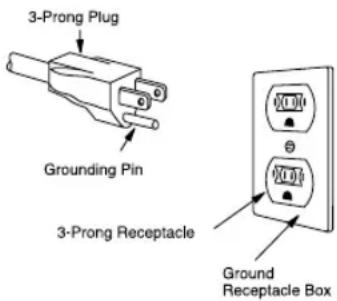
Notes: 1. If you have any questions about the grounding or electrical instructions, consult a qualified electrician or service person.
- Neither Sharp nor the dealer can accept any liability for damage to the oven or personal injury resulting from failure to observe the correct electrical connection procedures.
Radio or TV Interference
Should there be any interference caused by the microwave oven to your radio or TV, check that the microwave oven is on a different electrical circuit, relocate the radio or TV as far away from the oven as feasible or check position and signal of receiving antenna.
ABOUT YOUR OVEN
This Operation Manual is valuable: read it carefully and always save it for reference.
A good microwave cookbook is a valuable asset. Check it for microwave cooking principles, techniques, hints and recipes. See pages 27 and 28 for ordering the Ultimate Accessory, the SHARP CAROUSEL MICROWAVE COOKBOOK.
NEVER use the oven without the turntable and support nor turn the turntable over so that a large dish could be placed in the oven. The turntable will turn both clockwise and counterclockwise. See page 10 for complete instructions.
ALWAYS have food in the oven when it is on to absorb the microwave energy.
When using the oven at power levels below 100%, you may hear the magnetron cycling on and off.
The fan will automatically start when heat rises from range surface units or burners and when convection, high mix, low mix or the broil settings are used.
Condensation is a normal part of microwave cooking. Room humidity and the moisture in food will influence the amount of moisture that condenses in the oven. Generally, covered foods will not cause as much condensation as uncovered ones. Ventilation openings must not be blocked.
The oven is for food preparation only. It should not be used to dry clothes or newspapers.
Your oven is rated 850 watts by using the IEC Test Procedure. In using recipes or package directions, check food a minute or two before the minimum time and add time accordingly.
ABOUT FOOD
| FOOD | DO | DON'T |
| Eggs, sausages, fruits & vegetables | · Puncture egg yolks before cooking to prevent “explosion”. · Pierce skins of potatoes, apples, squash, hot dogs and sausages so that steam escapes. | · Cook eggs in shells. · Reheat whole eggs. · Dry nuts or seeds in shells. |
| Popcorn | · Use specially bagged popcorn for the microwave oven. · Listen while popping corn for the popping to slow to 1 or 2 seconds or use special POPCORN pad. | · Pop popcorn in regular brown bags or glass bowls. · Exceed maximum time on popcorn package. |
| Baby food | · Tr answer baby food to small dish and heat carefully, stirring often. Check temperature before serving. · Put nipples on bottles after heating and shake thoroughly. “Wrist” test before feeding. | · Heat disposable bottles. · Heat bottles with nipples on. · Heat baby food in original jars. |
| General | · Cut baked goods with filling after heating to release steam and avoid burns. · Stir liquids briskly before, during and after heating to avoid “eruption”. Be careful. · Use deep bowl, when cooking liquids or cereals, to prevent boilovers. | · Heat or cook in closed glass jars or air tight containers. · Can in the microwave as harmful bacteria may not be destroyed. · Deep fat fry. · Dry wood, gourds, herbs or wet papers. |
ABOUT MICROWAVE COOKING
- Arrange food carefully. Place thickest areas towards outside of dish.
- Watch cooking time. Cook for the shortest amount of time indicated and add more as needed. Food severely overcooked can smoke or ignite.
- Cover foods while cooking. Check recipe or cookbook for suggestions: paper towels, wax paper, microwave plastic wrap or a lid. Covers prevent spattering and help foods to cook evenly.
- Shield with small flat pieces of aluminum foil any thin areas of meat or poultry to prevent overcooking before dense, thick areas are cooked thoroughly.
- Stir foods from outside to center of dish once or twice during cooking, if possible.
- Turn foods over once during microwaving to speed cooking of such foods as chicken and hamburgers. Large items like roasts must be turned over at least once.
ABOUT SAFETY
- Check foods to see that they are cooked to the United States Department of Agriculture's recommended temperatures.
| TEMP FOOD | |
| 160°F | ... for fresh pork, ground meat, boneless white poultry, fish, seafood, egg dishes and frozen prepared food. |
| 165°F | ... for leftover, ready-to-reheat refrigerated, and deli and carry-out “fresh” food. |
| 170°F | ... white meat of poultry. |
| 180°F | ... dark meat of poultry. |
To test for doneness, insert a meat thermometer in a thick or dense area away from fat or bone. NEVER leave the thermometer in the food during cooking, unless it is approved for microwave oven use.
ABOUT CHILDREN AND THE MICROWAVE
Children below the age of 7 should use the microwave oven with a supervising person very near to them. Between the ages of 7 and 12, the supervising person should be in the same room.
The child must be able to reach the oven comfortably; if not, he/she should stand on a sturdy stool.
At no time should anyone be allowed to lean or swing on the oven door.
- Rearrange foods such as meatballs halfway through cooking both from top to bottom and from the center of the dish to the outside.
- Add standing time. Remove food from oven and stir, if possible. Cover for standing time which allows the food to finish cooking without overcooking.
- Check for doneness. Look for signs indicating that cooking temperatures have been reached.
Doneness signs include:
- Food steams throughout, not just at edge.
- Center bottom of dish is very hot to the touch.
- P poultry thigh joints move easily.
- Meat and poultry show no pinkness.
-
Fish is opaque and flakes easily with a fork.
-
ALWAYS use potholders to prevent burns when handling utensils that are in contact with hot food. Enough heat from the food can transfer through utensils to cause skin burns.
- Avoid steam burns by directing steam away from the face and hands. Slowly lift the farthest edge of a dish's covering and carefully open popcorn and oven cooking bags away from the face.
- Stay near the oven while it's in use and check cooking progress frequently so that there is no chance of overcooking food.
- NEVER use the cavity for storing cookbooks or other items.
- Select, store and handle food carefully to preserve its high quality and minimize the spread of foodborne bacteria.
- Keep waveguide cover clean. Food residue can cause arcing and/or fires.
- Use care when removing items from the oven so that the utensil, your clothes or accessories do not touch the safety door latches.
Children should be taught all safety precautions: use potholders, remove coverings carefully, pay special attention to packages that crisp food because they may be extra hot.
Don't assume that because a child has mastered one cooking skill he/she can cook everything.
Children need to learn that the microwave oven is not a toy. See page 24 for Child Lock feature.
ABOUT UTENSILS AND COVERINGS
It is not necessary to buy all new cookware. Many pieces already in your kitchen can be used successfully in your new microwave convection oven. The chart below will help you decide what utensils and coverings should be used in each mode.
| UTENSILS AND COVERINGS | MICROWAVE ONLY | CONVECTION BROIL, SLOW COOK | HIGH MIX/ROAST LOW MIX/BAKE |
| Aluminum Foil | Yes Small flat pieces of aluminum foil placed smoothly on food can be used to shield areas from cooking or defrosting too quickly. Keep foil at least 1 inch from wall of oven. | Yes For shielding. | Yes For shielding. |
| Aluminum containers | Yes Can be used if 3/4 filled with food. Keep 1 inch away from walls and do not cover with lid. | Yes Broil - No cover. | Yes Can be used if 3/4 filled with food. Keep 1 inch away from walls and do not cover with foil. |
| Browning dish | Yes Do not exceed recommended preheating time. Follow manufacturer's directions. | No | No |
| Glass ceramic (Pyroceram®) | Yes Excellent. | Yes Excellent. | Yes Excellent. |
| Glass, heat-resistant | Yes Excellent | Yes Excellent | Yes Excellent |
| Glass, non-heat-resistant | No | No | No |
| Lids, glass | Yes | Yes Broil - No cover. | Yes |
| Lids, metal | No | Yes Broil - No cover. | No |
| Metal cookware | No | Yes | Yes Do not use metal coverings. |
| Metal, misc: dishes with metallic trim, etc. Metal twist-ties. | No | No | No |
| Oven cooking bags | Yes Good for large meats or foods that need tenderizing. DO NOT use metal twist ties. | Yes Broil - No | Yes Do not use metal coverings. |
| Paper plates | Yes For reheating. | No | No |
| Paper towels | Yes To cover for reheating and cooking. Do not use recycled paper towels which may contain metal filings. | No | No |
| Paper, ovenable | Yes | Yes For temperatures up to 400° F. Do not use for broiling. | Yes For temperatures up to 400° F. |
| Microwave-safe plastic containers | Yes Use for reheating and defrosting. Follow manufacturer's directions. | No | No |
| Plastic, Thermoset® | Yes | Yes Are heat resistant up to 425° F. Do not use for broiling. | Yes |
| Plastic wrap | Yes Use brands specially marked for microwave use. DO NOT allow plastic wrap to touch food. Vent so steam can escape. | No | No |
| Pottery, stoneware, porcelain | Yes Check manufacturer's recommendation for being microwave-safe. | Yes | Yes Must be microwave-safe and ovenable. |
| Styrofoam | Yes For reheating | No | No |
| Wax paper | Yes Good covering for cooking and reheating. | No | No |
| Wicker, wood, straw | Yes May be used for short periods of time. Do not use with high fat or high sugar content foods. Could char. | No | No |
DISH CHECK. If you wish to check if a dish is safe for microwaving, place the empty dish in the oven and microwave on HIGH for 30 seconds. If the dish becomes very hot, DO NOT use it for microwaving.
ACCESSORIES There are many microwave accessories available for purchase. Evaluate carefully before you purchase so that they meet your needs. A microwave-safe thermometer will assist you in determining correct doneness and assure you that foods have been cooked to safe temperatures. Sharp is not responsible for any damage to the oven when accessories are used.
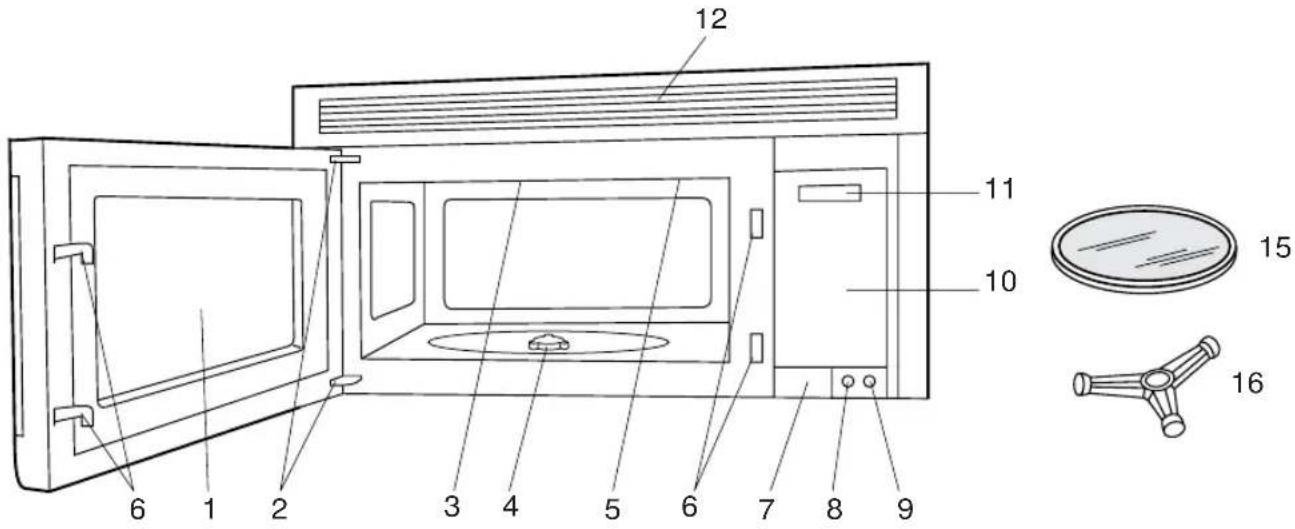
FRONT VIEW
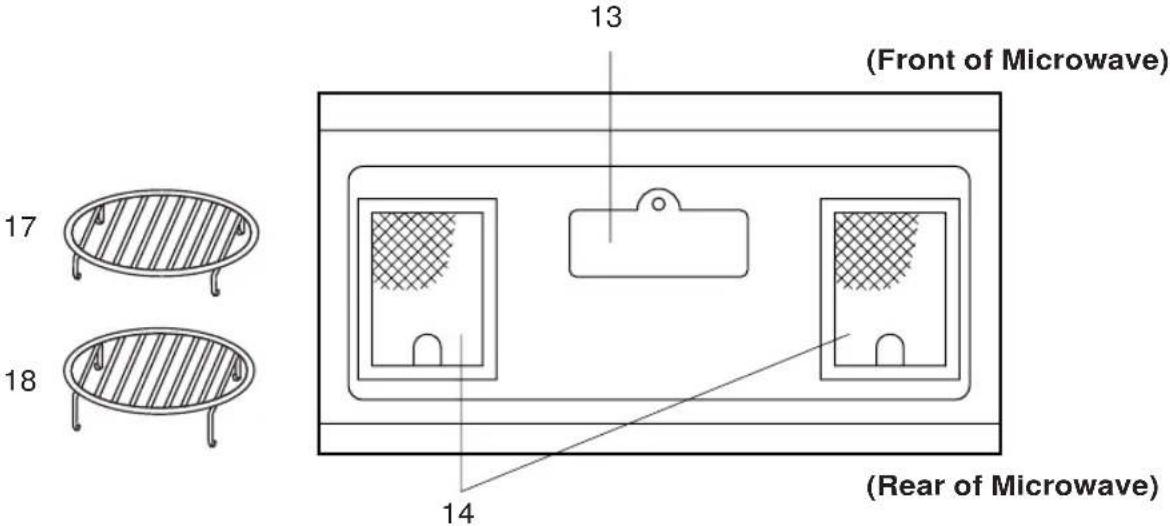
BOTTOM VIEW
- Oven door with see-through window.
- Door hinges.
- Waveguide cover DO NOT REMOVE.
- Turntable motor shaft.
- Oven light. It will light when oven is operating or door is open.
- Safety door latches. The oven will not operate unless the door is securely closed.
- One touch DOOR OPEN button. Push to open door.
- FAN HI / LO button. Push for high/low/off.
-
LIGHT button. Push for on/off.
-
Auto-Touch control panel.
- Time display: Digital display, 99 minutes 99 seconds.
- Ventilation openings.
- Light cover.
- Grease filters.
- Removable ceramic turntable. The turntable will rotate clockwise or counterclockwise. Only remove for cleaning.
- Removable turntable support. Place the turntable support on the floor of the oven cavity and the turntable on the turntable support.
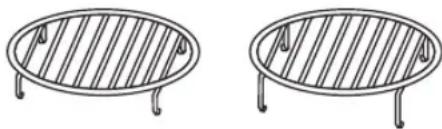
- Removable low rack for broiling and meat and poultry roasting.
- Removable high rack for two level baking.
INTERACTIVE DISPLAY
Words will light in the display to indicate features and cooking instructions.
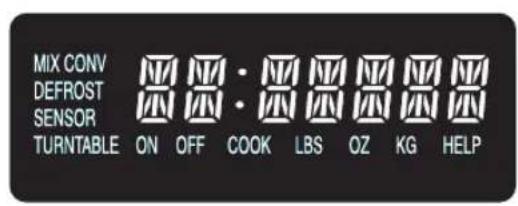
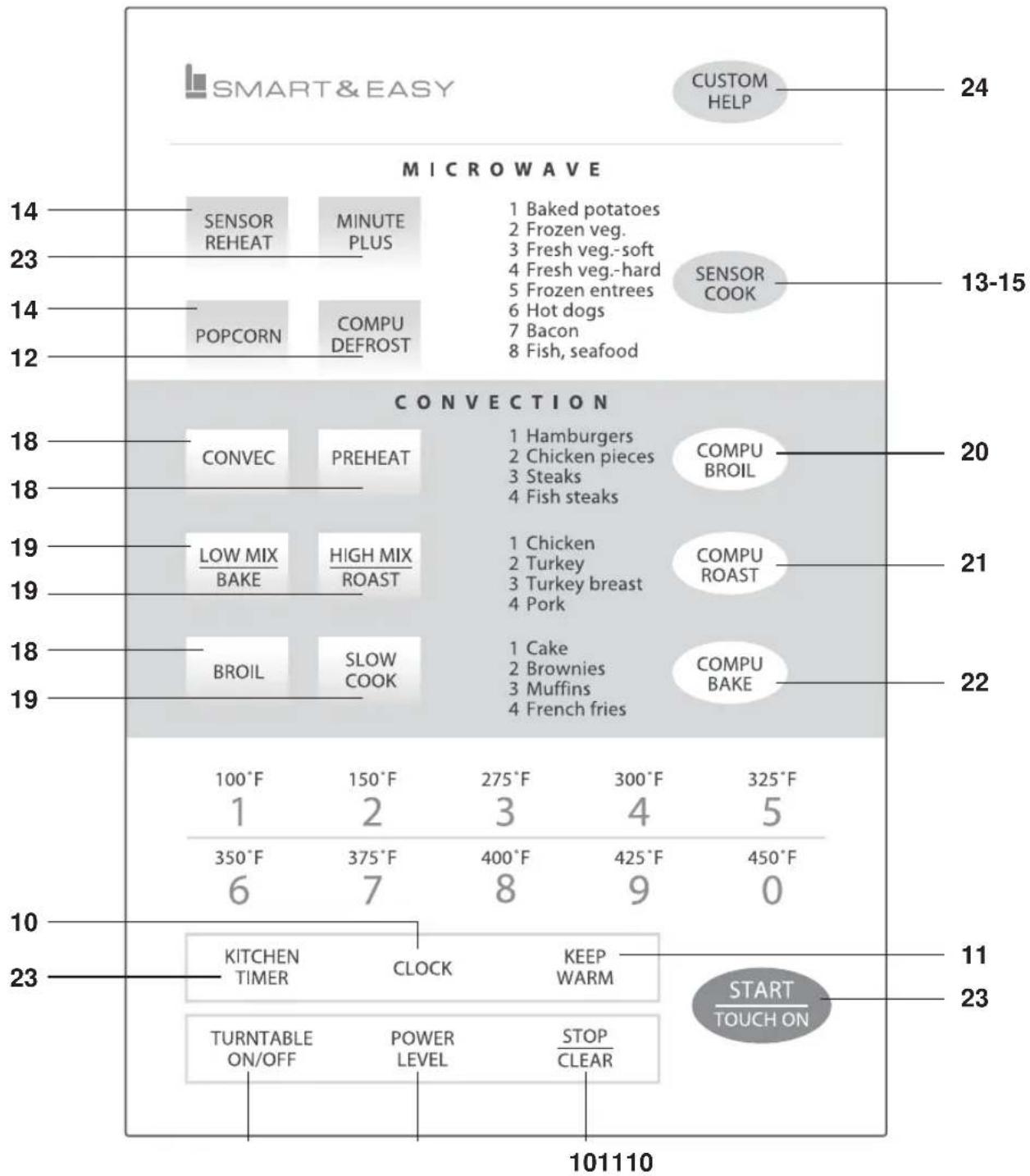
other
| Item | Value | | :--- | :--- | | 101110 | 24 | | 101110 | 13-15 | | 101110 | 20 | | 101110 | 21 | | 101110 | 22 | | 101110 | 11 | | 101110 | 23 |Number next to the control panel illustration indicates page on which there are feature descriptions and usage information.
BEFORE OPERATING
- Before operating your new microwave oven make sure you read and understand this operation manual completely.
- Before the oven can be used, follow these procedures:
1.Plug in the oven. Close the door. The oven display will show SHARP SIMPLY THE BEST PRESS CLEAR AND PRESS CLOCK.
- Touch the STOP/CLEAR pad.
will appear.
- Touch CLOCK and follow directions to set.
TO SET THE CLOCK
- Suppose you want to enter the correct time of day 12:30 (A.M. or P.M.).
PROCEDURE DISPLAY
1
CLOCK
Touch CLOCK pad.
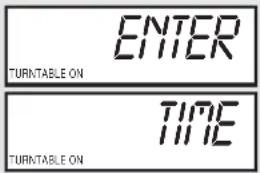
2

Enter the correct time of day by touching the numbers in sequence.
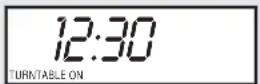
3
CLOCK
Touch CLOCK pad.
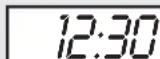
TURNTABLE ON
This is a 12 hour clock. If you attempt to enter an incorrect clock time, ERROR will appear in the display. Touch the STOP/CLEAR pad and re-enter the time.
- If the electrical power supply to your microwave oven should be interrupted, the display will intermittently show SHARP SIMPLY THE BEST PRESS CLEAR AND PRESS CLOCK after the power is reinstated. If this occurs during cooking, the program will be erased. The time of day will also be erased. Simply touch STOP/CLEAR pad and reset the clock for the correct time of day.
NOTE: Your oven can be programmed with the door open except for START/TOUCH ON, MINUTE PLUS, SENSOR REHEAT and POPCORN.
STOP/CLEAR
Touch the STOP/CLEAR pad to:
- Erase if you make a mistake during programming.
- Cancel kitchen timer.
- Stop the oven temporarily during cooking.
- Return the time of day to the display.
- Cancel a program during cooking, touch twice.
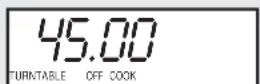
For most cooking, the turntable should be on; however the turntable can be turned off so that it does not rotate when extra large dishes, such as the popular 13"x9"x2" glass utility casserole, are used. The casserole should be placed on the turntable so that it is level.
- Suppose you want to cook lasagna in a 13"x9"x2" casserole for 45 minutes on 40% power.
PROCEDURE DISPLAY
1
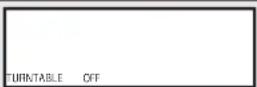
Touch TURNTABLE ON/OFF pad and note TURNTABLE OFF in the display.
2
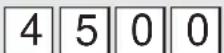
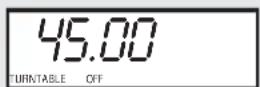
Enter cooking time.
3
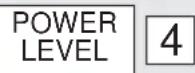
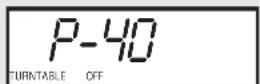
Enter power level.
4
Touch START/TOUCH ON pad.
NOTE:
The door can be opened for checking food and the turntable will stay in the off position. After checking, close door and touch START/TOUCH ON.
The turntable will stay off for one minute after door is opened when time-of-day appears in the display. It is possible to reprogram the oven during that minute without touching the TURNTABLE ON/OFF pad. The display always indicates whether the turntable is off or on.
THE TURNTABLE SHOULD ALWAYS BE ON WHEN USING THE SPECIAL FEATURES. On/Off function can be used with manual cooking modes and Sensor Reheat. Turntable off condition will automatically change to on condition when you select auto cooking except Sensor Reheat and CompuBake.
When cooking large quantities of food which cannot be stirred, it is best to use a lower power level such as 40 or 50%. You may speed cooking of large amounts by programming 5 to 10 minutes on 100% power (HIGH) followed by the desired time on lower power. See page 23 for how to program multiple sequences. You may wish to reverse a large casserole once during cooking; simply open door, reposition casserole, close door and touch START/TOUCH ON.
HOOD LIGHT/ HOOD FAN
Your oven is equipped with a Hood Light and a Hood Fan which can be used whether the door is open or closed.
To turn the Hood Light on, touch the LIGHT pad once. To turn the Hood Light off, touch the LIGHT pad again.
To turn the Hood Fan on, touch the FAN HI/LO pad once for high speed. To turn the Hood Fan to low speed, touch pad twice and touch the pad three times to turn the fan off.
Your oven can be programmed for 99 minutes 99 seconds (99.99). Always enter the seconds after the minutes, even if they are both zeros.
- Suppose you want to cook for 5 minutes at 100%
PROCEDURE DISPLAY
| 1 | 500 | 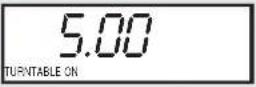 |
| Enter cooking time. | ||
| 2 | START/TOUCH ON | 5.00TURNITABLE ON COOK |
| Touch START/TOUCH ON pad. |
KEEP WARM
KEEP WARM can only be programmed with manual cooking or as a separate program.
- Suppose you want to cook a baked potato for 4 minutes at 100% power and you want to keep it warm after cooking for 30 minutes.
PROCEDURE
| 1 | 400 | Touch the desired cook time for 1 baked potato. (Ex: 4 minutes.) |
| 2 | KEEP WARM | Touch KEEP WARM pad. |
| 3 | START TOUCH ON | Touch START/TOUCH ON pad. |
| At the end of cook time, KEEP WARM is displayed warming food until end of 30 minutes. | ||
To use KEEP WARM as a separate program, touch KEEP WARM pad within 1 minute after cooking, closing the door or touching the STOP/CLEAR pad.
TO SET POWER LEVEL
There are eleven preset power levels.
Using lower power levels increases the cooking time which is recommended for foods such as cheese, milk and long slow cooking of meats. Consult cookbook or recipes for specific recommendations.
| TOUCH POWER LEVEL PAD ONCE THEN TOUCH | APPROXIMATE PERCENTAGE OF POWER | COMMON WORDS FOR POWER LEVELS |
| POWER LEVEL 100% High | ||
| 9 | 90% | |
| 8 | 80% | |
| 7 | 70% | Medium High |
| 6 | 60% | |
| 5 | 50% | Medium |
| 4 | 40% | |
| 3 | 30% | Med Low/Defrost |
| 2 | 20% | |
| 1 | 10% | Low |
| 0 | 0% | |
- Suppose you want to defrost for 5 minutes at 30 % with the turntable on.
PROCEDURE DISPLAY
| 1 |  | 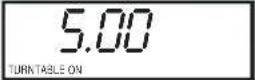 |
| Enter defrosting time. | ||
| 2 |  | 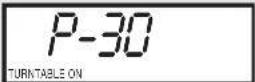 |
| Touch POWER LEVEL pad.Enter power level. | ||
| 3 |  | 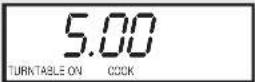 |
| Touch START/TOUCH ON pad. |
MICROWAVE FEATURES
COMPU DEFROST
CompuDefrost automatically defrosts ground meat, steaks, chicken pieces.
- Suppose you want to defrost a 2.0 pound steak.
PROCEDURE DISPLAY
1
COMPU DEFROST
x 3
STEAK
ENTER
WE
Touch COMPU DEFROST
pad once. Then touch COMPU
DEFROST pad two more times to select steak.
2
20
DEFROST 2.0 TURNITABLE ON LBS HELP
Enter weight by touching the number pads. (Ex. 2.0 lb)
3
START OUCH ON
DEFROST 6.50 TURNITABLE ON COOK HELP
Touch START/TOUCH ON pad.
The oven will stop and directions will be displayed. Follow the indicated message.
4
After the 1st stage, open the door. Turn steak over and shield any warm portions.
Close the door.
START TOUCH ON
DEFROST 4.35 TURNTABLE ON HELP
Touch START/TOUCH ON pad.
5
After the 2nd stage, open the door. Shield any warm portions. Close the door.
START TOUCH ON
DEFROST 2.50 TURNTABLE ON HELP
Touch START/TOUCH ON pad.
6
After defrost cycle ends, cover and let stand as indicated in chart below.
NOTE:
-
The weight can be entered in increments of 0.1 lb. If you attempt to enter more or less than the allowed amount ERROR WEIGHT TOO SMALL TOO LARGE will appear in the display.
-
CompuDefrost can be programmed with More/Less Time Adjustment. See page 23.
-
To defrost other foods or foods above or below the weights allowed on CompuDefrost Chart, use time and 30% power. See Manual Defrost on page 13.
COMPU DEFROST CHART
| TOUCHCOMPU DEFROST PAD* | FOOD | FOR AMOUNT | PROCEDURE |
| once | Ground Meat | 0.5 - 3.0 lb(0.2 - 1.4 kg) | Remove any thawed pieces after each stage. Let stand, covered, for 5 to 10 minutes. |
| twice | Steaks(chops, fish) | 0.5 - 4.0 lb(0.2 - 1.8 kg) | After each stage of defrost cycle, rearrange and if there are warm or thawed portions, shield with small flat pieces of aluminum foil. Remove any meat or fish that is nearly defrosted. Let stand, covered, for 10 to 20 minutes. |
| 3 times | Chicken Pieces | 0.5 - 3.0 lb(0.2 - 1.4 kg) | After each stage of defrost cycle, if there are warm or thawed portions, rearrange or remove. Let stand, covered, for 10 to 20 minutes. |
* Number of touches AFTER initial touch to access COMPU DEFROST.
NOTE: Check foods when oven signals. After final stage, small sections may still be icy. Let stand to continue thawing. Do not defrost until all ice crystals are thawed.
Shielding prevents cooking from occurring before the center of the food is defrosted. Use small smooth strips of aluminum foil to cover edges and thinner sections of the food.
MANUAL DEFROST
If the food that you wish to defrost is not listed on the CompuDefrost Chart or is above or below the limits in the "Amount" column on the chart, you need to defrost manually.
You can defrost any frozen food, either raw or previously cooked, by using power level 3. Follow the exact 3-step procedure found under To Set Power Level on page 11. Estimate defrosting time and press 3 for 30% when you select the power level.
For either raw or previously cooked frozen food, the rule of thumb is approximately 5 minutes per pound. For example, defrost 5 minutes for 2-3 cups of casserole or 1 pound of frozen spaghetti sauce.
Always stop the oven periodically to remove or separate the portions that are defrosted. If food is not defrosted at the end of the estimated defrosting time, program the oven in 1 minute increments on power level 3 until totally defrosted.
When using plastic containers from the freezer, defrost only long enough to remove from the plastic in order to place food in a microwave-safe dish.
SENSOR COOKING
Sharp's Sensor is a semi-conductor device that detects the vapor (moisture and humidity) emitted from the food as it heats. The Sensor adjusts the cooking times and power level for various foods and quantities. It takes the guesswork out of microwave cooking.
Using Sensor Settings:
- Room temperature should not exceed 95^ F.
- Be sure the exterior of the cooking container and the interior of the oven are dry. Wipe off any moisture with a dry cloth or paper towel.
- Sensor cooking can only be entered within 1 minute after cooking, opening and closing the door or touching the STOP/CLEAR pad.
- During the first part of sensor cooking,
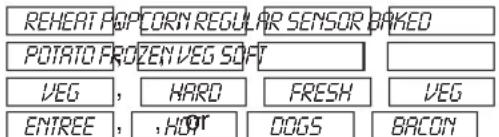
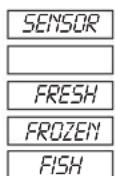
will appear on display. Do not open oven door or touch STOP/CLEAR during this part of the cooking
cycle. The measurement of vapor will be interrupted. If this occurs, □ with a appear and sensor cooking will be interrupted. To continue cooking, touch the STOP/CLEAR pad and select cooking time and power. When sensor detects the vapor emitted from the food, remainder of cooking time will appear. Door may be opened when remaining cooking time appears on display. At this time, you may stir or season food, as desired.
- Check food for doneness after cooking with sensor settings. If additional time is needed, continue to cook with variable power and time.
- If the sensor does not detect vapor, ERROR will appear and the oven will shut off.
- At the end of any cycle, open oven door or touch STOP/CLEAR pad. The time of day will reappear on the display.
- Any sensor setting can be programmed with More or Less Time Adjustment. See page 23.
Selecting Foods:
- The sensor works with foods at normal storage temperature. For example, foods for reheating would be at refrigerator temperature and potatoes for baking would be room temperature.
- More or less food than the quantity listed in the charts should be cooked by time and variable power.
Covering Foods:
Some foods work best when covered. Use the cover recommended in the Sensor Cooking chart for these foods.
- Casserole lid.
- Plastic wrap: Use plastic wrap recommended for microwave cooking. Cover dish loosely; allow approximately 1/2 inch to remain uncovered to allow steam to escape. Plastic wrap should not touch food.
- Paper towel: Use paper towels to absorb excess fat and moisture when cooking bacon and potatoes. Line the turntable when baking potatoes.
- Wax paper: Cover dish completely; fold excess wrap under dish to secure. If dish is wider than paper, overlap two pieces at least one inch to cover.
INSTANT SENSORS
Your oven has Instant Sensor Popcorn and Instant Sensor Reheat. To use any of the Instant Sensors, simply touch the chosen pad. The oven will start automatically. Any sensor setting can be programmed with More/Less Time Adjustment. See page 23.
INSTANT SENSOR REHEAT
Turntable on:
You can reheat many foods by touching just one pad. You don't need to calculate reheating time or power level. To reheat food with turntable on, simply touch the SENSOR REHEAT pad.
PROCEDURE
SENSOR REHEAT
Touch SENSOR REHEAT pad. (Note : Sensor Reheat can be programmed with turntable on or off).
SENSOR REHEA be displayed repeatedly. When sensor detects the vapor emitted from the food, remainder of cooking time will appear. After cooking, LEWill beSTAND COVER displayed.
Turntable off:
You may reheat using a 11"x8"x2" or 13"x9"x2" casserole with the turntable off. First touch TURN-TABLE ON/OFF and note indicator. Then touch SENSOR REHEAT. The display will indicate turntable off and oven will start automatically. After cooking,
- Switch be displayed.
INSTANT SENSOR POPCORN
- Suppose you want to pop a 3.5 oz bag of popcorn.
PROCEDURE
POPCORN
Touch POPCORN pad once. (Ex: Touch POPCORN once for regular size bag.)
SENSOR A OPCORN REGULAR will be displayed repeatedly. After cooking, END will be displayed.
This sensor setting works well with most brands of microwave popcorn. You may wish to try several and choose your favorite. Pop only one bag at a time. Unfold the bag and place in oven according to directions.
POPCORN CHART
TOUCH POPCORN PAD
FOR AMOUNT
once
3.0 and 3.5 oz bag (Regular size)
twice 1.5 and 1.75 oz bag (Snack size)
INSTANT SENSOR CHART
| FOOD | AMOUNT | PROCEDURE |
| Leftovers such as rice, potatoes, vegetablescasserole | 4 - 32 oz Place | in dish or casserole slightly larger than amount to be reheated.Flatten, if possible. Cover with lid, plastic wrap or wax paper. Use covers such as plastic wrap or lids with larger quantities of more dense foods such as stews. |
| Soups | 1 - 4 cups | After reheating, stir well, if possible. Foods should be very hot. If not, continue to heat with variable power and time. After stirring, recover and allow to stand 2 to 3 minutes. |
| Canned entrees and vegetables | 4 - 16 oz | Use less Time Adjustment by touching POWER LEVEL pad twice for small quantities of canned vegetables. |
| Dinner Plate1 plate | 3-6 oz of meat plus vegetablesand/or potato/rice | Use this pad to reheat precooked foods from the refrigerator. Place meaty portions and bulky vegetables to outside of plate. Cut large items like baked potatoes in smaller pieces. Flatten foods such as mashed potatoes and other dense foods. Cover with wax paper or plastic wrap. ONE PLATE ONLY. After cooking, check that food is very hot throughout and that the bottom center of the plate is very hot. If not, continue heating using time and power level. Allow to stand, covered, 2 to 3 minutes. |
| Popcorn Only 1 | package at a time | Use only popcorn packaged for microwave oven use. Try several brands to decide which you like best. Do not try to pop unpoped kernels. More/ Less Time Adjustment can be used to provide adjustment needed for older popcorn or individual tastes. |
SENSOR COOK
- Suppose you want to cook a baked potato.
PROCEDURE DISPLAY
| 1 | SENSOR COOK | SELECT | FOOD |
| NUMBER |
Select desired sensor setting. Touch 1 to cook baked potatoes.
| BAKED | POTATO |
| PRESS | START |
3
Touch START/TOUCH ON pad.
When sensor detects the vapor emitted from the food, the remainder of cooking time will appear.
| LET | STAND |
| COVER |
Open oven door or touch STOP/CLEAR pad. The time of day will appear in the display.
SENSOR COOK CHART
| FOOD | AMOUNT | PROCEDURE |
| 1. Baked potatoes 1 - 6 medium | Pierce. Place on paper-towel-lined turntable. After cooking, remove from oven, wrap in aluminum foil and let stand 5 to 10 minutes. | |
| 2. Frozen vegetables | 1 - 6 cups | Cover with lid or plastic wrap. After cooking, stir and let stand 3 minutes, covered. |
| 3. Fresh vegetables - soft Broccoli | 0.25 - 2.0 lb | Wash and place in casserole. Add no water if vegetables have just been washed. Cover with lid for tender vegetables. Use plastic wrap for tender-crisp vegetables. Stir before standing, if possible. After cooking, let stand, covered, 2 to 5 minutes. |
| Brussels sprouts | 0.25 - 2.0 lb | |
| Cabbage | 0.25 - 2.0 lb | |
| Cauliflower (flowerets) | 0.25 - 2.0 lb | |
| Cauliflower (whole) | 1 medium | |
| Spinach | 0.25 - 1.0 lb | |
| Zucchini | 0.25 - 2.0 lb | |
| Baked apples | 2 - 4 medium | |
| 4. Fresh vegetables - hard Carrots, sliced | 0.25 - 1.5 lb | Place in casserole. Add 1-4 tbsp water. Cover with lid for tender vegetables. Use plastic wrap cover for tender-crisp vegetables. Stir before standing, if possible. After cooking, let stand, covered, 2 to 5 minutes. |
| Corn on the cob | 2 - 4 pcs | |
| Green beans | 0.25 - 1.5 lb | |
| Winter squash: diced halves | 0.25 - 1.5 lb | |
| 1 - 2 | ||
| 5. Frozen entrees 6 - 17 oz | Use for frozen convenience food. It will give satisfactory results for most brands. You may wish to try several and choose your favorite. Remove package from outer wrapping and follow package directions for covering. After cooking, let stand, covered, for 1 to 3 minutes. | |
| 6. Hot dogs 1 - 4 servings | Place hot dog in bun and wrap in paper towel or paper napkin. | |
| 7. Bacon 2 - 6 slices | Place bacon on paper plate, lined with paper towel. Bacon should not extend over the rim of plate. Cover with paper towel. | |
| 8. Fish, seafood 0.25 - 2.0 lb | Arrange in ring around shallow glass dish (roll fillet with edges underneath). Cover with vented plastic wrap. After cooking, let stand, covered, 3 minutes. | |
SENSOR COOK RECIPES
Cranberry Fluff
Makes 6 to 8 servings
2 cups fresh cranberries 1/2 pint whipping cream, whipped or
1 cup water 1 carton (8 ounces) non-dairy whipped topping
3/4 cup sugar
1 carton (3 ounces) orange flavored gelatin
1 Combine cranberries, water and sugar in a 2-quart casserole. Cover with wax paper. Microwave using SENSOR COOK for Fresh Vegetables-soft. Drain cranberries and reserve liquid.
2 Add enough hot water to reserved liquid to make 2 cups. Stir the gelatin into hot liquid until it dissolves. Cover with wax paper. Microwave using SENSOR REHEAT.
3 Add berries and cool. Refrigerate until thickened. Fold whipped cream into cooled cranberry mixture. Spoon into serving dishes and garnish with extra whipped cream. Refrigerate until ready to serve.
Curry Vegetable Chowder
Makes 4 servings
6 slices bacon 3/4 teaspoon salt
1 can (10 3/4 ounces) chicken broth 1/2 teaspoon curry powder
3 medium potatoes, finely diced (about 2 cup) 1/8 teaspoon pepper
2 carrots, shredded (about 1 cup) 1 can (12 ounces) evaporated milk
1 small onion, chopped (about 1/2 cup) 2 tablespoons chopped fresh parsley
1 Layer 2 paper towels on a microwave-safe plate. Arrange bacon on the towels. Cover with another paper towel. Microwave using SENSOR COOK for Bacon. Crumble and reserve bacon.
2 Combine chicken broth, vegetables and seasonings in 4-quart casserole. Cover with vented plastic wrap. Microwave using SENSOR COOK for Baked potatoes. Vegetables should be tender.
3 Stir in evaporated milk. Re-cover with vented plastic wrap. Microwave using SENSOR REHEAT Less. Stir in parsley. Let stand, covered, 5 minutes.
4 Top each serving with crumbled bacon.
Glazed Apple Slices
Makes 6 to 8 servings
1/4 cup brown sugar 3/4 cup orange juice
3 tablespoons margarine or butter 1 tablespoon cornstarch
2 tablespoons apricot preserves
1/2 teaspoon ground nutmeg
1/4 teaspoon salt
1/2 cup sugar
4 baking apples (about 1 1/2 pounds), peeled and sliced into 8 pieces each
3 tablespoons chopped green pistachios
1 Combine brown sugar, margarine and apricot preserves in a small bowl. Microwave at HIGH (100%) until margarine melts and preserves soften, 45 seconds to 1 minute. Stir in nutmeg, salt, sugar, orange juice and cornstarch. Microwave at HIGH (100%) until thickened, 4 to 6 minutes, stirring several times.
2 Arrange apple slices in a large microwave serving dish. Spread hot sauce over apples. Cover well with vented plastic wrap. Microwave using SENSOR COOK for Fresh vegetables-soft. Allow to cool 5 minutes before serving.
3 Sprinkle with pistachios. Serve alone or over vanilla ice cream or sponge cake.
SENSOR COOK RECIPES (CONTINUED)
Mexican Seasoned Potatoes
Makes 6 to 8 servings
4 medium baking potatoes (8 ounces each) 1/2 teaspoon oregano leaves
1/4 cup olive oil 1/4 teaspoon ground cumin
1 tablespoon instant minced onion 1/2 teaspoon salt
1/2 teaspoon chili powder
1 Cut each potato lengthwise into 4 equal wedges. Place potato wedges into 10-inch square casserole. Toss potatoes with oil to coat well.
2 In small bowl, combine remaining ingredients. Sprinkle over potatoes.
3 Cover potatoes with wax paper. Microwave using SENSOR COOK for Baked potatoes setting. Rearrange potatoes when time appears on display. Let stand, covered, 5 minutes.
Spiced Carrots
Makes 6 to 8 servings
3 cups sliced carrots, 1/4 inch thick 2 teaspoons vinegar
1/2 cup chopped green pepper, 1-inch cubes 1 teaspoon soy sauce
1/4 cup linely chopped onion 1/2 teaspoon salt
3 tablespoons water 1/2 teaspoon prepared mustard
1 can (7 3/4 ounces) semi-condensed tomato soup
1/8 teaspoon pepper
1/2 cup sugar
1 In a 1 1/2-quart casserole, combine carrots, green pepper, onion and water. Cover with lid. Microwave using SENSOR COOK for Fresh vegetables-hard. Carrots should be tender-crisp. Drain.
2 Stir in remaining ingredients. Cover and microwave using SENSOR REHEAT.
Savory Flounder Fillets
Makes 4 servings
3/4 cup of corn flake crumbs
3 tablespoons chopped parsley
2 teaspoons grated lemon peel
1/2 teaspoon paprika
1 pound flounder fillets
1 egg, slightly beaten
1 On waxed paper, combine corn flake crumbs, parsley, lemon peel and paprika. Dip fillets in beaten egg, then coat with crumb mixture.
2 Place fish in a covered, microwave-safe, baking dish. Microwave using SENSOR COOK for Fish, seafood.
3 Serve with tartar or cocktail sauce or melted cheese.
Creole Corn
Makes 6 servings
2 teaspoons oil
1/2 cup chopped celery
1/2 cup chopped green pepper
16 ounce can tomatoes
4 ounce can mushroom stem and pieces, drained
1 teaspoon brown sugar
1/2 teaspoon onion powder
1/4 teaspoon garlic powder salt and pepper to taste
1 package (16 ounces) frozen corn
1 In 2-quart casserole, combine oil, celery, green pepper, tomatoes, mushrooms, sugar, onion powder, garlic powder, salt and pepper.
2 Microwave using SENSOR REHEAT. Set aside.
3 In covered, 1-quart casserole, microwave corn using SENSOR COOK for Frozen vegetables. Drain.
4 Combine corn and vegetable-seasoning mixture. Stir and serve immediately.
This section of the Operation Manual gives you specific cooking instructions and procedures. Please consult your Sharp Carousel Convection Microwave Cookbook for helpful hints for convection and combination cooking.
The oven should not be used without the turntable in place, and it should never be restricted so that it cannot rotate. You may remove the turntable when preheating the oven and when preparing food to be cooked directly on the turntable.
CONVECTION COOKING
During convection heating, hot air is circulated throughout the oven cavity to brown and crisp foods quickly and evenly. This oven can be programmed for ten different convection cooking temperatures for up to 99 minutes, 99 seconds.
TO COOK WITH CONVECTION
- Suppose you want to cook at 350^ for 20 minutes.
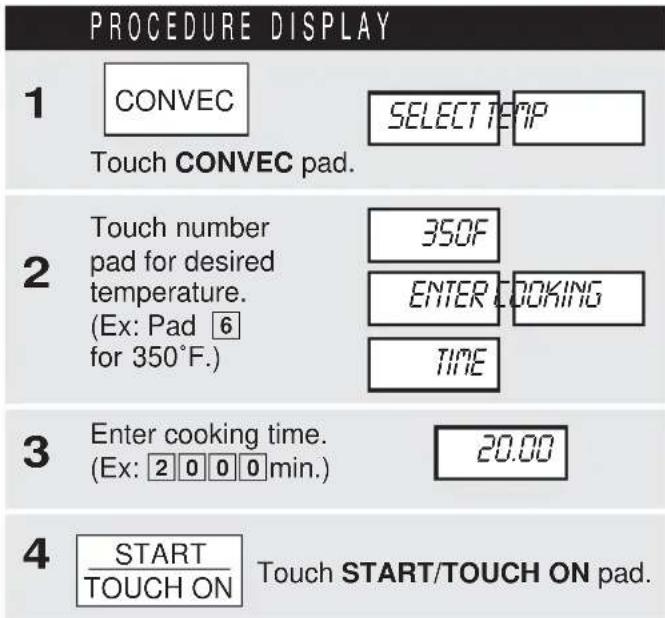
TO PREHEAT AND COOK WITH CONVECTION
Your oven can be programmed to combine preheating and convection cooking operations. You can preheat at the same temperature as the convection temperature or change it to a higher or lower temperature.
- Suppose you want to preheat until 350°F and then cook 25 minutes at 375°F convection.
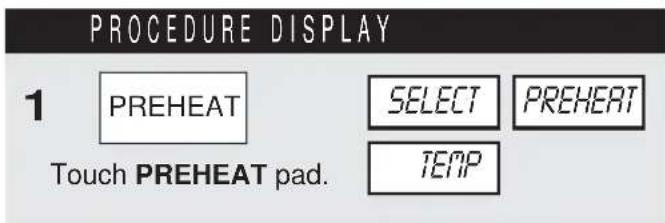
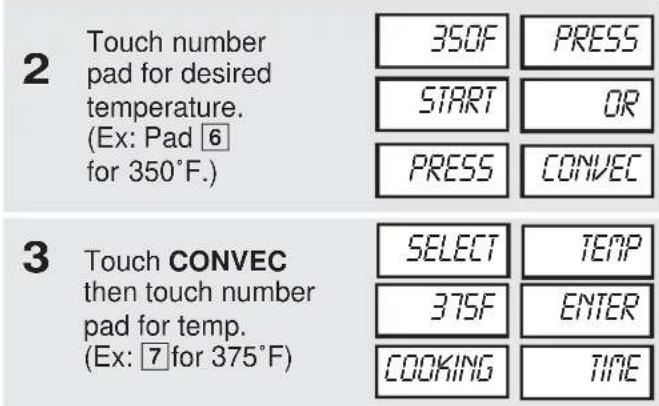

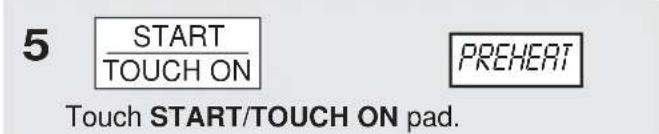
When the oven reaches the programmed temperature, it will automatically hold at the preheat temperature for 30 minutes and then the display will change to time of day. Whenever STOP/CLEAR pad is touched during this 30 minute period, PRESS CONVEC or PRESS MIX will be displayed and cooking mode and time can be entered.
NOTE:
To preheat and cook with the same temperature, enter same temperature in steps 2 and 3.
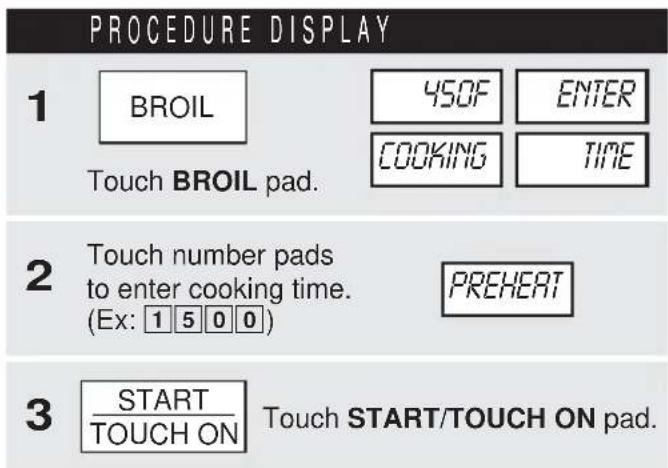
TO BROIL
In the BROIL setting, preheating is automatic. Just enter the actual broiling time and wait for preheat to be over before adding food. (Preset 450°F). Oven temperature cannot be changed.
- Suppose you want to broil a ham steak for 15 minutes.
TO SLOW COOK
Slow Cook is a preset at 300°F. Slow Cook is programmed for 4 hours. Oven temperature can be changed to temperature below 300°F. Simply touch the SLOW COOK pad and touch the desired numbered pad with temperature below 300°F.
PROCEDURE DISPLAY


This oven has two pre-programmed settings that make it easy to cook with both convection heat and microwave automatically.
With the exception of those foods that cook best by convection heating alone, most foods are well suited to mix cooking using either LOW MIX/BAKE or HIGH MIX/ROAST.
The marriage of these two cooking methods produces juicy meats, moist and tender cakes and fine textured breads, all with just the right amount of browning and crispness.
The temperature can be changed; however, the microwave power cannot.
The oven temperature can be changed from 100°F to 450°F. To change the temperature, first touch HIGH MIX or LOW MIX, then touch the same pad again. When the display says SELECT TEMP touch desired temperature pad. Ex: HIGH MIX, HIGH MIX, pad 7 and START/TOUCH ON. The mix temperature will change automatically.
TO COOK WITH AUTOMATIC MIX
- Suppose you want to bake a cake at low mix for 20 minutes.
PROCEDURE DISPLAY
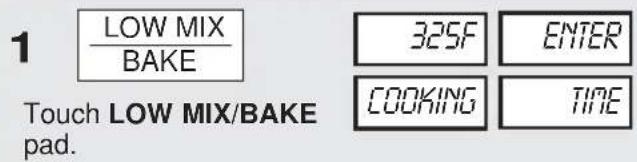
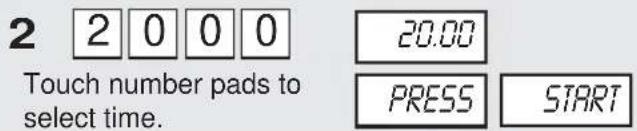
At the end of the baking time, 1 long tone will sound and END will be displayed.
TO PREHEAT AND COOK WITH AUTOMATIC MIX
Your oven can be programmed to combine preheating and Automatic Mix cooking operations. You can preheat at the same temperature as the preset combination temperature or change it to a different temperature.
- Suppose you want to preheat until 350°F and then cook 25 minutes on 325°F Low Mix bake.
PROCEDURE DISPLAY
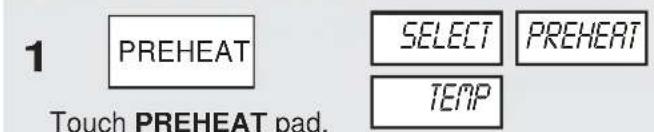
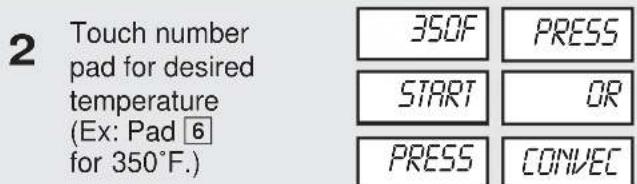
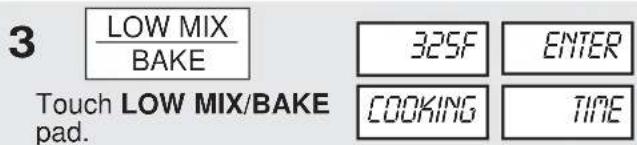


Touch START/TOUCH ON pad.
At the end of the baking time, 1 long tone will sound and END will be displayed.
CONVECTION AUTOMATIC MIX FEATURES
This section of the operation manual offers instructions for preparing 12 popular foods using CompuBroil, CompuRoast and CompuBake.
After selecting the desired feature, follow the directions indicated in the display.
For helpful hints, simply touch CUSTOM HELP anytime HELP is lighted in the display.
COMPU BROIL
CompuBroil automatically broils hamburgers, chicken pieces, steaks and fish steaks.
- Suppose you want to broil 2 hamburgers.
PROCEDURE DISPLAY
1
COMPU BROIL
Touch COMPU BROIL pad.
SELECTFOOD
NUMBER
2
1
Touch number pad. (Ex: for hamburgers, touch 1.)
HAN-BURGERS
USELOW
RACK
HOWIANY
PRESS NUMBER
3
2
Touch number pad to enter quantity. (Ex: 2.) Follow information in display for cooking information.
2
NO FOOD IN OVEN
FOR MEDIUM
PRESS START
For well done or rare burgers, touch POWER LEVEL pad to select More for well done or Less for rare. See More/ Less Time Adjustment on page 23.
4
START OUCH ON
Touch START/TOUCH ON pad.
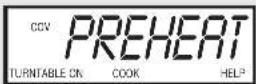
After broil preheat cycle ends, 4 long tones will sound. PREHERT OVER PLACE FOOD IN OVEN will be displayed repeatedly. Open the door and place hamburgers into oven. Close the door.
5
START OUCH ON
Touch START/TOUCH ON pad.
After broil cycle ends, 1 long tone will sound and END will be displayed.
NOTE:
-
CompuBroil can be programmed with More/Less Time Adjustment. See page 23.
-
If you attempt to enter more or less than the allowed weight ERROR WEIGHT TOO LARGE PRESS CLEAR or ERROR WEIGHT TOO SMALL PRESS CLEAR will appear in the display. If you enter more or less than the allowed number ERROR QQTY PRESS CLEAR or ERROR TOO MANY PRESS CLEAR will appear in the display.
-
To broil other foods or foods above or below the weight or number allowed on the chart below, follow instructions in the Sharp Carousel Convection Microwave Cookbook. See Broiling Chart.
COMPU BROIL CHART
| SETTING/FOOD | AMOUNT | PROCEDURE |
| 1. Hamburgers | 1 - 8 pieces1/4 lb each | Use this setting to broil hamburger patties. Place on low rack. |
| 2. Chicken pieces | 0.5 - 3.0 lb | Arrange pieces on low rack. After cooking, let stand, 3-5 minutes. Dark meat should be 180°F, and white meat should be 170°F. |
| 3. Steaks | 0.5 - 2.0 lb | Use this setting to broil steaks from 3/4" to 1" thick. Individual boneless steaks broil evenly. Place steak on low rack. For well done, touch POWER LEVEL once; for rare, touch POWER LEVEL twice. |
| 4. Fish steaks | 0.5 - 2.0 lb | Use this setting to broil fish steak which is 3/4" to 1" thick. Place on low rack. |
COMPU ROAST
CompuRoast automatically roasts chicken, turkey, turkey breast or pork.
- Suppose you want to roast a 2.5 pound chicken.
PROCEDURE DISPLAY
| 1 | COMPU ROAST | SELECT FOOD |
| NUMBER | ||
| Touch COMPU ROAST pad. | ||
| 2 | 1 | CHICKEN USE |
| LOW RACK | ||
| ENTER WEIGHT | ||
| 3 | 2 5 | 2.5 |
| Touch number pad to enter weight. (Ex: 2.5) | PRESS START | |
4
Touch START/TOUCH ON pad.
| After COMPU ROAST cycle end, a long tone will sound. | LET | STAND | COVERED | FOR |
| 5-10 MIN | will be displayed. | |||
NOTE:
- CompuRoast can be programmed with More/Less Time Adjustment. See page 23.
- If you attempt to enter more or less than the allowed weight, ERROR | WEIGHT | TOO | LARGE PRESS CLEAR or ERROR | WEIGHT | TOO SMALL PRESS CLEAR will appear in the display.
- To roast other food or foods above or below the weights allowed on the chart below, check the Sharp Carousel Convection Microwave Cookbook's Combination Roasting Chart.
COMPU ROAST CHART
| SETTING/FOOD AMOUNT PROCEDURE | |||
| 1. Chicken | 2.5 - 7.0 lb(1.2 - 3.1 kg) | Low | After the cycle ends, cover with foil and let stand for 5-10 minutes. Internal temperature of white meat should be 170°F and of dark meat, 180°F. |
| 2. Turkey(Unstuffed) | 6.5 - 9.0 lb(3.0 - 4.0 kg) | Low | Season, as desired. Place on low rack. After the cycle ends, cover with foil and let stand 10 minutes. Internal temperature of white meat should be 170°F and of dark meat, 180°F. |
| 3. Turkey breast | 3.0 - 6.0 lb(1.4 - 2.7 kg) | Low | Season, as desired. Place on low rack. After the cycle ends, cover foil and let stand 10 minutes. Internal temperature of white meat should be 170°F. |
| 4. Pork | 2.0 - 3.5 lb(0.9 - 1.5 kg) | Low | Boneless pork loin is recommended because it cooks evenly. Place on low rack. After cooking, remove from oven, cover with foil and allow to stand 5-10 minutes. Internal temperature should be 160°F. |
COMPU BAKE
CompuBake automatically bakes cakes, brownies, muffins and French fries.
- Suppose you want to bake a 13"x9"x2" cake.
PROCEDURE DISPLAY
1
COMPU BAKE
SELECT
000
Touch COMPU BAKE pad.
Note: Turntable function is automatically turned OFF.
NUMBER
2
1
Touch number pad.
(Ex: for cake, touch 1.)
CAKE
USE1BX9X2
INCH METAL
PRMGN
LOU RACK
NO FOOD IN OVEN
PRESS
START
3
START TOUCH ON
Touch START/TOUCH ON pad.
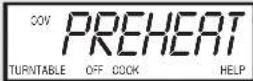
After CompuBake preheat cycle ends, 4 tones will sound. The display will indicate PREHERT OVER PLACE FOOD IN OVEN. Open door. Place the cake pan inside. Close door and touch START/TOUCH ON.
4
START TOUCH ON
Touch START/TOUCH ON pad.
After COMPU BAKE cycle ends, 1 long tone will sound, and will be displayed.
NOTE:
- CompuBake can be programmed with More/Less Time Adjustment. See page 23.
- To bake other food, see the Sharp Carousel Convection Microwave Cookbook's Baking Section.
COMPU BAKE CHART
| SETTING/FOOD | PAN SIZE/QTY | RACK | PROCEDURE |
| 1. Cake | 13"x9"x2" | Low | Ideal for packaged cake mix or your own recipe for 13"x9"x2" pan. Prepare according to package or recipe directions and place in a greased and floured 13"x9"x2" baking pan. After the preheat is over, place pan in oven centered on low rack. Cool before frosting and serving. |
| 2. Brownies | 13"x9"x2" | Low | Ideal for packaged brownie mix or your own recipe for 13"x9"x2" pan. Prepare according to package or recipe directions and place in a greased and floured 13"x9"x2" baking pan. After the preheat is over, place pan in oven centered on low rack. Cool before cutting into serving pieces. |
| 3. Muffins | 12 cupMuffin pan | Low | Ideal for packaged muffin mix or your own recipe for 12 medium size muffins. Prepare according to package or recipe directions and place in one 12-cup muffin pan. After the preheat is over, place pan in oven centered on low rack. |
| 4. French fries | 3 to 24 ozCookie sheet to hold | Low | Use frozen prepared French fries.No preheat is required for the French fries baking procedure.Place French fries on cookie sheet on low rack.For shoestring potatoes, touch POWER LEVEL pad twice to enter less time before touching START/TOUCH ON pad. |
OTHER CONVENIENT FEATURES
MULTIPLE SEQUENCE COOKING
The oven can be programmed for up to 4 automatic cooking sequences for the microwave mode and 3 automatic cooking sequences for convection mode, switching from one setting to another automatically.
Sometimes cooking directions tell you to start on one power level and then change to a different power level. Your oven can do this automatically.
- Suppose you want to cook roast beef for 5 minutes at 90% and then continue to cook for 30 minutes at 50% .
PROCEDURE
| 1 | POWER LEVEL | Touch POWER LEVEL pad once. |
| 2 | 9 | Touch POWER LEVEL number. (Ex: 90%) |
| 3 | 500 | Enter cooking time. (Ex: 5 minutes.) |
| 4 | POWER LEVEL | Touch POWER LEVEL pad again. |
| 5 | 5 | Touch POWER LEVEL number. (Ex: 50%) |
| 6 | 3000 | Enter cooking time. (Ex: 30 minutes.) |
| 7 | START TOUCH ON | Touch START/TOUCH ON pad. |
NOTE:
- If POWER LEVEL pad is touched twice, HIGH will be displayed.
- If 100% is selected as the final sequence, it is not necessary to touch the POWER LEVEL pad.
- If you wish to know power level, simply touch the POWER LEVEL pad. As long as your finger is touching the POWER LEVEL pad, the power level will be displayed.
MORE OR LESS TIME ADJUSTMENT
More : Should you discover that you like any of the COMPU DEFROST, COMPU ROAST, COMPU BAKE, COMPU BROIL, SENSOR COOK or INSTANT SENSOR settings slightly more done, touch the POWER LEVEL pad once after touching your choice of pads.
Less : Should you discover that you like any of the COMPU DEFROST, COMPU ROAST, COMPU BAKE, COMPU BROIL, SENSOR COOK or INSTANT SENSOR settings slightly less done, touch the POWER LEVEL pad twice after touching your choice of pads.
KITCHEN TIMER
- Suppose you want to time a 3 minute long distance phone call.
PROCEDURE
| 1 | KITCHEN TIMER | Touch KITCHEN TIMER pad. |
| 2 | 3 0 0 | Enter time. |
| 3 | START TOUCH ON | Touch START/TOUCH ON pad. |
MINUTE PLUS
Minute Plus allows you to cook for a minute at 100% by simply touching the MINUTE PLUS pad. You can also extend cooking time in multiples of 1 minute by repeatedly touching the MINUTE PLUS pad during manual cooking using microwave, convection, mix or broil.
- Suppose you want to heat a cup of soup for one minute.
PROCEDURE
| MINUTE PLUS | Touch MINUTE PLUS pad. |
NOTE:
-
Touch MINUTE PLUS pad within 1 minute after cooking, closing the door, touching the STOP/CLEAR pad or during cooking. Minute Plus cannot be used to start the oven if any program is on display.
-
Minute Plus cannot be used with Special Features.
DEMONSTRATION MODE
To demonstrate, touch CLOCK, 0 and START/TOUCH ON and hold for three seconds.
| DURING | DEMO | NO | OVEN | POWER | SHARP |
| SIMPLY | and | willappear | DEMO | ||
in the display. Cooking operations and special features can now be demonstrated with no power in the oven. For example, touch MINUTE PLUS, and the display will show and count down quickly to 0 and the .END
To cancel, touch CLOCK, the number 0 and STOP/CLEAR.
HELP
Each setting of CompuDefrost, CompuBroil, CompuRoast, CompuBake and Sensor Cook has a cooking hint. If you wish to check, touch CUSTOM HELP whenever HELP is lighted in the Interactive Display.
CUSTOM HELP
Custom Help provides 5 features which make using your oven easy because specific instructions are provided in the Interactive Display.
1. CHILD LOCK
The Child Lock prevents unwanted oven operation such as by small children. Note: Child Lock is not applicable to Hood Fan and Hood Light buttons.
The oven can be set so that the control panel is deactivated or locked. To set, touch CUSTOM HELP, the number 1 and START/TOUCH ON pad. Should a pad be touched, will appear in the display.
To cancel, touch CUSTOM HELP, the number 1 and STOP/CLEAR.
2. AUDIBLE SIGNAL ELIMINATION
If you wish to have the oven operate with no audible signal, touch CUSTOM HELP, the number 2 and STOP/CLEAR.
To cancel and restore the audible signal, touch CUSTOM HELP, the number 2 and START/TOUCH ON.
3. AUTO START
If you wish to program your oven to begin cooking automatically at a designated time of day, follow this procedure:
- Suppose you want to start cooking a stew for 20 minutes on 50% at 4:30. Before setting, check to make sure the clock is set correctly.
PROCEDURE
| 1 | CUSTOM HELP | Touch CUSTOM HELP pad. |
| 2 | 3 | Touch the number. |
| 3 | 4 3 0 | Enter the start time. |
| 4 | CLOCK | Touch CLOCK pad. |
| 5 | 2 0 0 0 | Enter cooking program. |
| 6 | START TOUCH ON | Touch START/TOUCH ON pad. |
NOTE:
- Auto Start can be used for manual cooking, CompuBroil/Roast/Bake, if clock is set.
-
If the oven door is opened after programming Auto Start, it is necessary to touch the START/TOUCH ON pad for the time of day to appear in the readout so that the oven will automatically begin programmed cooking at the chosen Auto Start time.
-
Be sure to choose foods that can be left in the oven safely until the Auto Start time. Baked potatoes are often a good choice.
4. LANGUAGE SELECTION
The oven comes set for English language. To change, touch CUSTOM HELP and the number 4. Continue to touch the number 4 until your choice is selected from the table below. Then touch START/TOUCH ON pad.
LANGUAGE NUMBER DISPLAY
| Once English | ENGLISH |
| Twice Spanish | ESPARNOL |
| 3 times French | FR |
5. WEIGHT/TEMP SELECTION
The oven comes set for U.S. Customary Unit-pounds. To change, touch CUSTOM HELP and the number 5. Continue to touch the number 5 until your choice is selected from the table below. Then, touch START/TOUCH ON pad.
| NUMBER 5 | STANDARD OF WEIGHT AND TEMPERATURE | DISPLAY |
| Once | Pound/Fahrenheit | LB F |
| Twice | Kilogram/Celsius | KG C |
TOUCH ON
Touch On allows you to cook at 100% power by touching the START/TOUCH ON continuously. Touch On is ideal for melting cheese, bringing milk to just below boiling etc. The maximum cooking time is 3 minutes.
- Suppose you want to melt cheese on a piece of toast.
PROCEDURE
| 1 | START/TOUCH ON | Continuously touch START/TOUCH ON pad. The cooking time will begin counting up. |
| 2 | When the cheese is melted to desired degree, remove finger from START/TOUCH ON pad. Oven stops immediately. | |
NOTE:
- Note time it takes for frequently used foods and program that time in the future.
- Touch TOUCH ON pad within 1 minute after cooking, opening and closing the door or touching the STOP/CLEAR pad.
- TOUCH ON can only be used 3 times in a row. If more times are needed, open and close door or touch STOP/CLEAR.
CLEANING AND CARE
EXTERIOR
The outside surface is precoated metal and plastic. Clean the outside with mild soap and water; rinse and dry with a soft cloth. Do not use any type of household or abrasive cleaner.
DOOR
Wipe the window on both sides with a damp cloth to remove any spills or spatters. Metal parts will be easier to maintain if wiped frequently with a damp cloth. Avoid the use of harsh abrasives.
TOUCH CONTROL PANEL
Care should be taken in cleaning the touch control panel. If the control panel becomes soiled, open the oven door to inactivate the control panel before cleaning. Wipe the panel with a cloth dampened slightly with water only. Dry with a soft cloth. Do not scrub or use any sort of chemical cleaners. Avoid the use of excess water. Close door and touch STOP/CLEAR.
INTERIOR- AFTER MICROWAVE COOKING
The oven walls, ceiling and floor are stainless steel. Cleaning after microwave cooking is easy because no heat is generated to the interior surfaces; therefore, there is no baking and setting of spills or spattering. To clean the interior surfaces, wipe with a soft cloth and warm water. DO NOT USE ABRASIVE OR HARSH CLEANERS OR SCOURING PADS. For heavier soil, use mild soap; rinse thoroughly with hot water.
INTERIOR- AFTER CONVECTION, MIX OR BROIL COOKING
Spatters may occur because of moisture and grease. Wash immediately after use with hot, soapy water. Rinse and polish dry. Harder to remove spatters may occur if oven is not thoroughly cleaned or if there is long time/high temperature cooking. If so, you may wish to purchase an oven cleaner pad with liquid cleaner within it-not a soap filled steel pad-for use on stainless or porcelain surfaces. Follow manufacturer's directions carefully and be especially cautious not to get any of the liquid cleaner in the perforations on the wall or ceiling or any door surfaces. Rinse thoroughly and polish dry.
WAVEGUIDE COVER
The waveguide cover is located on the ceiling in the oven cavity. It is made from mica so requires special care. Keep the waveguide cover clean to assure good oven performance. Carefully wipe with a damp cloth any food spatters from the surface of the cover immediately after they occur. Built-up splashes may overheat and cause smoke or possibly catch fire. DO NOT REMOVE THE WAVEGUIDE COVER.
ODOR REMOVAL
Occasionally, a cooking odor may remain in the oven. To remove, combine 1 cup water, grated peel and juice of 1 lemon and several whole cloves in a 2-cup glass measuring cup. Boil for several minutes using 100% power. Allow to set in oven until cool. Wipe interior with a soft cloth.
TURNTABLE/TURNTABLE SUPPORT
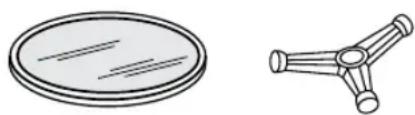
The ceramic turntable and turntable support can be removed for easy cleaning. Wash them in mild, sudsy water; for stubborn stains use a mild cleanser and scouring sponge as described above. They are also dishwasher-safe using top rack.
natural_image
Two simple line drawings: a circular plate with diagonal lines and a three-leafed triangular structure (no text or symbols)OVEN RACKS
The high and low baking racks can be removed for easy cleaning and stored away from the microwave oven when racks are not needed. After each use, wash them in mild, sudsy water. For any stubborn stains, use a mild kitchen cleanser and scouring sponge as described above. They are dishwasher-proof.
natural_image
Two simple oval-shaped metal furniture stands with slatted panels and handles (no text or symbols)GREASE FILTERS
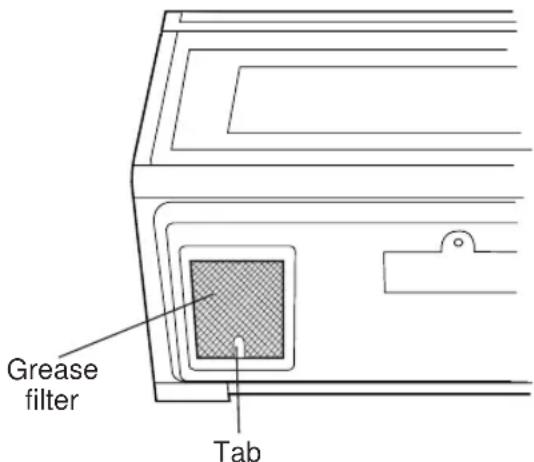
Filters should be cleaned at least once a month. Never operate the fan or oven without the filters in place.
- Pull the tab toward the front of the oven, down slightly and remove the filter. Repeat for the other filter.
- Soak the filters in a sink or dish pan filled with hot water and detergent. DO NOT use ammonia or other alkali; they will react with the filter material and darken it.
- Agitate and scrub with a brush to remove embedded dirt.
- Rinse thoroughly and shake dry.
- Replace by fitting the filter back into the opening.
FAN
The fan will automatically start when heat rises from range surface units or burners and when convection, high mix, low mix or the broil settings are used. This protects the microwave oven from excessive temperature rise. The fan will stay on until the temperature decreases. It cannot be turned off manually during this time.
For other uses, select either high or low speed.
PRECAUTIONS FOR PROPER USE:
- DO NOT leave range unattended while using high temperatures. Automatic fan may start and provide excessive air to the surface units. This may cause spattering or boilover.
- Avoid burning food.
- Keep grease filters clean.
LIGHT
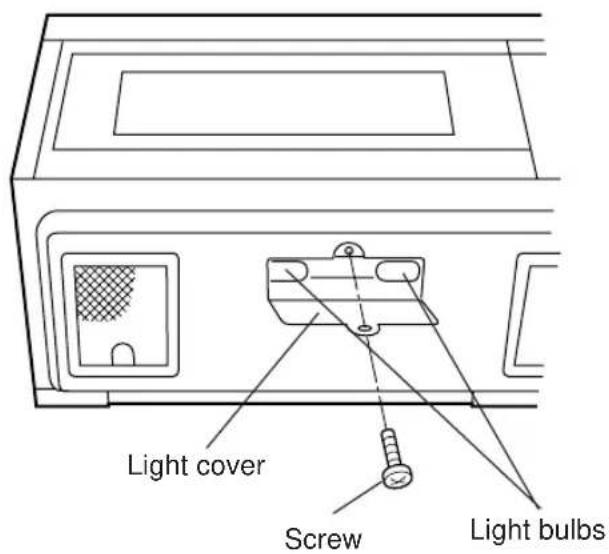
- To replace light bulbs, first disconnect power to the oven at the circuit breaker panel or by unplugging.
- To release cover remove the screw on the light cover. (See illustration.)
- Replace bulbs only with equivalent watt bulbs available from a Sharp Authorized Servicer or parts distributor. Bulbs are also available at most hardware stores or lighting centers. DO NOT USE A BULB LARGER THAN 30 WATTS.
- Close light cover and secure with screw removed in step 2.
CAUTION: Light cover may become very hot. Do not touch glass when light is on. Do not use light for long time use such as a night light.
CHARCOAL FILTER
Charcoal Filter, Sharp Part Number RK-220 is used for No-vented, recirculated installation. The filter should be changed every 6 to 12 months depending on use.
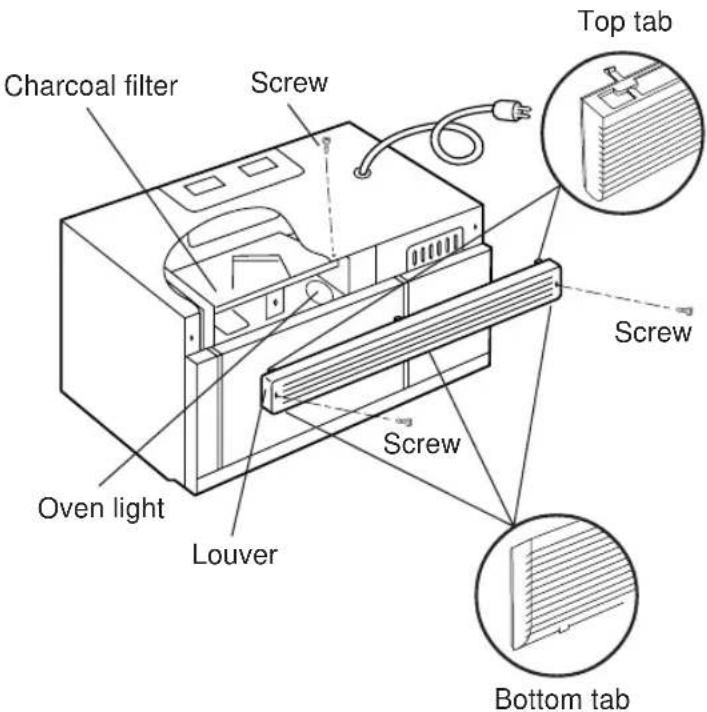
- Disconnect power to the oven at the circuit breaker panel or by unplugging.
- Remove 3 screws that secure louver.
- Remove louver by inserting flat edge screwdriver over each tab depressing the tab down and moving louver away from unit.
- Pull the louver away from the oven.
- Slide Charcoal Filter into position on support tabs.
- Push louver back into place and gently snap tabs into place by hand (engaging both the bottom and top tabs) and replace the 3 screws to secure louver.
OVEN LIGHT
Remove the louver per instructions 1-4 above and charcoal filter, if used.
- Slide the light cover forward and lift up.
- Remove old light bulb and replace only with an equivalent watt bulb available from a Sharp Authorized Servicer or parts distributor. Bulbs are also available at most hardware stores or lighting centers. DO NOT USE A BULB LARGER THAN 30 WATTS.
- Replace the oven light cover and charcoal filter, if used; push louver back in place (engaging both the bottom and top tabs) and replace the louver mounting screws.
SERVICE CALL CHECK
Please check the following before calling for service:
- Place one cup of water in a glass measuring cup in the oven and close the door securely. Operate the oven for two minutes at HIGH 100%.
A. Does the light come on in the oven? YES ____ NO ____
B. Does the cooling fan work? YES ____ NO ____
(Put your hand over the top ventilation openings.)
C. Does the turntable rotate when the TURNTABLE ON/OFF pad is touched and TURNTABLE ON is in the display? YES ____ NO ____ (It is normal for the turntable to turn in either direction when TURNTABLE ON is in the display.)
D. Is the water in the oven warm? YES ____ NO ____
- Remove the water from the oven and program:
CONVEC
450°F
500
START TOUCH ON
A. Do CONV and COOK light? YES ____ NO ____
B. After the oven shuts off, is the inside of the oven hot? YES ____ NO ____
If "NO" is the answer to any of the above questions, please check electrical outlet, fuse and/or circuit breaker. If either or both are not functioning properly, CONTACT YOUR NEAREST SHARP AUTHORIZED SERVICER. A microwave oven should never be serviced by a "do-it-yourself" repair person.
NOTE: If time appearing in the display is counting down very rapidly, check Demonstration Mode on page 23 and cancel.
THE ULTIMATE ACCESSORY
★ Great recipes
Reliable microwave reference guide
★ Many color photos
Step-by-step instructions
* Nutritional information for each recipe
Durable wipe-clean soft cover with 128 8^1/2 × 11 pages
★ Helpful tips and special techniques
SHARP®
Simply call this toll-free number : 1-800-642-2122. Please have your credit card ready.
If you prefer to order by mail, complete and return the order form on page 28. Please include check or money order (payable to Sharp Accessories & Supplies Center) for \6.00 plus \4.25 shipping & handling and tax, if applicable, per book.
SATISFACTION GUARANTEED
You must be completely satisfied with the Sharp Carousel Microwave Cookbook. If, within 14 days, you are dissatisfied for any reason, simply return the book and we'll gladly refund your \$6.00 plus tax.
(SOLAMENTE ESCRITO EN INGLES!)
R-1870 / R-1871 / R-1872
| AC Line Voltage: Single phase 120V, 60Hz, AC only | |
| AC Power Required: 1600 watts 13.2 amps. | |
| Output Power | |
| Microwave: | 850 watts* (IEC Test Procedure) |
| Convection Heater: | 1400 watts |
| Frequency: | 2450 MHz |
| Outside Dimensions: | 29 15/16" (W) x 16 11/32" (H) x 15 9/32" (D) |
| Cavity Dimensions: | 17 1/8 " (W) x 8 1/16" (H) x 13 13/16" (D) |
| Oven Capacity: | 1.1 cu. ft. |
| Cooking Uniformity: | Turntable & Stirrer Fan |
| Weight: | Approx. 71 lbs. |
★ The International Electrotechnical Commission's standardized method for measuring output wattage. This test method is widely recognized.
In compliance with standards set by:
FCC – Federal Communications Commission Authorized.
DHHS
- Complies with Department of Health and Human Services (DHHS) rule, CFR, Title 21, Chapter I, Subchapter J.
- This symbol on the nameplate means the product is listed by Underwriters Laboratories, Inc.

Cut along this line.
Please send me ____ cookbooks at \10.25 each \ ____
Illinois sales tax, (if applicable) per book \.44 no. of books ____ \ ____
Other tax, (if applicable) no. of books ____ \$ ____
TOTAL ORDER AMOUNT \$ \_\_\_\_
☐ I have enclosed a check made payable to Sharp Accessories & Supplies Center.
☐ Please bill my VISA MASTERCARD AMERICAN EXPRESS
Acct. No. ____ Expiration date ____ / ____
Signature
(All credit card orders must be signed.)
Name ____
Address
City ____ State ____ Zip ____
Daytime Phone No. ( ) ____
Mail to: SHARP Accessories & Supplies Center Price is subject to change without notice.
2130 Townline Road
Peoria, Illinois 61615–1560
For more complete information and safety precautions, refer to the inside instructions.
SET CLOCK
| If | SHARP | SIMPLY | THE | BEST | PRESS |
| CLEAR | AS in the display, | CLOCK | |||
| first touch STOP/CLEAR. | |||||
| 1. Touch CLOCK pad. | CLOCK | ||||
| 2. Enter correct time of day by touching numbers in sequence.(Ex: 12:30) | 1 2 3 0 | ||||
| 3. Touch CLOCK pad again. | CLOCK | ||||
INSTANT SENSOR POPCORN
| Touch POPCORN pad. Touch once for regular size and twice for snack size. See page 14. | POPCORN |
INSTANT SENSOR REHEAT
| Touch SENSOR REHEAT once. The oven will start automatically. SENSOR REHEAT can be programmed with turntable on or off.See Instant Sensor Chart on page 14. | SENSOR REHEAT |
SENSOR COOK
| 1. Touch SENSOR COOK pad. |
| 2. Select desired SENSOR COOK setting. (Ex: 1) |
| 3. Touch START/TOUCH ON pad. |
| See Sensor Cook Chart, page 15. |
| SENSOR COOK |
| 1 |
| START |
| TOUCH ON |
TO PREHEAT AND COOK WITH CONVECTION
| 1. Touch PREHEAT pad. |
| 2. Touch number pad for desired temperature. (Ex: touch pad 6 for 350° F.) |
| 3. Touch CONVEC pad. |
| 4. Touch number pad for desired temperature. (Ex: 5 for 325°F.) |
| 5. Enter cooking time by touching number pads. (Ex: 2 0 0 0 .) |
| 6. Touch START/TOUCH ON pad |
When the oven reaches the programmed temp., it will automatically hold at the preheat temperature for 30 minutes and then the display will change to the time of day. Whenever STOP/CLEAR is touched during this 30 minute period, PRESS CONVEC or PRESS MIX will be displayed and cooking mode and time can be entered.
For more information on convection cooking, see pages 18 and 19.
MANUAL OPERATION
High Power Cooking
| 1. Enter cooking time by touching numbers pads. (Ex: 1 min. 30 sec.) |
| 2. Touch START/TOUCH ON pad. |
Variable Power Cooking
| 2. After Step 1 above, touch POWER LEVEL pad. |
| 3. Select power level (Ex: 5 for 50%) and touch START/TOUCH ON pad. |
MINUTE PLUS
| Touch MINUTE PLUS for one minute at 100% power or to add additional minutes. |
TOUCH ON
| Continuously touch START/TOUCH ON for 100% power cooking. Remove finger and oven will stop instantly. |
COMPU DEFROST
| 1. Touch COMPU DEFROST pad(Ex: three times for a steak). |
| 2. Enter weight by touching number pad.(Ex: 2 and 0.) |
| 3. Touch START/TOUCH ON pad.During defrosting, oven will stop.Check food. See CompuDefrost Chart or |
COMPU ROAST
| or CompuBake or CompuBroil |
| 1. Touch desired COMPU pad. |
| 2. Select desired Compu setting.(Ex: Touch 1 for chicken.) |
| 3. Touch number pad for weight or quant |
| 4. Touch START/TOUCH ON pad. |
| See CompuRoast, Bake and Broil Charts on pages 20, 21 and 22. |
TO COOK WITH AUTOMATIC MIX
| Touch LOW MIX/BAKE pad, enter desired cooking time and touch START/TOUCH ON pad. Follow information on the display. |
Your oven can be programmed to combine preheating and automatic mix cooking operations. See page 19 for information.
SHARP
SHARP ELECTRONICS CORPORATION Sharp Plaza, Mahwah, NJ 07430-2135
- FOR CUSTOMER ASSISTANCE
- TO PHONE:
- TO WRITE:
- TO ACCESS INTERNET: www.sharp-usa.com
- PRECAUTIONS TO AVOID POSSIBLE EXPOSURE TO EXCESSIVE MICROWAVE ENERGY
- CONTENTS
- INTERACTIVE COOKING SYSTEM
- CONSUMER LIMITED WARRANTY
- Your Product Model Number & Description:
- Warranty Period for this Product:
- Additional Item(s) Excluded from Warranty Coverage (if any):
- Where to Obtain Service:
- PRODUCT INFORMATION CARD
- IMPORTANT SAFETY INSTRUCTIONS
- SAVE THESE INSTRUCTIONS
- UNPACKING INSTRUCTIONS
- Unpacking and Examining Your Oven
- Remove:
- OPTIONAL ACCESSORIES
- Two optional accessories are available for this oven.
- GROUNDING INSTRUCTIONS
- Electrical Requirements
- Radio or TV Interference
- ABOUT YOUR OVEN
- ABOUT MICROWAVE COOKING
- ABOUT SAFETY
- ABOUT CHILDREN AND THE MICROWAVE
- Doneness signs include:
- ABOUT UTENSILS AND COVERINGS
- BEFORE OPERATING
- TO SET THE CLOCK
- PROCEDURE DISPLAY
- STOP/CLEAR
- NOTE:
- HOOD LIGHT/ HOOD FAN
- KEEP WARM
- TO SET POWER LEVEL
- MICROWAVE FEATURES
- COMPU DEFROST
- COMPU DEFROST CHART
- MANUAL DEFROST
- SENSOR COOKING
- Using Sensor Settings:
- Selecting Foods:
- Covering Foods:
- INSTANT SENSORS
- INSTANT SENSOR REHEAT
- Turntable on:
- PROCEDURE
- Turntable off:
- INSTANT SENSOR POPCORN
- POPCORN CHART
- INSTANT SENSOR CHART
- SENSOR COOK
- 3
- SENSOR COOK RECIPES
- Cranberry Fluff
- Curry Vegetable Chowder
- Glazed Apple Slices
- SENSOR COOK RECIPES (CONTINUED)
- Mexican Seasoned Potatoes
- Spiced Carrots
- Savory Flounder Fillets
- Creole Corn
- CONVECTION COOKING
- TO COOK WITH CONVECTION
- TO PREHEAT AND COOK WITH CONVECTION
- TO BROIL
- TO SLOW COOK
- TO COOK WITH AUTOMATIC MIX
- TO PREHEAT AND COOK WITH AUTOMATIC MIX
- CONVECTION AUTOMATIC MIX FEATURES
- COMPU BROIL
- 1
- 2
- 4
- 5
- COMPU ROAST
- COMPU BAKE
- OTHER CONVENIENT FEATURES
- MULTIPLE SEQUENCE COOKING
- MORE OR LESS TIME ADJUSTMENT
- KITCHEN TIMER
- MINUTE PLUS
- DEMONSTRATION MODE
- HELP
- CUSTOM HELP
- CHILD LOCK
- AUDIBLE SIGNAL ELIMINATION
- AUTO START
- LANGUAGE SELECTION
- WEIGHT/TEMP SELECTION
- TOUCH ON
- CLEANING AND CARE
- EXTERIOR
- DOOR
- TOUCH CONTROL PANEL
- INTERIOR- AFTER MICROWAVE COOKING
- INTERIOR- AFTER CONVECTION, MIX OR BROIL COOKING
- WAVEGUIDE COVER
- ODOR REMOVAL
- TURNTABLE/TURNTABLE SUPPORT
- OVEN RACKS
- GREASE FILTERS
- FAN
- PRECAUTIONS FOR PROPER USE:
- LIGHT
- CHARCOAL FILTER
- OVEN LIGHT
- SERVICE CALL CHECK
- THE ULTIMATE ACCESSORY
- SHARP®
- SATISFACTION GUARANTEED
- TOTAL ORDER AMOUNT \$ \_\_\_\_
- SHARP
Brand : SHARP
Model : R-1871T
Category : Microwaves