
NVR-810BRD - Loudspeaker NEVIR - Free user manual and instructions
Find the device manual for free NVR-810BRD NEVIR in PDF.


| Product Type | Bluetooth Speaker |
| Brand | NEVIR |
| Model | NVR-810BRD |
| Driver Units | 2" full-range + 3" low-frequency |
| Rated Power (RMS) | 5W + 5W + 10W |
| Frequency Response | 100Hz - 18KHz |
| Impedance | 4Ω + 4Ω + 8Ω |
| Bluetooth Version | V4.0 |
| Connectivity | Bluetooth, AUX 3.5mm, USB, Micro SD, FM Radio |
| Power Input | DC 12V 2.3A |
| Power Supply | AC100-240V 50/60Hz (via adapter) |
| USB Output | DC 5V 1000mA (for charging devices) |
| Controls | Mode, Volume+/-, Play/Pause, Standby, Handsfree, Remote |
| Auto Standby | After 8 hours continuous play or 30 minutes pause/mute |
| Handsfree Calling | Yes (via Bluetooth) |
| FM Radio | PLL, auto scan and store |
| Package Contents | Speaker, AUX cable, Remote, Power adapter, Manual |
| Safety | Avoid rain, damp, high temperature, dropping |
Frequently Asked Questions - NVR-810BRD NEVIR
User questions about NVR-810BRD NEVIR
0 question about this device. Answer the ones you know or ask your own.
Ask a new question about this device
Download the instructions for your Loudspeaker in PDF format for free! Find your manual NVR-810BRD - NEVIR and take your electronic device back in hand. On this page are published all the documents necessary for the use of your device. NVR-810BRD by NEVIR.
USER MANUAL NVR-810BRD NEVIR
natural_image
White and black portable electronic device with a digital display showing time, no visible text or symbols on the device body.natural_image
White and black portable electronic device with a digital display showing time, no visible text or symbols on the device body.INSTRUCTION MANUAL
PLEASE READ THIS OPERATING MANUAL COMPLETELY BEFORE OPERATING THIS UNIT AND RETAIN IT FOR FUTURE REFERENCE.
Thank you for purchasing this Bluetooth speaker, it is certain to fully satisfy you with music ,Featured by stylish appearance, versatile-purpose and reliable quality, it definitely brings more convenience and happiness to you. Please read this instruction carefully before using and store it properly.
Safety
In order to use this portable speaker in the proper and safe way, please abide by the following safety tips:
- Read and understand all safety guidelines.
- Abide by all warning and guidance information labeled.
- Please avoid rain, damp or being dropped or splashed by any liquid.
- Please neither get it closed to or dry it by the high-temperature heat source.
- Please avoid dropping or impacting, or posing great pressure on it.
Main functions
- Bluetooth wireless connection.
Bluetooth V4.0 saves more electricity, let you enjoy music freely from the wire restraint. - Strong boosted bass
- AUX in/audio input
3.5MM AUX in makes it easy to connect mobile phones, MP3, computer and other audio sources - Micro SD(TF) reader, USB
- PLL FM radio
Contents of the whole unit
The following items are in the packing box; for any missing, please contact the local seller or dealer:
- Bluetooth speaker : 1piece
- 3.5MM AUX-IN cable: 1 piece
- Instruction: 1 piece
- power adapter: 1 piece
- remote control
Product overview

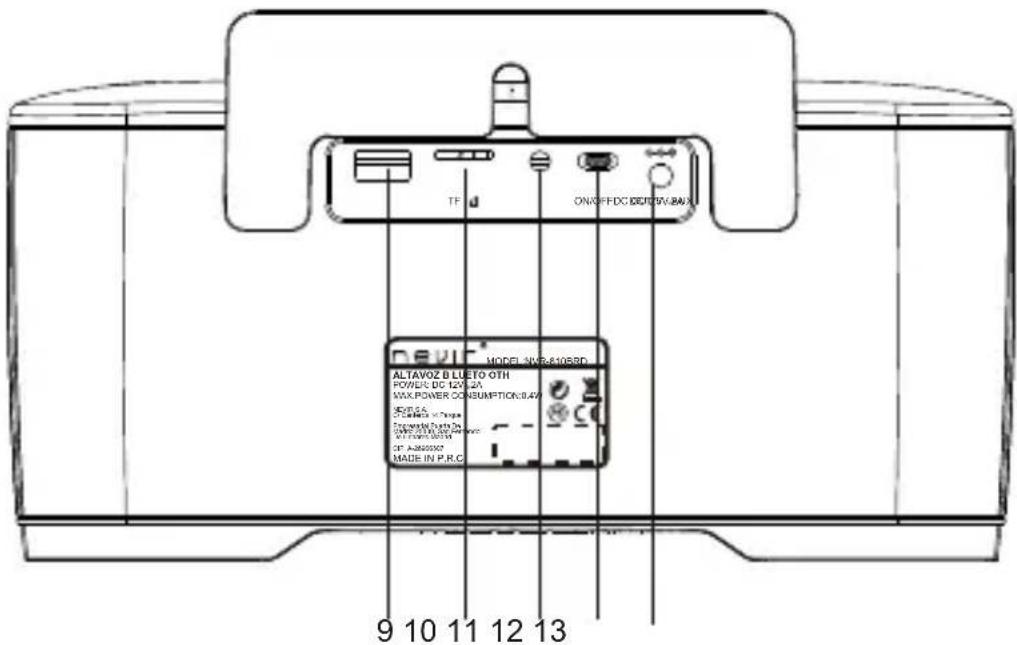
- Mode : press this button to enter the different mode like bluetooth, AUX-in, USB, micro-SD(TF), radio
- Volume down /previous audio track or radio Frequency tuning
- Volume up /next audio track or radio Frequency tuning
- handsfree
- play/pause or radio channel;
- LEDdisplay
- led indicator
- Standby : standby after turn on the power toggle switch and press this button to enter working status
- USB /DC 5V OUTPUT
- micro-SD(TF) slot
- 3.5mm AUX in
- Power toggle switch: POWER OFF/ON
- DC-in 12V/2.3A adaptor
Remote control and its button purpose
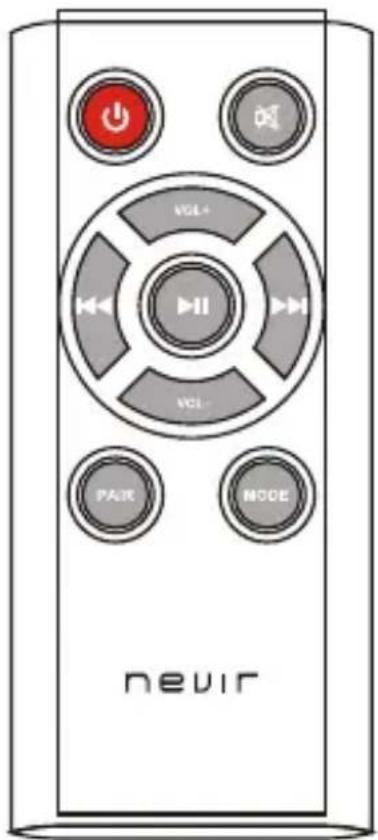
-
STANDBY standby after turn on the power toggle switch and press this button to enter working status
-
MUTE
-
VOL+ volume up
-
VOL- volume down
-
at bluetooth mode, at USB mode, or at TF mode, press it to go backward to the previous audio track, at FM radio mode, press it to go forward to Frequency tuning.
-
➕ at bluetooth mode, at USB mode, or at TF mode, press it to go forward to the next audio track, at FM radio mode, press it to go backward to Frequency tuning.
-
▶ at bluetooth mode, at USB mode, or at TF mode, press it to go play or pause, at FM radio mode, press it to the previous radio channel,
-
PAIR Bluetooth match
-
MODE press this button to enter the different mode like bluetooth, AUX-in, USB, micro-SD(TF), radio
Operation
Bluetooth connection
- start-up
Turn on the power toggle switch and the stand-by, the LED indicator in blue flash quickly, it is ready for Bluetooth connection.
-
activate the Bluetooth of the equipment to be connected
-
Search for this Bluetooth soudbox
Enter the “Bluetooth setting” and carry out the “scan the Bluetooth device”
command. After being scanned, names of "N V R- 8 10 B R D "will be listed.
- Match and confirm the connection
choose the “N VR - 81 0 B R D” Bluetooth device and it will be automatically matched in the next several seconds. The soundbox will release a short sound tip. It indicates that bluetooth has been connected successfully. generally it takes only several seconds to complete the Bluetooth connection, and maybe longer time according to the different bluetooth technology (some devices might require to feed matching digits like “1234” or “0000” before connecting successfully)
- Bluetooth automatic re-connection
after the renewal startup it will automatically search for and connect the Bluetooth device connected last time. Please put these two Bluetooth devices at the mutually-discernable distance. if the re-connection fails, the indicator in blue will flash quickly, and it will search for the Bluetooth device again.
- bluetooth Disconnection
press play/pause/Bluetooth-match button for a few of seconds, the Bluetooth will be disconnected, then the Bluetooth indicator will flash quickly, entering the status of Bluetooth-searching.
Play back the audio file at the Bluetooth connection mode
- press the play/pause quickly to play or pause, the blue light is on when play and flash when pause.
- Volume down /previous audio track : press this button quickly to go backward to the previous audio track, press it for a few of seconds, volume down.
- Volume up /next audio track : press this button quickly to go forward to the next audio track, press it for a few of seconds, volume up.
Answer calls ( only after the Bluetooth is successfully connected to phone)
- Make calls
Press handsfree button for a few of seconds to call back the last call, and the music will be paused if it is being played.
- Answer calls
The speaker will produce music tips if there is a call and please short press handsfree button to answer the call; the call will be rejected if keeping pressing for a few of seconds.
- Hang up
Quickly press the handsfree button to hang up if you make calls, or press it for a few of seconds to switch to the Bluetooth speaker.
AUX-in
This soundbox is also designed to connect the external audio source by the normal AUX cable (3.5mm), if AUX disconnected, it will revert the bluetooth mode again.
Remark: at aux-in mode, such function buttons as change the audio track or audio track doesn't work
Play back the audio file stored in Micro-SD (TF), USB storage
This speaker is compatible with the audio file in mp3 or WMA format.
You can use the buttons to fulfill the different function
USB also is designed with the output of DC5V 1000mA currency to charge other devices like smartphone, tablet pc etc at the precondition that this speaker is enter working status.
FM radio
Insert the aux-in cable as the indispensable antenna, press the MODE button to the FM status.
- press the play/pause/ radio channel button continuously for a few of seconds to scan and store the radio channels automatically . press this button quickly to the previous radio channel,
- Volume down /previous radio channel : press this button quickly to go backward to Frequency tuning, press it for a few of seconds, volume down
- Volume up /next radio channel : press this button quickly to go forward to Frequency tuning, press it for a few of seconds, volume up
Caution :
- if it is working for continuous 8 hours or at the status of pause, mute for 30 minutes, it will automatically enter standby status, please press the standby button to restart.
- pair button is workable only at the Bluetooth mode. Press it to renew Bluetooth connection if the connection fails.
Troubleshooting
- Press standby No turn on: check the power toggle switch is on.
- No sound from horn: check if the volume is on.
- No function or function error by pressing any key: turn it off and restart it.
Failure on connecting Bluetooth: first of all, make sure the Bluetooth function is open, then the research for Bluetooth devices has been conducted and Bluetooth device has been connected and started normally.
- FM status Sound effect is not ideal: check the normal AUX cable (3.5mm) is Insert, and Put the position of the normal AUX cable.
Technical parameters
| Category Items | Description | |
| Voice frequency | Driver unit | 2" internal magnetic full frequency loudspeakers3" internal magnetic Low frequency loudspeakers |
| Rated power | 5W + 5W +10W ( RMS ) | |
| Frequency response 100Hz-18KHz | ||
| Rated impedance 4 ohm+4 ohm+8 ohm | ||
| Bluetooth Bluetooth chipset Bluetooth CSR4.0 | ||
| Power Working voltage AC100V-240V 50HZ/60HZ | ||
| Connector AUX | audio input 3.5mm stereo audio | |
| DC-IN input power DC 12V 2300mA | ||
| DC-OUTPUT | DC 5V 1000mA | |
Product photos are for reference only and please take the real product as standard. We will not give any prior notice for any change of design specification or upgrade.
ENGLISH
According to Waste of Electrical and Electronic Equipment (WEEE) directive, WEEE should be separately collected and treated. If at any time in future you need to dispose of this product please do not dispose it with household waste. Please send this product to WEEE collecting points where available.
In order to fulfill ruling UNE EN-60335, we indicate that if the flexible wire is damaged, it can only be substituted by a technical service recognized by NEVIR S.A., due to special tooling is required
- INSTRUCTION MANUAL
- Safety
- Main functions
- Contents of the whole unit
- Product overview
- Remote control and its button purpose
- Operation
- Bluetooth connection
- Play back the audio file at the Bluetooth connection mode
- Answer calls ( only after the Bluetooth is successfully connected to phone)
- AUX-in
- Play back the audio file stored in Micro-SD (TF), USB storage
- FM radio
- Caution :
- Troubleshooting
- ENGLISH
Brand : NEVIR
Model : NVR-810BRD
Category : Loudspeaker