
MP24RAS3LS - Fridge Marvel - Free user manual and instructions
Find the device manual for free MP24RAS3LS Marvel in PDF.


| Product Type | Built-in Refrigerator |
| Model | MP24RAS3LS |
| Brand | Marvel |
| Width | 24 inches (61 cm) |
| Height Range | 33 1/4 to 34 3/4 inches (85.7 to 88.3 cm), adjustable via leveling legs |
| Depth (with door) | 26 7/32 inches (66.6 cm) |
| Weight | 140 lbs (63.6 kg) |
| Power Supply | 115 V, 60 Hz, 15 A dedicated grounded circuit |
| Temperature Range | 34°F to 42°F (1.2°C to 5.7°C) |
| Control Type | Electronic touch keypad with sleep mode |
| Interior Light | LED (automatically turns off when door closed) |
| Shelving System | Cantilever: half-width metal shelf, full-width slide-out metal shelf, glass crisper cover, roll-out crisper pan |
| Door Storage | Full-width and half-width door racks |
| Alarm System | Door ajar (after 5 min), power failure, temperature alarm (if 10°F from setpoint for 1 hour) |
| Vacation Mode | Disables lights, alarms, and keypad tones; acts as Sabbath mode |
| Control Lock | Prevents unintentional changes |
| Hinge Type | Articulated hinges for built-in installation |
| Overlay Panel Capacity | Accepts custom panels up to 3/4 inch (18 mm) thick, max weight 15 lbs (6.8 kg) for solid door |
| Installation | Built-in only; requires ventilation through front grille |
| Cleaning | Mild soap and water; do not use abrasive cleaners |
| Warranty | 1 year parts and labor; additional 2-5 years on sealed system parts |
| Certifications | ISO 9001, ISO 14001, OHSAS 18001 |
| Safety | Child entrapment warnings; California Proposition 65 compliant |
Frequently Asked Questions - MP24RAS3LS Marvel
User questions about MP24RAS3LS Marvel
0 question about this device. Answer the ones you know or ask your own.
Ask a new question about this device
Download the instructions for your Fridge in PDF format for free! Find your manual MP24RAS3LS - Marvel and take your electronic device back in hand. On this page are published all the documents necessary for the use of your device. MP24RAS3LS by Marvel.
USER MANUAL MP24RAS3LS Marvel
EN Installation, Operation and Maintenance Instructions
Unpacking your appliance ....3
Warranty registration ....3
Installing your appliance ....4
Cabinet clearances ....4
Leveling the appliance ....4
Electrical connection 5
Product dimensions 6
Using your Electronic control 8
Starting your appliance ....8
Sleep mode 8
Turning your appliance "ON" or "OFF" 8
Adjusting the temperature 9
Interior display lighting 9
Temperature mode 9
Control lock 9
Alarms 9
Door ajar 9
Power failure 10
Temperature alarm 10
Vacation mode 10
Overlay door panel installation 11
Shelving configurations ....17
Care and cleaning 20
Energy saving tips ....20
Obtaining service 21
Troubleshooting 22
Warranty 23
Important Safety Instructions
Warnings and safety instructions appearing in this guide are not meant to cover all possible conditions and situations that may occur. Common sense, caution, and care must be exercised when installing, maintaining, or operating this appliance.
Recognize Safety Symbols, Words, and Labels.

WARNING
WARNING - You can be killed or seriously injured if you do not follow these instructions.

CAUTION
CAUTION-Hazards or unsafe practices which could result in personal injury or property / product damage.
NOTE
NOTE-Important information to help assure a problem free installation and operation.
State of California Proposition 65 Warnings:
WARNING: This product contains one or more chemicals known to the State of California to cause cancer.
WARNING: This product contains one or more chemicals known to the State of California to cause birth defects or other reproductive harm..

ISO 9001

ISO 14001

OHSAS 18001
AGA MARVELis committed to building a quality product in an environmentally friendly manner. Our processes are tightly controlled and closely monitored. We have achieved certifications in ISO 9001 for quality assurance, ISO 14001 for environmental management, and OHSAS 18001 for occupational health and safety from Lloyd's Register Quality Assurance.

WARNING
EXCESSIVE WEIGHT HAZARD
Use two or more people to move product.
Failure to do so can result in personal injury.
Remove Interior Packaging
Your appliance has been packed for shipment with all parts that could be damaged by movement securely fastened.
Remove internal packing materials and any tape holding internal components in place. The owners manual is shipped inside the product in a plastic bag along with the warranty registration card, and other accessory items.
Important
Keep your carton and packaging until your appliance has been thoroughly inspected and found to be in good condition. If there is damage, the packaging will be needed as proof of damage in transit. Afterwards please dispose of all items responsibly.

CAUTION
Dispose of the plastic bags which can be a suffocation hazard.
Note to Customer
This merchandise was carefully packed and thoroughly inspected before leaving our plant. Responsibility for its safe delivery was assumed by the retailer upon acceptance of the shipment. Claims for loss or damage sustained in transit must be made to the retailer.
NOTE
DO NOT RETURN DAMAGED MERCHANDISE TO THE MANUFACTURER - FILE THE CLAIM WITH THE RETAILER.

CAUTION
If the appliance was shipped, handled, or stored in other than an upright position for any period of time, allow the appliance to sit upright for a period of at least 24 hours before plugging in. This will assure oil returns to the compressor. Plugging the appliance in immediately may cause damage to internal parts.
Warranty Registration
It is important you send in your warranty registration card immediately after taking delivery of your appliance or you can register online at www.agamarvel.com.
The following information will be required when registering your appliance.
Service Number
Serial Number
Date of Purchase
Dealer's name and address
Online registration available at
www.agamarvel.com
The service number and serial number can be found on the serial plate which is located inside the cabinet on the left side near the top. See figure 1.
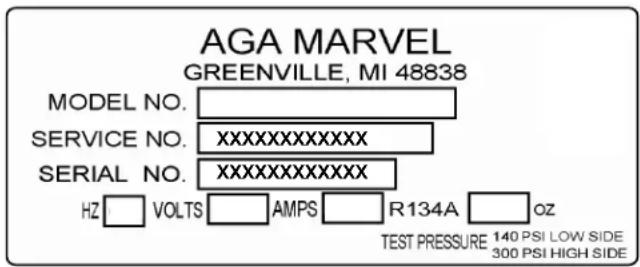
Figure 1

CAUTION
Help Prevent Tragedies
Child entrapment and suffocation are not problems of the past. Junked or abandoned refrigerators are still dangerous
- even if they sit out for "just a few days".
If you are getting rid of your old refrigerator, please follow the instructions below to help prevent accidents.
Before you throw away your old refrigerator or freezer:
• Take off the doors or remove the drawers.
- Leave the shelves in place so children may not easily climb inside.
Select Location
The proper location will ensure peak performance of your appliance. We recommend a location where the unit will be out of direct sunlight and away from heat sources. To ensure your product performs to specifications, the recommended installation location temperature range is from 55 to 100°F (13 to 38°C).
Cabinet Clearance
Ventilation is required from the bottom front of the appliance. Keep this area open and clear of any obstructions. Adjacent cabinets and counter top can be installed around the appliance as long as the front grille remains unobstructed. All Marvel Professional models with articulated hinges are intended for built-in applications only.

WARNING
An optional stacking kit, shown in Table "A", is required to stack products. Failure to use a stacking kit could result in personal injury. Contact your dealer or Aga Marvel customer service at 800-223-3900 to order.
| Color Door Swing Kit Part Number | |
| Stainless Steel Left Hand 42249095 | |
| Stainless Steel Right Hand 42249096 | |
| Black Left Hand 42249097 | |
| Black Right Hand 42249098 | |
| White Left Hand 42249099 | |
| White Right Hand 42249100 | |
Table A
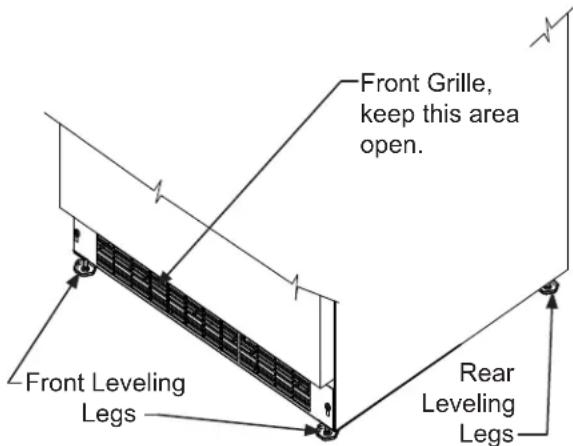
Figure 2
Leveling Legs
Adjustable legs at the front and rear corners of the appliance should be set so the unit is firmly positioned on the floor and level from side to side and front to back. The overall height of your Marvel appliance may be adjusted higher (by turning the leveling leg out, CCW) and lower (by turning the leveling leg in, CW) dimensions as shown in Table "B".
To adjust the leveling legs, place the appliance on a solid surface and protect the floor beneath the legs to avoid scratching the floor. With the assistance of another person, lean the appliance back to access the front leveling legs. Raise or lower the legs to the required dimension by turning the legs. Repeat this process for the rear by tilting the appliance forward using caution. On a level surface check the appliance for levelness and adjust accordingly.
The front grille screws may be loosened and the grille adjusted to the desired height. When adjustment is complete tighten the two front grille screws. (See Figure 3).

CAUTION
Front Grille
Do not obstruct the front grille. The openings within the front grille allow air to flow through the condenser heat exchanger. Restrictions to this air flow will result in increased energy usage and loss of cooling capacity. For this reason it is important this area to not be obstructed and the grille openings kept clean. AGA MARVEL does not recommend the use of a custom made grille as air flow may be restricted. (See Figure 2).
| Model Door Style | Minimum Height | Maximum Height | |
| MP(15)(24)* (S) or (G) | 33 3⁄4"(85.7 cm) | 34 3⁄4"(88.3 cm) | |
| MP(15)(24)* (F) | 34"(86.4 cm) | 35"(88.9 cm) | |
Table B
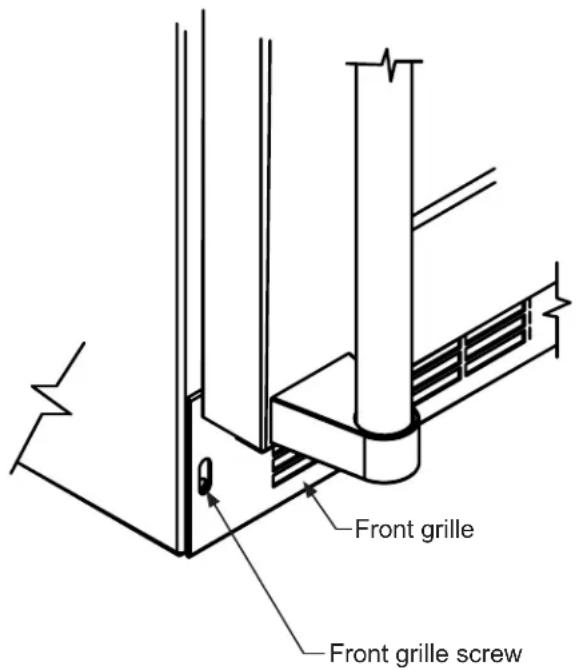
Figure 3

WARNING
Electrical Shock Hazard
- Do not use an extension cord with this appliance. They can be hazardous and can degrade product performance.
- This appliance should not, under any circumstances, be installed to an un-grounded electrical supply.
- Do not remove the grounding prong from the power cord.
- Do not use an adapter.
- Do not splash or spray water from a hose on the appliance. Doing so may cause an electrical shock, which may result in severe injury or death.
Electrical Connection
A grounded 115 volt, 15 amp dedicated circuit is required.
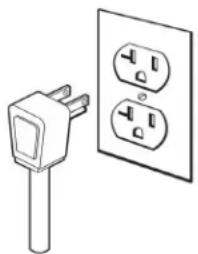
This product is factory equipped with a power supply cord that has a three-pronged, grounded plug. It must be plugged into a mating grounding type receptacle in accordance with the National Electrical Code and applicable local codes and ordinances (see Figure 4). If the circuit does not have a grounding type receptacle, it is the responsibility and obligation of the customer to provide the proper power supply. The third ground prong should not, under any circumstances, be cut or removed.
natural_image
Simple line drawing of an electrical plug and two separate socket (no text or symbols)Figure 4
NOTE
Ground Fault Circuit Interrupters (GFCI) are prone to nuisance tripping which will cause the appliance to shut down. GFCI's are generally not used on circuits with power equipment that must run unattended for long periods of time, unless required to meet local building codes and ordinances.
| ROUGH-IN OPENING DIMENSIONS CABINET DIMENSIONS | |||||||||
| MODEL | "A" | "B" | "C" | "D" | "E" | "F" | "G" | "H" | "J" |
| MP15BCG | 15"(38.1 cm) | **34" to 35"(86.4 to 88.9 cm) | * | 1478" (37.8 cm) | 3334" to 3434" (85.7 to 88.3 cm) | 232332" (60.2 cm) | 26732" (66.6 cm) | 371332" (95 cm) | 17116" (44.3 cm) |
| MP15BCF | 15"(38.1 cm) | **34 12" to 3512" (87 to 89.5 cm) | * | 1478" (37.8 cm) | 34" to 35"(86.4 to 88.9 cm) | 2278" (58.1 cm) | - | 712" (95.2 cm) | 1418" (35.9 cm) |
| MP24**S | 24"(61 cm) | **34" to 35"(86.4 to 88.9 cm) | * | 2318" (60.7 cm) | 3314" to 3434" (85.7 to 88.3 cm) | 232332" (60.2 cm) | 26732" (66.6 cm) | 461332" (117.9 cm) | 26116" (67.2 cm) |
| MP24**G | 24"(61 cm) | **34" to 35"(86.4 to 88.9 cm) | * | 2318" (60.7 cm) | 3314" to 3434" (85.7 to 88.3 cm) | 23 2332" (60.2 cm) | 26732" (66.6 cm) | 461332" (117.9 cm) | 26116" (67.2 cm) |
| MP24**F | 24"(61 cm) | **34 14" to 3514" (87 to 89.5 cm) | * | 2318" (60.7 cm) | 34" to 35"(86.4 to 88.9 cm) | 2278" (58.1 cm) | - | 4612" (118.1 cm) | 2318" (58.7 cm) |

| DOOR STYLE |
| (S) Solid Door |
| (G) Glass Frame Door |
| (F) Frame Glass Overlay Door (no handle) |
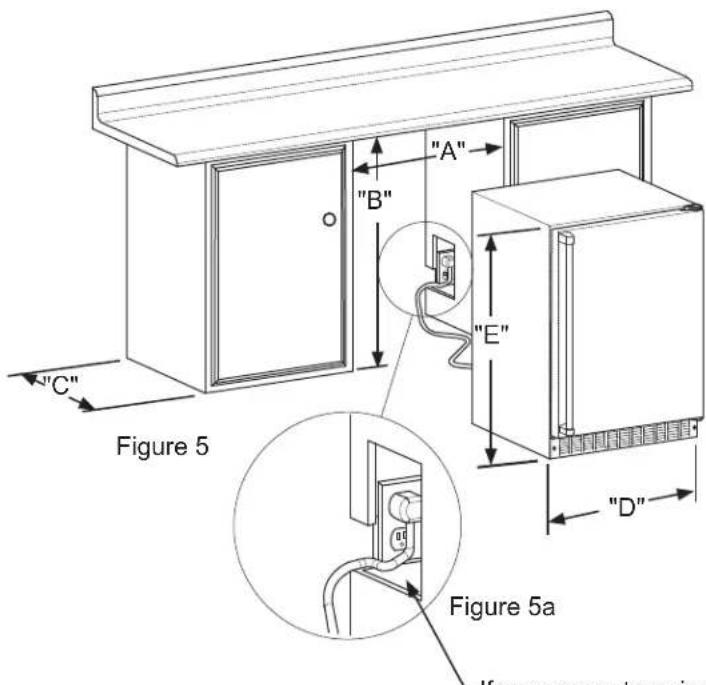
-If necessary to gain clearance inside the rough-in opening a hole can be cut through the adjacent cabinet and the power cord routed through this hole to a power outlet. Another way to increase the available opening depth is to recess the power outlet into the rear wall 1" (2.5 cm) to gain the thickness of the power cord plug.
| PRODUCT DATA | ||
| MODEL | ELECTRICAL REQUIREMENTS # | PRODUCT WEIGHT |
| MP15BCG 115V | /60Hz/15A | 105 lbs(47.6 kg) |
| MP15BCF 115V | /60Hz/15A | 105 lbs(47.6 kg) |
| MP24**S 115V | /60Hz/15A | 140 lbs(63.6 kg) |
| MP24**G 115V | /60Hz/15A | 140 lbs(63.6 kg) |
| MP24**F 115V | /60Hz/15A | 140 lbs(63.6 kg) |
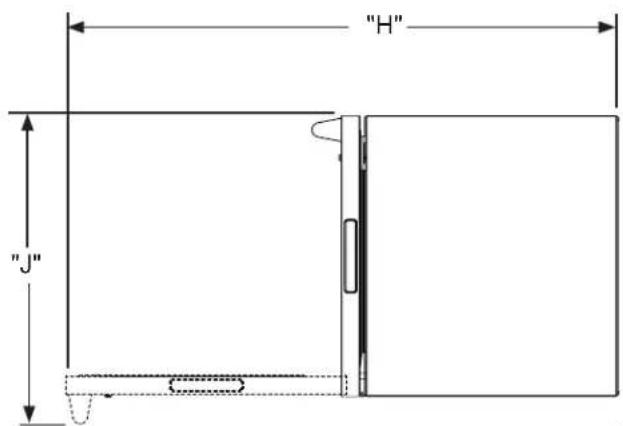
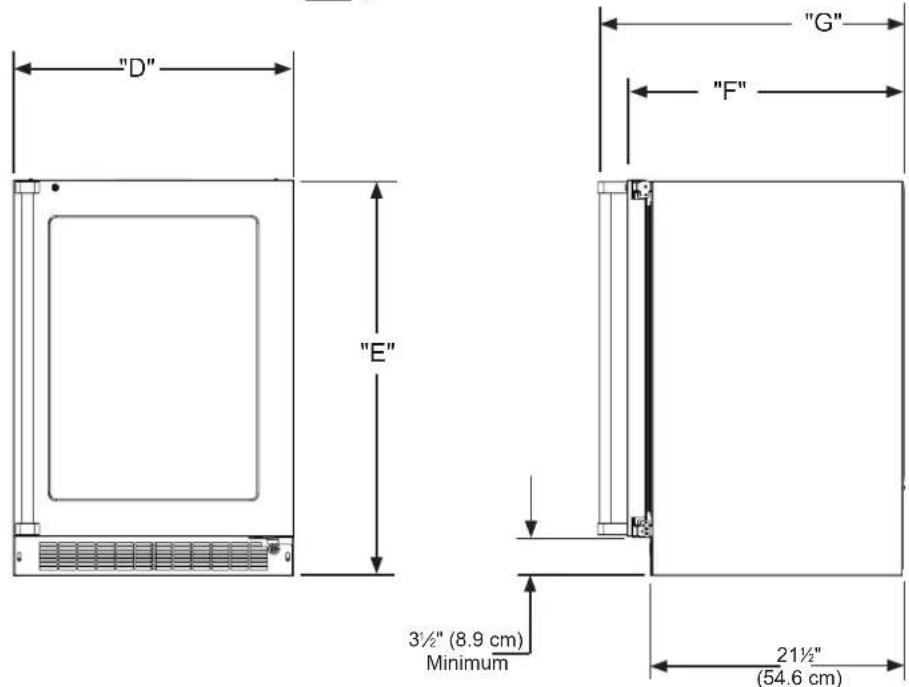
Figure 6
* Depth dimension of rough-in opening may vary depending on each individual installation. To recess entire door "F" dimension plus 1" (2.5 cm) for thickness of power cord plug is required.
** Minimum rough-in opening required is to be larger than the adjusted height of the cabinet.
# A grounded 15 amp dedicated circuit is required. Follow all local building codes when installing electrical and appliance.
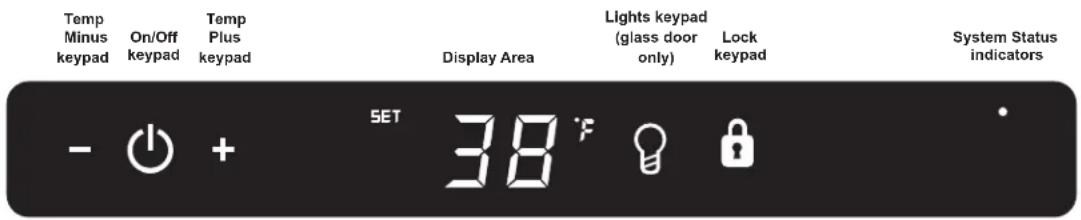
Figure 7 Electronic single zone control

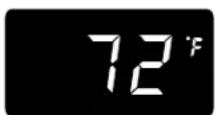
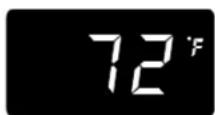
To wake the display press any keypad. A confirm tone will sound, and the current storage compartment temperature will be displayed.
Starting your appliance:
Plug the appliance power cord into a 115 volt wall outlet. Your appliance is shipped from the factory in the "On" position and will begin start-up of cooling as soon as power is supplied. If the appliance does not start, confirm that the wall outlet has power, and that the control is in the "On" position, (See "Turning your appliance On and Off" below).
The control display is covered with a clear plastic film. This film may be removed by carefully lifting the film at a corner.
On initial power up, the control display will indicate a "Power Failure" alarm. This is a normal condition as the appliance was powered-up at the factory for quality inspection and then removed from power. A momentary press of the "On/Off" keypad will reset this alarm condition. (See Alarms section on page 9).
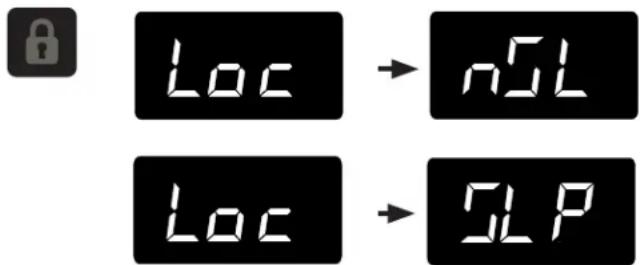
The sleep mode can be disabled if you prefer to have the display on continuously. Press and hold the "Lock" keypad until the display goes past "Loc" and reads "nSL". To enable the sleep mode, repeat the instruction, again going past "Loc" until the display reads "SLP".


Sleep mode:
If no keypads are pressed for 60 seconds, the display will enter sleep mode to conserve power. The control panel will go dark with the exception of the system status "OK" indicator which will remain enabled. Alarm conditions will wake the display, (see alarms on page 9).
To make the following changes to the control settings (turning the appliance ON/OFF, adjusting the temperature, changing the interior lights, and activating vacation mode), the control must be awake.
Turning your appliance ON and OFF:
If the appliance is "On", (and out of sleep mode) the temperature will be shown in the display area of the control. To turn the appliance "Off", press and hold the "On/Off" keypad for 4-seconds. "OFF" will now be displayed on the control.

To turn the appliance "On", press and hold the "On/Off" keypad for 4-seconds.




Adjusting the temperature:
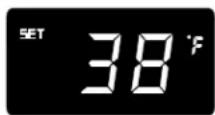
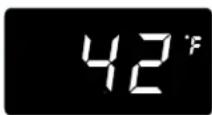
To set or check the set-point temperature (with the control out of sleep mode), press the "-" or "+" keypads. "SET" will be indicated on the user interface panel and the current set-point temperature will display and flash. Subsequent presses of the "-" or "+" keypads will adjust the temperature colder or warmer respectively. When you have reached your desired set-point temperature, press the "On/Off" keypad to accept, or do nothing and the "Set" mode will time-out in 10-seconds accepting the displayed temperature as the new set-point.
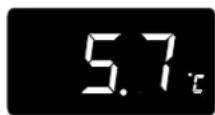
The available set-point temperature range for your appliance is 34^ F ( 1.2^ C) to 42^ F ( 5.7^ C). If you attempt to adjust the temperature outside of this range you will receive an audible notification.
When initially loading your product with warm contents, it may take up to 48-hours for the storage compartment temperature to stabilize.
When making temperature set-point changes, it may take up to 24-hours for the stored contents to stabilize at your new set-point temperature.
Factors that affect the storage compartment stabilized temperature:
• Changes to temperature setting.
• Room temperature changes.
• Temperature of stored contents.
- Loading warm contents.
- Cold content load will delay the change to a warmer set-point temperature.
- Warm content load will delay the change to a colder set-point temperature.
• Usage, (number and duration of the door openings).
- Use of the storage compartment display lighting, (glass door product only).
- Installation of the appliance in direct sunlight or next to a heat source.


Interior display lighting: (Glass door models only) Your appliance is equipped with a dual light level display lighting feature. With the control out of sleep mode press the "Light" keypad once to activate the interior lighting display feature at full illumination. A confirmation tone will sound, and the light bulb "Icon" will illuminate. Pressing the "Light" keypad a 2nd time will dim the lighting to 50%. A 3rd press will deactivate the display lighting feature. The display lighting will automatically deactivate after 4-hours.
Temperature mode:
The temperature mode is preset from the factory in Fahrenheit (°F) but you have the option to change it to Centigrade (°C). To change the mode, press and hold the "-" keypad, while pressing the "+" keypad, then release the "-" keypad. The temperature will now be displayed in Centigrade (°C). Repeat the procedure to change the temperature mode back to Fahrenheit (°F).





Control lock:
The control panel can be locked to avoid unintentional changes. To lock the control, press and hold the "Lock" keypad until the display reads "Loc" then release your finger from the keypad. The lock icon will flash 3-times and then continuously illuminate. When the control panel is locked, only the Lock keypad, System Status OK indicator, and the Alarm indicator are active. To un-lock the control panel, repeat this instruction until the display reads "nLc".
Alarms:
The control will alert you to conditions that could adversely affect the performance of the appliance.
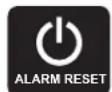
- Door ajar - If the door is open, or not closed properly, for more than 5-minutes the System Status OK indicator will turn-off, the "Door Ajar" indicator will flash, and a tone will sound every 60 seconds. Additionally, an "ALARM RESET" indicator will be displayed below the "On/Off" keypad. This alarm condition can be reset by closing the door or momentarily pressing the "On/Off" keypad, (i.e.-if you are cleaning the storage compartment, etc.). The alarm will recur in 5-minutes if the alarm condition persists.

- Power failure - If power to the appliance is interrupted the System Status indicator will turn-off and the "Power Failure" indicator will flash. Additionally, an "ALARM RESET" indicator will be displayed below the "On/Off" keypad. No audible tone will sound. This alarm condition can be reset by momentarily pressing the "On/Off" keypad. If this alarm occurs, it is recommended that you check the condition of any perishables, even if the appliance is operating normally and the temperature has recovered, as prolonged power outages could result in excessive temperature excursions which may spoil perishables.
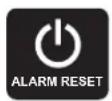
- Temperature alarm - If the storage compartment temperature exceeds 10°F from set-point for more than a 1-hour duration, the System Status indicator will turn off, the "Temp" indicator will flash, and an audible tone will sound every 60-seconds. Additionally, an "ALARM RESET" indicator will be displayed below the "On/Off" keypad. This alarm condition can be reset by momentarily pressing the "On/Off" keypad. If this alarm occurs it is recommended that you check the condition of your stored contents, even though the appliance is operating normally and the temperature has recovered, as prolonged temperature excursions could spoil perishables.
NOTE
Multiple alarms are possible, i.e.- "Door Ajar" for a prolonged period may trigger a "Temp" alarm, in which case both "Door Ajar" and "Temp" indicators will activate.
Vacation mode:
This operating mode can be used to save energy during high cost energy periods, or when you won't be using your appliance for an extended period of time by disabling the lights, alarm tones, and keypad entry tones. Vacation mode also serves as a Sabbath mode, disabling functions and its controls in accordance with the weekly Sabbath and religious holidays observed within the Orthodox Jewish community. When used as Sabbath mode, you may open or close the door at any time to access contents without concern of directly turning on or off any lights, digital readouts, solenoids, fans, valves, compressor, icons, tones, or alarms.
When activated, the display, alarm indicators and tones, keypad touch tones, interior lights, and all options are disabled. All keypad functions are disabled, with the exception of the "On/Off" keypad which is required to exit Vacation-mode. Storage compartment temperatures are monitored and controlled at the settings prior to entering Vacation mode.
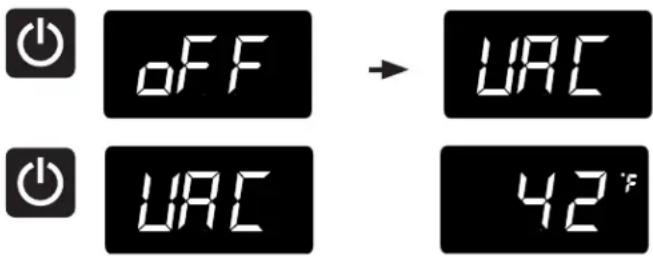
To enter Vacation Mode (with the control out of sleep mode), press and hold the "On/Off" keypad until the display goes past "OFF" and reads "VAC". The display will flash "VAC" 3-times to acknowledge your request, then will display "VAC" continuously until Vacation mode is exited. A power outage will not exit Vacation mode, exiting can only be accomplished manually. To exit Vacation mode and return to normal operation, press and hold the "On/Off" keypad until the control displays the temperature.
If you purchased an overlay panel model, your unit is equipped with articulated hinges to allow fully integrated built-in installations. Custom panel thicknesses of 58" (15 mm) and 34" (18 mm) are accommodated.

CAUTION
It is important to use the factory provided grille that came with the product to assure proper air flow is maintained through the condenser. The use of a custom grille is not recommended and will void the warranty.

WARNING
Overlay panel models are designed for use with built-in installations only. Use in freestanding installations could result in personal injury.
Step 1: Removing the Door
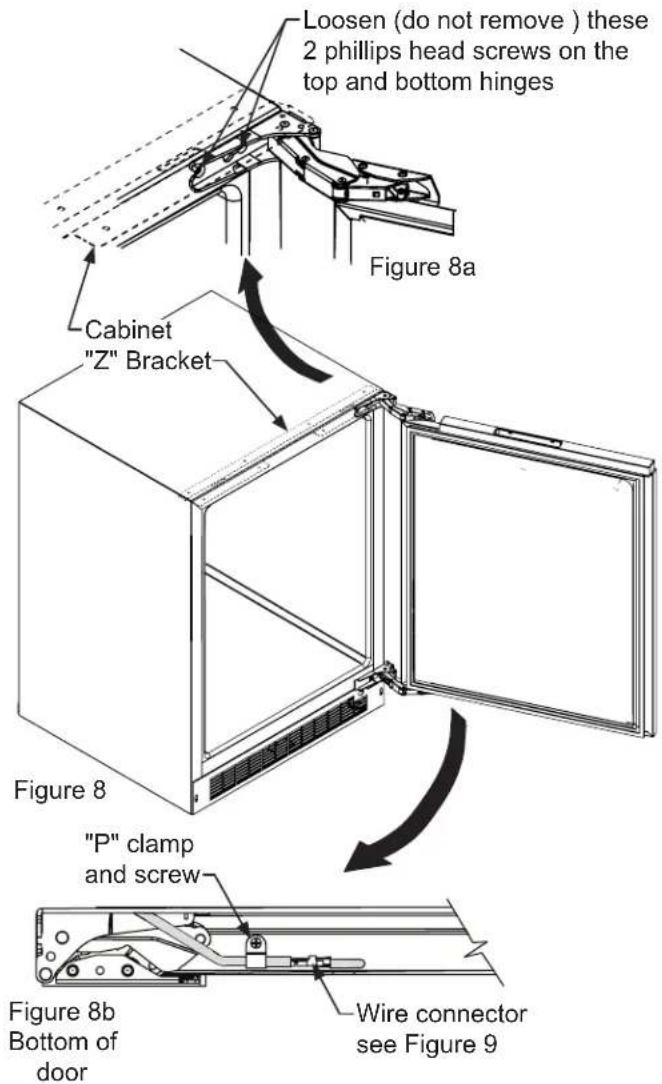
With a phillips screwdriver remove the screw and "P" clamp from the bottom of the door near the hinge. See Figure 8b.
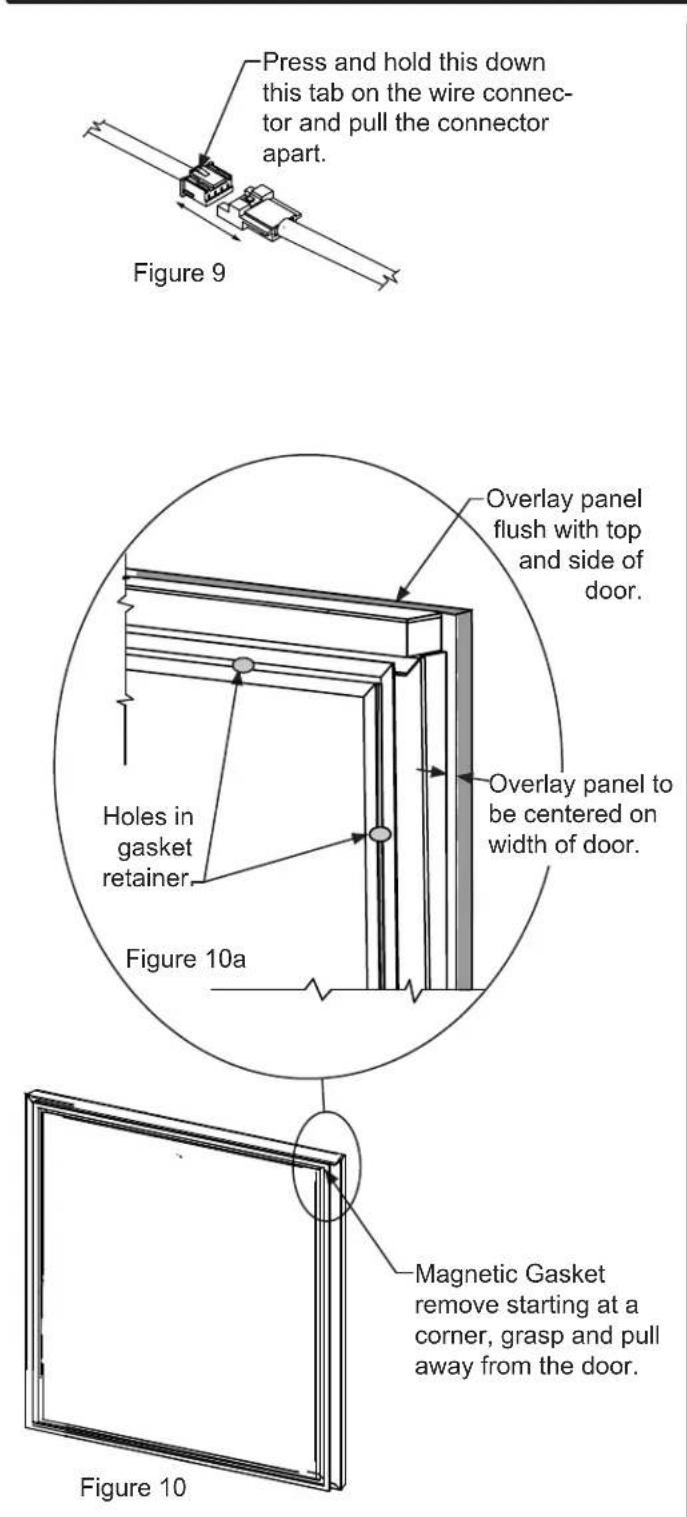
Disconnect the door wire harness by pressing and holding down the locking tab on the wire connector and pulling the connector apart. See Figure 9.
Open the door and loosen the screws holding the hinges to the cabinet (2 at the top and 2 at the bottom hinge). Do not remove the screws but loosen them enough so the hinges can be slipped off of the screws when sliding the door to the side.

WARNING
The articulated hinges have many pinch points. Carefully close / collapse the hinges as soon as the door is removed from the cabinet.
With a helper, and being careful not to scratch the cabinet or the door, slide the door to the side about 12 inch and remove the hinges and door from the unit.

WARNING
Use extreme caution with the articulated hinges. The hinge is self closing and many pinch points exist prior to built-in installation. Do not remove the cabinet "Z" bracket from the top of the cabinet.
Step 2: Remove the door gasket
With the door laying on a flat surface and starting at a corner of the door remove the magnetic door gasket from the interior side of the door, see Figure 10. Set the gasket aside on a flat surface.
There are 10 holes in the gasket retainer extrusions, (3 on each side and 2 at the top and bottom which are used to fasten the panel to the front of the door. The screws are provided in the literature pack along with the door lock, which is provided on certain models.
Step 3: Cut and drill the overlay panel
Depending on your model cut the overlay door panel to the dimensions shown in Figures 11 to 18. The window cut out is for glass door models only. If your appliance has a lock also drill the lock hole in the panel, see Figure 19.
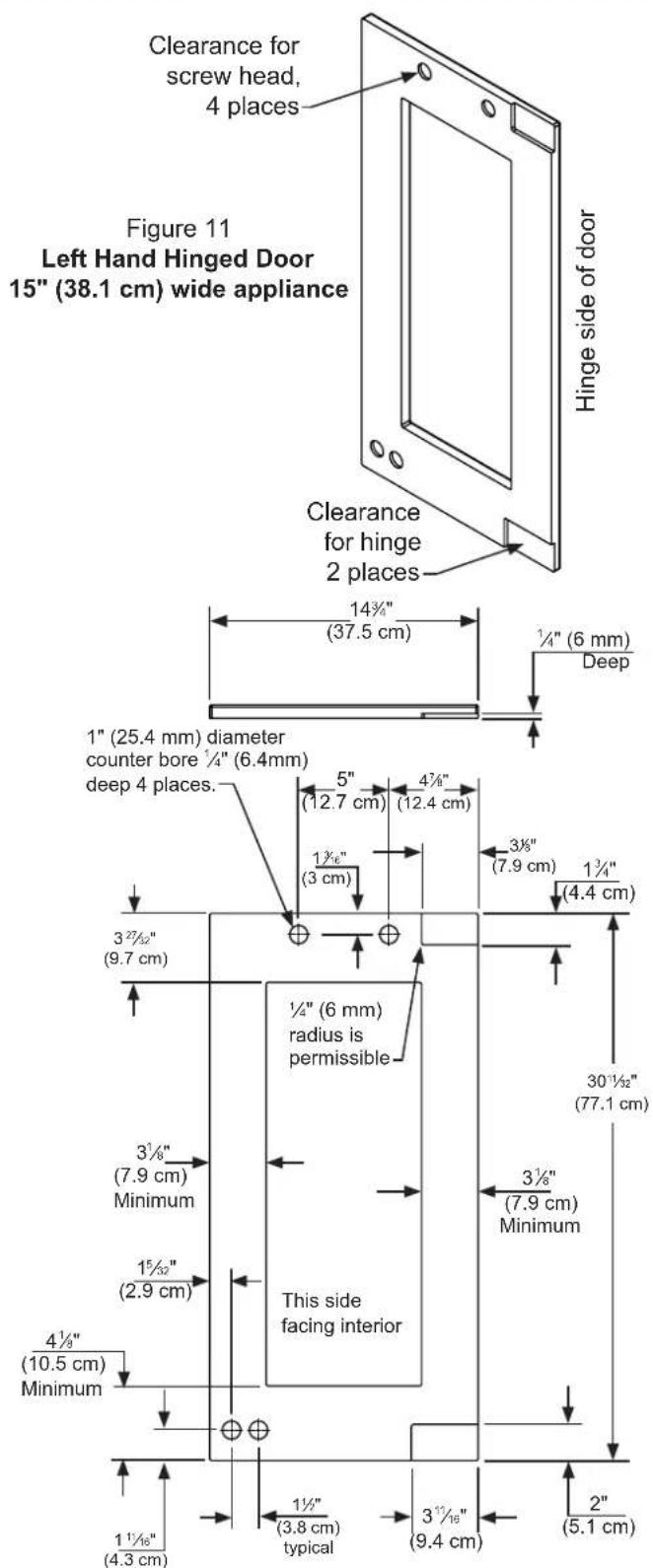
Figure 12
Left Hand Hinged Door
15" (38.1 cm) Wide Appliance
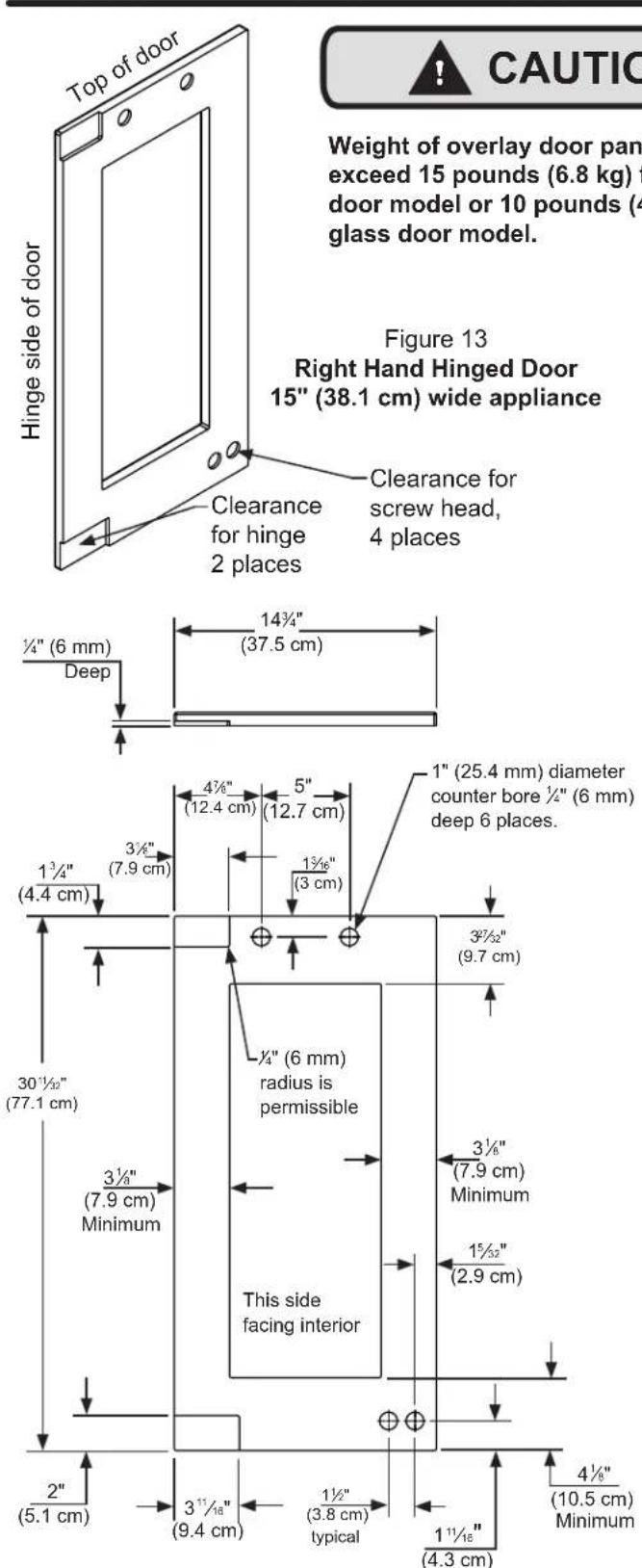
Figure 14 Right Hand Hinged Door 15" (38.1 cm) wide appliance
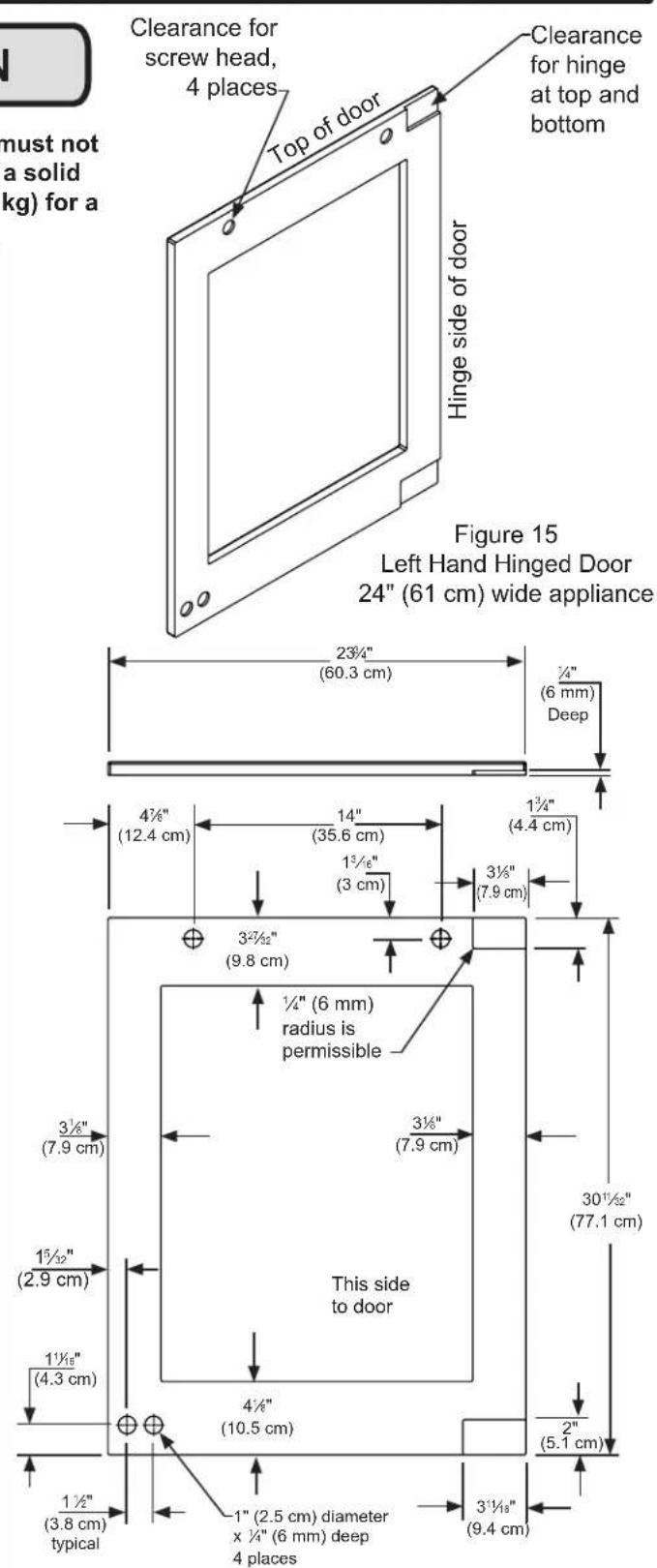
Figure 16 Left Hand Hinged Door 24" (61 cm) wide appliance
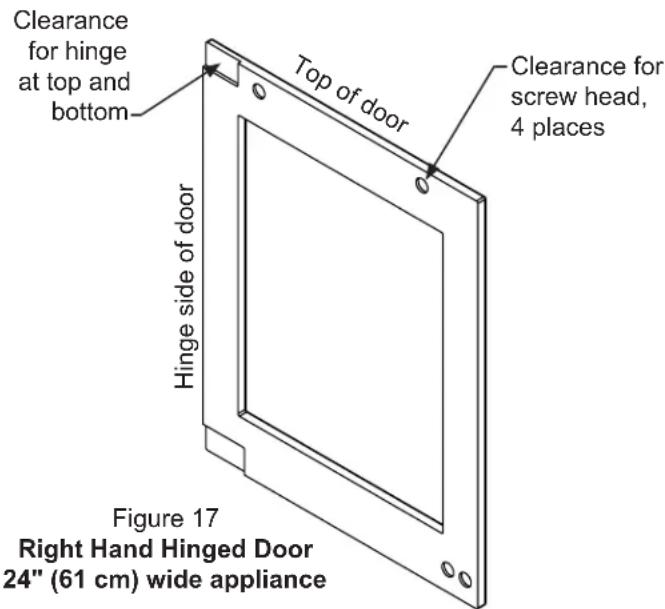
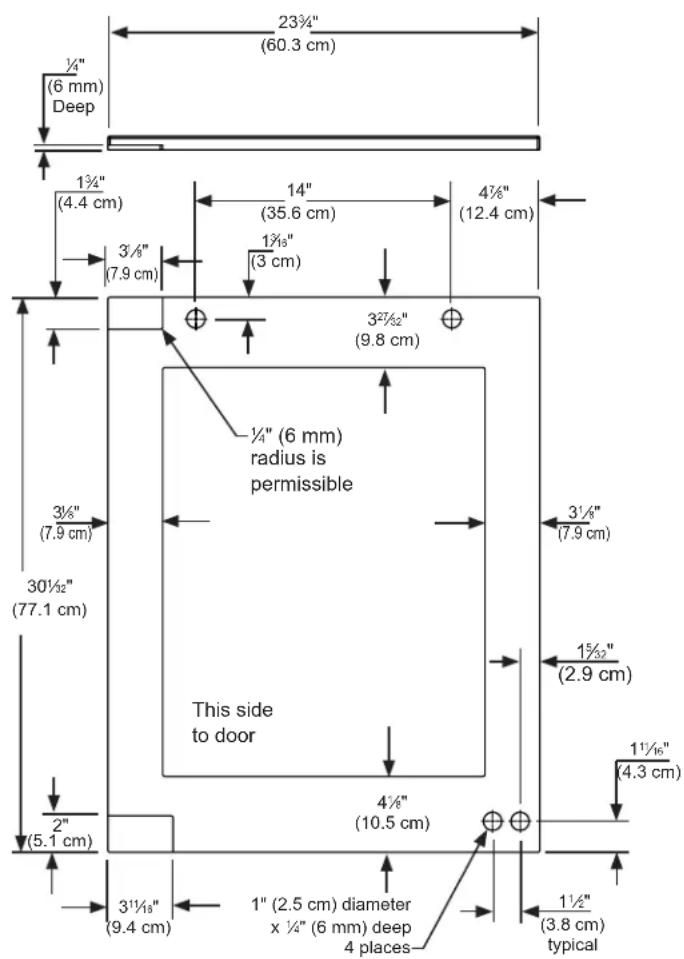
Figure 18 Right Hand Hinged Door 24" (61 cm) wide appliance

CAUTION
Weight of overlay door panel must not exceed 15 pounds (6.8 kg) for a solid door model or 10 pounds (4.5 kg) for a glass door model.
| Material Type #10 Wood Screw | |
| Hardwood | 18'' (3.2 mm) Diameter. Pilot Hole |
| Softwood | 764 (2.8 mm) Diameter. Pilot Hole |
Table C
Step 4: Assemble the panel to the door
The preferred method of attaching the panel to the door is to clamp the panel to the door so it cannot move while drilling the screw pilot holes. Use bar clamps or "C" clamps with pads on the clamping surfaces that will not mar the panel or the door. The custom overlay panel should be flush with the top of the door and centered along the width of the door. See Figure 10a. Drill holes through the gasket extrusion using the 10 holes as pilot holes. Use the drill size from the chart in Table "C", being careful not to drill through the front surface of the panel, drill no deeper than 12 " (12.7 mm) deep. If the overlay panel is thinner than 58 " (16 mm) thick shorter screws will have to be obtained. Fasten the panel to the door with the 10 screws provided in the literature pack. (See Figure 19a). Remove the clamps and replace the gasket in the gasket extrusion channels of the door. Some force may be required to seat the gasket into the channels. Be sure the gasket corners are seated properly.
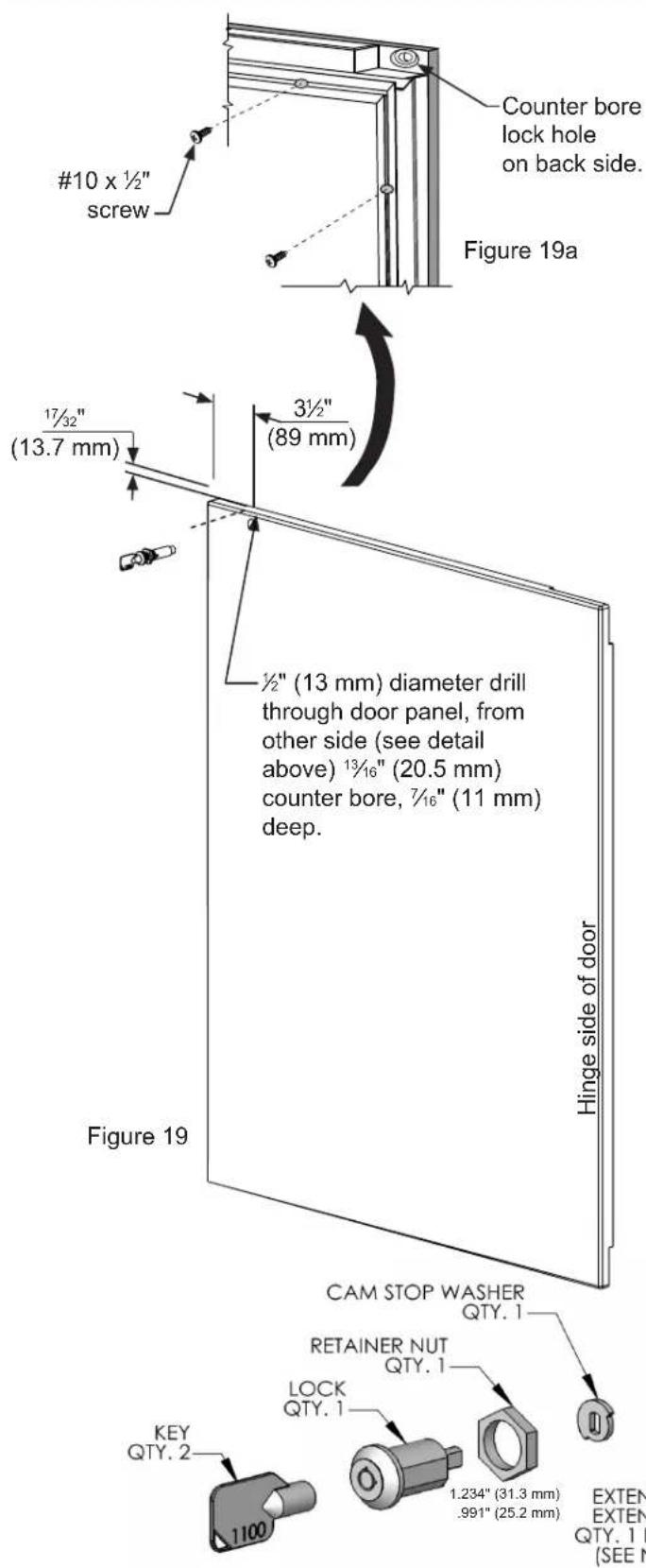
Step 5: Assemble lock parts
Two (2) lock extensions are provided with the lock. Use the longer extension for 34 " thick overlay panels and the shorter one for 58 " thick overlay panels. Assemble the lock extension, cam stop washer, spring washer, and set screw to the lock as shown in Figure 20 and 21.
Install this lock assembly into the lock hole in the overlay panel and secure with the retaining nut on the back side with a 15 mm socket and ratchet. Make sure the key slot in the front of the lock is vertical.
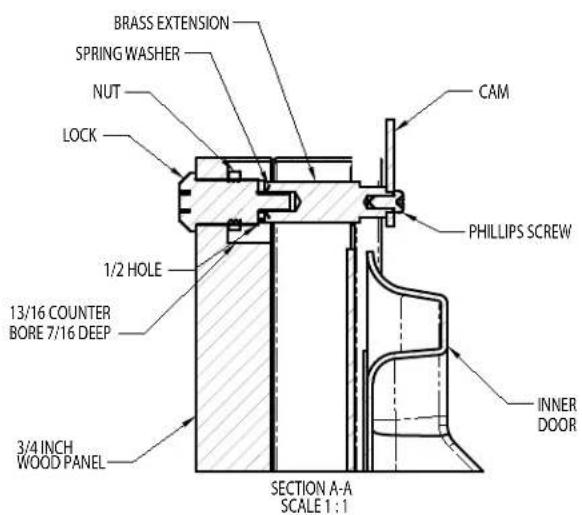
Figure 20
Step 6: Install lock cam
Attach the lock cam to the back of the lock assembly with the phillips head screw provided. Orient the lock cam vertically when installing on the lock.
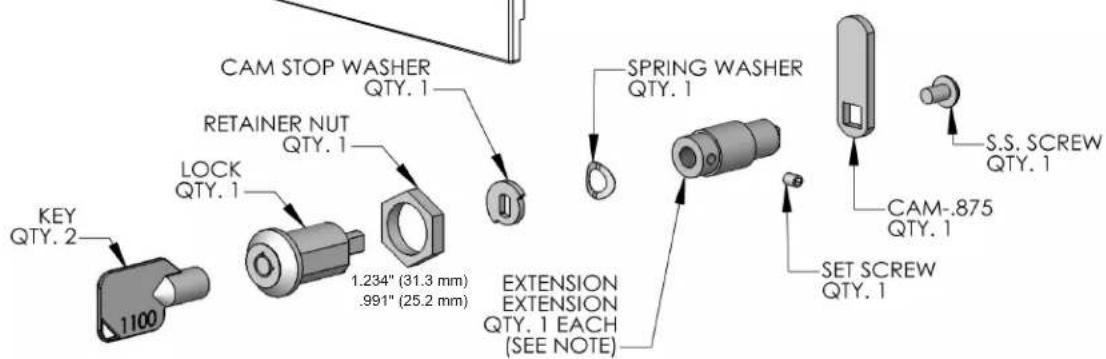
Figure 21
Step 7: Install the door
Carefully open the top and bottom hinges on the door being careful as there are many pinch points. Place the hinges over the 4 screws in the cabinet, 2 at the top and 2 at the bottom and slide the door into position. Tighten the 4 hinge screws with a phillips screwdriver. (See Figures 8 and 8a). Place wire harness from the grille and mount to the bottom of the door with the screw and "P" clamp removed in step 1. (See Figure 8b). Reconnect the wire harness, (See Figure 9).
Step 8: Secure the cabinet
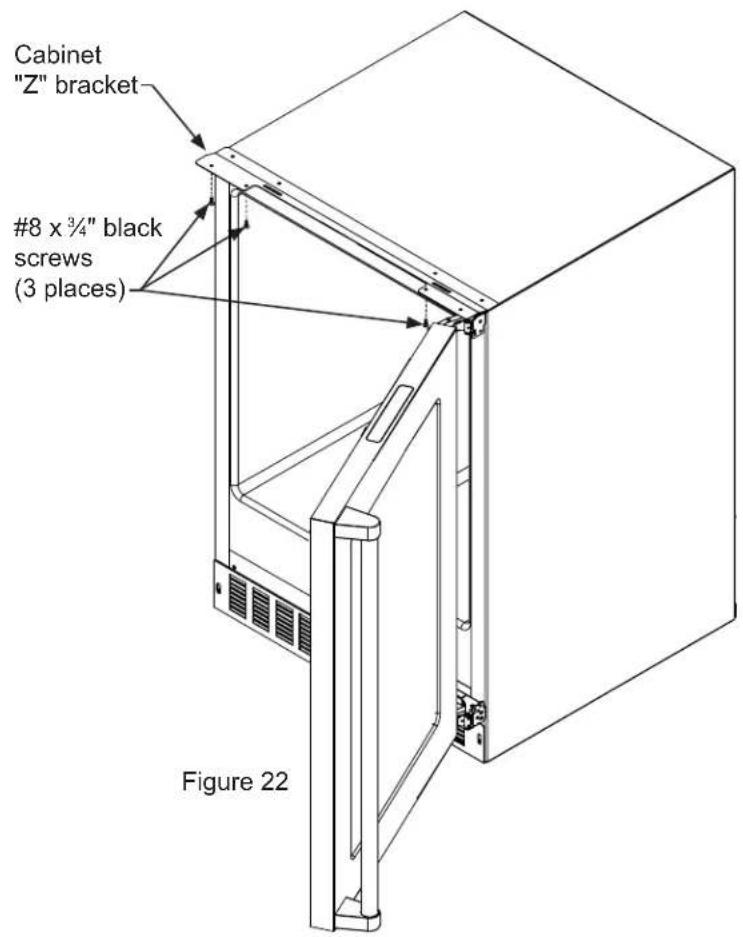
Use the #8 x 3/4" black screws from the literature pack to secure the counter top to the cabinet top through the holes in the cabinet "Z" bracket.
Loading Tips and Suggestions
Your appliance is equipped with a cantilever shelf system which provides maximum adjust ability and customizing of the shelving arrangements listed below.
Beverage Center:
15" (38.1 cm) Wide Models:
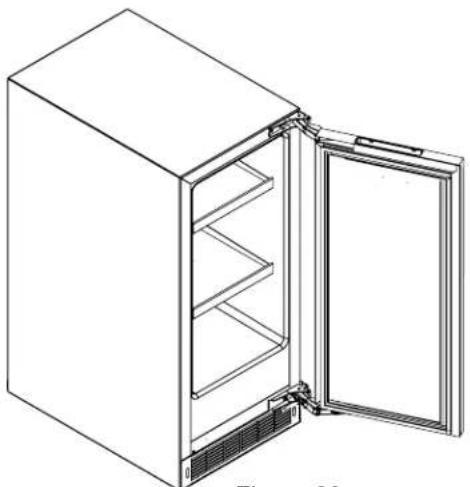
Shown with a glass door. Figure 23.
(2) frame and flat glass shelf. (See Figure 26).
natural_image
Line drawing of an open refrigerator with internal compartments and ventilation slots (no text or symbols)Figure 24
natural_image
Line drawing of a refrigerator with an open door and side shelves (no text or symbols)Figure 23
Refrigerator:
24" (61 cm) Wide Models:
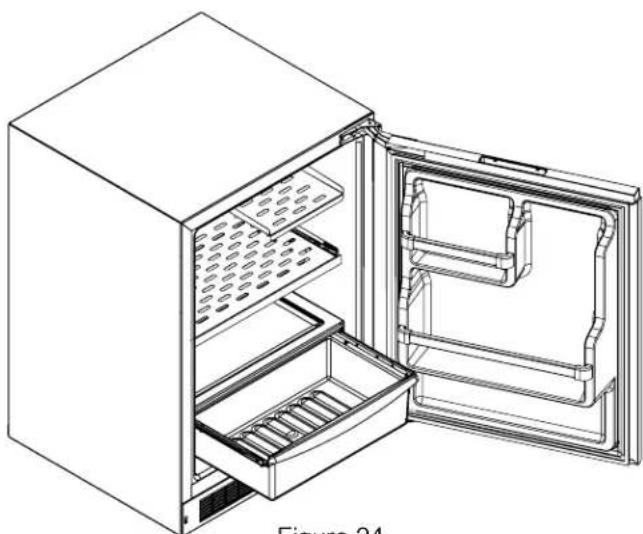
Shown with a solid door with door racks. Figure 24.
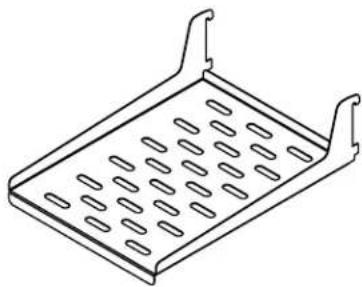
(1) half width metal cantilever shelf (See Figure 29).
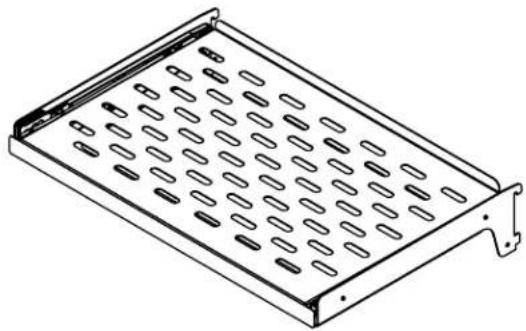
(1) full width slide out cantilever metal shelf. (See Figure 28).
(1) frame and flat glass crisper cover.
(1) roll-out crisper pan.
(1) full width door storage rack.
(1) half width door storage rack.
Beverage Refrigerator:
24" (61 cm) Wide Models:
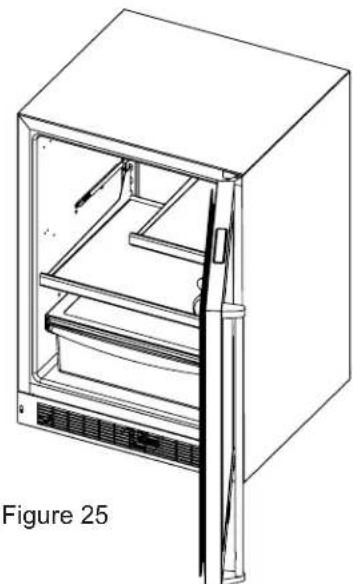
Shown with a glass door. Figure 25.
(1) half width flat glass cantilever shelf. (See Figure 26).
(1) wine cutout and flat glass cantilever shelf. (See Figure 27).
(1) frame and flat glass crisper cover.
(1) roll-out crisper pan
natural_image
Line drawing of a refrigerator with open door and side panel (no text or symbols)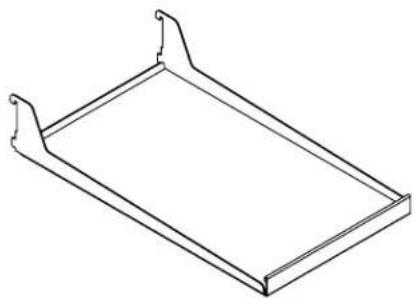
natural_image
Line drawing of a rectangular metal tray or holder with two side handles (no text or symbols)Figure 26 Frame and flat glass shelf with trim
natural_image
Isometric line drawing of a rectangular metal tray with evenly spaced oval cutouts (no text or symbols)Figure 28 Slide out metal cantilever shelf
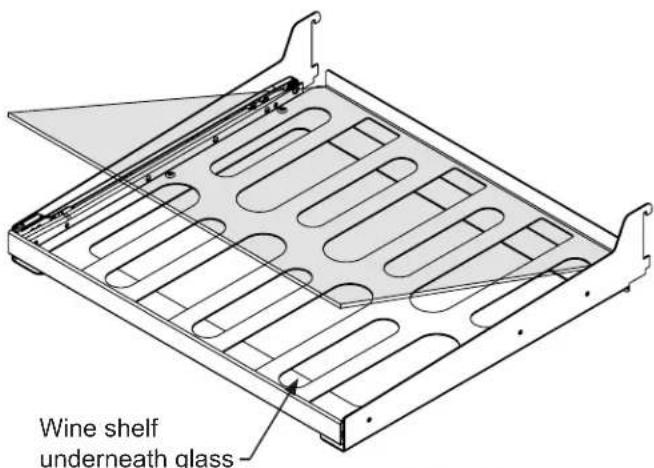
Figure 27 Wine cutout and flat glass shelf with vibration dampening mat, the glass can be removed for wine storage.
natural_image
Isometric line drawing of a rectangular tray with perforated inner compartments and two side handles (no text or symbols)Figure 29 half width metal cantilever shelf
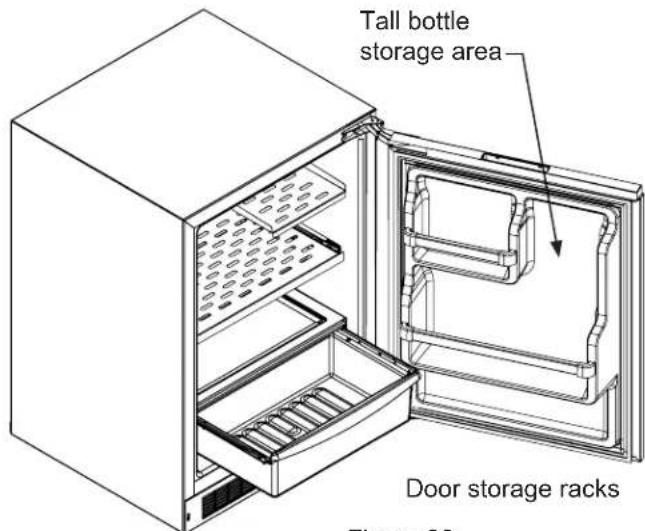
Figure 30
To remove the crisper :
Pull out until it stops. Lift up on the front of the pan, and remove it from the frame.

CAUTION
Make sure your cantilever shelf is secure on the shelf supports by pressing down on the shelf before loading the shelf.
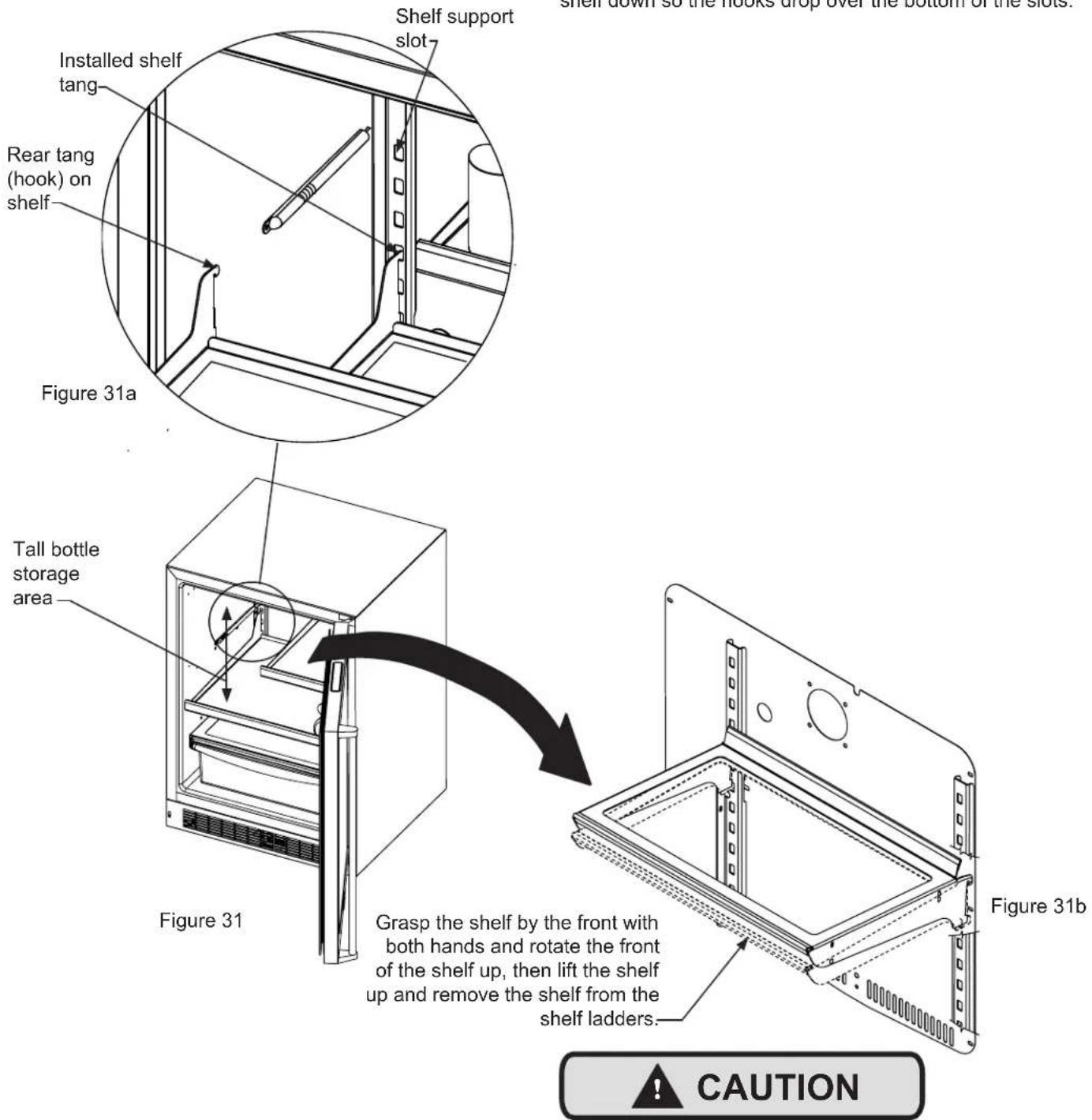
To Add or Remove a Shelf
Remove stored product from the shelf. Do not try to remove a loaded shelf from the appliance. Grasp the shelf front with both hands, rotate the front upward and lift out. (See Figure 31b). To install a shelf insert the shelf in the appliance and insert the hooks into the shelf support slots and drop the shelf down so the hooks drop over the bottom of the slots.
Never try to move a loaded shelf, remove everything from the shelf before moving. Use both hands when moving a shelf.
Front Grille
Be sure that nothing obstructs the required air flow openings in front of the cabinet. At least once or twice a year, brush or vacuum lint and dirt from the front grille area (see page 4).

CAUTION
SHOCK HAZARD: Disconnect electrical power from the appliance before cleaning with soap and water.
Cabinet
The painted cabinet can be washed with either a mild soap and water and thoroughly rinsed with clear water. NEVER use abrasive scouring cleaners.
Interior
Wash interior compartment with mild soap and water. Do NOT use an abrasive cleaner, solvent, polish cleaner or undiluted detergent.
Care of Appliance
- Avoid leaning on the door, you may bend the door hinges or tip the appliance.
- Exercise caution when sweeping, vacuuming or mopping near the front of the appliance. Damage to the grille can occur.
- Periodically clean the interior of the appliance as needed.
- Periodically check and/or clean the front grille as needed.
In the Event of a Power Failure
If a power failure occurs, try to correct it as soon as possible. Minimize the number of door openings while the power is off so as not to adversely affect the appliance's temperature.
Light assembly replacement
All models use an LED to illuminate the interior of the appliance. This component is very reliable, but should it fail, contact a qualified service technician for replacement of the LED.
The following suggestions will minimize the cost of operating your refrigeration appliance.
- Do not install your appliance next to a hot appliance (cooker, dishwasher, etc.), heating air duct, or other heat sources.
- Install product out of direct sunlight.
- Ensure the front grille vents at front of appliance beneath door are not obstructed and kept clean to allow ventilation for the refrigeration system to expel heat.
- Plug your appliance into a dedicated power circuit. (Not shared with other appliances).
- When initially loading your new product, or whenever large quantities of warm contents are placed within refrigerated storage compartment, minimize door openings for the next 12 hours to allow contents to pull down to compartment set temperature.
- Maintaining a relatively full storage compartment will require less appliance run time than an empty compartment.
- Ensure door closing is not obstructed by contents stored in your appliance.
- Allow hot items to reach room temperature before placing in product.
- Minimize door openings and duration of door openings.
- Use the warmest temperature control set temperature that meets your personal preference and provides the proper storage for your stored contents.
- When on vacation or away from home for extended periods, set the appliance to warmest acceptable temperature for the stored contents.
- Set the control to the "off" position if cleaning the appliance requires the door to be open for an extended period of time.
- For wine storage products:
When serving temperatures are not required, return the compartment(s) set temperature to the ideal red and white wine long term storage temperature of 13^ C / 55^ F.
If Service is Required:
- If the product is within the first year warranty period please contact your dealer or call AGA MARVEL Customer Service at 800.223.3900 for directions on how to obtain warranty coverage in your area.
- If the product is outside the first year warranty period, AGA MARVEL Customer Service can provide recommendations of service centers in your area. A listing of authorized service centers is also available at www.agamarvel.com under the service and support section.
- In all correspondence regarding service, be sure to give the service number, serial number, and proof of purchase.
- Try to have information or description of nature of the problem, how long the appliance has been running, the room temperature, and any additional information that may be helpful in quickly solving the problem.
- Table "D" is provided for recording pertinent information regarding your product for future reference.
| For Your Records | |
| Date of Purchase | |
| Dealer's name | |
| Dealer's Address | |
| Dealer's City | |
| Dealer's State | |
| Dealer's Zip Code | |
| Appliance Serial Number | |
| Appliance Service Number | |
| Date Warranty Card Sent (Must be within 10 days of purchase). | |
Table D
Before You Call for Service
If the appliance appears to be malfunctioning, read through this manual first. If the problem persists, check the troubleshooting guide below. Locate the problem in the guide and refer to the cause and its remedy before calling for service. The problem may be something very simple that can be solved without a service call. However, it may be required to contact your dealer or a qualified service technician.

WARNING
Electrocution Hazard
- Never attempt to repair or perform maintenance on the appliance until the main electrical power has been disconnected. Turning the appliance control "OFF" does not remove electrical power from the units wiring.
- Replace all parts and panels before operating.
| Problem Possible Cause | Remedy | |
| Appliance not cold enough(See “Adjusting the temperature” on page 9) | Control set too warmContent temperature not stabilized. | Adjust temperature colder. Allow 24 hours for temperature to stabilize. |
| Excessive usage or prolonged door openings. | Allow temperature to stabilize for at least 24 hours. | |
| Airflow to front grille blocked. | Airflow must not be obstructed to front grille. See “clearances” on page 4. | |
| Door gasket not sealing properly. | Check door alignment and/or replace door gasket. | |
| Appliance too cold(See “Adjusting the Temperature” on page 9) | Control set too cold | Adjust temperature warmer.Allow 24 hours for temperature to stabilize. |
| Door gasket not sealing properly. | Check door alignment and/or replace door gasket. | |
| No interior light. • Failed LED light assembly or light switch. | Contact a qualified service technician. | |
| Light will not go out when door is closed | Display light is turned on. (Glass door models only. | Turn off display light, shut door. |
| Door not activating light switch. | Appliance not level, level appli-ance, (See page 4, “leveling legs”) | |
| Failed light switch | Contact a qualified service technician. | |
| Noise or Vibration • Appliance not level | Level appliance, see “Leveling Legs” on page 4. | |
| Fan hitting tube obstruction. | Contact a qualified service technician. | |
| Appliance will not run. • Appliance turned off | Turn appliance on. See “Starting your appliance” on page 8. | |
| Plug in power cord. | ||
| Check house circuit. | ||
Entire Product
Limited One Year Parts and Labor Warranty
AGA MARVEL warrants that it will supply all necessary parts and labor to repair or replace in the end user's home or office, any component which proves to be defective in material or workmanship, subject to the condition and exclusions stated below, for a period of one year from the date of purchase by the end user.
Additional Second Through Fifth Year Limited Parts Only Warranty
During the four years following expiration of the one year limited warranty, AGA MARVEL will supply replacement parts for the hermetically sealed refrigeration system which consists of the compressor, condenser, drier, accumulator, bypass valve, connecting tubing and the evaporator that are proven to be defective due to workmanship or materials subject to the conditions and exclusions below.
The above warranties do not cover:
- Shipping costs of replacement parts or returned defective parts.
- Customer education or instructions on how to use the appliance.
- Any content loss due to product failure.
- Removal or installation of product.
Nor do the above warranties cover failure of this product or its components due to:
- Transportation or subsequent damages.
- Commercial use or use other than normal household or small office.
- Improper installation, misuse, abuse, accident or alteration, use of wiring not conforming to electrical codes, low or high voltages, failure to provide necessary maintenance, or other unreasonable use.
Parts or Service
Not Supplied or Designated by AGA MARVEL
The above warranties also do not apply if:
- The original bill of sale, deliver date, or serial number cannot be verified.
- Defective parts are not returned for inspection if so requested by AGA MARVEL.
- The refrigeration equipment is not in the possession of the original end use purchaser.
The warranties set forth herein are the only warranties extended by AGA MARVEL. Any implied warranties, including the implied warranty of merchantability, are limited to the duration of these express warranties. In no event shall AGA MARVEL be liable for any consequential or incidental damages or expenses resulting from breach of these or any other warranties, whether express or implied.
Some states do not allow the exclusion or limitation of consequential damages or a limitation on how long an implied warranty lasts, so the above exclusion or limitation may not apply to you. This warranty gives you specific legal rights and you may have other rights that may vary from state to state.
No person, firm, or corporation is authorized to make any other warranty or assume any other obligation for AGA MARVEL. These warranties apply only to products used in any of the fifty states of the United States and the District of Columbia.
To obtain performance of this warranty, report any defects to:
AGA MARVEL
1260 E. VanDeinse St.
Greenville MI 48838
Phone: 800.223.3900

www.agamarvel.com
AGA MARVEL
1260 E. VanDeinse St.
Greenville MI 48838
800.223.3900
41013373-EN Rev F
11/5/14
All specifications and product designs subject to change without notice. Such revisions do not entitle the buyer to corresponding changes, improvements, additions, replacements or compensation for previously purchased products.