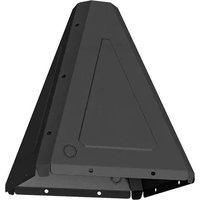
ODAPCVRB - Wall mount for screen Chief - Free user manual and instructions
Find the device manual for free ODAPCVRB Chief in PDF.


| Product Type | Pedestal Floor Cover (Accessory) |
| Brand | Chief |
| Model | ODAPCVRB |
| Compatible With | ODA330 Pedestal Base |
| Material | Metal with plastic spacers |
| Color | Black (typical) |
| Dimensions | Fits ODA330 base plate; specific dimensions not listed |
| Weight | Approximately 5 lbs (2.3 kg) |
| Hardware Included | 8 x 1/4-20 x 3/4" hex head cap screws, 8 x 1/4" washers, 8 x plastic spacers, 6 x 1/4-20 x 5/8" button head cap screws |
| Installation | Attaches to ODA330 base using provided hardware |
| Use | Outdoor pedestal cover for screen or other AV component |
| Safety Compliance | Warnings: read all instructions, use only as intended, inspect for damage |
| Warranty | Manufacturer's limited warranty; see manual for details |
| Manufacturer | Milestone AV Technologies |
| Country of Origin | China (typical for Chief accessories) |
| Maintenance | Clean with a soft damp cloth; do not use harsh chemicals |
| Repairability | Not user-serviceable; contact manufacturer for replacement parts |
Frequently Asked Questions - ODAPCVRB Chief
User questions about ODAPCVRB Chief
0 question about this device. Answer the ones you know or ask your own.
Ask a new question about this device
Download the instructions for your Wall mount for screen in PDF format for free! Find your manual ODAPCVRB - Chief and take your electronic device back in hand. On this page are published all the documents necessary for the use of your device. ODAPCVRB by Chief.
USER MANUAL ODAPCVRB Chief
INSTALLATION INSTRUCTIONS

natural_image
Technical line drawing of a mechanical support structure with no visible text or symbolsOutdoor Pedestal Floor Cover
DISCLAIMER
Milestone AV Technologies and its affiliated corporations and subsidiaries (collectively "Milestone"), intend to make this manual accurate and complete. However, Milestone makes no claim that the information contained herein covers all details, conditions or variations, nor does it provide for every possible contingency in connection with the installation or use of this product. The information contained in this document is subject to change without notice or obligation of any kind. Milestone makes no representation of warranty, expressed or implied, regarding the information contained herein. Milestone assumes no responsibility for accuracy, completeness or sufficiency of the information contained in this document.
Chief® is a registered trademark of Milestone AV Technologies. All rights reserved.
DEFINITIONS
MOUNTING SYSTEM: A MOUNTING SYSTEM is the primary Chief product to which an accessory and/or component is attached.
ACCESSORY: AN ACCESSORY is the secondary Chief product which is attached to a primary Chief product, and may have a component attached or setting on it.
COMPONENT: A COMPONENT is an audiovisual item designed to be attached or resting on an accessory or mounting system such as a video camera, CPU, screen, display, projector, etc.

WARNING: A WARNING alerts you to the possibility of serious injury or death if you do not follow the instructions.

CAUTION: A CAUTION alerts you to the possibility of damage or destruction of equipment if you do not follow the corresponding instructions.

IMPORTANT SAFETY INSTRUCTIONS

WARNING: Failure to read, thoroughly understand, and follow all instructions can result in serious personal injury, damage to equipment, or voiding of factory warranty! It is the installer's responsibility to make sure all accessories are properly assembled and installed using the instructions provided.

WARNING: Use this accessory only for its intended use as described in these instructions. Do not use attachments not recommended by the manufacturer.

WARNING: Never operate this accessory if it is damaged. Return the accessory to a service center for examination and repair.
IMPORTANT ! : The ODAPCVR accessory is designed to be mounted to a concrete floor or ceiling.
--SAVE THESE INSTRUCTIONS--
DIMENSIONS
![12.97 [329.3] Ø 3.63 [92.1] 2X KNCKOUT, FOR ½" OR ¾" CONDUIT 15.90 [403.7]](/content/2026/06/1196245/images/8f8fb786fe38405999fdc20aeaf65090744a11428a534588cd3f69655dfdba7f.jpg)

natural_image
Technical line drawing of a 3D geometric frame structure with internal cutouts (no text or symbols)TOOLS/PARTS
![5/32" 3/8" (9.5 mm) A (2) [Pedestal cover] B (8) 1/4-20 x 3/4" C (6) 1/4-20 x 5/8" D (14) [Plastic spacer] E (14) 1/4" F (1)](/content/2026/06/1196245/images/d6a2df0693e739d9504a23a9ad7d0a519fefeaac06e1aaa3aac56a1d28d54a57.jpg)
Assembly And Installation
- Place two pedestal covers (A) over ODA330 (not included) plate making sure holes line up with the holes around outside edge of ODA300 base. (See Figure 1)
- Use eight 1/4-20 x 3/4" hex head cap screws (B), eight 1/4" washers (E) and eight plastic spacers (D) to secure covers (A) to ODA330 base. (See Figure 1)

Figure 1
- Use six 1/4-20 x 5/8" button head cap screws (C), six 1/4" washers (E) and six plastic spacers (D) to secure covers (A) to each other. (See Figure 2)

Figure 2

CHIEF®
Our Mounts. Your Vision.
Chief, a products division of Milestone AV Technologies
8800-003026 Rev00
©2018 Milestone AV Technologies
www.milestone.com
07/18
USA/International A 6436 City West Parkway, Eden Prairie, MN 55344
P 800.582.6480 / 952.225.6000
F 877.894.6918 / 952.894.6918
Europe A Franklinstraat 14, 6003 DK Weert, Netherlands
P +31 (0) 495 580 852
F +31 (0) 495 580 845
Asia Pacific A Office No. 918 on 9/F, Shatin Galleria
18-24 Shan Mei Street
Fotan, Shatin, Hong Kong
P 852 2145 4099
F 852 2145 4477



Brand : Chief
Model : ODAPCVRB
Category : Wall mount for screen