LA20 - Clock Radio Valore - Free user manual and instructions
Find the device manual for free LA20 Valore in PDF.


| Product Type | Clock Radio with LED display |
| Brand | Valore |
| Model | LA20 |
| Dimensions (L x W x D) | 150 x 85 x 32 mm |
| Weight | 197 g |
| Material | Aluminium alloy + PC |
| Power Source | 3 x AA batteries (not included) or DC 5V/500mA via USB |
| Battery Type | AA (alkaline recommended) |
| Input Power (USB) | DC 5V/500mA (max) |
| Display Type | LED digital display |
| Night Light | Bottom 3 LEDs, auto-activates between 8pm and 6am |
| Alarm Function | 3 programmable alarms with snooze (tap or shake to silence) |
| Temperature Display | Switches between °C and °F |
| Time Format | 12-hour or 24-hour selectable |
| Calendar | Year, month, day, week |
| Tap/Shake Feature | Activates display backlight (auto-off after 20 seconds) |
| Power Saving Mode | Auto shuts off display after 20 seconds |
| Package Contents | LED clock, USB charging cable (730mm) |
| Care Instructions | Keep dry; avoid high temperatures; do not disassemble |
| Safety Warnings | Do not expose to moisture; avoid impact; stop use if damage or abnormal odor |
| Warranty | Register at www.valore.sg; support at v.info@valore.sg |
Frequently Asked Questions - LA20 Valore
User questions about LA20 Valore
0 question about this device. Answer the ones you know or ask your own.
Ask a new question about this device
Download the instructions for your Clock Radio in PDF format for free! Find your manual LA20 - Valore and take your electronic device back in hand. On this page are published all the documents necessary for the use of your device. LA20 by Valore.
USER MANUAL LA20 Valore
Thank you for purchasing the Valore LED Clock With Night Light Function (LA20).
• Gently tap or shake to light up display
- When clock is activated between 8pm to 6am, the night light at the bottom will automatically light up
- Enjoy longer battery life with power saving mode which auto shuts off display after 20 seconds of activation
Important: Please read the user manual thoroughly before using your LED Clock
Specifications:
Package Contents:
- Battery type: 3 x AA (not included)
• LED clock with night light function
• Material: Aluminium alloy + PC
• USB charging cable (730mm) - Input power: DV5V/500mAh (max)
- Dimensions (L x W x D): 150 x 85 x 32mm
- Weight: 197g
UNDERSTANDING THE PRODUCT
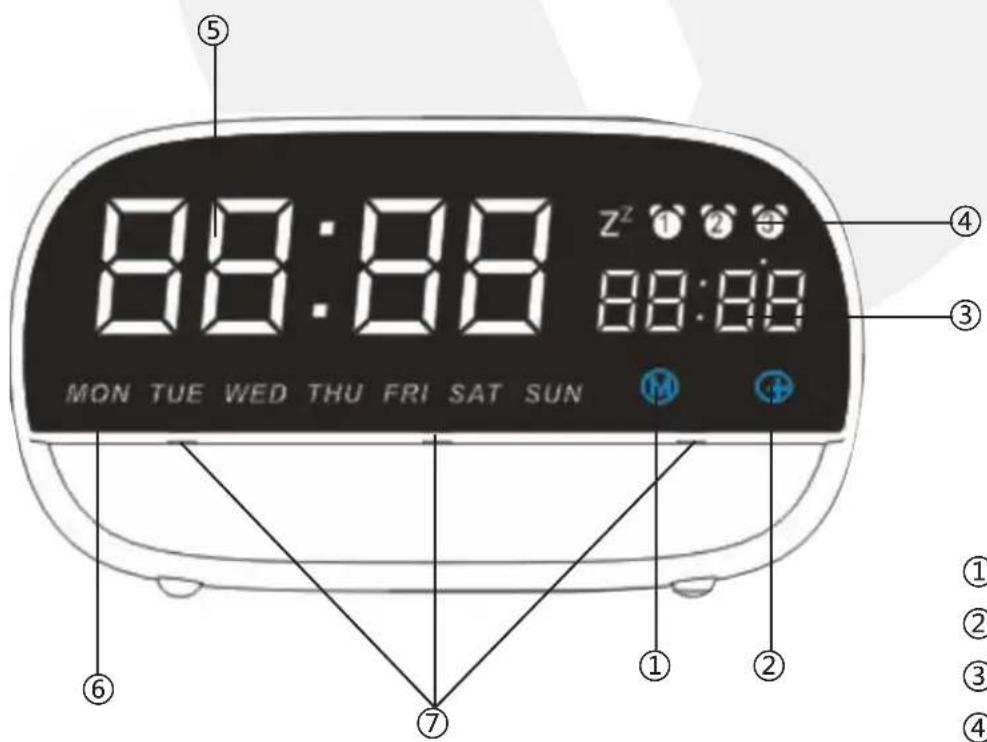
① Mode toggle (M)
② Adjustment button (+)
③ Temperature
④ Alarm icon
⑤ Time
⑥ Week icon
⑦ LED light
START USING THE LED CLOCK WITH NIGHT LIGHT FUNCTION
How to set time and date:
1) Press and hold "M", screen will start to blink
2) Press “+” to select 24/12 hours format
3) Press "M", press "+" to set Hour
4) Press "M", press "+" to set Minutes
5) Press "M", press "+" to set Year
6) Press "M", press "+" to set Month
7) Press "M", press "+" to set Day
8) Press "M", press "+" to set Week
9) Press and hold "M" to exit setting
How to set alarm:
1) Press and hold "M", screen will start to blink
2) Press "M", toggle through till Alarm 1 icon & OFF starts to blink
3) Press “+” to switch Alarm 1's OFF to ON
4) Press "M", press "+" to set Hour
5) Press "M", press "+" to set Minutes
6) Press "M" again to set
Press “M” again to set Alarm 2 and 3. Press and hold “M” to exit setting. *Press and hold “+” to toggle faster through hour and minutes.
When alarm is ringing, tap or gently shake the alarm clock to switch it off.
Switch temperature unit
1) Press and hold "M", screen will start to blink
2) Press "M", toggle through till Temperature is blinking (After Alarm 3 icon)
3) Press “+” to switch between Celcius(°C) and Farenheit(°F)
4) Press and hold "M" to exit setting
Night light function
The 3 LED light located at the bottom of the LED clock will light up automatically between 2000 - 0600 hours (8pm - 6am).
TECHNICAL SUPPORT & WARRANTY
- For Technical Support, email us at v.info@valore.sg.
- For Warranty Registration, visit www.valore.sg.
Cautions:
Read all the instructions and warnings carefully prior to using this product.
- Do not store the digital clock in a high temperature environment.
- Do not place the digital clock near a fire or other excessively hot environments.
- Do not expose its digital clock to moisture or submerge it in liquid. Keep digital clock dry at all times.
- Do not attempt to charge the digital clock using any other method or connection other than the digital clock's provided charging cable.
- Do not disassemble this digital clock or attempt to repair or modify it in any manner.
- Be cautious of excessive drops, bumps, abrasions or other impacts to this digital clock. If there is any damage to the digital clock such as dents, punctures, tears, deformities or corrosion, stop using the digital clock and contact us immediately via email at v.info@valore.sg, or return this product to the store where you have purchased it from.
- If the product produces an abnormal smell, high temperature (low temperature during normal use), discolours or changes shape abnormally, stop using the product and contact us immediately via email at v.info@valore.sg.
DISCLAIMER & TRADEMARKS
All information, trademarks, logos, graphics, and images (“Materials”) provided on this user manual are copyrighted or trademarked and are the property of Valore Lifestyle Pte Ltd. Any unauthorized use of any material contained on the instruction manual may violate copyright laws, trademark laws, laws of privacy and communications statutes.
The trademarks, service marks and logos used and displayed in the Materials are registered and unregistered trademarks and service marks of Valore and others. All other registered and unregistered company names, product names and marks mentioned herein the (“Materials”) are the property of their respective owners and may be trademarks or registered trademarks.
Brand : Valore
Model : LA20
Category : Clock Radio