Pro 3 - Camera NETGEAR - Free user manual and instructions
Find the device manual for free Pro 3 NETGEAR in PDF.


User questions about Pro 3 NETGEAR
0 question about this device. Answer the ones you know or ask your own.
Ask a new question about this device
Download the instructions for your Camera in PDF format for free! Find your manual Pro 3 - NETGEAR and take your electronic device back in hand. On this page are published all the documents necessary for the use of your device. Pro 3 by NETGEAR.
USER MANUAL Pro 3 NETGEAR
Set up your Arlo Pro 3 Wire-Free camera
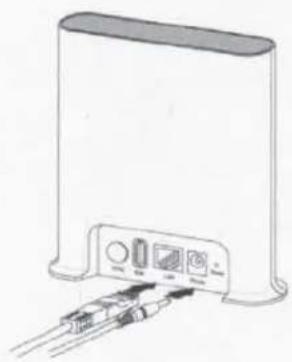
- Connect the power adapter and the Ethernet cable to your Arlo SmartHub.
- Download the Arlo app and follow the setup instructions for a wire-free camera.
natural_image
Illustration of a wireless device with ports and cables (no text or symbols visible)
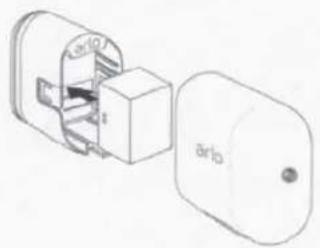
- Insert the battery into your wire-free camera.
What's in the box
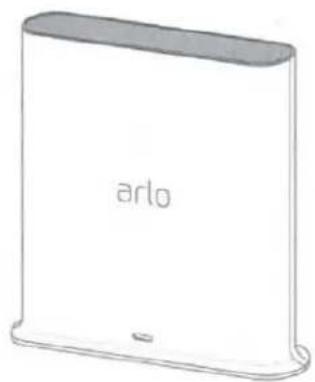
natural_image
Simple line drawing of a rectangular electronic device labeled 'arlo' (no additional text or symbols)Arlo SmartHub
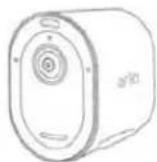
Pro 3 Wire-Free
Camera
Rechargeable battery
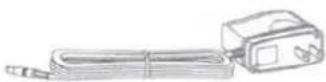
SmartHub
power adapter

Ethernet cable
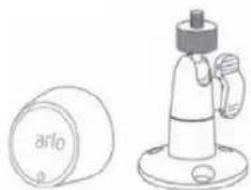
natural_image
Line drawing of a cylindrical object labeled 'arlo' next to a mechanical device with a handle (no text or symbols beyond label)Mounts
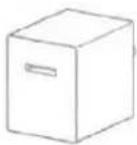
Camera
power adapter

Camera
charging cable
Need help?
We are here for you.
Visit www.arlo.com/support for quick answers and resources:
- How-to videos
- Troubleshooting tips
• The Arlo Support phone number for your location
© Arlo Technologies, Inc. Arlo, Arlo logo, and Every Angle Covered are trademarks of Arlo Technologies, Inc. App Store is a service mark of Apple Inc. Google Play and the Google Play logo are trademarks of Google LLC. Other trademarks are for reference purposes.
(If this product is sold in Canada, you can access this document in Canadian French at arlo.com/docs.)
For regulatory compliance information including the EU Declaration of Conformity, visit www.arlo.com/about/regulatory/.

Arlo Technologies Intl. Ltd. Ground Floor, Building 3 University Technology Center Curraheen Road, Cork, T12 EF21 Ireland
Arlo Technologies, Inc. 2200 Faraday Avenue, Suite 150 Carlsbad, CA 92008 USA
July 2019
arlo
Safety Rules for Arlo Rechargeable Batteries
Some Arlo devices use rechargeable batteries and can go wherever you need them. But ALL batteries can EXPLODE, CATCH FIRE and CAUSE BURNS if disassembled, punctured, cut, crushed, short-circuited, incinerated or exposed to water, fire or high temperatures, so you need to handle them with care.
To use Arlo Rechargeable Batteries safely:
• ALWAYS store spare batteries in a cool, dry, ventilated area.
- ALWAYS make sure that the battery compartment is clean and free of any debris before inserting new batteries.
• ALWAYS make sure the battery contacts are aligned.
• ALWAYS keep all batteries away from children.
- ALWAYS follow local waste and recycling laws when throwing used batteries away.
- ALWAYS use an Arlo Power Adapter or an Arlo Charging Station (sold separately) to charge Arlo Rechargeable Batteries.
- NEVER place Arlo Rechargeable Batteries in a pocket, purse, or other receptacle, especially those containing metal objects.
- NEVER store Arlo Rechargeable Batteries with hazardous or combustible materials.
- NEVER let an Arlo Rechargeable Battery or battery compartment get wet—before, during, or after installation. (Remember your Arlo device itself is weatherproof, but its interior battery compartment and batteries aren't!).
- NEVER disassemble, cut, crush, puncture, short-circuit, dispose of in fire or water, or expose your Arlo Rechargeable Battery to temperatures above 60°C (140°F).
Your Arlo device has been specifically designed for use only with Arlo Rechargeable Batteries. Therefore, only use Arlo Rechargeable Batteries with Arlo devices.
TO THE EXTENT PERMISSIBLE BY APPLICABLE LAW, ARLO TECHNOLOGIES DISCLAIMS ALL LIABILITY WHATSOEVER RELATED TO THE USAGE OF ANY BATTERY OTHER THAN ARLO RECHARGEABLE BATTERIES IN YOUR ARLO DEVICE, INCLUDING WITHOUT LIMITATION, FIRE, DAMAGE TO PROPERTY, BODILY INJURY, AND/OR DEATH. YOU ASSUME ANY AND ALL RISKS ASSOCIATED WITH THE USAGE OF ANY BATTERY OTHER THAN ARLO RECHARGEABLE BATTERIES IN ARLO DEVICES, INCLUDING WITHOUT LIMITATION, FIRE, DAMAGE TO PROPERTY, BODILY INJURY, AND/OR DEATH.
TO THE EXTENT PERMISSIBLE BY APPLICABLE LAW, FAILURE TO FOLLOW THESE WARNINGS AND/OR DIRECTIONS COULD RESULT IN DAMAGE TO YOUR ARLO DEVICE THAT WILL NOT BE COVERED BY ARLO'S WARRANTY.
ALWAYS REMEMBER that poor quality or mishandled batteries can damage your devices, cause a fire, or result in personal injury. Arlo Technologies, Inc is not responsible for any failure to follow these battery usage guidelines.
© Arlo Technologies, Inc. Arlo, Arlo logo, and Every Angle Covered are trademarks of Arlo Technologies, Inc. Other trademarks are for reference purposes only. October 2018
October 2018
Arlo Technologies, Inc. 2200 Faraday Avenue, Suite 150 Carlsbad, CA 92008 USA