WINGS MX2 - SSD Angelbird - Free user manual and instructions
Find the device manual for free WINGS MX2 Angelbird in PDF.


User questions about WINGS MX2 Angelbird
0 question about this device. Answer the ones you know or ask your own.
Ask a new question about this device
Download the instructions for your SSD in PDF format for free! Find your manual WINGS MX2 - Angelbird and take your electronic device back in hand. On this page are published all the documents necessary for the use of your device. WINGS MX2 by Angelbird.
USER MANUAL WINGS MX2 Angelbird
USER MANUAL SSD MANAGER


INTRODUCTION
The Angelbird SSD Manager shows you a live view of the TRIM activity happening on the disks in your computer.
It also allows you to register your Angelbird products for the extended limited warranty.
Furthermore it has a refresh feature, which allows you to clean and refresh your CFast recording media before reusing.
USER INTERFACE
Main Window
The main window of the application looks as in fig. 1.
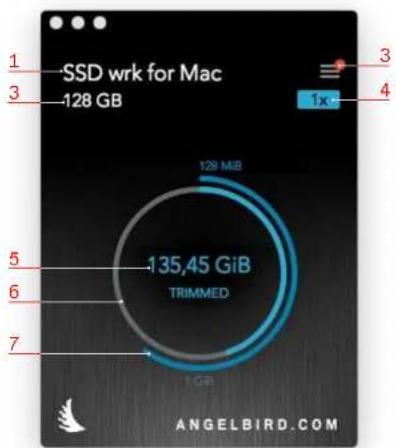
fig. 1
The window has the following elements:
- Drive selection
- Open the device list window
- Drive storage capacity
- TRIM multiplier
The amount of times the whole drive capacity has been TRIMed - Total amount of capacity that was TRIMed since the TRIM Monitor was installed
- Low capacity TRIM activity
This ring will fill up once for every 128 MiB TRIMed (inner ring). - High capacity TRIM activity
This ring will fill up once for every 1 GiB TRIMed (outer ring).
Note
Not in all cases can the product name be determined correctly.
Some drives do not support native TRIM or have TRIM forced. These cases are clearly displayed by the use of red as in fig. 2.
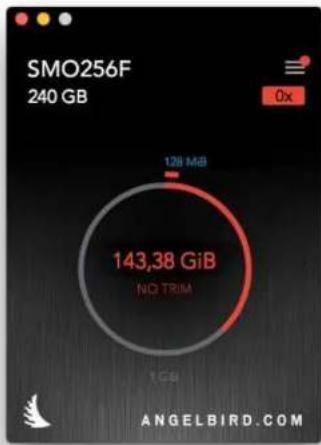
fig. 2
Device List Window
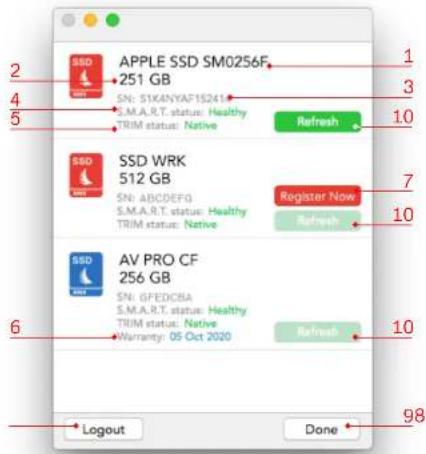
fig. 3
The drive list window show the list of supported drives, as in fig. 3. The list also includes some details of each drive.
The window has the following elements:
-
Drive name
-
Drive capacity
-
Drive serialnumber
-
S.M.A.R.T. status
-
TRIM status
-
Warranty end date. Only shown when the drive has been registered
-
Product registration button
-
PSP Account Login button
-
Button to close the device list, and go back to the monitor
-
Refresh button
Recording Media Refresh
Using the 'refresh' button next to a media in the device list window, you can clean and refresh your Angelbird CFast recording media. After the refresh, the media will have its performance restored to its peak, making sure your next recording will go as smooth as possible. Simply click the button and follow the prompts on screen.
Drive Registration
You can register any supported Angelbird to your Angelbird PSP account. When you do this, you will get extended warranty for the product. Click the "Register Now" button to register the product.
DETAIL VIEW WINDOW
The detail view (fig. 4) shows more detailed information about TRIM events as they happen. Each row is one TRIM event.
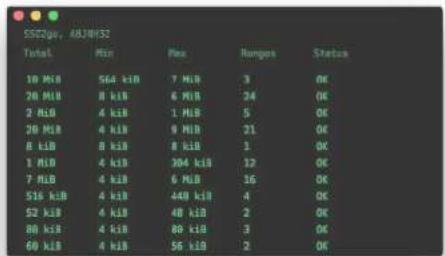
For each event the following information is shown:
Total: The total capacity being TRIMed by this event.
Min: The size of the smallest range in the event. Max: The size of the smallest range in the event.
Ranges: The amount of start-end ranges being TRIMed.
Status: The result of the TRIM command.
THE DIFFERENCE BETWEEN GB AND GiB
The capacity of any storage device is counted in bytes. But we do not want to write down something like 1000000000 bytes. We write 1 Gigabyte, and the shorthand is 1 GB. This is calculated in a way that everyone knows.
"Giga" is 1000^3 , so 1000000000 / 1000^3 = 1 .
However, computers work in binary and work with "Giga" is 1024 ^3 . Suddenly 1.0 Gigabyte is the same as 0.93 Gigabyte. That cannot be right. We are using the same name for a different "unit" of counting.
For this reason the GibiByte was introduced, with the shorthand GiB. Now everything makes sense. 1 GB = 1×1000 ^3 = 1000000000 bytes, and 1000000000 bytes / 1024 ^3 = 0.931322575 GiB.
For historic reasons, much software uses GB instead of GiB, and it is therefore not clear which is meant. Most modern software, however, gets it right.
Some examples:
| GB GiB | GB GiB |
| 1.00 | 0.93 |
| 128.00 | 119.21 |
| 256.00 | 238.42 |
| 512.00 | 476.84 |
| 640.00 | 596.05 |
| 1000.00 | 931.32 |
| 2000.00 | 1862.65 |
SUPPORT
For support, please visit www.angelbird.com/support or email support@angelbird.com
Please send us a copy of the logfiles. You can export them from the help menu, as in fig. 6.
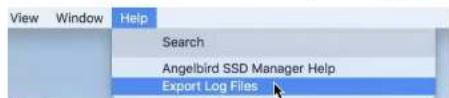
fig. 6
LEGAL INFORMATION
Copyright
Copyright © Angelbird Technologies GmbH. All rights reserved.