
Mini Docking Station - Computer accessory Xcellon - Free user manual and instructions
Find the device manual for free Mini Docking Station Xcellon in PDF.


| Product Type | Mini Docking Station |
| Brand | Xcellon |
| Model | Mini Docking Station |
| Dimensions (H x W x D) | 0.6 x 3.2 x 3.2 in (1.6 x 8 x 8 cm) |
| Cable Length | 7.9 in (20 cm) |
| Input Interface | USB Type-C (Thunderbolt 3 compatible) |
| Output Ports | 2 x USB 3.1 Gen 1 Type-A, 1 x HDMI, 1 x SD Card Reader (UHS-II), 1 x USB Type-C Power Delivery |
| Video Output | HDMI up to 4K @ 30 Hz (requires DisplayPort Alternate Mode from host) |
| Data Transfer Speed | USB 3.1 Gen 1 up to 5 Gbps |
| SD Card Reader Speed | Up to 270 MB/s (UHS-II) |
| Power Delivery | USB-C PD 2.0, supports 5V, 9V, 15V, 20V (Note: MDS-31G1 does not support PD for Android devices) |
| System Compatibility | Windows, macOS, Chrome OS, Android (with DP Alt Mode) |
| Cleaning | Use a soft, dry cloth only |
| Safety Precautions | Keep away from water, flammable gases/liquids; do not attempt to disassemble |
| Warranty | One-year limited warranty |
| Additional Features | Pass-through power delivery for host device charging, compact design |
Frequently Asked Questions - Mini Docking Station Xcellon
User questions about Mini Docking Station Xcellon
0 question about this device. Answer the ones you know or ask your own.
Ask a new question about this device
Download the instructions for your Computer accessory in PDF format for free! Find your manual Mini Docking Station - Xcellon and take your electronic device back in hand. On this page are published all the documents necessary for the use of your device. Mini Docking Station by Xcellon.
USER MANUAL Mini Docking Station Xcellon
MINI DOCKING STATION
User Manual

XCELLON ^+
Thank you for choosing Xcellon.
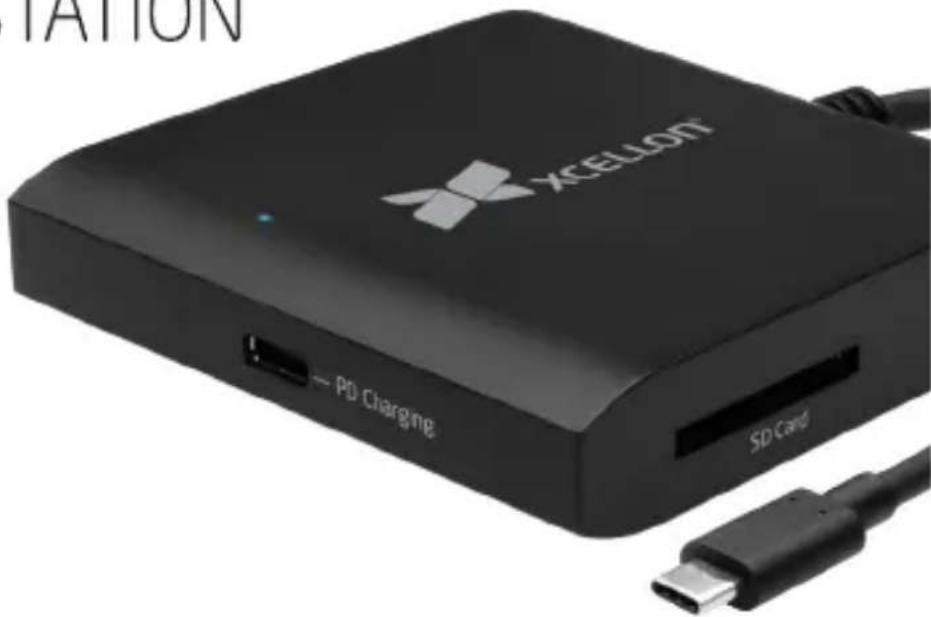
Xcellon's USB Type-C™ Mini Docking Station expands your computer's USB Type-C (or Thunderbolt 3) port into multiple ports. When the dock is connected to a single port, it's capable of offering two USB data connections, HDMI display output, an SD card reader, and pass-through power delivery.
Overview
1 SuperSpeed USB 3.1 Gen 1 ports with data transfer speeds up to 5 Gbps
2 4K HDMI video output
3 USB Type-C power delivery for host device charging*
4 SD card reader (UHS-II) with read speeds up to 270 MB/s
*Warning: Do not disconnect the power source from the Type-C power delivery port in order to avoid data loss while a transfer is active.


Precautions
» Please read and follow these instructions, and keep this manual in a safe place.
» Back up your data before using this product in order to prevent loss of important data. Xcellon will not be responsible for any data loss.
» Keep this product away from water and any flammable gases or liquids.
»Do not attempt to disassemble or repair this product.
»Clean this product with only a soft, dry cloth.
»Keep this product away from children.
»All images are for illustrative purposes only.
Specifications
| Ports | HDMI, SD card reader,Type-C charging |
| SD card reader | S-II) Read speeds up to 270 MB/s |
| Power delivery | C PD 2.0 @ 5, 9, 15, or 20 V (MDS-31G1 does not support Power delivery for Android devices.) |
| HDMI | BO Hz) host device must supportDisplayPort Alternate Mode |
| Cable length | cm) |
| System requirements | / Windows / Chrome OS / Android |
| Dimensions (H × W × D) | 6 × 3.2 × 3.2 in. (1.6 × 8 × 8 cm) |
| Weight |
One-Year Limited Warranty
This Xcellon product is warranted to the original purchaser to be free from defects in materials and workmanship under normal consumer use for a period of one (1) year from the original purchase date or thirty (30) days after replacement, whichever occurs later. The warranty provider's responsibility with respect to this limited warranty shall be limited solely to repair or replacement, at the provider's discretion, of any product that fails during normal use of this product in its intended manner and in its intended environment. Inoperability of the product or part(s) shall be determined by the warranty provider. If the product has been discontinued, the warranty provider reserves the right to replace it with a model of equivalent quality and function.
This warranty does not cover damage or defect caused by misuse, neglect, accident, alteration, abuse, improper installation or maintenance. EXCEPT AS PROVIDED HEREIN, THE WARRANTY PROVIDER MAKES NEITHER ANY EXPRESS WARRANTIES NOR ANY IMPLIED WARRANTIES, INCLUDING BUT NOT LIMITED TO ANY IMPLIED WARRANTY OF MERCHANTABILITY OR FITNESS FOR A PARTICULAR PURPOSE. This warranty provides you with specific legal rights, and you may also have additional rights that vary from state to state.
To obtain warranty coverage, contact the Xcellon Customer Service Department to obtain a return merchandise authorization ("RMA") number, and return the defective product to Xcellon along with the RMA number and proof of purchase. Shipment of the defective product is at the purchaser's own risk and expense.
For more information or to arrange service, visit www.xcellongear.com or call Customer Service at 212-594-2353.
Product warranty provided by the Gradus Group.
www.gradusgroup.com
Xcellon is a registered trademark of the Gradus Group.
© 2017 Gradus Group LLC. All Rights Reserved.

XCELLON*
A Gradus Group Brand
Brand : Xcellon
Model : Mini Docking Station
Category : Computer accessory