
USB-EC - Network adapter Xcellon - Free user manual and instructions
Find the device manual for free USB-EC Xcellon in PDF.


| Type | USB-C to Gigabit Ethernet Adapter |
| Brand | Xcellon |
| Model | USB-EC |
| Dimensions (H × W × D) | 2.5 × 3.3 × 7.45 cm |
| Power Source | Bus powered via USB-C |
| Connector | USB-C |
| Ethernet Port | 1x RJ-45 Gigabit Ethernet |
| Data Transfer Speed | 10/100/1000 Mbps |
| USB Compatibility | USB 3.0, backward compatible with USB 2.0 and 1.1 |
| System Requirements | Windows XP or later, Mac OS X 10.6 or later, Linux 2.6.14 or later |
| LED Indicators | Power (blue), Activity (yellow), Connection (green) |
| Supported Ethernet Standards | IEEE 802.3, 802.3u, 802.3x, 802.3ab, 802.3az |
| Warranty | One-year limited warranty |
| Safety Precautions | Keep away from water and flammable gases/liquids; do not open; no user-serviceable parts |
| Cleaning | Use a soft, slightly moistened cloth; do not use solvents |
| Included Accessories | Installation CD (drivers also available online) |
| Installation | Driver installation required via CD or download, then plug in |
| Full Duplex Support | Yes |
Frequently Asked Questions - USB-EC Xcellon
User questions about USB-EC Xcellon
0 question about this device. Answer the ones you know or ask your own.
Ask a new question about this device
Download the instructions for your Network adapter in PDF format for free! Find your manual USB-EC - Xcellon and take your electronic device back in hand. On this page are published all the documents necessary for the use of your device. USB-EC by Xcellon.
USER MANUAL USB-EC Xcellon
Thank you for choosing Xcellon.
The Xcellon USB-EC Ethernet adapter adds a Gigabit Ethernet port to your USB-C™-supported Mac or PC. It provides secure and reliable Internet access via a wired connection and offers 10/100/1000 Mbps Ethernet speeds.
This adapter is bus powered, so no external power source is needed. Just plug it into an available USB-C port on your computer and go to work. Full duplex operation is supported, ensuring the fastest data transfer speed possible. Backwards compatibility with USB 2.0 and 1.1 make this versatile adapter compatible with most computers.
Precautions
» Please read and follow the instructions in this manual for proper use of this device.
» Keep this product away from water and flammable gases or liquids.
» Use a soft, slightly moistened cloth when cleaning. Do not use solvents or abrasive substances.
»This product has no serviceable parts.
»Do not open this device for maintenance.
»All images are for illustrative purposes.
System Requirements
»Windows XP or later
»Mac OS X 10.6 or later
»Linux 2.6.14 or later
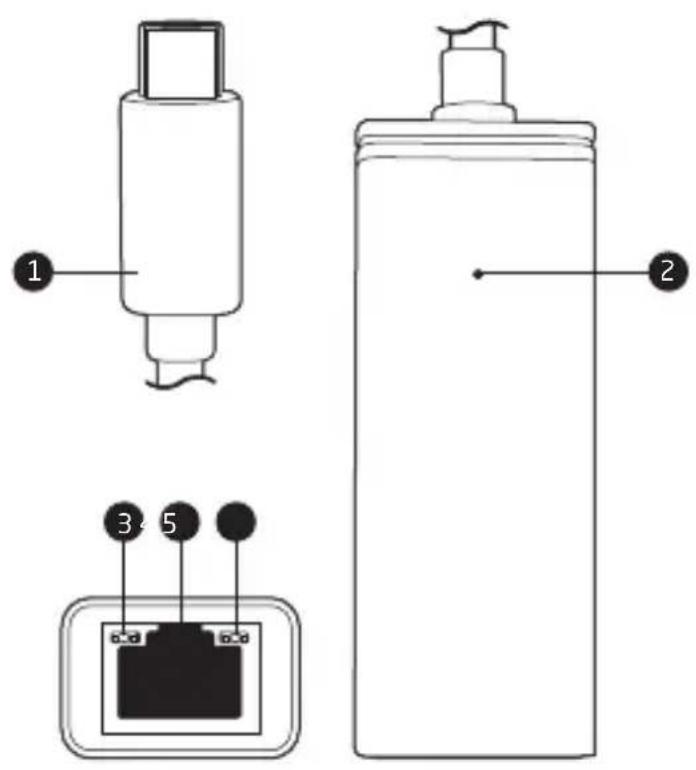
Overview
Front
1 USB-C connector
2 Power LED (blue)
Bottom
3 Activity LED (yellow)
4 Ethernet port
5 Connection LED (green)
Installing the Driver
Important: If your computer does not have a CD drive, drivers can be downloaded from www.xcellongear.com/downloads.
1 Insert the included CD into your computer's CD drive. The AutoPlay window may open.
2 Click on "Open Folders" to view the files on the CD and click on the Windows, Mac, or Linux folder depending on your operating system.
- Windows: Open the folder of your Windows operating system and double-click on the .exe file "setup". Follow the instructions in the setup wizard.
Note: For Windows XP, open the folder labeled AllInOne_5009_12232015.
- Mac OS: Double-click on the .pkg file. Follow the instructions in the setup wizard.
- Linux: The makefile is located in the Linux folder. Run make_install from the driver directory.
Advanced installation instructions can be found on www.xcellongear.com/downloads.
Using the Adapter
1 Plug the USB-C connector into an available USB port on your computer. The blue LED indicator will light up when the adapter is receiving power.
2 Plug the Ethernet cable into the Ethernet port of the adapter. On either side of the Ethernet port, the green LED indicator will show that you have an Ethernet connection, and the yellow LED indicator will flash to show activity.
Troubleshooting
| Problem Solution | |
| I can’t connect to the Internet or the Power LED is not on. | Make sure the adapter is plugged into a powered USB port on your computer.Make sure you have correctly installed the software drivers from the included CD.Download the latest driver from xcellongear.com/downloads. |
Specifications
| Port | |
| PC Connection | |
| Construction | |
| System Requirements | Windows XP or later / Mac OS X 10.6 or later / Linux 2.6.14 or later |
| USB Compatibility | |
| Speed | USB: SuperSpeed USB 3.0 5 Gbps / Ethernet: 10/100/1000 Mbps |
| Supported Ethernet Standards | EE 802.3, 802.3u, 802.3x, 802.3ab, 802.3az |
| Cable Length | |
| Dimensions (H × W × D) | 2.9" (2.5 × 3.3 × 7.45 cm) |
| Weight |
One-Year Limited Warranty
This XCELLON product is warranted to the original purchaser to be free from defects in materials and workmanship under normal consumer use for a period of one (1) year from the original purchase date or thirty (30) days after replacement, whichever occurs later. The warranty provider's responsibility with respect to this limited warranty shall be limited solely to repair or replacement, at the provider's discretion, of any product that fails during normal use of this product in its intended manner and in its intended environment. Inoperability of the product or part(s) shall be determined by the warranty provider. If the product has been discontinued, the warranty provider reserves the right to replace it with a model of equivalent quality and function.
This warranty does not cover damage or defect caused by misuse, neglect, accident, alteration, abuse, improper installation or maintenance. EXCEPT AS PROVIDED HEREIN, THE WARRANTY PROVIDER MAKES NEITHER ANY EXPRESS WARRANTIES NOR ANY IMPLIED WARRANTIES, INCLUDING BUT NOT LIMITED TO ANY IMPLIED WARRANTY OF MERCHANTABILITY OR FITNESS FOR A PARTICULAR PURPOSE. This warranty provides you with specific legal rights, and you may also have additional rights that vary from state to state.
To obtain warranty coverage, contact the Xcellon Customer Service Department to obtain a return merchandise authorization ("RMA") number, and return the defective product to Xcellon along with the RMA number and proof of purchase. Shipment of the defective product is at the purchaser's own risk and expense.
For more information or to arrange service, visit www.xcellongear.com or call Customer Service at 212-594-2353.
Product warranty provided by the Gradus Group.
www.gradusgroup.com
Xcellon is a registered trademark of the Gradus Group.
© 2016 Gradus Group LLC. All Rights Reserved.


Brand : Xcellon
Model : USB-EC
Category : Network adapter