
BMC-PBK-1 - Camera accessory Ikan - Free user manual and instructions
Find the device manual for free BMC-PBK-1 Ikan in PDF.


| Product Type | V-Mount Battery Plate |
| Brand | Ikan |
| Model | BMC-PBK-1 |
| Compatibility | V-Mount batteries and accessories |
| Dimensions (W x H x D) | 4.5 x 3.5 x 1.2 inches |
| Weight | 0.3 lbs (136 g) |
| Material | High-strength plastic and metal contacts |
| Power Output | 14.4V DC, up to 10A |
| Mounting | 1/4-20 and 3/8-16 threaded holes |
| Main Functions | Power distribution, battery mount, and accessory shoe |
| LED Indicators | Power on/off status |
| Protection Features | Overcurrent and short circuit protection |
| Operating Temperature | 0°C to 40°C (32°F to 104°F) |
| Storage Temperature | -20°C to 60°C (-4°F to 140°F) |
| Care Instructions | Wipe with a dry cloth; avoid liquids |
| Safety Precautions | Do not disassemble; use only with compatible batteries |
| Spare Parts Availability | Contact Ikan or authorized dealers |
| Repairability | Professional repair recommended; no user-serviceable parts |
| Warranty | 1 year limited warranty |
| Included Accessories | Mounting screws and user manual |
Frequently Asked Questions - BMC-PBK-1 Ikan
User questions about BMC-PBK-1 Ikan
0 question about this device. Answer the ones you know or ask your own.
Ask a new question about this device
Download the instructions for your Camera accessory in PDF format for free! Find your manual BMC-PBK-1 - Ikan and take your electronic device back in hand. On this page are published all the documents necessary for the use of your device. BMC-PBK-1 by Ikan.
USER MANUAL BMC-PBK-1 Ikan
BMC Over/Under Pro Battery Rail Kit QUICKSTART GUIDE

natural_image
Black mechanical device labeled 'ikan 15RM' with visible mounting holes and wiring (no additional text or symbols)What's included
□ 1-ELE-DBLPT
□ 1-ELE-15RM
□ 1-PTAP Cable/w Adaptor
☐ 1-AB or V-Mount Battery Plate
CONDITIONS OF WARRANTY SERVICE
- Free service for one year from the day of purchase if the problem is caused by manufacturing errors.
- The components and maintenance service fee will be charged if the warranty period has expired.
Free Service will not be Provided in the Following Situations: (* Even if the product is still within the warranty period.)
• Damage caused by abuse or misuse, dismantling, or changes to the product not made by the company.
- Damage caused by natural disaster, abnormal voltage, and environmental factors etc.
BMC Over/Under Pro Battery Rail Kit QUICKSTART GUIDE
ikan's Pro Battery Rail Kit, designed for BlackMagic Cinema Camera, is easy and simply to use. Attach your Pro battery (Anton Bauer or V-Mount) to the battery plate and make sure it is secure.

Loosen the thumbscrews to the 15RM and slide it on to your 15mm rail system for your BlackMagic Cinema Camera. You can either mount that battery kit facing over or under the 15mm rails.

natural_image
3D rendering of a mechanical optical or laser system with a probe and cable (no text or symbols visible)BMC Over/Under Pro Battery Rail Kit QUICKSTART GUIDE
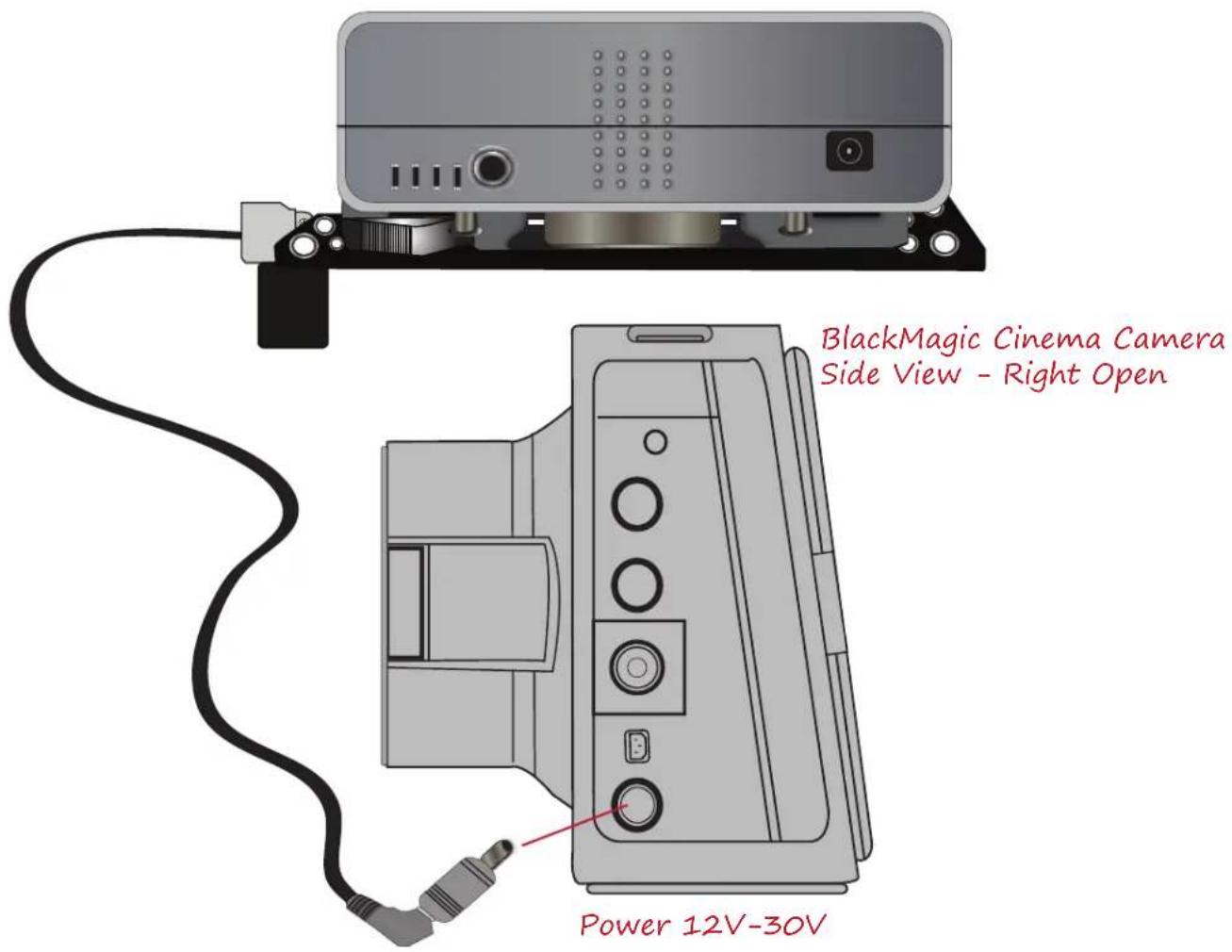
After you have mounted the battery kit to your discretion, take P-tap cord with the adapter and plug the two prong end to the battery palate and the other end to the BlackMagic Cinema Camera. Now you are running off Pro Battery power and not the internal battery of the BlackMagic Cinema Camera.
Brand : Ikan
Model : BMC-PBK-1
Category : Camera accessory