
SB-B - USB Drive Raya - Free user manual and instructions
Find the device manual for free SB-B Raya in PDF.


| Product Type | Bi-color LED Light Wand |
| Model | SB-B Raya |
| Illumination Area | 15 inches |
| Color Temperature Range | 3000 K - 5600 K |
| Color Temperature Steps | 6 steps (400 K increments) |
| Brightness Steps | 6 steps (15% increments, from 10% to 100%) |
| All LED Mode | Yes, 30-second burst at approx. 4400 K |
| CRI | 84.6 (3000K), 87.2 (4400K), 84.9 (5600K) |
| Dimensions (L × W × H) | 21.75 × 1.25 × 1.1 in (55.2 × 3.2 × 2.8 cm) |
| Weight | 7.9 oz (229 g) |
| Power Source | Built-in rechargeable lithium-ion battery (5V / 1.5A DC) |
| Charging Cable | Micro-USB (22.25 in / 56.5 cm) |
| Max Power Consumption | 7.2 W |
| Mounting | 1/4-20 socket for tripod |
| Remote Control | IR remote, range up to 23 ft (7 m) |
| Remote Battery | CR2025 (replaceable) |
| Cooling System | Passive |
| Housing Material | Plastic |
| Box Contents | LED wand, remote, wrist strap, charging cable, carry bag, user manual |
| Warranty | 1-year limited warranty |
| Safety | Keep away from water, flammable gases/liquids; do not disassemble; avoid direct eye contact |
| Cleaning | Soft dry cloth only |
Frequently Asked Questions - SB-B Raya
User questions about SB-B Raya
0 question about this device. Answer the ones you know or ask your own.
Ask a new question about this device
Download the instructions for your USB Drive in PDF format for free! Find your manual SB-B - Raya and take your electronic device back in hand. On this page are published all the documents necessary for the use of your device. SB-B by Raya.
USER MANUAL SB-B Raya
THANK YOU FOR CHOOSING RAYA
The Raya Brite Stix Bi-color LED wand provides even illumination along its 15-inch length. It's extremely simple to operate, and it packs up in its own carry bag so it can go anywhere light is needed for photos or video. It has a color temperature range of 3000 to 5600 K that's adjustable in six 400 K increments, and brightness that's adjustable in six steps.
As a handheld wand, the Brite Stix can deliver creative and dramatic lighting effects. The handle is also equipped with a standard 1/4-20 socket for tripod mounting. This fixture is powered by a rechargeable battery that plugs into a powered USB computer port or a power adapter (not included). A remote is included for hands-free operation from up to 23 feet away.
PRECAUTIONS ⚠️
- Please read and follow these instructions, and keep this manual in a safe place.
- Keep this unit away from water and any flammable gases or liquids.
- Do not attempt to disassemble or repair the equipment—doing so will void the warranty, and Raya will not be responsible for any damage.
- Handle the unit with care.
- Do not stare directly at the lights when they are powered on.
- Clean the unit with only a soft, dry cloth.
- Keep this unit away from children.
• Use only parts provided by the manufacturer. - Make sure the item is intact and that there are no missing parts before use.
• All images are for illustrative purposes only.
FEATURES
• Built-in rechargeable lithium-ion battery
• 3000 to 5600 K adjustable color temperature range
• 15 in. illumination area
- 6-step adjustable brightness
• All LED mode for extra brightness
• 1/4-20 socket for tripod mounting
- Remote included
BOX CONTENTS
• Brite Stix Bi-color LED Wand
- Remote
- Wrist strap
- Charging cable
- Carry bag
- User manual
OVERVIEW
Front Back

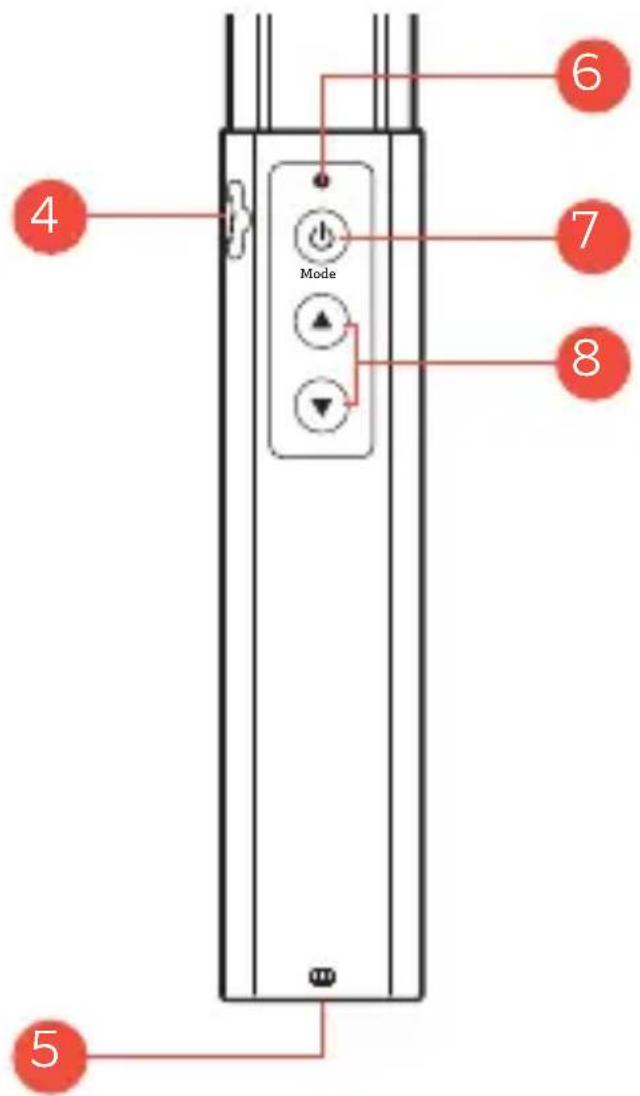
Light
- LED panel
- Built-in diffuser
- Handle
- USB charging port
-
1/4-20 mounting socket
-
Charging indicator
-
Power button/ mode selector
-
Color temp and brightness ▼/▲
Front Back

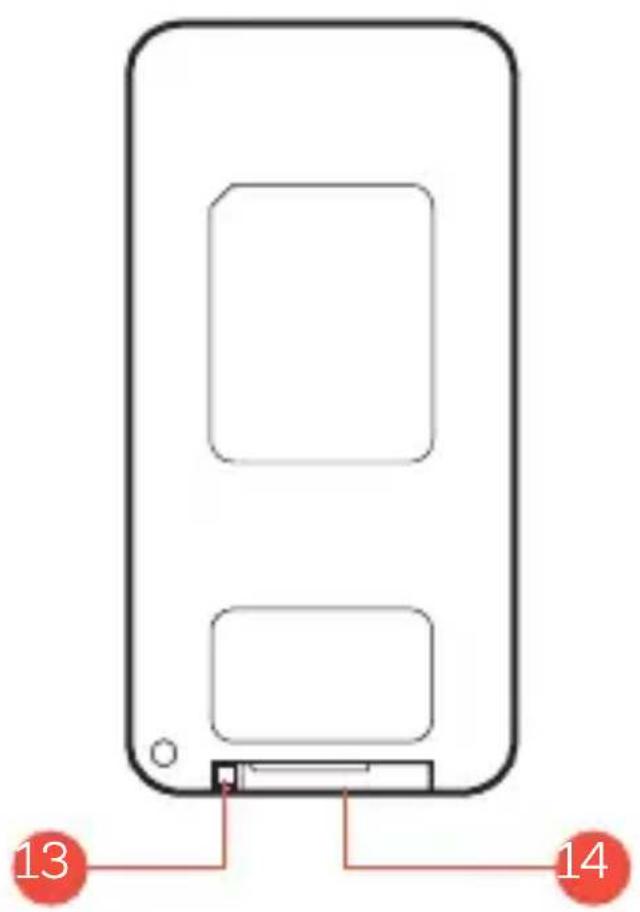
Remote
- Power button
- All LEDs button
- Brightness buttons
-
Color temperature buttons
-
Battery lock
- Battery tray
POWERING ON AND SELECTING
THE MODE
Press and hold the power button to turn the Brite Stix on or off.
Press the power button to switch from Color Temperature mode to Brightness mode.
Note: The Brite Stix cannot be powered on or off by the remote. The remote sets the Brite Stix to sleep mode. See Remote Operation below.
Color Temperature (CCT) Mode
In Color Temperature mode, the Brite Stix's color temperature can be adjusted from 3000 to 5600 K in six steps. Press the buttons to adjust the color temperature in 400 K increments. Press and hold either button to rapidly adjust.
Brightness Mode
In Brightness mode, the light's output can be adjusted from 10 % to 100 % in six 15 % increments. Press the buttons to adjust the brightness incrementally. Press and hold either button to rapidly adjust.
All LED Mode
All LED mode provides a 30-second burst that increases the Brit Stix's output by illuminating all tungsten and daylight LEDs at full brightness. The color temperature will be approximately 4400 K, and it will maximize the light's output.
Double-press the power button for All LED mode. Double-press again to exit All LED mode, or wait 30 seconds for the light to return to its previous settings.
CHARGING THE BATTERY
Connect the Brite Stix to a powered USB port with the included cable. The charging indicator will blink while the battery is charging and will stop blinking when the battery is fully charged.
To charge the Brite Stix from an AC outlet, plug the USB cable into a USB power adapter (not included).
MOUNTING THE LIGHT
The Brite Stix has a 1/4-20 mounting socket. Screw the light onto the threaded screw of a tripod, light stand, or ball head until it's secure.
REMOTE OPERATION
Power Button: Once the Brite Stix is powered on via the on-handle power button, press the remote's power button to activate Sleep mode. Press the power button again to resume operation.
Brightness Buttons: Press the Brightness buttons to adjust the brightness in 15% increments.
Color Temperature Buttons: Press the Color Temperature buttons to adjust the color temperature in 400 K increments.
All LEDs Button: Press to illuminate all LEDs to maximize the light's output at approximately 4400 K. Press the button again to resume at the previous setting, or the light will return to the previous setting in 30 seconds.
REPLACING THE BATTERY
The remote is powered by a CR2025 battery. To replace the battery, follow these steps:
- Push in the battery lock and slide the battery tray out of the remote.
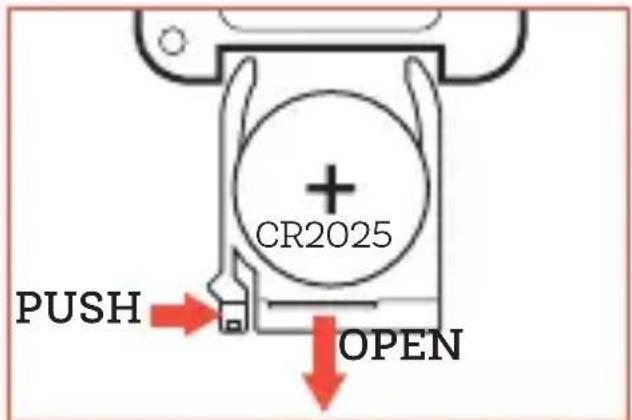
-
Remove the old battery, and replace it with a new battery in the correct orientation, indicated by the illustration on the back of the remote.
-
Push the battery tray in until it locks into place.
SPECIFICATIONS
| Light Fixture | |
| Color Temperature 3000 to 5600 K | |
| CRI 84.6 (3000 K), | 87.2 (4400 K),84.9 (5600 K) |
| TLCI 75 (3000 K), | 74 (4400 K),73 (5600 K) |
| Light Intensity@ 3 ft. | 171 lx (3000 K),197 lx (4400 K),183 lx (5600 K) |
| Cooling System Passive | |
| Dimming Yes, 6-step | |
| Display None | |
| Housing Material Plastic | |
| Dimensions(L × W × D) | 21.75 × 1.25 × 1.1 in.(55.2 × 3.2 × 2.8 cm) |
| Weight 7.9 oz. (229 g) | |
Mounting
Fixture Mount 1/4-20 socket
Remote Operation
Remote Control Type IR
Wireless Range 23 ft. (7 m)
Power
AC Input 5 V / 1.5 A DC
Power Source Li-ion battery
Max Power Consumption 7.2 W
Cable
Cable Type Micro-USB
Cable Length 22.25 in. (56.5 cm)
ONE-YEAR LIMITED WARRANTY
This Raya product is warranted to the original purchaser to be free from defects in materials and workmanship under normal consumer use for a period of one (1) year from the original purchase date or thirty (30) days after replacement, whichever occurs later. The warranty provider's responsibility with respect to this limited warranty shall be limited solely to repair or replacement, at the provider's discretion, of any product that fails during normal use of this product in its intended manner and in its intended environment. Inoperability of the product or part(s) shall be determined by the warranty provider. If the product has been discontinued, the warranty provider reserves the right to replace it with a model of equivalent quality and function.
This warranty does not cover damage or defect caused by misuse, neglect, accident, alteration, abuse, improper installation or maintenance. EXCEPT AS PROVIDED HEREIN, THE WARRANTY PROVIDER MAKES NEITHER ANY EXPRESS WARRANTIES NOR ANY IMPLIED WARRANTIES, INCLUDING BUT NOT LIMITED TO ANY IMPLIED WARRANTY OF MERCHANTABILITY OR FITNESS FOR A PARTICULAR PURPOSE. This warranty provides you with specific legal rights, and you may also have additional rights that vary from state to state.
To obtain warranty coverage, contact the Raya Customer Service Department to obtain a return merchandise authorization (“RMA”) number, and return the defective product to Raya along with the RMA number and proof of purchase. Shipment of the defective product is at the purchaser’s own risk and expense.
For more information or to arrange service, visit www.rayalighting.com or call Customer Service at 212-594-2353.
Product warranty provided by the Gradus Group.
www.gradusgroup.com
Raya is a registered trademark of the Gradus Group.
© 2020 Gradus Group LLC. All Rights Reserved.

- THANK YOU FOR CHOOSING RAYA
- PRECAUTIONS ⚠️
- FEATURES
- BOX CONTENTS
- OVERVIEW
- LIGHT
- FRONT BACK
- REMOTE
- POWERING ON AND SELECTING
- THE MODE
- COLOR TEMPERATURE (CCT) MODE
- BRIGHTNESS MODE
- ALL LED MODE
- CHARGING THE BATTERY
- MOUNTING THE LIGHT
- REMOTE OPERATION
- REPLACING THE BATTERY
- SPECIFICATIONS
- MOUNTING
- POWER
- CABLE
- ONE-YEAR LIMITED WARRANTY
Brand : Raya
Model : SB-B
Category : USB Drive