GUD3C08 - Docking Station IOGEAR - Free user manual and instructions
Find the device manual for free GUD3C08 IOGEAR in PDF.


User questions about GUD3C08 IOGEAR
0 question about this device. Answer the ones you know or ask your own.
Ask a new question about this device
Download the instructions for your Docking Station in PDF format for free! Find your manual GUD3C08 - IOGEAR and take your electronic device back in hand. On this page are published all the documents necessary for the use of your device. GUD3C08 by IOGEAR.
USER MANUAL GUD3C08 IOGEAR
USB-C™ Pocket Dock with Power Delivery 3.0
- USB-C (Thunderbolt 3 compatible) Host System with DP Alt Mode support
- Windows 7/8/8.1/10
- Chrome OS
- MacOS® X 10.7+
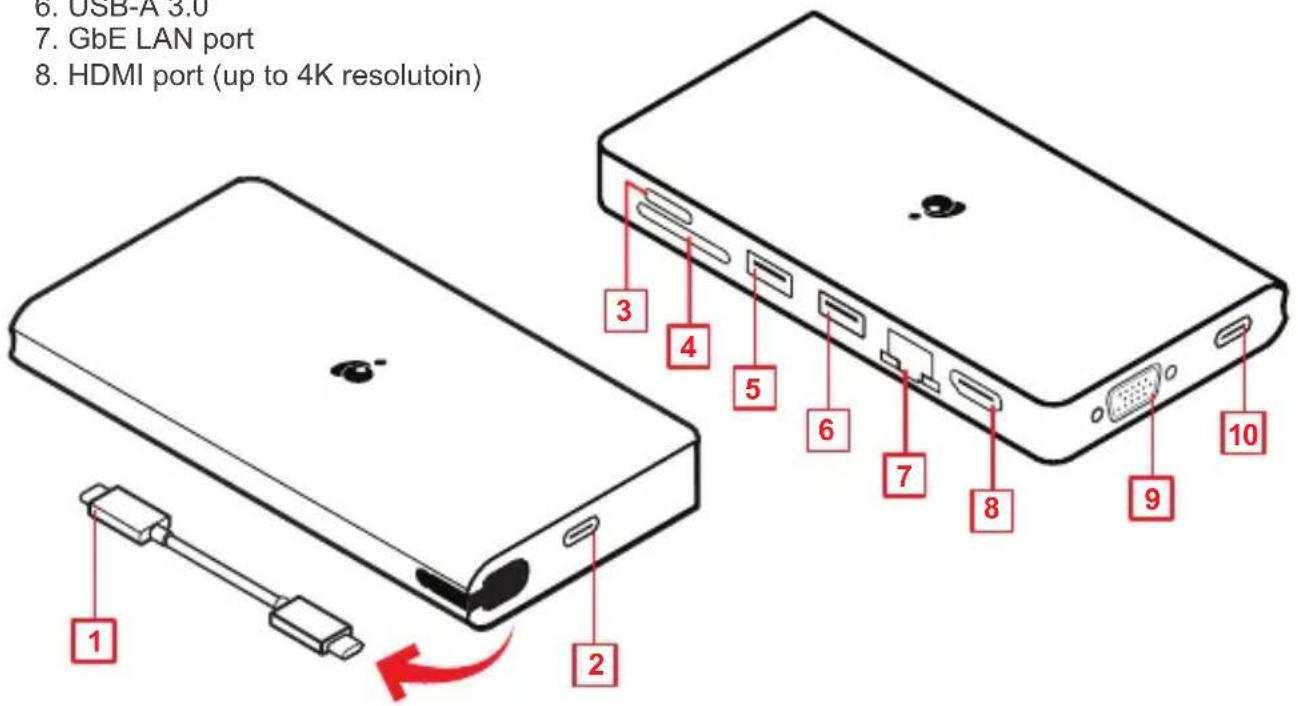
Product Overview
- Detached USB-C cable
- USB-C port (to the host laptop)
- Micro SD Card Slot
- SD/MMC Card Slot
- USB-A 3.0
(BC 1.2 charging port with max 1.5A)
- USB-A 3.0
- GbE LAN port
-
HDMI port (up to 4K resolutoin)
-
VGA port
- USB-C port (Power Delivery Pass-Through up to 100W) (Maximum of up to 85W of power can be delivered to the laptop after deduction of 15W used by the docking station)
text_image
6. USB-A 3.0 7. GbE LAN port 8. HDMI port (up to 4K resolutoin) 1 2 3 4 5 6 7 8 9 10Hardware Installation
Please follow steps below to ensure the optimal performance:
Step 1
Turn on the host computer. Then plug in the laptop's USB-C Power adapter to the USB-C port with Power Delivery Pass-Through*
Step 2
Connect external devices to appropriate ports as needed (refer to product overview for ports call out).
Step 3
Connect external monitor(s) to the video output with HDMI port or VGA port for single monitor. Please note that VGA port cannot be used with HDMI at the same time.
Step 4
Connect the detach USB-C cable on GUD3C08 USB-C port (the port for the host) to the USB-C port on the host computer. The computer screen might appear to flicker few times before GUD3C08 can recognize all the connected devices.

text_image
USB-C 4 2 1 32GB HDD mouse PC*Note: Without plugging the laptop's USB-C power adapter, GUD3C08 can still function in step 2-3, but GUD3C08 will not provide power to charge the laptop.
**Note: Maximum resolution of 4K is dependent on the capability of the video display and its computer host sources.
Compliance Information
⚠ WARNING: This product may expose you to chemicals including styrene which is known to the State of California to cause cancer, birth defects or other reproductive harm. For more information, go to www.P65Warnings.ca.gov
FCC Statement
This equipment has been tested and found to comply with the limits for a Class B digital device, pursuant to Part 15 of the FCC Rules. These limits are designed to provide reasonable protection against harmful interference in a residential setting. This product generates, uses, and can radiate radio frequency energy and, if not installed and used as directed, it may cause harmful interference to radio communications. Although this product complies with the limits for a Class B digital device, there is no guarantee that interference will not occur in a particular installation.
CE Statement
This device has been tested and found to comply with the following European Union directives: Electromagnetic Capability (2004/108/EC), Low Voltage (2006/95/EC) and R&TTED (1999/5/EC).
Limited Warranty
This product carries a 1 Year Limited Warranty. For the terms and conditions of this warranty, please go to http://www.iogear.com/support/warranty
Register online at http://www.iogear.com/register
Important Product Information
Product Model ____ Serial Number ____
Contact
WE'RE HERE TO HELP YOU! NEED ASSISTANCE SETTING UP THIS PRODUCT?
Make sure you:
- Visit www.iogear.com for more product information
- Visit www.iogear.com/support for live help and product support
IOGEAR
iogear.custhelp.com | support@iogear.com | www.iogear.com