
Ultra Thin UTP-30B - Flash kit Genaray - Free user manual and instructions
Find the device manual for free Ultra Thin UTP-30B Genaray in PDF.


| Product Type | LED Flash Kit |
| Brand | Genaray |
| Model | Ultra Thin UTP-30B |
| Light Source | SMD LED (144 LEDs) |
| Output Power | 15 W (at both 3200K and 5600K) |
| Color Temperature | 3200K to 5600K (adjustable) |
| Dimmer Range | 10% to 100% |
| CRI / TLCI | >90 |
| Wireless Control | Built-in 2.4 GHz receiver, 99 channels |
| Battery Compatibility | NP-F style Li-ion batteries (not included) |
| AC Power | 100-240 V, 50/60 Hz (via optional AC adapter) |
| Dimensions (H x W x D) | 3.7 x 5.7 x 1 in (9.5 x 14.5 x 2.5 cm) |
| Weight (without battery) | 12.6 oz (357 g) |
| Mounting | Shoe adapter for camera; light stand adapter (1/4-20 thread) |
| Barndoors | Built-in, matte black finish, independently adjustable |
| Diffuser | Integrated for soft light |
| Bulb Life | 50,000 hours |
| Included Accessories | Barndoors, shoe adapter |
| Safety | Keep away from water & flammable gases; use correct voltage; do not disassemble; do not stare at lights |
| Cleaning | Soft, dry cloth only |
| Spare Parts | Use only manufacturer-provided parts |
| Reparability | Do not attempt to disassemble or repair; contact Genaray service |
| Warranty | One-year limited warranty |
Frequently Asked Questions - Ultra Thin UTP-30B Genaray
User questions about Ultra Thin UTP-30B Genaray
0 question about this device. Answer the ones you know or ask your own.
Ask a new question about this device
Download the instructions for your Flash kit in PDF format for free! Find your manual Ultra Thin UTP-30B - Genaray and take your electronic device back in hand. On this page are published all the documents necessary for the use of your device. Ultra Thin UTP-30B by Genaray.
USER MANUAL Ultra Thin UTP-30B Genaray

genaray®
UTP-30B/UTP-60B INTRODUCTION
Thank you for choosing Genaray.
The UTP series of LED lights features surface-mount (SMD) LED technology that furnishes a powerful, high-output beam. The Elite 144- and 288-LED ultra-thin light fixtures provide flicker-free, continuous illumination. These lightweight, camera-mountable lights deliver outstanding brightness with precise color accuracy.
The lights are designed with an integrated 99-channel 2.4 GHz receiver, and they can be controlled individually or globally with the Genaray MB-WRT remote. Advanced features include an adjustable dimmer from 10% to 100% and built-in barndoors with a matte black finish. An integrated diffuser creates a soft and diffused light while it minimizes the multiple shadows often associated with LED lighting. The 144- and 288-LED arrays generate minimal heat, and they allow you to place the lights close without overheating your subjects.
PRODUCT CONTENTS
UTP-30B UTP-60B UTP-60B-KA UTP-60B-KS
- Light fixture
- Barndoors
-
Shoe adapter
-
Light fixture
- Barndoors
- Battery (×2)
- Dual charger
- AC power cord
- Shoe adapter
- Handle mount
• Light stand adapter - Wireless remote
-
Soft case
-
Light fixture
- Barndoors
- AC power cord
- Shoe adapter
- Handle mount
· Light stand adapter - Wireless remote
-
Soft case
-
Light fixture
- Barndoors
- Shoe adapter
• Light stand adapter
PRECAUTIONS


- Please read and follow these instructions, and keep this manual in a safe place.
- Keep this unit away from water and any flammable gases or liquids.
• Make sure the unit is powered off when plugging it into a power source. - Use only the correct, recommended voltage.
-
Do not attempt to disassemble or repair the equipment—doing so will void the warranty, and Genaray will not be responsible for any damage.
-
Handle the unit with care.
- Do not stare directly at the lights when they are powered on.
- Clean the unit with only a soft, dry cloth.
- Use only parts provided by the manufacturer.
• Make sure the item is intact and that there are no missing parts. - All images are for illustrative purposes only.
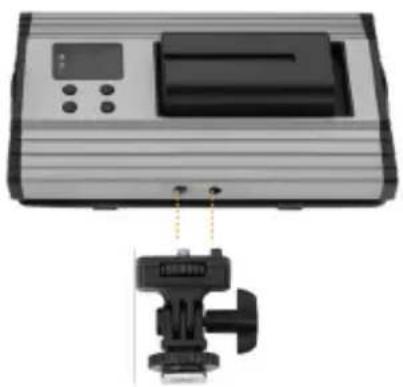
MOUNTING THE LIGHT ONTO A CAMERA
- Align and screw in.
- Mount to your camera.
- Adjust the angle.

Note
Mounting the UTP-60B vertically with the extra weight of batteries can potentially damage your camera's shoe. For vertical mounting, we recommend mounting the UTP-60B on a light stand with the included light stand adapters.
MOUNTING THE LIGHT TO A LIGHT STAND
UTP-30B
- If your light stand isn't equipped with a 1/4-20 mounting stud, insert a 5/8" spigot or a ball head (not included) with a 1/4-20 mounting post.
- Screw the light onto the light stand until it's secure.
UTP-60B
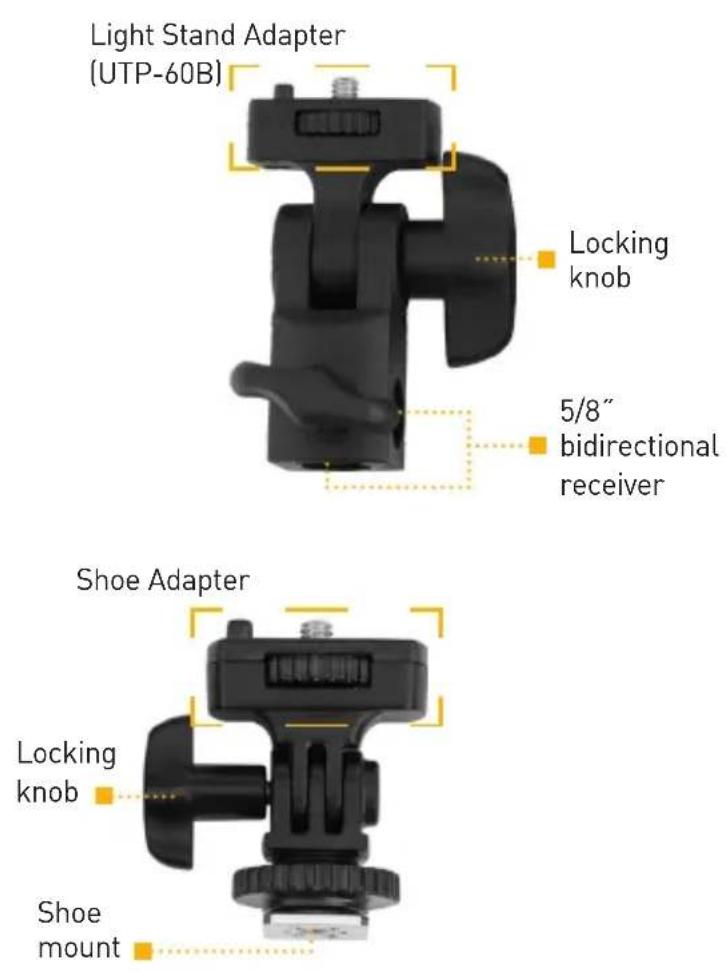
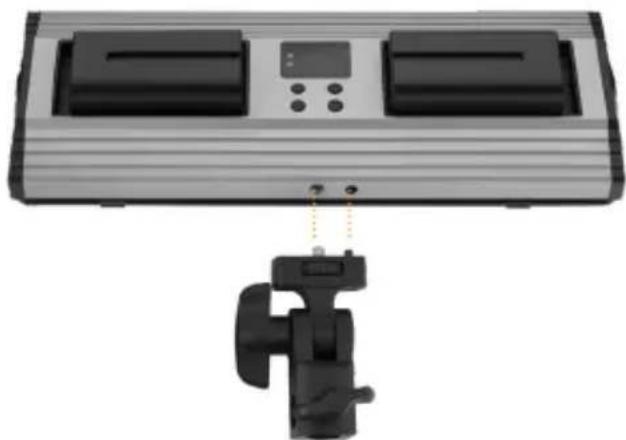
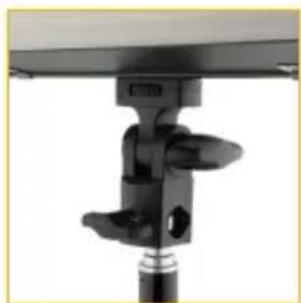
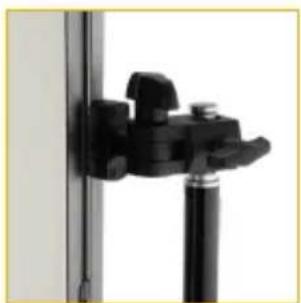
- Fit the light stand adapter over the light stand's 5/8" post, and tighten the locking wheel until it's secure.
- Mount the UTP-60B vertically or horizontally to the light stand adapter.
- Adjust the angle of the light, and turn the locking knob until secure.
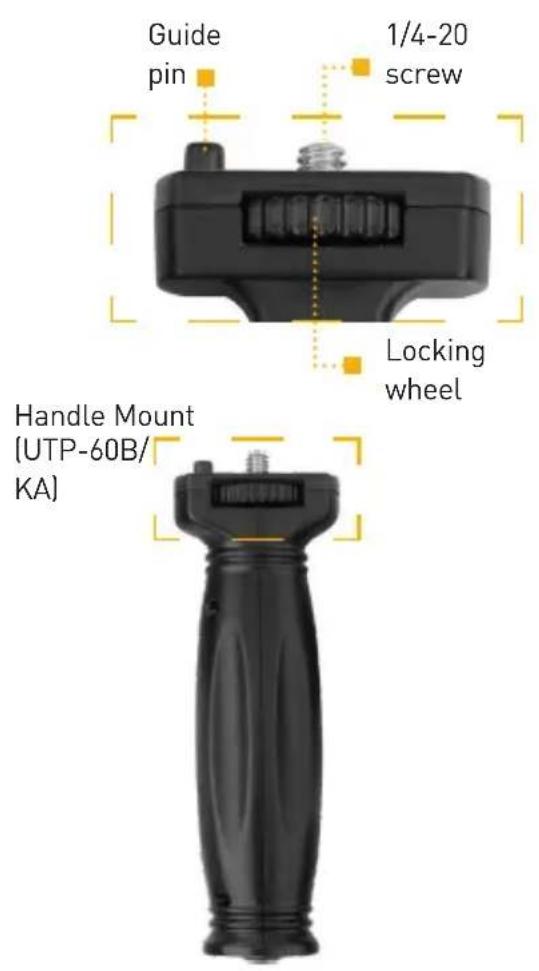
USING THE HANDLE MOUNT (UTP-60B/KA)
For handheld operation of your UTP-60B, follow these steps:
- Align the 1/4-20 post and guide pin with the appropriate sockets on the sides or bottom of the light.
- Screw in the handle mount by turning the locking wheel until secure.

POWERING THE LIGHT
The UTP-30B and UTP-60B run on NP-F style batteries, and they can be powered directly from an AC outlet.
AC Power
Note
The multivoltage AC adapter (UTP-60B only) runs on 100 to 240 V, 50/60 Hz. The included cable has a 2-prong (US) plug. To use this fixture in other countries or different style wall outlets, you must use a plug adapter (sold separately). Always use the included AC adapter to connect the light's power socket to an AC outlet.
The UTP-30B will run on AC power with the AC adapter that's included with the UTP-60B. If a separate AC adapter is needed to run the UTP-30B, contact Genaray customer service, or go to www.genaray.com for information.
Battery Power
Installing the batteries:
- Make sure the light is not plugged into a wall outlet.
- Place the batteries into the battery compartment so that the contacts are facing each other.
- Slide the batteries toward the battery contacts until they lock into place.
The batteries should easily slide into their compartments. Do not use force when installing the batteries. If the batteries don't easily slide into place, check to make sure they are properly aligned.
To remove the batteries, slide them away from the contacts, and lift them out of the compartments.
Checking the battery power:
You can check how much battery power is remaining by following these steps:
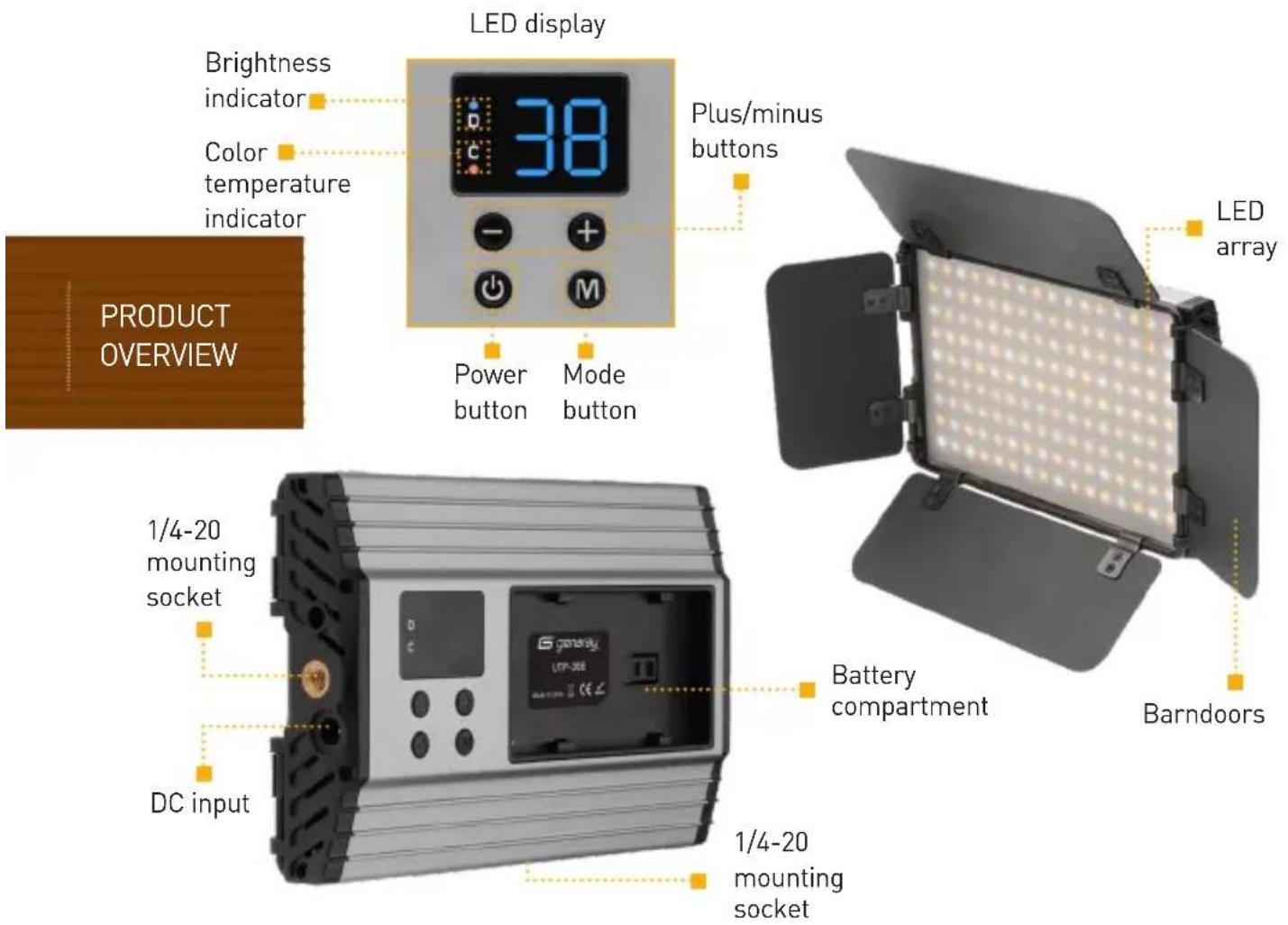
- With the light's power on, press the power button.
- The remaining percentage of battery power will blink on the LED screen.
- Press the power button again to return to normal operation.
Charging the batteries:
The batteries included with the UTP-60B light come with their own dual charger. To charge the batteries:
- Place each battery into the charger's compartment so that the contacts are facing each other.
- Slide the batteries toward the contacts until they lock into place.
- Plug the charger into an AC wall outlet. The four LED indicators on the charger will show the current level of each battery.
- When the battery is fully charged, all of the LED indicators will glow. Unplug the charger, and remove the batteries.
Open the barndoors, and press and hold the power until the LED array turns on. The LED display will show the last settings that were used.
Modifying the Light Output
The brightness ranges from 10 to 99 (10% to full brightness). To set the light's brightness, follow these steps:
- Turn on the power.
- Press the mode button so the brightness indicator appears on the screen.
- Press the + or - buttons to raise or lower the value by one-unit increments. Press and hold to change the value rapidly.
ADJUSTING THE COLOR TEMPERATURE
To change the color temperature, follow these steps:
- Press the mode button so the color temperature indicator appears on the screen.
- Use the + or - buttons to adjust the color temperature from 5600 K (daylight balance) to 3200 K (tungsten balance). Press the buttons to change the temperature by 100 K increments. Press and hold to change the value rapidly.
To adjust the color temperature with the remote, and for more information about using the remote with a multilight setup, refer to the user manual included with the Genaray MB-WRT wireless remote.
SHAPING THE LIGHT WITH THE BARNDOORS
The barndoors can be opened and closed independently to prevent light from spreading to unwanted areas, or to precisely control where the light strikes.
SETTING THE CHANNEL
The UTP-30B and UTP-60B feature a 2.4 GHz receiver that enables them to be operated by the Genaray MB-WRT wireless remote (included with UTP-60B). The remote can control your lights from up to 98 feet (30 m) away. The lights offer 99 channels for controlling setups with multiple lights and preventing interference from other remote devices in your area.
To set the channel, follow these steps:
- With the light's power on, press and hold the mode button. The channel number will appear on the screen without any mode indicators. If one of the mode indicators is visible, press and hold the mode button again to enter channel selection mode.
- Press and hold the + or - buttons to increase or decrease the value. Press either button to raise or lower the value by one-unit increments.
- Press the mode button again to exit channel selection mode.
The lights and the remote must be set to the same channel. To set the channel on the remote, refer to the user manual included with the Genaray MB-WRT wireless remote.
STORING THE LIGHTS
When you're finished using the light, power it off by pressing and holding the power button until the LED array and LED display turn off.
Remove the power cord or the batteries from the light, and close the barndoors to protect the light during transport and storage. If the light is warm, allow a few minutes for it to cool down.
Note
Always keep the barndoors closed when the light is not in use.
FCC DECLARATION OF CONFORMITY
This device complies with Part 15 of the FCC rules. Operation is subject to the following two conditions:
- This device may not cause harmful interference, and
- This device must accept any interference received, including interference that may cause undesired operation.
SPECIFICATIONS UTP-30B UTP-60B
| Output power | 15 W 3200 K, 15 W 5600 K 30 W 3200 K, 30 W 5600 K | |
| Lux (@ 3 ft.) | 3200 K: >270 | 3200 K: >585 |
| 5600 K: >280 | 5600 K: >635 | |
| TLCI/CRI | 3200 K: >90 | 3200 K: >90 |
| 5600 K: >90 | 5600 K: >90 | |
| Color temperature | 3200 to 5600 K 3200 to 5600 K | |
| Dimmer | 10% to 100% 10% to 100% | |
| Light source | SMD LED SMD LED | |
| Bulb life | 50,000 hr. 50,000 hr. | |
| Wireless receiver | Built-in 2.4 GHz receiver, 99 channels Built-in 2.4 GHz receiver, 99 channels | |
| Battery | Compatible with NP-F li-ion batteries Compatible with NP-F li-ion batteries | |
| DC operating voltage | 13 to 19 V DC 13 to 19 V DC | |
| Dimensions(H × W × D) | 3.7 × 5.7 × 1 in.(9.5 × 14.5 × 2.5 cm) | 3.7 × 9.8 × 1 in.(9.5 × 25 × 2.5 cm) |
| Weight | Without battery: 12.6 oz. (357 g) Without battery: 1.2 lb. (544 g) | |
ONE-YEAR LIMITED WARRANTY
This GENARAY product is warranted to the original purchaser to be free from defects in materials and workmanship under normal consumer use for a period of one (1) year from the original purchase date or thirty (30) days after replacement, whichever occurs later. Genaray's responsibility with respect to this limited warranty shall be limited solely to repair or replacement, at Genaray's discretion, of any product that fails during normal use of this product in its intended manner and in its intended environment. Inoperability of the product or part(s) shall be determined by Genaray. If the product has been discontinued, Genaray reserves the right to replace it with a model of equivalent quality and function.
This warranty does not cover damage or defect caused by misuse, neglect, accident, alteration, abuse, improper installation or maintenance. EXCEPT AS PROVIDED HEREIN, GENARAY MAKES NEITHER ANY EXPRESS WARRANTIES NOR ANY IMPLIED WARRANTIES, INCLUDING BUT NOT LIMITED TO ANY IMPLIED WARRANTY OF MERCHANTABILITY OR FITNESS FOR A PARTICULAR PURPOSE. This warranty provides you with specific legal rights, and you may also have additional rights that vary from state to state.
To obtain warranty coverage, contact the Genaray Customer Service Department to obtain a return merchandise authorization ("RMA") number, and return the defective product to Genaray along with the RMA number and proof of purchase. Shipment of the defective product is at the purchaser's own risk and expense.
For more information, or to arrange service, visit www.genaray.com or contact us at info@genaray.com.
© 2019 Genaray. All Rights Reserved
Other product and corporate names mentioned herein are trademarks of their respective holders.

genaray®


- THANK YOU FOR CHOOSING GENARAY
- PRODUCT CONTENTS
- UTP-30B UTP-60B UTP-60B-KA UTP-60B-KS
- PRECAUTIONS
- MOUNTING THE LIGHT ONTO A CAMERA
- NOTE
- MOUNTING THE LIGHT TO A LIGHT STAND
- UTP-30B
- UTP-60B
- USING THE HANDLE MOUNT (UTP-60B/KA)
- POWERING THE LIGHT
- AC POWER
- BATTERY POWER
- INSTALLING THE BATTERIES
- CHECKING THE BATTERY POWER
- CHARGING THE BATTERIES
- MODIFYING THE LIGHT OUTPUT
- ADJUSTING THE COLOR TEMPERATURE
- SHAPING THE LIGHT WITH THE BARNDOORS
- SETTING THE CHANNEL
- STORING THE LIGHTS
- FCC DECLARATION OF CONFORMITY
- ONE-YEAR LIMITED WARRANTY
Brand : Genaray
Model : Ultra Thin UTP-30B
Category : Flash kit