Dress 1496 - Watch Sekonda - Free user manual and instructions
Find the device manual for free Dress 1496 Sekonda in PDF.


| Product Type | Quartz Watch |
| Brand | Sekonda |
| Model | Dress 1496 |
| Display Type | Analog |
| Case Material | Stainless Steel |
| Case Diameter | Approx. 40 mm |
| Case Thickness | Approx. 10 mm |
| Band Material | Leather or Stainless Steel |
| Band Width | 20 mm |
| Weight | Approx. 80 g |
| Power Source | Battery (SR626SW or equivalent) |
| Battery Life | Approx. 2 years |
| Water Resistance | 3 ATM (splash resistant) |
| Movement Type | Japanese Quartz |
| Functions | Hours, minutes, seconds, date display |
| Crystal | Mineral glass |
| Crown | Push-pull crown for time and date adjustment |
| Care Instructions | Clean with soft dry cloth; avoid magnetic fields and harsh chemicals |
| Safety Precautions | Keep away from children; small parts may cause choking |
| Spare Parts | Battery, strap, crown, crystal |
| Repair | Visit authorized service center for battery replacement or repairs |
Frequently Asked Questions - Dress 1496 Sekonda
User questions about Dress 1496 Sekonda
0 question about this device. Answer the ones you know or ask your own.
Ask a new question about this device
Download the instructions for your Watch in PDF format for free! Find your manual Dress 1496 - Sekonda and take your electronic device back in hand. On this page are published all the documents necessary for the use of your device. Dress 1496 by Sekonda.
USER MANUAL Dress 1496 Sekonda
InstructionGuide and
2YearGuarantee
IS01
Contents
1ServiceandRepairs/SettingtheTime–AM/PM
2WaterResistancy 3–12OperationandAdjustment
Forfreebraceletadjustingservice,returnthewatch totheaddressbelow.
T.P.(UK)Ltd,AlexanderHouse,ChartwellDrive,Wigston,LeicesterLE182EZ
Formaximumprotection,pleasekeepyourwatch initspresentationboxwhennotinuse.
ImportantNote It is important to identify your watch correctly. If, after reading this Instruction Guide, you have any further questions regarding the use, operation or adjustment of your watch, please call us during office hours on 01162882500
SERVICEANDREPAIRS
YourSEKONDAwatchisguaranteedagainstdefectsinmaterials andworkmanshipforaperiodof2yearsfromthedateof purchase. During this period, wewillexchangeorrepair, atourdiscretion, any defective components.
IMPORTANT-NotcoveredbyGuarantee
- Batteries, strapsandbracelets.
- Damagecausedbyaccident, misuseorlackofcare.
- Waterpenetrationexceptinwatchesmarked as "WaterResistant". (seepage2).
SERVICINGANDREPAIRSUNDERGUARANTEE
Pleasepostyourwatch,togetherwiththeRetailer'sSalesRe- ceiptorProofofPurchase,thecompletedGuaranteesliponthe backcoverofthisbooklet,andabriefnotetoexplainthenature ofthefault,byRegisteredPostorRecordedDeliverytothead-dressshown.Donotsendthepresentationboxasthiswillnotbe returned.
SERVICINGANDREPAIRSOUTSIDEOFGUARANTEE
Availableatareasonablechargeafteranestimatehasbeen sentbySEKONDA.SendyourwatchtousbyRegisteredPost orRecordedDeliverytotheaddresssshownontheinsidefront cover.
SETTINGTHECORRECTTIME(AM/PM)—DATEWATCHES
- IftheDATEchangeswhenthehandsareturnedpast 12o'clock,thetimeshownis“am”.
- IftheDATEdoesnotchange,thetimeshownis"pm".
WATERRESISTANCY
If your watch is water resistant, it will clearly state "Water Resistant" or have a static water pressure indication (eg "30/50/100 metres") on the daily and/or caseback.
IfitisNOTmarkedaswaterresistant, it should not be allowed to come into contact with water or beworn in condition that could expose it to moisture (egwashing, heavy rainetc). Certain chemicals in water may damage the watch seals. Tomaintain its water resistance, were recommend that your watch is serviced and re-sealed at least every 12 months by SEKONDA.
IMPORTANTButtonsmustnotbeoperatedwhilein contactwithwater.
WATERRESISTANTorRESISTANT TO30METRES
Suitablefornormaleverydayuseandwillresist exposuretosplashesandrain;itisNOTdesigned tobeusedwhilebathingorswimming.
WATERRESISTANTTO50METRES
As30metresplusbathingorswimming.
WATERRESISTANTTO100METRES
As50metrespluspoolsidedivingandsnorkelling, butNOThighboardorscubadiving.
WATERRESISTANTTO200METRES
As100metresplusscubadiving, but NO Thighboard diving.
MODELSWITHASCREW-DOWNCROWN (BUTTON)
Unlockthecrownbyturningitanti-clockwiseuntilfree. Lockitbypressinginwhileturningclockwise.WATER RESISTANCEislostwhenthecrownisintheUN-LOCKEDposition.
QuartzanaloguewatchesdoNOT requirewinding.
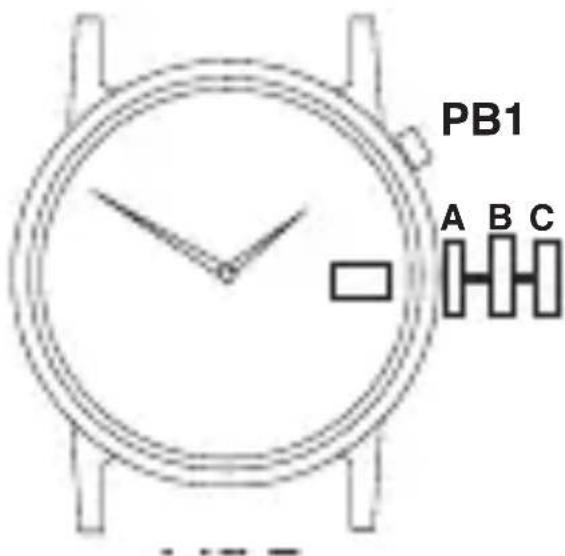
Thebuttonisusedforhand/functionsettingonly.When inuse,ensurethatthebuttonispushedFULLYINto position“A”.Failuretodosocanresultinexcessive batterydrainordamagetothehandsetting/date mechanism.
The instructions and diagramson the following pages are designed to demonstrate the adjustment of all models within our range.
Yourwatchmaynothaveallofthecharacteristics shownandmayhaveotherbuttonsanddialsinadditiontothoseshownonindividualdiagrams.
QUARTZNON-DATEWATCH TIMESETTING:
- Pullbuttonouttoposition“B”.
- Advancehandstocorrecttime.
- Returnbuttontoposition“A”.
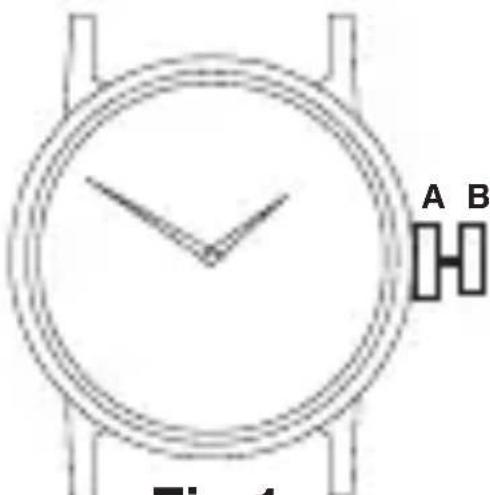
Fig 1
QUARTZDATEWATCH DATESETTING:
- Pullbuttonouttoposition“B”.
- Turnclockwiseoranti-clockwisetosetcorrectdate.
- Returnbuttontoposition“A”.
NOTE: Donotusethisfunctionbetween8.30pm and1.30amasdatechangecycleisinprogress.
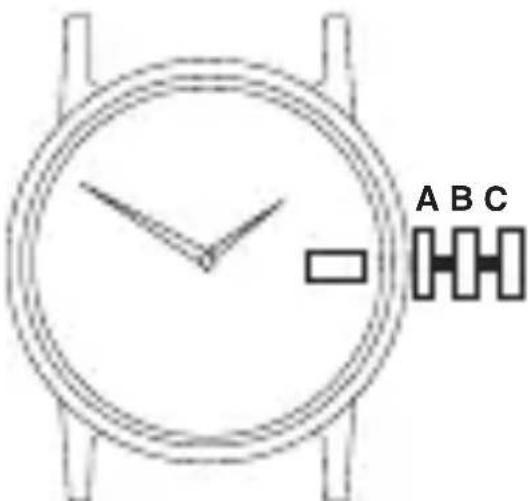
DAY/DATEMOONPHASEWATCH MOONPHASESETTING:
- Pullbuttonouttoposition“B”.
- Turnbuttonclockwisetosetcorrectmoonphase (seeenclosedleafletfordatesofmoonphase).
- Returnbuttontoposition“A”.
DATECORRECTION:
- Pullbuttonouttoposition“B”.
- Turnbuttonanti-clockwisetosetdate.
- Returnbuttontoposition“A”.
DAY/TIMESETTING:
- Pullbuttonouttoposition"C".
- Turnhandsforwardsuntilcorrectdayandtimearereached.
- Returnbuttontoposition“A”.
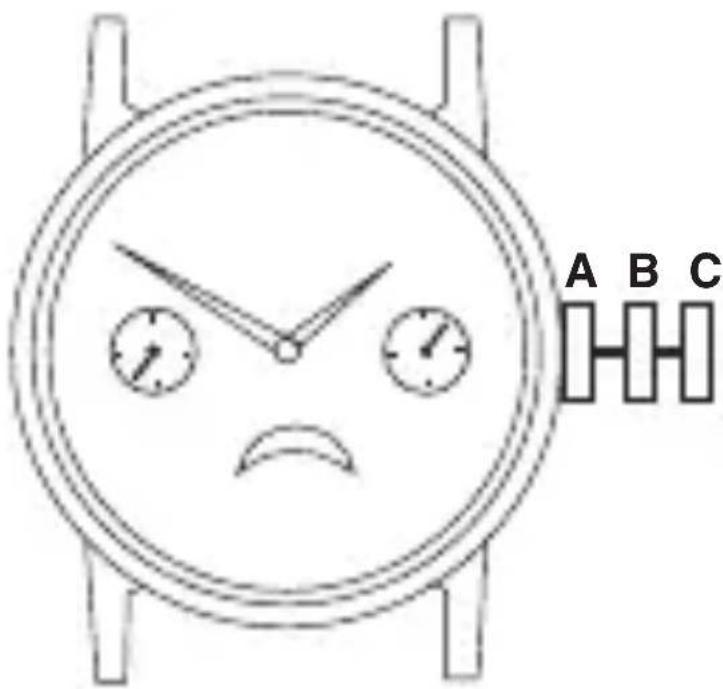
QUARTZ3EYECHRONOGRAPHWITHDATE TIME/DATESETTING:
Seeinstructionsonpages4and5.
OPERATINGCHRONOGRAPH:
- PushPB1tostart/stopchronograph.
- PushPB2toreset.
CHRONOGRAPHZERORESET:
- Pullbuttonouttoposition'C' (Chronosecondhandsreturntozeroposition).
- PushPB1tosetChronosecondhand to12.00(zero)position.
- Returnbuttontoposition'A'.
- PushPB2tosetChronominuteto12.00(zero)position.
HAND DISPLAYS
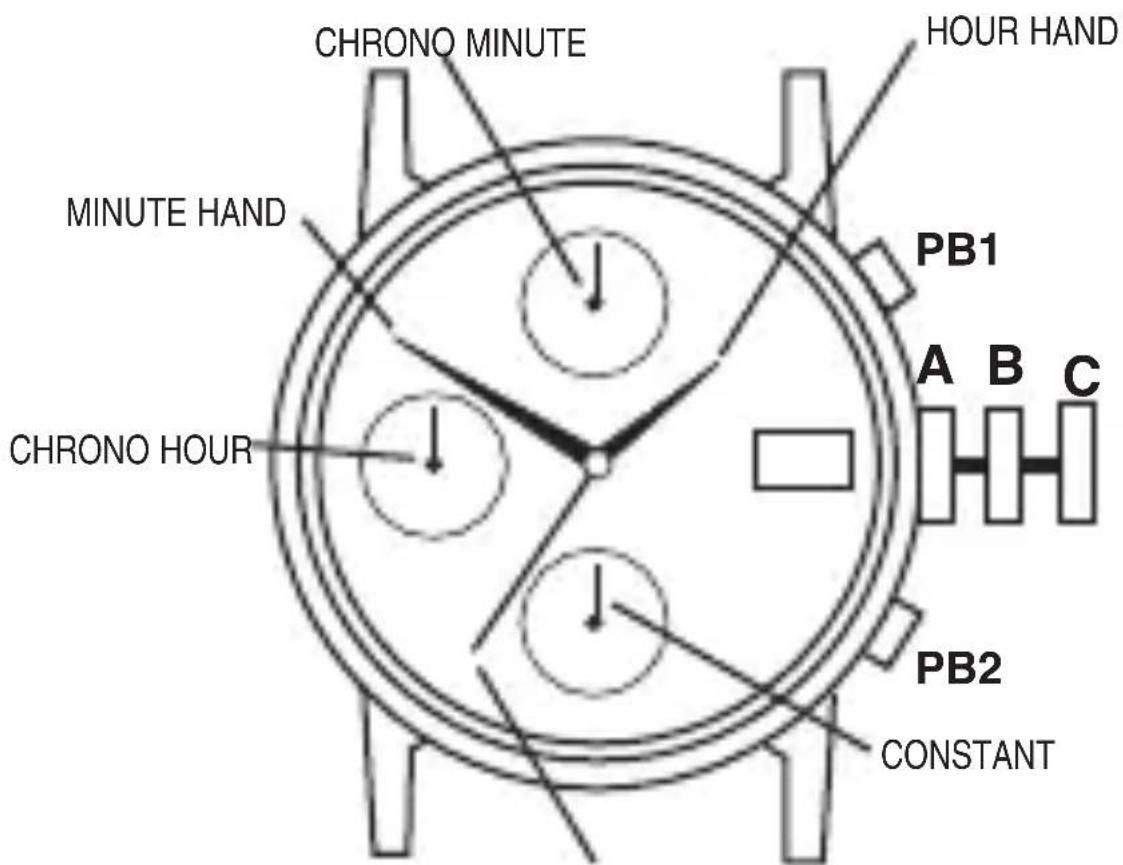
CHRONO SECONDS NOTE: Thishandshouldbeat zero(12o'clockposition) whenchronoisnotinuse.
QUARTZDAY/DATEWATCHES TIMESETTING:
- Pullbuttonouttoposition“C”.
- Advancehandstocorrecttime.
- Returnbuttontoposition“A”.
DAY/DATESETTING:
- Pullbuttonouttoposition“B”.
- Turnclockwiseoranti-clockwisetosetcorrectdate.
- Turnclockwiseoranti-clockwisetosetcorrectday.
NOTE:DaysoftheweekcanbesetinEnglishor Spanish. Oncesetthewatchwillautomatically indicatethedayinthechosenlanguage.
- Returnbuttontoposition“A”.
NOTE: Donotsetday/datebetween8.30pm and5.00amasday/datechangecycleisinprogress.
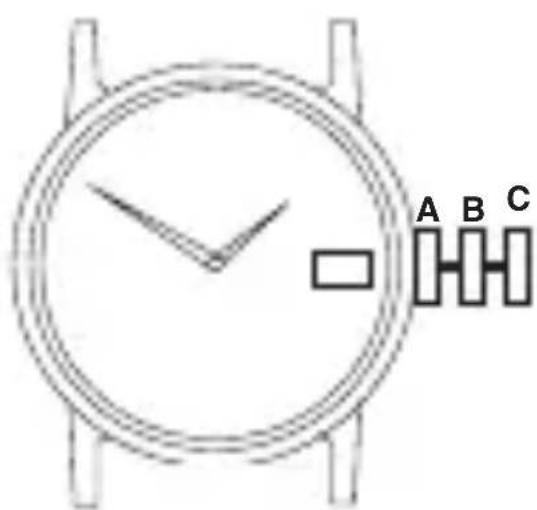
QUARTZ“TWO-EYE”(MONTH&DAY)WITHDATEWATCH DAY&TIMESETTING:
- Pullbuttonouttoposition"C".
- Turnbuttontoadvancehandsuntildaychanges; repeatuntilcorrectdayandtimeisshown.
- Returnbuttontoposition“A”.
DATE&MONTHSETTING:
- Pullbuttonouttoposition“B”.
- Turnbuttonclockwiseuntilmonthchanges (every31days).
- Repeat until correct month and date areshown.
- Returnbuttontoposition"A".
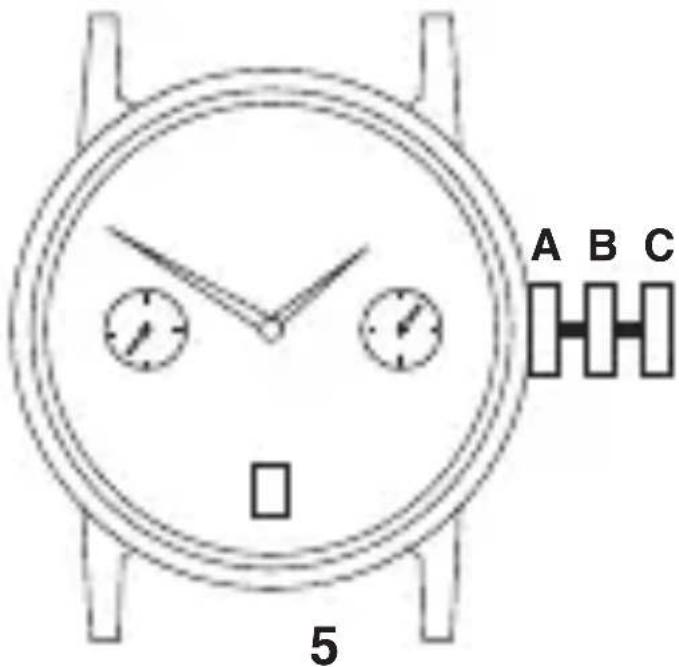
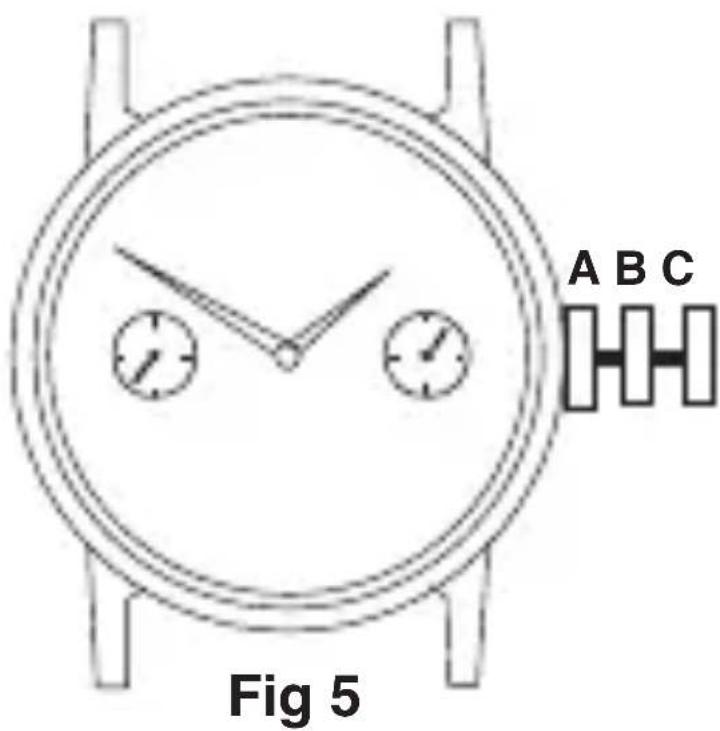
QUARTZ“TWO-EYE”(DAY&DATE)WATCH
IMPORTANT-Thepositionoftheday/date"eyes"referredtoin theseinstructionsMAYBEREVERSEDoncertainModels.
DATEINRIGHTEYE-DAY&TIMESETTING:
- Pullbuttonouttoposition"C".
- Turnbuttontoadvancehandsuntildaychanges; repeatuntilcorrectdayandtimeisshown.
- Returnbuttontoposition"A".
QUARTZ“TWO-EYE”(DAY&DATE)WATCH(continued) DATEINRIGHTEYE(continued) DATESETTING:
- Pullbuttonouttoposition“B”.
- Turnbuttonclockwiseuntildatechanges.
- Repeatuntilcorrectdateisshown.
- Returnbuttontoposition“A”.
DATEINLEFTEYE TIMESETTING:
- Pullbuttonouttoposition"C".
•Turnbuttontoadvancehands. - Returnbuttontoposition“A”.
DAY/DATESETTING:
- Pullbuttonouttoposition“B”.
- Turnbuttonanti-clockwisetosetcorrectDAY.
- TurnbuttonclockwisetosetcorrectDATE.
- Returnbuttontoposition“A”.
MODELSWITHELECTROLUMINESCENT DISPLAY(E.L.D.)FACILITY
NON-DATEMODELS
TIMESETTING:
•Seeinstructionsonpage4.
DATEMODELS
TIME/DATESETTING:
•Seeinstructionsonpages4and5.
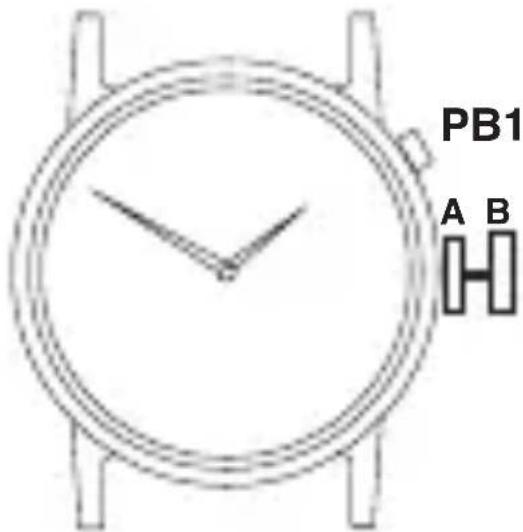
E.L.D.DISPLAY
- PressPB1toactivatedisplay (Displayonlyvisibleinsubduedlight).
Note: Displayshouldonlybeactivatedfor shortperiods, e.g. 1 or 2 seconds as excessive use will greatly reduce the life of the battery.
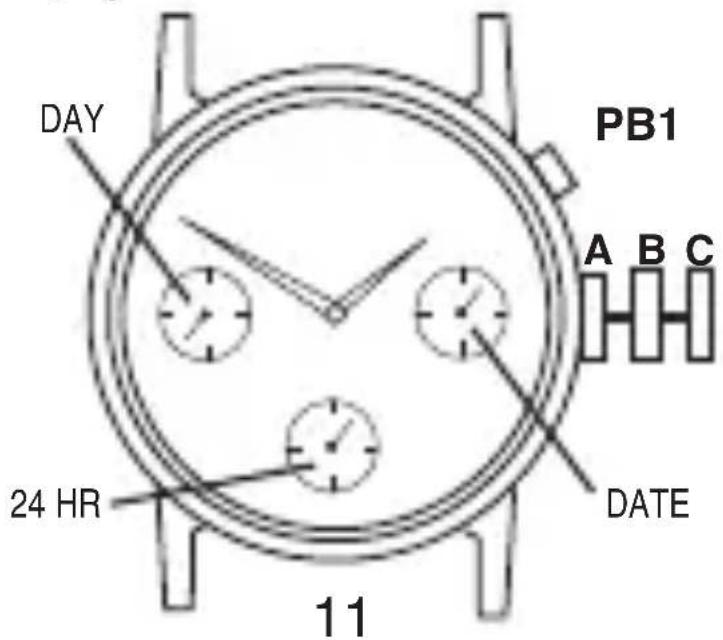
E.L.D.-THREEEYEWITHDAY-DATE- 24HOURFUNCTIONS DAYSETTING:
- Pullbuttonouttoposition"C".
- Turnbuttonclockwisetoadvancehands.
- Continueuntilcorrectdayisshown.
- Returnbuttontoposition"A".
NOTE: Datechangetakesplacebetweenapproximately midnight and 5.30am.
TIME/24HRFUNCTIONSETTING:
- Pullbuttonouttoposition"C".
- Turnbuttonclockwisetosetthehour,minuteand24 hourhandstothecorrecttime.*Whensettingthehour hand,besuretocheckthatthe24hourhandisset properly.(E.G.12midnight=24.00hrs)
- Returnbuttontoposition“A”.
NOTE: Whensettingtheminutehandfirstadvanceit4to 5minutesaheadofthedesiredtimeandthenturnitback totheexactminute.
DATE(QUICKCHANGEFUNCTION)SETTING:
- Pullbuttonouttoposition“B”.
- Turnbuttonanti-clockwisetoadvancedatehand tocorrectdate.
- Returnbuttontoposition“A”.
E.L.D.DISPLAY:
Seeinstructionsonpage10.

B
MULTIPLECLASPS
Someofourbraceletmodelsare nowfittedwithamultipleclasp systemwhichisdesignedtomake braceletadjustmenteasierforyou.
Toreducethesizeofthebracelet simplyopenandremoveoneor bothoftheadjustableclasps indicatedas(A)and(B)onthe diagram.
Shouldyoufeelthatyourbracelet isinneedoffurtheradjustment, pleasefollowtheproceduresinIn-struction3ofthebraceletgaugein- cluduedinthisleaflet.
Guarantee
BlockCapitals
Name
Address
PostCode
DaytimePhone
T.P.(UK)Ltd,AlexanderHouse,ChartwellDrive,Wigston,LeicesterLE182EZ
Important
ThisguaranteeshouldberetainedbytheownerofthewatchandshouldbesenttoSekondatogetherwiththewatchand£4.00tocoverhandlingandpostagewhenserviceunderguaranteeisrequired.Pleaserefertopage1oftheinstructionguideforfurtherinformationonserviceunderguarantee.Thisguaranteedoesnotaffect yours tatutoryrights.
RetailersStampifrequiredorfullnameandaddress
AttachReceptorProofofPurchase; failuretoattachmayinvalidateguarantee. Thisguaranteedoesnotaffectyour statutoryrights.
IS01/10-10