
AF-R100EX - Air purifier SHARP - Free user manual and instructions
Find the device manual for free AF-R100EX SHARP in PDF.
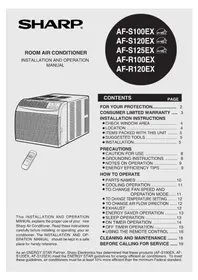


| Product Type | Room Air Conditioner |
| Model Number | AF-R100EX |
| Power Rating | 125V, 60Hz, 15A |
| Cooling Modes | High Cool, Med Cool, Low Cool |
| Fan Only Modes | High Fan, Med Fan, Low Fan |
| Temperature Range | 64°F to 86°F |
| Timer | On/Off Timer up to 12 hours |
| Energy Saver Mode | Fan stops when compressor off |
| Sleep Mode | Adjusts temperature automatically |
| Exhaust Control | Open/Close for stale air removal |
| Filter | Washable, clean every 10 days |
| Remote Control | Included, range up to 20 ft |
| Installation Type | Window mounted, single/double hung |
| Cooling Capacity | Appropriate for room size (refer to manual) |
| Compressor Type | Hermetically sealed, permanently lubricated |
| Warranty | 1 year parts & labor, 5 years sealed system |
Frequently Asked Questions - AF-R100EX SHARP
User questions about AF-R100EX SHARP
0 question about this device. Answer the ones you know or ask your own.
Ask a new question about this device
Download the instructions for your Air purifier in PDF format for free! Find your manual AF-R100EX - SHARP and take your electronic device back in hand. On this page are published all the documents necessary for the use of your device. AF-R100EX by SHARP.
USER MANUAL AF-R100EX SHARP
This INSTALLATION AND OPERATION MANUAL explains the proper use of your new Sharp Air Conditioner. Read these instructions carefully before installing or operating your air conditioner. The INSTALLATION AND OPERATION MANUAL should be kept in a safe place for handy reference.
AF-S100EX
AF-S120EX
AF-S125EX
AF-R100EX
AF-R120EX



CONTENTS
PAGE
FOR YOUR PROTECTION...... 2
CONSUMER LIMITED WARRANTY ..... 3
INSTALLATION INSTRUCTIONS
- CHECK WINDOW AREA 4
- LOCATION 4
- ITEMS PACKED WITH THIS UNIT .... 5 ● SUGGESTED TOOLS 5
- INSTALLATION.... 5
PRECAUTIONS
- CAUTION FOR USE 8 ● GROUNDING INSTRUCTIONS ..... 8 • NOTES ON OPERATION ...... 9
- ENERGY EFFICIENCY TIPS 9
HOW TO OPERATE
• PARTS NAMES ....10 • COOLING OPERATION 11 - TO CHANGE FAN SPEED AND OPERATION MODE......11 • TO CHANGE TEMPERATURE SETTING ..... 12 • TO CHANGE AIR FLOW DIRECTION ..... 12 • EXHAUST ....12 - ENERGY SAVER OPERATION ...... 13 - SLEEP OPERATION ....13 - ON TIMER OPERATION ....14 - OFF TIMER OPERATION 15 • USING THE REMOTE CONTROL ..... 16
CLEANING AND MAINTENANCE ..... 18
BEFORE CALLING FOR SERVICE ..... 19
FOR YOUR PROTECTION
To aid in answering questions if you call for service or for reporting loss or theft, please record below the model and serial number located on the right side of the unit.
| MODEL NUMBER |
| SERIAL NUMBER |
| DATE OF PURCHASE |
| Dealer Name |
| Address |
| City |
| State |
| Zip |
| Telephone |
TO PHONE: Dial 1-800-BE-SHARP (237-4277) for: SERVICE (for your nearest Sharp Authorized Servicer) PARTS (for your Authorized Parts Distributor) ACCESSORIES ADDITIONAL CUSTOMER INFORMATION
TO WRITE: For service problems, warranty information, missing items and other assistance: Sharp Electronics Corporation Customer Assistance Center 1300 Naperville Drive Romeoville, IL 60446-1091
Please provide the following information when you write or call: model number, serial number, date of purchase, your complete mailing address (including zip code), your daytime telephone number (including area code) and description of the problem.
CONSUMER LIMITED WARRANTY
CONSUMER LIMITED WARRANTY
SHARP ELECTRONICS CORPORATION warrants to the first consumer purchaser that this Sharp brand product (the "Product"), when shipped in its original container, will be free from defective workmanship and materials, and agrees that it will, at its option, either repair the defect or replace the defective Product or part thereof with a new or remanufactured equivalent at no charge to the purchaser for parts or labor for the period(s) set forth below.
This warranty does not apply to any appearance items of the Product nor to the additional excluded item(s) set forth below nor to any Product the exterior of which has been damaged or defaced, which has been subjected to improper voltage or other misuse, abnormal service or handling, or which has been altered or modified in design or construction.
In order to enforce the rights under this limited warranty, the purchaser should follow the steps set forth below and provide proof of purchase to the servicer.
The limited warranty described herein is in addition to whatever implied warranties may be granted to purchasers by law. ALL IMPLIED WARRANTIES INCLUDING THE WARRANTIES OF MERCHANTABILITY AND FITNESS FOR USE ARE LIMITED TO THE PERIOD(S) FROM THE DATE OF PURCHASE SET FORTH BELOW. Some states do not allow limitations on how long an implied warranty lasts, so the above limitation may not apply to you.
Neither the sales personnel of the seller nor any other person is authorized to make any warranties other than those described herein, or to extend the duration of any warranties beyond the time period described herein on behalf of Sharp.
The warranties described herein shall be the sole and exclusive warranties granted by Sharp and shall be the sole and exclusive remedy available to the purchaser. Correction of defects, in the manner and for the period of time described herein, shall constitute complete fulfillment of all liabilities and responsibilities of Sharp to the purchaser with respect to the Product, and shall constitute full satisfaction of all claims, whether based on contract, negligence, strict liability or otherwise. In no event shall Sharp be liable, or in any way responsible, for any damages or defects in the Product which were caused by repairs or attempted repairs performed by anyone other than an authorized servicer. Nor shall Sharp be liable or in any way responsible for any incidental or consequential economic or property damage. Some states do not allow the exclusion of incidental or consequential damages, so the above exclusion may not apply to you.
THIS WARRANTY GIVES YOU SPECIFIC LEGAL RIGHTS. YOU MAY ALSO HAVE OTHER RIGHTS WHICH VARY FROM STATE TO STATE.
| Your Product Model Number & Description: | AF- S100EX, AF-S120EX, AF-S125EX, AF-R100EX or AF-R120EX Room Air Conditioner. Be sure to have this information available when you need service for your Product. |
| Warranty Period for this Product: | One (1) year parts and labor from date of purchase. The warranty period continues for a total of five (5) years from date of purchase for the Sealed Cooling System parts; labor and service are not provided free of charge for this additional period. |
| Additional Item(s) Excluded From Warranty Coverage (If any): | Appearance items of the Product, knobs, filter, or accessories, mounting kit, seals, or any printed materials. |
| Where to Obtain Service: | From a Sharp Authorized Servicer located in the United States. To find the location of the nearest Sharp Authorized Servicer, call Sharp Toll Free at 1-800-BE-SHARP. |
| What to Do to Obtain Service: | Contact your Sharp Authorized Servicer to obtain in-home service for this Product. The Servicer will come to your home, and if it is necessary to remove the Product, the Servicer will reinstall it. Be sure to have Proof of Purchase available. |
TO OBTAIN SUPPLY, ACCESSORY OR PRODUCT INFORMATION, GO TO OUR WEBSITE AT www.sharpusa.com OR CALL 1-800-BE-SHARP.
SHARP®
SHARP ELECTRONICS CORPORATION
Sharp Plaza, Mahwah, New Jersey 07430-2135
INSTALLATION INSTRUCTIONS
Before beginning installation, read these instructions carefully.
Use the enclosed MOUNTING KIT for proper installation.
CHECK WINDOW AREA
The mounting kit is designed for wooden sill double or single hung sash-type windows.
| Minimum opening(Without mounting kit) | Mounting kit fully closed | Mounting kit fully opened |
2227/32 "(580mm)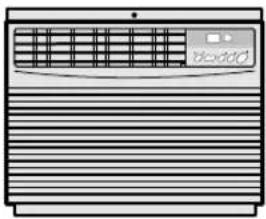 | 2715/16 "(710mm) 38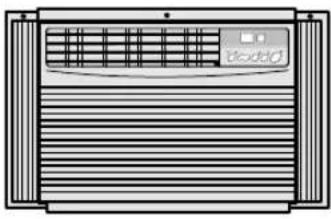 | 19/32 "(980mm)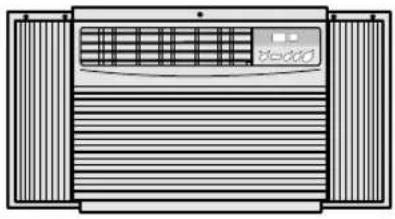 |
Window opening from stool to lower sash bottom must be 15 7/16" (392mm) or more.

LOCATION
The air conditioner should be installed on a firm foundation to minimize noise and vibration.
For safe installation, repairs, replacement and secure positioning, make sure the foundation is solid and level.
The room air conditioner must be installed in an area within reach of a properly rated grounded outlet.
Use of extension cords of any kind is not recommended.
Never place any obstacles around the air inlet.
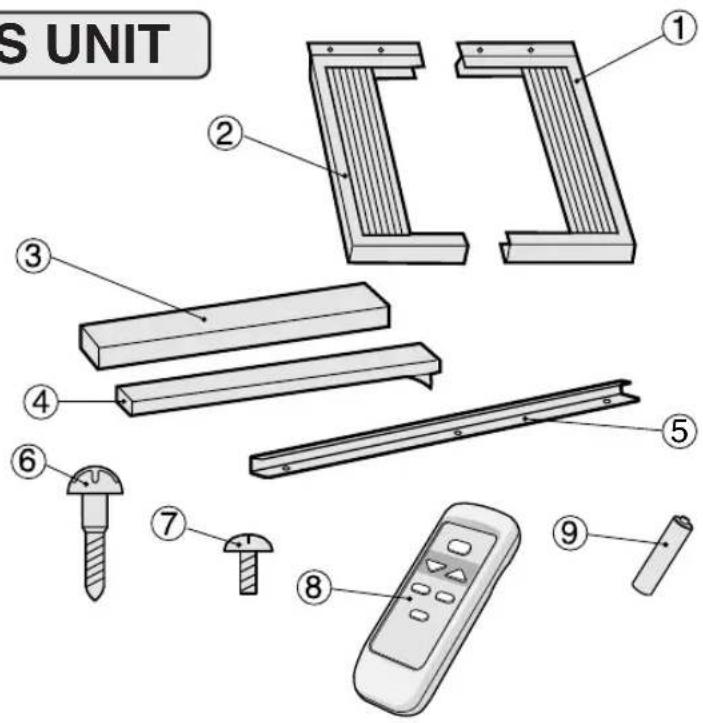
ITEMS PACKED WITH THIS UNIT
| No. | Accessories | Q'ty |
| 1 | Right closure assembly | 1 |
| 2 | Left closure assembly | 1 |
| 3 | Window sash foam seal | 1 |
| 4 | Window sash foam seal (adhesive type) | 1 |
| 5 | Top angle | 1 |
| 6 | Screws(L=1", 25.4mm) | 7 |
| 7 | Screws(L= 1/4 ", 6mm) | 9 |
| 8 | Remote control | 1 |
| 9 | Battery | 2 |
SUGGESTED TOOLS
- Screw driver (medium size Phillips)
- Tape measure or ruler
- Knife or scissors
- Cotton gloves
INSTALLATION
WARNING: Make sure the unit is turned off and unplugged before working. Wear cotton gloves when working on installation, in order to avoid injuries.
1 Cut the window sash foam seal (adhesive type) to the proper length and attach it to the underside of the window sash.

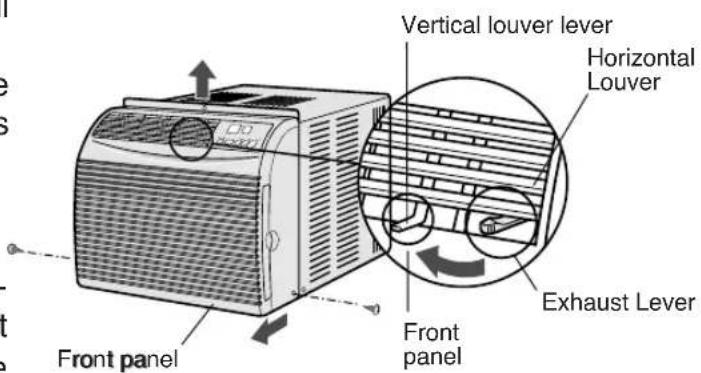
2 (1) Unscrew the 2 screws at the corners of the front panel. Keep them as they will be used later. (2) Remove the front panel by pulling the front panel at the lower corners towards you about an inch.
Next lift it up and pull it towards you.
CAUTION:
Move the exhaust lever and the 3 vertical louver levers thoroughly to the left when replacing the front panel. Take care not to damage the levers.
INSTALLATION INSTRUCTIONS
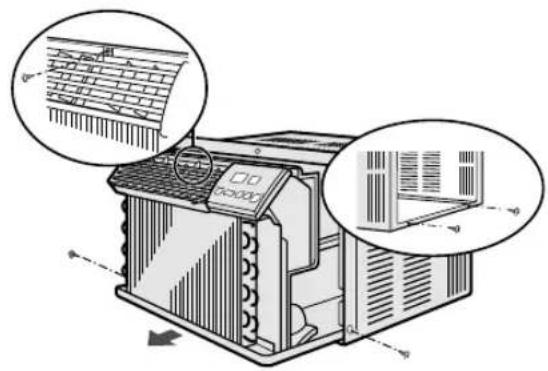
3 (1) Unscrew the 5 stopper screws of the cabinet. Keep the 3 screws from the front and side, as they will be used later. (2) Slide the chassis out from the cabinet by pulling on the hand hold located at the bottom both sides of the chassis.
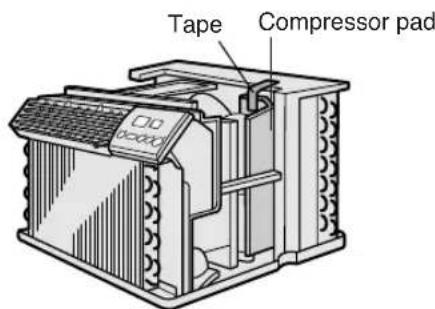
4 Remove the tape and the compressor pad from the unit.
CAUTION:
Do not remove any other material (ex. styrofoam, etc.) from inside the unit.
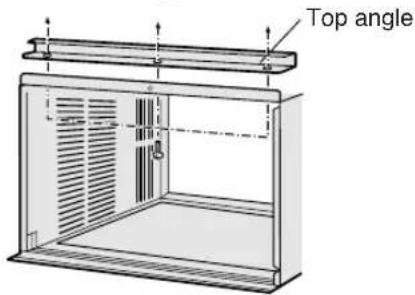
5 Attach the top angle to the cabinet with 3 gold screws (1/4", 6mm).
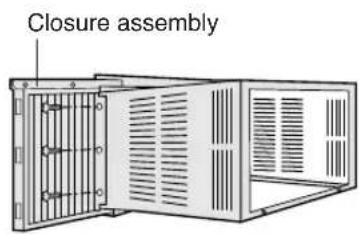
6 Insert the right closure assembly and the left closure assembly into the top angle and the bottom channels.
Secure the right and left closure to the cabinet with 6 of the provided screws. (L=1/4", 6mm)
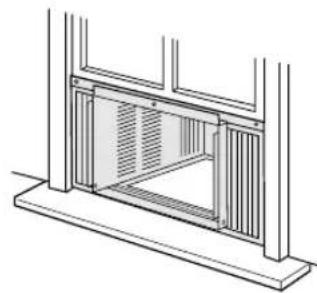
7 Open the window sash and place the cabinet on the sill.
Close the window sash securely behind the top angle.
If there is space between the bottom channel and the sill, fill the gap with a thin board or other hard filler.
WARNING
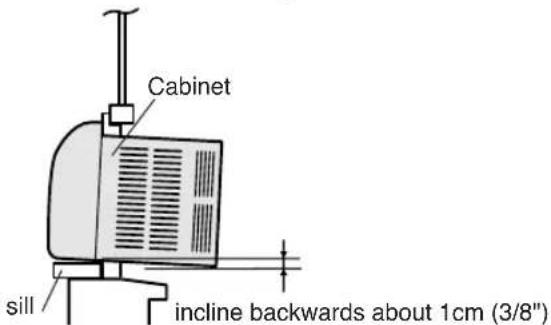
At this step, make sure the cabinet is inclined approximately 1 cm (3/8") to the back.
If the cabinet is not properly inclined, the water collected in the bottom tray during operation will not drain properly and may flow into the room where the air conditioner is installed.
8
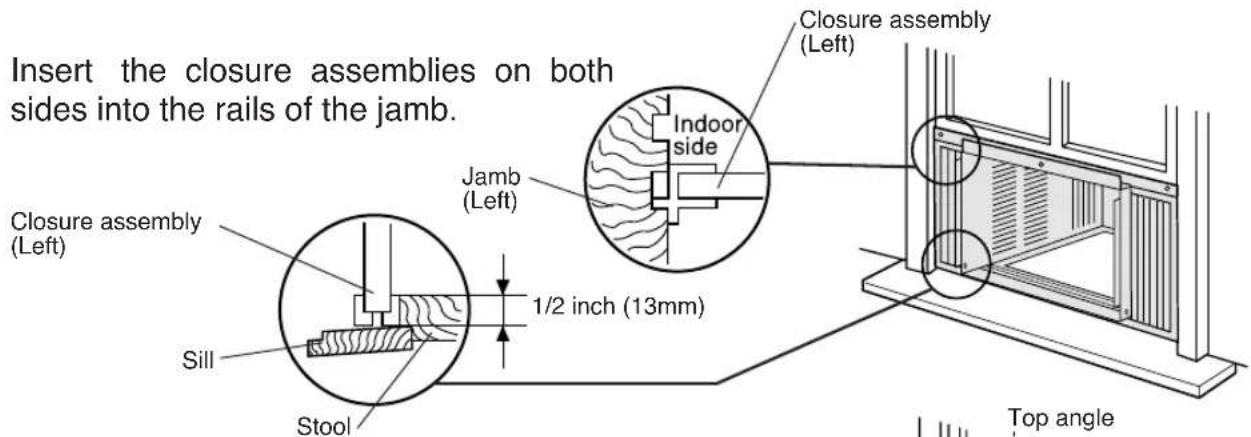
Insert the closure assemblies on both sides into the rails of the jamb.
9
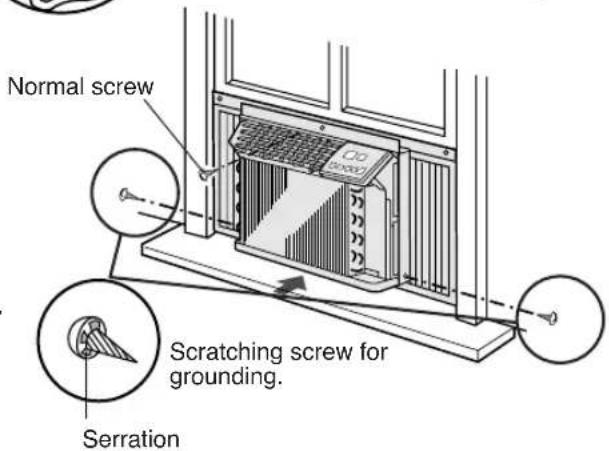
(1) Secure the cabinet to the window stool with 2 screws (L=1", 25.4mm), working from the inside of the cabinet. (2) Secure the top angle and the closure assemblies to the window sash with 3 screws (L=1", 25.4mm). (3) Secure the closure assemblies to the sill with 2 screws (L=1", 25.4mm).
10
(1) Slide the chassis back into the cabinet. (2) Replace the 3 screws removed in step 3 to the Front and side of the cabinet.
11
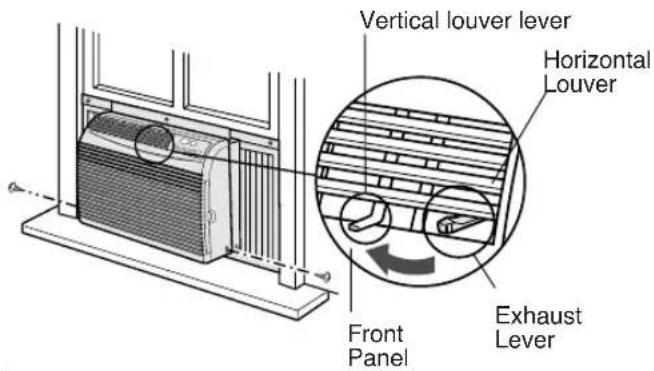
(1) Replace the front panel. Slip the exhaust lever through the opening between the horizontal louver and the front panel then, hook the cabinet top.
CAUTION:
Move the exhaust lever and the 3 vertical louver levers thoroughly to the left when replacing the front panel. Take care not to damage the levers.
(2) Screw the front cabinet on at the bottom corners with 2 screws removed in step 2.
Cut the window sash foam seal to the proper length and seal the opening between the top of the inside window sash and the outside window sash.


CAUTION FOR USE
IMPORTANT: Points to keep in mind when using your air conditioner.
- Install the air conditioner by following the installation instructions given in the previous section of this manual.
- Make sure the unit is the correct capacity for the area you want to cool.
- Do not modify any part of this product.
- Do not insert objects into any part of the unit.
- Push the AC power plug securely into the receptacle and make sure it is not loose.
- Use power circuit with a proper voltage rating.
Use a three-pronged grounded electrical outlet rated 125V, 60Hz, 15 amp or more, AC only as shown on right.
Use of an improper voltage rating power circuit can result in damage to the unit and possibly fire.
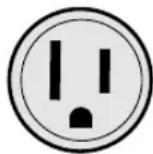
Two-Pole, 3-wire Grounding
Receptacle 15 Amps. 125V.
• Always use a fuse with the proper amp rating. Do not, under any circumstances, use wire, pins or other objects in place of the proper fuse. - Use of extension cords of any kind is not recommended. If you still elect to use an extension cord, it is absolutely necessary that it be a UL Listed 3-wire grounding type appliance extension cord rated 125 Volts, 15 amp or more. - Ventilate the room periodically during use, especially if using gas appliances.
GROUNDING INSTRUCTIONS
WARNING: Improper use of the grounding plug can result in the risk of electric shock.
This appliance must be grounded. In the event of an electrical short circuit, grounding reduces the risk of electric shock by providing an escape wire for the electric current.
This appliance is equipped with a cord having a grounding wire with a grounding plug.
The plug must be plugged into an outlet that is properly installed and grounded.
WARNING: Do not under any circumstances cut or remove the round grounding prong from this plug.
If it is necessary to use an extension cord, use only a UL Listed 3-wire extension cord that has a 3-blade grounding plug, and a 3-slot receptacle that will accept the plug on the appliance.
The marked rating of the extension cord should be AC 125 Volt, 15 Amp or more.
Consult a qualified electrician or serviceman if the grounding instructions are not completely understood, or if doubt exists as to whether the appliance is properly grounded.
If a grounding adapter is used, make sure the receptacle box is fully grounded.

NOTES ON OPERATION
- Allow 3 minutes for the compressor to restart cooling.
If you turn the air conditioner off and immediately restart it, allow three minutes for the compressor to restart cooling. There is an electronic device in the unit that keeps the compressor off three minutes for protection.
- If a power failure occurs during use, allow 3 minutes before restarting the unit.
After power is reinstated, restart the air conditioner. If the power was off for less than three minutes, be sure to wait at least three minutes before restarting the unit. If you restart the air conditioner within three minutes, a protective device in the unit may cause the compressor to shut off. This protective device will prevent cooling for about 5 minutes.
Memory settings will be cancelled and the unit will return to factory presettings.
- Dehumidifying function
The air conditioner removes moisture from the air in your room.
• Cooling operation under low temperatures: Is your unit freezing up?
The unit operates on inside and outside temperatures. Freezing can occur when the temperature is set close to 64°F and when there are low outside temperatures, especially during the night hours. At these conditions, a further temperature drop may cause the unit to freeze. Setting the unit to a higher temperature will prevent it from freezing.
ENERGY EFFICIENCY TIPS
- Setting the proper temperature.
For optimum energy efficiency, keep the difference between the inside and outside temperature within 10°F (5°C). Do not keep the temperature setting any lower than is necessary for you to feel comfortable. Generally, 78°F to 80°F (26°C to 27°C) is a comfortable summer indoor temperature.
When you turn the unit on, do not set the temperature higher than the room temperature at start up as this will not allow the compressor to cycle and maintain a comfortable room temperature.
- Avoid direct sunlight.
Close blinds, drapes or shades to keep out direct sunlight during cooling operation.
- Keep the filter clean.
Keeping the filter clean greatly aids efficient operation. A dirty filter blocks the flow of air, making your air conditioner work harder and less efficiently. See page 18 on how to clean the filter.
- Turn off unnecessary light.
Your air conditioner must remove the heat produced by your lights or other heat-producing appliances. Turn off lights or appliances that are not in use.
- Install your air conditioner in a shady location.
Direct sunlight on a window air conditioner increases its workload and will increase its operating cost.
- Don't let cool air escape.
Close windows and outside doors. Do not keep doors open and let hot air rush in. Improperly installed air conditioners and improperly weatherstripped doors and windows will let hot air in and the cool air out.
- Turn off air conditioner when no one is home.
Use only when necessary. The fewer hours a room air conditioner is used, the lower the operating cost.
- Disconnect the power cord when the unit is not used for an extended period of time.
The unit still consumes a small amount of power when it is not operating.
PARTS NAMES
UNIT

① Front panel ② Air inlet (Indoor side) ③ Vertical louvers ④ Horizontal louvers ⑤ Air outlet (Indoor side) ⑥ Exhaust lever ⑦ Control panel
⑧ Cabinet ⑨ Air outlet (Outdoor side) ⑩ Air inlet (Outdoor side) ⑪ Filter handle ⑫ Filter (Pull the filter handle to the right to remove.) ⑬ Power cord
CONTROL PANEL
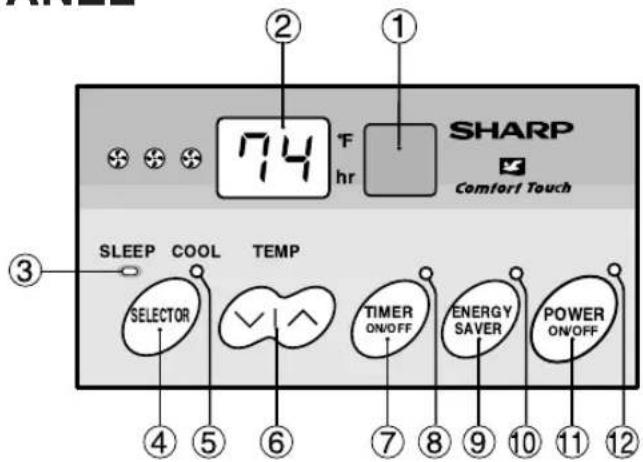
① Receiver window for remote control signal ② Display ③ SLEEP indicator ④ SELECTOR pad ⑤ COOL indicator ⑥ TEMPERATURE setting pad
▼ ---Lower temp. ^ ---Raise temp.
⑦ TIMER ON/OFF pad ⑧ TIMER indicator ⑨ ENERGY SAVER pad ⑩ ENERGY SAVER indicator ⑪ POWER ON/OFF pad ⑫ POWER indicator
COOLING OPERATION

1. Touch POWER ON/OFF pad. The unit is preset at 74°F and HIGH COOL.
- The unit is preset at 74°F and HIGH COOL. This will show in the display when the power is first turned on.
- POWER indicator and COOL indicator will light.
2. To turn off the unit, touch POWER ON/OFF pad again.
- POWER indicator and COOL indicator will go off.
TO CHANGE FAN SPEED AND OPERATION MODE
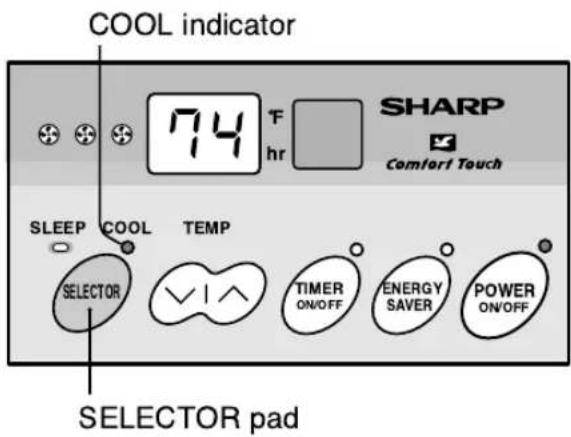
During operation
Touch SELECTOR pad and select the operation mode and fan speed.
- Fan speed and operation mode will change as you touch.
![graph TD A["HIGH COOL"] --> B["MED COOL"] B --> C["LOW COOL"] D["LOW FAN"] <--_E["MED FAN"] E <--_F["HIGH FAN"]](/content/2026/06/1194198/images/abed4235597cd4b586d057ddd42f7e4f11c0b66fa0f6d07d0593f1c28eec5af6.jpg)
| MODE | COOL indicator DISPLAY | ||
| HIGH COOL | light on | Cooling operation with high fan speed. | |
| MED COOL | light on | Cooling operation with medium fan speed. | |
| LOW COOL | light on | Cooling operation with low fan speed. | |
| HIGH FAN | light off | Fan only operation with high fan speed. | |
| MED FAN | light off | Fan only operation with medium fan speed. | |
| LOW FAN | light off | Fan only operation with low fan speed. | |
- When the SELECTOR is changed to fan only operation from cooling operation, it will take 5 seconds for the compressor to stop.
TO CHANGE TEMPERATURE SETTING

During cooling operation
Touch the TEMPERATURE setting pad to adjust the temperature setting.
√ ---Lower temp. ∧ ---Raise temp.
- Temperature can be set within the range of 64°F to 86°F.
• Display will change as you touch the pad.
NOTES:
- In fan only (HIGH FAN, MED FAN, LOW FAN) operation, the temperature display will go off and the temperature setting cannot be changed.
- In cases of power outages or when the unit is disconnected; when the power is restored or the unit is plugged in, the unit and display will return to the preset conditions of 74°F and HIGH COOL. The unit will not automatically turn back on. The user must touch POWER ON/OFF to resume operation.
TO CHANGE AIR FLOW DIRECTION
The horizontal louvers are used to adjust the UP/DOWN direction of air flow, and the vertical louvers are used to adjust the LEFT/RIGHT direction of air flow for uniform and efficient cooling of the room.
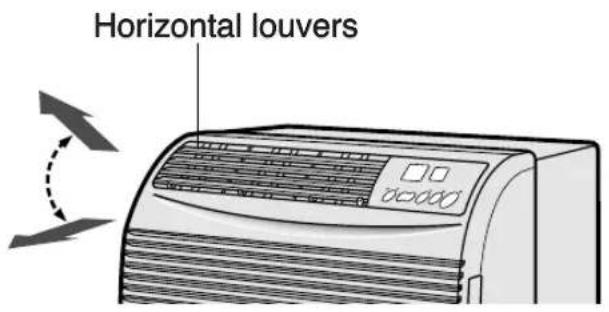
Adjust UP/DOWN air flow

Adjust LEFT/RIGHT air flow
EXHAUST
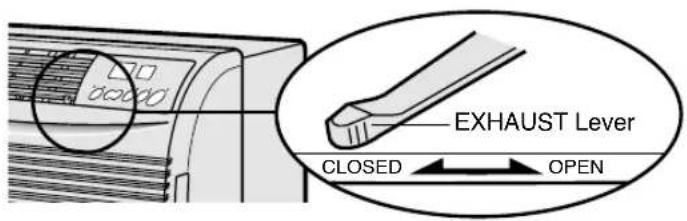
If air in your room is stale, set the EXHAUST lever to the OPEN position. This will exhaust stale air to the outside. The EXHAUST lever should normally be kept in the CLOSED position during cooling for maximum efficiency.
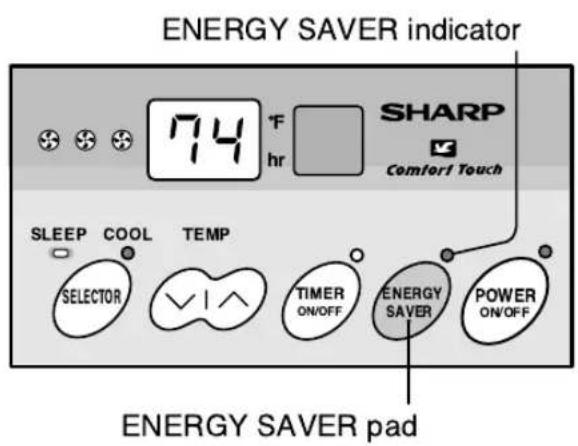
During normal operation, the thermostat automatically controls cooling and the fan runs continuously. When the ENERGY SAVER OPERATION is selected, the thermostat automatically controls cooling and the fan automatically stops when the compressor is not operating. (Fan will stop 30 seconds after the compressor stops. After the fan stops, the fan is programmed to rotate for approx. 2 minutes to detect room temperature. This will occur within a 20 min time span.)
During cooling operation
1 Touch ENERGY SAVER pad. • ENERGY SAVER indicator will light.
2 To cancel, touch ENERGY SAVER pad again.
- ENERGY SAVER indicator will go off.
NOTE: ENERGY SAVER OPERATION cannot be set during fan only operation.
SLEEP OPERATION
When SLEEP OPERATION is set, the temperature setting is automatically adjusted to prevent the room from becoming too cold while you sleep. One hour after the SLEEP OPERATION is started, the temperature setting rises 2°F higher than the original temperature setting. The temperature will return to its original setting after 8 hours. Temperature display on the unit will not change from its original setting.
SLEEP indicator
During cooling operation
1 Press the SLEEP button on the remote control.
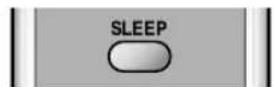
• SLEEP indicator will light.
2 To cancel, press the SLEEP button again.
• SLEEP indicator will go off.
NOTE:
- SLEEP OPERATION cannot be set during fan only operation.
- SLEEP OPERATION will be cancelled in 5 seconds, when cooling operation is changed to fan only operation while SLEEP OPERATION is set.
ON TIMER OPERATION
- This unit has a built-in timer that can be programmed to start the unit up to 12 hours in advance. You can set the timer to start in increments of 30 minutes (0.5 hours) up to 9.5 hours in advance of the start time, or in 1 hour increments from 10 to 12 hours in advance of the start time.
- The unit will start automatically according to your setting.

(If you wish to start the operation 6 hours and 30 minutes later, set the delay time as shown above.)
When the unit is not operating
1 Touch the TIMER ON/OFF pad to set the delayed start time.
- The time setting will change as you touch the pad. The display will change as follows;
![graph LR A["Preset(0.5h)<br>Previous setting"] --> B["0.5h → 1.0h → 1.5h → 10h"] B --> C["CL(cancel) ← 12h ← 11h"]](/content/2026/06/1194198/images/7620691cfb17d7abf4a517244d5d76636fb9a0acac87b6bffe46f47be9250862.jpg)
- The timer will be set, 5 seconds after the TIMER ON/OFF pad is touched for the last time. • TIMER indicator will light.
- Cool indicator will light when cooling operation is selected.
- The time display will count down the remaining time.
- The unit will start when the set time expires. The temperature setting will be displayed.
TO CANCEL THE TIMER SETTING
Touch the TIMER ON/OFF pad again after the timer is set, or press the TIMER ON/OFF pad until CL(cancel) appears on the display.
OFF TIMER OPERATION
- This unit has a built-in timer that can be programmed to shut the unit off up to 12 hours in advance. You can set the timer to stop in increments of 30 minutes (0.5 hours) up to 9.5 hours in advance of the stop time, or in 1 hour increments from 10 to 12 hours in advance of the stop time.
- The unit will stop automatically according to your setting.
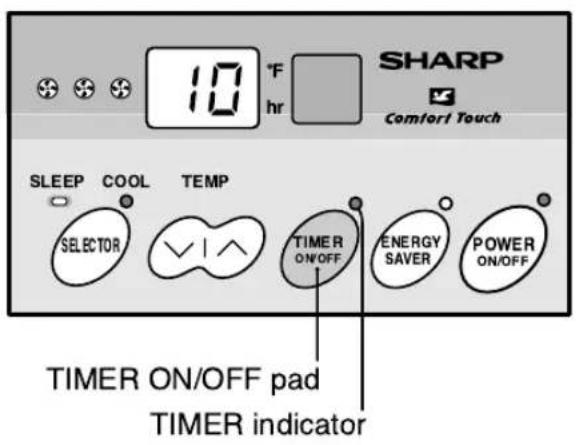
(If you wish to stop the operation 10 hours later, set the delay time as shown above.)
When the unit is operating
1 Touch the TIMER ON/OFF pad to set the delayed stop time.
- The time setting will change as you touch the pad. The display will change as follows:
![graph TD A["Preset(0.5h) Previous setting"] --> B["0.5h"] B --> C["1.0h"] C --> D["1.5h"] D --> E["10h"] E --> F["CL(cancel) ← 12h ← 11h"]](/content/2026/06/1194198/images/a0a2e6da1ff7dd7b4635a32fd3c940d6e989c52d2bad0b687178a4504ddb9367.jpg)
- The timer will be set 5 seconds after the TIMER ON/OFF pad is touched for the last time. • TIMER indicator will light.
- The time display will count down the remaining time.
- The unit will stop when the set time expires. All indicators and displays will go out.
TO CANCEL THE TIMER SETTING
Touch the TIMER ON/OFF pad again after the timer is set, or press the TIMER ON/OFF pad until CL (cancel) appears on the display.
NOTES FOR ON/OFF TIMER SETTING AND OPERATION:
- After setting the TIMER, change the temperature and fan speed settings as shown on pages 11 and 12. When the temperature is set in the timer mode, the temperature will show in the display for 5 seconds and then return to the time display.
- The last setting used will be memorized and will appear on the display the next time you operate the unit with the TIMER function.
- If a power failure occurs while the ON or OFF TIMER is set, the TIMER memory will be cancelled and will not resume even after power is reinstated. The unit will not automatically start.
- OFF TIMER OPERATION can also be set with the REMOTE CONTROL.
USING THE REMOTE CONTROL
INSTALLING BATTERIES
Use two size-AA (R6) batteries.
1. Open the battery compartment cover. 2. Insert and slide the batteries into the compartment, making sure the ⊕ and ⊖ polarities are properly aligned. 3. Close the cover.

Battery compartment cover

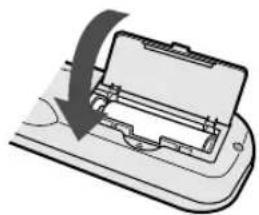
NOTES:
• The battery life is approximately one year with normal use. • When you replace the batteries, always use two new ones of the same type. • If the remote control does not operate normally after replacing the batteries, take out the batteries and replace them again after 30 seconds. • If you will not be using the unit for a long time, remove the batteries from the remote control.
HOW TO USE THE REMOTE CONTROL
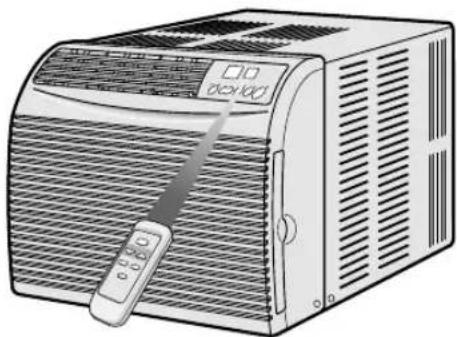
Point the remote control towards the unit's receiver window and press the desired button. A beep will sound when the unit receives the signal.
- Make sure no objects, such as curtains, block the receiver window.
- The remote control operates from up to 20 feet (6 meters) away.
- The beep will also sound when each pad on the control panel is touched.
CAUTION:
- Do not expose the receiver window to direct sunlight. This can adversely affect its operation. In such case, close the curtains to block the sunlight.
- Use of a fluorescent lamp in the same room may interfere with the transmission of the signal.
- The unit may be affected by signals emitted from the remote control of a television, VCR or other equipment used in the same room.
- Do not leave the remote control exposed to direct sunlight or near a heater. Protect the remote control from moisture and shock which can discolor or damage it.
OPERATING WITH THE REMOTE CONTROL

Light absorbing material is used for the Power ON/OFF and TEMP buttons. Keep the remote control in a lighted place for several hours in order for the buttons to absorb light. The buttons will glow for approximately two hours and the duration may differ depending on various conditions.
CLEANING AND MAINTENANCE
CLEANING THE FILTER
If the filter is clogged with dust, the amount of air flow will be reduced, resulting in poor cooling performance. The filter should be cleaned every 10 days. At the beginning of every cooling season or after a long period of inactivity, clean the filter before starting the unit.
1 REMOVE THE FILTER
Gently pull the filter handle to the right and slide the filter out from the unit.
2 CLEAN THE FILTER
To remove dust from the filter, use a vacuum cleaner or wash it in clean water.
If the filter is very dirty, wash it with detergent and rinse carefully with clean water. Dry the filter with a soft cloth.
Do not expose the filter to heat or dry it in direct sunlight.
3 RE-INSTALL THE FILTER
Align the filter behind the front panel.
Grasp the filter handle and gently push the filter back into place.
Never operate the unit without installing the filter. It may result in serious damage to the unit.

CLEANING OF THE FRONT PANEL AND CABINET
To clean the front panel and cabinet, wipe with a soft, dry cloth or with a cloth moistened with a mild soap. Rinse carefully by wiping with a damp cloth and dry completely.
Avoid splashing the unit with water. Excess water can damage electrical insulation and result in danger.
Never use harsh chemicals or abrasive cleaners on any part of the unit. To avoid damage to the unit, do not use hot water (120°F/50°C or more) when cleaning.
OILING OF THE COMPRESSOR AND FAN MOTOR IS UNNECESSARY
The compressor is permanently lubricated and is hermetically sealed. The fan motor is lifetime sealed and does not require oiling.
REMOVING THE AIR CONDITIONER
Before removing the air conditioner, operate the unit in the HIGH FAN mode on a fine day, for about half a day to thoroughly dry the water inside the air conditioner unit.
BEFORE CALLING FOR SERVICE
IF YOUR AIR CONDITIONER DOES NOT OPERATE PROPERLY, PLEASE CHECK THE FOLLOWING ITEMS BEFORE CALLING FOR SERVICE.
AIR CONDITIONER DOES NOT OPERATE AT ALL
- Is the unit plugged in or is the plug loose?
- Is the fuse blown or the circuit breaker tripped?
- Did you restart the unit within 3 minutes after a power failure? If the power was off for less than 3 minutes, and you restarted the air conditioner within 3 minutes, a protective device may cause the compressor to shut off, preventing cooling for about 5 minutes.
AIR CONDITIONER DOES NOT PROPERLY COOL
- Is the SELECTOR set to fan only (HIGH FAN, MED FAN, LOW FAN) mode? Cooling will not take place in the fan only mode. Change the SELECTOR setting. • Is the filter clogged with dust? A dirty filter can cause the cooling coils to freeze. If this happens, clean the filter and replace. Run the air conditioner on the MED FAN setting until all ice dissipates. • Is the temperature set properly? If your room is too warm, adjust the temperature setting lower. If your room is too cool, adjust the temperature setting higher.
- Is the EXHAUST lever in the OPEN position? The lever should be in the CLOSED position during cooling.
- Is the window exposed to direct sunlight? Close curtains or blinds to minimize solar energy heating the room.
- Are the windows or doors open? Close all windows and doors for maximum cooling.
TIMER DOES NOT WORK PROPERLY
- If a power failure occurs while the ON or OFF TIMER is set, the TIMER setting will be cancelled and will not resume even after the power is reinstated. This is the normal operation for this unit.
NOTE: WATER IN BOTTOM OF TRAY
- Water will collect in the bottom tray of the unit. This is normal. Water condenses on the evaporator coil at the front of the unit and is channeled to the rear where it is picked up by the condenser fan. The water is blown onto the condenser coil fins and this creates a "splashing" noise which is normal. If excess water builds up in this tray it will drain outside through a grooved channel in the tray.
SOUNDS
- The operating sound may seem rather loud for 2 to 3 minutes when the unit is first turned on. This is the sound of the compressor's start-up and is normal.
- A soft, swishing noise can be heard immediately after the unit is turned on or off, and also during operation. This is the sound of the refrigerant flowing inside the unit.
IF THE UNIT FAILS TO RECEIVE THE REMOTE CONTROL SIGNAL
- Check the remote control batteries. Replace if necessary.
- Try to send the signal again with the remote control pointed directly at the unit's receiver window.
- Check whether the remote control batteries are installed with the polarities properly aligned.

- CONTENTS
- PAGE
- PRECAUTIONS
- HOW TO OPERATE
- FOR YOUR PROTECTION
- CONSUMER LIMITED WARRANTY
- SHARP®
- SHARP ELECTRONICS CORPORATION
- INSTALLATION INSTRUCTIONS
- CHECK WINDOW AREA
- LOCATION
- ITEMS PACKED WITH THIS UNIT
- SUGGESTED TOOLS
- INSTALLATION
- CAUTION
- WARNING
- CAUTION FOR USE
- GROUNDING INSTRUCTIONS
- NOTES ON OPERATION
- ENERGY EFFICIENCY TIPS
- PARTS NAMES
- UNIT
- CONTROL PANEL
- COOLING OPERATION
- TOUCH POWER ON/OFF PAD. THE UNIT IS PRESET AT 74°F AND HIGH COOL
- TO TURN OFF THE UNIT, TOUCH POWER ON/OFF PAD AGAIN
- TO CHANGE FAN SPEED AND OPERATION MODE
- DURING OPERATION
- TOUCH SELECTOR PAD AND SELECT THE OPERATION MODE AND FAN SPEED
- TO CHANGE TEMPERATURE SETTING
- DURING COOLING OPERATION
- NOTES
- TO CHANGE AIR FLOW DIRECTION
- EXHAUST
- SLEEP OPERATION
- NOTE
- ON TIMER OPERATION
- WHEN THE UNIT IS NOT OPERATING
- TOUCH THE TIMER ON/OFF PAD TO SET THE DELAYED START TIME
- TO CANCEL THE TIMER SETTING
- OFF TIMER OPERATION
- WHEN THE UNIT IS OPERATING
- TOUCH THE TIMER ON/OFF PAD TO SET THE DELAYED STOP TIME
- NOTES FOR ON/OFF TIMER SETTING AND OPERATION
- USING THE REMOTE CONTROL
- INSTALLING BATTERIES
- HOW TO USE THE REMOTE CONTROL
- OPERATING WITH THE REMOTE CONTROL
- CLEANING AND MAINTENANCE
- CLEANING THE FILTER
- REMOVE THE FILTER
- CLEAN THE FILTER
- RE-INSTALL THE FILTER
- CLEANING OF THE FRONT PANEL AND CABINET
- OILING OF THE COMPRESSOR AND FAN MOTOR IS UNNECESSARY
- REMOVING THE AIR CONDITIONER
- BEFORE CALLING FOR SERVICE
- AIR CONDITIONER DOES NOT OPERATE AT ALL
- AIR CONDITIONER DOES NOT PROPERLY COOL
- TIMER DOES NOT WORK PROPERLY
- NOTE: WATER IN BOTTOM OF TRAY
- SOUNDS
- IF THE UNIT FAILS TO RECEIVE THE REMOTE CONTROL SIGNAL
Brand : SHARP
Model : AF-R100EX
Category : Air purifier