
Contemporary WDAC001Z - Wristwatch ORIENT - Free user manual and instructions
Find the device manual for free Contemporary WDAC001Z ORIENT in PDF.


| Product Type | Watch |
| Brand | ORIENT |
| Model | Contemporary WDAC001Z |
| Movement | Solar quartz (Caliber WD) |
| Power Source | Secondary cell (rechargeable) charged by solar cell under dial |
| Duration of Continuous Operation | Approx. 6 months from full charge |
| Accuracy | Mean monthly rate ±15 seconds (at 5°C to 35°C) |
| Crystal Oscillator Frequency | 32,768 Hz |
| Operating Temperature Range | -10°C to +60°C |
| Drive System | Step motor |
| Functions | Hour, minute, second hands; power reserve indicator; second hand halt mechanism; reset switch; overcharge prevention |
| Water Resistance | Water resistant for daily life (WATER RESISTANT) - suitable for face-washing, rain, but not swimming or diving |
| Battery Warning | Second hand moves in 2-second intervals when charge is low; watch may stop within 24 hours |
| Charging Time (Full Charge) | Approx. 10 hours under clear sunlight, approx. 180 hours under office fluorescent light |
| Maintenance | Keep crown pushed in; avoid magnetism, strong shocks, high temperatures, chemicals; wipe with soft cloth |
| Safety Precautions | Do not remove secondary cell; consult authorized service center for battery replacement; avoid sauna and high heat |
| Allergic Reactions | Stop wearing if skin irritation occurs; consult doctor |
Frequently Asked Questions - Contemporary WDAC001Z ORIENT
User questions about Contemporary WDAC001Z ORIENT
0 question about this device. Answer the ones you know or ask your own.
Ask a new question about this device
Download the instructions for your Wristwatch in PDF format for free! Find your manual Contemporary WDAC001Z - ORIENT and take your electronic device back in hand. On this page are published all the documents necessary for the use of your device. Contemporary WDAC001Z by ORIENT.
USER MANUAL Contemporary WDAC001Z ORIENT

◆ 時刻及び日付の合わせ方 [WG]
【日付の合わせ方】

(5) 磁気について
(7) 温度について

(8) 化学薬品・ガスなどについて
Thank you for choosing our product. To ensure prolonged use and optimum performance, please read this instruction manual carefully and familiarize your-self with the terms of the guarantee.
Please keep this Instruction Manual handy for future reference.
◆ SAFETY PRECAUTIONS
Make absolutely sure to observe the demarcated contents indicated below to prevent any possible physical danger and property damage to you as well as other people concerned.
... A demarcation with this symbol represents the contents assuming possibility for death or serious injury when the product is used in any manner different from given instructions.
... A demarcation with this symbol represents the contents assuming possibility of causing human injury or material damage only when a product is used in any manner different from given instructions.
◆ IN HANDLING THE WATCH
(1) Water-resistance
| Type\Conditions of use | Underwater operation of crown and operation of crown with drops of water on it | Exposure to small amounts of water (face-washing, rain, etc.) | Water sports (swimming, etc.), frequent contact with water (car-washing, etc.) | Skin diving (air tanks are not used) | Scuba diving (air tanks are used) | Mixed-gas Diving (using helium gas) | ||
| Non water resistant | Without WATER RESISTANT (WATER RESIST) | × × | × × | × × | ||||
| Water resistant watches | Water resistant for daily life | WATER RESISTANT (WATER RESIST) | × | ○ | × × | × × | ||
| Reinforced water resistance for daily life I | WATER RESISTANT (WATER RESIST) 50m (5bar) | × | ○ | ○ | × × | × | ||
| Reinforced water resistance for daily life II | WATER RESISTANT (WATER RESIST) 100m (10bar) 200m (20bar) | × | ○ | ○ | × | × | × | |
| Diver's watches | Diver's watch for Air Diving | AIR DIVER'S 100m / 150m 200m | × | ○ | ○ | ○ | × | |
| Diver's watch for Mixed-gas Diving | He-GAS DIVER'S 200m / 300m /... | × | ○ | ○ | ○ | ○ | ||
* It is recommended that you use the watch correctly following the above-mentioned scope of usage after ascertaining water resistance precautions marked on the dial or caseback.
WARNING
① A watch with water resistance for daily life 30m (3 bar) can be used during face-washing, etc. but cannot be used in an environment in which it will be submerged in water.
② A watch with reinforced water resistance for daily life I 50m (5 bar) can be used while swimming, etc. but cannot be used during any type of diving including skin diving.
③ A watch with reinforced water resistance for daily life II 100m or 200m (10 or 20 bar) can be used while skin diving, but cannot be used while scuba diving using oxygen tanks or saturation diving using helium gas, etc.
CAUTION
④ Keep the crown pushed in at all times (in the normal position) while using the watch. If the crown is the screwed-down type, check that it is securely screwed down.
⑤ Do not operate the crown underwater, or while the watch is wet. Water may enter the interior of the watch and defeat the water resistance.
⑥ If your watch is non-water resistant, beware of splashes of water (during face washing, rain, etc.) and sweat. If the watch becomes wet from water or sweat, wipe the moisture off with a dry, soft cloth.
⑦ Even with a water resistant watch for everyday use, avoid directing strong jets of mains water onto the watch. Water pressure above the limit can apply, which may defeat the water resistance.
⑧ With a water resistant watch for everyday use, rinse sea water off the case after exposure, then wipe it thoroughly to avoid corrosion and other effects.
⑨ The interior of the watch contains some amount of moisture, which may cause fogging on the inside of the glass when the outside air is cooler than the internal temperature of the watch. If the fogging is temporary it causes no harm inside the watch, but if prolonged, or if water enters the watch, consult your place of purchase and do not leave the problem untreated.
(2) About the Battery (Secondary Cells)
① This watch uses a special-purpose secondary cell for a power source that differs from a regular battery.
The secondary cell is not a regular disposable type of battery but is instead a rechargeable battery that can be used more than once.
The battery charge and charging efficiency of the secondary cell may drop little by little depending on the duration of use and usage environment.
If it begins to seem that performance has deteriorated, contact the store where the place of purchase or your nearest ORIENT authorized service center.
② Be aware that the battery charge will not be maintained even if the crown is pulled out to stop the watch.
(3) Replacing the Battery

WARNING
① Do not remove the secondary cell from the watch.
② Battery replacement requires highly specialized knowledge and special-purpose tools, technology, etc. For assistance with battery replacement, contact the place of purchase or your nearest ORIENT authorized service center.
③ Do not use in combination with regular silver-oxide batteries as doing so may cause explosion, overheating, fire, etc. to occur. The watch is designed so as not to allow electricity to conduct even if used with a silver-oxide battery.
(4) Shock
① Be sure not to carry the watch when you engage in strenuous sports, whereas playing such light sports as golf, etc., will not adversely influence the watch.
② Avoid a violent shock such as dropping the watch on the floor.

(5) Magnetism
① If the watch is left at a location with strong magnetism for an extended period of time, the components may be magnetized, resulting in malfunction. Be careful.
② The watch may temporarily speed up or slow down when exposed to magnetism. Precision is restored when placed away from magnetism. In such a case, reset the time.
(6) Vibration
The watch may lose precision if subjected to strong vibrations such as from riding motorcycles, using jackhammers, chain saws, etc.

(7) Temperature
In the environment below and above the normal temperatures <5°C 35°C> , the watch may malfunction and stop.

CAUTION
Do not use the watch at high temperatures, such as in a sauna. The watch may heat and cause burns.
(8) Chemicals, Gases, etc.
Utmost caution must be exercised when coming into contact with gases, mercury, chemicals (paint thinner, gasoline, various solvents, detergents containing such components, adhesives, paint, drugs, perfumes, cosmetics, etc.), and so forth. Such may cause discoloration of the watchcase, watchband, and dial face. Discoloration, deformation, and damage to various resin-based component parts may also occur.
(9) About accessory parts

Do not attempt to disassemble or modify the watch.

Store the bracelet/strap pin and other small parts out of the reach of children.
If any small parts are swallowed, immediately contact a doctor.
(10) Allergic reactions

If you develop a skin rash or your skin becomes abnormally irritated due to contact with the watch or strap, stop wearing the watch immediately and consult a doctor.
(11) About "luminous light"
Some models have luminous light on the hands and dial.
The luminous light is a safe paint that stores sunlight and artificial light without using any radioactive material, and emits that light in a dark setting. As the paint discharges the stored light, it will become dimmer over time. The amount of light emitted and the time that light is emitted depends on various factors when the light is stored, such as the shape of the glass, the thickness of the paint, surrounding brightness level, the distance from the watch to the light source, and the light absorption level. Please note that when not enough light energy is stored, the watch may emit weak light or emit light for only a short time.
(12) Water resistant watchband
Some models employ leather and nylon bands on which a special treatment to resist perspiration and water absorption have been applied. Please understand that the water resisting effect of this watchband can be lost depending on the period and conditions of use.
◆ HOW TO IDENTIFY THE CALIBER NUMBER
Check the caliber number by referring to the model number of your watch or the case code on the watch's case back.
1. Searching by 10-digit model number
Check the 10-digit model number on the guarantee supplied with your watch. You can also see the number on the product tag put on the watch. Its second and third digits indicate the caliber number of your watch.
Example: If the model number is “☐WD02001W☐”, the caliber number is “WD”.
2. Searching by the case code
See the case code on the case back of your watch.
The first two digits indicate the caliber number.
Example: When the case code is "WD02-Q4", the caliber number is "WD".

* The place of case code may vary and its letter size may be small and difficult to see depending on the characteristics of watches.
* The pictures and illustrations on this manual may differ from the actual appearance of your watch but the function and operation procedures are the same.
◆ FEATURES
There is a solar cell located under the dial on this watch that converts absorbed light into electrical energy which is then used to charge the secondary cell and operate the watch.
- This watch uses a rechargeable secondary cell instead of one of the silver-oxide batteries used in regular quartz watches.
- The watch should be able to be used for about 6 months when fully charged.
- The watch will start running if the solar cell is exposed to light, even if the watch is left for long periods of time.
- It comes with a power reserve indicator feature.
When the amount of charge starts to get low, the second hand will start to move in 2-second intervals to inform you that the battery needs to be charged.
If the second hand has begun to move in 2-second intervals, it means that the watch could stop within the next 24 hours due to low battery.
◆ SPECIFICATIONS
(1) Crystal oscillator frequency: 32,768 Hz (Hz = Oscillations per second)
(2) Wrist-worn accuracy: Mean monthly rate: ±15 seconds (at 5°C to 35°C)
(3) Operating temperature range: -10°C to +60°C
(4) Drive system: Step motor
(5) Functions: WD: 3 hands (hour, minute, second)
WG: 3 hands (hour, minute, second), calendar (date)
(6) Additional functions: Second hand halt mechanism, reset switch, power reserve indicator feature, overcharge prevention mechanism, quick setting function (*WG only)
(7) Battery: Secondary cell; 1 piece
(8) Duration of continuous operation: From fully charged to complete stop: Approx. 6 months
* The above specifications may change without notice for improvement.
◆ NAMES AND FUNCTIONS OF INDIVIDUAL COMPONENT PARTS
A: Hour hand
1 : Normal position
B: Minute hand
2 : Calendar setting
C: Second hand
3 : Time setting
D: Crown
E: Date
F: Dial
There is a solar cell (solar battery) located under here.
* The position of the crown and day indicator may vary depending on the model.

◆ HOW TO CHARGE THE BATTERY
This watch will start running if it is exposed to light while stopped.
- The watch will continue to run for approx. 6 months once fully charged.
- If the watch is not exposed to enough light, it may stop running sometime before the 6 months are over.
Expose the watch to high enough levels of light in order to make it run again if it has stopped or if the battery charge is too low.
The second hand may start to advance in 2-second intervals even if the watch is exposed to sunlight or intense light (1000 lux: 70 cm (27.6 in.) under a 30-W fluorescent lamp).
- If the second hand begins moving in 2-second intervals, it signifies that the watch battery hasn't been charged enough. Expose the watch to even more light to charge it more fully.
- Continue charging the watch until the second hand clearly begins moving in 1-second intervals using the required charging time as a rough estimate.
- You do not need to charge it fully, but you should make sure to charge it as much as possible the first time you use it.
* Movement of the second hand in 2-second intervals refers to when the second hand advances two tick marks (2 seconds) along the scale every time it moves.

(Cautions for Charging)
- When charging the battery, be careful not allow the watch to get to close to the light source, such as a piece of photographic lighting equipment, a spotlight, an incandescent bulb, etc., as it could cause the watch to get hot, leading to internal parts, etc. becoming damaged.
- Be careful where you leave the watch if charging it using sunlight as the temperature of a dashboard of a car or other such location can get rather high.
- Do not allow the temperature of the watch itself to exceed 60°C (140°F).
◆ IF THE SECOND HAND BEGINS MOVING IN 2-SECOND INTERVALS DURING USE
The second hand begins moving in 2-second intervals when the power reserve indicator feature turns on.
Charge the watch as soon as possible as the watch could stop running within 24 hours after the second hand starts moving in this manner.
Charge the watch as fully as possible using the estimated required charging times.
◆ ROUGH ESTIMATES OF REQUIRED CHARGING TIMES
| Illuminance (Lx) | Light source | Environment (Estimate) | WD WG | |||||
| Required charging time for full charge | Required charging time until the second hand moves in 1-second intervals (★) | Required charging time to run the watch for 1 day | Required charging time for full charge | Required charging time until the second hand moves in 1-second intervals (★) | Required charging time to run the watch for 1 day | |||
| 700 | Fluorescent light | General office environment | — | Approx. 60 hrs. | Approx. 3 hrs. | — | Approx. 16 hrs. | Approx. 110 min. |
| 3000 | Fluorescent light | 20 cm, 30 W | Approx. 180 hrs. | Approx. 10 hrs. | Approx. 35 min. | Approx. 90 hrs. | Approx. 4 hrs. | Approx. 30 min. |
| 10000 Sunlight Cloudy | Approx. 60 hrs. | Approx. 4 hrs. | Approx. 12 min. | Approx. 30 hrs. | Approx. 1.2 hrs. | Approx. 8 min. | ||
| 100000 Sunlight Clear | Approx. 10 hrs. | Approx. 30 min. | Approx. 2 min. | Approx. 10 hrs. | Approx. 10 min. | Approx. 1 min. | ||
* Use the numerical values in the above table as rough estimates.
* Values in the column marked with (★) are required times to charge the watch through exposure to light while stopped until the second hand changes from moving in 2-second intervals to 1-second intervals. In some cases with the times listed, the second hand will advance normally in 1-second intervals even without being charged but will switch over to 2-second intervals rather suddenly. To ensure that this does not occur, make sure to charge the watch for the estimated length of time given.
* Required charging time settings were calculated based on standard models. There may be differences in the length of charging times needed depending on dial design and other factors.
* The watch comes with an overcharge prevention mechanism designed to protect the watch from damage even if it is charged for longer than the length of the required charging time for full charge. The overcharge prevention mechanism works automatically to prevent the watch battery from charging anymore once fully charged.
◆ MODELS WITH SCREWED-DOWN CROWN
Depending on the model, you may not be able to pull the crown out without unscrewing it (models with screwed-down crown).
Operate this type of watch as follows:
(1) Before setting the time, first turn the crown to the left to loosen the screw lock.
(2) After setting the time, turn the crown to the right while pressing in, until it stops turning to securely tighten the screw.
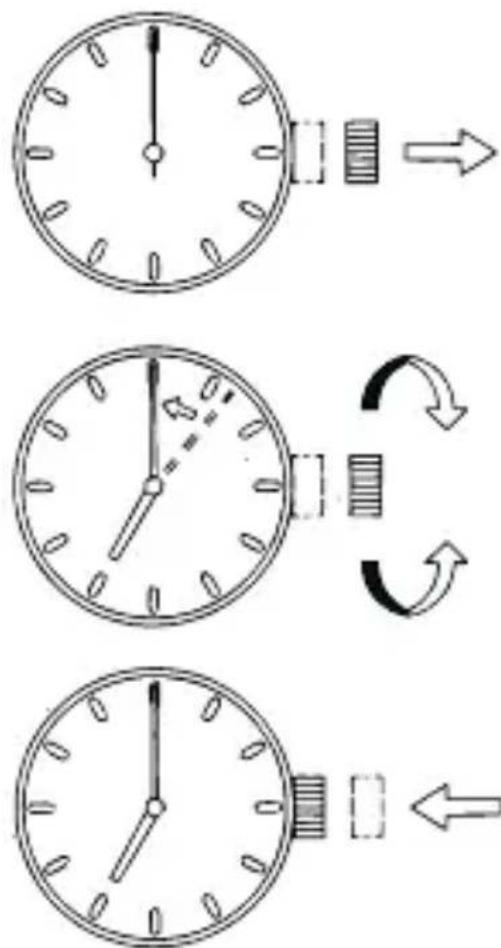
◆ HOW TO SET THE TIME [WD]
Once the watch is charged, set the time.
(1) Pull out the crown when the second hand is at the 12 o'clock position. The second hand stops on the spot.
(2) Turn the crown to set the time. When setting the time, first advance it 4 to 5 minutes ahead of the current time, and then turn it back to the exact time.
(3) Push the crown back in to the normal position.
◆ HOW TO SET THE TIME & DATE [WG]
Once the watch is charged, set the time and calendar date.
[How to set the time]
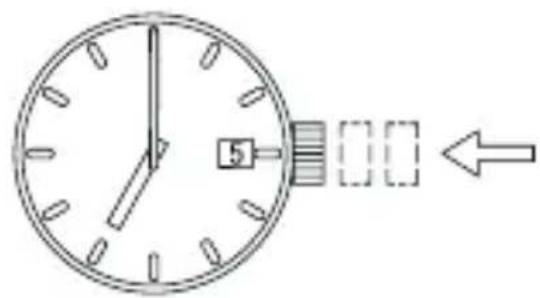
(1) Pull out the crown to the second click when the second hand is at the 12 o'clock position.
The second hand stops on the spot.

(2) Turn the crown to set the time.
* This watch features a calendar function.
When setting the hour hand, check that AM/PM is set correctly. The date changes at "0:00 a.m.".

* When setting the time, first advance it 4 to 5 minutes ahead of the current time, and then turn it back to the exact time.
(3) Push the crown back in to the normal position.
[How to set the date]
![ORIENT Contemporary WDAC001Z - [How to set the date] - 1](/content/2026/06/1193776/images/bcdc6caeb0883f32af8bbec8184ce140bdeee5ac2a47feee93e334a8dc80c191.jpg)
* Do not set the date during the period from 9:00 p.m. to 1:00 a.m., as the date on the watch switches over during this time.
Setting the date during this time period may cause the date to fail to change even after the day switches over and may cause the watch to malfunction.
* When setting the date, move the hour hand to a time outside of this period before proceeding.
(1) Pull out the crown to the first click.
* The crown on this watch has two click positions.

(2) Turn the crown clockwise and adjust the date.
* Depending on the model, some crowns may need to be turned counterclockwise.
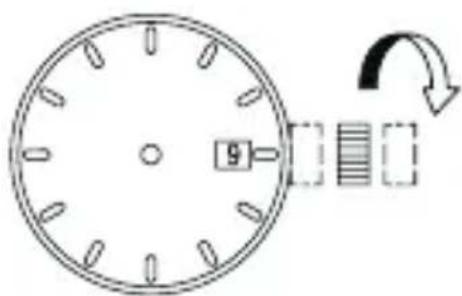
(3) Push the crown back in to the normal position.
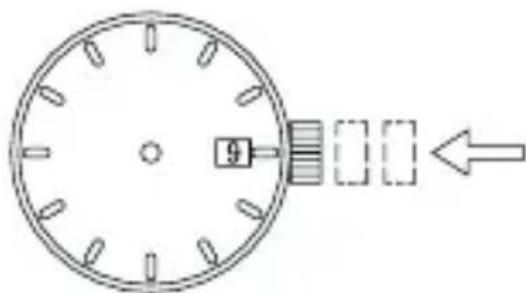
* About date correction at month's end :
Date correction is necessary for months with 30 days or less. In this case, set the date to the [1st day] on the first day of the next month.
![ORIENT Contemporary WDAC001Z - [How to set the date] - 5](/content/2026/06/1193776/images/4c7b857d5cc685e45130b09ddf4190dc32230e7b27550796e6e521354a806cd7.jpg)
◆ HOW TO USE THE ROTATING INDICATOR BEZEL
Please notice that some models come with a rotating indicator bezel, which should be used properly. Rotating indicator bezel
Turn the bezel by pointing the ▽ mark to the minute-hand. While certain time goes by, you can measure the elapsed time from the distance between minute-hand and figures on the rotating indicator bezel. You can also set the ▽ mark as a desired time to remind you how long time is still remain for an appointment.
You cannot turn the bezel reversely since it comes with a protection mechanism for preventing wrong operation by force or shock. Figures on the bezel could also help you to read the current time easily.
Rotating indicator bezel
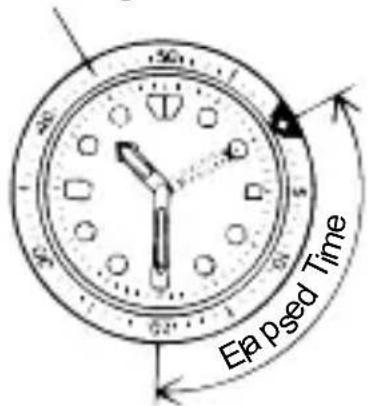
The above shows that 20 minutes have elapsed from 10:10.
* Depending on design, anti-reversely and 1 minute "click" sound mechanism on rotating indicator ring models.
does not apply to some
中文
自动/手动上弦机械表
使用说明书
(5) 磁化
(7) 温度
(3) 将把头按回到正常位置。

◆ 时间和日期的设置方法 [WG]
手表充电后,请设定时间和日历日期。
[时间的设置方法]
中文
(3) 将把头按回到正常位置。
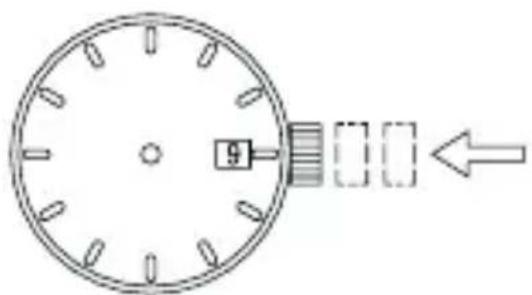
* 有关月底日期更正:
- ◆ 時刻及び日付の合わせ方 [WG]
- 【日付の合わせ方】
- 磁気について
- 温度について
- 化学薬品・ガスなどについて
- ◆ SAFETY PRECAUTIONS
- ◆ IN HANDLING THE WATCH
- WATER-RESISTANCE
- WARNING
- CAUTION
- ABOUT THE BATTERY (SECONDARY CELLS)
- REPLACING THE BATTERY
- SHOCK
- MAGNETISM
- VIBRATION
- TEMPERATURE
- CHEMICALS, GASES, ETC
- ABOUT ACCESSORY PARTS
- ALLERGIC REACTIONS
- ABOUT "LUMINOUS LIGHT
- WATER RESISTANT WATCHBAND
- ◆ HOW TO IDENTIFY THE CALIBER NUMBER
- SEARCHING BY 10-DIGIT MODEL NUMBER
- SEARCHING BY THE CASE CODE
- ◆ FEATURES
- ◆ SPECIFICATIONS
- ◆ NAMES AND FUNCTIONS OF INDIVIDUAL COMPONENT PARTS
- ◆ HOW TO CHARGE THE BATTERY
- (CAUTIONS FOR CHARGING)
- ◆ IF THE SECOND HAND BEGINS MOVING IN 2-SECOND INTERVALS DURING USE
- ◆ ROUGH ESTIMATES OF REQUIRED CHARGING TIMES
- ◆ MODELS WITH SCREWED-DOWN CROWN
- ◆ HOW TO SET THE TIME [WD]
- ◆ HOW TO SET THE TIME & DATE [WG]
- [HOW TO SET THE TIME]
- [HOW TO SET THE DATE]
- ◆ HOW TO USE THE ROTATING INDICATOR BEZEL
- 中文
- 自动/手动上弦机械表
- 使用说明书
- 磁化
- 温度
- ◆ 时间和日期的设置方法 [WG]
- [时间的设置方法]
Brand : ORIENT
Model : Contemporary WDAC001Z
Category : Wristwatch