DS4652E - Safe Phoenix - Free user manual and instructions
Find the device manual for free DS4652E Phoenix in PDF.


User questions about DS4652E Phoenix
0 question about this device. Answer the ones you know or ask your own.
Ask a new question about this device
Download the instructions for your Safe in PDF format for free! Find your manual DS4652E - Phoenix and take your electronic device back in hand. On this page are published all the documents necessary for the use of your device. DS4652E by Phoenix.
USER MANUAL DS4652E Phoenix
Operating instructions for electronic high-security locks
Table of contents
General notes....3
Functional overview and description....4
-
Opening / Closing....5
-
Changing the code ....6
-
Retrieve opening protocol ....7
-
Super code functions ....8
-
Power supply....10
-
Restart....11
-
Signal table....11
-
Technical data and certification....12
-
Quick guide SOLAR Basic....13
General notes
- Please read these instructions carefully before making any adjustments to the lock.
■ The lock acknowledges every press of a button with an acoustic signal. Concluded or cancelled procedures are displayed by the illumination of the L+D, together with acoustic signals. (see signal overview) - <nput pauses of more than 20 seconds between buttons will interrupt the ongoing input. <n case of input errors, each procedure can be cancelled by pressing the button C
We recommend regularly inspecting the safe and the control unit for signs of manipulation. <n case of suspicious marks, contact your dealer immediately to rule out possible manipulation.
The following codes are preset from the factory and must be changed for security reasons. Perform all changes only with the door open and the locking mechanism closed (bolts extend from the door).
Code
| Opening code 1 2 8 4 5 9 |
| SUP+R 1 1 1 1 1 1 1 |
Function and use of the super code, see item 4
■ The lock must first be opened to change the settings.
The lock is locked and unlocked by a motor. When the motor is moving, the L+D above the keypad is illuminated. Never pull the handle of the locking mechanism while the motor is moving the bolt. This can lead to lock damage.
- Only use alkaline batteries in accordance with the technical specifications in the appendix to these instructions.
■ Symbols and their meanings
| x sec %old X seconds | Long tone | |
| x sec | Wait X seconds L+D illuminates / blinks | |
| Short tone | ||
| Lock open Lock closed | ||
Functional overview and description
Opening code
The lock uses an individual user code, which makes opening, changing the code, and reading out the protocol possible.
Super code
The super code is an emergency code and can reset the lock to the factory settings.
Manipulation block
<f four invalid opening codes are entered, three long tones sound with simultaneous illumination of the red L+D. Operations are blocked for five minutes, which can be seen by the 8-second blinking interval of the red L+D. <f an incorrect entry is again made after the duration of the blocking period, the five-minute blocking period begins once more. This is only overridden by the entry of a valid code.
Emergency power
<f the battery is completely discharged and the lock can no longer be opened, the lock can be supplied with power externally. For this, read item 5, sub item 2, emergency power.
Restart
<f entries cannot be made as usual, the operating system of the lock can be restarted. All codes and settings are retained during this.
1. Opening / Closing
1.1 Opening
+example with factory code.

Button Signal Description

Code input

8sec

rrect
<ncorrect


After correct entries, the handle of the locking mechanism can be moved and the safe opened.

Only pull the handle once the lock has been completely opened (L+D blinks 1x).

After an incorrect entry, the procedure can be repeated three times. Then, a blocking period of 5 minutes goes into effect (manipulation block).
1.2 Closing
+nsure that the handle of the locking mechanism is completely in the closed position.

Button / example Signal Description

Closing

8sec


Closed
After pressing the button, the handle of the locking mechanism may not be pulled until the lock has locked. After locking, you must check whether the container is closed by pulling the handle of the locking mechanism.
2. Changing the code
+example with factory code with an opened lock.

In opened lock condition
| Button Signal Description | |||||
| *8sec Start programming | |||||
| 1 2 3 7 8 9 Code | |||||
| ? ? ? ? ? ? +nter new code | |||||
| ? ? ? ? ? ? Repeat new code | |||||
| * Confirm and close | |||||
| Changed +rror | |||||

<n case of a long, acoustic signal, the code has not been changed due to an incorrect entry. The old code is still active. You must repeat the procedure.

After successfully changing the code, the new code must be tested by opening and closing numerous times with the door open and the locking mechanism closed.

For security reasons, set codes should not be written down.
3. Retrieve opening protocol
The lock saves the last 82 openings and events. This protocol can be retrieved by the user. Output is made by means of a different number of acoustic and optical signals in accordance with the table below. The latest event is output first.

In opened lock condition
Button Signal Description
| * 8sec | Start programming |
| 1 2 3 7 8 9 | Code |
| 7 | Start output |
| * | Confirm and start |
Signal Description Signal Description
| 1x | User | 8x | Mechanical blocking |
| 2x | Super code | 4x | Battery low voltage |
| 1x | Separates users / events |
7. Super code functions
The super code is preset from the factory at (7x1) <t can open the lock and reset the opening code.
7.1 Change super code
The super code can be changed with the opening code.

In opened lock condition
| Button Signal Description | ||||||
| * 3sec Start programming | ||||||
| 1 2 3 7 8 9 Code | ||||||
| ? ? ? ? ? ? ? +nter new super code | ||||||
| ? ? ? ? ? ? ? ? Repeat new super code | ||||||
| * Changed +rror |

The super code is not a regular opening code and is only intended for emergencies. The factory setting must be changed for security reasons. +ven if it is only used in exceptional cases and is therefore difficult to remember, this code may not be written down.
7.2 Opening with the super code
<f the opening code is lost or the blocking period is active, the lock can be opened with the super code.

Button Signal Description
| *6sec | Start super code opening | ||||||||||
| 1 | 1 | 1 | 1 | 1 | 1 | 1 | Super code | ||||
| 3sec | Open +rror | ||||||||||
7.3 Resetting the opening code by means of the super code
<f the opening code is lost, this can be reset with the super code.

In opened lock condition
| Button Signal Description | ||
| 6sec 3sec | Start reset | |
| 3sec | ||
| 0 | ||
| 1 1 1 1 1 1 1 | Super code | |
| 0 | ||
| 1 1 1 1 1 1 1 | Super code | |
| Confirm and close | ||
| Changed +rror | ||

After a successful reset, the opening code is set to 1 and must now be changed again.
8. Power supply
8.1 Changing the battery
Power is supplied by a 9V-block battery (Caution: only use alkaline or lithium batteries). The battery compartment is accessible when the door is open and is visibly installed in the door frame or directly on the interior of the door, depending upon the type of safe (when changing the battery, pay attention to correct battery polarity). <t is necessary to change the battery if a long signal sounds before the short tone after the lock opens. The battery must be changed as soon as possible, because sure operation is no longer guaranteed after approximately ten further activations.
8.2 Emergency power
<f the battery is completely discharged and the safe is closed, proceed as follows.
- Remove the keypad from the bracket by carefully prying with a flat, dull screwdriver on the edge of the keypad between 4 and 7, above the L+D and between 6 and 9
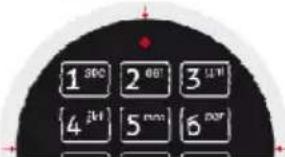
- Pull the keypad out approximately 5 cm with both cables and lift it.
- Clip the new 9V battery into the two poles (large to small, small to large) on the back. %ere, provide support with your fingers on the front of the keypad between 0 and 9.
- Now, proceed in accordance with the operating instructions, item Opening, and open the safe.
- Open the battery compartment on the inside, carefully remove the new battery from the back of the keypad, and exchange it for the dead battery.
- Push the keypad cables carefully back into the door and snap the keypad back into the bracket.

Prying the keypad from the bracket on the sides will leave marks on the bracket. This is
intentional and protects you against illegal manipulation of the lock by unauthorized third parties. <f necessary, you can order a new bracket from the manufacturer.
9. Restart
<f the lock is inoperable in spite of sufficient battery power, the lock can be restarted.
Button Signal Description
| [WCGB] | 30sec | <initiate restart | |
| 30 sec | [ABCCH] | Restart concluded | |
Restarting the lock does not change any codes or delete other settings.
7. Signal table
| Function Short Long LED Sound | ||||
| Functions of the input | ||||
| 1 x | x | |||
| Star button upon conclusion of a correct entry | 1 x | x | x | |
| Star button upon conclusion of an incorrect entry | 1 x | x | x | |
| Star button at the beginning of programming | 3 x | x | x | |
| Star button at the beginning of super code entry | 3 x | x | x | |
| Functions of the system monitoring | ||||
| Battery dead | 1 x | x | x | |
| Lock opens (as long as the motor runs) | x | |||
| Lock open | 1 x | x | x | |
| Lock closes (as long as the motor runs) | x | |||
| Lock closed | 1 x | x | x | |
| Motor mechanically blocked | 2 x | x | x | |
| Start of the manipulation block | 3 x | x | x | |
| Functions of the manipulation block | ||||
| Manipulation block running (every 8 seconds for 5 minutes) | 1 x | x | ||
| End of the manipulation block | 2 x | x | x | |
| Functions of the opening protocol output | ||||
| Event output | n+1x | x | x | |
| Separator between 2 events | 1 x | x | x | |
8. Technical data and certification
The lock is designed for indoor use.
Temperature: 10^ C - 40^ C
Relative humidity: 30% - 85%
No-load current: < 0.1mA
Battery supply: 9V nominal (min. 3V with a load of 0.5A / max. 12 V at all load levels)
Batteries: 9V alkaline or lithium block battery
Useful life of the battery in normal operation: approximately 2 years
Maximum locking force: 25 N
Lock class II (B), approval number M103343
Tested by VdS-Köln in accordance with VdS 2344:2005-12, VdS 2841: 2005-12, and EN 1300: 2004-06
CE
9. Quick guide SOLAR Basic
 | 1 2 3 4 5 6 | 8sec |  |
 | |||
 |  | 8sec |  |