
Comfort 2200 - Keyboard Sven - Free user manual and instructions
Find the device manual for free Comfort 2200 Sven in PDF.


| Product Type | Wireless Keyboard |
| Dimensions (W x H x L) | 438 x 16 x 136 mm |
| Weight | 350 g |
| Power Source | 1 x AAA battery (included) |
| Interface | 2.4 GHz USB wireless (nano receiver) |
| Number of Keys | 104 |
| Key Layout | Russian/Ukrainian/English |
| Coverage Range | Up to 10 m |
| Operating Frequency | 2.4 GHz |
| Error-Free Running Time | More than 20,000,000 strokes |
| OS Compatibility | Windows XP/Vista/7/8/10 |
| Special Features | Classic fullsize layout, waterproof design, energy saving |
| Package Contents | Wireless keyboard, 2.4 GHz USB nano receiver, AAA battery, User's Manual, Warranty card |
| Care and Cleaning | Use a soft, dry cloth to clean the keyboard. Avoid liquids even though the design is waterproof. |
| Safety Precautions | Insert battery with correct polarity. Do not attempt to repair yourself; contact a service center. |
| Spare Parts and Repairability | No user-serviceable parts except battery. For repairs, contact an authorized service center. |
| Automatic Sleep Mode | The keyboard enters sleep mode after a long pause. Press any key to wake it. |
Frequently Asked Questions - Comfort 2200 Sven
User questions about Comfort 2200 Sven
0 question about this device. Answer the ones you know or ask your own.
Ask a new question about this device
Download the instructions for your Keyboard in PDF format for free! Find your manual Comfort 2200 - Sven and take your electronic device back in hand. On this page are published all the documents necessary for the use of your device. Comfort 2200 by Sven.
USER MANUAL Comfort 2200 Sven
Congratulations on your purchase of the Sven Keyboard!
Please read this User's Manual before using the unit and retain this User's Manual in a safe place for future reference.
COPYRIGHT
© 2016. SVEN PTE. LTD. Version 1.0 (V 1.0).
This Manual and information contained in it are copyrighted. All rights reserved.
TRADEMARKS
All trademarks are the property of their legal holders.
NOTICE OF RESPONSIBILITY RESTRICTION
Despite the exerted efforts to make this Manual more exact, some discrepancies may occur. The information in this Manual is given on “as is” terms. The author and the publisher do not bear any liability to a person or an organization for loss or damage which has arisen from the information contained in this Manual.
UNPACKING
Unpack the device carefully. Make sure there are no accessories left in the box. Check up the device for damage; if the product was damaged during transportation, address the firm which carried out the delivery; if the product functions incorrectly, address the dealer at once.
CONTENTS
- SPECIAL FEATURES ...... 2
- PACKAGE CONTENTS 2
- SYSTEM REQUIREMENTS ...... 2
- INSTALLATION 2
- CONNECTION 3
- TROUBLESHOOTING 4
- TECHNICAL SPECIFICATIONS .... 4
1. SPECIAL FEATURES
- Classic fullsize layout
- Waterproof design
- Energy saving
• Coverage range up to 10 m
2. PACKAGE CONTENTS
- Wireless keyboard — 1 pc
• 2.4 GHz USB nano receiver — 1 pc - AAA battery — 1 pc
- User's Manual — 1 pc
- Warranty card — 1 pc
3. SYSTEM REQUIREMENTS
• Windows XP/Vista/7/8/10.
- Free USB port.
4. INSTALLATION
- Open the cover of the battery compartment of the keyboard, insert one AAA battery matching the polarity, and close the cover of the battery compartment (see Fig. 1).
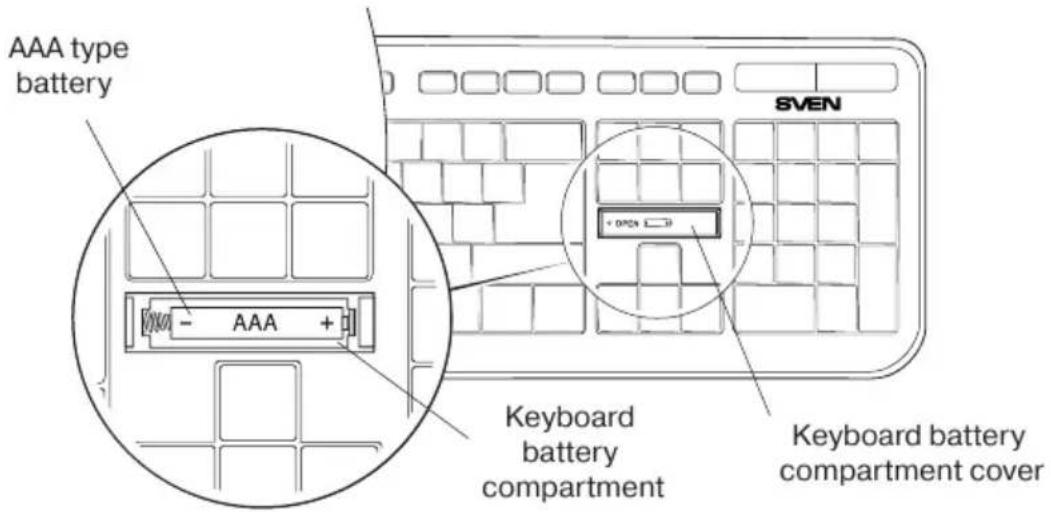
Fig. 1

Please match the polarity when installing the battery. Incorrect polarity can cause malfunction of the device, which gives no claims for warranty servicing.
5. CONNECTION
- Connect the 2.4 GHz USB nano receiver to a free USB port of your PC.
- Wireless connection of the keyboard with nanoreceiver is automatic.
• After completion of work the nanoreceiver can be left in USB port. - If wireless connection with the nanoreceiver is missed, it is necessary to establish a connection once again by pressing "ESC" and "+" keys simultaneously.
Notes:
- Do not place the receiver into a confined metal space (table drawer, box, safe), as a metal screen does not transmit radio signals.
- If battery runs down, there is a «lapses» in operation of the keyboard. In such a case replace the battery with new one.
- If there is a long pause in operation of the keyboard, they enter the Sleep mode. To enter the working mode just press any button.
6. TROUBLESHOOTING
| Problem | Solution |
| The keyboard is not working. | 1. Check whether the battery has been installed correctly. If necessary, replace the battery with new one matching the polarity.2. Pull out the USB receiver and insert it back, make sure that it is not damaged.3. We recommend that you address your nearest service center. |
If none of the above methods can solve the problem, please seek professional advice at your nearest service center. Never attempt to repair the product yourself.
7. TECHNICAL SPECIFICATIONS
| Parameter, measurement unit | Value |
| Q-ty of keyboard keys | 104 |
| Keyboard layout | Pyc/Укр/Eng |
| OS compatibility | Windows XP/Vista/7/8/10 |
| Interface | USB |
| Error-free running time | more than 20,000,000 strokes |
| Coverage range, m | up to 10 |
| Frequency, GHz | 2.4 |
| Keyboard dimensions (W × H × L), mm | 438 × 16 × 136 |
| Weight, g | 350 |
Notes:
- Technical specifications given in this table are supplemental information and cannot give occasion to claims.
- Technical specifications are subject to change without notice due to the improvement of SVEN production.
Standard Wireless Keyboard
SVEN®
YOU WANT - WE CAN
natural_image
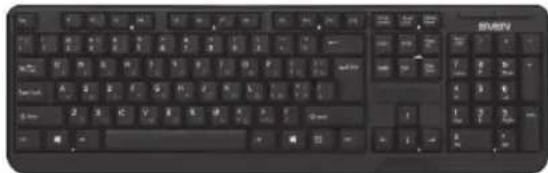
Black computer keyboard with standard keys and a partially visible 'BISRV' label (no other text or symbols)Model: Comfort 2200 Wireless
Manufacturer: SVEN PTE. LTD, 176 Joo Chiat Road, N° 02-02, Singapore, 427447. Produced under the control of Oy Sven Scandinavia Ltd. 15, Kotolahdentie, Kotka, Finland, 48310. Made in China.
® Registered Trademark of Oy SVEN Scandinavia Ltd. Finland.
COMFORT 2200 WIRELESS
- Congratulations on your purchase of the Sven Keyboard!
- COPYRIGHT
- TRADEMARKS
- NOTICE OF RESPONSIBILITY RESTRICTION
- UNPACKING
- CONTENTS
- SPECIAL FEATURES
- PACKAGE CONTENTS
- SYSTEM REQUIREMENTS
- INSTALLATION
- CONNECTION
- Notes:
- TROUBLESHOOTING
- TECHNICAL SPECIFICATIONS
- Standard Wireless Keyboard
- SVEN®
- YOU WANT - WE CAN
- Model: Comfort 2200 Wireless
Brand : Sven
Model : Comfort 2200
Category : Keyboard