
NAP-51 - Mobile Phone Charger Naxa - Free user manual and instructions
Find the device manual for free NAP-51 Naxa in PDF.


| Product Type | Wireless Charger & Power Bank |
| Battery Capacity | 10000 mAh |
| Power Input | DC 5V / 2.0A (max) |
| Wireless Output | 5W |
| USB Output | 5V (dual USB ports) |
| Charging Ports | Micro USB, USB Type-C |
| Wireless Charging Standard | Qi |
| Special Features | Suction grips, dual USB ports, compact design |
| LED Indicators | 4 LEDs for battery level (0-25%, 25-50%, 50-75%, 75-100%) |
| Auto Power Off | Yes, after 30 seconds of no device or low current |
| Safety Features | Overload protection, short-circuit protection, temperature protection |
| Included Accessories | USB charging cable, instruction manual |
| Color | Black |
| Material | Plastic with suction grips |
| Compatibility | Qi-enabled devices and USB-charged devices |
| Brand | Naxa |
| Model | NAP-51 |
Frequently Asked Questions - NAP-51 Naxa
User questions about NAP-51 Naxa
0 question about this device. Answer the ones you know or ask your own.
Ask a new question about this device
Download the instructions for your Mobile Phone Charger in PDF format for free! Find your manual NAP-51 - Naxa and take your electronic device back in hand. On this page are published all the documents necessary for the use of your device. NAP-51 by Naxa.
USER MANUAL NAP-51 Naxa
THE NEW GENERATION IN TECHNOLOGY
Wireless Charger & Power Bank
NAP-51

natural_image
Black rectangular device with circular LED pattern and 12 circular buttons (no text or symbols)Instruction Manual
Please read carefully before use and keep for future reference.
Thank You
We know you have many choices when it comes to technology; thank you for choosing us here at Naxa Electronics. Established in 2001 in Los Angeles, California, we are dedicated to delivering products that entertain and delight.
We trust that you will be happy with your purchase. Please read this manual carefully and save it for reference. You may also find the latest FAQ, documentation, and other product material at our website. Come visit us on the web at www.naxa.com and see all that we have to offer!
In the Box
Please take a moment to make sure that you have everything in the list below. Although we make every effort to ensure that each Naxa device is securely packed and sealed, we know a lot can happen in between us and you. If anything is missing, check back with your local retailer to get immediate assistance. If they cannot help you, please contact our Naxa Support team at www.naxa.com/naxa_support.
• NAP-51 Wireless Charger & Power Bank
- USB charging cable
- Instruction manual
Key Features
- Provides 10000 mAh of power when you need it most
- Qi functionality allows you to wirelessly charge your devices
- Charge multiple devices at once thanks to the dual-USB ports
- Compact design allows for added portability
• Suction grips hold your device firmly in place
• Power Output: Wireless 5W and USB 5V - Recharge the battery pack with the included micro USB cable
• Power Input: DC 5 V / 2.0 A (max)
Before You Start
Safety Instructions
- Keep the unit from heat sources, direct sunlight, humidity, water or any other form of liquid.
- Do not operate the unit if it has been wet or exposed to moisture to prevent electric shock, explosion, and/or injury to yourself or damage to the unit.
- Do not use the unit with wet hands.
- Keep the unit free from dust, lint and other small particles.
- Do not use the unit for anything other than its intended use.
- Keep the unit out of reach of children. This unit is not a toy.
Care and Maintenance
Read the following recommendations before using the device.
- Do not expose the battery to liquid, moisture or humidity. This may adversely affect the internal circuit of the device.
- Do not use abrasive cleaning solvents to clean the device.
- Do not expose the device to extremely high or low temperatures. Extreme temperatures may destroy the battery or distort some of the plastic parts.
- Do not incinerate or otherwise dispose of the device in fire as it may result in an explosion.
- Do not expose the device to contact with sharp to prevent scratches and other damage.
- Do not drop the device. Drops and other hard shocks may damage the internal circuit.
- Do not attempt to disassemble the device. There are no user-serviceable parts inside.
At a Glance
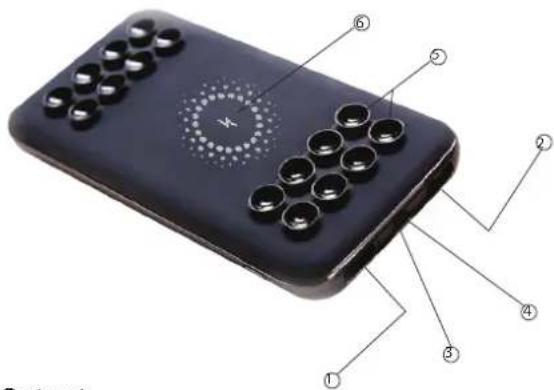
USB Output
- USB Output
- Micro USB Input
- Type-C Input
- Suction Grips
- Qi Charge Pad
Using the Device
Getting Started
- Remove the device from the box.
- Remove any packaging from the product, such as tape or protective film.
- Check to see if everything is included in the box. Retain all packaging for future use.
- Charge the battery pack.
Charging the Device
The ways in which you may charge your Wireless Charger & Power Bank are as follows:
- Install the device onto a charging dock and connect it to a power supply.
- Use the included USB charge cable to charge your device from any USB port on a computer.
- Connect the device to an external power source using a Type-C cable via the Type-C input port.
| LED 1 | LED Indicator | Battery Level |
| 1 LED | 0~25% | |
| 2 LED | 25~50% | |
| 3 LED | 50~75% | |
| 4 LED | 75~100% | |
| 1 LED blink | 0% (Need charging) |

If you charge your phone and the Wireless Charger & Power Bank simultaneously, it will charge your phone first, and then the device. When the device is fully charged, all 4 LED lights will remain lit.
Power On/Off
- If the Wireless Charger & Power Bank detects that no device is connected within 30 seconds, or the charging current of the device is less than 100mA, it will automatically turn off.
- When the device is in low power mode, it will automatically turn off.
- Press the power button once to turn the device on. Press the power button twice to turn the device off.
Warnings and Precautions
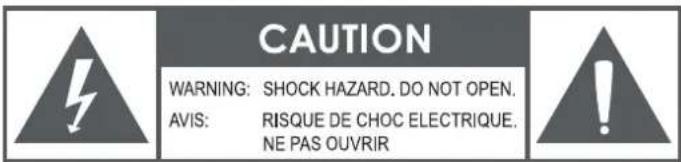
CAUTION: TO REDUCE THE RISK OF FIRE AND ELECTRIC SHOCK, DO NOT REMOVE THE COVER (OR BACK) OF THE UNIT. REFER SERVICING ONLY TO QUALIFIED SERVICE PERSONNEL.

The lightning flash with arrowhead symbol within an equilateral triangle is intended to alert the user to the presence of uninsulated "dangerous voltage" within the product's enclosure that may be of significant magnitude to constitute risk of electric shock
The exclamation point within an equilateral triangle is intended to alert the user to the presence of important operation and servicing instructions in the literature accompanying the appliance.
Important Safety Information
- Read Instructions: All the safety and operating instructions should be read before the product is operated.
- Retain Instructions: The safety and operating instruction should be retained for future reference.
-
Heed Warnings: All warnings on the product and in the operating instructions should be adhered to.
-
Follow Instructions: All operating and usage instructions should be followed.
- Cleaning: Unplug this product from the wall outlet before cleaning. Do not use liquid cleaners or aerosol cleaners. Use a damp cloth for cleaning.
- Attachments: Use only y attachments recommended by the manufacturer. Use of other attachments may be hazardous.
- Water and Moisture: Do not use this product near water (e.g., near a bathtub, washbowl, kitchen sink, laundry tub, in wet basements, or near a swimming pool and the like).
- Ventilation: Slots and openings in the cabinet are provided for ventilation to ensure reliable operation of the product and to protect it from overheating. These openings should never be blocked by placing the product on a bed, sofa, rug, or other similar surface. This product should not be placed in a built-in installation such as a bookcase or rack unless proper ventilation is provided or the manufacturer instructions have been adhered to.
- Power Sources: This product should be operated only from the type of power source indicated on the rating label. If you are not sure of the type of power supply to your home, consult your product dealer or local power company. For products intended to operate from battery power or other sources, refer to the operating instructions.
- Grounding or Polarization: This product may be equipped with a polarized alternating-current line plug that has one blade wider than the other. This plug will only fit into the power outlet in one direction. This is a safety feature. If you are unable to insert the plug fully into the outlet, try reversing the direction of the plug. If the plug should
still fail to fit, contact an electrician to replace the obsolete outlet. Do not defeat the safety purpose of the polarized plug.
- Power-Cord Protection: Power supply cords should be routed so that they are not likely to be walked on or pinched by items placed upon or against them, paying particular attention to cords at plugs, convenience receptacles, and at the point which they exit from the product.
- Protective Attachment Plug: The product may be equipped with an attachment plug with overload protection. This is a safety feature. See the operating instructions for replacement or directions to reset the protective device. If replacement of the plug is required, be sure the service technician has used a replacement plug that has the same overload protection as the original plug as specified by the manufacturer.
- Lightning: For added protection for this product, unplug it from the wall outlet during a lightning storm or when it is left unattended and unused for long periods of time. This will prevent damage to the product due to lightning or power-line surges.
- Overloading: Do not overload wall outlets, extension cords, or integral convenience receptacles as this can result in a risk of fire or electric shock.
- Object and Liquid Entry: Never push objects of any kind into this product through openings as they may touch dangerous voltage points or short-out parts that could result in a fire or electric shock. Never spill liquid of any kind on the product.
- Servicing: Do not attempt to service this product yourself as opening or removing covers may expose you to dangerous voltage or other hazards. Refer all servicing to qualified service personnel.
- Damage Requiring Service: Unplug this product from the wall outlet and refer servicing to qualified service personnel under the following conditions: a) when the power-supply or plug is damaged; b) if liquid has been spilled or if objects have fallen into the product; c) if
the product has been exposed to rain or water; d) if the product does not operate normally by following the operating instructions. Adjust only those controls that are covered by the operating instructions as improper adjustment of other controls may result in damage and will often require extensive work by a qualified technician to restore the product to its normal operation; e) if the product has been dropped or damaged in any way; f) when the product exhibits a distinct change in performance—this indicates a need for service.
- Replacement Parts: When replacement parts are required, be sure that your service technician has used replacement parts specified by the manufacturer or have the same characteristics as the original part. Unauthorized substitutions may result in fire, electric shock, or other hazards.
- Safety Check: Upon completion of any service or repairs to this product, ask the service technician to perform safety checks to ensure that the product is in proper operating condition.
- Heat: The product should be situated away from heat sources such as radiators, heat registers, stoves, or other products (including amplifiers) that produce heat.
WARNING
This product contains lead, a chemical known to the State of California to cause cancer and birth defects or other reproductive harm. Wash hands after handling.
FCC NOTICE
This device complies with Part 15 of the FCC Rules. Operation is subject to the following two conditions: (1) this device may not cause harmful interference, and (2) this device must accept any interference received, including interference that may cause undesired operation.
Note: This equipment has been tested and found to comply with the lim-
its for a Class B digital device, pursuant to Part 15 of the FCC Rules. These limits are designed to provide reasonable protection against harmful interference in a residential installation. This equipment generates, uses and can radiate radio frequency energy and, if not installed and used in accordance with the instructions, may cause harmful interference to radio communications. However, there is no guarantee that interference will not occur in a particular installation. If this equipment does cause harmful interference to radio or television reception, which can be determined by turning the equipment off and on, the user is encouraged to try to correct the interference by one or more of the following measures:
- Reorient or relocate the receiving antenna.
- Increase the separation between the equipment and receiver.
- Connect the equipment into an outlet on a circuit different from that to which the receiver is connected.
- Consult the dealer or an experienced radio/TV technician for help.
CAUTION ON MODIFICATIONS
Any changes or modifications not expressly approved by the grantee of this device may void the authority granted by the FCC to operate the equipment.
Support
If you have problems with your device, please consult the instructions in this manual. Please also visit us on the web at www.naxa.com to get up to the minute news, alerts, and documentation for your device. For additional assistance, please contact Naxa Technical Support.
NAXA Technical Support
2320 East 49th St.
Vernon, CA 90058
http://www.naxa.com/naxa_support/
MADE IN CHINA
- Wireless Charger & Power Bank
- Instruction Manual
- Thank You
- In the Box
- Key Features
- Before You Start
- Safety Instructions
- Care and Maintenance
- At a Glance
- USB Output
- Using the Device
- Getting Started
- Charging the Device
- Power On/Off
- Warnings and Precautions
- Important Safety Information
- WARNING
- FCC NOTICE
- CAUTION ON MODIFICATIONS
- Support
Brand : Naxa
Model : NAP-51
Category : Mobile Phone Charger