CON-H2-SCL - Unspecified WyreStorm - Free user manual and instructions
Find the device manual for free CON-H2-SCL WyreStorm in PDF.


| Product Type | HDMI Cable |
| Brand | WyreStorm |
| Model | CON-H2-SCL |
| Length | 1 meter (3.3 feet) |
| Connector Type | HDMI Type A (male) to HDMI Type A (male) |
| HDMI Version | HDMI 2.0 |
| Supported Resolution | Up to 4K@60Hz (3840x2160) |
| Bandwidth | 18 Gbps |
| Audio Support | Up to 32-channel audio, Dolby TrueHD, DTS-HD Master Audio |
| Ethernet Channel | Yes (HDMI Ethernet Channel) |
| 3D Support | Yes |
| Color | Black |
| Material | PVC jacket, gold-plated connectors |
| Weight | 50 g (0.11 lbs) |
| Operating Temperature | 0°C to 50°C (32°F to 122°F) |
| Storage Temperature | -20°C to 60°C (-4°F to 140°F) |
| Compliance | HDCP 2.2, RoHS |
| Package Contents | 1x HDMI Cable |
| Warranty | 2 years limited |
| Maintenance | Wipe with a dry, soft cloth |
| Safety | Do not bend sharply or expose to moisture |
| Repairability | Not repairable; replace if damaged |
Frequently Asked Questions - CON-H2-SCL WyreStorm
User questions about CON-H2-SCL WyreStorm
0 question about this device. Answer the ones you know or ask your own.
Ask a new question about this device
Download the instructions for your Unspecified in PDF format for free! Find your manual CON-H2-SCL - WyreStorm and take your electronic device back in hand. On this page are published all the documents necessary for the use of your device. CON-H2-SCL by WyreStorm.
USER MANUAL CON-H2-SCL WyreStorm
WyreStorm recommends reading through this document in its entirety to become familiar with the product's features prior to starting the installation process.





IMPORTANT! Installation Requirements
- Advanced configuration of this product requires the use of the use of the WyreStorm Management Suite v1.6 or higher configuration tool. Download the latest version from the product page before continuing with the installation.
- Visit the product page to download the latest firmware, document version, additional documentation, and configuration tools.
- Read through the Wiring and Connections section for important wiring guidelines before creating or choosing premade cables.
In the Box
1x CON-H2-SCL
1x DC 12V 2A Power Supply (US/UK/EU/AU)
3x 3-Pin Terminal Block
2x Mounting Brackets
1x Quickstart Guide (This Document)
Basic Wiring Diagram
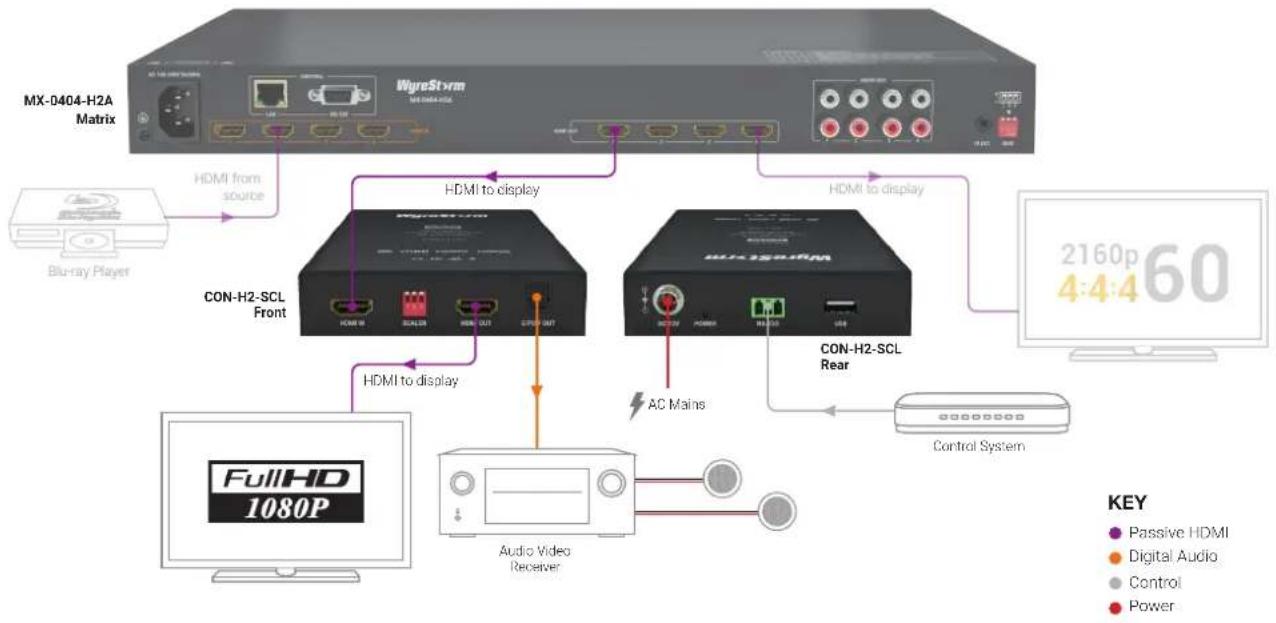
flowchart
graph TD
    A["MX-0404-H2A Matrix"] -->|HDMI from source| B["CON-H2-SCL Front"]
    A -->|HDMI to display| C["CON-H2-SCL Rear"]
    B -->|HDMI to display| D["FullHD 1080P"]
    C -->|AC Mains| E["Audio Video Receiver"]
    C --> F["Control System"]
    style A fill:#f9f,stroke:#333
    style B fill:#ccf,stroke:#333
    style C fill:#ccf,stroke:#333
    style D fill:#dfd,stroke:#333
    style E fill:#dfd,stroke:#333
    style F fill:#dfd,stroke:#333
    note right of B: CON-H2-SCL Front
    note right of C: CON-H2-SCL Rear
    note right of E: Audio Video Receiver
    note right of F: Control System
    note right of A: Blu-ray Player
    note right of F: Passive HDMI
    note right of F: Digital Audio
    note right of F: Power
Wiring and Connections
WyreStorm recommends that all wiring for the installation is run and terminated prior to making connections to the switcher. Read through this section in its entirety before running or terminating the wires to ensure proper operation and to avoid damaging equipment.

IMPORTANT! Wiring Guidelines
- The use of patch panels, wall plates, cable extenders, kinks in cables, and electrical or environmental interference will have an adverse effect on signal transmission which may limit performance. Steps should be taken to minimize or remove these factors completely during installation for best results.
- WyreStorm recommends using pre-terminated HDMI cables due to the complexity of these connector types. Using pre-terminated cables will ensure that these connections are accurate and will not interfere with the performance of the product.
RS-232 Guidelines
This product uses a 3-pin RS-232 with no hardware flow control. Most control systems and computers are DTE where pin 2 is RX, this can vary from device to device. Refer to the documentation for the connected device for pin functionally to ensure that the correct connections can be made.
HDMI Cable Performance Guide
| 0m | 2m | 4m | 6m | 8m | 10m | 12m | 14m | 16m | 18m | 20m |
| 0ft | 7ft | 13ft | 20ft | 26ft | 33ft | 39ft | 46ft | 52ft | 60ft | 66ft |
HD/4K Transmission
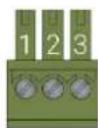
| WyreStorm Connector | 3rd Party Device | ||
| Pin 1 TX (Transmit) ---> To ---> RX (Receive) | |||
| Pin 2 RX (Receive) ---> To ---> TX (Transmit) | |||
| Pin 3 G (Ground) ---> To ---> G (Ground) | |||
Troubleshooting
No or Poor Quality Picture (snow or noisy image)
- Verify that the output resolution of the source and display is supported by this product.
- If transmitting 3D or 4K, verify that the HDMI cables used are 3D or 4K rated.
- Verify that all source and display connections are not loose and are functioning properly.
No or Intermittent 3rd party Device Control
- Verify that the RS-232 and Relay cables are properly terminated. Refer to RS-232 Guidelines and/or Relay Wiring sections for pinout information.
Setup and Configuration
Scaler Settings
This device can be set to scale the video output when required by the system using the dip switches on the front of the device.
| Auto Scaling (Default) |  | 1920x1080@60Hz |  |
| 1024x768@60Hz |  | 1920x1200@60Hz |  |
| 1280x720@60Hz 3840x2160@30Hz |  |  | |
| 1280x800@60Hz 3840x2160@60Hz |  |  |
Advanced Configuration
The following steps require the use of the use of the WyreStorm Management Suite v1.6 or higher. Download the latest version from the product page before continuing with the installation.
Initial Configuration Tool Setup
- Connect the converter to a PC using the RS-232 port. Refer to RS-232 Guidelines for pinout.
- Open the WyreStorm Management Suite and select the CON-H2-xxxx Configuration Tool from the menu.
- Under RS-232 Port Configuration select the COM port for the PC and set the baud rate to 57600.
- Select the Connect button to connect the PC to the converter.
EDID Write from a File
If an EDID file is available it can be uploaded into the converter for setting the desired EDID.
- Under RS-232 Port Configuration select the COM port for the PC and set the baud rate to 57600.
- Under EDID Write select Choose File to select the file to upload.
- Once the selection dialog closes, select Import to upload the file to the converter.
Specifications
| Audio and Video | |
| Inputs 1x HDMI In: 19-pin type A | |
| Outputs | 1x HDMI Out: 19-pin type A1x S/PDIF Out: TOSLINK (Digital Optical) |
| Audio Formats | HDMI Pass-through: 2ch PCMS/PDIF Out: De-Embed: 2ch PCM |
| Video Resolutions (Max) | Video Resolution HDMI |
| 1920x1080p @60Hz 12bit 15m/49ft | |
| 3840x2160p @24Hz 10bit 4:2:0 HDR 7m/23ft | |
| 3840x2160p @30Hz 8bit 4:4:4 7m/23ft | |
| 3840x2160p @60Hz 10bit 4:2:0 HDR 5m/16ft | |
| 3840x2160p @60Hz 12bit 4:2:2 HDR 3m/10ft | |
| 4096x2160p @60Hz 8bit 4:2:0 7m/23ft | |
| 4096x2160p @60Hz 8bit 4:4:4 3m/10ft | |
| Supported Standards DCI | RGB | HDR | HDR10 | Dolby Vision | HLG | BT.2020 | BT.2100 | |
| Maximum Pixel Clock 600MHz | |
| Communication and Control | |
| HDMI | HDMI 2.0 | HDCP 2.2 | EDIDInputs supports DVI/D and DisplayPort Dual-Mode (DP++) v1.3 with adapter (not included) |
| RS-232 1x RS-232: 3-pin Terminal Block - 3.5mm | |
| USB 1x USB: USB-A | Firmware Updates Only | |
| Power | |
| Power Supply 12V DC 2A | |
| Max Power Consumption 8.38W | |
| Environmental | |
| Operating Temperature 32°F ~ 113°F (0°C ~ 45°C) | 10% ~ 90%, non-condensing | |
| Storage Temperature -4°F to ~ 158°F (-20°C ~ +70°C) | 10% ~ 90%, non-condensing | |
| Maximum BTU 29 BTU/hr | |
| Dimensions and Weight | |
| Rack Units | Wall Box | <1U |
| Height With | Without Feet | 25mm/0.99in |
| Width With | Without Brackets | 110mm/4.34in |
| Depth With | Without Handles | 150.1mm/5.91in |
| Weight | 0.476kg/1.05lbs |
| Regulatory | |
| Safety and Emission | CE | FCC | RoHS | RCM |
Note: WyreStorm reserves the right to change product specification, appearance or dimensions of this product at any time without prior notice.
Warranty Information
WyreStorm Technologies LLC warrants that its products to be free from defects in material and workmanship under normal use for a period of five (5) years from the date of purchase. Refer to the Product Warranty page on wyrestorm.com for more details on our limited product warranty.

- IMPORTANT! Installation Requirements
- In the Box
- Wiring and Connections
- IMPORTANT! Wiring Guidelines
- RS-232 Guidelines
- Troubleshooting
- No or Poor Quality Picture (snow or noisy image)
- No or Intermittent 3rd party Device Control
- Setup and Configuration
- Scaler Settings
- Advanced Configuration
- Initial Configuration Tool Setup
- EDID Write from a File
- Warranty Information
Brand : WyreStorm
Model : CON-H2-SCL
Category : Unspecified