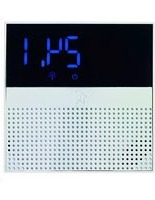
MIHO069 - Thermostat EnerGenie - Free user manual and instructions
Find the device manual for free MIHO069 EnerGenie in PDF.


| Product Type | Thermostat |
| Brand | EnerGenie |
| Model | MIHO069 |
| Dimensions (W x H x D) | 100 x 100 x 25 mm |
| Weight | 150 g |
| Power Supply | 2 x AA (LR6) batteries |
| Radio Frequency | 433.9 MHz |
| Range (open area) | 30 m |
| Switching Rating | DC 2A/30V max, AC 0.25A/230V max |
| Temperature Accuracy | ±0.3°C |
| Display | OLED display |
| Sensors | Temperature, humidity, motion (presence) |
| Control Interface | Smartphone app (iOS/Android) and web portal |
| Functions | Set target temperature, schedules, geofencing, comfort/eco modes, winter/summer modes |
| Integration | Compatible with MiHome Gateway and eTRVs (sold separately) |
| Installation | Must be installed by a competent person; wall mount with included screws |
| Care and Cleaning | Clean with a dry cloth; protect from moisture and water |
| Safety | Indoor dry use only; do not disassemble; no user-serviceable parts |
| Spare Parts | Batteries (user-replaceable); no other spare parts available |
| Reparability | No user-serviceable parts; contact support for faults |
| Warranty | Warranty void if not installed/used according to manual |
| Compliance | EU Declaration of Conformity (2014/53/EU) |
Frequently Asked Questions - MIHO069 EnerGenie
User questions about MIHO069 EnerGenie
0 question about this device. Answer the ones you know or ask your own.
Ask a new question about this device
Download the instructions for your Thermostat in PDF format for free! Find your manual MIHO069 - EnerGenie and take your electronic device back in hand. On this page are published all the documents necessary for the use of your device. MIHO069 by EnerGenie.
USER MANUAL MIHO069 EnerGenie
Mi|Home Thermostat User Guide
The MiHome Thermostat is part of Energenie's heating range of products and part of the MiHome home automation range. The heating range includes the radio controlled MiHome thermostat, radio controlled radiator valves*.
MiHome products link directly to the MiHome Gateway* which provides the communications between your MiHome device and the internet.
(* MiHome Gateway, radiator valves are available to purchase separately)
The MiHome thermostat is suitable for switching any standard domestic boiler (see product specification below). Control of the thermostat is by radio control using either the Android or IOS smartphone App, or by using the MiHome server web portal, in conjunction with an internet connected Gateway
In the Box:
- MiHome Thermostat (Product Code MIHO069)
- Batteries (2 x AA (LR6))
- Screw Fittings (please note that while we provide screw fittings it is your responsibility to check their compatibility with the surface to which you are fixing the thermostat).
Installation
MUST BE INSTALLED BY A COMPETENT PERSON
- Remove your old thermostat, if it is necessary cut the power off in the installation area
- Remove the back of the thermostat by inserting your finger into the opening and pulling back the panel connections box
- Enter the connection cables to the boiler through the hole in the connections box.
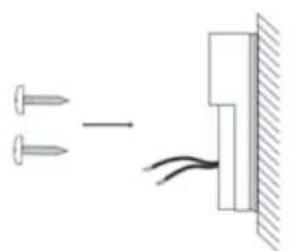
- Screw the connections box to the wall, using either the fixings included in the package, or if they are unsuitable for your wall material please use alternative fixings
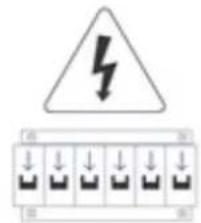
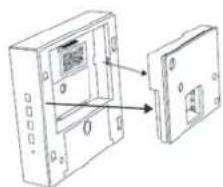
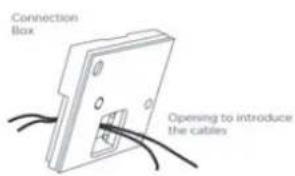





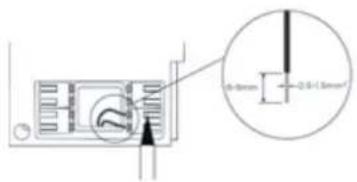
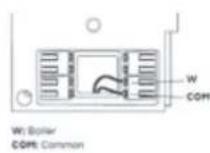
- Connect the control wires to the W and COM terminals on the connections box. If the cable is rigid, you can enter it directly. If its flexible, you may need help from the tip of a pen to press on the thermostat terminal block.
- Insert the batteries into the thermostat. The LED will flash three times, indicating that they have been inserted correctly.
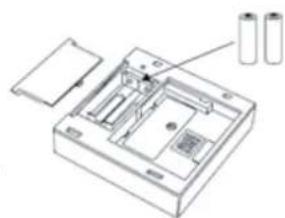
- Fit the thermostat to the connections box on the wall and your thermostat is now ready to use
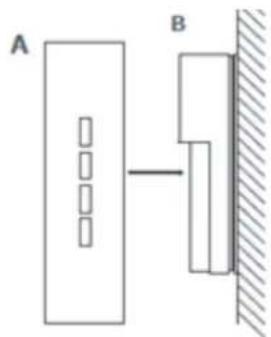
Pairing with the MiHome Gateway
To pair the thermostat to your MiHome Gateway, follow the instructions below to pair using either the MiHome App or the web browser. When requested by the app/web browser, put the thermostat into pairing mode by pressing the 'M' button on the side of the unit until the pairing LED icon starts to flash (approx. 3 seconds). Successful pairing will be indicated on the app or MiHome server web portal by a message, and the pairing LED icon on the unit's display will stop flashing and stay steady on.
Smartphone:
- Log into your MiHome account on the MiHome App (Available for free on both iOS and Android platforms)
- Select Add a new device from the menu and choose Thermostat.
- Follow on-screen pairing instructions
Web Browser
- Log into your MiHome account at mihome4u.co.uk.
- Select Pair New Device from the mihome4u.co.uk/devices
- Select the Thermostat, followed by Pair Device and follow the on screen pairing instructions
Remote Control Operation
Once paired with the M-Home gateway all functions of the Mi-Home thermostat can be controlled and viewed through the Smartphone App and Web portal. Available functions include
- Set the target temperature
View current and historical graphs of ambient temperature and relative humidity
- Setup a schedule - Setup Geofencing to automatically switch your heating when you're away
- Choose between Comfort and Eco modes
- Choose a battery-saving summer mode
- Configure MiHome TRVs to work with the MiHome Thermostat
Configuring the Thermostat
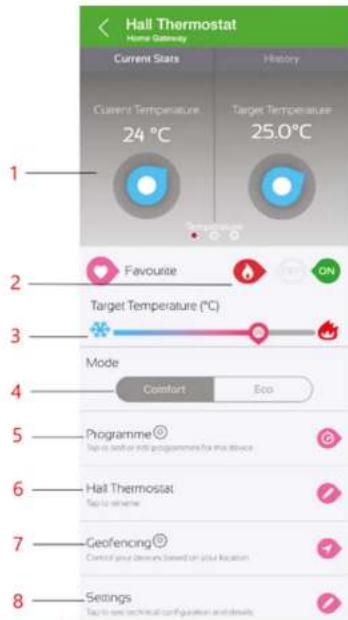
Display (1)
Swipe to view temperature, humidity and motion.
Manual On/Off control (2)
The thermostat may be set to either:
On - normal operation, powered on, controlling the heating, and reporting temperature, humidity, and motion.
Button shows green when selected, otherwise light grey.
Off standby mode, powered or, not controlling the heading, but still reporting temperature, humidity and motion. Button shows dark grey when selected, otherwise light grey
On and Off may be set from the Mill-lome server on the web browser, from the Mill-lome smartphone app device 1.5 or from the thermostat page on the Mill-lome smartphone app.
Set the Target Temperature (3)
The target temperature may be set in 0.5°C steps using the slider control on either the web browser, or smartphone app. The temperature is shown on the slider itself (point 3) and the target temperature dial
Comfort and Eco mode (4)
Comfort mode keeps the temperature control close to the target temperature, whereas Eco mode will allow the temperature to fall lower than Comfort mode before switching the boiler back on. This may be set from the Comfort/Eco selector on the main page. The margins for Comfort and Eco mode may be set in the sections section or enter the web browser, or smartphone app.
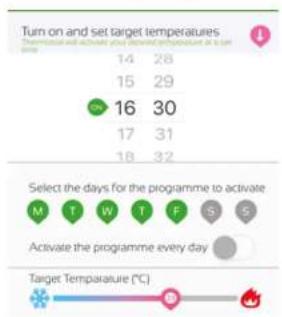
Programmes (5)
Programmes comprise of an On time, an Off time, any or all days of the week, and a target temperature which together provide for controlled operation of the heating system. Multiple programmes may be configured for each thermosat these programmes may be set on either the web browser, or smartphone app.
Name your thermostat (6)
The thermostat may be given a logical/descriptive name via the Rename Your Device section on either the web browser, or smartphone app.
Geofencing (7)
Geofending uses the GPS technology on your smartphone (Apple or Android) to create a virtual geographic boundary, enabling software to perform a trigger activity when your mobile device enters or leaves a particular geographical area.
Configuring the thermostat - Settings page (8)
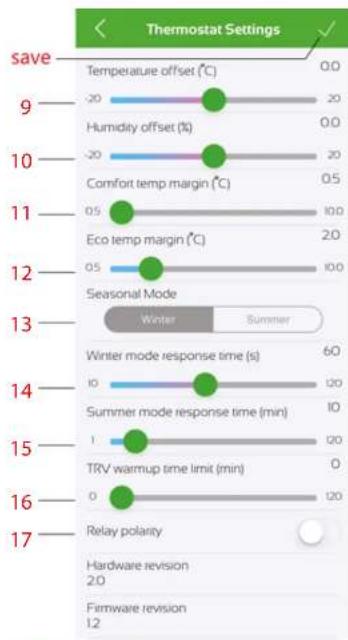
Temperature offset (9)
The thermoslot may be given an offset in steps of 0.5°C to a sign with either other room or temperature measuring devices within your home. This offset may be set from the settings section on either the web browser, or smartphone app.
Humidity offset (10)
The thermoclet may be given an offset in steps of 1% to a sign with either other room's or humidity measuring devices within your home. This offset may be set from the seconds session on either the web browser, or smartphones up
Comfort and Eco temp margins (II and 12)
See "Comfort and Eco Mode" on the previous "Configure then hermostar" section
Seasonal modes, Winter and Summer (13, 14, and 15)
During Winter, the heating control is normally required to be quite responsive to maintain the target temperatures, so the response time may be set accordingly (10 to 120 seconds in 1 second steps). During summer, battery life of the thermostat may be extended as the response time of the heating control may be set to a higher value (50 to 120 minutes in 1 minute steps).
Note: Selling the response time to less than one minute could significantly reduce battery life.
This summer and winter response times may be set from the settings section on either the web browser, or smartphone app
TRV warmup time (16)
To allow any TRVs to reach their own designated target temperature, the heating can be set to continue heating for deformed time after it has reached the target temperature at the thermostat location. This TRV warmup time can be set from the seat rings section on either the web browser, or smartphone app.
Reverse relay (17)
Depending on the boiler requirements, the relay may be left as default (Normally Open) or may be set to reverse operation (Normally Closed). This may be set from the settings section on either the web browser, or smartphone dup.
eTRV Integration
For initial eTRV setup please refer to the eTRV instructions which are available on our eTRV product page
All sections in eTRV Integration refer to the eTRV pages on the app. Repeat the following procedures as required for all eTRVs that are to follow the thermostat.
Follow Thermostat
You can enable any of your eTRVs to follow your Thermostat. By following the Thermostat, this eTRV will replicate and maintain the same target temperature as the Thermostat. To do this, select your desired eTRV from the dashboard. Select the last option on the page "Follow Thermostat"
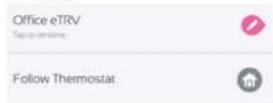
Select your thermostat from the list and save.
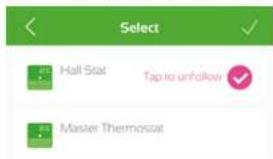
This returns you to the eTKV screen which now displays the Thermostat being followed, and the 'Thermostat Overides' option
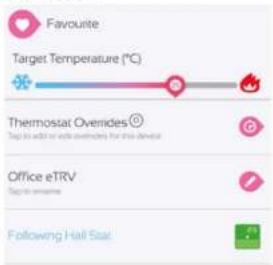
Thermostat Overrides
An Override timer allows an eTRV that is following a Thermostat to ignore the target temperature of the Thermostat for a period. The timer will specify the time of the override, the days to activate the override and the desired temperature during this time. To set an Override timer select your desired eTRV, then select the "The mostrat Overides" option.
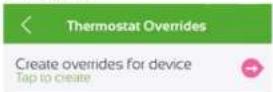
Create the Override by defining the target temperature, times and days as required then save.
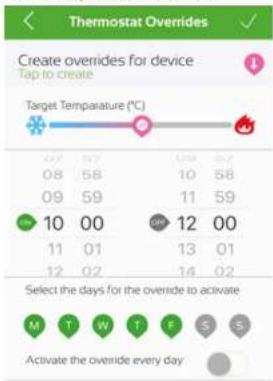
This will save the record showing an overview of the Overde
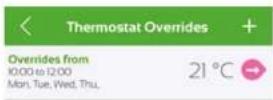
Selecting back returns you to the e1kV screen which now displays the number of Overrides created in the circle to the right of "Thermosus. Overrides".
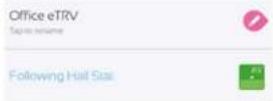
Unfollow Thermostat
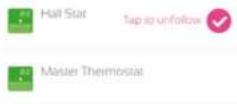
From the e14V page, select the following, "option that shows the name of your thermostas. On the following page, select the option Tap to unfollow" and save.
Safety
If you do not install and use in line with this guide the warranty will become invalidated and we will not be liable for any damage or loss whatsoever, including indirect loss, damage to property or personal injury. You must only use the product in dry areas indoors, and it must be protected from moisture and water. Do not disassemble as it does not contain any parts to service. If it arrives fully, return it to where you bought it. Your statutory rights are not affected.
Further Help
For more help, lock online at mihome4u.co.uk/troubleshooting und www.energenie4u.co.uk or contact our helpful support team in the UK via 08000 469 466 or support@mihome4u.co.uk Further contact memors can be found at energenie4u.co.uk/about_us/contact_us
Parameter Settings
| Range | In steps of | Default | |
| Temperature Offset | ±20°C | 0.5°C | 0°C |
| Humidity Offset | ±20% | 1% | 0% |
| Comfort margin | 0.5 to 10 | 0.5°C | 0.5°C |
| Eco margin | 0.5 to 10 | 0.5°C | 2.0°C |
| Winter mode response time | 10 to 120 secs | 1 sec | 60s |
| Summer mode response time | 1 to 120 mins | 1 min | 10 mins |
| TRV warmup time | 0 to 120 mins | 1 min | 0 mins |
| Relay polarity | Normally open or normally closed | n/a | Normally open |
Product Spec
Model: MIH0069, Radio: 133MHz Open Things Batteries (2 x AA) (1 kΩ) Voltage Range: 270 - 740 V/50Hz at Temperature, rotary and presence sensor Temperature accuracy ±0.3°C LLD display Switching Rating DC 2A/30V max, AC 0.25A/230V max Max Power: 625V / 60W Relay Type: Single pole, volt free, dry contacts Dimensions: 100 x 100 x 25 mm Weight 150g Rx Frequency: /33.9 MHz Range: 30 min open area
SIMPLIFIED EU DECLARATION OF CONFORMITY
Hereby, Sendal Plc, T/a Enrganic decures that the radio equipment type MI 10059 Millome Thermostat is in compliance with Directive 20.4/53/LU. The full text of the EU declaration of conformity is available at the following internet address: www.enorganic4u.co.uk
Copyright Notice
© 2017 Sandal Plc
User Manual
Part no: M1H00059
Emergentic and Millome are brand names of Sandal Plc. Registered Office, Claremont House, Deans Court, Bicoester Oxon, OX26 5BW


- MI|HOME THERMOSTAT USER GUIDE
- IN THE BOX
- INSTALLATION
- MUST BE INSTALLED BY A COMPETENT PERSON
- PAIRING WITH THE MIHOME GATEWAY
- SMARTPHONE
- WEB BROWSER
- REMOTE CONTROL OPERATION
- DISPLAY (1)
- MANUAL ON/OFF CONTROL (2)
- SET THE TARGET TEMPERATURE (3)
- COMFORT AND ECO MODE (4)
- PROGRAMMES (5)
- NAME YOUR THERMOSTAT (6)
- GEOFENCING (7)
- TEMPERATURE OFFSET (9)
- HUMIDITY OFFSET (10)
- COMFORT AND ECO TEMP MARGINS (II AND 12)
- SEASONAL MODES, WINTER AND SUMMER (13, 14, AND 15)
- TRV WARMUP TIME (16)
- REVERSE RELAY (17)
- ETRV INTEGRATION
- FOLLOW THERMOSTAT
- THERMOSTAT OVERRIDES
- UNFOLLOW THERMOSTAT
- SAFETY
- FURTHER HELP
- PRODUCT SPEC
- SIMPLIFIED EU DECLARATION OF CONFORMITY
Brand : EnerGenie
Model : MIHO069
Category : Thermostat