
NE-968 - Radio Naxa - Free user manual and instructions
Find the device manual for free NE-968 Naxa in PDF.


| Product Type | Wireless Bluetooth Headphones |
| Model | NE-968 |
| Brand | Naxa |
| Battery Type | Built-in Lithium-ion rechargeable |
| Battery Capacity | 250mAh, 3.7V |
| Charging Time | Approximately 2 hours |
| Running Time | Approximately 3.5 hours at 70% volume |
| Bluetooth Range | Up to 32 feet (open area) |
| Charging Port | Micro-USB |
| Audio Jack | 3.5mm AUX-IN |
| TF Card Slot | Yes, supports TF card playback |
| Voice Assistant | Google Assistant & Siri |
| Hands-Free Function | Built-in microphone, answer/end/redial calls |
| Volume Control | On-ear controls (volume up/down) |
| Playback Control | Play/Pause, Next/Previous track |
| Indicator Light | Red (charging), Blue (connected/blinking pairing) |
| Auto Power Off | After 10 minutes of inactivity |
| Weight | Approximately 180g |
| Accessories Included | User Manual, USB Charging Cable |
| Safety Compliance | FCC Part 15 |
Frequently Asked Questions - NE-968 Naxa
User questions about NE-968 Naxa
0 question about this device. Answer the ones you know or ask your own.
Ask a new question about this device
Download the instructions for your Radio in PDF format for free! Find your manual NE-968 - Naxa and take your electronic device back in hand. On this page are published all the documents necessary for the use of your device. NE-968 by Naxa.
USER MANUAL NE-968 Naxa
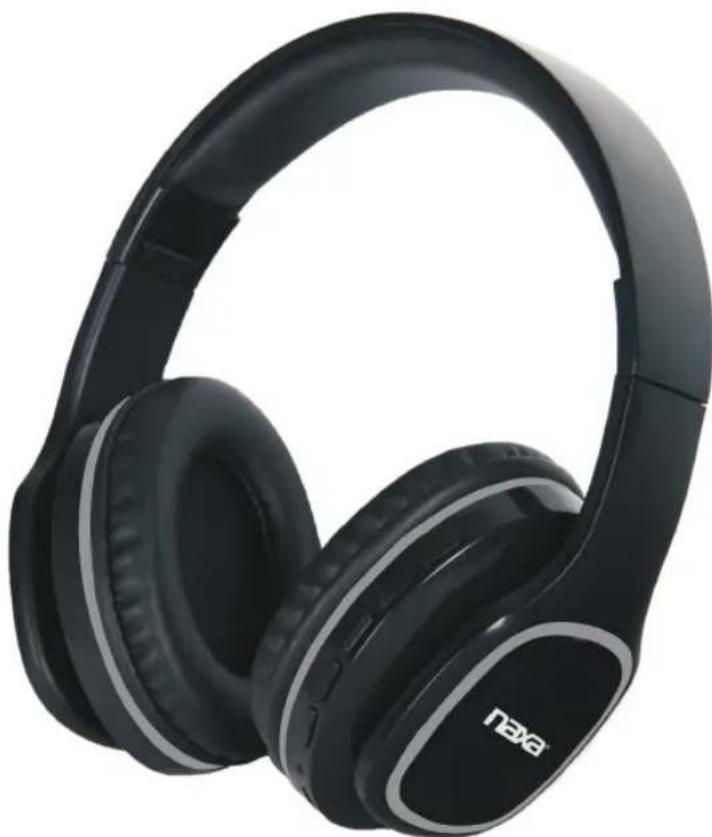
Voice-Controlled Bluetooth® Headphones with Google Assistant™ & Siri Assistant™
natural_image
Black and white photo of a NEXO headphones with visible brand logo (no text or symbols on the headset body)MODEL:NE-968
Please read this user manual carefully to ensure proper use of this product and keep this manual for future reference
IMPORTANT SAFETY INSTRUCTIONS
CAUTION
RISK OF ELECTRIC SHOCK DO NOT OPEN
CAUTION: TO REDUCE THE RISK OF ELECTRIC SHOCK, DO NOT REMOVE THE COVER (OR BACK) OF THE DEVICE. NO USER SERVICEABLE PARTS ARE INSIDE. PLEASE REFER SERVICING TO QUALIFIED SERVICE PERSONNEL.
DANGEROUSVOLTAGE: The lighting flash with arrowhead symbol within an equilateral triangle is intended to alert the user to the presence of uninsulated “dangerous voltage” within the product’s enclosure that may be of sufficient magnitude to constitute a risk of electric shock to persons.
ATTENTION: The exclamation point within an equilateral triangle is intended to alert the user to the presence of important operating and maintenance (servicing) instructions in the literature accompanying the appliance.
WARNING: TOPREVENTFIREORSHOCKHAZARD, DONOTEXPOSE THISUNITTORAINORMOISTURE.
Warning:
- This product is built with an internal rechargeable battery.
- Batteries (a battery pack or installed batteries) shall not be subject to excessive heat, such as direct sunlight, fire, or the like.
- Changes or modifications not expressly approved by the manufacturer could void the user's authority to operate this device.
- Usage of controls or adjustments of performance procedures, other than those specified herein, may result in hazardous exposure.
- Recharge the battery when the device indicates that the battery is low.
- It is recommended to charge the battery immediately when the battery is low.
- To prolong the life of the battery, it is NOT recommended to use the device when charging.
- To prolong the life of the battery, consider recharging its battery at least once per month.
IMPORTANT SAFETY INSTRUCTIONS
FCCSTATEMENT:
This device complies with part 15 of the FCC Rules. Operation is subject to the following two conditions:
(1) This device may not cause harmful interference, and
(2) This device must accept any interference received, including interference that may cause undesired operation.
FCCNOTICE:
This equipment has been tested and found to comply with the limits for a Class B digital device, pursuant to Part 15 of the FCC Rules. These limits are designed to provide reasonable protection against harmful interference in a residential installation. This equipment generates, uses and can radiate radio frequency energy and, if not installed and used in accordance with the instructions, may cause harmful interference to radio communications. However, there is no guarantee that interference will not occur in a particular installation. If this equipment does cause harmful interference to radio or television reception, which can be determined by turning the equipment off and on, the user is encouraged to try to correct the interference by one or more of the following measures:
●Reorient or relocate the receiving antenna.
- Increase the separation between the equipment and receiver.
- Connect the equipment into an outlet on a circuit different from that to which the receiver is connected.
- Consult the dealer or an experienced radio/TV technician for help.
FCCWARNING:
To assure continued operation, follow the attached installation instructions and use only shield cables when connecting to other devices. Changes or modifications not expressly approved by the party responsible for compliance could void the user's authority to operate the equipment.

WARNING:
Cancer and Reproductive Harm-www.P65Warnings.ca.gov

To prevent possible hearing damage, do not listen at high volume levels for long periods of time.
HEADPHONES ADJUSTMENT
The headphones can be adjusted properly following the direction of the arrowhead, as illustrated below. This affords a comfortable and form-fitting experience for the user.

natural_image
Line drawing of a headboard with two side panels and bidirectional arrows indicating clockwise motion (no text or symbols)FUNCTION PANEL

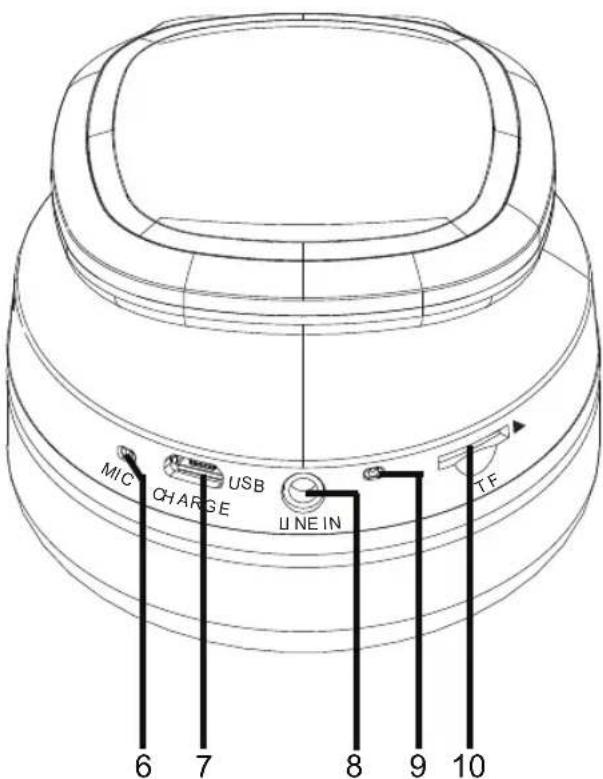
- Power On/Off Button
- Volume Up, Next Button
- Play/Pause, Hands-Free Button
- Volume Down, Previous Button
-
Voice Control Button
-
Built-In Microphone
- Micro-USB Charging Port
- Aux-In Jack
- Indicator
- TF Card Slot
RECHARGING THE UNIT
The unit has a built-in Li-ion rechargeable battery, charge it before use or when it is drained as below:
- Connect the Micro USB Plug from the supplied USB Charging Cable to the USB CHARGE Port.
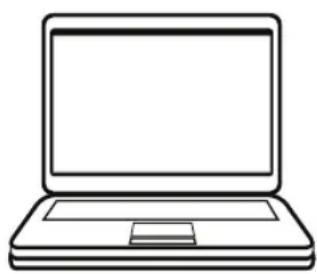
- Plug the Macro USB Plug to the USB Port on Laptop (or USB Adapter) as below.
natural_image
Line drawing of a laptop computer with blank screen (no text or symbols)
- While charging, the indicator on the unit will turn Red, it will turn Blue when completely charged.
NOTES:
A. Before first time use, charge approximately 2 hours until the unit is completely charged.
B. Recharge and store the unit within the temperature range of 5^ C\~ 35^ C ( 40^ F\~ 95^ F).
C. Do not charge longer than 24 hours. Excessive charging or running the unit until the battery fully drains will damage battery. Battery life will be extended if you keep the battery fully charged.
D. Battery life naturally shortens slowly over time.
E. The rechargeable battery incorporated in this product is not user replaceable.
BLUETOOTH OPERATION
- Press and hold the ⏻ button to turn on the unit, the indicator will turn Blue and begin blinking.
- Activate the bluetooth menu on the device you wish to connect to the unit. Search the unit, and the device name "NAXA NE-968" will appear on the pairing list. Select it and establish a connection.
- After successful connection, the indicator light will be solid Blue.
- Play a track on your paired device as normal.
While playing:
- Press the ▶Button to pause. Press it again to resume playing.
- Press the ◀◀ + or—▶▶ button to adjust volume level.
- Press and hold the ◀◀ + or -▶▶ button to skip to next or previous track.
Hands-free Function:
- Press the ▶ Button to answer the incoming call, press it agian to end the call.
- Press and hold the ▶ Button to refuse the incoming call.
- Press the ▶ Button twice to redial the last dialed phone number.
NOTES:
- If the auxiliary cable is inserted into the AUX-IN jack, or the TF-Card inserted into the card slot, the unit will be switched to AUX- IN or TF-Card mode.
● The latter one inserted will be selected as a playing source.
INSTALLING GOOGLE ASSISTNAT
- Access the Google Play Store or Apple App Store from your smartphone device.
- Install the Google Home app onto your smartphone device.

Google, Android™, Google Play, Google Home, Chromecast Built-in and other marks and logos are trademarks of Google Inc.
-
Establish a wireless connection from the wireless router to your smartphone. If Wi-Fi is not available, you can use data.
-
Activate the Bluetooth functionality on your smartphone device.
* The Google Home app uses Bluetooth to identify the headphones.
- Open the Google Home app and follow the on-screen instructions to set the initial settings for the headphones.

SETTING UP SIRI ASSISTANT
-
To set up Siri Assistant on your headphones, you need an iPhone, iPod touch, or iPad with iOS 12 or later.
-
To begin, ensure that your iOS device has Bluetooth mode turned.
-
Turn on the headphones. Then hold your unlocked iOS device within a few centimeters of the headphones, until the setup screen appears. Tap "Set Up" and follow the on-screen instructions.
Note: If the setup screen does not appear automatically, open the Home app on your iOS device, tap the ⭕, then tap Add Accessory. Tap “Don’t Have a Code or Can’t Scan?”, then select the headphones in the Nearby Accessories list. If you do not have the Home app already installed, you can download it from the App Store.
- Listen for "Hey Siri" in the Siri & Search settings menu of your iOS device.
VOICE ASSISTANT
-
Connect the unit with your phone with Siri or Google Assistant through Bluetooth.
-
Press the M button on the unit, then speak your requests to the Microphone on the unit.
-
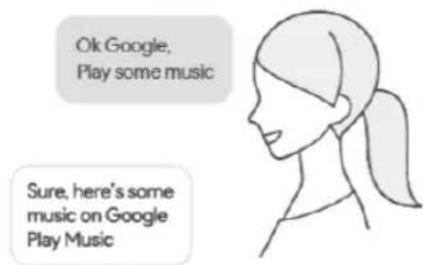
You can visit any function on your phone, navigate the desired location, asking weather or traffic, giving a call to somebody on your contact list, checking the NBA schedule, checking the emails, playing music, sending message, checking the airline information, browsing the photos, etc.
-
When the phone searching the answer from network, you may need to activate your Wifi or phone data streaming.
AUX IN
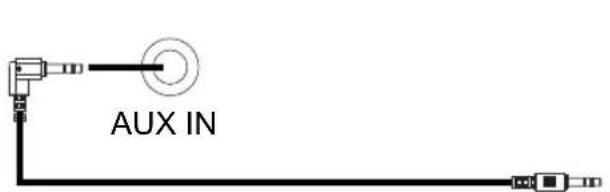
- Insert one end of the 3.5mm auxiliary cable to the AUX-OUT jack on the external player.
- Insert the other end of the 3.5mm aux cable cable to the AUX-IN jack of the unit.

MP3

Mobile Phone
Connect to the mobile p /external audio device's AUX Out / Line Out jack (LWP3ahayer, mobile phone, or iPod/iPad, etc.)
- Turn on the unit.
- Play music on external player.
While playing:
Press the ◀◀ + or - ▶▶ button to adjust volume level.
NOTE:
Do not insert the TF-Card into card slot, or it will switch to TF-Card playing mode.
TF-CARD PLAYING
- Insert the TF-CARD into the TF card slot with the copper plate facing upside, as shown in the figure on the right.
- Turn on the unit.
- The unit will play automatically.
- When finished playing, push the TF-CARD again to spring out from the slot.
NOTE:
Do not insert the auxiliary cable, or it will switch to AUX-IN playing mode.

TROUBLESHOOTING GUIDE
Check the following before requesting service:
| SYMPTOMPOSSIBLECAUSEPOSSIBLESOLUTION | ||
| Can't power on | Built in battery drained | Recharge the battery |
| No sound or sound weak | Volume level of paired/connected device is in low level | Rise the volume level of the paired/connected device |
| Sound distortion | Volume level of the connected/paired device too high | Reduce the volume level of the connected/paired device |
| BT not functioning | The external BT device had NOT paired to the unit | Pair the external BT device to the unit |
| The external BT device too far from the unit | Place the external BT device close to the unit | |
SPECIFICATIONS
Power source: Built-in DC 3.7V, 250mAh rechargeable battery Recharge by DC 5V through Micro USB port
Charging time: approx. 2 hours Running time: approx. 3.5 hours @70% volume Bluetooth working range: up to 32 feet in open area
NOTE: The unit will power off when no any operation (no Bluetooth connection, no Line In cable or TF Card inserted) for 10 minutes.
ACCESSORIES:
1 x User Manual 1 x USB Charging Cable
SPECIFICATIONSANDACCESSORIESARESUBJECTTOCHANGE WITHOUTNOTICE
SUPPORT
If you have problems with your device, please consult the instructions detailed in this manual. Please also visit us on the web at www.naxa.com to get the latest news, alers, and documentation for your device. For addition assistance, please contact Naxa Technical Support.
NAXA Technical Support
2320 East 49th St.
Vernon, CA 90058
http://www.naxa.com/naxa_support/


- MODEL:NE-968
- IMPORTANT SAFETY INSTRUCTIONS
- CAUTION
- RISK OF ELECTRIC SHOCK DO NOT OPEN
- WARNING: TOPREVENTFIREORSHOCKHAZARD, DONOTEXPOSE THISUNITTORAINORMOISTURE.
- Warning:
- FCCSTATEMENT:
- FCCNOTICE:
- FCCWARNING:
- HEADPHONES ADJUSTMENT
- RECHARGING THE UNIT
- NOTES:
- BLUETOOTH OPERATION
- INSTALLING GOOGLE ASSISTNAT
- SETTING UP SIRI ASSISTANT
- VOICE ASSISTANT
- AUX IN
- TF-CARD PLAYING
- TROUBLESHOOTING GUIDE
- SPECIFICATIONS
- SPECIFICATIONSANDACCESSORIESARESUBJECTTOCHANGE WITHOUTNOTICE
- SUPPORT
Brand : Naxa
Model : NE-968
Category : Radio