
KX-TCD153E - Cordless phone PANASONIC - Free user manual and instructions
Find the device manual for free KX-TCD153E PANASONIC in PDF.
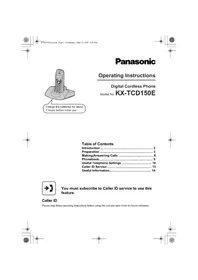


| Product Type | Digital Cordless Phone (DECT) |
| Standard | DECT (Digital Enhanced Cordless Telecommunications) |
| Number of Channels | 120 Duplex Channels |
| Frequency Range | 1.88 GHz to 1.9 GHz |
| RF Transmission Power | Approx. 250 mW |
| Power Source | 220–240 V, 50 Hz |
| Power Consumption (Base Unit) | Standby: Approx. 3.5 W, Maximum: Approx. 9.2 W |
| Battery Type | Ni-MH AAA (700 mAh), rechargeable |
| Battery Life | Talk: 10 h max, Standby: 120 h max |
| Charging Time | Approx. 7 hours for initial charge |
| Display | LCD with status icons |
| Phonebook Capacity | 20 names and numbers |
| Caller ID | Compatible (requires subscription), logs last 50 callers |
| Handset Weight | Approx. 115 g |
| Base Unit Weight | Approx. 185 g |
| Handset Dimensions | Approx. 143 mm × 48 mm × 32 mm |
| Base Unit Dimensions | Approx. 58 mm × 123 mm × 115 mm |
| Operating Temperature | 5 °C to 40 °C |
| Relative Humidity | 20% to 80% (dry) |
| Key Features | Handset locator, intercom, key lock, call bar, direct call, hot keys, redial, call waiting, voice mail compatible |
| Maintenance | Clean with a soft, dry cloth; do not use liquid cleaners |
| Safety | Use only included AC adaptor; keep away from water and heat sources |
| Warranty | 12 months (subject to conditions) |
Frequently Asked Questions - KX-TCD153E PANASONIC
User questions about KX-TCD153E PANASONIC
0 question about this device. Answer the ones you know or ask your own.
Ask a new question about this device
Download the instructions for your Cordless phone in PDF format for free! Find your manual KX-TCD153E - PANASONIC and take your electronic device back in hand. On this page are published all the documents necessary for the use of your device. KX-TCD153E by PANASONIC.
USER MANUAL KX-TCD153E PANASONIC
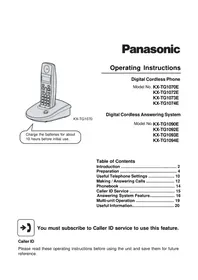
Operating Instructions
Digital Cordless Phone
Model No. KX-TCD150E
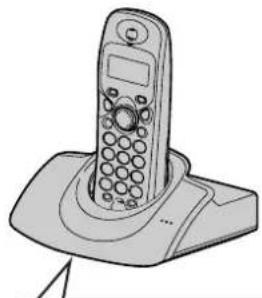
Charge the batteries for about 7 hours before initial use.
Table of Contents
Introduction 2
Preparation 3
Making/Answering Calls 8
Phonebook....9
Useful Telephone Settings 10
Caller ID Service 13
Useful Information.... 14

You must subscribe to Caller ID service to use this feature.
Caller ID
Please read these operating instructions before using the unit and save them for future reference.


Introduction
Thank you for purchasing a new Panasonic digital cordless phone.
For your future reference
Attach or keep original receipt to assist with any repair under warranty.
Serial No. (found on the bottom of the unit)
Date of purchase
Name and address of dealer
Note:
- This equipment is designed for use on the UK and Republic of Ireland analogue telephone network.
- In the event of problems, you should contact your equipment supplier in the first instance.
Declaration of Conformity:
- Panasonic Communications Co., Ltd. declares that this equipment is in compliance with the essential requirements and other relevant provisions of Radio & Telecommunications Terminal Equipment (R&TTE) Directive 1999/5/EC. Declarations of Conformity for the relevant Panasonic products described in this manual are available for download by visiting: http://www.doc.panasonic.de
Contact:
Panasonic Services Europe a Division of Panasonic Marketing Europe GmbH Panasonic Testing Centre Winsbergring 15, 22525 Hamburg, Germany
Included accessories
| AC adaptorPart No. PQLV19EY(PQLV19E) | Telephone line cordPart No. PQJA87S (for UK) | Rechargeable batteriesAAA (R03) sizePart No. HHR-4EPT(Order No. P03P) |
| Handset coverPart No. PQYNTCD150ER | Operating instructions |
2 Helpline Tel. No.: U.K. 08700 100 076 R.O.I. 01289 8333





Preparation
Important information
General
- Use only the AC adaptor included with this product, noted on page 2.
- Do not connect the AC adaptor to any AC outlet other than a standard 220–240 V AC outlet. This product is unable to make calls when:
- The portable handset battery(ies) need recharging or have failed.
- There is a power failure. - The key lock feature is turned on. - The call bar feature is turned on (only phone numbers stored in the unit as emergency numbers can be called).
- Do not open the base unit or handset other than to replace the battery(ies). This product should not be used near emergency/intensive care medical equipment and should not be used by people with pacemakers. Care should be taken that objects do not fall onto, and liquids are not spilled into, the unit. Do not subject this product to excessive smoke, dust, mechanical vibration or shock.
- Only the included handset can be used with the base unit. No other handsets can be registered or used.
Environment
- Do not use this product near water.
- This product should be kept away from heat sources such as radiators, cookers, etc. It should also not be placed in rooms where the temperature is less than 5 °C or greater than 40 °C. The AC adaptor is used as the main disconnect device. Ensure that the AC outlet is installed near the unit and is easily accessible.
Warning:
- To prevent the risk of electrical shock, do not expose this product to rain or any other type of moisture. Unplug this unit from power outlets if it emits smoke, an abnormal smell or makes unusual noise. These conditions can cause fire or electric shock. Confirm that smoke has stopped and contact an authorised service centre.
Battery caution
- We recommend using the battery(ies) noted on page 2. Use only rechargeable battery(ies).
- Do not mix old and new batteries.
- Do not dispose of the battery(ies) in a fire, as they may explode. Check local waste management codes for special disposal instructions.
- Do not open or mutilate the battery(ies). Released electrolyte from the battery(ies) is corrosive and may cause burns or injury to the eyes or skin. The electrolyte may be toxic if swallowed. Exercise care when handling the battery(ies). Do not allow conductive materials such as rings, bracelets or keys to touch the battery(ies), otherwise a short circuit may cause the battery(ies) and/or the conductive material to overheat and cause burns.
- Charge the battery(ies) in accordance with the information provided in these operating instructions.
- Only use the included base unit (or charger) to charge the battery(ies). Do not tamper with the base unit (or charger). Failure to follow these instructions may cause the battery(ies) to swell or explode.
Safety caution
The ringer tone is reproduced through the handset receiver. To avoid damage to hearing, we recommend you answer






Preparation
incoming calls before holding the phone to your ear.
Information on Disposal for Users of Waste Electrical & Electronic Equipment (private households)

This symbol on the products and/or accompanying documents means that used electrical and electronic products should not be mixed with general household waste.
For proper treatment, recovery and recycling, please take these products to designated collection points, where they will be accepted on a free of charge basis.
Alternatively, in some countries you may be able to return your products to your local retailer upon the purchase of an equivalent new product.
Disposing of this product correctly will help to save valuable resources and prevent any potential negative effects on human health and the environment which could otherwise arise from inappropriate waste handling.
Please contact your local authority for further details of your nearest designated collection point.
Penalties may be applicable for incorrect disposal of this waste, in accordance with national legislation.
For business users in the European Union
If you wish to discard electrical and electronic equipment, please contact your dealer or supplier for further information.
Information on Disposal in other Countries outside the European Union
This symbol is only valid in the European Union.
If you wish to discard this product, please contact your local authorities or dealer and ask for the correct method of disposal.




Connections
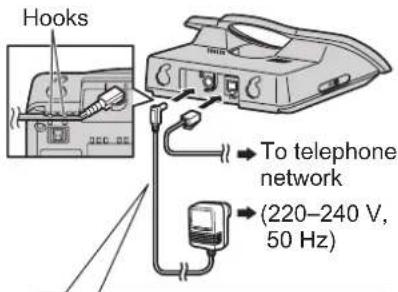
Use only the included AC adaptor and telephone line cord.
Note:
- Never install telephone wiring during a lightning storm.
- Do not connect the AC adaptor to a ceiling-mounted AC outlet, as the weight of the adaptor may cause it to become disconnected. The unit will not work during a power failure. We therefore recommend you also connect a standard telephone to the same telephone line using a T-adaptor. Your Panasonic sales shop can offer you more information about connection possibilities.
- To turn the power on, press [✗①] for about 1 second.
- To turn the power off, press [✗①] for about 2 seconds.
Location
For maximum distance and noise-free operation, place your base unit:
- Away from electrical appliances such as TVs, radios, personal computers or other phones.
- In a convenient, high and central location.
Battery installation
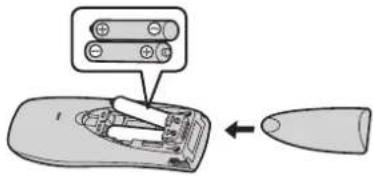
Insert the batteries negative (⊖) terminal first. Close the handset cover.
Note:
- Use only rechargeable batteries (page 2).
Battery charge
Place the handset on the base unit for about 7 hours before initial use.
Battery strength
| Battery icon Battery strength | |
| Fully charged. | |
| Medium | |
| Needs to be charged. | |
Battery life
Panasonic Ni-MH batteries (700 mAh)
| Operation Operating time | |
| While in use (talking) 10 hours max. | |
| While not in use (standby) | 120 hours max. |
Preparation
Controls
Handset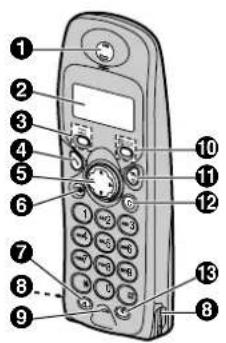
① Receiver
② Display
③ [□] (Phonebook)
④ [~] (Talk)
⑤ Navigator ([▲]/[▼]/[▶]/[◀])
⑥ [○] (Redial/Pause)
⑦ [R] (Recall)
⑧ Charge contacts
⑨ Microphone
⑩ [☐/OK] (Menu/OK)
⑪ [×①] (Off/Power)
⑫ [C] (Clear)
⑬ [INT] (Intercom)
Base unit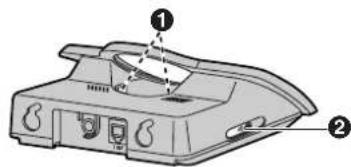
① Charge contacts
② [••] (Page)
Displays
| Icons Meaning | |
| Within range of base unit | |
| Out of range, no registration or no power on base unit | |
| Paging, intercom mode or accessing base unit | |
| Making or answering a call | |
| Phonebook mode | |
| Setting mode | |
| Battery strength | |
| Call bar is on (page 10). | |
| Direct call is on (page 10). | |
| Key lock is on (page 8). | |
| Ringer volume is off (page 10). | |
| Displayed when you press【#】. | |
| Displayed when base unit number is selected for standby mode display (page 10). | |
| Displayed when handset number is selected for standby mode display (page 10). | |
| 4 new callsWhen new calls have been received, the display will show the number of new calls. | |





Symbols used in this manual
These are the symbols that will navigate through these operating instructions.
| Symbol Meaning | |
| 【□/OK】 | Press【□/OK】. |
| →Proceed to the next operation. | |
| “ ” | Press【▲】or【▼】to select the words in quotations shown on the display. |
Display language
To change the display language
1 [目/OK] 2 "SETTING HS" ([▼]) → [▶] 3 "DISPLAY OPT" → [▶] 4 "LANGUAGE" → [▶] 5 Select the desired language. → [▶] → [✗①]
Note:
- If you select a language you cannot read, reset the handset to its default settings:
- [回 / OK] → [] → [] → []; rightarrow []
- Enter handset PIN (default: "0000") .
- [] → [] → [①]
Setting the date and time
Important:
- Confirm that the AC adaptor is connected. 1 [OK] 2 "SETTING BS" ([▼]) → [▶] → [*] 3 Enter the current hour and minute (24-hour time entry).
- If you make a mistake, press [C]. Digits will be cleared from the right.
4 [▶] 2 times → [*] 2 times 5 Enter the current day, month and year.
- If you make a mistake, press [C]. Digits will be cleared from the right.
6 [▶] → [✗①]





Making/Answering Calls
Making calls
1 Dial the phone number. → [~] 2 When finished talking, press [✗①] or place the handset on the base unit.
Answering calls
1 Press [~] to answer the call.
- You can also answer a call by pressing any dial key from [0] to [9], [*], [†], or [INT]. (Any key answer feature)
2 When finished talking, press [✗①] or place the handset on the base unit.
Handset locator
1 Press [•••] on the base unit. 2 To stop paging, press [•••] on the base unit or press [◀] on the handset.
To adjust the receiver volume
Press [▲] or [▼] while on a call.
Pause button (for PBX/long distance service users)
A pause is sometimes required when making calls using a PBX or long distance service. Pressing [C●] 1 time creates 1 pause. Press [C●] repeatedly to create longer pauses.
Redialling/storing/editing before calling/erasing
1 [○] → Select the item (【▼】). 2 ■ Redialling:
■ Storing:
[▷] → "SAVE TEL NO" → [▷] → [ ] / [OK] → Enter the name (9 characters max.; page 9). → [三/OK]
■ Editing before calling:
[▷] → "EDIT CALL NO" → [▷] → Edit the number. → [↗]
■ Erasing:
[▷] → "CLEAR"/"ALL CLEAR" → [▷] → "YES" → [▷] → [✗ ①]
Key lock
The handset can be locked so that no calls or settings can be made. Incoming calls can be answered, but all other functions are disabled while key lock is on.
To turn key lock on, press [☐/OK] for about 2 seconds.
To turn key lock off, press [☐/OK] for about 2 seconds.
Call waiting - [R] button
If a second call is received while in conversation with the first caller, a beep tone will be heard. Press [R] button to switch between callers.
This service requires a subscription, consult your service provider for details.
Note:
- If your unit is connected to a PBX (private branch exchange), consult your PBX dealer for details.





Adding entries to the phonebook
The phonebook allows you to make calls without having to dial manually. You can add 20 names and phone numbers to the phonebook.
1 [☐/OK] 2 times 2 Enter the party's phone number (24 digits max.). → [☐/OK] 3 Enter the party's name (9 characters max.). → [☐/OK] → [✗①]
Note:
- When caller information is received and it matches a phone number stored in the unit's phonebook, the stored name will be displayed.
Character table
| Keys | Characters | |||||
| [1]# | [ | ] | *, - / 1 | |||
| [2]A | B | C | 2 | |||
| [3]D | E | F | 3 | |||
| [4]G | H | I | 4 | |||
| [5]J | K | L | 5 | |||
| [6]M | N | O | 6 | |||
| [7]P | Q | R | S | 7 | ||
| [8]T | U | V | 8 | |||
| [9]W | X | Y | Z | 9 | ||
| [0](Space) 0 | ||||||
To edit/correct a mistake
1 Move the cursor to the right of where you want to correct the number/character ([◀]/[▶]).
2 [C] → Enter the correct number/character.
Making calls/editing/erasing
1 [□□] → Display the desired entry ([▲]/[▼]). 2 ■ Making calls: 【】 ■ Editing: [▶] → “EDIT” → [▶] → Edit the phone number. → [□/OK] → Edit the name. → [□/OK] ■ Erasing: [▶] → “CLEAR” → [▶] → “YES” → [▶] → [✗①]
Hot key (quick dial)
Assigning an entry in the phonebook to a hot key
Dial keys [1] to [9] can each be used as a "hot key", allowing you to dial a number from the phonebook by simply pressing a dial key.
1 [□□] → Display the desired entry ([▲]/[▼]). → [■/OK] 2 "HOT KEY REG" → [▶] 3 Select the desired dial key. → [▶] - If the dial key is already assigned as a hot key, the displayed number will flash.
4 "YES" → [▶] → [✗①]
Making calls/erasing
1 Press and hold the desired hot key ([1] to [9]). 2 ■ Making calls: [\~] ■ Erasing: [▶] 2 times → "YES" → [▶] → [✗①]





Useful Telephone Settings
Guide to handset settings
To customise the handset:
1 [☐/OK] → "SETTING HS" → [▶] 2 Select the desired item in the handset settings menu ([▼]). → [▶] 3 Select the desired item in sub-menu ([▼]). → [▶]
4 Select the desired setting ([▼]) or follow the instructions in the "Feature" column of the chart.
- To exit the operation, press [✗①].
| Handset settings menu | Sub-menu Feature (default setting) | |
| TIME ALARM SET TIME | SET time alarm. | - Enter the desired hour and minute (24-hour time entry). →【▶】- Select the desired setting. →【▶】 |
| SET ALARM Change | alarm frequency (“OFF”). | |
| RINGER OPT RINGER VOL Handset ringer volume (level 6)*1 | ||
| TONE OPT KEY TONE Keytones on/off (“ON”) | ||
| DISPLAY OPT STANDBY MODE Standby mode display (“CLOCK”) | ||
| CALL OPT CALL BAR Call bar on/off (“OFF”)*2- Enter handset PIN (default: “0000”).- Select the desired setting. →【▶】 | ||
Useful Telephone Settings
| Handset settings menu | Sub-menu Feature (default setting) | |
| OTHER OPT | HSPIN CHANGE | Change handset PIN (“0000”).*4– Enter the current 4-digit handset PIN.– Enter the new 4-digit handset PIN.– Enter the new 4-digit handset PIN again. |
| AUTO TALK | Auto talk on/off (“OFF”)*5 | |
| RESET HS ———— | Reset handset to its | default settings.– Follow steps 1 and 2.– Enter handset PIN (default: “0000”).– [▼] → [▶] |
*1 If you set to level 3 to 6 or *6, each ringer will start ringing with lower volume, then gradually increase in volume when receiving a call. Levels 6 and *6 are the highest settings. Their ringing methods are slightly different. *2 Call bar feature prohibits making outside calls. When call bar is turned on, only emergency calls can be made. To store emergency numbers, see page 12. *3 Direct call feature allows you to dial a preset phone number simply by pressing [~]. No dialling is necessary. *4 If you change the PIN, please write down your new PIN as the unit will not reveal the PIN to you. If you forget your PIN, consult your nearest Panasonic service centre. *5 Auto talk feature allows you to answer calls simply by lifting the handset off the base unit. You do not need to press [~].
Guide to base unit settings
To customise the base unit:
1 [☐/OK] → "SETTING BS" → [▶] - "INPUT CODE" is displayed. 2 Enter the desired code number. Follow the instructions in the "Feature" column of the chart. - To exit the operation, press [✗①].
| Code No. Feature (Default setting) | |
| [0]Reset base unit to its default settings.*1– Enter base unit PIN (default: “0000”). → [▶] | |
| [2] [2] | Base unit ringer volume (Medium)– Select the desired setting by pressing [1] for low, [2] for medium, [3] for high or [0] for off. → [▶] |
| [5] | Change base unit PIN (“0000”).*2– Enter the current 4-digit base unit PIN.– Enter the new 4-digit base unit PIN.– Enter the new 4-digit base unit PIN again. |
Useful Telephone Settings
| Code No. Feature (Default setting) | |
| [6]Call restriction | *3Setting call restrictionEnter base unit PIN (default: “0000”). → [1] → [▶]Enter the phone number to be restricted (8 digits max.).To select a different memory location, press [▶] repeatedly and enter a number.- [▶]Turning on/off call restrictionEnter base unit PIN (default: “0000”).Handset number will be displayed. Flashing number indicates call restriction is on; non-flashing number indicates call restriction is off.Press [1] to turn on/off. → [▶] |
| Emergency number (“112”, “999”)*4Enter base unit PIN (default: “0000”). → [★]Storing:- Enter the emergency number (8 digits max.).To select a different memory location, press [▶] and enter a number.- [▶]Editing:Display the desired number ([▶]). → [C] → Enter the new emergency number. → [▶] | |
| [★]Time and date: page 7 | |
*1 Only the emergency number setting will not be reset.
*2 If you change the PIN, please write down your new PIN as the unit will not reveal the PIN to you. If you forget your PIN, consult your nearest Panasonic service centre.
*3 Call restriction feature restricts the handset from dialling certain phone numbers. You can assign up to 10 phone numbers (memory locations 0–9) to be restricted.
*4 Emergency number feature determines which phone numbers may be dialled while the call bar feature is turned on. A total of 4 emergency numbers (memory locations 1–4) can be stored.
Using Caller ID service
Important:
- This unit is Caller ID compatible. To use Caller ID features (such as displaying caller phone numbers), you must subscribe to Caller ID service. Consult your service provider for details.
Caller ID features
Display indications
- When new calls have been received, the display will show the number of new calls. Example: 4 new calls have been received.

- Phone numbers of the last 50 different callers will be logged in the caller list. Example:
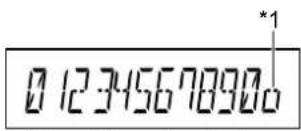
*1 Shown when this call has already been viewed or answered. Press [◀] to call back. - "OUT OF AREA": When the caller dialed from an area which does not provide Caller ID service. - "PRIVATE": When the caller requested not to send caller information.
Call Waiting Caller ID
This is a service of your service provider and will only operate if you have subscribed to this service. When you hear a call waiting tone during a conversation, the display will show the second caller's information. You can answer the second call by pressing [R]. The first caller will be placed on hold.
Consult your service provider for details of this service.
Storing/editing/erasing
1 Display the desired entry ([▲]/[▼]). → [▶] 2 ■ Storing:
"SAVE TEL NO" → [▶] → [OK] → Enter the party's name (9 characters max.; page 9). → [OK] → [OK]
■ Editing:
"EDIT CALL NO" → [▶] Move the cursor to the right of where you want to edit the number ([◀]/[▶]). → Edit the phone number. → [▶]
■ Erasing:
"CLEAR"/"ALL CLEAR" → [▶] → "YES" → [▶] → [✗①]
Voice mail service
Voice mail is an automatic answering service offered by your service provider. If you subscribe to this service, your service provider's voice mail system can answer calls for you when you are unavailable to answer the phone or when your line is busy. Messages are recorded by the service provider, not your telephone.
Useful Information
Troubleshooting
If you still have difficulties after following the instructions in this section, disconnect the AC adaptor and turn off the handset, then reconnect the AC adaptor and turn on the handset.
| Problem Cause & solution | |
| Υ is flashing. | ● The handset is too far from the base unit. Move closer.● The AC adaptor is not connected. Check the connections.● You are using the handset or base unit in an area with high electrical interference. Locate the handset and base unit away from interference sources, such as antenna and mobile phones.● The handset registration is cancelled. Register the handset to the base unit using the following method.1 [≡/OK]2 “SETTING HS” i [▶]3 “REGISTRATION” i [▶]4 “REGISTER HS” i [▶]5 Press and hold [•••] on the base unit until the registration tone sounds.● The rest of the procedure must be completed within 1 minute.6 Select a base unit number ([▼]). i [▶]7 Wait until “BS PIN” is displayed. i Enter base unit PIN (default: “0000”). i [▶]● A confirmation tone will sound, and Ψ will stop flashing. |
| I cannot make or receive calls. | ● The AC adaptor or telephone line cord is not connected. Check the connections.● The call bar feature is turned on. Turn it off (page 10).● You dialled a call restricted number (page 12).● The key lock feature is turned on. Turn it off (page 8). |
| The unit does not ring. | ● The ringer volume is turned off. Adjust the ringer volume (page 10, 11). |
| The handset display is blank. | ● The handset is not turned on. Turn the power on (page 5). |
14 Helpline Tel. No.: U.K. 08700 100 076 R.O.I. 01289 8333
Useful Information
| Problem Cause & solution | |
| The handset will not turn on. | Make sure that the batteries are installed correctly (page 5).Fully charge the batteries (page 5). |
| A busy tone is heard when [↖] is pressed. | The handset is too far from the base unit. Move closer and try again. |
| Static, sound cuts in/out, fades.Interference from other electrical units. | Locate the handset and the base unit away from other electrical appliances.Move closer to the base unit.Your unit is connected to a telephone line with DSL service. We recommend connecting a filter (contact your DSL service provider) to the telephone line between the base unit and the telephone line jack. |
| Noise is heard during a call. | You are using the handset or base unit in an area with high electrical interference. Locate the handset and base unit away from interference sources, such as antenna and mobile phones. |
| Pressing [○●] does not display/dial the last number dialled. | The redialled number was more than 24 digits long. Redial the number manually. |
| I fully charged the batteries, butstill flashes. | Clean the charge contact and charge again (page 5).It is time to replace the batteries (page 5). |
| Caller information is not displayed. | You must subscribe to Caller ID service.Your unit is connected to a telephone line with DSL service. We recommend connecting a filter (contact your DSL service provider) to the telephone line between the base unit and the telephone line jack. |


Useful Information
Specifications
■ Standard: DECT (Digital Enhanced Cordless Telecommunications) ■ Number of channels: 120 Duplex Channels ■ Frequency range: 1.88 GHz to 1.9 GHz ■ Duplex procedure: TDMA (Time Division Multiple Access) ■ Channel spacing: 1,728 kHz ■ Bit rate: 1,152 kbit/s ■ Modulation: GFSK (Gaussian Frequency Shift Keying) ■ RF transmission power: Approx. 250 mW ■ Power source: 220–240 V, 50 Hz ■ Power consumption, Base unit: Standby: Approx. 3.5 W Maximum: Approx. 9.2 W ■ Operating conditions: 5 °C–40 °C, 20 %–80 % relative air humidity (dry) ■ Dimensions: Base unit: Approx. 58 mm × 123 mm × 115 mm Handset: Approx. 143 mm × 48 mm × 32 mm ■ Mass (weight): Base unit: Approx. 185 g Handset: Approx. 115 g - Specifications are subject to change. ●The illustrations used in these operating instructions may differ slightly from the actual product.
Note:
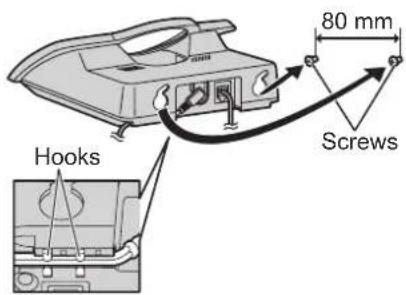
Wall mounting




Conditions of guarantee
This guarantee is in addition to and does not in any way affect any statutory or other rights of consumer purchasers. If within the applicable guarantee period, the appliance proves to be defective by reason of faulty design, workmanship or materials, we undertake subject to the following conditions to have the defective appliance (or any part or parts there of) repaired or replaced free of charge.
- The appliance shall have been purchased and used solely within either the UK or ROI and in accordance with standard operating instructions and the technical and/or Safety Standards required in the UK.
- The appliance should be returned together with this guarantee and proof of date of purchase promptly on being found defective at the purchaser's risk and expense to the authorised dealer from whom the appliance was purchased or to the nearest authorised dealer. All enquires must be through such dealers.
- This guarantee shall not apply to damage caused through fire, accident, lightning, misuse, wear and tear, neglect, incorrect adjustment or repair, to damage caused through installation, adaption, modification or use in an improper manner or inconsistent with the technical and/or safety standards required in the country where this appliance is used, or to damage occurred during transit to or from the purchaser.
- If at any time during the guarantee period any part or parts of the appliance are replaced with a part or parts not supplied or approved by us or of an objective quality safe and suitable for the appliance, or the appliance has been dismantled or repaired by any person not authorised by us, we shall have the right to terminate this guarantee in whole or in part immediately without further notice.
- The purchaser's sole and exclusive remedy under this guarantee against us is for the repair or replacement of the appliance or any defective part or parts and no other remedy, including, but not limited to, incidental or consequential damage or loss of whatsoever nature shall be available to the purchaser.
- This guarantee shall not apply to batteries and any other items of limited natural life.
- Our decision on all matters relating to complaints shall be final. Any appliance or defective part which has been replaced shall become our property.
- The guarantee period applicable to this product shall be 12 months.
Please keep these operating instructions with your receipt.
Panasonic Business Systems U.K.
Receipt No. Date of purchase
Model No. Serial No.
Sales and support information
Customer Care Centre
- For customers within the UK: 08700 100 076
- For customers within the Republic of Ireland: 01289 8333
- Visit our website for product information: www.panasonic.co.uk • E-mail: customer.care@panasonic.co.uk
Direct Sales at Panasonic UK
- Order accessory and consumable items for your product with ease and confidence by phoning our Customer Care Centre Monday - Thursday 9:00am - 5:30pm, Friday 9:30am - 5:30pm (Excluding public holidays).
- Or go on line through our Internet Accessory ordering application at www.panasonic.co.uk
- Most major credit and debit cards accepted.
- All enquiries transactions and distribution facilities are provided directly by Panasonic UK Ltd.
- It couldn't be simpler!
- Also available through our Internet is direct shopping for a wide range of finished products, take a browse on our website for further details.
Customer Care Helpline Tel. No.: U.K. 08700 100 076 / R.O.I. 01289 8333
C€0436
1999/5/EC
Sales Department:
Panasonic Business Systems U.K.
Panasonic House, Willoughby Road, Bracknell, Berkshire, RG12 8FP
Panasonic Communications Zhuhai Co., Ltd.
3 Ping Xi 8 Lu, Nanping Keji Gongye Yuan, Zhuhai, Guangdong, China 519060
Copyright:
This material is copyrighted by Panasonic Communications Co., Ltd., and may be reproduced for internal use only. All other reproduction, in whole or in part, is prohibited without the written consent of Panasonic Communications Co., Ltd.
© 2005 Panasonic Communications Co., Ltd. All Rights Reserved.
PQQX14832ZA DC0605PN0



- OPERATING INSTRUCTIONS
- TABLE OF CONTENTS
- CALLER ID
- INTRODUCTION
- NOTE
- DECLARATION OF CONFORMITY
- CONTACT
- PREPARATION
- IMPORTANT INFORMATION
- GENERAL
- ENVIRONMENT
- WARNING
- BATTERY CAUTION
- SAFETY CAUTION
- INFORMATION ON DISPOSAL FOR USERS OF WASTE ELECTRICAL & ELECTRONIC EQUIPMENT (PRIVATE HOUSEHOLDS)
- FOR BUSINESS USERS IN THE EUROPEAN UNION
- INFORMATION ON DISPOSAL IN OTHER COUNTRIES OUTSIDE THE EUROPEAN UNION
- CONNECTIONS
- LOCATION
- BATTERY INSTALLATION
- BATTERY CHARGE
- BATTERY LIFE
- CONTROLS
- SYMBOLS USED IN THIS MANUAL
- DISPLAY LANGUAGE
- SETTING THE DATE AND TIME
- MAKING/ANSWERING CALLS
- MAKING CALLS
- ANSWERING CALLS
- HANDSET LOCATOR
- TO ADJUST THE RECEIVER VOLUME
- PAUSE BUTTON (FOR PBX/LONG DISTANCE SERVICE USERS)
- REDIALLING/STORING/EDITING BEFORE CALLING/ERASING
- KEY LOCK
- CALL WAITING - [R] BUTTON
- ADDING ENTRIES TO THE PHONEBOOK
- TO EDIT/CORRECT A MISTAKE
- MAKING CALLS/EDITING/ERASING
- HOT KEY (QUICK DIAL)
- ASSIGNING AN ENTRY IN THE PHONEBOOK TO A HOT KEY
- MAKING CALLS/ERASING
- USEFUL TELEPHONE SETTINGS
- GUIDE TO HANDSET SETTINGS
- TO CUSTOMISE THE HANDSET
- GUIDE TO BASE UNIT SETTINGS
- USING CALLER ID SERVICE
- IMPORTANT
- CALLER ID FEATURES
- DISPLAY INDICATIONS
- CALL WAITING CALLER ID
- STORING/EDITING/ERASING
- VOICE MAIL SERVICE
- USEFUL INFORMATION
- TROUBLESHOOTING
- SPECIFICATIONS
- WALL MOUNTING
- CONDITIONS OF GUARANTEE
- SALES AND SUPPORT INFORMATION
- CUSTOMER CARE CENTRE
- DIRECT SALES AT PANASONIC UK
- C€
- SALES DEPARTMENT
- PANASONIC COMMUNICATIONS ZHUHAI CO., LTD
- COPYRIGHT
Brand : PANASONIC
Model : KX-TCD153E
Category : Cordless phone