TCH260 - USB Drive Montpellier - Free user manual and instructions
Find the device manual for free TCH260 Montpellier in PDF.


User questions about TCH260 Montpellier
0 question about this device. Answer the ones you know or ask your own.
Ask a new question about this device
Download the instructions for your USB Drive in PDF format for free! Find your manual TCH260 - Montpellier and take your electronic device back in hand. On this page are published all the documents necessary for the use of your device. TCH260 by Montpellier.
USER MANUAL TCH260 Montpellier
Installation and Operating Instructions
natural_image
Close-up of a black gas stove with asparagus being heated, placed on a wooden table with fresh vegetables and a bowl in the background (no text or symbols visible)Visor & Telescopic Cooker Hoods:
CHV611MSS, CHV611MW, TCH260 & TCH290
Thank you for choosing this Montpellier Cooker Hood.
Our Hoods has been designed to provide you with the best combination of style, reliability and performance to give you years of trouble-free use.
You may be familiar with a similar product, but please take time to read these instructions carefully before installing or using your Cooker Hood to ensure you get the most from your purchase.
We recommend that you keep this manual in a safe place for future reference.

Your Cooker Hood is covered by a comprehensive two year Parts & Labour Guarantee. In the unlikely event that you experience a problem with your Hood, you can rest assured that you are fully protected against the cost of repairs for the first 24 months. Please note that any claim must be accompanied by the model reference number, serial number and proof of purchase.
To activate your guarantee, you will need your product serial number. This can be found on the rear of the machine.
There are two ways to register your Guarantee:
- Online: Visit the Support page on our website and complete the online Product Registration form. www.montpellier-appliances.com
- By Post: Simply detach and fill in the form provided, attach a stamp and send it in the post. Don't forget to include your e-mail address so that we can send confirmation through to you.

Note: We are unable to take registrations over the phone.
Description of the Appliance
The following images are shown as an example only as the actual features and controls may vary on the model supplied.
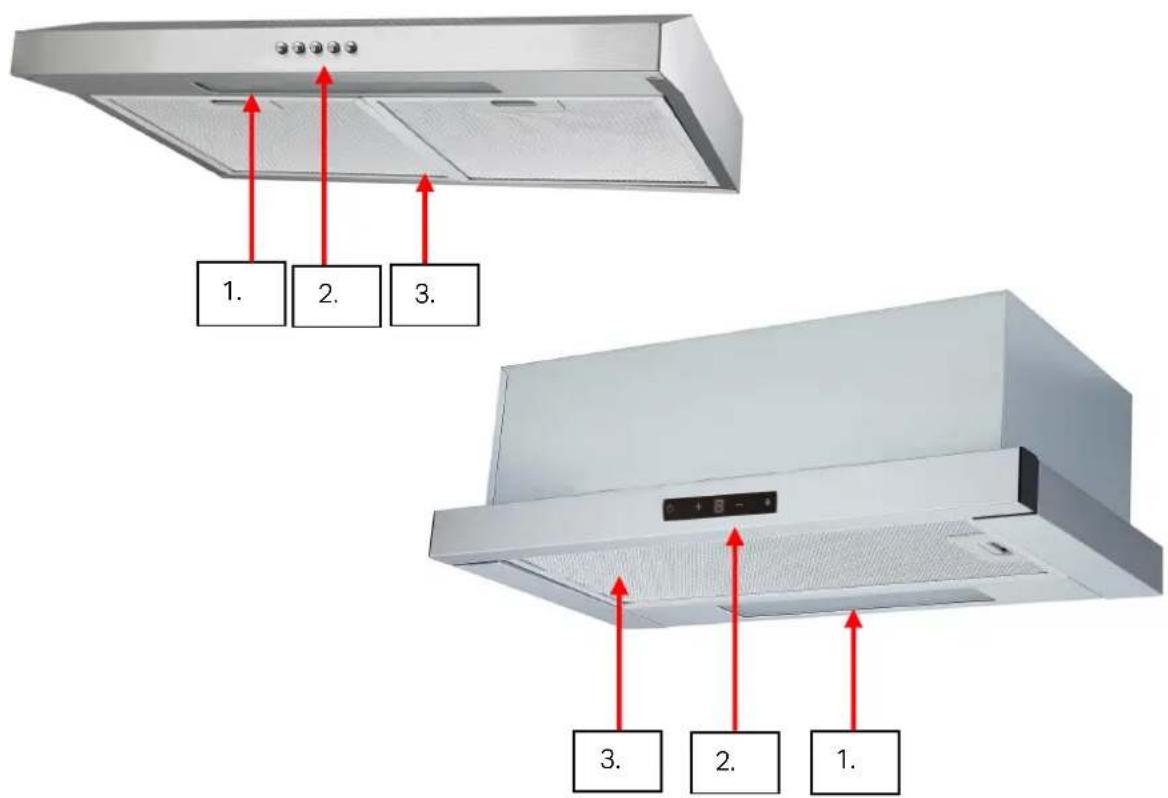
- Light
The position and number of lights may vary.
- Function Control Panel/Buttons
Either push button or electronic 'touch' controls depending on the actual model.
- Filter(s)
Your model will be fitted with either one or two filters.
CONTENTS:
Section 1. Installation
Section 2. Safety Advice
Section 3. Operating the Appliance
Section 4. Maintenance
Section 1. Installation
A qualified installer must carry out the installation.
This appliance can be used fully 'vented' via a ducting hose and external wall vent, or in 're-circulation' mode by using the charcoal filter provided.
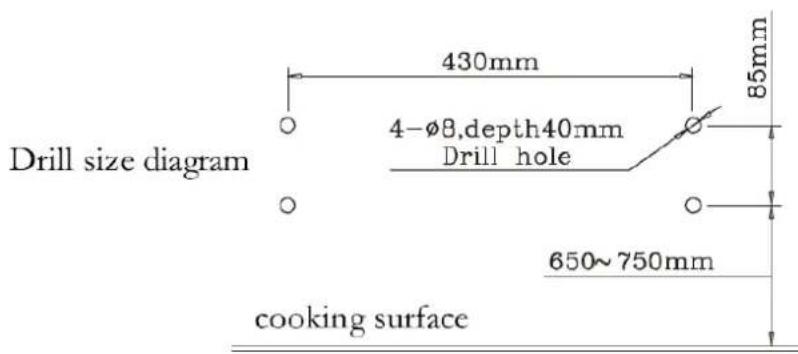
The cooker hood should ideally be installed between 65-75cm above the work surface/cooker hob. DO NOT INSTALL BELOW 65cm.
N.B. To ensure that your cooker hood operates efficiently the hose length must not exceed 2m with a maximum of one bend.
1.1. CHV611MSS & CHV611MW
Installation Way one:
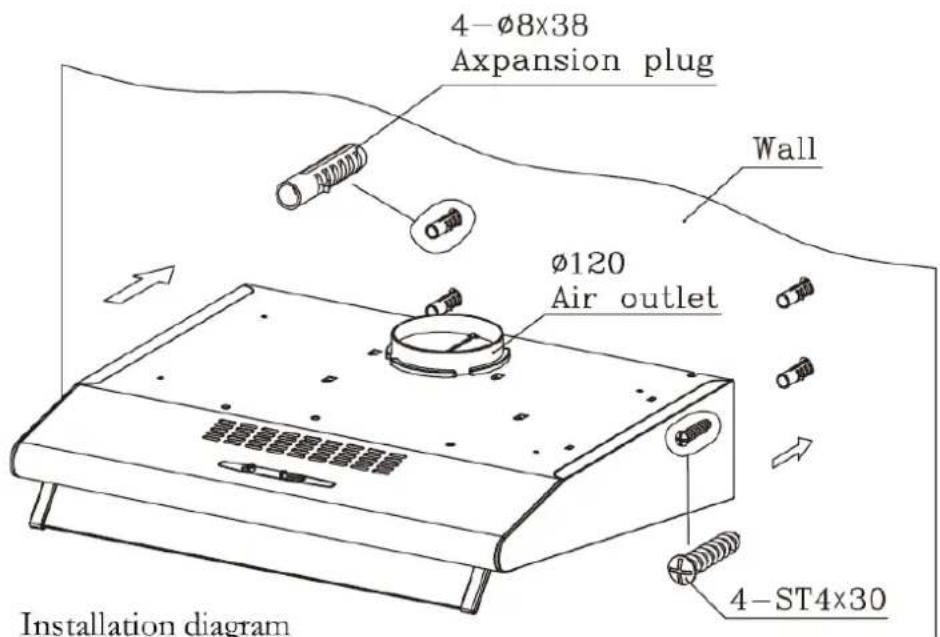
- Place at a distance of 65-75cm from the cooking surface, drill 4 holes of 8mm and depth of 40mm.
- Insert 4 swelling rubber plug into 4 holes.
- Fix air outlet into the vent on top of the hood.
- Open filters, keep the hood in line and tighten the screws.
- Fix filters.
Installation Way two:
-
Drill 4 holes of 5mm and 130mm at the bottom of the hanging cupboard.
-
Fix air outlet into the vent on top of the hood.
-
Open filters, keep the hood in line, insert screws and swelling rubber plug, tighten the screws.
-
Fix filters.
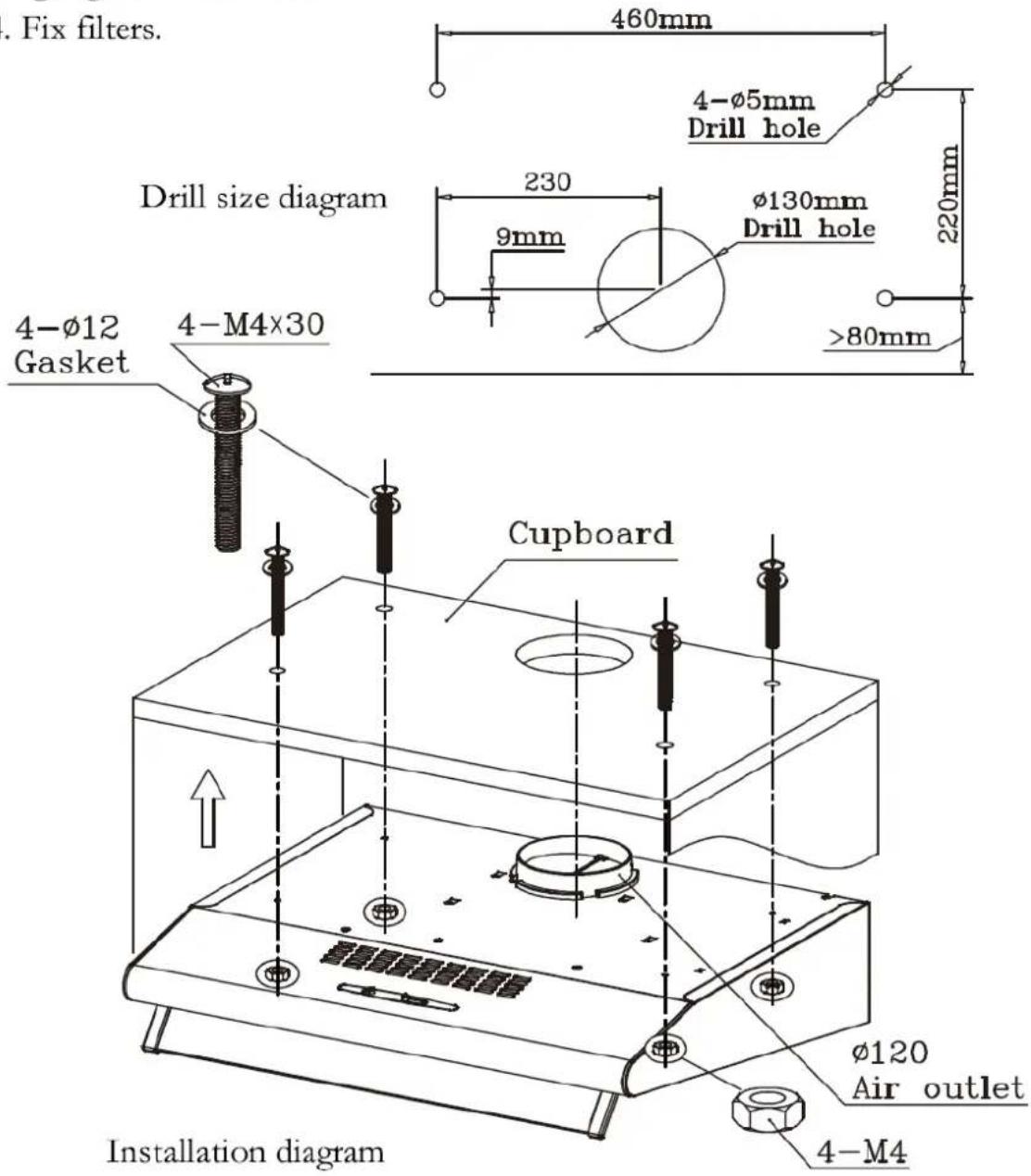
1.2. TCH260 & TCH290
- Drill 4 holes of 5mm and 130mm at the bottom of the hanging cupboard.
- Fix air outlet into the vent on top of the hood.
- Open filters, keep the hood in line, insert screws and swelling rubber plug, tighten the screws.
4.Fix filters.
Drill size diagram
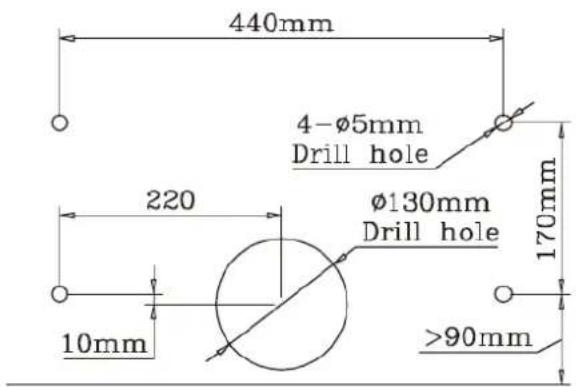
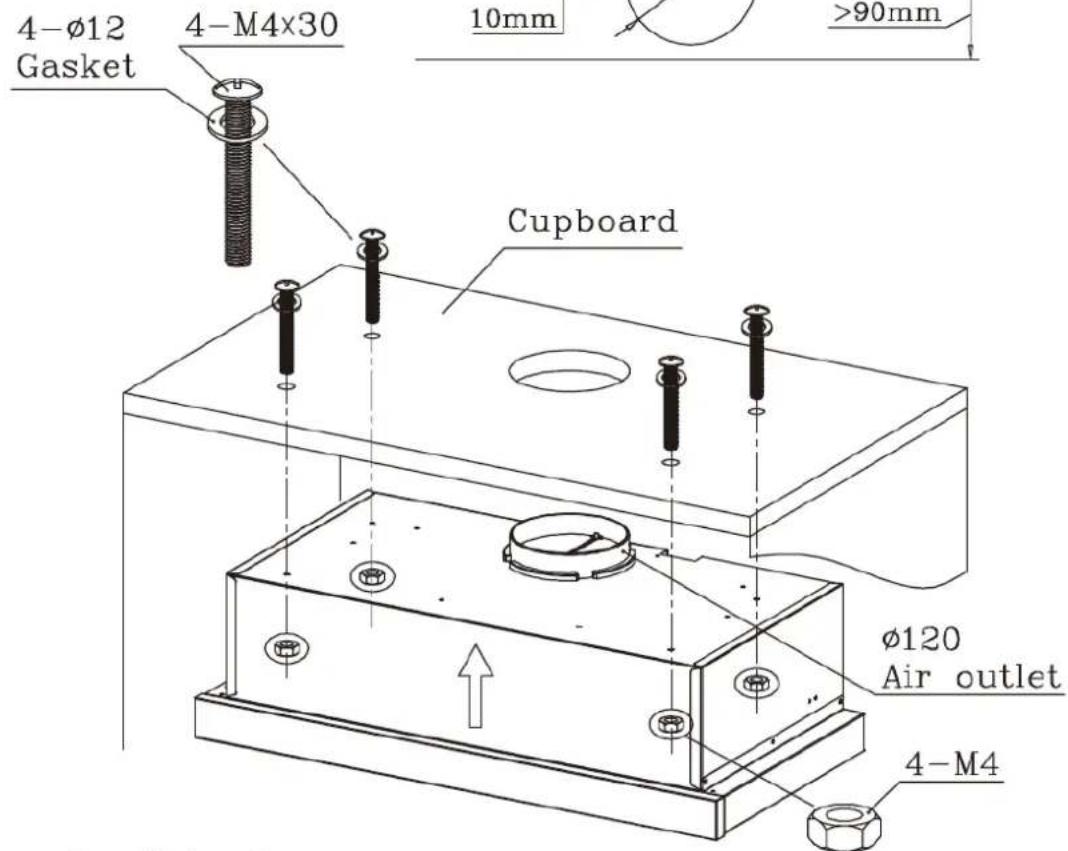
Installation diagram
Section 2. Safety Advice
This appliance is manufactured and intended for DOMESTIC use only. Any guarantee offered with the appliance is not valid for any installation in a commercial environment.
This appliance incorporates stainless steel. Handle with care as some of the edges may be sharp.
The main filter must be cleaned on a regular basis in order to help maintain the appliance in good working order.
Always turn off the electricity supply before cleaning the filter or the appliance exterior.
When replacing the bulbs/LED's or charcoal filter, ensure that you fit a 'like for like' replacement.
We recommend that this appliance is installed by a professional installer.
This appliance shall not be used by children aged from 8 years and above and persons with reduced physical, sensory or mental capabilities, or lack
of experience and knowledge, unless they have been given supervision or instruction on how to use of the appliance in a safe way and understand the hazards involved. Children shall not play with the appliance. Cleaning and user maintenance shall not be made by children without supervision.
If the power supply cord is damaged, it must be replaced by the manufacturer, it's service agent or similarly qualified persons in order to avoid a hazard.
Section 3. Operating the Appliance
N.B. For best results, we recommend that the Cooker Hood is switched on at least 10 minutes prior to cooking and left to run for a period of 10 minutes after cooking is finished.
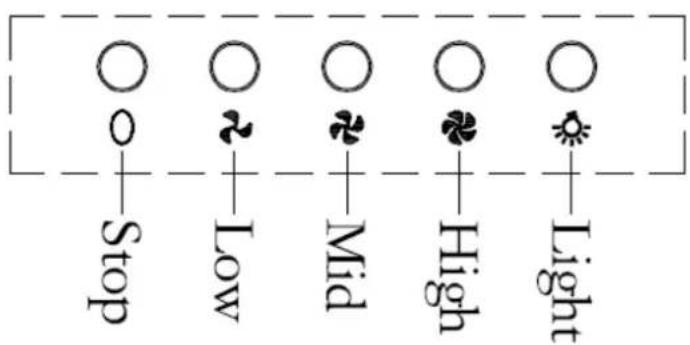
3.1. Push Button Controls
- Push the STOP button and the motor will stop running.
- Push the LOW button and the motor will run at low speed.
- Push the MID button and the motor will run at medium speed.
- Push the HIGH button and the motor will run at high speed.
- Push the LIGHT button to switch the light on or off.
3.2. Touch Controls
- Press the Start/Stop button to switch the motor on/off.
- Press the ' + ' or ' - ' to increase/decrease the motor speed.
- Press the Light button to switch the light on/off.


Section 4. Maintenance
4.1. Cleaning the Main Filter
If your cooker hood has aluminium filters, simply remove the filter panels and wash them in clean soapy water, ensuring that they are dry prior to refitting.
If you have charcoal filters, remove the aluminium filter panels and replace the charcoal filter(s) with like for like replacements.
4.2. Replacing the LED Unit(s)
To replace a Bulb/LED(s), isolate the power, remove the light cover and remove the Bulb/LED. Replace it with the same type/wattage and replace the light cover. Please note that Bulbs & LED lights are not covered by your guarantee.
4.3. What to do if something goes wrong
The light does not work:
- A Bulb/LED has probably failed. Replace the Bulb/LED as referred to in Section
4.2. Please note that lights are not covered by any guarantee offered with this appliance.
Motor operates but level of extraction appears to be poor:
- Check and clean the filter as detailed in Section 4.1. Dirty filters will cause a noticeable drop in performance. If you are using the appliance on 're-circulation' mode the charcoal filter may require changing as detailed in Section 4.1.
- If the length of flexible extraction hose exceeds 2m and/or you have installed more than one bend, there will be a noticeable reduction in extraction power.
There is no power to the appliance:
- Check there is not a power cut
- Check there is power to the electric socket/appliance
- Check the fuse in the plug and/or spur (Must be 13amp)
After-sales assistance
If you continue to experience problems with your Cooker Hood, please call the Montpellier customer service helpline on: 03333 234 473.
Please have all your product details available, including the model number, serial number, date of purchase, and your retailer's details before registering a fault.
The service call cannot progress without this information.
Your 2 year Manufacturer's guarantee
THIS DOES NOT AFFECT YOUR STATUTORY RIGHTS.
Your new Montpellier appliance carries a free guarantee which protects you against the cost of repairs during the first 24 months from date of purchase provided that:
Any claim is accompanied by evidence of the model reference, model serial number and proof of purchase, such as a Sales Receipt, showing that the appliance was purchased within the 24 months prior to the date of claim.
What is not covered under the Guarantee
- Any appliance not correctly installed and operated in accordance with the manufacturer's instructions.
- Any appliance that is used for anything other than domestic purposes.
- Any defect caused by accident, misuse, unauthorised modification or inexpert repair.
- Cost of Call-out where a fault cannot be found with the appliance.
- Cost of Call-out for work covering routine maintenance, such as, but not exclusively, cleaning of filters or defrosting.
- Cost of Call-out for work required to correct the alignment of doors following door reversal procedures carried out by you.
• Use of the appliance by anyone other than the Householder.
• Use in any commercial environment. - Consumable items, such as, but not exclusively, fuses in plugs, bulbs and breakable items which require routine replacement.
- Repair costs incurred that have not been authorised by Repairtech and/or carried out by a non-approved Repairtech engineer.
YOUR GUARANTEE IS VALID ONLY IN THE UK & ROI.
To register your appliance simply complete the card in your appliance pack and return it with a stamp affixed or alternatively you can register online at www.montpellier-appliances.com/support
SERVICE HELP-LINE
Should your appliance develop a fault, please call the Montpellier customer service helpline on: 03333 234 473.
Please remember to have all your product details available, including the model number, serial number, date of purchase and your retailer's details before registering a fault.
Your service call cannot progress without this information.
Montpellier Domestic Appliances Ltd.
Unit 1, Tewkesbury Retail Park, Northway Lane,
Tewkesbury, Gloucestershire GL20 8JU
www.montpellier-appliances.com
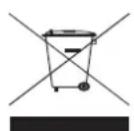
The symbol on the product or on its packaging indicates that this product may not be treated as household waste. Instead it shall be handed over to the applicable collection point for the recycling of electrical and electronic equipment. By ensuring this product is disposed of correctly, you will help prevent potential negative consequences for the environment and human health, which could otherwise be caused by inappropriate waste handling of this product. For more detailed information about recycling of this product, please contact your local city office, your household waste disposal service or the shop where you purchased the product.