WD14SS - Washing machine Montpellier - Free user manual and instructions
Find the device manual for free WD14SS Montpellier in PDF.


User questions about WD14SS Montpellier
0 question about this device. Answer the ones you know or ask your own.
Ask a new question about this device
Download the instructions for your Washing machine in PDF format for free! Find your manual WD14SS - Montpellier and take your electronic device back in hand. On this page are published all the documents necessary for the use of your device. WD14SS by Montpellier.
USER MANUAL WD14SS Montpellier
Installation and Operating Instructions
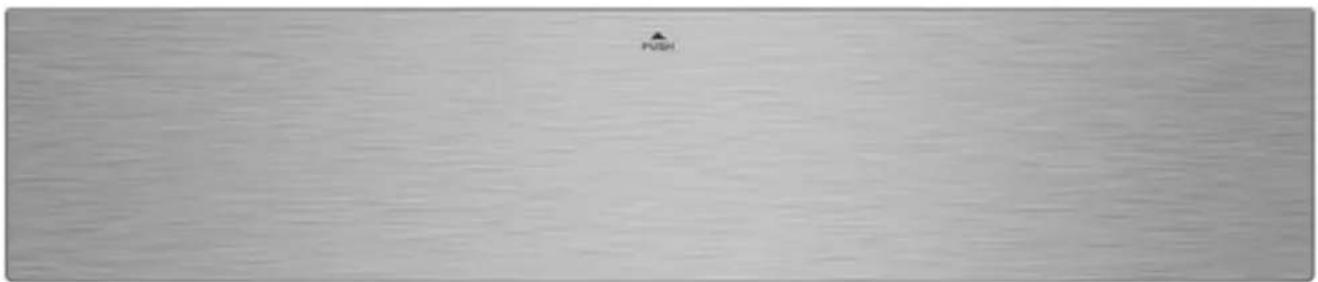
MODEL: MON-WD14SS Built-In S-Steel Warming Drawer
natural_image
Plain gray surface with no visible text, symbols, or markings(Image indicative of model supplied)
Please read these instructions carefully before attempting to install or use this appliance. It is advisable to keep these instructions in a safe place for future reference.
N.B. Should your appliance require attention, our service agents will not be able to book a service call without your unique serial number which can be found on the last page of this manual.
Introduction
Thank you for choosing this Montpellier branded appliance. It has been designed to give years of trouble-free use provided it is installed and maintained correctly.
Please read these instructions carefully before installing or using your appliance. It is advisable to keep your purchase and installation receipts with these instructions in a safe place for future reference. Included is some important safety information in addition to guidelines and recommendations that will enable you to take full advantage of all the functions available.
This quality appliance has been tested and certified to meet all applicable UK electrical and safety standards.
This appliance must be installed and connected in accordance with current regulations.
After unpacking the appliance ensure that there is no visible damage. If the appliance has been damaged during transit, do not use it, contact your retailer immediately.
Your 2 year Manufacturer's guarantee
THIS DOES NOT AFFECT YOUR STATUTORY RIGHTS.
Your new Montpellier appliance carries a free guarantee which protects you against the cost of repairs during the first 24 months from date of purchase provided that:
Any claim is accompanied by evidence of the model reference, model serial number and proof of purchase, such as a Sales Receipt, showing that the appliance was purchased within the 24 months prior to the date of claim.
What is not covered under the Guarantee:
- Any appliance not correctly installed and operated in accordance with the manufacturer's instructions.
- Any appliance that is used for anything other than domestic purposes.
• Any defect caused by accident, misuse, unauthorized modification or inexpert repair. - Cost of Call-out where a fault cannot be found with the appliance.
- Cost of Call-out for work covering routine maintenance, such as, but not exclusively, cleaning of filters or defrosting.
- Cost of Call-out for work required to correct the alignment of doors following door reversal procedures carried out by you.
- Use of the appliance by anyone other than the Householder.
- Use in any commercial environment.
- Consumable items, such as, but not exclusively, fuses in plugs, bulbs and breakable items which require routine replacement.
- Repair costs incurred that have not been authorised by Repairtech and/or carried out by a non-approved Repairtech engineer.
To Register your Appliance simply complete the card in your appliance pack and return it
with a stamp affixed or Alternatively you can Register online at
www.repairtechuk.com
SERVICE HELP-LINE
Should your appliance develop a fault, please call the
Repairtech Service Helpline on: 01527-888133
Please remember to have all your product details available, including the model number, serial number, date of purchase and your retailer's details before registering a fault.
Your service call cannot progress without this information.
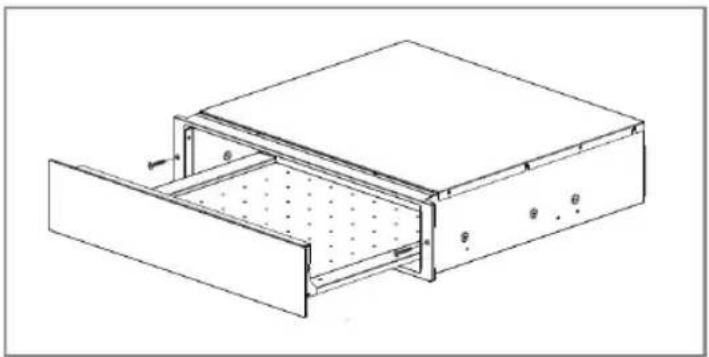
Description Of The Appliance
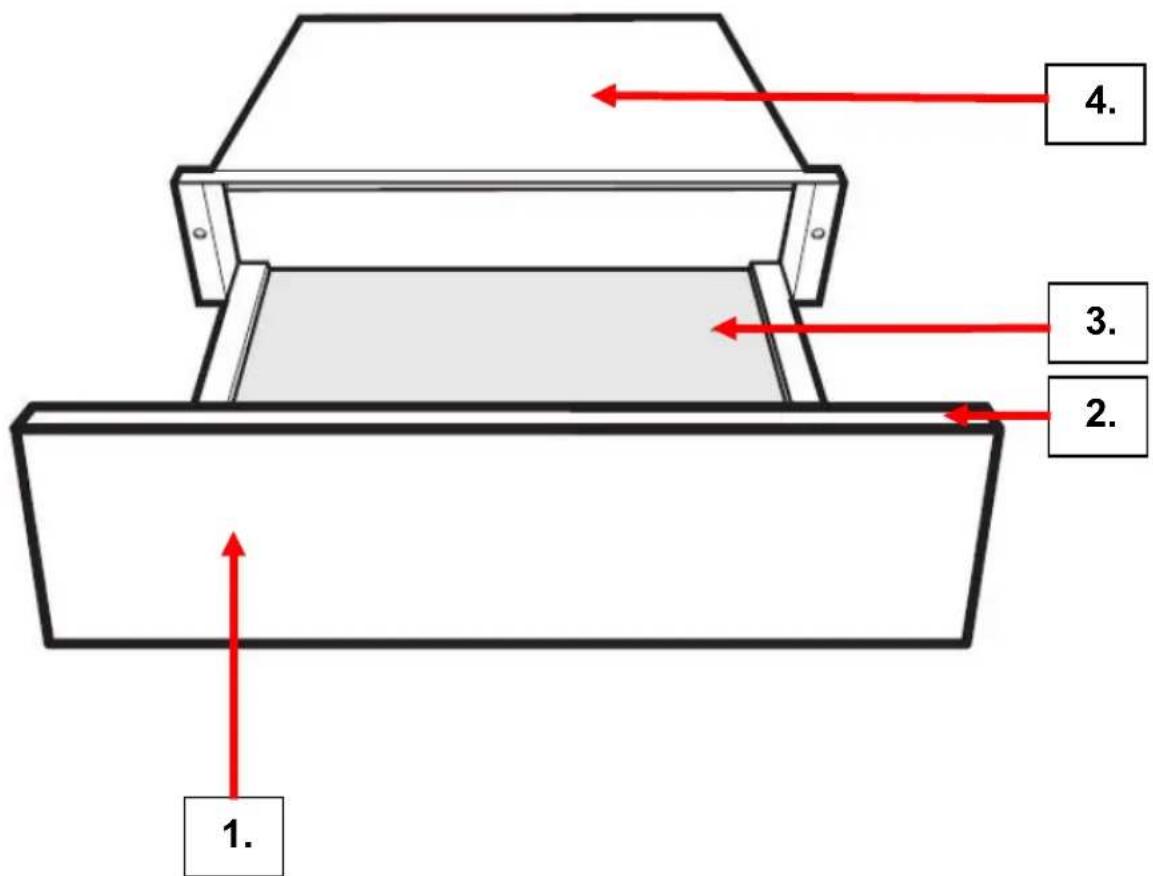
- Warming Drawer Door
- Control/Display Panel
- Interior Base of the Warming Drawer
- Warming Drawer Housing
(Image indicative of model supplied)
CONTENTS:
Section 1. Installation
Section 2. Safety Advice
Section 3. Operating the Appliance
Section 4. Maintenance
Section 1. Installation
- Remove all packaging, protective film and securing tape from the appliance.
- Wash the interior of the appliance with warm soapy water.
- Position the appliance in a dry atmosphere.
- Please note that certain parts of this appliance may have been protected with a light film of oil. During initial use you may see light smoke coming from the oven as the oil is burnt off. This is quite normal.
- Connect the plug to an adjacent ‘easily accessible’ 13amp socket outlet and ensure that the appliance is not standing on the supply cable.
- If the socket is located behind the appliance and no longer accessible to the consumer, you must ensure that the consumer can turn off the appliance via an accessible switched spur socket.
- You must ensure that the cable is not trapped beneath the appliance.
- If the power supply cord is damaged, it must be replaced by the manufacturer, it's service agent or similarly qualified persons in order to avoid a hazard.
To install this appliance, please proceed as shown in the diagrams below:
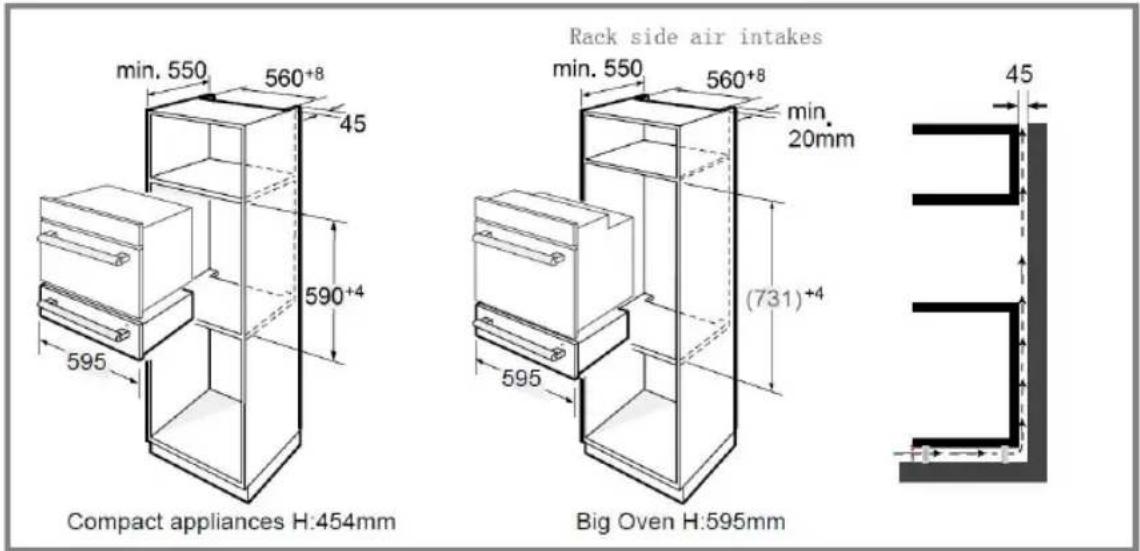
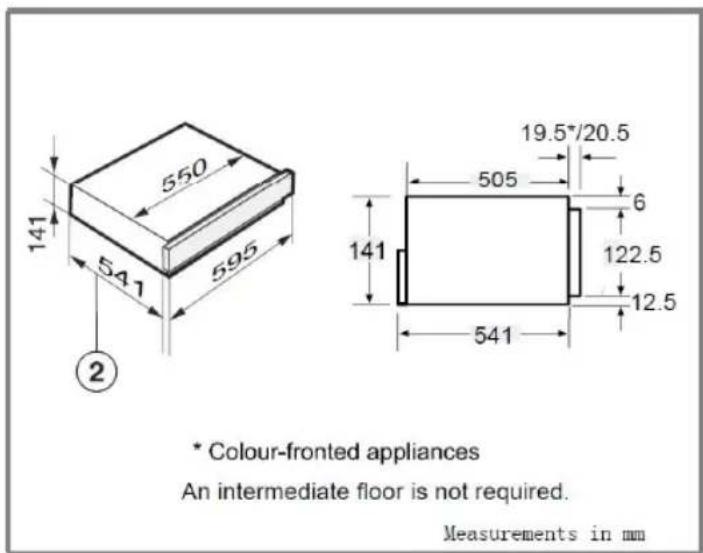
① Ventilation cut-out required when combined with a pyrolytic oven
② Building-in dimension including mains supply cable connection Connection cable L = 1000 mm
* Appliances with glass front
** Appliances with metal front
NOTE:
The maximum power of compact appliances is 3350W.
natural_image
Technical line drawing of a mechanical or architectural component with internal structure and mounting holes (no text or symbols)Section 2. Safety Advice
- Please read this booklet thoroughly before installing and switching on the appliance. The manufacturer accepts no responsibility for incorrect installation and usage.
- This appliance is guaranteed for Domestic Use Only.
- The appliance shall not be used by children aged from 8 years and above and persons with reduced physical, sensory or mental capabilities, or lack of experience and knowledge, unless they have been given supervision or instruction on how to use the appliance in a safe way and understand the hazards involved. Children shall not play with the appliance. Cleaning and user maintenance shall not be made by children without supervision.
- This appliance must only be used as described in this User Manual. Do not use it for any other purpose.
- If using an adaptor, this must be used in accordance with the manufacturers instructions and ensure that the electrical circuit is not overloaded as this could cause overheating.
- Do not twist or bend the cables, and keep them away from hot surfaces.
- If the power supply cord is damaged, it must be replaced by the manufacturer, it's service agent or similarly qualified persons in order to avoid a hazard.
- Do not plug in or unplug this appliance with wet hands.
- Following installation make sure that the power cable is not trapped underneath the appliance.
- Remove all twist-ties from food bags before placing them in the drawer.
- Keep the interior surfaces clean. Failure to do this could lead to the appliance malfunctioning.
Important Utensil Information:
- Do not warm paper, plastic or melamine dishes in this appliance. Do not heat bottles and/or baby bottles in this appliance.
Section 3. Operating the Appliance
3.1. Control Panel

For warming cups and glasses
For warming plates and dishes
For keeping food warm
For setting the temperature
For setting the duration
- + For adjust temperature and time
Cancel Button
Start Button
The appliance can be used to keep food warm at the same time as warming plates and dishes. But the food must be covered properly and dry the dishes when finished.
Take care. The plates and dishes will take longer to warm up, but can get very hot on this function.
3.2. Function Settings
(1) In waiting state, press "☐" key to start the function of warming cups and glasses with 40°C.
(2)" 40°C" will dislay.
(3) Touch " + " or '-' to adjust the temperature.
(4)Touch " L" and then touch " + " or " - " to adjust the warming time.
(5)Touch " ▶" to save the temperature and time.
(5) Close the door and there will be a beep. Then the appliance will start working.
Note:
(1) During parameters setting, you can press other function keys to change the function among "☐", "☐" and "☐".
(2) Before closing the door, you can touch " [Ⅱ] " to cancel the setting. And the appliance will go back to waiting state.
(3) During the process of working, open the door to enter to the parameters adjusting mode. And then press " + " or " — " to adjust the temperature.
You can press the " 🔒" or " Ⓛ" to change the parameter which you want to adjust. And then press " ▶" to save the setting.
(4) After saving the setting as above, you can press " [Ⅱ] " to enter to the waiting state, or close the door to start working.
Specifications
(1) When the appliance is electrified, open the door. The buzzer will ring once and the appliance will enter to waiting state. "0" will display.
(2) In the process of clock setting, if there is no operation within 3 minute, the oven will go back to the waiting state.
(3) The buzzer sounds once by efficient press.
(4) The buzzer will sound thrice to remind you when cooking is finished.
3.3. Temperature Settings
Temperature settings
Each function has its own temperature range. The factory-set recommended temperatures are printed in bold. The temperature can be altered in 5° steps by touching the sensor. The last temperature selected is automatically activated the next time the drawer is switched on, and this is shown in the display.
| Temperature °C* | ||
| 40 | 60 | 60 |
| 45 | 65 | 65 |
| 50 | 70 | 70 |
| 55 | 75 | 75 |
| 60 | 80 | 80 |
* Approximate temperature values, measured in the middle of the drawer when empty
Duration
The appliance is set for continuous operation mode. A limited duration can be selected by touching the
① sensor. One touch for 1 hour (1h), two touches for 2 hours (2h) etc.
3.4. Loading Capacity
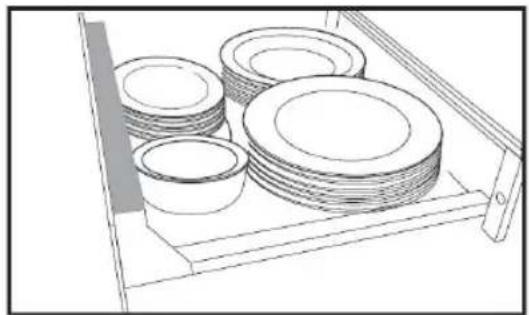
The quantity that can be loaded will depend to a great extent on the size and weight of your own crockery. Do not overload the drawer. The maximum load bearing capacity of the drawer is 25 kg. Under the maximum load bearing capacity, the drawer should be opened or closed slightly.
natural_image
Line drawing of a storage rack with multiple circular plates and a shelf (no text or symbols)The loading examples shown here are suggestions only
- preheat dinnerware for people:
6 dinner plates ∅ 26 cm
6 soup plates ∅ 23cm
6 dessert dishes ∅ 19cm
1 oval platter 32cm
1 medium serving bowl ∅ 16cm
1 small serving bowl ∅ 13cm
3.5. Keeping Food Warm
Settings
| Food | Cover the container? | Temperature for the ☉ setting |
| Steak (rare) | yes | 65 |
| Bake/gratin | yes | 80 |
| Roast meat | yes | 75 |
| Casserole | yes | 80 |
| Fish fingers | no | 80 |
| Meat in a sauce | yes | 80 |
| Vegetables in a sauce | yes | 80 |
| Goulash | yes | 80 |
| Mashed potato | yes | 75 |
| Plated meal | yes | 80 |
| Baked potatoes / New potatoes | yes | 75 |
| Breaded escalope | no | 80 |
| Pancakes/ potato pancakes | no | 80 |
| Pizza | no | 80 |
| Boiled potatoes | yes | 80 |
| Gravy | yes | 80 |
| Strudel | no | 80 |
| To warm bread | no | 65 |
| To warm rolls | no | 65 |
* Depending on model
* The containers depend on the quantity, or food, or type of recipe
3.6. Low Temperature Cooking
Your Warming Drawer can be used for Low Temperature Cooking where a food ‘core’ temperature of no more than 70^ C is required. You are advised to pre-heat the drawer to 70^ C and cover the food whilst inside the drawer.
You are advised to use a food temperature probe to check the ‘core’ temperature of the food being cooked.
3.7. Defrosting
You can also use your warming drawer to defrost fruit, vegetables or bread/bakery items. Pre-heat the drawer to 65^ C and place the food items in the drawer (on a suitable plate). Check the food items periodically to check progress.
Section 4. Maintenance
Before any maintenance or cleaning work is carried out, DISCONNECT the appliance from the ELECTRICITY supply and ensure that the appliance is completely cool.
4.1. Internal Cleaning
Clean the interior with warm soapy water. Rinse and dry thoroughly. Do not use detergents, abrasive powders, highly perfumed cleaning products, wax polishes or cleaning products containing bleach or alcohol.
4.2. External Cleaning
Wash the fascia and door with warm soapy water. Do NOT use abrasive products.
4.3. What to do if something goes wrong
There is no power to the appliance:
- Check there is not a power cut
- Check there is power to the electric socket/appliance
- Check the fuse in the plug (Must be 13 amp)
The warming drawer will not operate:
- Has the Function and Temperature been set?
- Has the door been closed correctly?
Should your appliance develop a fault, please call the
Repairtech Service Helpline on: 01527-888133
Please remember to have all your product details available, including the model number, serial number, date of purchase and your retailer's details before registering a fault.
Your service call cannot progress without this information.
DOMESTIC APPLIANCE DISTRIBUTORS;
HENRY JOHN HOUSE
NORTHWAY LANE
ASHCHURCH
TEWKESBURY, GLOUCESTERSHIRE, GL20 8JH
Important Note:
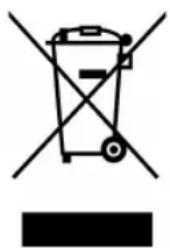
This appliance is marked according to the European directive 2002/96/EC on Waste Electrical and Electronic Equipment (WEEE). By ensuring this product is disposed of correctly, you will help prevent potential negative consequences for the environment and human health, which could otherwise be caused by inappropriate waste handling of this product.
The symbol on the product, or on the documents accompanying the product, the Crossed Out Wheelie Bin, indicates that this appliance may not be treated as household waste. Instead it shall be handed over to the applicable collection point for the recycling of electrical and electronic equipment.
Disposal must be carried out in accordance with local environmental
regulations for waste disposal. For more detailed information about treatment, recovery and recycling of this product, please contact your local authority, your household waste disposal service or the retailer where you purchased the product.
natural_image
Symbol of a trash bin crossed with no text or labels, accompanied by a black rectangular block below (no readable text or symbols)We continuously try to improve our products for the benefit of our customers.
For this reason we reserve the right to make changes to any product at any time, without notice
Issue: 05/14-03-2016