
S Line 230S8QHSB - Tracking PHILIPS - Free user manual and instructions
Find the device manual for free S Line 230S8QHSB PHILIPS in PDF.


| Product Type | LED Monitor |
| Model | 230S8QHSB |
| Brand | Philips |
| Screen Size | 23 inches (58.4 cm) |
| Resolution | 1920 x 1080 (Full HD) |
| Aspect Ratio | 16:9 |
| Panel Type | IPS |
| Brightness | 250 cd/m² |
| Contrast Ratio | 1000:1 (typical) |
| Response Time | 5 ms (GTG) |
| Viewing Angles | 178° / 178° |
| Connectivity | VGA, DVI-D, HDMI, DisplayPort |
| Power Consumption | 21.8 W (typical), 0.5 W (standby) |
| Dimensions (with stand) | 532 x 421 x 220 mm |
| Weight (with stand) | 4.3 kg |
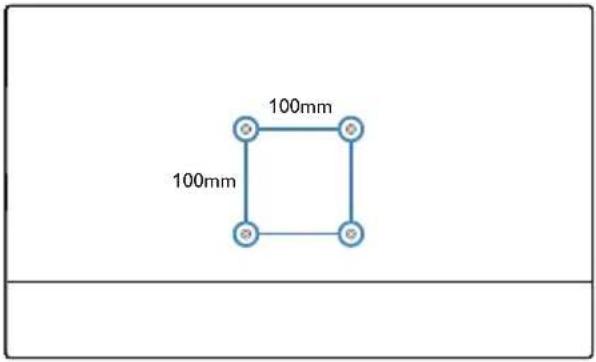
| VESA Mount | 100 x 100 mm |
| Adjustability | Tilt (-5° / 20°), Swivel, Height, Pivot |
| Built-in Speakers | Yes, 2 x 2W |
| Features | Low Blue Light, Flicker Free, SmartImage |
| Maintenance | Clean with soft dry cloth; avoid aggressive cleaners |
| Safety | CE, RoHS, Energy Star certified |
| Spare Parts | Contact local Philips service center for replacement parts |
| General | 3-year warranty (depending on region) |
Frequently Asked Questions - S Line 230S8QHSB PHILIPS
User questions about S Line 230S8QHSB PHILIPS
0 question about this device. Answer the ones you know or ask your own.
Ask a new question about this device
Download the instructions for your Tracking in PDF format for free! Find your manual S Line 230S8QHSB - PHILIPS and take your electronic device back in hand. On this page are published all the documents necessary for the use of your device. S Line 230S8QHSB by PHILIPS.
USER MANUAL S Line 230S8QHSB PHILIPS
natural_image
Modern flat-screen monitor displaying a futuristic blue glass ceiling with curved white panels and metallic railings, mounted on a black stand (no visible text or symbols)www.philips.com/welcome
EN User manual 1
Customer care and warranty 17
Troubleshooting & FAQs 21
Table of Contents
1. Important ....1
1.1 Safety precautions and maintenance .... 1
1.2 Notational Descriptions ..... 3
1.3 Disposal of product and packing material ....4
2. Setting up the monitor .....5
2.1 Installation 5
2.2 Operating the monitor ...... 6
2.3 Remove the Base Assembly for VESA Mounting 8
3. Image Optimization .....10
3.1 SmartImage 10
3.2 SmartContrast .....11
4. Adaptive Sync ...... 12
5. Technical Specifications .....13
5.1 Resolution & Preset Modes ....15
6. Power Management .....16
7. Customer care and warranty ..17
7.1 Philips' Flat Panel Monitors Pixel Defect Policy ....17
7.2 Customer Care & Warranty .....20
8. Troubleshooting & FAQs ...... 21
8.1 Troubleshooting .....21
8.2 General FAQs ......23
1. Important
This electronic user's guide is intended for anyone who uses the Philips monitor. Take time to read this user manual before you use your monitor. It contains important information and notes regarding operating your monitor.
The Philips guarantee applies provided the product is handled properly for its intended use, in accordance with its operating instructions and upon presentation of the original invoice or cash receipt, indicating the date of purchase, dealer's name and model and production number of the product.
1.1 Safety precautions and maintenance
Warnings
Use of controls, adjustments or procedures other than those specified in this documentation may result in exposure to shock, electrical hazards and/or mechanical hazards.
Read and follow these instructions when connecting and using your computer monitor.
Excessive sound pressure from earphones and headphones can cause hearing loss. Adjustment of the equalizer to maximum increases the earphones and headphones output voltage and therefore the sound pressure level.
Operation
- Please Keep the monitor out of direct sunlight, very strong bright lights and away from any other heat source. Lengthy exposure to this type of environment may result in discoloration and damage to the monitor.
- Remove any object that could fall into ventilation holes or prevent proper cooling of the monitor's electronics.
- Do not block the ventilation holes on the cabinet.
- When positioning the monitor, make sure the power plug and outlet are easily accessible.
- If turning off the monitor by detaching the power cable or DC power cord, wait for 6 seconds before attaching the power cable or DC power cord for normal operation.
- Please use approved power cord provided by Philips all the time. If your power cord is missing, please contact with your local service center. (Please refer to Service contact information listed in Important information manual.)
- Operate under the specified power supply. Be sure to operate the monitor only with the specified power supply. Use of an incorrect voltage will cause malfunction and may cause fire or electric shock.
- Protect the cable. Do not pull or bend the power cable and signal cable. Do not place the monitor or any other heavy objects on the cables, if damaged, the cables may cause fire or electric shock.
- Do not subject the monitor to severe vibration or high impact conditions during operation.
- Do not knock or drop the monitor during operation or transportation.
- Excessive usage of monitor can cause eye discomfort, it's better to take shorter breaks more often at your workstation than longer breaks and less often; for example a 5-10 minute break after 50-60-minute continuous screen use is likely to
Important
be better than a 15-minute break every two hours. Try to keep your eyes from eye strain while using the screen for a constant period of time by :
- Looking at something varying distances after a long period focusing on the screen.
- Conscious Blinking often while you work.
• Gently closing and rolling your eyes to relax. - Reposition your screen to appropriate height and angle according to your height.
- Adjusting the brightness and contrast to appropriate level.
- Adjusting the environment lighting similar to that of your screen brightness, avoid the fluorescent lighting, and surfaces that don't reflect too much light.
• Seeing a doctor if your symptoms.
Maintenance
- To protect your monitor from possible damage, do not put excessive pressure on the LCD panel. When moving your monitor, grasp the frame to lift; do not lift the monitor by placing your hand or fingers on the LCD panel.
- Unplug the monitor if you are not going to use it for an extensive period of time.
- Unplug the monitor if you need to clean it with a slightly damp cloth. The screen may be wiped with a dry cloth when the power is off. However, never use organic solvent, such as, alcohol, or ammonia-based liquids to clean your monitor.
• To avoid the risk of shock or permanent damage to the set, do
not expose the monitor to dust, rain, water, or excessive moisture environment.
• If your monitor gets wet, wipe it with dry cloth as soon as possible.
- If foreign substance or water gets in your monitor, please turn the power off immediately and disconnect the power cord. Then, remove the foreign substance or water, and send it to the maintenance center.
- Do not store or use the monitor in locations exposed to heat, direct sunlight or extreme cold.
- In order to maintain the best performance of your monitor and use it for a longer lifetime, please use the monitor in a location that falls within the following temperature and humidity ranges.
• Temperature: 0-40°C 32-104°F
• Humidity: 20-80% RH
Important information for Burn-in/Ghost image
- Always activate a moving screen saver program when you leave your monitor unattended. Always activate a periodic screen refresh application if your monitor will display unchanging static content. Uninterrupted display of still or static images over an extended period may cause “burn in”, also known as “after-imaging” or “ghost imaging”, on your screen.
- “Burn-in”, “after-imaging”, or “ghost imaging” is a well-known phenomenon in LCD panel technology. In most cases, the “burned in” or “after-imaging” or “ghost imaging” will disappear gradually over a period of time after the power has been switched off.
Important
Warning
Failure to activate a screen saver, or a periodic screen refresh application may result in severe “burn-in” or “after-image” or “ghost image” symptoms that will not disappear and cannot be repaired. The damage mentioned above is not covered under your warranty.
Service
• The casing cover should be opened only by qualified service personnel.
- If there is any need for any document for repair or integration, please contact with your local service center. (Please refer to Service contact information listed in Important information manual.)
- For transportation information, please refer to “Technical Specifications”.
- Do not leave your monitor in a car/ trunk under direct sun light.
Note
Consult a service technician if the monitor does not operate normally, or you are not sure what procedure to take when the operating instructions given in this manual have been followed.
1.2 Notational Descriptions
The following subsections describe notational conventions used in this document.
Notes, Cautions and Warnings
Throughout this guide, blocks of text may be accompanied by an icon and printed in bold or italic type. These blocks contain notes, cautions or warnings. They are used as follows:
Note
This icon indicates important information and tips that help you make better use of your computer system.
Caution
This icon indicates information that tells you how to avoid either potential damage to hardware or loss of data.
Warning
This icon indicates the potential for bodily harm and tells you how to avoid the problem.
Some warnings may appear in alternate formats and may not be accompanied by an icon. In such cases, the specific presentation of the warning is mandated by the relevant regulatory authority.
1.3 Disposal of product and packing material
Waste Electrical and Electronic Equipment-WEEE

This marking on the product or on its packaging illustrates that, under European Directive 2012/19/EU governing used electrical and electronic appliances, this product may not be disposed of with normal household waste. You are responsible for disposal of this equipment through a designated waste electrical and electronic equipment collection. To determine the locations for dropping off such waste electrical and electronic, contact your local government office, the waste disposal organization that serves your household or the store at which you purchased the product.
Your new monitor contains materials that can be recycled and reused. Specialized companies can recycle your product to increase the amount of reusable materials and to minimize the amount to be disposed of.
All redundant packing material has been omitted. We have done our utmost to make the packaging easily separable into mono materials.
Please find out about the local regulations on how to dispose of your old monitor and packing from your sales representative.
Taking back/Recycling Information for Customers
Philips establishes technically and economically viable objectives to optimize the environmental performance of the organization's product, service and activities.
From the planning, design and production stages, Philips emphasizes the important of making products that can easily be recycled. At Philips, end-of-life management primarily entails participation in national take-back initiatives and recycling programs whenever possible, preferably in cooperation with competitors, which recycle all materials (products and related packaging material) in accordance with all Environmental Laws and taking back program with the contractor company.
Your display is manufactured with high quality materials and components which can be recycled and reused.
To learn more about our recycling program please visit
http://www.philips.com/a-w/about/sustainability.html
2. Setting up the monitor
2.1 Installation
1 Package contents
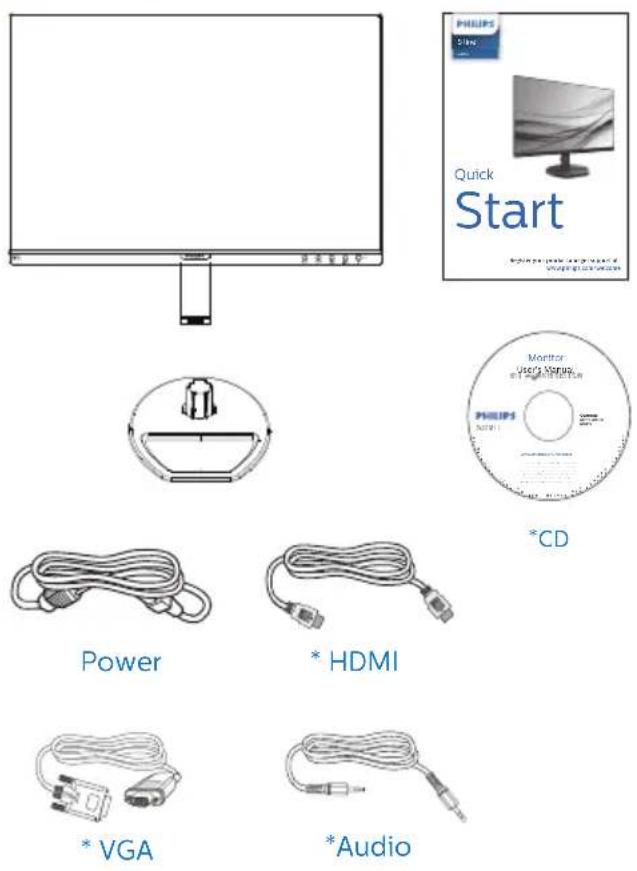
* Different according to region.
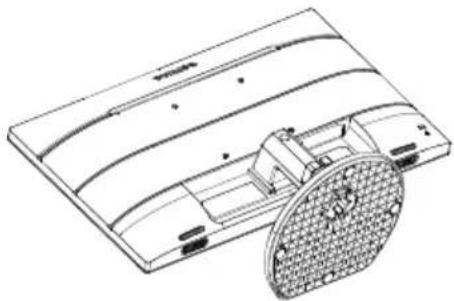
2 Install the base
- Place the monitor face down on a smooth surface. Pay attention not to scratch or damage the screen.

natural_image
Technical line drawing of a curved structural component with internal components and mounting holes (no text or symbols)- Hold the base stand with both hands and firmly insert the base stand into the base column.

2. Setting up the monitor
3 Connecting to your PC

flowchart
graph TD
    A["Device ①"] --> B["Switch"]
    B --> C["Speaker ⑤"]
    D["Audio System"] --> E["Switch"]
    E --> F["Speaker ⑥"]
    G["Power Supply"] --> H["Switch"]
    I["Control Panel"] --> J["Switch"]
    K["External Display"] --> L["Speaker ⑦"]
    M["Power Supply"] --> N["Switch"]
    O["External Display"] --> P["Speaker ⑧"]
1 AC power input
2HDMinput
3VGAinput
4 HDMI Audio out
5 Kensington anti-theft lock
Connect to PC
- Connect the power cord to the back of the monitor firmly.
- Turn off your computer and unplug its power cable.
- Connect the monitor signal cable to the video connector on the back of your computer.
- Plug the power cord of your computer and your monitor into a nearby outlet.
- Turn on your computer and monitor. If the monitor displays an image, installation is complete.
2.2 Operating the monitor
1 Description of the control buttons

natural_image
Line drawing of a flat-screen monitor with a stand (no text or symbols)
flowchart
graph TD
    A["即"] --> B["⊕"]
    C["⊕"] --> D["★"]
    E["⊕"] --> F["★"]
    G["⊕"] --> H["●"]
    I["●"] --> J["1"]
    K["7"] --> L["6"]
    M["5"] --> N["4"]
    O["2"] --> P["2"]
| 1 | ∅ | Switch monitor's power ON and OFF. |
| 2 | ∅/OK | Access the OSD menu. Confirm the OSD adjustment. |
| 3 | ▲▼ | Adjust the OSD menu. |
| 4 | Adjust the brightness level. | |
| 5 | Change the signal input source. | |
| 6 | Return to previous OSD level. | |
| 7 | SmartImage. There are multiple selections: EasyRead, Office, Photo, Movie, Game, Economy, LowBlue Mode, Off. |
2. Setting up the monitor
2 Description of the On Screen Display
What is On-Screen Display (OSD)?
On-Screen Display (OSD) is a feature in all Philips LCD monitors. It allows an end user to adjust screen performance or select functions of the monitors directly through an on-screen instruction window. A user friendly on screen display interface is shown as below:

Basic and simple instruction on the control keys
In the OSD shown above, you can press
▼▲buttons at the front bezel of the monitor to move the cursor, and press OK button to confirm the choice or change.
The OSD Menu
Below is an overall view of the structure of the On-Screen Display. You can use this as a reference when you want to work your way around the different adjustments later on.
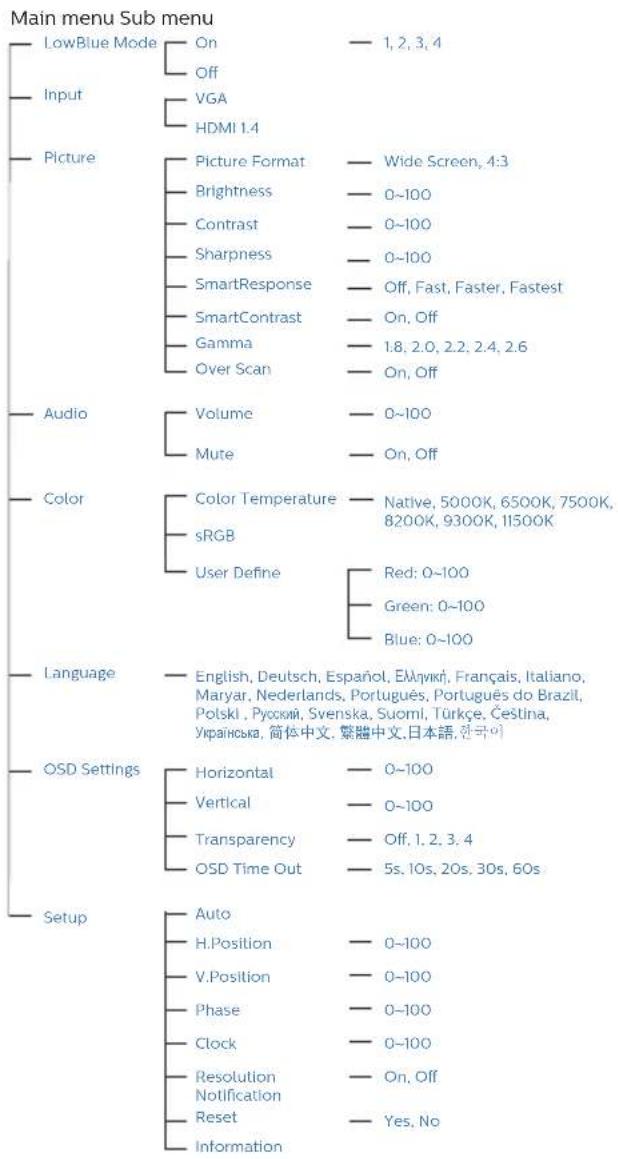
flowchart
graph TD
    A["Main menu Sub menu"] --> B["LowBlue Mode"]
    A --> C["Input"]
    A --> D["Picture"]
    A --> E["Audio"]
    A --> F["Color"]
    A --> G["Language"]
    A --> H["OSD Settings"]
    A --> I["Setup"]

    B --> B1["On"]
    B --> B2["Off"]
    B --> B3["VGA"]
    B --> B4["HDMI 1.4"]

    C --> C1["Picture Format"]
    C --> C2["Brightness"]
    C --> C3["Contrast"]
    C --> C4["Sharpness"]
    C --> C5["SmartResponse"]
    C --> C6["SmartContrast"]
    C --> C7["Gamma"]
    C --> C8["Over Scan"]

    D --> D1["Volume"]
    D --> D2["Mute"]
    D --> D3["On, Off"]

    E --> E1["Color Temperature"]
    E --> E2["sRGB"]
    E --> E3["User Define"]

    F --> F1["English, Deutsch, Español, Élémyké, Français, Italiano, Maryar, Nederlands, Português, Português do Brazil, Polski, Русский, Svenska, Suorni, Türkçe, Češtna, Українська, 简体中文, 繁體中文, 日本語, 한국아"]

    G --> G1["Horizontal"]
    G --> G2["Vertical"]
    G --> G3["Transparency"]
    G --> G4["OSD Time Out"]

    H --> H1["Auto"]
    H --> H2["H.Position"]
    H --> H3["V.Position"]
    H --> H4["Phase"]
    H --> H5["Clock"]
    H --> H6["Resolution Notification"]
    H --> H7["Reset"]
    H --> H8["Information"]

    I --> I1["1, 2, 3, 4"]

    style B fill:#f9f,stroke:#333
    style C fill:#f9f,stroke:#333
    style D fill:#f9f,stroke:#333
    style E fill:#f9f,stroke:#333
    style F fill:#f9f,stroke:#333
    style G fill:#f9f,stroke:#333
2. Setting up the monitor
3 Resolution notification
This monitor is designed for optimal performance at its native resolution, 1920 × 1200 @ 60 Hz. When the monitor is powered on at a different resolution, an alert is displayed on screen: Use 1920 × 1200 @ 60 Hz for best results.
Display of the native resolution alert can be switched off from Setup in the OSD (On Screen Display) menu.
4 Physical Function
Tilt

2.3 Remove the Base Assembly for VESA Mounting
Before you start disassembling the monitor base, please follow the instructions below to avoid any possible damage or injury.
- Place the monitor face down on a smooth surface. Pay attention not to scratch or damage the screen.
natural_image
Technical line drawing of a mechanical component with a circular inset showing internal structure (no text or symbols)- Press the locking clips to detach the base stand away from the base column.
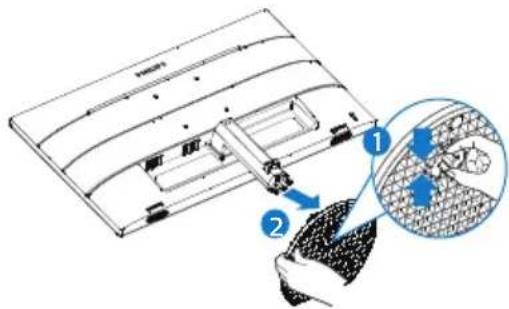
- Remove the screw from hinge cover.

2. Setting up the monitor

Note
This monitor accepts a 100mm x 100mm VESA-Compliant mounting interface. VESA Mounting Screw M4. Always contact manufacturer for wall-mount installation.
3. Image Optimization
3.1 SmartImage
1 What is it?
SmartImage provides presets that optimize display for different types of content, dynamically adjusting brightness, contrast, color and sharpness in real time. Whether you're working with text applications, displaying images or watching a video, Philips SmartImage delivers great optimized monitor performance.
2 Why do I need it?
You want a monitor that delivers optimized display all your favorite types of content, SmartImage software dynamically adjust brightness, contrast, color and sharpness in real time to enhance your monitor viewing experience.
3 How does it work?
SmartImage is an exclusive, leading edge Philips technology that analyzes the content displayed on your screen. Based on a scenario you select, SmartImage dynamically enhances the contrast, color saturation and sharpness of images to enhance the contents being displayed - all in real time with the press of a single button.
4 How to enable SmartImage?

natural_image
Line drawing of a computer monitor with a circular icon containing two overlapping squares (no text or symbols)- Press to launch the SmartImage on screen display.
- Keep pressing ▼▲ to toggle among EasyRead, Office, Photo, Movie, Game, Economy, LowBlue Mode, Off.
- The SmartImage on screen display will remain on screen for 5 seconds, or you can also press "OK" to make confirmation.
There are multiple selections: EasyRead, Office, Photo, Movie, Game, Economy, LowBlue Mode, Off.
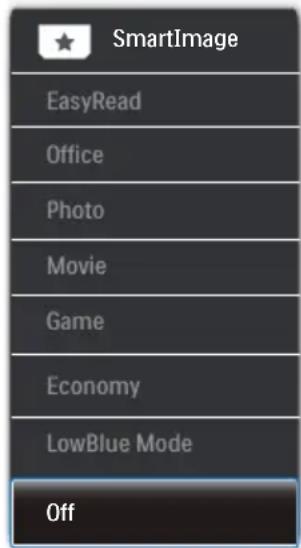
- EasyRead: Helps improve reading of text based application like PDF ebooks. By using a special algorithm which increases the contrast and boundary sharpness of text content, the display is optimized for a stress-free reading by adjusting the brightness, contrast and color temperature of the monitor.
- Office: Enhances text and dampens brightness to increase readability and reduce eye strain. This mode significantly enhances readability and productivity when you're working with spreadsheets, PDF files, scanned articles or other general office applications.
3. Image Optimization
- Photo: This profile combines color saturation, dynamic contrast and sharpness enhancement to display photos and other images with outstanding clarity in vibrant colors - all without artifacts and faded colors.
- Movie: Ramped up luminance, deepened color saturation, dynamic contrast and razor sharpness displays every details in darker areas of your videos without color washout in brighter areas maintaining a dynamic natural values for the ultimate video display.
- Game: Turn on over drive circuit for best response time, reduce jaggy edges for fast moving objects on screen, enhance contrast ratio for bright and dark scheme, this profile delivers the best gaming experience for gamers.
- Economy: Under this profile, brightness, contrast are adjusted and backlighting finetuned for just right display of everyday office applications and lower power consumption.
- LowBlue Mode: LowBlue Mode for easy on-the-eyes productivity Studies have shown that just as ultra-violet rays can cause eye damage, shortwave length blue light rays from LED displays can cause eye damage and affect vision over time. Developed for wellbeing, Philips LowBlue Mode setting uses a smart software technology to reduce harmful shortwave blue light.
• Off: No optimization by SmartImage.
Note
Philips LowBlue mode, mode 2 compliance with TUV Low Blue Light certification, you can have this mode by simply press the hotkey then press to select LowBlue Mode, see above SmartImage selection steps.
3.2 SmartContrast
1 What is it?
Unique technology that dynamically analyzes displayed content and automatically optimizes a Monitor's contrast ratio for maximum visual clarity and viewing enjoyment, stepping up backlighting for clearer, crisper and brighter images or dimming backlighting for clear display of images on dark backgrounds.
2 Why do I need it?
You want the very best visual clarity and viewing comfort for every type of content. SmartContrast dynamically controls contrast and adjusts backlighting for clear, crisp, bright gaming and video images or displays clear, readable text for office work. By reducing your monitor's power consumption, you save on energy costs and extend the lifetime of your monitor.
3 How does it work?
When you activate SmartContrast, it will analyse the content you are displaying in real time to adjust colors and control backlight intensity. This function will dynamically enhance contrast for a great entertainment experience when viewing videos or playing games.
4. Adaptive Sync

Adaptive Sync
PC gaming has long been an imperfect experience because GPUs and monitors update at different rates. Sometimes a GPU can render many new pictures during a single update of the monitor, and the monitor will show pieces of each picture as a single image. This is called “tearing.” Gamers can fix tearing with a feature called “v-sync,” but the image can become jerky as the GPU waits on the monitor to call for an update before delivering new pictures.
The responsiveness of mouse input and overall frames per second are reduced with v-sync, too. AMD Adaptive Sync technology eliminates all of these problems by letting the GPU update the monitor the moment a new picture is ready, leaving gamers with unbelievably smooth, responsive, tearing-free games.
Followed by the graphic card that are compatible.
■ Operating system
- Windows 10/8.1/8/7
■ Graphic Card: R9 290/300 Series & R7 260 Series
• AMD Radeon R9 300 Series
• AMD Radeon R9 Fury X
• AMD Radeon R9 360
• AMD Radeon R7 360
• AMD Radeon R9 295X2
• AMD Radeon R9 290X
• AMD Radeon R9 290
• AMD Radeon R9 285
• AMD Radeon R7 260X
• AMD Radeon R7 260
■ Processor A-Series Desktop and Mobility APUs
- AMD A10-7890K
- AMD A10-7870K
- AMD A10-7850K
- AMD A10-7800
- AMD A10-7700K
- AMD A8-7670K
- AMD A8-7650K
- AMD A8-7600
-
AMD A6-7400K
-
Technical Specifications
| Picture/Display | |||
| Monitor Panel Type IPS Technology | |||
| Backlight W-LED | |||
| Panel Size 22.5" W (57.2 cm) | |||
| Pixel Pitch 0.254(H) mm x 0.248(V) mm | |||
| Contrast Ratio (typ.) 1,000:1 | |||
| Optimum Resolution 1920 x 1200 @ 60 Hz | |||
| Viewing Angle 178° (H) / 178° (V) @ C/R >10 (typ.) | |||
| Display Colors 16.7M (6 bit+ FRC) | |||
| Flicker Free YES | |||
| Picture Enhancement SmartImage | |||
| Vertical Refresh Rate | 50 Hz - 76 Hz (Analog)48 Hz - 76 Hz (HDMI) | ||
| Horizontal Frequency | 30 kHz - 83 kHz (Analog)30 kHz - 95 kHz (HDMI) | ||
| sRGB YES | |||
| LowBlue Mode | YES | ||
| Adaptive Sync YES | |||
| EasyRead YES | |||
| Connectivity | |||
| Signal Input/Output | VGA(Analog), HDMI 1.4(Digital) | ||
| Input Signal | Separate Sync, Sync on Green | ||
| Audio In/Out | HDMI audio out | ||
| Convenience | |||
| User Convenience | ☑/◀ ☑/▼ ☎/▲ ☐/OK ⏻ | ||
| OSD Languages | English, German, Spanish, Greek, French, Italian, Hungarian, Dutch, Portuguese, Brazil Portuguese, Polish, Russian, Swedish, Finnish, Turkish, Czech, Ukrainian, Simplified Chinese, Traditional Chinese, Japanese, Korean | ||
| Other Convenience | VESA mount (100x100mm), Kensington Lock | ||
| Plug & Play Compatibility | DDC/CI, sRGB, Windows 10/8.1/8/7, Mac OS X | ||
| Stand | |||
| Tilt | -5 / +25 degree | ||
| Power | |||
| Consumption | AC InputVoltage at100VAC, 60Hz | AC InputVoltage at115VAC, 60Hz | AC InputVoltage at230VAC, 50Hz |
| Normal Operation | 20.78 W (typ.) | 20.26 W (typ.) | 21.40 W (typ.) |
| Sleep (Standby) | <0.3 W | <0.3 W | <0.3 W |
| Off | <0.3 W | <0.3 W | <0.3 W |
5.Technical Specifications
| Heat Dissipation* | AC Input Voltage at 100VAC, 60Hz | AC Input Voltage at 115VAC, 60Hz | AC Input Voltage at 230VAC, 50Hz |
| Normal Operation | 70.92 BTU/hr (typ.) | 69.16 BTU/hr (typ.) | 73.04 BTU/hr (typ.) |
| Sleep (Standby) <1.02 BTU/hr | <1.02 BTU/hr <1.02 BTU/hr | ||
| Off <1.02 BTU/hr <1.02 BTU/hr | <1.02 BTU/hr | ||
| On Mode(ECO mode) 9.4W (typ.) | |||
| Power LED indicator | On mode: White, Standby/Sleep mode: White (blinking) | ||
| Power Supply Built-in, 100-240V AC, 50-60Hz | |||
| Dimensions | |||
| Product with stand (WxHxD) | 499 x 414 x 208 mm | ||
| Product without stand (WxHxD) | 499 x 323 x 42 mm | ||
| Product with packaging (WxHxD) | 559 x 481 x 136 mm | ||
| Weight | |||
| Product with stand 3.00 kg | |||
| Product without stand 2.58 kg | |||
| Product with packaging 4.53 kg | |||
| Operating Condition | |||
| Temperature range (operation) | 0°C to 40 °C | ||
| Relative humidity (operation) | 20% to 80% | ||
| Atmospheric pressure (operation) | 700 to 1060hPa | ||
| Temperature range (Non-operation) | -20°C to 60°C | ||
| Relative humidity (Non-operation) | 10% to 90% | ||
| Atmospheric pressure (Non-operation) | 500 to 1060hPa | ||
| Environmental and energy | |||
| ROHS YES | |||
| Packaging 100% recyclable | |||
| Specific Substances 100% PVC BFR free housing | |||
| Cabinet | |||
| Color Black | |||
| Finish | Texture | ||
5.Technical Specifications

Note
This data is subject to change without notice. Go to www.philips.com/support to download the latest version of leaflet.
5.1 Resolution & Preset Modes
1 Maximum Resolution
1920 × 1200 @ 60 Hz (analog/digital input)
2 Recommended Resolution
1920 x 1200 @ 60 Hz (digital input)
| H. freq (kHz) | Resolution V. freq (Hz) |
| 31.47 720 | × 400 70.09 |
| 31.47 640 | × 480 59.94 |
| 35.00 640 | × 480 66.67 |
| 37.86 640 | × 480 72.81 |
| 37.50 640 | × 480 75.00 |
| 35.16 800 | × 600 56.25 |
| 37.88 800 | × 600 60.32 |
| 48.08 800 | × 600 72.19 |
| 46.88 800 | × 600 75.00 |
| 47.73 832 | × 624 74.55 |
| 48.36 102 | 4 × 768 60.00 |
| 56.48 102 | 4 × 768 70.07 |
| 60.02 102 | 4 × 768 75.03 |
| 44.77 1280 | 0 × 720 59.86 |
| 60.00 | 1280 × 960 |
| 63.98 | 1280 × 1024 |
| 79.98 | 1280 × 1024 |
| 55.94 1440 | 0 × 900 59.89 |
| 65.29 | 1680 × 1050 |
| 67.50 | 1920 × 1080 |
| 74.04 | 1920 × 1200 |
| 93.149 | 1920 × 1200 |
Note
Please notice that your display works best at native resolution of 1920 x 1200 @ 60Hz. For best display quality, please follow this resolution recommendation.
6. Power Management
If you have VESA DPM compliance display card or software installed in your PC, the monitor can automatically reduce its power consumption when not in use. If an input from a keyboard, mouse or other input device is detected, the monitor will 'wake up' automatically. The following table shows the power consumption and signaling of this automatic power saving feature:
| Power Management Definition | |||||
| VESA Mode | Video | H-sync | V-sync | Power Used | LED Color |
| Active ON Yes Yes | 21.4 W (typ.) | White | |||
| Sleep (Standby) | OFF No No | 0.3 W (typ.) | White (blink) | ||
| Off OFF -- | 0.3 W (typ.) | OFF | |||
The following setup is used to measure power consumption on this monitor.
• Native resolution: 1920 × 1200
- Contrast: 50 %
- Brightness: 100%
• Color temperature: 6500k with full white pattern

Note
This data is subject to change without notice.
7. Customer care and warranty
7.1 Philips' Flat Panel Monitors Pixel Defect Policy
Philips strives to deliver the highest quality products. We use some of the industry's most advanced manufacturing processes and practice stringent quality control. However, pixel or sub pixel defects on the TFT Monitor panels used in flat panel monitors are sometimes unavoidable. No manufacturer can guarantee that all panels will be free from pixel defects, but Philips guarantees that any monitor with an unacceptable number of defects will be repaired or replaced under warranty. This notice explains the different types of pixel defects and defines acceptable defect levels for each type. In order to qualify for repair or replacement under warranty, the number of pixel defects on a TFT Monitor panel must exceed these acceptable levels. For example, no more than 0.0004% of the sub pixels on a monitor may be defective. Furthermore, Philips sets even higher quality standards for certain types or combinations of pixel defects that are more noticeable than others. This policy is valid worldwide.
flowchart
graph TD
    A["Sub pixels"] --> B["R"]
    A --> C["G"]
    A --> D["B"]
    E["pixels"] --> F["R"]
    E --> G["G"]
    E --> H["B"]
Pixels and Sub pixels
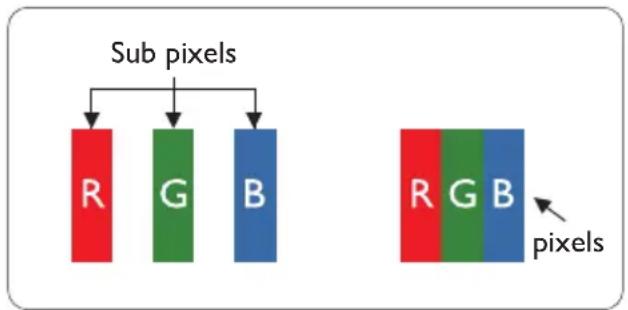
A pixel, or picture element, is composed of three sub pixels in the primary colors
of red, green and blue. Many pixels together form an image. When all sub pixels of a pixel are lit, the three colored sub pixels together appear as a single white pixel. When all are dark, the three colored sub pixels together appear as a single black pixel. Other combinations of lit and dark sub pixels appear as single pixels of other colors.
Types of Pixel Defects
Pixel and sub pixel defects appear on the screen in different ways. There are two categories of pixel defects and several types of sub pixel defects within each category.
Bright Dot Defects
Bright dot defects appear as pixels or sub pixels that are always lit or 'on'. That is, a bright dot is a sub-pixel that stands out on the screen when the monitor displays a dark pattern. There are the types of bright dot defects.

One lit red, green or blue sub pixel.

Two adjacent lit sub pixels:
- Red + Blue = Purple
- Red + Green = Yellow
- Green + Blue = Cyan (Light Blue)
7. Customer care and warranty
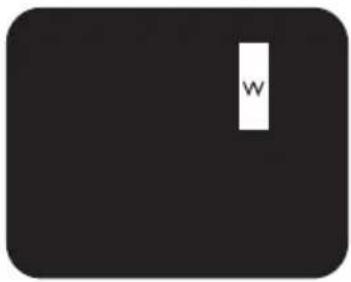
Three adjacent lit sub pixels (one white pixel).

Note
A red or blue bright dot must be more than 50 percent brighter than neighboring dots while a green bright dot is 30 percent brighter than neighboring dots.
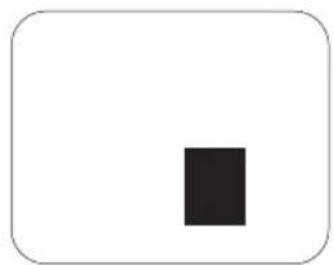
Black Dot Defects
Black dot defects appear as pixels or sub pixels that are always dark or 'off'. That is, a dark dot is a sub-pixel that stands out on the screen when the monitor displays a light pattern. These are the types of black dot defects.

natural_image
Simple black vertical rectangle on white background, no text or symbols presentProximity of Pixel Defects
Because pixel and sub pixels defects of the same type that are near to one another may be more noticeable, Philips also specifies tolerances for the proximity of pixel defects.
natural_image
Simple black square centered on a white background with rounded corners (no text or symbols)7.Customer care and warranty
Pixel Defect Tolerances
In order to qualify for repair or replacement due to pixel defects during the warranty period, a TFT Monitor panel in a Philips flat panel monitor must have pixel or sub pixel defects exceeding the tolerances listed in the following tables.
| BRIGHT DOT DEFECTS ACCEPTABLE LEVEL | |
| 1 lit subpixel 3 | |
| 2 adjacent lit subpixels 1 | |
| 3 adjacent lit subpixels (one white pixel) 0 | |
| Distance between two bright dot defects* >15mm | |
| Total bright dot defects of all types 3 | |
| BLACK DOT DEFECTS ACCEPTABLE LEVEL | |
| 1 dark subpixel 5 or fewer | |
| 2 adjacent dark subpixels 2 or fewer | |
| 3 adjacent dark subpixels 0 | |
| Distance between two black dot defects* >15mm | |
| Total black dot defects of all types 5 or fewer | |
| TOTAL DOT DEFECTS | ACCEPTABLE LEVEL |
| Total bright or black dot defects of all types | 5 or fewer |

Note
1 or 2 adjacent sub pixel defects = 1 dot defect
7.2 Customer Care & Warranty
For warranty coverage information and additional support requirements valid for your region, please visit www.philips.com/support website for details or contact your local Philips Customer Care Center.
For extended warranty, if you would like to extend your general warranty period, an Out of Warranty service package is offered via our Certified Service Center.
For Warranty Period please refer to Warranty Statement in Important Information Manual.
If you wish to make use of this service, please be sure to purchase the service within 30 calendar days of your original purchase date. During the extended warranty period, the service includes pickup, repair and return service, however the user will be responsible for all costs accrued.
If the Certified Service Partner cannot perform the required repairs under the offered extended warranty package, we will find alternative solutions for you, if possible, up to the extended warranty period you have purchased.
Please contact our Philips Customer Service Representative or local contact center (by Consumer care number) for more details.
Philips Customer Care Center number listed below.
| • Local Standard Warranty Period | • Extended Warranty Period | • Total Warranty Period |
| • Depend on different Regions | • + 1 Year | • Local Standard warranty period +1 |
| • + 2 Years | • Local Standard warranty period +2 | |
| • + 3 Years | • Local Standard warranty period +3 |
**Proof of original purchase and extended warranty purchase required.

Note
Please refer to important information manual for regional service hotline, which is available on the Philips website support page.
8. Troubleshooting & FAQs
8.1 Troubleshooting
This page deals with problems that can be corrected by a user. If the problem still persists after you have tried these solutions, contact Philips customer service representative.
1 Common Problems
No Picture (Power LED not lit)
• Make sure the power cord is plugged into the power outlet and into the back of the monitor.
- First, ensure that the power button on the front of the monitor is in the OFF position, then press it to the ON position.
No Picture (Power LED is White)
• Make sure the computer is turned on.
• Make sure the signal cable is properly connected to your computer.
• Make sure the monitor cable has no bent pins on the connect side. If yes, repair or replace the cable.
• The Energy Saving feature may be activated
Screen says
Check cable connection
• Make sure the monitor cable is properly connected to your computer. (Also refer to the Quick Start Guide).
- Check to see if the monitor cable has bent pins.
• Make sure the computer is turned on.
AUTO button doesn't function
- The auto function is applicable only in VGA-Analog mode. If the result is not satisfactory, you can do manual adjustments via the OSD menu.
Note
The Auto Function is not applicable in DVI-Digital mode as it is not necessary.
Visible signs of smoke or sparks
- Do not perform any troubleshooting steps
- Disconnect the monitor from mains power source immediately for safety
- Contact with Philips customer service representative immediately.
2 Imaging Problems
Image is not centered
- Adjust the image position using the “Auto” function in OSD Main Controls.
- Adjust the image position u sing the Phase/Clock of Setup in OSD Main Controls. It is valid only in VGA mode.
Image vibrates on the screen
- Check that the signal cable is properly securely connected to the graphics board or PC.
Vertical flicker appears

- Adjust the image using the "Auto" function in OSD Main Controls.
- Eliminate the vertical bars using the Phase/Clock of Setup in OSD Main Controls. It is valid only in VGA mode.
8.Troubleshooting & FAQs
Horizontal flicker appears

- Adjust the image using the "Auto" function in OSD Main Controls.
- Eliminate the vertical bars using the Phase/Clock of Setup in OSD Main Controls. It is valid only in VGA mode.
Image appears blurred, indistinct or too dark
- Adjust the contrast and brightness on On-Screen Display.
An "after-image", "burn-in" or "ghost image" remains after the power has been turned off.
- Uninterrupted display of still or static images over an extended period may cause "burn in", also known as "after-imaging" or "ghost imaging", on your screen. "Burn-in", "after-imaging", or "ghost imaging" is a well-known phenomenon in LCD panel technology. In most cases, the "burned in" or "after-imaging" or "ghost imaging" will disappear gradually over a period of time after the power has been switched off.
• Always activate a moving screen saver program when you leave your monitor unattended.
• Always activate a periodic screen refresh application if your LCD monitor will display unchanging static content. - Failure to activate a screen saver, or a periodic screen refresh application may result in severe “burn-in” or “after-image” or “ghost image” symptoms that will not disappear and cannot be repaired. The damage mentioned above is not covered under your warranty.
Image appears distorted. Text is fuzzy or blurred.
- Set the PC's display resolution to the same mode as monitor's recommended screen native resolution.
Green, red, blue, dark, and white dots appears on the screen
- The remaining dots are normal characteristic of the liquid crystal used in today's technology, Please refer the pixel policy for more detail.
* The "power on" light is too strong and is disturbing
- You can adjust “power on” light using the power LED Setup in OSD main Controls.
For further assistance, refer to the Service contact information listed in Important information manual and contact Philips customer service representative.
* Functionality different according to display.
8.2 General FAQs
Q1: When I install my monitor what should I do if the screen shows 'Cannot display this video mode'?
Ans.: Recommended resolution for this monitor: 1920 x 1200 @ 60 Hz.
- Unplug all cables, then connect your PC to the monitor that you used previously.
- In the Windows Start Menu, select Settings/Control Panel. In the Control Panel Window, select the Display icon. Inside the Display Control Panel, select the 'Settings' tab. Under the setting tab, in box labelled 'desktop area', move the sidebar to 1920 x 1200 pixels.
- Open 'Advanced Properties' and set the Refresh Rate to 60 Hz, then click OK.
- Restart your computer and repeat step 2 and 3 to verify that your PC is set at 1920 x 1200 @ 60 Hz.
- Shut down your computer, disconnect your old monitor and reconnect your Philips LCD monitor.
- Turn on your monitor and then turn on your PC.
Q2: What is the recommended refresh rate for LCD monitor?
Ans.: Recommended refresh rate in LCD monitors is 60 Hz, In case of any disturbance on screen, you can set it up to 75 Hz to see if that removes the disturbance.
Q3: What are the .inf and .icm files on the user manual? How do I install the drivers (.inf and .icm)?
Ans.: These are the driver files for your monitor. Follow the instructions in your user manual to install the drivers. Your computer may ask
you for monitor drivers (.inf and .icm files) or a driver disk when you first install your monitor.
Q4: How do I adjust the resolution?
Ans.: Your video card/graphic driver and monitor together determine the available resolutions. You can select the desired resolution under Windows® Control Panel with the "Display properties".
Q5: What if I get lost when I am making monitor adjustments via OSD?
Ans.: Simply press the OK button, then select 'Reset' to recall all of the original factory settings.
Q6: Is the LCD screen resistant to scratches?
Ans.: In general it is recommended that the panel surface is not subjected to excessive shocks and is protected from sharp or blunt objects. When handling the monitor, make sure that there is no pressure or force applied to the panel surface side. This may affect your warranty conditions.
Q7: How should I clean the LCD surface?
Ans.: For normal cleaning, use a clean, soft cloth. For extensive cleaning, please use isopropyl alcohol. Do not use other solvents such as ethyl alcohol, ethanol, acetone, hexane, etc.
Q8: Can I change the color setting of my monitor?
Ans.: Yes, you can change your color setting through OSD control as the following procedures,
- Press "OK" to show the OSD (On Screen Display) menu
8.Troubleshooting & FAQs
- Press "Down Arrow" to select the option "Color" then press "OK" to enter color setting, there are three settings as below.
-
Color Temperature: The settings are Native, 5000K, 6500K, 7500K, 8200K, 9300K and 11500K. With settings in the 5000K range the panel appears "warm, with a red-white color tone", while a 11500K temperature yields "cool, bluewhite toning".
-
sRGB: This is a standard setting for ensuring correct exchange of colors between different device (e.g. digital cameras, monitors, printers, scanners, etc).
-
User Define: The user can choose his/her preference color setting by adjusting red, green blue color.

Note
A measurement of the color of light radiated by an object while it is being heated. This measurement is expressed in terms of absolute scale, (degrees Kelvin). Lower Kevin temperatures such as 2004K are red; higher temperatures such as 9300K are blue. Neutral temperature is white, at 6504K.
Q9: Can I connect my LCD monitor to any PC, workstation or Mac?
Ans.: Yes. All Philips LCD monitors are fully compatible with standard PCs, Macs and workstations. You may need a cable adapter to connect the monitor to your Mac system. Please contact your Philips sales representative for more information.
Q10: Are Philips LCD monitors Plug-and-Play?
Ans.: Yes, the monitors are Plug-and-Play compatible with Windows 10/8.1/8/7, Mac OSX
Q11: What is Image Sticking, or Image Burn-in, or After Image, or Ghost Image in LCD panels?
Ans.: Uninterrupted display of still or static images over an extended period may cause "burn in", also known as "after-imaging" or "ghost imaging", on your screen. "Burn-in", "after-imaging", or "ghost imaging" is a well-known phenomenon in LCD panel technology. In most cases, the "burned in" or "atter-imaging" or "ghost imaging" will disappear gradually over a period of time after the power has been switched off.
Always activate a moving screen saver program when you leave your monitor unattended. Always activate a periodic screen refresh application if your LCD monitor will display unchanging static content.
Warning
Failure to activate a screen saver, or a periodic screen refresh application may result in severe “burn-in” or “after-image” or “ghost image” symptoms that will not disappear and cannot be repaired. The damage mentioned above is not covered under your warranty.
8.Troubleshooting & FAQs
Q12: Why is my Display not showing sharp text, and is displaying jagged characters?
Ans.: Your LCD monitor works best at its native resolution of 1920 x 1200 @ 60 Hz. For best display, please use this resolution.
Q13: How to unlock/lock my hot key?
Ans.: Pleasepress for 10/OK seconds to unlock/lock the hot key, by doing so, your monitor pops out "Attention" to show the unlock/lock status as shown below illustrators.
Monitor controls unlocked
Monitor controls locked
Q14: Where can I find Important Information manual mentioned in EDFU?
Ans.: Important Information manual can be download on the Philips website support page.

2019 © TOP Victory Investment Ltd. All rights reserved.
This product has been manufactured by and is sold under the responsibility of Top Victory Investments Ltd., and Top Victory Investments Ltd. is the warrantor in relation to this product. Philips and the Philips Shield Emblem are registered trademarks of Koninklijke Philips N.V. and are used under license.
Specifications are subject to change without notice.
Version: M8230SE1L



- Table of Contents
- Important ....1
- Setting up the monitor .....5
- Image Optimization .....10
- Adaptive Sync ...... 12
- Technical Specifications .....13
- Power Management .....16
- Customer care and warranty ..17
- Troubleshooting & FAQs ...... 21
- Important
- Safety precautions and maintenance
- Warnings
- Operation
- Important
- Maintenance
- Important information for Burn-in/Ghost image
- Warning
- Service
- Note
- Notational Descriptions
- Notes, Cautions and Warnings
- Caution
- Disposal of product and packing material
- Setting up the monitor
- Installation
- Install the base
- Connecting to your PC
- Connect to PC
- Operating the monitor
- Description of the control buttons
- Description of the On Screen Display
- Basic and simple instruction on the control keys
- The OSD Menu
- Resolution notification
- Physical Function
- Remove the Base Assembly for VESA Mounting
- Image Optimization
- SmartImage
- What is it?
- Why do I need it?
- How does it work?
- How to enable SmartImage?
- SmartContrast
- Adaptive Sync
- Adaptive Sync
- 5.Technical Specifications
- Resolution & Preset Modes
- Maximum Resolution
- Recommended Resolution
- Power Management
- Customer care and warranty
- Philips' Flat Panel Monitors Pixel Defect Policy
- Pixels and Sub pixels
- Types of Pixel Defects
- Bright Dot Defects
- Two adjacent lit sub pixels:
- Black Dot Defects
- Proximity of Pixel Defects
- 7.Customer care and warranty
- Pixel Defect Tolerances
- Customer Care & Warranty
- Troubleshooting & FAQs
- Troubleshooting
- Common Problems
- No Picture (Power LED not lit)
- No Picture (Power LED is White)
- Screen says
- Check cable connection
- AUTO button doesn't function
- Visible signs of smoke or sparks
- Imaging Problems
- Image is not centered
- Image vibrates on the screen
- Vertical flicker appears
- 8.Troubleshooting & FAQs
- Horizontal flicker appears
- Image appears blurred, indistinct or too dark
- An "after-image", "burn-in" or "ghost image" remains after the power has been turned off.
- Image appears distorted. Text is fuzzy or blurred.
- Green, red, blue, dark, and white dots appears on the screen
- For further assistance, refer to the Service contact information listed in Important information manual and contact Philips customer service representative.
- General FAQs
Brand : PHILIPS
Model : S Line 230S8QHSB
Category : Tracking