MNO2-8-CTL-30 - Camera Monnit - Free user manual and instructions
Find the device manual for free MNO2-8-CTL-30 Monnit in PDF.


| Product Type | Wireless Security Camera |
| Model | MNO2-8-CTL-30 |
| Brand | Monnit |
| Dimensions | 4.5 x 2.5 x 2.5 inches |
| Weight | 0.5 lbs (227 g) |
| Power Source | 4 x AA batteries (not included) or optional AC adapter |
| Battery Life | Up to 6 months with typical usage |
| Wireless Range | Up to 500 ft (150 m) line-of-sight |
| Resolution | 640 x 480 pixels |
| Night Vision | Yes, infrared LEDs up to 30 ft |
| Motion Detection | Passive infrared (PIR) sensor |
| Field of View | 90 degrees |
| Operating Temperature | -20°C to 50°C (-4°F to 122°F) |
| Weatherproof Rating | IP65 (dust-tight and protected against water jets) |
| Mounting Type | Wall mount bracket included |
| Communication Protocol | Monnit wireless 900 MHz or 433 MHz |
| Image Capture | Still images on motion trigger |
| Alert Method | Email, SMS, or push notification via Monnit iMonnit app |
| Maintenance | Clean lens with soft cloth; replace batteries as needed |
| Safety | Mount securely; avoid exposure to direct sunlight and water ingress |
| Spare Parts | Battery pack and mounting bracket available from Monnit |
| Repairability | Battery replacement is user-serviceable; other repairs by Monnit |
Frequently Asked Questions - MNO2-8-CTL-30 Monnit
User questions about MNO2-8-CTL-30 Monnit
0 question about this device. Answer the ones you know or ask your own.
Ask a new question about this device
Download the instructions for your Camera in PDF format for free! Find your manual MNO2-8-CTL-30 - Monnit and take your electronic device back in hand. On this page are published all the documents necessary for the use of your device. MNO2-8-CTL-30 by Monnit.
USER MANUAL MNO2-8-CTL-30 Monnit
natural_image
Product display of a wireless network device with attached cables and four labeled sensors (no visible text or symbols on main components)Wireless Control User's Guide
Inside the Box
You should find the following items in the box:
• Monnit Wireless Control Unit
- Antenna
Monnit Wireless Control Quick Start
- Create an iMonnit user account and assign a wireless gateway and sensors.
- Assign the wireless control device to the sensor network.
- Connect control relay's to devices you wish to control.
- Plug the control device's power supply into a power outlet.
- Pair the control relays with wireless sensor's on the same sensor network.
- Set sensor conditions that will activate the relays.
IMPORTANT!
Disconnect all power to the control unit and the device to be controlled, before connecting the control relay wires.
Monnit Wireless Control - Principle of Operation
The Monnit control unit has two separate relays that react in response to either the iMonnit.com web portal or a wireless sensor on the network. The relays are capable of automatically controlling motors, equipment or electrical devices. Monnit control is currently available in 10-amp or 30-amp versions (10-amp unit has two 10-amp relays and 30-amp unit has two 30-amp relays).
Four LED indicators let the user know if the device is powered on, communicating with the online system and the status of each relay.
Each of the units two relays can be automatically controlled through the iMonnit software by pairing a relay directly with a sensor (which will use the sensor's aware state to control the relay) or by adding a control relay action in any notification setup in the system. (See section 4.)
The user can also manually turn a relay on or off through the iMonnit software. Manual changes can also be temporary based on a set duration (ex. activate the relay for 10 minutes then return to the default state). (See section 5.)
Example Use: If a water sensor detects water at a certain level in a sump pit, the relay will switch ON, activating the pump. When water is no longer detected, the relay will switch OFF, deactivating the pump motor.
Monnit Wireless Control Features
- Allows for automated control.
• 10-amp or 30-amp units available. - Two separate relays per unit.
- Can pair with two Monnit wireless sensors to activate upon detection of set conditions.
- Can be triggered manually through online monitoring interface.
- AC powered, always on for immediate response from the Monnit wireless sensor network.
Note: Monnit control requires a Monnit wireless gateway to receive commands from wireless sensors as all commands are processed through the iMonnit online software.

Using the Wireless Control Unit
1. Adding a Wireless Control Unit to a Sensor Network
Monnit wireless control units can be added to any Monnit sensor network through the iMonnit online sensor monitoring software.
The control unit is added to the network like a sensor is. Do not power it on until it has been assigned to a network. From the iMonnit portal enter the ID and the Code.
Steps to add a wireless control unit to your sensor network.
- Choose "Manage" from the main navigation.
- Select the network you would like to add the control unit to.
• Find the bottom of the section "Sensor List / Assign Sensor". - Enter the ID and Security Code from the back label of the control unit.
- Press the "Assign Sensor" button.

text_image
Sensor List / Assign Sensor Sensor Name Sensor ID Sensor Typ Assign New Sensor Sensor ID Security Code Assign Sensor Contains FCC ID: ZTL-RFSC1 and IC: 9794A-RFSC1 This device complies with Part 15 of the FCC Rules. Operation is subject to the following two conditions: (1) this device may not cause harmful interference and (2) this device must accept any interference received, including interference that may cause undesired operation. ID: ### Code: XXXXXXPower cycle your gateway to ensure that the gateway will recognize the control unit. Once the control unit has been added to your network and before connecting the relay wires to any equipment, power on the control unit. Check that the bottom two LED indicators are illuminated green. In the iMonnit online software, verify that data is being received by viewing the history tab in iMonnit.
Set the poll rate:

text_image
Control History C Chart Notifications Export Edit 5/9/2014 - 5/16/2014 Date Signal Battery Sensor Reading 5/15/2014 5:10 PM 45 100 Relay 1: Off, Relay 2: Off 5/15/2014 5:09 PM 57 100 Relay 1: Off, Relay 2: OffEach reading in the iMonnit software for the control device will show the status of each of the two relays as either "On" or "Off".
2. Wireless Control LED Indicators
Relay 1 and 2 - Solid green indicates that the relay is “on” (closed). No light indicates that the relay is “off” (open).
Radio - Solid green indicates that the radio is active. Flashing indicates radio communication with a wireless sensor or gateway. Flashes on every poll, corresponding to the set poll rate saved to the control unit.
Power - Solid green indicates that the device is powered.
3. Connecting the Relays
The relay acts as a switch on the line for your power source. The relays are by default NORMALLY OPEN, so there is no connection (lights for the relays will be off to indicate this). Return to the edit page if you want the default state to be NORMALLY CLOSED.
The relay is just allowing the current to pass through, so it will be installed inline on the power wire. It is not connected to power and ground.

text_image
Monnit Control Relay Wire Power Device to Control4. Naming and Pairing Control Relays with Wireless Sensors
By clicking on the "Edit" tab, you can name each of the control relays and set their default state.
Relay 1
Relay 1 Title
Fan
Default State
ON
Paired Sensor ID
31825
Each of the units two relays can be paired with any Monnit wireless sensor (currently over 40 types) to activate the relay when the sensor detects user defined conditions (using the “Aware” state). To pair a relay with a wireless sensor, enter the sensor’s ID from it’s bottom label.
The control device will listen for messages from the iMonnit software via a Monnit wireless gateway, if a sensor reading meets the “Aware” state conditions, the control relay will automatically switch to the non-default state. When the sensor reports a reading outside of the “Aware” state conditions, the relay will switch back to it’s default state.
For an explanation on sensors and how the aware state is set, refer to that sensor's edit page in iMonnit.
Set the poll interval on the control unit to your desired interval. The poll interval is how often the control unit checks with the Gateway on the network to see if there are any control actions that need to be taken.
Advanced Settings
Poll Interval
1 minutes

The units two relays can also be controlled via sensor notification settings. Create or edit an existing sensor notification and click on the "Devices to Notify" tab. This will allow the notification to interact with the control relays. Select a control relay from the list on the left and click the arrow button to add it to the recipient list. Clicking the control icon toggles their setting.

text_image
History Notification Settings Sent From People to Notify Devices to Notify Device Search Control - 19324 Relay 2 Notification will be sent to Control - 19324 Relay 1 60 SecondsNote: Control devices have two relays per device that are controlled separately. You can turn a relay on, off or toggle the state. You can also set a duration by clicking on the timer icon. This will perform the selected toggle (on/off/toggle) for a set duration, then change back.
Go to the Gateway edit page and set the poll interval for the gateway. The poll interval on the Gateway is how often the gateway checks with the server to see if there are any control actions that need to be taken. The reaction time of the control unit is a maximum period of the poll interval on the control unit plus the poll interval on your gateway. If the poll interval on the gateway is not set, then the reaction time of the control unit is a maximum period of the poll interval on the control unit plus the heartbeat of the Gateway.
5. On Demand Relay Control
To test the functionality of the relays when connected to equipment, go into the iMonnit portal, click on the control unit information bar from the overview page, then click the “Control” tab:
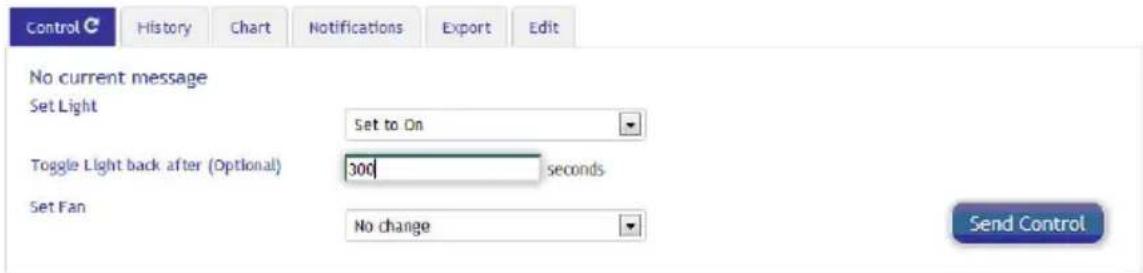
text_image
Control History Chart Notifications Export Edit No current message Set Light Set to On Toggle Light back after (Optional) 300 seconds Set Fan No change Send ControlUse the drop down to select what you want the relay to do (turn the relay ON (close it), OFF (open it) or toggle the state). Once a selection is made, another field will appear allowing you to set a duration of time (in seconds) for the selected action to affect the relay, after which it will switch back. If you want to simply switch the relay without a set time to switch back, leave the field empty.
Once the Send Control command is sent, it will take the combined time of the gateway poll interval OR heartbeat, if poll interval is not set plus the poll interval on the control unit to affect the relay. To speed up the process, force the gateway to communicate with the server and/or lower the poll rates (in the Edit tab).

text_image
Control Configuration Sensor Name Control 1 - 412 Heartbeat Interval 5 minutes Advanced Settings Poll Interval 1 minutes Failed transmissions before link mode 0| Monnit Wireless Control Unit Specifications | ||
| Control Unit Relays 10-Amp Units 30-Amp Units | ||
| Initial Contact Resistance Max. 100 mΩ Max. 50 mΩ | ||
| Max Switching Power (resistive load) 2500VA 150W (NO)1662VA 150W (NC) | 8310VA(30A 277VAC) | |
| Max Switching Voltage 250 VAC, | 100 VDC (0.5A) | 277 VAC |
| Max Switching Current 10A (AC), 5A (DC) | 30A | |
| Nominal Operating Power 360 mW Approx | 800 mW | |
| Operate Time (at nominal voltage / 20°C) Max 10 ms Max 20 ms | ||
| Release Time (at nominal voltage / 20°C) Max 10 ms Max 10 ms | ||
| Max Operating Speed 20 times/min | (at nominal switching capacity) | 20 times/min(at nominal switching capacity) |
| Number of Relays 2 (individually controlled) | ||
| Control Activation - Automatic based on paired sensor- Manual through iMonnit online software | ||
| Paired Sensor Relationship | 1 sensor per relay (total: 2 sensors / device) | |
| Power | ||
| Input Power | 5.5 VDC @ 900 mA | |
| Mechanical | ||
| Antenna | Connector: SMAGain (dBi): 5.0 | |
| Indicator Lights | Four LED indicators- Power- Radio (RF) communication- Relay 1 status (On/Off)- Relay 2 status (On/Off) | |
| Enclosure | ABS PlasticUL94V-0 flame rating | |
| Dimensions | 5.5 x 3.355 x 1.25 in.(139.7 x 85.217 x 31.75 mm) | |
| Weight | 8 ounces | |
| Environmental | ||
| Operating Temperature | -40° to +85°C (-40° to +185°F) | |
| Certifications: | 900 MHz product; FCC ID: ZTL-RFSC1 and IC: 9794A-RFSC1.868 and 433 MHz product tested and found to comply with: CISPR 22:2008-09 / EN55022:2010 - Class B and ETSI EN 300220-2 V2.4.1 (2012-05). | |
Warranty Information
(a) Monnit warrants that Monnit-branded products will be free from defects in materials and workmanship for a period of one (1) year from the date of delivery with respect to hardware and will materially conform to their published specifications for a period of one (1) year with respect to software. Monnit may resell sensors manufactured by other entities and are subject to their individual warranties; Monnit will not enhance or extend those warranties. Monnit does not warrant that the software or any portion thereof is error free. Monnit will have no warranty obligation with respect to Products subjected to abuse, misuse, negligence or accident. If any software or firmware incorporated in any Product fails to conform to the warranty set forth in this Section, Monnit shall provide a bug fix or software patch correcting such non-conformance within a reasonable period after Monnit receives from Customer (i) notice of such non-conformance, and (ii) sufficient information regarding such non-conformance so as to permit Monnit to create such bug fix or software patch. If any hardware component of any Product fails to conform to the warranty in this Section, Monnit shall, at its option, refund the purchase price less any discounts, or repair or replace non-conforming Products with conforming Products or Products having substantially identical form, fit, and function and deliver the repaired or replacement Product to a carrier for land shipment to customer within a reasonable period after Monnit receives from Customer (i) notice of such non-conformance, and (ii) the non-conforming Product provided; however, if, in its opinion, Monnit cannot repair or replace on commercially reasonable terms it may choose to refund the purchase price. Repair parts and replacement products may be reconditioned or new. All replacement products and parts become the property of Monnit. Repaired or replacement products shall be subject to the warranty, if any remains, originally applicable to the product repaired or replaced. Customer must obtain from Monnit a Return Material Authorization Number (RMA) prior to returning any Products to Monnit. Products returned under this Warranty must be unmodified.
Customer may return all Products for repair or replacement due to defects in original materials and workmanship if Monnit is notified within ninety (90) days of customer's receipt of the product. Monnit reserves the right to repair or replace products at its own and complete discretion. Customer must obtain from Monnit a Return Material Authorization Number (RMA) prior to returning any products to Monnit. Products returned under this Warranty must be unmodified and in original packaging. Monnit reserves the right to refuse warranty repairs or replacements for any products that are damaged or not in original form. For products outside the ninety-day warranty period repair services are available at Monnit at standard labor rates for a period of one year from the Customer's original date of receipt.
(b) As a condition to Monnit's obligations under the immediately preceding paragraphs, Customer shall return Products to be examined and replaced to Monnit's facilities, in shipping cartons which clearly display a valid RMA number provided by Monnit. Customer acknowledges that replacement products may be repaired, refurbished or tested and found to be complying. Customer shall bear the risk of loss for such return shipment and shall bear all shipping costs. Monnit shall deliver replacements for Products determined by Monnit to be properly returned, shall bear the risk of loss and such costs of shipment of repaired products or replacements, and shall credit Customer's reasonable costs of shipping such returned Products against future purchases.
(c) Monnit's sole obligation under the warranty described or set forth here shall be to repair or replace non-conforming products as set forth in the immediately preceding paragraph, or to refund the documented purchase price for non-conforming Products to Customer. Monnit's warranty obligations shall run solely to Customer, and Monnit shall have no obligation to customers of Customer or other users of the Products.
Limitation of Warranty and Remedies.
THE WARRANTY SET FORTH HEREIN IS THE ONLY WARRANTY APPLICABLE TO PRODUCTS PURCHASED BY CUSTOMER. ALL OTHER WARRANTIES, EXPRESS OR IMPLIED, INCLUDING BUT NOT LIMITED TO THE IMPLIED WARRANTIES OF MERCHANTABILITY AND FITNESS FOR A PARTICULAR PURPOSE ARE EXPRESSLY DISCLAIMED. MONNIT'S LIABILITY WHETHER IN CONTRACT, IN TORT, UNDER ANY WARRANTY, IN NEGLIGENCE OR OTHERWISE SHALL NOT EXCEED THE PURCHASE PRICE PAID BY CUSTOMER FOR THE PRODUCT. UNDER NO CIRCUMSTANCES SHALL MONNIT BE LIABLE FOR SPECIAL, INDIRECT OR CONSEQUENTIAL DAMAGES. THE PRICE STATED FOR THE PRODUCTS IS A CONSIDERATION IN LIMITING MONNIT'S LIABILITY. NO ACTION, REGARDLESS OF FORM, ARISING OUT OF THIS AGREEMENT MAY BE BROUGHT BY CUSTOMER MORE THAN ONE YEAR AFTER THE CAUSE OF ACTION HAS ACCRUED.
IN ADDITION TO THE WARRANTIES DISCLAIMED ABOVE, MONNIT SPECIFICALLY DISCLAIMS ANY AND ALL LIABILITY AND WARRANTIES, IMPLIED OR EXPRESSED, FOR USES REQUIRING FAIL-SAFE PERFORMANCE IN WHICH FAILURE OF A PRODUCT COULD LEAD TO DEATH, SERIOUS PERSONAL INJURY, OR SEVERE PHYSICAL OR ENVIRONMENTAL DAMAGE SUCH AS, BUT NOT LIMITED TO, LIFE SUPPORT OR MEDICAL DEVICES OR NUCLEAR APPLICATIONS. PRODUCTS ARE NOT DESIGNED FOR AND SHOULD NOT BE USED IN ANY OF THESE APPLICATIONS.
Certifications
United States FCC
This equipment has been tested and found to comply with the limits for a Class B digital devices, pursuant to Part 15 of the FCC Rules. These limits are designed to provide reasonable protection against harmful interference in a residential installation. This equipment generates, uses, and can radiate radio frequency energy and, if not installed and used in accordance with the instruction manual, may cause harmful interference to radio communications. However, there is no guarantee that interference will not occur in a particular installation. If this equipment does cause harmful interference to radio or television reception, which can be determined by turning the equipment off and on, the user is encouraged to try to correct the interference by one of more of the following measures:
- Reorient or relocate the receiving antenna
- Increase the separation between the equipment and receiver
- Connect the equipment into an outlet on a circuit different from that to which the receiver is connected.
- Consult the dealer or an experienced radio/TV technician for help.
Warning: Changes or modifications not expressly approved by Monnit could void the user's authority to operate the equipment.
RF Exposure

WARNING: To satisfy FCC RF exposure requirements for mobile transmitting devices, the antenna used for this transmitter must not be co-located in conjunction with any other antenna or transmitter.
Monnit Wireless Control Contains:
FCC ID: ZTL-RFSC1
This device has been designed to operate with an approved antenna listed below, and having a maximum gain of 5.1 dBi. Antennas not included in this list or having a gain greater than 5.1 dBi are strictly prohibited for use with this device. The required antenna impedance is 50 ohms.
To reduce potential radio interference to other users, the antenna type and its gain should be so chosen that the equivalent isotropically radiated power (EIRP) is not more than that required for successful communication.
Approved Antennas
The following antennas are approved for use with Monnit devices.
• Hyperlink HG905RD-RSP (5.1 dBi Rubber Duck)
- Pulse W1063 (3.0 dBi Rubber Duck)
• ChangHong GSM-09 (2.0 dBi Rubber Duck)
- Specialized Manufacturing MC-ANT-20/4.0C (4" whip)
English
Under Industry Canada regulations, this radio transmitter may only operate using an antenna of a type and maximum (or lesser) gain approved for the transmitter by Industry Canada. To reduce potential radio interference to other users, the antenna type and its gain should be so chosen that the equivalent isotropically radiated power (e.i.r.p.) is not more than that necessary for successful communication.
The radio transmitter (IC: 9794A-RFSC1) has been approved by Industry Canada to operate with the antenna types listed on previous page with the maximum permissible gain and required antenna impedance for each antenna type indicated. Antenna types not included in this list, having a gain greater than the maximum gain indicated for that type, are strictly prohibited for use with this device.
This device complies with Industry Canada licence-exempt RSS standard(s). Operation is subject to the following two conditions: (1) this device may not cause interference, and (2) this device must accept any interference, including interference that may cause undesired operation of the device.
French
Error Reporting, Troubleshooting and Support
For technical support and troubleshooting tips please visit our support library online at http://www.monnit.com/support/. If you are unable to solve your issue using our online support, email Monnit support at support@monnit.com with your contact information and a description of the problem, and a support representative will call you within one business day. For error reporting, please email a full description of the error to support@monnit.com.
Additional Information and Support
For additional information or more detailed instructions on how to use your Monnit Wireless Sensors or the iMonnit Online System, please visit us on the web at http://www.monnit.com/support/.
For additional information or more detailed instructions on how to use your Monnit Wireless Sensors or sensor monitoring software, please visit us on the web at http://www.monnit.com/support/.
MONNIT®
Monnit Corporation
4403 South 500 West
Murray, UT 84123
801-561-5555
www.monnit.com