YP-S1JQL - Mp3 player SAMSUNG - Free user manual and instructions
Find the device manual for free YP-S1JQL SAMSUNG in PDF.


User questions about YP-S1JQL SAMSUNG
0 question about this device. Answer the ones you know or ask your own.
Ask a new question about this device
Download the instructions for your Mp3 player in PDF format for free! Find your manual YP-S1JQL - SAMSUNG and take your electronic device back in hand. On this page are published all the documents necessary for the use of your device. YP-S1JQL by SAMSUNG.
USER MANUAL YP-S1JQL SAMSUNG
MP3 Player user manual
imagine the possibilities
Thank you for purchasing this Samsung product. To receive a more complete service, please register your product at
www.samsung.com/register


Using this manual
- Some of the contents in this manual may differ from your MP3 player depending on the firmware installed. Some of the contents may be changed without prior notice.
- Your MP3 player and screens may differ from the illustrations in this manual.
- To view the special features of your MP3 player, see "Special features of your MP3 player" on page 3.
- To view troubleshooting, see "Troubleshooting" on page 26.

Icons used in this manual
| Icon | Description |
| Note | Notes, usage tips, or additional information |
| Caution | Safety warnings and precautions |
| < > | Menu names or text on the PC when the player or the TicToc PC program is in use; for example:, |
| [ ] | Button; for example: [☐] (represents the Power/Control button) |
Safety information
This manual describes how to properly use your new MP3 player. Read it carefully to avoid damaging the player and injuring yourself. Pay particular attention to the following serious warnings.
PROTECT YOURSELF


- Do not disassemble, repair, or modify this product on your own.
- Do not get the product wet or drop it in water. If the product gets wet, do not switch it on because you could get an electric shock.
- Do not use the product during a thunderstorm, as it may cause malfunction or a risk of electric shock.

- Do not use the earphones while you are driving a bicycle, automobile or motorcycle. It can cause a serious accident, and furthermore, is prohibited by law in some areas. Using the earphones while walking or jogging on a road, in particular, on a crosswalk can lead to a serious accident.
- For your safety, make sure the earphone cable does not get in the way of your arm or other surrounding objects while you are taking exercising or walking.

- Do not place the product in damp, dusty, or sooty areas because these environments could lead to fire or electric shock.
Safety information
PROTECT YOURSELF

- Using earphones or headphones for an extended time may cause serious damage to your hearing. If you are exposed to sound louder than 85db for an extended time, you may adversely affect your hearing. The louder the sound is, the more seriously damaged your hearing may be (an ordinary conversation is between 50 to 60 db and road noise is approximately 80 db). You are strongly advised to set the volume level to medium (the medium level is usually less than 2/3 of the maximum).
- If you feel a ringing in your ear(s), lower the volume or stop using the earphones or headphones.
- Do not expose the battery to excessive heat, store it in direct sunlight, or place it in a fire.

PROTECT YOUR MP3 PLAYER

- Do not leave the player in temperatures above 35^ C (95°F), such as a sauna or a parked car.
- Do not cause excessive impact on the player by dropping it.
- Do not place heavy objects on top of the player.
- Prevent any foreign particles or dust from entering into the product.
- Do not place the product near magnetic objects.

- Be sure to backup important data. Samsung is not responsible for data loss.
- Use only accessories provided by or approved by Samsung.

- Do not spray water on the product. Never clean the product with chemical substances such as benzene or thinner, as it may cause fire, electric shock or deteriorate the surface.

- Failure to follow these instructions may lead to physical injuries or damage to the player.

- When printing this user manual, we recommend that you print in colour and check "Fit to Page" in the print option for better viewing.


Special features of your MP3 player

Use the gesture sensor to operate your player with different motions

Listen to true three-dimensional sound with the Samsung Digital Natural Sound engine (DNSe ^TM )

Show off the special design by wearing your player as a necklace

Easily manage your music with the TicToc PC program

Use the voice guide to learn about the features of your MP3 player

Customise your player with interchangeable cases
Features of the TicToc PC program
Automatically sort your music by tempo.
No other programs needed to manage and play your music.
Easily update the firmware, with just one click.
See "Use the TicToc PC program" on page 14.

YP-S1

Contents

5 Getting started
6 What's included
7 Your MP3 player
8 Connect to a PC and charge the battery
10 Turn your player on or off
11 Attach a neck strap

13 Manage your music
14 Use the TicToc PC program
14 Launch the TicToc PC program
15 Manage music files
1 / Customise player settings
18 Disconnect your player from a PC

19 Play music
20 Play music
24 Appendix
25 Maintenance of your player
26 Troubleshooting
28 Specifications
29 Correct disposal of this product (Waste Electrical & Electronic Equipment)
29 Correct disposal of batteries in this product
30 Licence
31 Contact Samsung World Wide

natural_image
Illustration of a gift box with red ribbon and golden stars (no text or symbols)Getting started
Prepare your player for use.
What's included 6
Your MP3 player 7
Connect to a PC and charge the battery 8
Turn your player on or off 10
Attach a neck strap 11
What's included
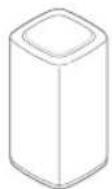
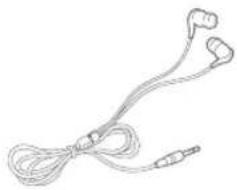
Check your product box for the following items:
natural_image
Line drawing of a pair of earbuds tied together (no text or symbols)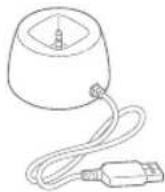
MP3 player Earphones Cradle
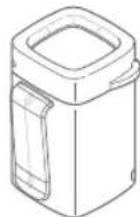

Player case Quick start guide

Note
- The items supplied with your player may appear different from the illustrations in this manual.
- You can obtain additional accessories from your local Samsung dealer.
YourMP3 player
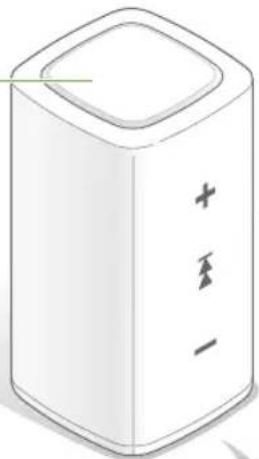
Power/Control button
natural_image
Simple line drawing of a rectangular device with three vertical slots and a top recess (no text or symbols)The indicators will illuminate when turning the player on or off or when the player is in use.
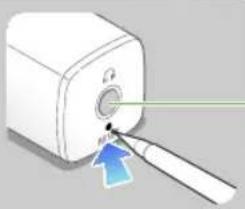
Reset hole
If your player is frozen or unresponsive, insert a pointed object (such as a toothpick or paper clip) into the reset hole. The system will be initialized.
natural_image
Illustration of a device with a blue arrow pointing to a small component (no text or symbols)Earphones jack/ Cradle jack
Connect to a PC and charge the battery
Connect your player to a PC and charge the battery before you use your player for the first time or when you have not used it for a long time.

Caution
The rechargeable battery incorporated in this product is not user replaceable. For information on its replacement, please contact your service provider.
1 Connect the player to the cradle.
2 Connect the cradle to the USB port of a PC.
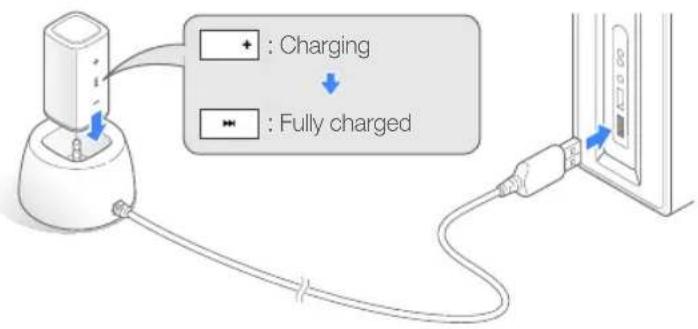
Charging time About 2 hours
3 When the battery is fully charged, unplug the cradle from your player and the PC.
Getting started > Connect to a PC and charge the battery
About batteries
- Charge and store the battery at 5\~35°C (41\~95°F).
- Do not charge the battery for more than 12 hours or leave the battery fully discharged for a long time. Doing so may shorten the battery life.
- Depending on how you use your player, actual battery life may vary and may be shorter than specified.

Note
- The charging time may differ depending on your PC's capabilities.
- If you want to charge the battery on your laptop, make sure that the laptop's battery is full or the laptop is plugged into a power source.
- The player can only be charged by connecting to your PC with the cradle. Do not use a separate USB AC adapter as it may not charge the battery or allow proper operation of the player.
natural_image
Line drawing of a notebook with earbuds and a handheld device, no text or symbols presentTurn your player on or off
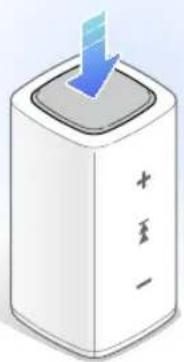
Press and hold [] to turn your player on or off.
natural_image
Illustration of a white cylindrical device with a blue downward arrow pointing to its top surface, labeled '十至一' (no other text or symbols)
Note
The player will stay in Standby mode for 1 minute after you turn it off. In Standby mode, the voice guide will not inform you of the remaining battery even when you turn the player back on.
Attach a neck strap
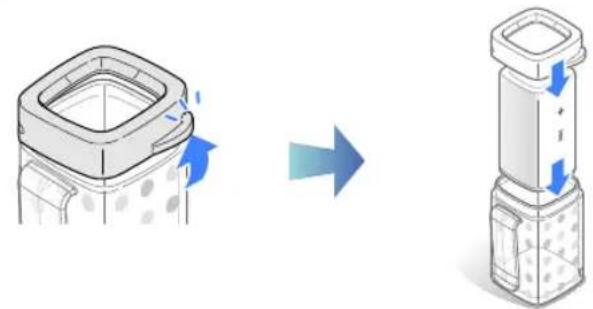
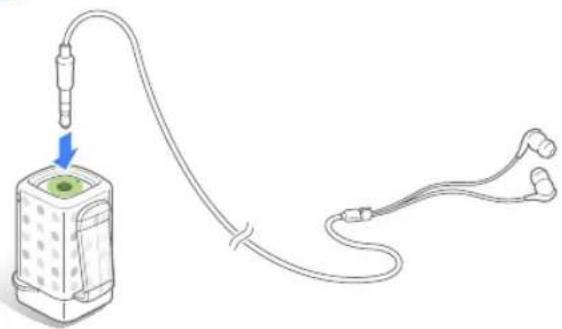
You can conveniently carry your player by connecting the player to the earphones after putting it into the case and plugging the earphones in the earphones jack.
1 Put your player inside the player case.
natural_image
Diagram showing a device being processed from a left-side view and then to a right-side view, with no visible text or symbols.2 Plug the earphones into the earphones jack of the player.
natural_image
Diagram of a medical device connected to two earbuds via tubing, with a blue arrow indicating direction (no text or symbols)Getting started > Attach a neck strap
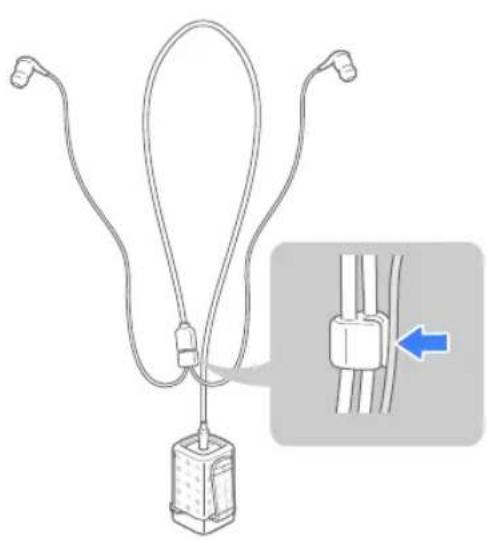
3 Wear the earphones strap around your neck and secure it by inserting the strap into the earphones slot.
natural_image
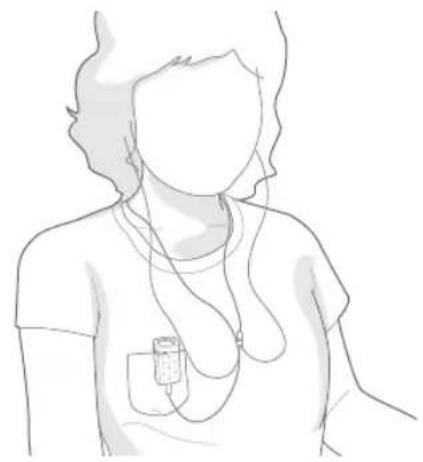
Diagram of a medical device with attached tubing and a close-up inset showing a blue arrow pointing to a cable or connector (no text or symbols present)4 Use the clip on the case to attach your player to your clothes.
natural_image
Line drawing of a person wearing a T-shirt with an ECG device inserted, no text or symbols present
Caution
Avoid exposing the clip to high external pressure.
natural_image
3D cube with colored blocks and musical notes, no readable text or symbolsManage your music
Manage music files or customize player settings with the TicToc PC program.
Use the TicToc PC program ....14

Usethe TicToc PC program
Launch the TicToc PC program
When you connect the player to your PC, the TicToc PC program will launch automatically.

Note
If the program does not launch automatically, see "Launch the TicToc PC program manually."
Recommended PC requirements
CPU Pentium 1.8 GHz or higher
Operating System Windows XP SP 2 or higher/Vista/7
| Others | Resolution 1024 X 768 (600) or higher1 GB RAM500 MB available hard disk space or more.Net Framework 3.5 SP1 or higherMicrosoft DirectX 9.0C or higher |
Launch the TicToc PC program manually
1 Connect your player to a PC using the cradle.
2 On your PC, double click

Note
If the
Manage your music > Use the TicToc PC program
Manage music files
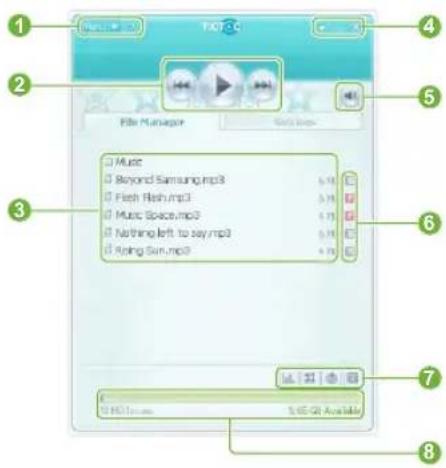
Icons on the TicToc PC program screen
| No. | Description |
| 1 | ·Menu drop-down list·? : View Help |
| 2 | ·/ : Play or pause·/ : Skip to the previous or next file |
| 3 | File list |
| 4 | ·: View mini mode·— : Minimise the program·× : Close the program |
| No. | Description |
| 5 | Adjust the volume |
| 6 | Tempo analysis icons |
| 7 | Analyze the tempo of music filesAdd music files to the playerUpdate the firmware of the player and the TicToc PC programPlay the tutorial video for your player |
| Used/available memory |

Note
m = 311
m = 311
m = 311
m = 311
m = 311
m = 311
m = 311
m = 311
m = 311
m = 311
m = 311
m = 311
m = 311

Note
m = 311
m = 311
m = 311
Regarding the Built-In Memory
1 GB = 1,000,000,000 bytes : actual formatted capacity may be less as the internal firmware uses a portion of the memory.
m = 311
m = 311
m = 311
m = 311
m = 311
m = 311
m = 311
m = 311
m = 311
m = 311
m = 311
m = 311
m = 311
m = 311
m = 311
m = 311
m = 311
Regarding the Built-In Memory
1 GB = 1,000,000,000 bytes : actual formatted capacity may be less as the internal firmware uses a portion of the memory.
m = 311
m = 311
m = 311
m = 311
m = 311
m = 311
m = 311
m = 311
m = 311
m = 311
m = 311
m = 311
m = 311
m = 311
m = 311
m = 311
Regarding the Built-In Memory
m = 311
m = 311
m = 311
m = 311
Regarding the Built-In Memory
m = 311
m = 311
m = 311
m = 311
m = 311
m = 311
m = 311
m = 311
m = 311
m = 311
m = 311
m = 311
m = 311
m = 311
m = 311
Regarding the Built-In Memory
m = 311
m = 311
m = 311
m = 311
m = 311
m = 311
m = 311
m = 311
m = 311
m = 311
m = 311
m = 311
m = 311
m = 311
m = 311
m = 311
Regarding the Built-In Memory
1 GB = 1,000,000,000 bytes : actual formatted capacity may be less as the internal firmware uses a portion of the memory.
m = 311
m = 311
m = 311
m = 311
Note
√
√
√
√
√
m = 311
m = 311
m = 311
m = 311
√
√
√
√
[Non-Text]
√
√
√
√
√
√
√
√
√
Note
√
√
√
√
√
√
[Non-Text]
√
√
√
√
√
√
√
√
m = 311
Regarding the Built-In Memory
m = 311
m = 311
√
√
√
√
√
√
√
√
√
√
√
√
√
√
√
√
√
√
√
√
√
√
√
[Non-Text]
√
√
√
√
√
√
√
√
√
Note
√
√
√
√
√
√
√
√
m = 311
m = 311
m = 311
m = 311
m = 311
yze
yze
yze
yze
yze
yze
yze
yze
yze
yze
yze
yze
m = 311
m = 311
m = 311
m = 311
m = 311
m = 311
m = 311
m = 311
m = 311
m = 311
m = 311
√
√
√
√
m = 311
Manage your music > Use the TicToc PC program
Add music files
You can easily transfer music files from a PC with the TicToc PC program.
1 Connect your player to a PC using the cradle.
2 Click 📋 on the TicToc PC program.
3 Select a music file, and then click
- The selected file is copied to your player.

Caution
To avoid damage to your player and corruption of your files, do not disconnect the cradle while files are being transferred.

Note
- To use the music voice guide feature, add your files only with the TicToc PC program. Files added using other programs or using the player as a removable disk will not be provided with the music voice guide.
- If you connect your player to a PC while the player's battery is low, the battery will charge for a few minutes before your player will connect to the PC.
- If you connect your player to a PC via a USB hub, the PC may not recognise your player. Connect your player directly into the USB port of a PC.
Update the firmware
The firmware of the player and the TicToc PC program will be updated automatically when the program is launched.
If the firmware does not update automatically, click 🤳 to update.

Caution
- To avoid damage to your player and corruption of your files, do not disconnect the cradle while the firmware is being updated.
- Check the battery charge status of your player. If the battery is low, the firmware will not be upgraded.
- You need to have at least 20 MB of free space in your player for the upgrade.
Play the tutorial video for your player
To play the tutorial video for your player, click on the TicToc PC program.
Manage your music > Use the TicToc PC program
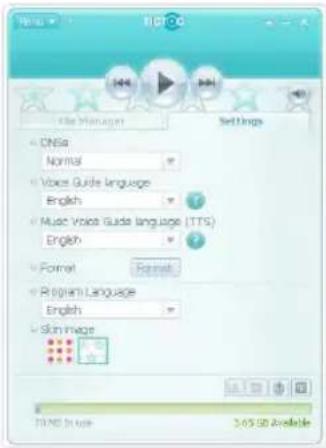
Customise player settings
You can customise various settings for the player or format the player. Click
| Option Description | |
| DNSe | Select a sound effect to enhance your music.Clickto automatically select the sound effect according to the information stored in the music file (ID3 tag). |
| Voice Guide language | Select a language for the voice guide. |
| Option Description | |
| Music Voice Guide language (TTS) | Select a language for the music voice guide that informs you about the current music. |
| Format | Delete all data and files stored in your player and restore all settings to the factory settings.NoteFormat the player only with the TicToc PC program.Remember to make backup copies of all important data stored in your player.The manufacturer's warranty does not cover any loss of data. |
| Program Language | Select a language for the TicToc PC program. |
| Skin image | Select a skin. The default skin may differ depending on the colour of your player. |
Manage your music > Use the TicToc PC program
What is DNSe?
Digital Natural Sound Engine (DNSe) is a group of sound effects for MP3 players developed by Samsung. It provides various settings to enhance your music.
What is an ID3 tag?
ID3 tag is a metadata container attached to MP3 files. It includes information for the music, such as the title, artist, album, or track number.
Disconnect your player from a PC
Carefully follow the steps below when disconnecting your player from a PC to avoid data loss or damage to your player.
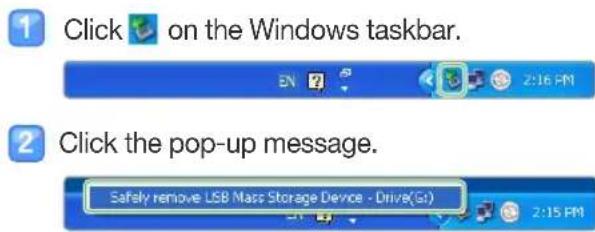
3 Unplug the cradle from your player and the PC.

Do not disconnect your player during playback. Stop playback first and then disconnect your player from the PC.

natural_image
Illustration of two brown speakers with sound waves, no text or symbols presentPlay music
You can listen to music in excellent 3D surround sound with the DNSe effects. Control your player with gesture sensor while you listen to music.
Play music 20

Playmusic
Play music files stored in your player. To transfer files, see "Use the TicToc PC program" on page 14.
Control playback
Press and hold [] to turn on the player and begin playback.
Hold your player in the position shown and press [☐] to perform the action listed.
| Task Position of the player Action | ||
| Skip to the next file | 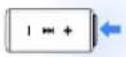 | Press [ ] once. |
| Skip to the previous file | 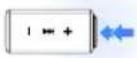 | Quickly press [ ] twice. |
| Skip to the next folder | 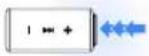 | Quickly press [ ] three times. |
Play music > Play music
Task Position of the player Action
Turn the volume up
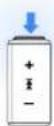
Press [ ] once.
Turn the volume down
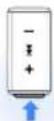
Press [] once.
Task Action
Change the play mode
Shake three times.
Listen to the music voice guide
Shake the player once. To change the language for the music voice guide, see "Music Voice Guide language (TTS)" on page 17.

Note
- Only the music files that have been analyzed for tempo by the TicToc PC program will play in the fast or slow modes. See "Analyze the tempo of music files" on page 15.
- The music voice guide informs you about music information stored in the ID3 tag. For the files without an ID3 tag, the music voice guide will inform you of the file name only.
Play music > Play music
Use your player
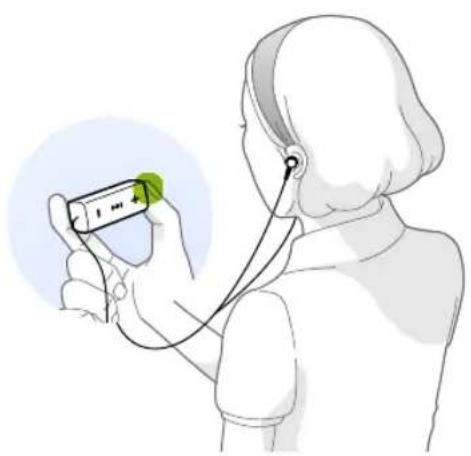
There is a sensor inside the player that can detect the motion and the position of the player. You can control the player by shaking it or pressing [] . The function of [] changes depending on how you hold the player.
natural_image
Illustration of a person using a handheld device to interact with a green device (no text or symbols visible)Example 1: Skip to the next file
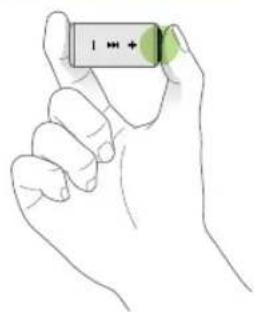
natural_image
Line drawing of a hand holding a battery with a green label (no text or symbols on the object itself)1 Hold the player horizontally.
2 Press [ ] .
- The player skips to the next file.
Play music > Play music
Example 2: Change the play mode
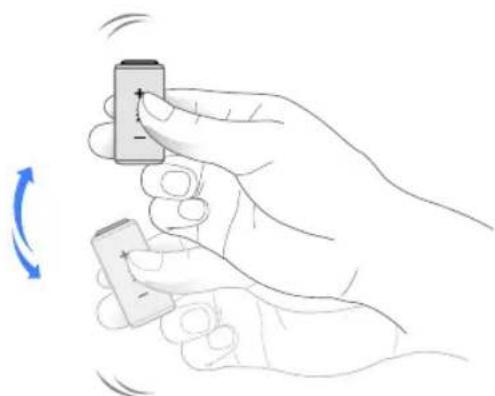
natural_image
Illustration of a hand holding a small electronic device with a blue circular arrow indicating rotation (no text or symbols)Shake the player three times.
- The play mode changes each time you shake the player. (Normal → Shuffle → Fast → Slow)
About the voice guide
The voice guide informs you about the current status of the player and usage instructions. To change the language, see "Voice Guide language" on page 17.
Customise player settings
You can use the TicToc PC program to customise player settings, such as DNSe, voice guide language, and play mode. See "Customise player settings" on page 17.
natural_image
Red notebook with lined pages and a red bookmark (no visible text or symbols)Appendix
View maintenance, specifications, and troubleshooting information for your player.
Maintenance of your player 25
Troubleshooting....26
Specifications....28
Correct disposal of this product
(Waste Electrical & Electronic Equipment) 29
Correct disposal of batteries in this product 29
Licence....30
Contact Samsung World Wide 31
Maintenance of your player
Carefully read the following to properly clean, store, or dispose of your player.
 | CleaningWhen your player is dirty, wipe your player with a soft, clean and dry cloth.Do not apply cleaners to your player's surface. This may cause damage or affect the performance of the player.Do not clean your player with gasoline, benzene, thinner, WD-40, or other chemicals. This may cause damage to your player's surface. |
 | StoringStore your player in a well-ventilated area. |
 | DisposingDispose of wrapping materials, batteries, and electronic devices separately.The wrapping materials include paper and two kinds of plastics (PC and PE). |
Troubleshooting
When you have a trouble using the player, try the following before contacting a service centre.
| Problem | Solution |
| My player will not turn on. | ·Your player will not turn on if the battery is completely drained. Recharge the battery and turn the player on again.·Press the reset button to reset your player. |
| The button does not work. | Press the reset button to reset your player. |
| My player turns off automatically. | If you do not use your player for 1 minute after you pause the playback, it will automatically turn off. |
| The battery running time is different from what is written in the user manual. | ·The battery running time may differ depending on the current sound mode.·The battery running time may shorten when your player was left in a high or low temperature. |
| The TicToc PC program will not work on a PC. | Check if your PC meets PC requirements.See "Recommended PC requirements" on page 14. |
| Problem | Solution |
| My player will not connect to a PC. | Run Windows Update on the PC. Select key updates and service packs and update all.When the update is completed, reboot the PC and reconnect. |
| The file transfer is too slow. | Launch the TicToc PC program and click to format your player.End all programs you are not using. Running multiple programs simultaneously can slow down the file transfer rate. |
| My player will not play any files. | Check if any playable files are stored in your player.Check if the files are damaged.Check the battery remaining. |
| I cannot download files to my player. | Check if the cradle is correctly connected. Reconnect it.Check if the memory is full.Press the reset button to reset your player. |
Appendix > Troubleshooting
| Problem | Solution |
| Files or data are missing. | Check if you disconnected the cradle while transferring files or data. This can cause data loss or fatal errors in your player. Samsung is not responsible for any damages resulting from data loss. |
| My player is getting hot to the touch. | Charging the battery can heat up your player. This will not affect the player's life or capabilities. |
natural_image
Line drawing of a notebook with earbuds and a battery, floating above it (no text or symbols)Specifications
| Model Name YP-S1 | |
| Rating DC 5.0V / 500mA | |
| File | MPEG1 Layer 3 (8 kbps~320 kbps, 32 kHz~48 kHz)MPEG2 Layer 3 (32 kbps~160 kbps, 16 kHz~24 kHz)MPEG2.5 Layer 3 (32 kbps~160 kbps, 8 kHz~12 kHz)WMA (48 kbps~320 kbps, 8 kHz~48 kHz, V4.0, 4.1, 7, 8, 9)ASF (Audio) (8 kbps~192 kbps, 8 kHz~48 kHz)Ogg (Q0~Q10)FLAC (0 Mbps~1.2 Mbps, 16 bits/sample, 2 channel) |
| Earphones Output | 12 mW/Ch. (based on 16 Ω) |
| Output Frequency Range 40 Hz~20 kHz | |
| Signal to Noise Ratio 85 dB with A LPF (based on 1 kHz, 0 dB) | |
| Supported Number of Files/Folders | File: Max. 3000Folder: Max. 3000 (including Files) |
| Playing Time Music: 12 hours (MP3 128 kbps, Volume level 15, Normal sound mode) | |
| Temperature Range for Operation -5~35°C (23~95°F) | |
| Case Plastic | |
| Weight 12 g | |
| Dimensions (WxHxD) 17.5 X 17.5 X 35.9 mm | |
* Some of the contents in this manual are subject to change without prior notice for further improvement.
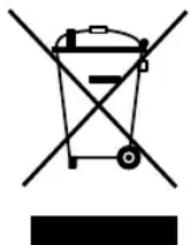
Correct disposal of this product (Waste Electrical & Electronic Equipment)
(Applicable in the European Union and other European countries with separate collection systems)
This marking on the product, accessories or literature indicates that the product and its electronic accessories (e.g. charger, headset, USB cable) should not be disposed of with other household waste at the end of their working life. To prevent possible harm to the environment or human health from uncontrolled waste disposal, please separate these items from other types of waste and recycle them responsibly sustainable reuse of material resources.
natural_image
Symbol of a trash bin crossed with no text or numbers, representing waste sorting or restriction (no text present)Household users should contact either the retailer where they purchased this product, or their local government office, for details of where and how they can take these items for environmentally safe recycling.
Business users should contact their supplier and check the terms and conditions of the purchase contract. This product and its electronic accessories should not be mixed with other commercial wastes for disposal.
Correct disposal of batteries in this product
(Applicable in the European Union and other European countries with separate battery return systems.)
This marking on the battery, manual or packaging indicates that the batteries in this product should not be disposed of with other household waste at the end of their working life. Where marked, the chemical symbols Hg, Cd or Pb indicate that the battery contains mercury, cadmium or lead above the reference levels in EC Directive 20 are not properly disposed of, these substances to human health or the environment.
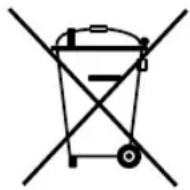
To protect natural resources and to promote material reuse, please separate batteries from other types of waste and recycle them through your local, free battery return system.
Licence
The product player accompanying this user manual is licenced under certain intellectual property rights of certain third parties. This licence is limited to private non-commercial use by end-user consumers for licenced contents.
No rights are granted for commercial use.
The licence does not cover any product player other than this product player and the licence does not extend to any unlicensed product player or process conforming to ISO/IEC 11172-3 or ISO/IEC 13818-3 used or sold in combination with this product player. The licence only covers the use of this product player to encode and/or decode audio files conforming to the ISO/IEC 11172-3 or ISO/IEC 13818-3. No rights are granted under this licence for product features or functions that do not conform to the ISO/IEC 11172-3 or ISO/IEC 13818-3.
Contact Samsung World Wide
If you have any questions or comments relating to Samsung products, please contact the SAMSUNG Customer Care Centre.
| Country | Customer Care Centre ☎ | Web Site |
| CANADA | 1-800-SAMSUNG (726-7864) | www.samsung.com |
| MEXICO | 01-800-SAMSUNG (726-7864) | www.samsung.com |
| U.S.A | 1-800-SAMSUNG (726-7864) | www.samsung.com |
| ARGENTINE | 0800-333-3733 | www.samsung.com |
| BRAZIL | 0800-124-421, 4004-0000 | www.samsung.com |
| CHILE | 800-SAMSUNG (726-7864) | www.samsung.com |
| NICARAGUA | 00-1800-5077267 | www.samsung.com |
| HONDURAS | 800-7919267 | www.samsung.com |
| COSTA RICA | 0-800-507-7267 | www.samsung.com |
| ECUADOR | 1-800-10-7267 | www.samsung.com |
| EL SALVADOR | 800-6225 | www.samsung.com |
| GUATEMALA | 1-800-299-0013 | www.samsung.com |
| JAMAICA | 1-800-234-7267 | www.samsung.com |
| PANAMA | 800-7267 | www.samsung.com |
| PUERTO RICO | 1-800-682-3180 | www.samsung.com |
| REP. DOMINICA | 1-800-751-2676 | www.samsung.com |
| TRINIDAD & TOBAGO | 1-800-SAMSUNG (726-7864) | www.samsung.com |
| VENEZUELA | 0-800-100-5303 | www.samsung.com |
| Country | Customer Care Centre | Web Site |
| COLOMBIA | 01-8000112112 | www.samsung.com |
| AUSTRIA | 0810 - SAMSUNG (7267864, € 0.07/min) | www.samsung.com |
| BELGIUM | 02 201 2418 | www.samsung.com/be (Dutch)www.samsung.com/be_fr (French) |
| CZECH | 800-SAMSUNG (800-726786) | www.samsung.com |
| DENMARK | 70 70 19 70 | www.samsung.com |
| FINLAND | 030 - 6227 515 | www.samsung.com |
| FRANCE | 01 48 63 00 00 | www.samsung.com |
| GERMANY | 01805 - SAMSUNG (726-7864 € 0,14/Min) | www.samsung.com |
| HUNGARY | 06-80-SAMSUNG (726-7864) | www.samsung.com |
| ITALIA | 800-SAMSUNG (726-7864) | www.samsung.com |
| LUXEMBURG | 261 03 710 | www.samsung.com |
| NETHERLANDS | 0900-SAMSUNG (0900-7267864) (€ 0,10/Min) | www.samsung.com |
| NORWAY | 815-56 480 | www.samsung.com |
| POLAND | 0 801 1SAMSUNG (172678), 022-607-93-33 | www.samsung.com |
Appendix > Contact Samsung World Wide
| Country Customer Care Centre Web Site | ||
| PORTUGAL | 80820-SAMSUNG (726-7864) | www.samsung.com |
| SLOVAKIA | 0800-SAMSUNG (726-7864) | www.samsung.com |
| SPAIN | 902-1-SAMSUNG (902 172 678) | www.samsung.com |
| SWEDEN | 0771 726 7864 (SAMSUNG) | www.samsung.com |
| U.K | 0845 SAMSUNG (7267864) | www.samsung.com |
| EIRE | 0818 717 100 | www.samsung.com |
| SWITZERLAND | 0848-SAMSUNG (7267864, CHF 0.08/min) | www.samsung.com/chwww.samsung.com/ch_fr/(French) |
| LITHUANIA | 8-800-77777 | www.samsung.com |
| LATVIA | 8000-7267 | www.samsung.com |
| ESTONIA | 800-7267 | www.samsung.com |
| RUSSIA | 8-800-555-55-55 | www.samsung.com |
| KAZAKHSTAN | 8-10-800-500-55-500 | |
| UZBEKISTAN | 8-10-800-500-55-500 | www.samsung.com |
| KYRGYZSTAN | 00-800-500-55-500 | www.samsung.com |
| TADJIKISTAN | 8-10-800-500-55-500 | www.samsung.com |
| UKRAINE | 0-800-502-000 | www.samsung.uawww.samsung.com/ua_ru |
| AUSTRALIA | 1300 362 603 | www.samsung.com |
| NEW ZEALAND | 0800 SAMSUNG (0800 726 786) | www.samsung.com |
| Country Customer Care Centre Web Site | ||
| CHINA | 400-810-5858010-6475 1880 | www.samsung.com |
| HONG KONG | (852) 3698-4698 | www.samsung.com/hkwww.samsung.com/hk_en/ |
| INDIA | 3030 8282, 1800 110011,1-800-3000-8282,1800 266 8282 | www.samsung.com |
| INDONESIA | 0800-112-8888,021-5699-7777 | www.samsung.com |
| MALAYSIA | 1800-88-9999 | www.samsung.com |
| PHILIPPINES | 1-800-10-SAMSUNG (726-7864),1-800-3-SAMSUNG (726-7864),1-800-8-SAMSUNG (726-7864),02-5805777 | www.samsung.com |
| SINGAPORE | 1800-SAMSUNG (726-7864) | www.samsung.com |
| THAILAND | 1800-29-3232, 02-689-3232 | www.samsung.com |
| TAIWAN | 0800-329-999 | www.samsung.com |
| VIETNAM | 1 800 588 889 | www.samsung.com |
| TURKEY | 444 77 11 | www.samsung.com |
| SOUTH AFRICA | 0860-SAMSUNG (726-7864 ) | www.samsung.com |
| U.A.E | 800-SAMSUNG (726-7864) | www.samsung.com |
SAMSUNG
REV. 1.0