
PBC5200PN - Generator Pyle - Free user manual and instructions
Find the device manual for free PBC5200PN Pyle in PDF.


| Product Type | 3G Wi-Fi Mobile Power Bank & Router |
| Brand | Pyle |
| Model | PBC5200PN |
| Dimensions (approx.) | 4.0 x 2.4 x 0.8 inches (101 x 60 x 20 mm) |
| Weight (approx.) | 5.3 oz (150 g) |
| Power Input | DC 5V, 600-1000 mA via Micro USB |
| Battery Capacity | Not specified; charges via 5V adapter |
| 3G Support | WCDMA / CDMA2000 / TD-SCDMA |
| Wi-Fi Standard | 802.11 b/g/n |
| USB Port | 1 x USB (for charging devices or connecting 3G modem/storage) |
| Ethernet Port | 1 x RJ45 WAN |
| Mobile Power Bank | Can charge smartphones, tablets, and other USB devices |
| Wireless Storage | Supports U disk, USB hard drive sharing via SMB/FTP |
| Wireless Repeater | Extends existing Wi-Fi network |
| Management Interface | Web browser at 192.168.169.1 |
| Maintenance | Keep dry; avoid extreme temperatures; use original charger |
| Safety | Do not disassemble; avoid water; use specified voltage |
| Spare Parts / Reparability | Not user-serviceable; battery non-removable |
| Included Accessories | Host, USB charging cable, Quick Installation Guide, Warranty Card |
Frequently Asked Questions - PBC5200PN Pyle
User questions about PBC5200PN Pyle
0 question about this device. Answer the ones you know or ask your own.
Ask a new question about this device
Download the instructions for your Generator in PDF format for free! Find your manual PBC5200PN - Pyle and take your electronic device back in hand. On this page are published all the documents necessary for the use of your device. PBC5200PN by Pyle.
USER MANUAL PBC5200PN Pyle
QuickInstallationGuide
3GWi-Fimobilepowerbankandrouterintegratorisa3Gnetworkproductforconsumers,which integrates3Grouting,wirelessrouting,ADSLdial-upInternetaccess,wirelessnetworkstorage,mobile powerandotherfunctions.Thisallowsyoutocreateawirelessnetworkanytimeandanywherethereisa LANconnection.Youcaneasilysharecontentsindigitaldeviceswithothers.Variousfunctionsofthis productarelistedbelow:
3G Routing: support 3G wireless network card dialing and bandwidth sharing for WCDMA / CDMA 2000/TD-SCDMAstandard;
✿ Wireless routing: support traditional wired broadband ADSL dial-up, dynamic and static network access;
Wireless network storage: supports file reading and sharing on U disk, USB mobile hard disk, as wellasonlinevideoon-demand;
Mobilepowerbank: canchargeiPhone, iPad, Androidsmartphones, tabletPCs and other mobile digital devices;
✿ Wireless relay: relay and amplify the signals and thus extend the coverage of wireless network.
1. List of accessories
Thank you for buying the 3G Wi-Fi mobile power and router integrator. Please make sure your package includesthefollowingaccessories.
1.Host
2. USBchargingcable
3. Quick Installation Guide/Warranty Card
4. Certificate
2. Introduction of panel
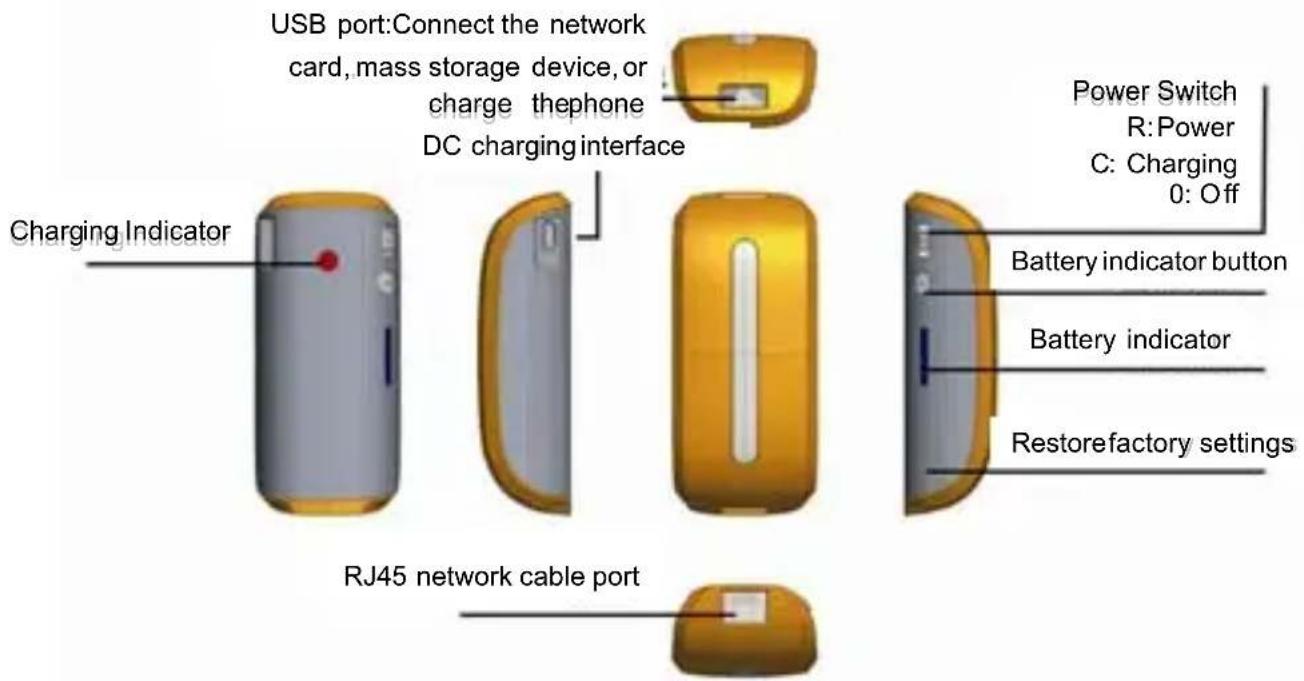
2.1 Description of hardwareinterfaces
| Hardware Interface | IdentityDetailedDescriptionofFunctions | |
| Powerswitch | RTurnonthepowerswitchtoRtostarttherouterfunction | |
| C | Charging,switchtoCtoactivatethemobilepowerbankfunctionto chargedevicesthroughtheUSBport | |
| ⊖ | Offswitch | |
| Batteryindicator button |  | Pressthisbutton,thebatteryindicatorwillshowthecurrentbattery,batteryindicatorisdividedintofourlevels. |
| USBinterface |  | Thisinterfacecanconnect3GUSBmodems,Udisk,USBmobile harddisk,flashdrive,orconnectsmartphones,tabletPCs,PSP andotherdigitalterminalsforcharging. |
| DCcharging interface |  | DC5Vinput,youcanchargetheunitthroughtheMicroUSB chargingcable. |
| Charging indicator | Whentheunitisbeingcharged,theindicatorisalwayson | |
| RJ45network port |  | WANport:InthemodeofDynamicIP/StaticIP/PPPoE,theportis usedasaWANporttoconnectawirednetwork,LANbroadband,xDSLModem/CableModemofhotels. |
| Restorefactory settings |  | InRoutingstate,longpressfor5seconds,thenreleasethekey,therouterwillrestoretofactorysettings. |
2.2 Descriptions of Status Indicators
| Action Performed | Indicator status | Details |
| TurnOnthe power | Bluelight alwayson | SlidethepowerswitchtoCtopoweronunit |
| Removable storage inserted Equipment | Bluelight flashesslowly (1.5seconds eachtime) | WhenUdisk, mobileharddrivesandotherremovablestorage devicesarepluggedintotheUSBport,youcanseetheblue lightflashslowlyafter8-10seconds, indicatingthatthe removablestoragedevicesareloadednormallyandcanbe accessed. |
| Bluelight alwayson | Removablestoragedevicesarenotloadedsuccessfully | |
| 3Gcard inserted | Bluelight flashesquickly (0.5seconds eachtime) | When3GUSBmodemsareinserted,youcanseethebluelight flashquicklyafterabout30seconds(0.5secondseachtime), indicatingtherouterisinthe3Gdialingstate; |
| Bluelight flashesslowly (1.5seconds eachtime) | Bluelightflashesslowly(1.5secondseachtime),indicatingthat therouterhasdialed-upvia3Gsuccessfully, andyoucan accesstheInternet. | |
| Bluelight alwayson | Dialnotsuccessful | |
| InsertADSL networkcable (PPPOEMode) | Greenlight alwayson | WiththeEthernetcablepluggedin, ifyoucanseethegreen lightisalwaysonafter5seconds, thisindicatesthatthenetwork connectionisnormal; |
| Bluelight flashesslowly (1.5seconds eachtime) | Aftergreenlightisonforawhile, ifyouseethebluelightflash slowly, thisindicatesthattherouterADSLhasdialed-up successfully, andyoucanaccesstheInternet | |
| Networkcable plugged into therouter (DynamicIP mode) | Greenlight alwayson | Indicatesthatthenetworkcableisconnectedproperly |
| Greenlight flashesslowly (1.5seconds eachtime) | Indicatesthatnetworkcableisconnectedproperly, also meaningthattherouterhassuccessfullyretrievedIPaddresses dynamicallyassignedontheupperrouter. | |
| Networkcable plugged into therouter (StaticIPmode) | Greenlight alwayson | Indicatingthatthenetworkcableisconnectedproperly |
3. Applicationscenarios
The products supports the following application modes:
1)3GtoWiFiInternetSharingmode

flowchart
graph TD
    A["Internet"] -->|Data| B["3G/3.75G Network"]
    B --> C["Plug3GUSBdatacard"]
    C --> D["iPad"]
    D --> E["Wi-Fi"]
    E --> F["Mobile Phone"]
    G["3G Router 3Gtowifimode"] --> H["Network"]
    I["Wi-Fi"] --> J["Smartphone"]
    K["Wi-Fi"] --> L["Smartphone"]
    M["Wi-Fi"] --> N["Smartphone"]
2) WiredtoWiFiInternetSharingmode
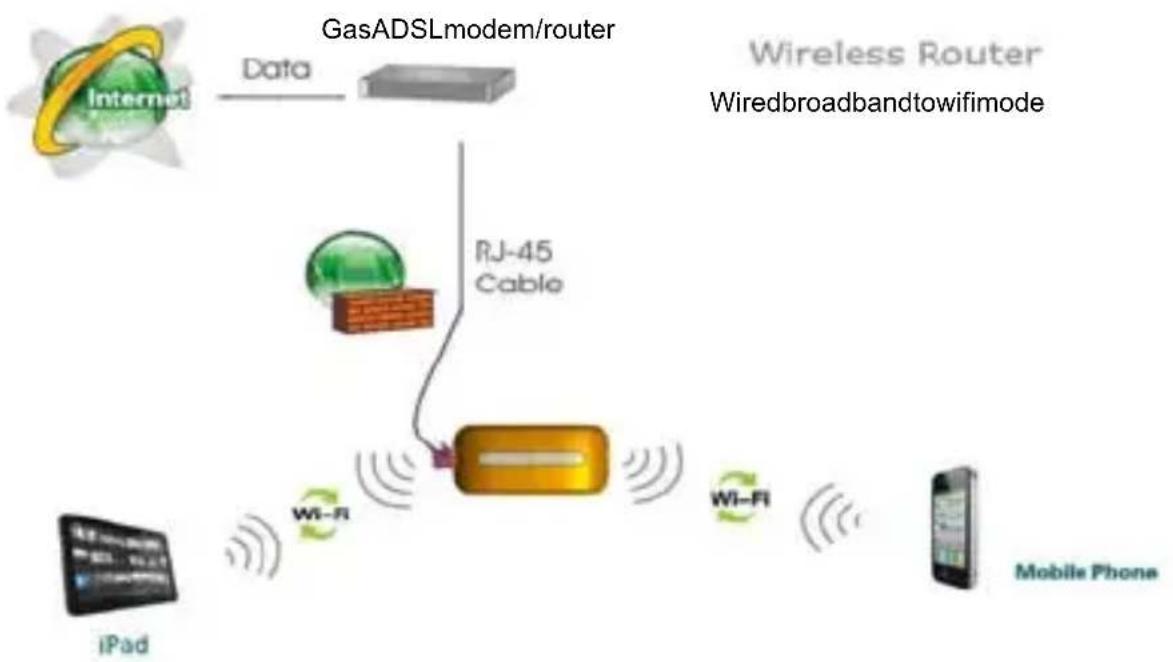
flowchart
graph TD
    A["Internet"] -->|Data| B["GasADSLmodem/router"]
    B --> C["RJ-45 Cable"]
    C --> D["Wi-Fi"]
    D --> E["Mobile Phone"]
    F["iPad"] --> G["Wi-Fi"]
    G --> H["Wireless Router"]
    style A fill:#f9f,stroke:#333
    style B fill:#ccf,stroke:#333
    style C fill:#cfc,stroke:#333
    style D fill:#fcc,stroke:#333
    style E fill:#cff,stroke:#333
    style F fill:#ffc,stroke:#333
    style G fill:#cfc,stroke:#333
    style H fill:#fcc,stroke:#333
4. Mobile power function: Instructions for charging mobile phones, tablet computers and other digital products
Step1:Batterydisplay.
Beforechargingmobilephones, tabletcomputersandotherdigitalproducts, checkthebatterylevelofthe deviceitself,andfollowtheseinstructions:
a) Pressthebatteryindicatorbutton. Thebatteryindicatorlightshouldturnonandyoucanseethe currentbatteryppercentage. Thelightwillturnoffautomaticallywhenidleformorethanfoursecondsin ordertosavepower.
b) The corresponding relationship between battery and power indicator:
| LEDstatusDetails | ||
| Battery level indicator | Nolights | Noelectricity,pleasechargethisunit first |
| OnelightisonCapacityislessthan25% | ||
| TwolightsareonCapacityisbetween25%-50% | ||
| ThreelightsareonCapacityisbetween50%-75% | ||
| FourlightsareonCapacityisbetween75%-100% | ||
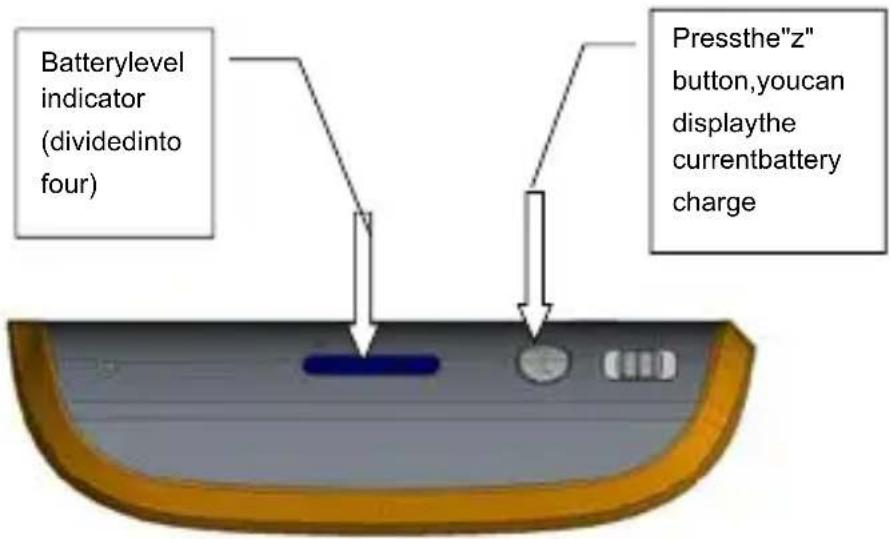
(Batteryschematic diagram)
Step2:Chargemobilephones,tabletcomputersandotherdigitalproducts.
Settheswitchtothechargingfunction(C)positiontoactivatemobilepowerfunction,andthenconnect the charging cable of digital products to the USB port of this product. This unit can charge iPad, iPhone,
Androidsmartphones, and other mobile digital devices.
Tip: Use original charging cable for cell phone to achieve the best results.
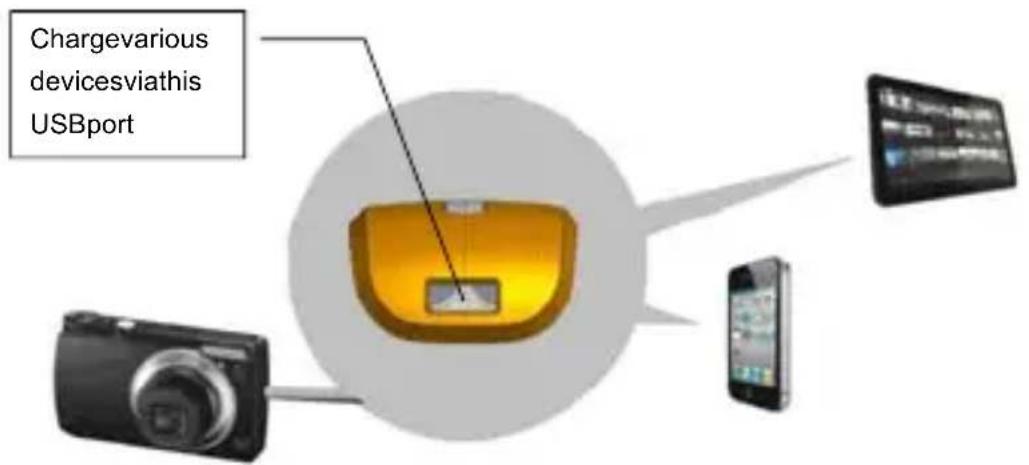
(Schematic diagram of charging devices)
5. Charge this product
Whenthebatteryhasbeenexhausted,youcanchargeitinthefollowingtwoways:
Power Charging: Connect one end of the Micro USB charging cable to the DC charging port of this product(MicroUSBInterface)andconnecttheotherendtotheUSBportofchargingadapter.
ComputerUSBCharging:ConnectoneendoftheMicroUSBchargingcabletotheDCcharging portofthisproduct(MicroUSBInterface)andconnecttheotherendtothecomputer'sUSBport.

(Schematic diagram of charging this 3GWi-Fi unit)
ChargingPrecautions:
-
Please choose the charging adapter where the output is 5V (output current is between 600 to 1000 mA) Common charging adapters, such as adapters for iPhone or iPad, can be used.
-
Chargingtime: it will take about 5-8 hours with a charge of 5 V 1000 mA; 11 hours with a charge of 5 V 600 mA;
Itwilltakemorethan12hoursifitisdirectlychargedusingacomputerUSB.
- In the process of charging this unit, donot reus the unit to charge o there equipment, in ordertoprotect the battery and prolong battery life.
6. Features and configurations of 3G Wi-Fi wireless router
3GWi-Firoutersupportsaccessandconfigurationthroughawebbrowser.Youcanusecommon browsers,suchasMicrosoft'sIEbrowser,Apple'sSafaribrowserandthebuilt-inbrowserofanyAndroid operatingsystem.Logintotherouter,browsecontentsofmobilestorage,andconfiguretherouter parameters. The following is an introduction to the operation of this unit.
6.1 The use your wireless device, you need to connect to the wireless router first (for example,iPad)
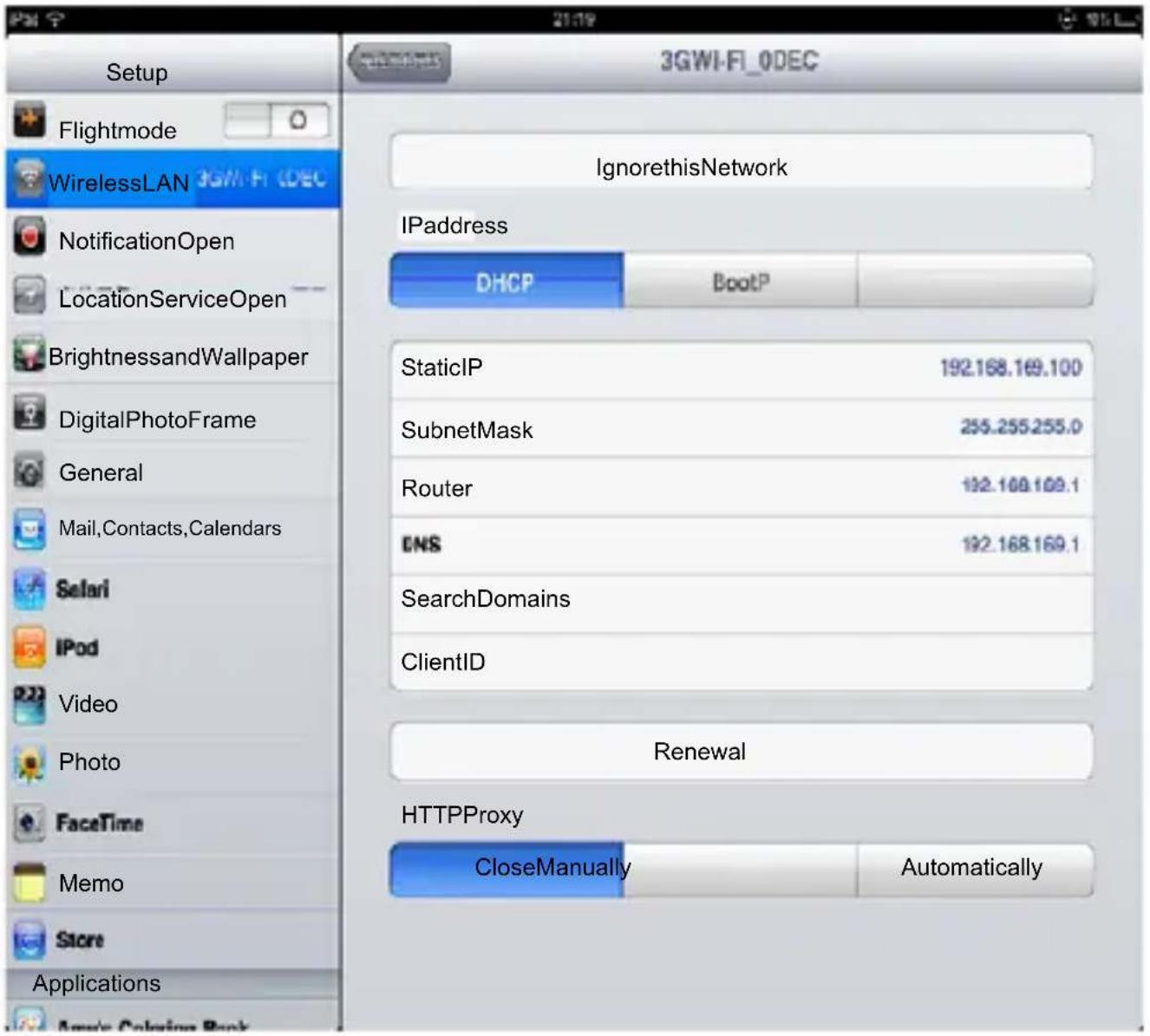
Step 1: Open the main interface of the iPad, select "Settings" → "Wireless LAN", enter the Wi-Fi settings page. Turnonthewirelessnetworkswitch,iPadwillautomaticallyscansurroundingwirelessnetworks, andyouwillseetheid3GWi-Fixxxx,double-clicktoconnect.
Step2: When connecting, enter the Wi-Fi password behind the router enclosure, and make the connection (the password can be modified yourself)
If connected successfully, a tick “√” will appear to the left, while at the same time there will be a sign iPad 📞 attheupperleftcornerofthescreenindicatingasuccessfulconnection.Ifpromptedyoucannot jointhenetwork,pleasemakesureyourwirelesspasswordisenteredcorrectly.

Step 3: View and set network parameters. Click the ">" button at the right of where it says connected, and the setting page for wireless connection network parameters popsup (By default, DHCP server is enabled by etherouter, its recommended to use DHCP).
6.2 Enter the configuration interface for 3G Wi-Fi router
Click the Safari browser, enter: http://192.168.169.1, in the address bar. Click the "Go" button to enter the homepageoftherouterconfigurationpage.Seebelow:

Inaddition, for users of iPhone and iPadios devices, there is more efficient way to enter the router configuration page. You can directly enter "wd" in the Safari browser's address bar. Then, you can go in by clicking the "Go" button.

6.3 Homepage of 3G router configuration interface – Description of functions in common functionsoperation interface

Iconsofthefirstrow:

:Clickonthisicon,youcanenterthe3Gconfigurationpage;

:Clickonthisicon,youcanbrowseandplaymultimediafilesonmobilestoragedevices.

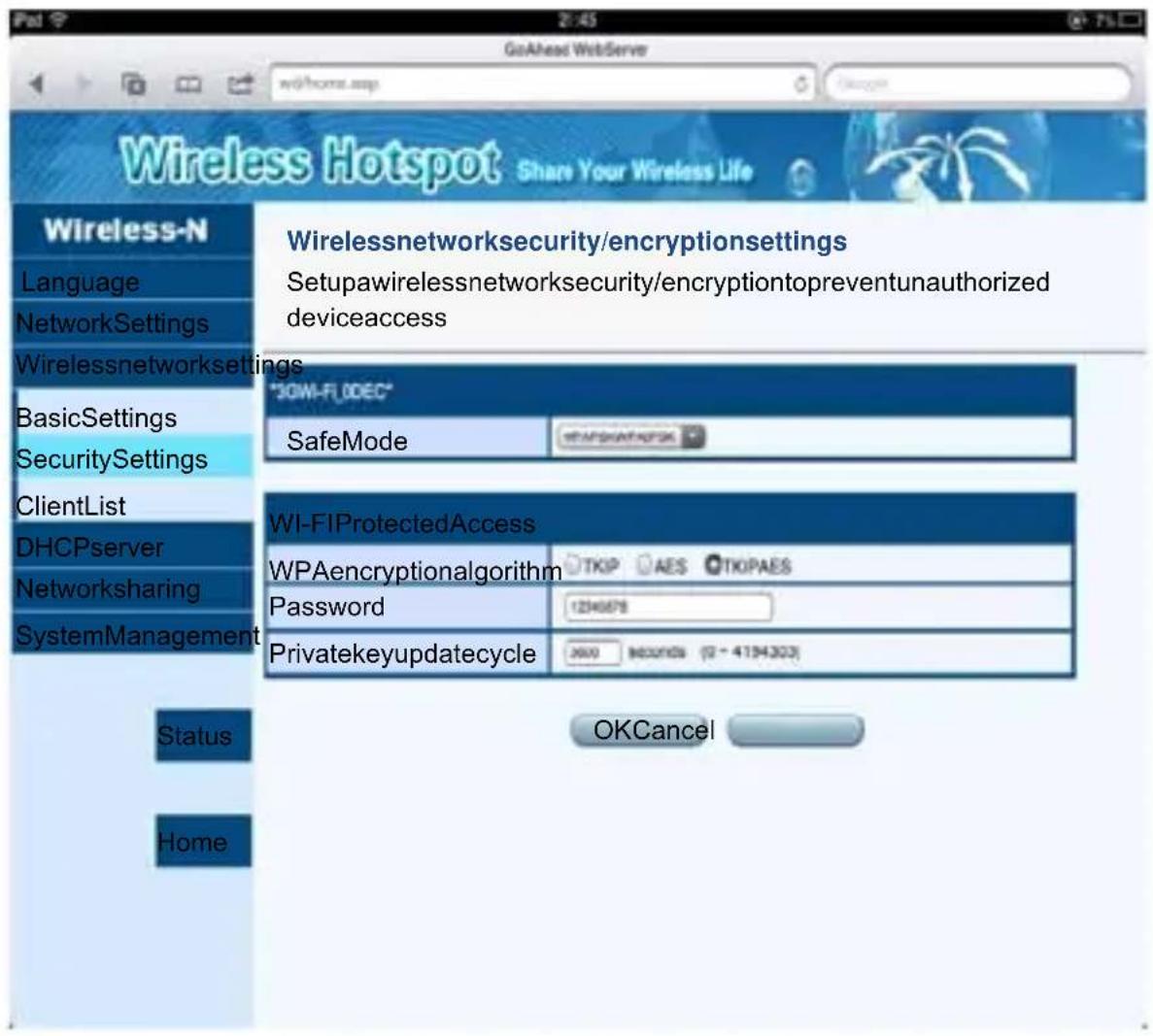
: Click on this icon, you can enter the WiFi security settings interface. Here, you can change the WiFipassword.

Click on this icon, you can enter the router's advanced setup interface. Here, you can set up morefeaturesoftherouter,suchasupgradingfirmware,checkingstatus,andsoon.
Secondrowicons:

:ClickonthisicontoenterthesettinginterfacefordynamicIPInternet.Thiswillpopupatthe bottomofthepage.IfyourcurrentInternetenvironmentistroughawirednetworkcable(Hotel Internettypicallyusesthismethod),thentheIPaddressisassignedbytheupperrouter.Please clickonthe"OK"buttontocompletethesetting;otherwiseclick"Cancel."

:ClickonthisicontoenterthesettinginterfaceforPPPOEdial-up.Thiswillpopupatthebottom ofthepage.IfyourcurrentInternetenvironmentistroughawirednetworkcableoratelephone linedial-up,then,pleasefirstentertheusernameandpasswordofthePPPOEdial-up,and thenclickthe"OK"buttontocompletethesetting;otherwiseclick"Cancel."

:ClickonthisicontoenterthesettinginterfaceforstaticIPInternet. Thiswillpopupatthebottom ofthepage.IfyourcurrentInternetenvironmentistroughawirednetworkcableandtheIP addressismanuallyspecified,thenentertheaddressesofIPaddress,subnetmask,gateway, andDNSdomainnameineachcolumn.Thenclickthe"OK"buttontocompletethesetting; otherwiseclick"Cancel."

:ClickonthisicontoenterthesettinginterfaceforWiFirepeatermode. Thiswillpopupatthe bottomofthepage.Click"SearchallAP", and thenchecktheSSIDyouwanttorelay.Enterthe passwordandclickOK.
6.4 To modify Wi-Fi passwords
WiFi router's factory-set password is relatively simple. When you first use this product, remember to modify the WiFi password to ensure data security.
Modificationmethod:
Clickon"WiFiSecurity"icon, enterthesettingpageforWiFisecurity.
Tip:
a) Inordertopreventyourwirelessnetworkfromunauthorizedaccessbyothers, werecommendsetting upwirelessencryption. TherecommendedencryptionmethodisWPA-PSK/WPA2-PSK.
b) AftersettingthewirelessnetworkSSIDandencryption, pleaseconnectthewirelessnetworkagain. TheWiFipasswordhasnowbeenset.
6.5. To set parameters for 3G Internet
Whenusersinsertthe3Gmodemintotherouter'sUSBport,therouterwillautomaticallybegin3Gdialup.
When 3G dials-up, the system needs to call some configuration information. So please configure them in the3Gconfigurationpagebeforeinsertingthe3Gmodem.
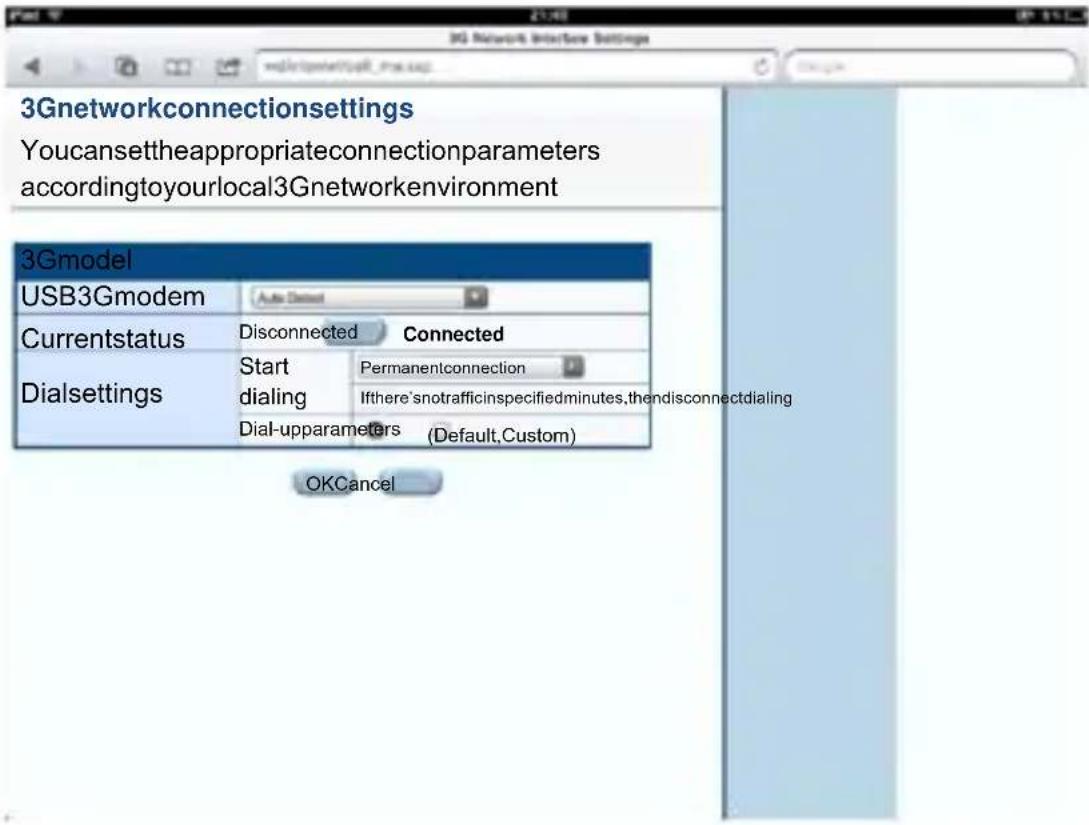
Click the "3G" icon to enter the 3G setting interface, select "3G network card model", and in the dial setting, select "dialing on start mode", type "dial-up parameters" provided by 3G ISP, and click "OK".
Bydefaultthesystemisinautomaticrecognitionmode,plugandplay,usersdonotneedtodoany modification.
Normally, you only need to select "Auto Detect" (automatic identification) for "USB 3G Modem" Model on the interfaceshownintheabovefigure, whichcanautomaticallysetthedialnumber,APNusernameand passwordandotherinformation. Thisway,youonlyneedtoconnect3Gmodemtotherouter'sUSBport, andthere'snoneedtodoanysettingbeforecompleting3Gdialing.
6.6 To set the parameters of wired broadband Internet access
In wired Wi-Fi mode, 3G Wi-Fi is equivalent to a wireless router, the Ethernet port works as WAN port, all of the wireless terminal only connect to the Internet via Wi-Firouter.
Click the "Network Settings" → "WAN", choose the way to access the Internet according to the front-end broadbandlines, and theroutersupportsthreekindsofcommonwiredInternet:staticIP,dynamicIP, PPPoE.
a)StaticIP
If thenetworkproviderprovidesthewayofstaticIPforyouraccesstoInternet,youneedtoentertheIPaddress,subnetmask,gateway,DNSserver,alternateDNSserverprovidedbyyourISPornetworkadministrator.
| Staticmode | |
| IPaddress | 192.168.1.8 |
| SubnetMask | 255.255.255.0 |
| Gateway | 192.168.1.1 |
| PrimaryDNSserver | 202.96.134.33 |
| AlternateDNSserver | 202.96.128.25 |

b)DynamicIP
If thenetworkproviderprovidesthewayofdynamicIPforyouraccesstoInternet,youdonotneedto makeanysettingshere.Justclick"OK".DynamicIPisthemethodofaccessingInternetcommonly usedinhotelsandrestaurantsandotherpublicplaces.

c) PPPoE
If you access internet by "ADSL virtual dial-up" approach, you only need to type account information provided by your ISP in the "UserName" and "Password" input boxes, and after that the setup is
complete,click"OK".


d) WirelessRepeater
Ifyouwanttousethe"WirelessRepeater"mode,simplycheckthe"wanWiFimodes"item,click "ScanallAP",thenselectthenameofthewirelessnetworkinterfaceyouwanttorelay,enterthe passwordandclick"OK"button.
6.7 Basic settings of WiFi wireless network
Click on the left menu bar, "Wireless Network Settings" -> "Basic Settings", you can make basic wireless networksettingsofnetworkmode,SSID,wirelesschannel,andothers.

6.8 To upgrade firmware of wireless router
Routersupportsupgradingfirmwarethroughthebrowser.
Therearetwomethodsofupgradingfirmwaresasfollows:
1) UpgradefirmwareviaLAN
ThismethodcanonlybeusedtoupgradethefirmwareonWindowsPCandnotebookcomputers.
Stepsareasfollows:
Clickthe"SelectFilesbutton,"locatethenameofthefirmwaretobeupgradedinthepop-upfile selectionbox,afterthat,click"OK"buttontobegintheupgrade.
2) UpgradefirmwareviaaUSBstoragedevice(UdiskorSDcard)
Pleaseusethebrowsertologintotherouter(YoucanusebrowsersofPCs,smartphones,tablet computerstöoperate),intheletmenu,select[SystemManagement]-[FirmwareUpgrade],and
thenplugaUdisk/TFcontainingtheupgradefileintothesocketoftherouter,thenclickthe[scan] buttonontheuserinterface,selectthefileyouwanttougradeinthedrop-downbox,andclick[OK] button.
During the process of upgrading firmware, the indicator light of the router will flash quickly and constantly. While it is flashing, pleased on turn off power of the router until the router's indicator goes off. After router upgrade is complete, it will cause the outlet to restart. Then, your wireless device may need to re-search the device and reconnect manually.
Specificprocessisshownbelow:
![Wireless Hotspot Share Your Wireless Life Wireless-N Language NetworkSettings Wirelessnetwork DNServer Networksharing SystemManagement Management FirmwareUpgrade: SettingsManager Status Statistics Status Home FirmwareUpdate Updatingrouterfirmwarecanaddnewfeatures.Pleasecopythefirmwareforupdateto theflashdrive,UdiskorSDcard.TheninsertUdisk/SD/flashdrivecardintothedevice, andthenclickthe[Search]button.Afteryouseethenameoftheselectedfirmwarefile, clickthe[OK]buttontostarttheupgrade. Theprocessoffirmwareupdatewilltakeabout1minute,pleasewaitpatiently. Warning,abnormalfirmwarewillinterruptthenormaloperationofsystem. UpdatingthefirmwarefromtheUSBDisk Location OKSearch: Step1 Step2](/content/2026/06/1189346/images/6dfdace865b1185a60ec1c10fd05026a9e5b1dd7d4445800d7bacdef83f4f4fe.jpg)
![GoAhead WebServer Wireless Hotspot Share Your Wireless Life Wireless-N Language NetworkSettings Wirelessnetwork DHCPserver Networksharing SystemManagement Management FirmwareUpgrade: SettingsManager Status Statistics Status Home FirmwareUpdate Updatingrouterfirmwarecanaddnewfeatures.Pleasecopythefirmwareforupdateto theflashdrive,UdiskorSDcard.TheninsertUdisk/SD/flashdrivecardintothedevice, andthenclickthe[Search]button.Afteryouseethenameoftheselectedfirmwarefile, clickthe[OK]buttontostarttheupgrade. Theprocessoffirmwareupdatewilltakeabout1minute,pleasewaitpatiently. Warning,abnormalfirmwarewillinterruptthenormaloperationofsystem. UpdatingthefirmwarefromtheUSBDisk Location period image OKSearch: Step4 Step3](/content/2026/06/1189346/images/5346c736b3ccfd6e78d6cb664ff089490a3d407ee21d1a7f67c1f01f4a426ad4.jpg)
7. To restore the factory configuration of the wireless router
Ifwemodifysomeoftheparametersoftherouter,itmaycausesomeproblemswhenweusetherouter. Forexample,wemodifytherouter'sWiFipassword,butafteraperiodoftime,weforgetthispassword.If that happens, please manually restore the wireless router's parameters to the factory defaults, concrete stepsareasfollows:

8. The function of wireless network storage: the way iPad and other devices access the U disk or mobile hard disk
3GWi-FiprovidesaUSBinterfacetoconnecttoFlashdrives,Udisk,ormobileharddiskreader,etc.,and supportsthesharedaccessofcontentsofthesestoragedeviceswirelessly.Forexample,youcanusea third-partymediasoftwaretoplay,upload,downloadsharedfilesonUSBstoragedeviceoniOSplatform, suchas:iTunes,Goodplayer,OPlayerHD,TIOD,Aceplayer.
Router provides three ways to access Flash drive disk or mobile hard drives and other storage devices, stepsofwirelessstorageaccessareasfollows:
8.1 Online play of streaming media
Step 1: Plug U disk, mobile hard drives and other USB storage devices into the router's USB port.
Step 3: Open the router's power switch, and after the router starts, check the blue LED status indicator of therouter.
Step 4: Open iPad Wi-Fi settings, select SSID of 3G WI-FI equipment, and connect to wireless network (refertotheprevioussection)
Step 5: Click the Safari browser, type: http://192.168.169.1 or "wd" in the address bar, click the "Go" button, thenclickon "MultimediaBrowse" icon to enter themobilestoraged device file browser page of the router, where you can quickly access pictures, videos, music and other files inside the U disk or mobile harddisk.

Removablestoragedevicefileanddirectorybrowsing
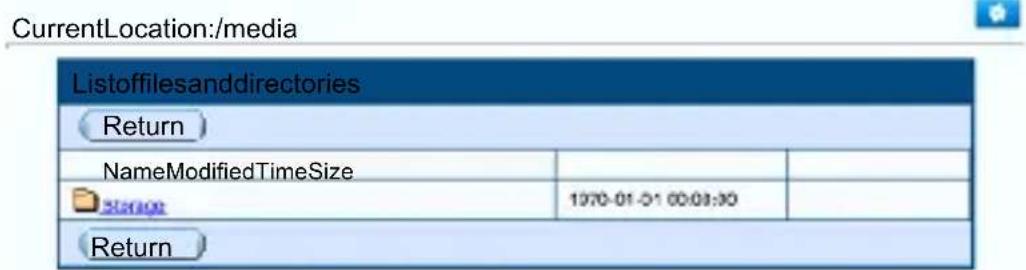
Thestorage1, storage2...arenamesofthesharedfoldersofUdisk, mobileharddisks.
8.2 FTP Server:
The following describes how to set the iPad to share files on the FTP server of the router, herewecite Good player as an example. Good Player is not only a local media player, but its an integrator of "Movie Player & Downloader & Streaming Media Player." Infact, as long as shared media files are transferred to your iOS device via Wi-Fi, you can immediately play them.
Step 1: Enter the App Store, search for "Goodplayer" program, then download and install the program.
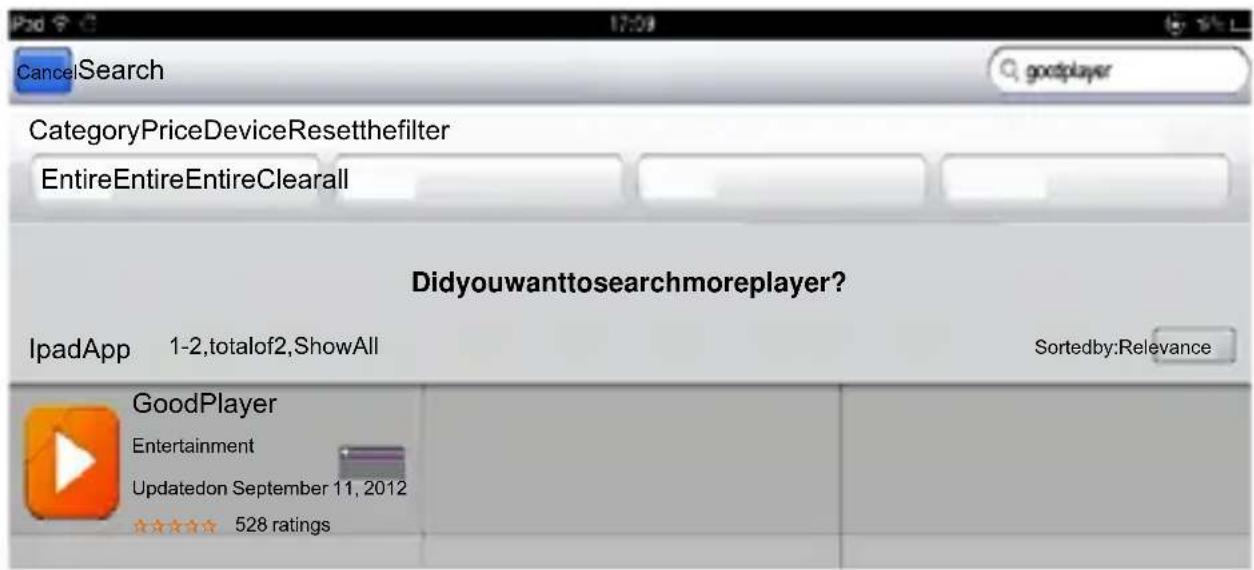
Step 2: Open Goodplayer, switch to the Wi-Fi interface, and click icon at the right corner of the bottom.
![照片 GoodPlayer [SMB] 192,168,169.1 [FTP] 192,168,169.1](/content/2026/06/1189346/images/d470c307852f335f3bb377df11e9caa596e81ed095383d20c618f04e0def8268.jpg)
Step3:SelecttheFTPclient

Step 4: Click the + button at the upper right corner, enter parameters of the FTP server, click the "Save"buttonattheupperrightcorner.
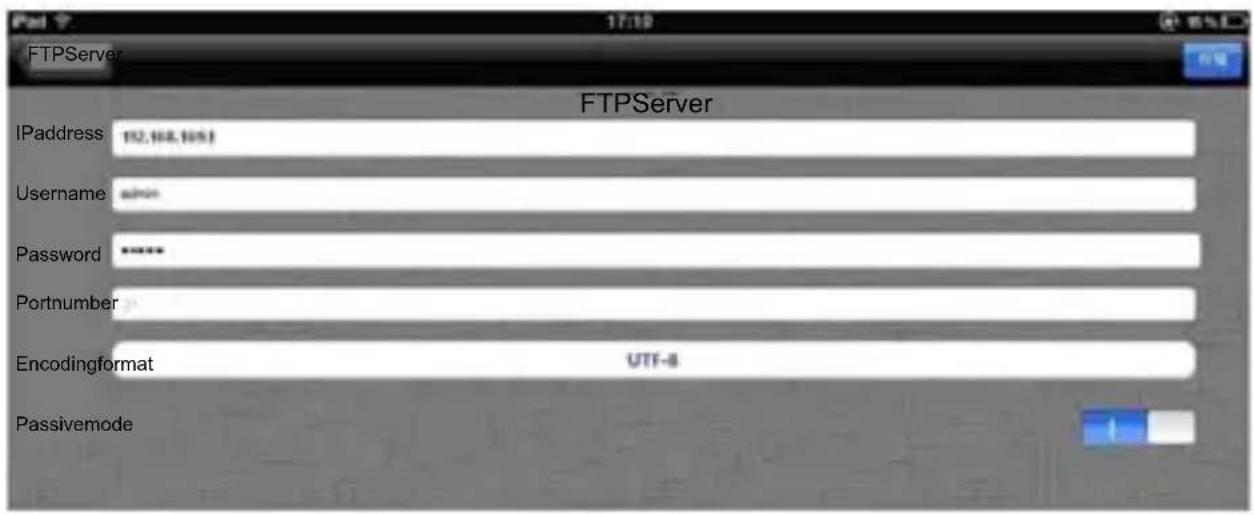
IPAddress:192.168.169.1
Username:admin
✨ Password:admin
✨ PortNumber:Youcancustomizethevalue,andthedefaultvalueis21.
Step 5: Back to main program interface of Goodplayer, click on the FTP server just added [FTP] 192.168.169.1
![[SMD] 192.168.169.1 [FTP] 192.168.169.1 Download Inbox](/content/2026/06/1189346/images/c7bbffdfd89495ae77adccd7aec85e199d8c43d1807a93b2206dc3c5be81bb86.jpg)
Thestorage, storage1, storage2....showsupafterclicking

storage1, storage2...arenamesofthesharedfoldersonUdisk, mobileharddisk.
Step 6: If you click on a file separately and choose to play this URL, the file will immediately be played; if you choosetodownloadthefile, thefilewillbedownloadedontotheiPad.
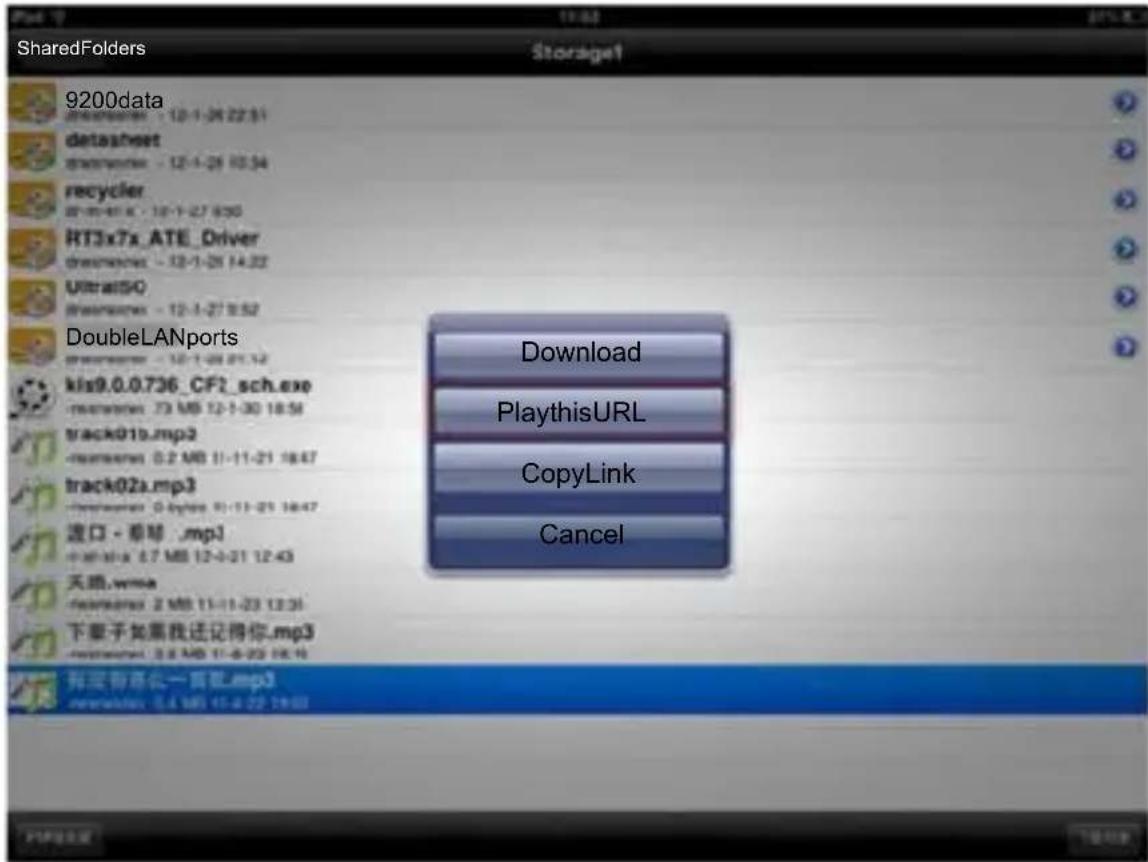
Note: The above is only a simple introduction for Goodplayer to play files via Wi-Fi, if you need more details, please visit Goodplayer's online help documentation.
Goodplayer → Settings → upper right corner button → Online Help
8.3Server
The following describes how to set thei Padtosharefiles on the server. Herewecite Oplayer HDLite as an example. OPlayer HD can be used toenhancethemediaplaybackcapability of youri Pad, you can also use it to play streaming media on thenetwork, and now its supports http protocol. Currently supported file formats are mp3, wma, wmv, avi, flv, rm, rmvb, mp3, 3gp, mkv, etc.
Step 1: Enter the App Store, search for "OplayerHD Lite" program, then download and install that program.
Step 2: Open OplayerHD Lite, switch to the file server interface and click the button next to the "+".

Step 3: Select the Windows Server and enter the address, authentication and other parameters of the server.Clickthe"Save"buttonattheupperrightcorner.

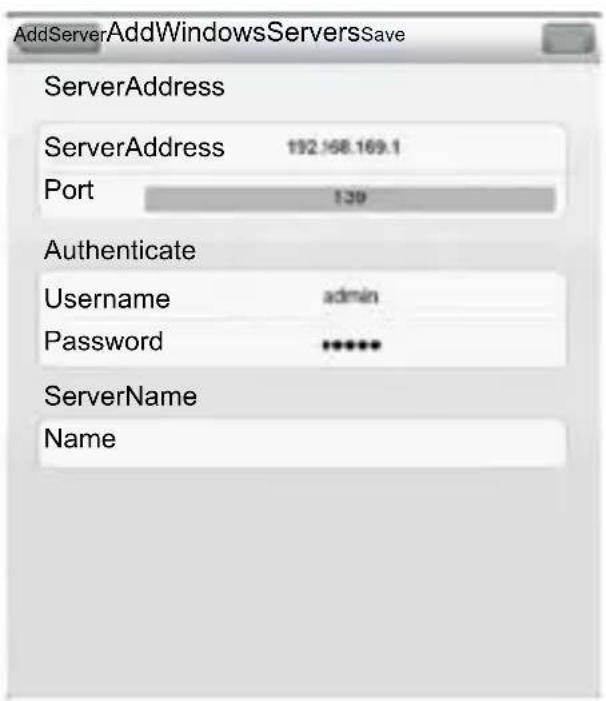
IPAddress:192.168.169.1
✨ Port:139(defaultvalue)
Username:admin
Step 5: Back to main interface of OplayerHD Lite program, click the-server just added 192.168.169.1
![FileserverEdit MyDocuments OpenURL 192.168.168 ! [SAMRA] Downloadofthefilelistisfinished Share](/content/2026/06/1189346/images/162d1bbae982b1062ecc32f155ea62533a7fec4d715b44e86ae4b4477a012e60.jpg)
Step 6: Open Share → Storage, Storage1, Storage2 ... shared folders, and click a specific file.
![FileserverEdit MyDocuments OpenURL 182.168.168.1 [SARMA] Retreat Storage Joel Hanson-Travelling Light.mp3 KBS浏览器E.mgl MCS-T8.7.xls R550 Tolf Distance Indoor.xls Savage Garden-Santa Monica.mp1 Shawn Colvin-Sunny Come Home.mp3 call_dawmon dsc08908.jpg Bashprogrammer.xar MI.xxz IPvd 2GIR插卡机宣传传件 (AP) .440 IPvd.lmp4 purchasesetorn.pdf purchasesetorn_steven.pdf qrplayer.exp roof_ulmage](/content/2026/06/1189346/images/ecde7eb7425a1ab7abea6e9c8540d0e4be6fb901f22b5c4c73b5c2100bb06a82.jpg)
Tip: For more information about the software, you can view OplayerHD help documentation, read frequently asked questions. The lower right corner "..." button → Help → FAQ
9.SolutionsforFrequentlyAskedQuestions
- WhatcanIdoifIforgettheWiFiencryptionkey?
PressRESETtorestoretheroutertofactorysettings, fordetailspleaserefertoSection7.
- Whatdoldoifl cannot log on to other outermanagement interface?
1) CheckiftheIPaddressandDNSaddressaresettobeobtainedautomatically. NormallytheIP addressobtainedshouldbe192.168.169.X.
2) Try using another computerologon;
If the problem is still not resolved after the above operations, try to restore other out of factory settings.
- What can I do if then to note book cannot find the wireless signal?
1) Checkifthebuilt-inwirelessLANswitchofthelaptopisturnedon(Fordetails, pleaseviewlaptop manual);
2) OpentheDeviceManagerofthecomputer, and viewifthewirelessnetworkadapterdriveris successfullyinstalledandenabled;
3)Checkifthecomputer'swirelessserviceisturnedon(CheckifthestatusofWirelessZero ConfigurationintheserviceoptionissettoStart,andifStartupTypeissetto"Startautomatically");
4) Trytofindthewirelesssignalwithina1-2mdistance.
5) Please use another computer's wireless adapter to find the wireless signal; If the problem is still not resolved after the above operations, try to restore the outer to factory settings.
- HowdolclearthepreviousnetworkconfigurationwithWindows7andAppleiPad?
Windows7: NetworkandSharingCenter—Managewirelessnetworks, select the corresponding wireless networkname, and dodelete operation;
iPad: NavigatetoSetting---WirelessLAN---correspondingwirelessnetworkname, ignore(orforet) thisnetworkoptionabovetherightbluearrow, and clickIgnore.
- Howtoviewtheroutersoftwareandhardwareversion?
Inthemangementinterface, clickon

"AdvancedSettings" buttontoview.
- List of accessories
- Introduction of panel
- Description of hardwareinterfaces
- Descriptions of Status Indicators
- Applicationscenarios
- Mobile power function: Instructions for charging mobile phones, tablet computers and other digital products
- Charge this product
- Features and configurations of 3G Wi-Fi wireless router
- The use your wireless device, you need to connect to the wireless router first (for example,iPad)
- Enter the configuration interface for 3G Wi-Fi router
- Homepage of 3G router configuration interface – Description of functions in common functionsoperation interface
- To modify Wi-Fi passwords
- Modificationmethod:
- To set parameters for 3G Internet
- To set the parameters of wired broadband Internet access
- d) WirelessRepeater
- Basic settings of WiFi wireless network
- To upgrade firmware of wireless router
- To restore the factory configuration of the wireless router
- The function of wireless network storage: the way iPad and other devices access the U disk or mobile hard disk
- Online play of streaming media
- FTP Server:
- 8.3Server
- 9.SolutionsforFrequentlyAskedQuestions
Brand : Pyle
Model : PBC5200PN
Category : Generator