CRA30008 - Ordinateurs et périphériques CyberPower - Free user manual and instructions
Find the device manual for free CRA30008 CyberPower in PDF.


User questions about CRA30008 CyberPower
0 question about this device. Answer the ones you know or ask your own.
Ask a new question about this device
Download the instructions for your Ordinateurs et périphériques in PDF format for free! Find your manual CRA30008 - CyberPower and take your electronic device back in hand. On this page are published all the documents necessary for the use of your device. CRA30008 by CyberPower.
USER MANUAL CRA30008 CyberPower
Cable Ladder KitCable Ladder Kit CRA30008
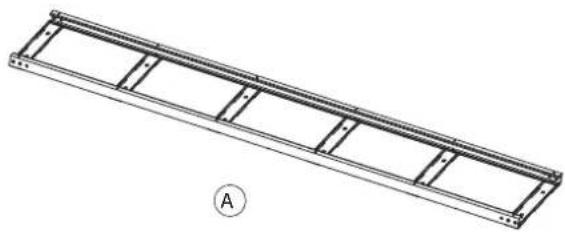
Parts List
| Item | Part | Qty |
| Ladder Components | ||
| A | Ladder Section (5ft/1.5m) | 2 |
| Assembly Hardware | ||
| B | Ladder Connector | 2 |
| C | M6 Phillips Pan Head Screw | 4 |
| Installation Hardware | ||
| D | Hook Bracket | 4 |
| E | M5 Flange Nut | 8 |
| F | M6 Phillips Pan Head Screw | 4 |
| G | M6 Flange Nut | 4 |
| Grounding Hardware | ||
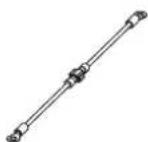
| H | Grounding Wire | 2 |
| I | M6 Phillips Pan Head Screw | 2 |
| J | Toothed Lock Washer | 2 |
natural_image
Technical line drawing of a long metal ladder or support structure with no text or symbols
B

C

DEFG

O

O

O
HIJ

O

O
Assembly
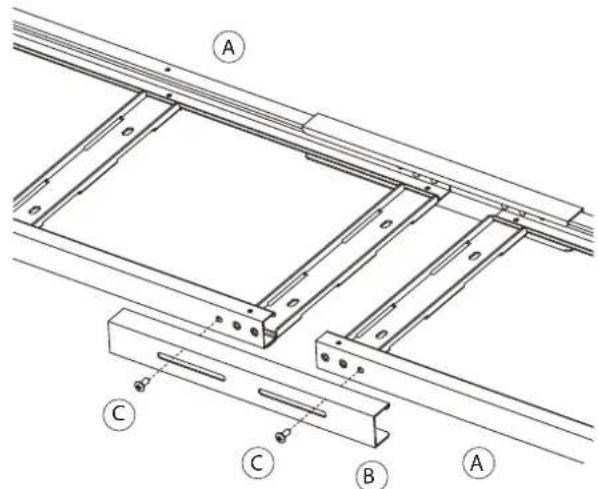
The cable ladder includes 2 sections (A). Individual sections can be used alone (5ft/1.5m), or they can be tied together to form a longer cable ladder (10ft/3m).
To tie both sections together, use 4 × M6 screws (C) to bolt the ladder connectors (B) on to the ladder sections (A) as shown below.
text_image
Technical diagram of a structural frame assembly with labeled components A, B, and CInstallation
Rack Enclosure
A power cable trough (CRA30009) or a data cable partition (CRA30010) is required to be installed on a rack enclosure prior to the installation of the cable ladder. The cable ladder can be used to connect cable runs between rack aisles or within a rack row.
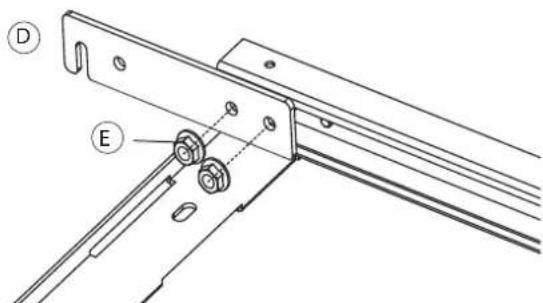
First, bolt the hook brackets (D) using the included M5 flange nuts (E) to the rivets on the cable ladder as shown below.
text_image
Technical diagram showing labeled components A, B, and C with annotations D and E indicating parts of a mechanical or structural assembly.Installing Cable Ladder Across Rack Aisles
Insert the ladder hooks into the slots in the power cable trough or data cable partition as shown below.
NOTE: The cable troughs have two sets of slots at different heights. Install the cable ladder using the slots best suited for your application.

text_image
Power Cable Trough Data Cable PartitionInstalling Cable Ladder Within Rack Row
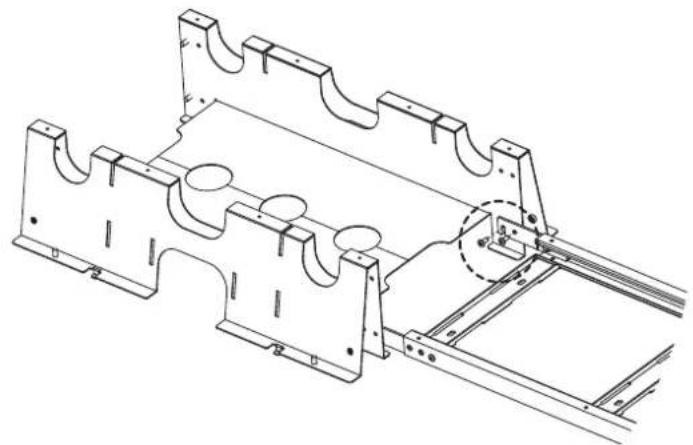
Screw the ladder hooks on to the power cable trough using the existing M6 screws as shown below.
NOTE: Cable ladder installation within a rack row can only be done with the use of power cable troughs (CRA30009).
natural_image
Technical line drawing of a mechanical assembly with mounting brackets and a highlighted section (no text or symbols)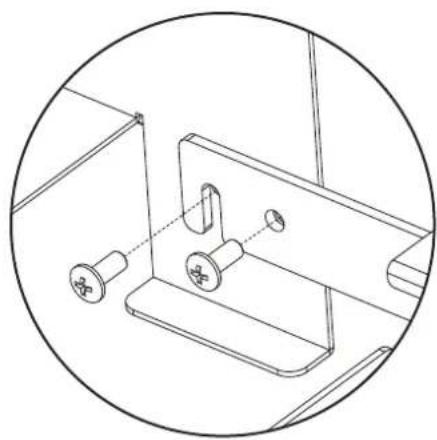
natural_image
Technical line drawing of a mechanical clamp or bracket assembly (no text or symbols)Install on Open Frame Rack
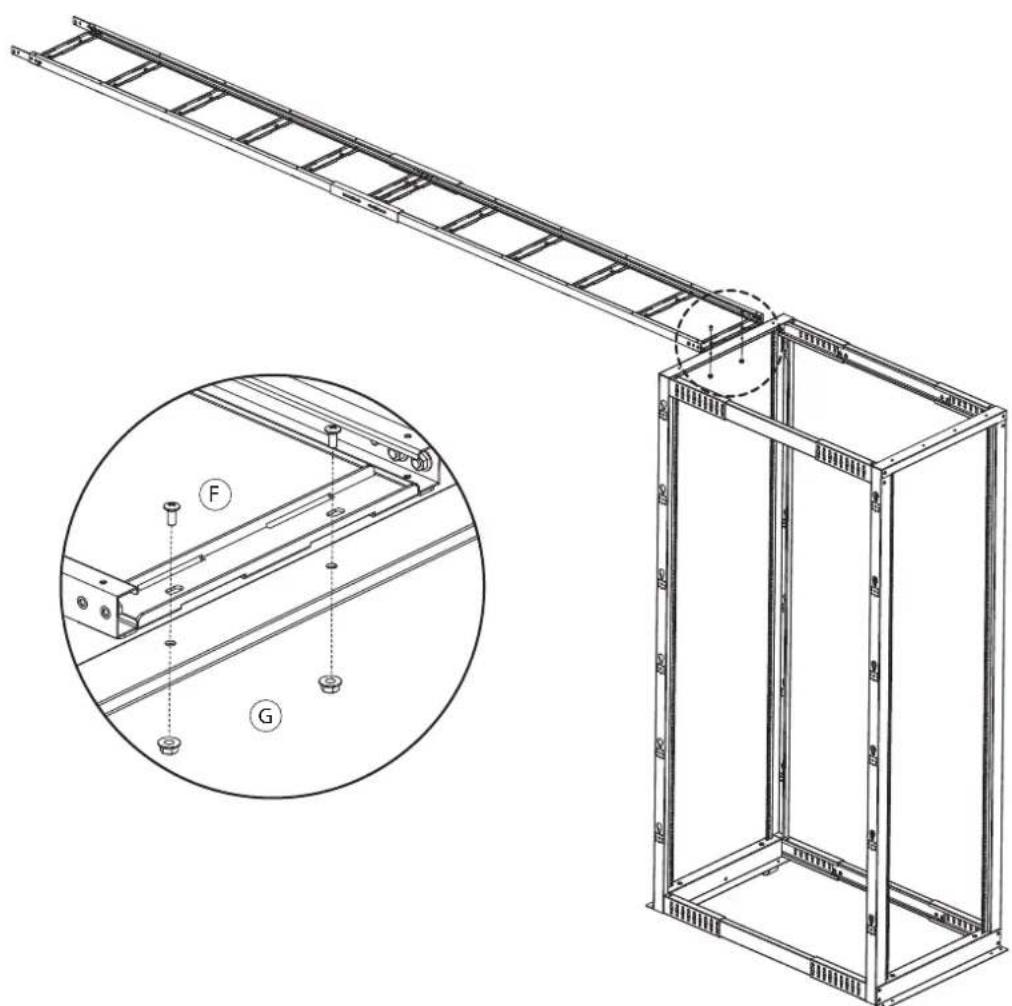
To install the cable ladder on an open frame rack, place one end of the ladder on top of the rack and use the M6 screws (F) with the M6 flange nuts (G) to secure the ladder as shown below.
natural_image
Technical line drawing of a metal ladder assembly with an inset showing a close-up of components (no text or symbols present)NOTE: For safety the cable ladder should always be installed between racks of the same height.
Ground Connection
- To ground the cable ladder, screw the included grounding wire (H) using an M6 screw (I) and toothed lock washer (J) to the pre-installed rivet nut on the cable ladder as shown below.

text_image
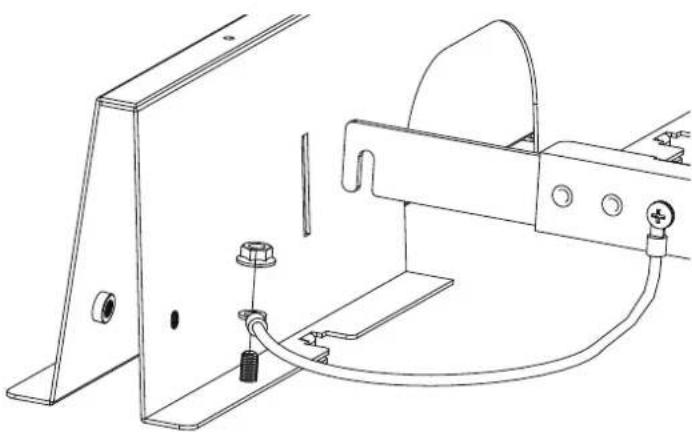
Technical diagram of a mechanical assembly with labeled components I, J, and H- Connect the other end of the grounding wire to the ground screw on the power cable trough or data cable partition. Secure the ground wire using the existing M6 flange nut as shown below.
natural_image
Technical line drawing of a mechanical assembly with mounting bracket and wiring (no text or symbols)CyberPower®
Cyber Power Systems, Inc.
www.cyberpower.com
For USA and Canada:
4241 12th Ave East, Suite 400
Shakopee, MN 55379
Toll-free: (877) 297-6937
For all other regions:
Please visit our website for local contact information.