Trio Connect ZB570-A - TV signal amplifier zBoost - Free user manual and instructions
Find the device manual for free Trio Connect ZB570-A zBoost in PDF.


| Product Type | TV Signal Amplifier |
| Brand | zBoost |
| Model | Trio Connect ZB570-A |
| Dimensions (Approx.) | 5 x 3 x 1 inches |
| Weight | 0.5 lbs |
| Power Source | AC adapter (included) |
| Input Connector | Coaxial (F-type) |
| Output Connector | Coaxial (F-type) |
| Amplification Gain | 20 dB (typical) |
| Frequency Range | VHF/UHF (47-862 MHz) |
| Number of Outputs | 1 |
| Indoor/Outdoor Use | Indoor |
| LED Indicator | Power on/off |
| Mounting | Desk or wall mount |
| Operating Temperature | 32°F to 104°F (0°C to 40°C) |
| Maintenance | Wipe with a dry, soft cloth |
| Safety Warnings | Do not expose to moisture; unplug during storms |
| Spare Parts Available | Power adapter (part # ZB570-PA) |
| Repairability | Contact zBoost support for service |
| Warranty | 1 year limited warranty |
Frequently Asked Questions - Trio Connect ZB570-A zBoost
User questions about Trio Connect ZB570-A zBoost
0 question about this device. Answer the ones you know or ask your own.
Ask a new question about this device
Download the instructions for your TV signal amplifier in PDF format for free! Find your manual Trio Connect ZB570-A - zBoost and take your electronic device back in hand. On this page are published all the documents necessary for the use of your device. Trio Connect ZB570-A by zBoost.
USER MANUAL Trio Connect ZB570-A zBoost
natural_image
Black wireless router with antenna and circular logo (no visible text or symbols)zBoost ^® products have a 30-day money back guarantee when purchased directly from zBoost. If product is purchased from a reseller or third party, the purchaser is subject to the policies of the third party.
1 year manufacturer warranty. Warranty registration at www.zBoost.com
FCC Requirements
This is a CONSUMER Device.
BEFORE USE, you MUST REGISTER THIS DEVICE with your wireless provider and have your provider's consent. Most wireless providers consent to the use of signal boosters. AT&T, Sprint, T-Mobile, Verizon and 90 additional carriers have already given consent for all consumers to use this device. Some providers may not consent to the use of this device on their network. If you are unsure, contact your provider.
You MUST operate this device with approved antennas and cables as specified by the manufacturer. Antennas MUST be installed at least 20 cm (8 inches) from any person.
You MUST cease operating this device immediately if requested by the FCC or a licensed wireless service provider.
WARNING. E911 location information may not be provided or may be inaccurate for calls served by using this device.
FCC contact information: www.fcc.gov/signal-boosters/registration

Warning
Any product modifications that use unauthorized antennas, cables, and/or coupling devices is no longer FCC compliant and will void the product warranty.
FCC Information
FCC ID: SO4ZB570-TRI-VLTE, SO4ZB570-TRI-ALTE
Warning: Changes or modifications to this device not expressly approved by zBoost could void the user's authority to operate the equipment.
Note: This equipment has been tested and found to comply with the limits for a Class B digital device, pursuant to Part 15 of the FCC Rules. These limits are designed to provide reasonable protection against harmful interference in a residential installation. This equipment generates, uses, and can radiate radio frequency energy and, if not installed and used in accordance with the instructions, may cause harmful interference to radio communications. However, there is no guarantee that interference will not occur in a particular installation. If the equipment does cause harmful interference to radio or television reception, which can be determined by turning the equipment off and on, the user is encouraged to try to correct the interference by one or more of the following measures:
• Reorient or relocate the receiving antenna
- Increase the separation between the equipment and receiver
- Connect the equipment to an outlet on a circuit different from that to which the receiver is connected
- Consult the dealer or an experienced radio/TV technician for help
This equipment complies with FCC radiation exposure limits set forth for an uncontrolled environment. This transmitter must not be co-located or operating in conjunction with any other antenna or transmitter. In accordance with FCC requirements of human exposure to radiofrequency fields, the radiating element (antenna) shall be installed such that a minimum separation distance of 20cm (8in) is maintained from all persons. Additionally, the device must not be used above 10 m above ground.
About zBoost®
zBoost, the leader in cell phone signal boosters, manufactures an award-winning line of cell phone signal boosters that enhance the performance of your cell phone, smartphone and wireless data card.
Uses patented technologies and protects the carrier networks.
1-year manufacturer warranty – register your product at www.zBoost.com.
Industry Canada Regulations
IC ID: 5544A-ZB570TRIVLT, 5544A-ZB570TRIALT
This Class B digital apparatus meets all requirements of the Canadian Interference Causing Equipment Regulations. Operation is subject to the following two conditions: (1) this device may not cause harmful interference, and (2) this device must accept any interference received, including interference that may cause undesired operation.
The term “IC:” before the radio certification number only signifies that Industry Canada technical specifications were met.
RF Exposure: The manufacturer's rated output power of this equipment is for single carrier operation. For situations when multiple carrier signals are present, the rating would have to be reduced by 3.5 dB, especially where the output is re-radiated and can cause interference to adjacent band users. This power reduction is to be by means of input power or gain reduction and not by an attenuator at the output of the device.
Please note: This unit has been approved for use in Canada under RSS 131, however, consent for the use of this device to improve cellular or PCS coverage, must be obtained through your cellular or PCS provider, prior to placing the unit in operation. Please refer to the Industry Canada document CPC 2-1-05, Section 6.1 available or viewable at:
http://www.ic.gc.ca/epic/site/smt-gst.nsf/en/sf08942e.html
Copyright Notice
This manual is copyrighted. All rights reserved. This manual, whole or in part, may not be copied, photocopied, reproduced, translated or reduced to any electronic medium or machine readable form for distribution. This manual whole or in part, may not be modified without prior consent, in writing, from zBoost.
Copyright © 2014 by zBoost.
Trademarks
Wireless Extenders, Wi-Ex, the Wi-Ex logo, zBoost, the zBoost logo and Extending Cell Zones are registered trademarks of zBoost.
Safety and Product Warranty Information
Safety Guidelines
In accordance with FCC requirements of human exposure to radiofrequency fields, the radiating element (antenna) shall be positioned such that a minimum separation distance of 8 inches (20cm) is maintained between the radiating element and the user and/or general population.
Limited Liability
In no event shall zBoost be liable for any direct, indirect, special, punitive, incidental, exemplary or consequential damages, or any damages, whether in an action under contract, negligence, or any other theory, arising out of or in connection with the set up of, use of, inability to use, or performance of the information, services, products, and materials available from this manual. These limitations shall apply notwithstanding any failure of essential purpose of any limited remedy. Because some jurisdictions do not allow limitations on how long an implied warranty last, or the exclusion or limitation of liability for consequential or incidental damages, the above limitations may not apply to you.
For full warranty guidelines, see page 11.
Package Contents
Before you begin, make sure all of the following parts came with your zBoost TRIO Workspace.
Literature Contents:
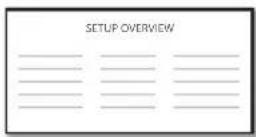
① Setup overview
Product Contents:
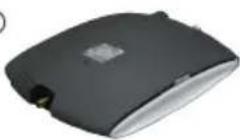
② zBoost Base Unit
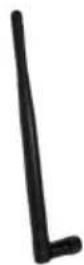
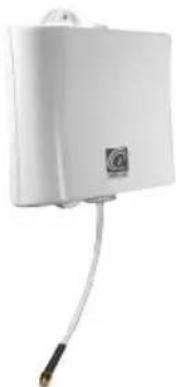
③ Indoor Antenna
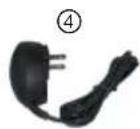
④ Power Supply
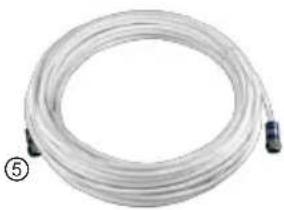
⑤ RG-6 Coax Cable (50 ft.)
⑥ Signal Antenna
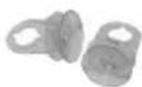
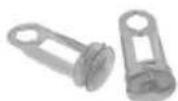
⑦ Signal Antenna Short and Long Suction Cup Attachments
①
②
③
natural_image
Coiled white plastic hose with black connectors, no visible text or symbols⑥
natural_image
White rectangular electronic device with a black circular connector and cable, no visible text or symbols.⑦
Optional Accessories
The following accessories are authorized for this zBoost product. Please see our website for a complete selection. To order, call 1-800-871-1612, or visit, www.zBoost.com.
| Broadcast Antennas - Indoor | |
| CANT-0039 Indoor | Broadcast Antenna, Omni Whip Direct to Booster, Black, Wideband, LTE-CEL-AWS-PCS (1 dBi) |
| CANT-0045* Indoor | Broadcast Antenna, Wideband Directional Panel, LTE-CEL-AWS-PCS (8 / 7.5 dBi) |
| YX052 Indoor Broadcast Antenna, Wideband Omnidirectional Ceiling Mount, LTE-CEL-AWS-PCS (1 / 2 dBi) | |
| External Antennas - Outdoor | |
| CANT-0040 Outdoor External Antenna, Wideband Omni Directional, LTE-CEL-AWS-PCS (3 / 5 dBi) | |
| CANT-0042 Outdoor External Antenna, Wideband Directional Log Periodic, LTE-CEL-AWS-PCS (10 / 12 dBi) | |
| CANT-0043 Window-Mount External Antenna, Wideband Directional Panel, LTE-CEL-AWS-PCS (6 / 7 dBi) | |
| Coax Cable - To be used in addition to the cable included in your kit | |
| YX030-0W8 8 Inch Window Entry Cable with F-Female Connectors | |
| YX030-15W 15 Foot RG-6 Coaxial Extension Cable with F-Male Connectors | |
| YX030-35W 35 Foot RG-6 Coaxial Extension Cable with F-Male Connectors | |
| YX030-50W 50 Foot RG-6 Coaxial Cable with F-Male Connectors | |
| YX031-100W 100 Foot Low Loss RG-11 Coaxial Cable with F-Male Connectors | |
| Accessories | |
| YX012 Outdoor External Antenna Grounding Kit | |
Table of Contents
FCC Requirements ....i
FCC Information......i
Industry Canada Regulations....ii
Copyright Notice ....ii
Trademarks......ii
Safety Guidelines....iii
Limited Liability ....iii
Safety and Product Warranty Information .... iii
Package Contents iv
Optional Accessories.... v
Table of Contents 1
Overview....2
Why Indoor Signals Can Be Weak....2
Preparing to Set Up Your zBoost Product .... 3
Check for Signal Strength.... 3
Setting Up Your zBoost Signal Booster 4
FIRST: Place the Signal Antenna on the interior of a window located in the area of best signal ..... 4
SECOND: Place the zBoost Base Unit where you want to create a Cell Zone™ 5
THIRD: Run the provided coaxial cable between the Base Unit and Signal Antenna 5
FOURTH: Connect zBoost Base Unit to the provided power supply and plug into a power outlet..... 6
Improving Your Coverage Area....6
zBoost Base Unit Light Indicators 8
Technical Specifications....9
Frequently Asked Questions.... 10
Warranty Information 11
Overview
Thank you for choosing zBoost! You will now be able to use your cell phone INSIDE your home. Gone are the days when you had to go to the window upstairs or walk outside to use your cell phone. Like a skylight that brings sunlight into your home, zBoost TRIO transports and amplifies the outdoor 2G/3G and 4G data signal into your home.
Why Indoor Signals Can Be Weak
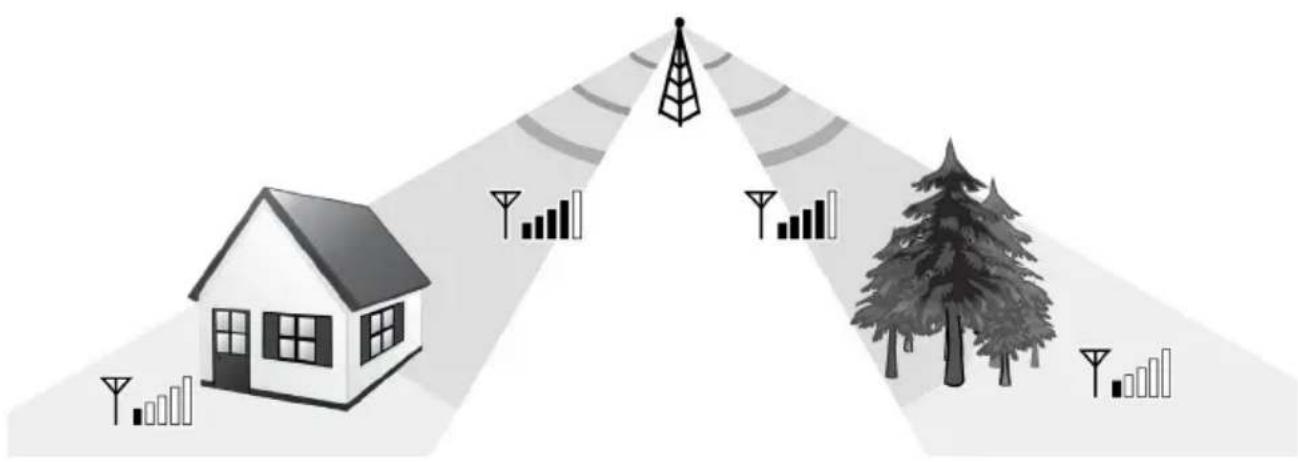
There are several obstacles that can contribute to the poor reception you receive in your home:
1. Location of the Cell Phone Tower in Relation to Your Home
While cell phone providers have tried to place cell phone towers to provide the best overall coverage, local ordinances and terrain features can impose restrictions on where these towers can be placed, thus, limiting the signal strength available at your location.
2. Obstructions Caused by Buildings, Terrain and Trees
Cell phone signals can be completely blocked or reflected by buildings, walls, trees, hills and other terrain features resulting in low signal strength.
3. Energy Efficient Windows
Energy efficient windows contain a metal film that can affect signal penetration into the house.
natural_image
Illustration of a house, tree, and signal processing icons (no text or symbols)Preparing to Set Up Your zBoost Product
Check for Signal Strength
Before placing the unit in your home, make sure that you have reliable signal and fast/reliable data speeds outside your home, in the attic, at roof level or wherever you plan to place the Signal Antenna. zBoost can only bring signal into your home when it reaches the Signal Antenna. If there is no signal, zBoost will not work for you.
If a weak signal is available at ground level, check the signal strength in your attic or at roof level location where the signal will likely be stronger and where the Signal Antenna can be placed for best performance.
If you have reliable, fast data speeds outside your home, then zBoost can bring the signal into your home.
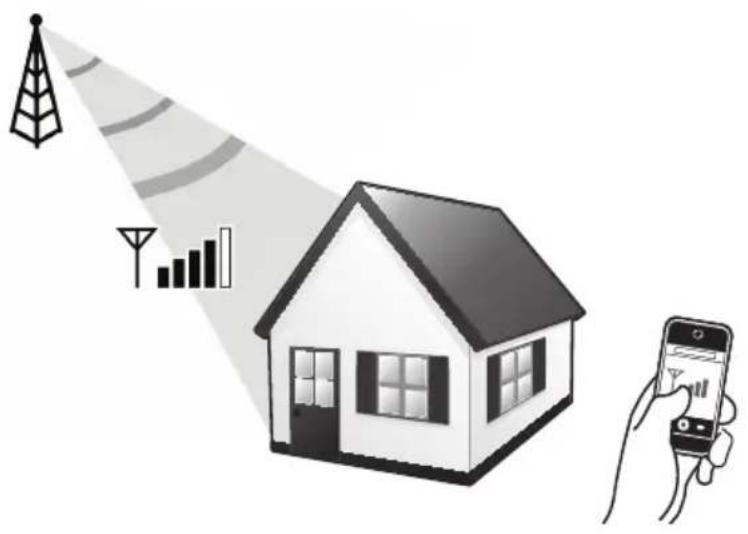
If only one signal bar is displayed on your cell phone outside, indoor coverage will be limited to one small room. We recommend placing the Signal Antenna outside and/or purchasing a zBoost upgrade Signal Antenna for increased coverage (see page v).
Note

Cell phone signal bars are approximate and vary from phone to phone. The number of bars can fluctuate widely, depending on the location of the phone, the position or angle of the phone, weather, etc. Most cell phone signal meters update every 6 to 10 seconds. An increase of only one bar typically indicates a 4x to 10x signal increase.
Setting Up Your zBoost Signal Booster
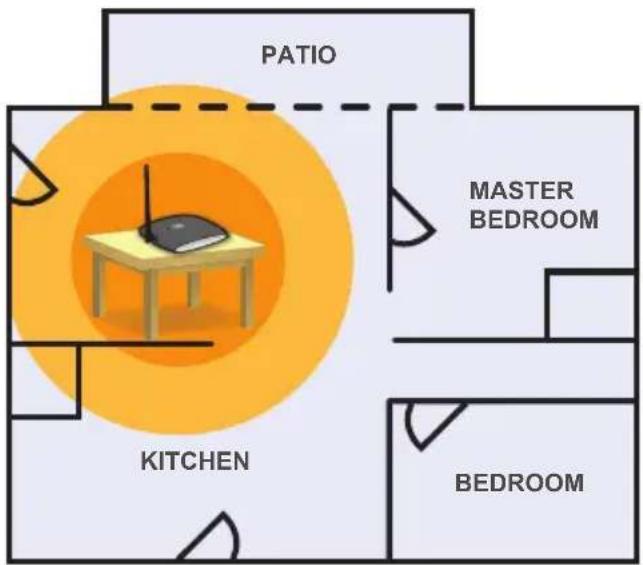
The Metro Workspace boosts signal up to 1,500 square feet, making it perfect for apartments, condos and lofts. No outside antenna placement is required.
Boost voice and data transmission and improve call clarity in 4 easy steps:
FIRST: Place the Signal Antenna on the interior of a window located in the area of best signal
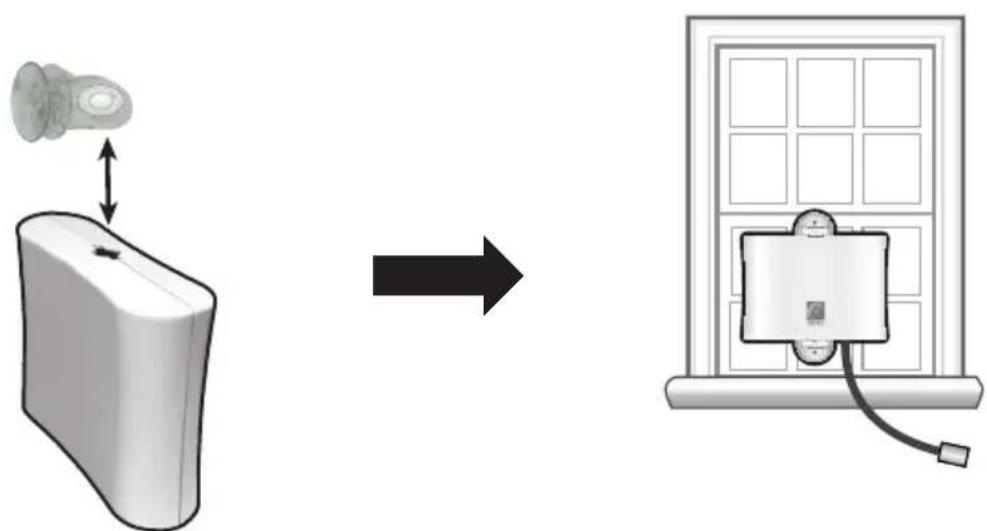
Determine the location that provides the strongest signal using the signal strength indicator on your cell phone. Find the location on the window that provides the most bars of signal strength. Before proceeding, make sure that the intended surface is clean and clear of any dust. Then choose the suction cup attachments appropriate for your setting (short or long), fasten to the Signal Antenna, and secure to your window.
Note: Energy-efficient windows will likely block signal from reaching the Signal Antenna. In this case, it is necessary to move the Signal Antenna away from this window to another location. You may also upgrade to an outdoor rated antenna (part # cant-0042) if mounting an antenna outside is possible.
In order to capture the strongest signal, you may do one or all of the following:
flowchart
graph LR
    A["Left Panel: Mouse with bidirectional arrow"] --> B["Right Panel: Solar Panel with cable"]
- Move the antenna around the window – higher is usually better.
- Use the long suction cup attachments provided, in order to create a greater angle in which to capture the signal. The suctions cups must be vertical on the window (as pictured, with cable
at the bottom – not on the side). Avoid draping the coax near the antenna. - Keep the Signal Antenna 2 feet from any metal.
SECOND: Place the zBoost Base Unit where you want to create a Cell Zone™
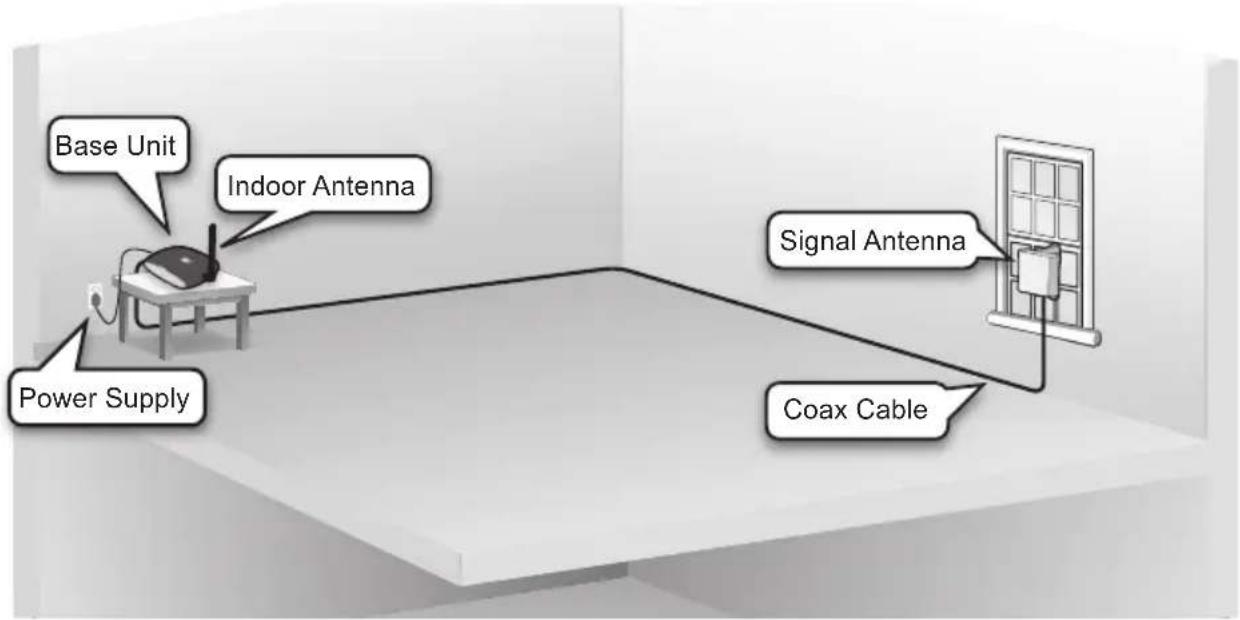
Connect the Indoor Antenna and coax to the Base Unit and place it where you need signal. For the widest possible signal area, it is recommended that you position the Base Unit near the middle of a room or mount it on an interior wall. This Base Unit uses an omni-directional antenna that delivers signal in a circular pattern around the antenna. The zBoost TRIO Workspace does not require

zBoost Base Unit Assembly
Note

Avoid placing the Signal Antenna near metal such as wiring, things likely in/near a window (e.g. window edge frame, A/C unit, metal siding, etc..
vertical separation; however, the Signal Antenna and Indoor Antenna should have at least 15 feet of horizontal separation. Increasing separation of the 2 antennas will optimize zBoost performance.
For best results, keep the Base Unit off the floor and at least 2 feet away from other cords, metal objects or other wireless devices such as wireless routers or wireless access points. The zBoost TRIO Workspace performs best when there are no obstructions between the zBoost Base Unit and your mobile device.
THIRD: Run the provided coaxial cable between the Base Unit and Signal Antenna
Use the provided RG-6 coaxial cable to connect the Signal Antenna and the Base Unit. Coaxial connections can loosen when the cable is moved. Be sure the connections stay hand-tight.
Should you need additional cable length, 15 foot extensions (Part #: YX030-15w) are available at www.zBoost.com.
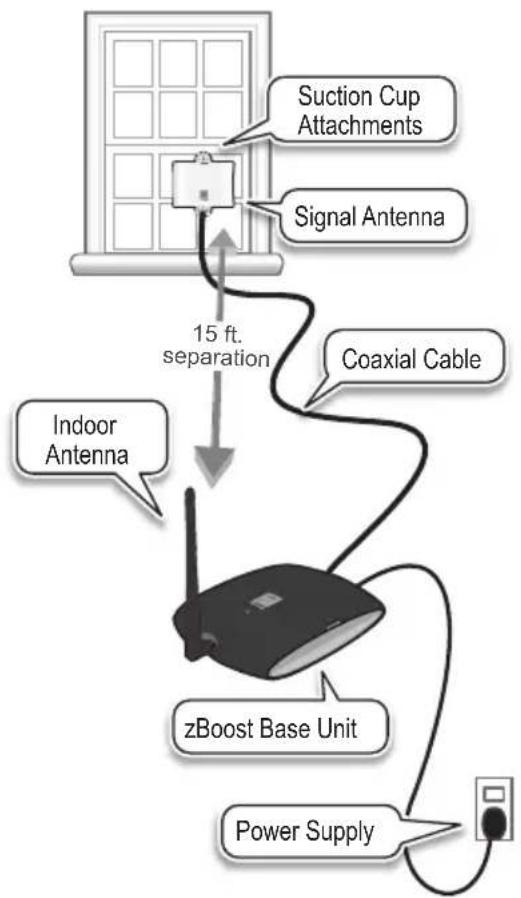
flowchart
graph TD
    A["Suction Cup Attachments"] --> B["Signal Antenna"]
    C["Indoor Antenna"] --> D["15 ft. separation"]
    D --> E["Coaxial Cable"]
    E --> F["zBoost Base Unit"]
    F --> G["Power Supply"]
The total cable length should not exceed 65 feet. A longer cable is helpful only if it allows you to place the Signal Antenna in a location where you measure stronger signal.
FOURTH: Connect the zBoost Base Unit to the provided power supply and plug into a power outlet
Upon initial power up, the LED will cycle RED, GREEN and ORANGE for 30 seconds. After 30 seconds, a series of GREEN flashes will indicate the quality of your setup. Following this, a solid GREEN light indicates normal conditions. If it is not solid GREEN, follow the instructions in the Base Unit LED Indicators section. Adjustments may be needed to optimize performance. If you find the increased signal coverage is acceptable, however, no additional adjustments are needed. See "zBoost Base Unit Light Indicators" on page 8) for more information.
NOTE: The Base Unit can be plugged into a standard 2 or 3 prong 110 VAC receptacle using the Included power supply. The power supply consumes less than 10W (less than 0.2A AC). For more information on power consumption, see “Technical Specifications” on page 9. Confirm That Your zBoost is Working Properly
Improving Your Coverage Area
When your zBoost system is in place and fully connected, you should walk throughout the room and see that you are able to reliably place calls.
Remember, coverage varies based on outdoor signal level, home construction, and antenna placement. Coverage in adjoining rooms will be reduced due to walls or ceiling/floors.
Should you desire to improve coverage, you may:
- Move the Base Unit and/or adjust the angle of the Indoor Antenna.
- Move the antenna around the window – higher is usually better.
- Move the Base Unit farther from the Signal Antenna or around a wall.
Note

Cell phone signal bars are approximate and vary from phone to phone. The number of bars can fluctuate widely, depending on the location of the phone, the position or angle of the phone, weather, etc. Most cell phone signal meters update every 6 to 10 seconds. An increase of only one bar typically indicates a 4x to 10x signal increase.
zBoost Base Unit Light Indicators
During Initial Power Up
| Light Mode | Status Solution | ||
| Cycle RED, GREEN, ORANGE | System is powering up. Please allow up to 30 seconds. | N/A | |
| Flashing GREEN | BASE UNIT will flash GREEN once for every 2 dB less than optimal system gain. Three flashes or less indicates the system will still operate properly. | 1. Unplug the BASE UNIT power supply.2. Relocate the SIGNAL ANTENNA to pick up the strongest signal from your wireless carrier.3. Move the SIGNAL ANTENNA as far away from the INDOOR ANTENNA as possible, with at least 15 ft. of horizontal separation.4. Plug the BASE UNIT power supply back in.5. Wait 30 secs. for the BASE UNIT to power cycle on. | Solution #1 |
After Initial Power Up
| Light Mode | Status Solution | ||
| SOLID GREEN | zBoost is ready. N/A | ||
| Flashing GREEN | zBoost is in use. N/A | ||
| SOLID ORANGE | SIGNAL ANTENNA and INDOOR ANTENNA are too close together. | 1. Unplug the BASE UNIT power supply.2. Move the SIGNAL ANTENNA as far away from the INDOOR ANTENNA as possible, with at least 15 ft. of horizontal separation.3. Plug the BASE UNIT power supply back in.4. Wait 30 secs. for the BASE UNIT to power cycle on. | Solution #2 |
| SOLID RED | Signal from the carrier's cell tower is too strong for the BASE UNIT to operate properly. | 1. Unplug the BASE UNIT power supply.2. Relocate the SIGNAL ANTENNA to another spot.3. If you have a directional antenna re-aim it to reduce carrier signal strength.4. Plug the BASE UNIT power supply back in.5. Wait 30 secs. for the BASE UNIT to power cycle on. | Solution #3 |
| Flashing RED | Excessive electronic noise in the system – the BASE UNIT will not operate. | ^ Refer to Solution #2 | |
Technical Specifications
Product Specifications for zBoost TRIO Workspace ZB570V
| Verizon LTE PCS CEL | |||
| Frequency | Uplink: 776—787 MHzDownlink: 746—757 MHz | Uplink: 1850—1910 MHzDownlink: 1930—1990 MHz | Uplink: 824—849 MHzDownlink: 869—894 MHz |
| Band supported 13 | A, D, B, E, F, C A, B, A', B' | ||
| System gain 58 dB 64 dB 58 dB | |||
| Output power 3 dBm 4 dBm 3 dBm | |||
| Networks LTE (Verizon) | CDMA, GSM, GPRS, EDGE, EVDO, 1xRTT, UMTS, HSPA, 3G | ||
| General Specifications | |||
| Power Consumption 3W standby; 7W max signal - 2.5A Max | |||
| Wall Supply Input ; Voltage 100-240VAC, 50-60 Hz; 5.0VDC | |||
| Input and Output Impedance TNC Connector: | 50 Ohm; F Connector: 75 Ohm | ||
| System Certifications FCC Parts 15 & 20, Industry Canada | |||
| Base Unit Size and Weight | 5" x 7" x 1.25" – 9 oz. | ||
| Operating Conditions Indoor Use Only (40° - 105° F) | |||
| Coverage (open areas) | Desk area - Up to 1,500 sq. ft. | ||
Product Specifications for zBoost TRIO Workspace ZB570A
| AT&T LTE | PCS | CEL | |
| Frequency | Uplink: 704—716 MHzDownlink: 734—746 MHz | Uplink: 1850—1910 MHzDownlink: 1930—1990 MHz | Uplink: 824—849 MHzDownlink: 869—894 MHz |
| Band supported | 17 | A, D, B, E, F, C | A, B, A', B' |
| System gain | 58 dB 64 dB | 58 dB | |
| Output power | 3 dBm 4 dBm 3 dBm | ||
| Networks | LTE (AT&T) | CDMA, GSM, GPRS, EDGE, EVDO, 1xRTT, UMTS, HSPA, 3G | |
| General Specifications | |||
| Power Consumption | 3W standby; 7W max signal - 2.5A Max | ||
| Wall Supply Input ; Voltage | 100-240VAC, 50-60 Hz; 5.0VDC | ||
| Input and Output Impedance | TNC Connector: 50 Ohm; F Connector: 75 Ohm | ||
| System Certifications FCC Parts 15 & 20, Industry Canada | |||
| Base Unit Size and Weight | 5" x 7" x 1.25" – 9 oz. | ||
| Operating Conditions | Indoor Use Only (40° - 105° F) | ||
| Coverage (open areas) | Desk area - Up to 1,500 sq. ft. | ||
The Manufacturer's rated output power of this equipment is for single carrier operation. For situations when multiple carrier signals are present, the rating would have to be reduced by 3.5 dB, especially where the output signal is re-radiated and can cause interference to adjacent band users. This power reduction is to be by means of input power or gain reduction and not by an attenuator at the output of the device.
This product is covered by patent US 7,706,744. Other U.S. and foreign patents pending.
Frequently Asked Questions
What can I expect my cell phone signal range and strength to be inside my home?
The closer you are to the base, the stronger the signal. This will vary with different conditions. Some of the conditions that will affect the improved data coverage area are signal strength outdoors, the type of building materials in the home, the placement of the unit and the antenna's proximity to cellular towers.
You can expect that your indoor coverage will be improved. You will experience faster, more reliable data where you didn't before. The degree of improvement will depend upon many factors. The intent of zBoost products are to bring outside coverage inside. Just as the signal bars move up and down when outside, the boosted signal will fluctuate in a similar fashion.
Is a cellular phone signal booster the same as a wireless router; will it help my WiFi signal?
The zBoost unit will not help your WiFi service. The WiFi in your home operates on a different frequency.
Why isn't my cell phone indicating more signal with more bars?
You may not always observe more bars on your signal meter because of the signal spreading out from the antenna. If your phone has a dB meter, 3 dB is a significant increase of 2x, 6 dB is 4x, and 10 dB is 10x. On a four bar phone, one "bar" equals about 10 dB.
The increase in signal you will see depends upon:
• The level of signal at the Signal Antenna (outdoor)
- The care of the antenna placement (two feet away from metal, adequate antenna separation [15 horizontal feet of separation is recommended])
• The signal already present inside (related to building losses)
- The distance of your phone/device from the Base Unit (signal spreads or diminishes rapidly with distance.)
There are usually several mobile devices in use at one time in my home, will your product boost all of our signals simultaneously?
The zBoost TRIO Workspace is designed to cover multiple signals simultaneously and will allow multiple users to operate at the same time.
Does the zBoost work if you have no bars?
No, if no signal is present outdoors zBoost products will not work for you. Also, keep in mind if your best signal is 1 bar at the Signal Antenna, your coverage will be limited to a small room. You could improve that with an upgraded antenna (See page v).
Warranty Information
Limited 1 Year Manufacturer Warranty
Warranty Registration at www.zBoost.com
zBoost warrants every zBoost product to be free from defects in material and workmanship under normal use for the warranty period of one year.
Who Is Covered?
You must have proof of purchase to receive warranty service. A sales receipt or other documentation showing the product purchased and the purchase date is considered proof of purchase. This limited warranty extends only to the original consumer purchaser or any person receiving the product as a gift from the original consumer purchaser and to no other purchaser or transferee.
What is Covered?
Warranty coverage begins the day you purchase the product. For one year from the original date, the zBoost Cell Phone Signal Booster will be repaired or replaced with a new, repaired, refurbished or comparable product (whichever is deemed necessary by zBoost) if it becomes defective or inoperative. The exchange will be made without charge to you for parts and labor. You will be responsible for the cost of shipping to the location designated by zBoost. If zBoost cannot reasonably repair or replace the unit then zBoost may, at its sole discretion, refund the price you paid for the product or the price of the unit.
All products, including replacement products, are covered only for the original warranty period. When the warranty on the original product expires, the warranty on the replacement product also expires.
What is Excluded?
Your warranty does NOT cover:
• Labor charges for set up of the unit.
- Product replacement because of misuse, accident, lightning damage, unauthorized repair or other cause not within the control of zBoost.
- Incidental or consequential damages resulting from the product. Some states do not allow the exclusion of incidental or consequential damages, so the above exclusion may not apply to you.
- Any modifications or other changes to the product, including but not limited to software or hardware modifications in any way other than as expressly authorized by zBoost will void this limited warranty.
- Product that has been modified or adapted to enable it to operate in any country other than the country for which it was designed, manufactured, approved and/or authorized, or repair of products damaged by these modifications.
All zBoost products that are packaged with other zBoost accessory products are intended for resale and use as a single unit, and such product kits are required to be sold to the end user or subsequent reseller as packaged. The “de-kitting” and sale as a standalone product of any one or more components of such a product kit is in violation of zBoost’ warranty. No “de-kitted” product will be eligible for return for any reason. The sale of separate, not-kitted cable, antennas and other accessories is allowed and fully warranted
Make sure you keep...
Please keep your sales receipt or other document showing proof of purchase. Also, keep the original box and packing material in case you need to return your product.
Before requesting repair service...
Make sure you have at least 15 feet of horizontal separation between Signal Antenna and Base Unit and that the Signal Antenna is at least 3 feet above metal.
If red light is on, system is receiving signals from either the mobile device or the base station transceiver which are too strong for proper operation. Please unplug your system. Re-orient your Signal Antenna and/or Base Unit to reduce the excessive signal source. Plug your system back in. If still solid red, call customer support 1-800-871-1612.
To get warranty service...
Warranty service will be provided by zBoost. If you believe you need service for your unit, contact zBoost at 1-800-871-1612 or support@zBoost.com. A representative will go through a diagnostic checklist with you. If it is determined that the product needs to be returned for service or exchanged, you will receive a return merchandise authorization (RMA) number. The representative will give you complete shipping details. Do not return products to zBoost without a Return Authorization Number (RMA).
To get out of warranty service...
To obtain out of warranty service, contact zBoost at 1-800-871-1612 or support@zBoost.com for information on the possibility of any costs for repair or replacement of out-of-warranty products.
Reminder
Record the model and serial number found on the product below:
Model #:
Serial #:
Purchase Date: