M-6201 - API Moxa - Free user manual and instructions
Find the device manual for free M-6201 Moxa in PDF.


| Product Type | API Module |
| Brand | Moxa |
| Model | M-6201 |
| Connector Type | DB9 Female |
| Dimensions (W x D x H) | 100 mm x 80 mm x 25 mm |
| Weight | 120 g |
| Input Voltage | 5 V DC |
| Power Consumption | 2.5 W |
| Operating Temperature | -40°C to 85°C |
| Storage Temperature | -40°C to 85°C |
| Interface | RS-232/422/485 |
| Data Rate | Up to 921.6 kbps |
| ESD Protection | 15 kV |
| Mounting | DIN Rail or Wall |
| Certifications | CE, FCC |
| Maintenance | Clean with dry cloth; avoid liquids |
| Spare Parts | Not applicable; device is sealed |
| Reparability | Not user-serviceable; contact support |
Frequently Asked Questions - M-6201 Moxa
User questions about M-6201 Moxa
0 question about this device. Answer the ones you know or ask your own.
Ask a new question about this device
Download the instructions for your API in PDF format for free! Find your manual M-6201 - Moxa and take your electronic device back in hand. On this page are published all the documents necessary for the use of your device. M-6201 by Moxa.
USER MANUAL M-6201 Moxa
ioLogik MXIO DLL API Reference
Second Edition, June 2008
www.moxa.com/product
MOXA®
© 2008 Moxa Inc., all rights reserved. Reproduction without permission is prohibited.
ioLogik MXIO DLL API Reference
The software described in this manual is furnished under a license agreement, and may be used only in accordance with the terms of that agreement.
Copyright Notice
Copyright © 2008 Moxa Inc.
All rights reserved.
Reproduction without permission is prohibited.
Trademarks
Moxa is a registered trademark of Moxa Inc.
All other trademarks or registered marks in this manual belong to their respective manufacturers.
Disclaimer
Information in this document is subject to change without notice, and does not represent a commitment on the part of Moxa.
Moxa provides this document “as is,” without warranty of any kind, either expressed or implied, including, but not limited to, its particular purpose. Moxa reserves the right to make improvements, and/or changes to this manual, or to the products, and/or the programs described in this manual, at any time.
Information provided in this manual is intended to be accurate, and reliable. However, Moxa assumes no responsibility for its use, or for any infringements on the rights of third parties that may result from its use.
This manual might include unintentional technical or typographical errors. Changes are made periodically to the information herein to correct such errors, and these changes are incorporated into new editions of the manual.
Technical Support Contact Information
www.moxa.com/support
Moxa Americas:
Toll-free: 1-888-669-2872
Tel: +1-714-528-6777
Fax: +1-714-528-6778
Moxa China (Shanghai office):
Toll-free: 800-820-5036
Tel: +86-21-5258-9955
Fax: +86-10-6872-3958
Moxa Europe:
Tel: +49-89-3 70 03 99-0
Fax: +49-89-3 70 03 99-99
Moxa Asia-Pacific:
What is the MXIO Linux Library? 1-2
Supported Platforms 1-2
Supported I/O Modules 1-2
Moxa Library Comparison 1-2
Chapter 2. Programming Flow....2-1
Connecting to a Single Ethernet I/O 2-2
Connecting to Multiple Ethernet I/O 2-3
Connecting to a Single Serial I/O 2-4
Connecting to Multiple RS-485 I/O 2-5
Connecting to the ioLogik E2000 and Attached RS-485 I/O.... 2-6
Modbus Command Sets vs. Direct I/O Command Sets....2-7
Modbus Command Sets.... 2-7
Direct I/O Command Sets....2-7
Chapter 3. MXIO API Overview ......3-1
System Command Sets 3-2
RS-485/RS-232 I/O Connect Commands 3-2
Ethernet I/O Connect Commands.... 3-2
General Commands 3-2
Special Commands for ioLogik E2000, R2000 3-2
Special Commands for ioLogik 4000....3-2
Modbus Command Sets.... 3-3
Direct I/O Command Sets.... 3-3
Digital Input Commands.... 3-3
Digital Input Commands for ioLogik E2000, R2000 3-3
Digital Input / Output Mode Commands for ioLogik E2000.... 3-3
Counter Commands for ioLogik E2000, R2000 3-4
Digital Output Commands.... 3-4
Digital Output Commands for ioLogik E2000, R2000.... 3-5
Digital Output Commands for ioLogik 4000....3-5
Pulse Output Commands for ioLogik E2000, R2000 3-5
Analog Input Commands 3-6
Analog Input Commands for ioLogik E2000, R2000 3-6
Analog Output Commands 3-6
Analog Output Commands for ioLogik E2000, R2000 3-7
Analog Output Commands for ioLogik 4000 3-7
RTD Commands 3-7
Thermocouple Commands.... 3-8
Click&Go Logic Commands.... 3-8
Active I/O Message Commands 3-8
Chapter 4. System Command Sets ....4-1
RS-232/RS-485 I/O Connect Commands 4-2
Ethernet I/O Connect Commands 4-4
General Commands 4-5
Special Commands for ioLogik E2000, R2000 4-7
Special Commands for ioLogik 4000....4-7
Chapter 5. Modbus Command Sets ....5-1
Chapter 6. Direct I/O Command Sets....6-1
Digital Input Commands 6-2
Digital Input Commands for ioLogik E2000, R2000 6-3
Counter Commands for ioLogik E2000, R2000 6-6
Digital Output Commands....6-18
Digital Output Commands for ioLogik E2000, R2000....6-22
Digital Input/Output Commands for ioLogik E2000....6-25
Digital Output Commands for ioLogik 4000....6-27
Pulse Output Commands for ioLogik E2000, R2000 6-29
Analog Input Commands....6-42
Analog Input Commands for ioLogik E2000, R2000....6-44
Analog Output Commands 6-50
Analog Output Commands for ioLogik E2000, R2000 6-58
Analog Output Commands for ioLogik 4000....6-63
RTD Commands 6-65
Thermocouple Commands....6-84
Chapter 7. Click&Go Logic Commands....7-1
Chapter 8. Active I/O Message Commands....8-1
Chapter 9. Return Codes....9-1
Chapter 10. Product Model and ID Reference Table....10-1
ioLogik 4000 10-1
ioLogik E2000 and R2000....10-2
This reference introduces the MXIO Linux Library for Moxa's ioLogik 4000, E2000, and R2000 remote I/O.
The following topics are covered in this chapter:
What is the MXIO Linux Library?
□ Supported Platforms
□ Supported I/O Modules
□ Moxa Library Comparison
What is the MXIO Linux Library?
The MXIO Linux Library is a set of tools for programmers to use with Moxa's ioLogik 4000, E2000, and R2000 remote I/O. Programmers can use the library when developing applications to manage I/O devices and obtain I/O data remotely over an Ethernet or RS-485 network. The MXIO Linux Library is designed for x86 platforms and Moxa's UC-7100-LX, UC-7400-LX, and IA-240-LX line of embedded computers.
Supported Platforms
- arm-elf-mxio-library-x.x.x.x.sh – for UC-7100-LX line
- mxsaclecb-mxio-library-x.x.x.x.sh – for UC-7400-LX line
- mxio-library-x.x.x.x.sh - for x86
- arm-linux-mxio-library-x.x.x.x.sh - for IA-240-LX line
Supported I/O Modules
For a list of I/O modules that are supported by this library, please refer to Chapter 10, Product Model and ID Reference Table.

ATTENTION
Click&Go logic and active I/O messaging are supported by the ioLogik E2000 line only.
Moxa Library Comparison
| Function Windows | PC-Linux 2.4 PC-Linux 2.6 | UC-7110-LX UC-7112-LX | UC-7408-LX UC-7420-LX | IA-240-LX | |
| MXSIO_OpenCommport | √(COM) | √(ttyS0...) | √(ttyM0...) | √(ttyM0...) | √(ttyM0...) |
| MXSIO_CloseCommport | √ | √ | √ | √ | √ |
| MXSIO_Connect | √ | √ | √ | √ | √ |
| MXSIO_Disconnect | √ | √ | √ | √ | √ |
| MXEIO_Init | √ | - | - | - | - |
| MXEIO_Exit | √ | - | - | - | - |
| MXEIO_Connect | √ | √ | √ | √ | √ |
| MXEIO_Disconnect | √ | √ | √ | √ | √ |
| MXEIO_CheckConnection | √ | √ | √ | √ | √ |
| MXIO_GetDllVersion | √ | √ | √ | √ | √ |
| MXIO_GetDllBuildDate | √ | √ | √ | √ | √ |
| MXIO_GetModuleType | √ | √ | √ | √ | √ |
| MXIO_ReadFirmwareRevision | √ | √ | √ | √ | √ |
| MXIO_ReadFirmwareDate | √ | √ | √ | √ | √ |
| MXIO_Restart | √ | √ | √ | √ | √ |
| MXIO_Reset | √ | √ | √ | √ | √ |
| MXIO_ReadCoils | √ | √ | √ | √ | √ |
| MXIO_WriteCoils | √ | √ | √ | √ | √ |
| MXIO_ReadRegs | √ | √ | √ | √ | √ |
| MXIO_WriteRegs | √ | √ | √ | √ | √ |
| DI_Reads | √ | √ | √ | √ | √ |
| DI_Read | √ | √ | √ | √ | √ |
| DO_Reads | √ | √ | √ | √ | √ |
| DO_Writes | √ | √ | √ | √ | √ |
| DO_Read | √ | √ | √ | √ | √ |
| DO_Write | √ | √ | √ | √ | √ |
| DO_GetSafeValues | √ | √ | √ | √ | √ |
| DO_SetSafeValues | √ | √ | √ | √ | √ |
| DO_GetSafeValue | √ | √ | √ | √ | √ |
| DO_SctSafeValue | √ | √ | √ | √ | √ |
| AI_Reads | √ | √ | √ | √ | √ |
| AI_Read | √ | √ | √ | √ | √ |
| AI_ReadRaws | √ | √ | √ | √ | √ |
| AI_ReadRaw | √ | √ | √ | √ | √ |
| AO_Reads | √ | √ | √ | √ | √ |
| AO_Writes | √ | √ | √ | √ | √ |
| AO_Read | √ | √ | √ | √ | √ |
| AO_Write | √ | √ | √ | √ | √ |
| AO_ReadRaws | √ | √ | √ | √ | √ |
| AO_WriteRaws | √ | √ | √ | √ | √ |
| AO_ReadRaw | √ | √ | √ | √ | √ |
| AO_WriteRaw | √ | √ | √ | √ | √ |
| AO_GetSafeValues | √ | √ | √ | √ | √ |
| AO_SctSafeValues | √ | √ | √ | √ | √ |
| AO_GetSafeValue | √ | √ | √ | √ | √ |
| AO_SetSafeValue | √ | √ | √ | √ | √ |
| AO_GetSafeRaws | √ | √ | √ | √ | √ |
| AO_SctSafeRaws | √ | √ | √ | √ | √ |
| AO_GetSafeRaw | √ | √ | √ | √ | √ |
| AO_SetSafeRaw | √ | √ | √ | √ | √ |
| RTD_Reads | √ | √ | √ | √ | √ |
| RTD_Read | √ | √ | √ | √ | √ |
| RTD_ReadRaws | √ | √ | √ | √ | √ |
| RTD_ReadRaw | √ | √ | √ | √ | √ |
| RTD2K_ResetMin | √ | √ | √ | √ | √ |
| RTD2K_ResetMins | √ | √ | √ | √ | √ |
| RTD2K_ResetMax | √ | √ | √ | √ | √ |
| RTD2K_ResetMaxs | √ | √ | √ | √ | √ |
| RTD2K_ReadMinRaw | √ | √ | √ | √ | √ |
| RTD2K_ReadMinRaws | √ | √ | √ | √ | √ |
| RTD2K_ReadMaxRaw | √ | √ | √ | √ | √ |
| RTD2K_ReadMaxRaws | √ | √ | √ | √ | √ |
| RTD2K_ReadMin | √ | √ | √ | √ | √ |
| RTD2K_ReadMins | √ | √ | √ | √ | √ |
| RTD2K_ReadMax | √ | √ | √ | √ | √ |
| RTD2K_ReadMaxs | √ | √ | √ | √ | √ |
| RTD2K_GetStartStatus | √ | √ | √ | √ | √ |
| RTD2K_SetStartStatus | √ | √ | √ | √ | √ |
| RTD2K_GetStartStatuses | √ | √ | √ | √ | √ |
| RTD2K_SetStartStatuses | √ | √ | √ | √ | √ |
| RTD2K_GetSensorType | √ | √ | √ | √ | √ |
| RTD2K_SetSensorType | √ | √ | √ | √ | √ |
| RTD2K_GetSensorTypes | √ | √ | √ | √ | √ |
| RTD2K_SctSensorTypes | √ | √ | √ | √ | √ |
| RTD2K_GetEngUnit | √ | √ | √ | √ | √ |
| RTD2K_SetEngUnit | √ | √ | √ | √ | √ |
| RTD2K_GetEngUnits | √ | √ | √ | √ | √ |
| RTD2K_SctEngUnits | √ | √ | √ | √ | √ |
| RTD2K_GetMathPar | √ | √ | √ | √ | √ |
| RTD2K_SctMathPar | √ | √ | √ | √ | √ |
| RTD2K_GetMathPars | √ | √ | √ | √ | √ |
| RTD2K_SctMathPars | √ | √ | √ | √ | √ |
| TC_Reads | √ | √ | √ | √ | √ |
| TC_Rcad | √ | √ | √ | √ | √ |
| TC_ReadRaws | √ | √ | √ | √ | √ |
| TC_ReadRaw | √ | √ | √ | √ | √ |
| Module2K_GetSafeStatus | √ | √ | √ | √ | √ |
| Module2K_ClearSafeStatus | √ | √ | √ | √ | √ |
| Adp4K_RcadStatus | √ | √ | √ | √ | √ |
| Adp4K_ClearStatus | √ | √ | √ | √ | √ |
| Adp4K_ReadFirmwareRevision | √ | √ | √ | √ | √ |
| Adp4K_ReadFirmwareDate | √ | √ | √ | √ | √ |
| DI2K_GetModes | √ | √ | √ | √ | √ |
| DI2K_SetModes | √ | √ | √ | √ | √ |
| DI2K_GetMode | √ | √ | √ | √ | √ |
| DI2K_SctMode | √ | √ | √ | √ | √ |
| DI2K_GetFilters | √ | √ | √ | √ | √ |
| DI2K_SetFilters | √ | √ | √ | √ | √ |
| DI2K_GetFilter | √ | √ | √ | √ | √ |
| DI2K_SetFilter | √ | √ | √ | √ | √ |
| DO2K_GetModes | √ | √ | √ | √ | √ |
| DO2K_SetModes | √ | √ | √ | √ | √ |
| DO2K_GetMode | √ | √ | √ | √ | √ |
| DO2K_SetMode | √ | √ | √ | √ | √ |
| DO2K_GetPowerOnValues | √ | √ | √ | √ | √ |
| DO2K_SetPowerOnValues | √ | √ | √ | √ | √ |
| DO2K_GetPowerOnValue | √ | √ | √ | √ | √ |
| DO2K_SetPowerOnValue | √ | √ | √ | √ | √ |
| Cnt2K_Reads | √ | √ | √ | √ | √ |
| Cnt2K_Clears | √ | √ | √ | √ | √ |
| Cnt2K_Rcad | √ | √ | √ | √ | √ |
| Cnt2K_Clear | √ | √ | √ | √ | √ |
| Cnt2K_GetOverflows | √ | √ | √ | √ | √ |
| Cnt2K_ClearOverflows | √ | √ | √ | √ | √ |
| Cnt2K_GetOverflow | √ | √ | √ | √ | √ |
| Cnt2K_ClearOverflow | √ | √ | √ | √ | √ |
| Cnt2K_GetFilters | √ | √ | √ | √ | √ |
| Cnt2K_SctFilters | √ | √ | √ | √ | √ |
| Cnt2K_GetFilter | √ | √ | √ | √ | √ |
| Cnt2K_SetFilter | √ | √ | √ | √ | √ |
| Cnt2K_GetStartStatuses | √ | √ | √ | √ | √ |
| Cnt2K_SetStartStatuses | √ | √ | √ | √ | √ |
| Cnt2K_GetStartStatus | √ | √ | √ | √ | √ |
| Cnt2K_SetStartStatus | √ | √ | √ | √ | √ |
| Cnt2K_GetTriggerTypes | √ | √ | √ | √ | √ |
| Cnt2K_SetTriggerTypes | √ | √ | √ | √ | √ |
| Cnt2K_GetTriggerType | √ | √ | √ | √ | √ |
| Cnt2K_SctTriggerType | √ | √ | √ | √ | √ |
| Cnt2K_GetPowerOnValues | √ | √ | √ | √ | √ |
| Cnt2K_SctPowerOnValues | √ | √ | √ | √ | √ |
| Cnt2K_GetPowerOnValue | √ | √ | √ | √ | √ |
| Cnt2K_SctPowerOnValue | √ | √ | √ | √ | √ |
| Cnt2K_GetSafeValues | √ | √ | √ | √ | √ |
| Cnt2K_SetSafeValues | √ | √ | √ | √ | √ |
| Cnt2K_GetSafeValue | √ | √ | √ | √ | √ |
| Cnt2K_SetSafeValue | √ | √ | √ | √ | √ |
| Pulse2K_GetSignalWidths | √ | √ | √ | √ | √ |
| Pulse2K_SetSignalWidths | √ | √ | √ | √ | √ |
| Pulse2K_GetSignalWidth | √ | √ | √ | √ | √ |
| Pulse2K_SetSignalWidth | √ | √ | √ | √ | √ |
| Pulse2K_GetOutputCounts | √ | √ | √ | √ | √ |
| Pulse2K_SctOutputCounts | √ | √ | √ | √ | √ |
| Pulse2K_GetOutputCount | √ | √ | √ | √ | √ |
| Pulse2K_SctOutputCount | √ | √ | √ | √ | √ |
| Pulse2K_GetStartStatuses | √ | √ | √ | √ | √ |
| Pulse2K_SetStartStatuses | √ | √ | √ | √ | √ |
| Pulse2K_GetStartStatus | √ | √ | √ | √ | √ |
| Pulse2K_SetStartStatus | √ | √ | √ | √ | √ |
| Pulse2K_GetPowerOnValu | √ | √ | √ | √ | √ |
| Pulse2K_SetPowerOnValue | √ | √ | √ | √ | √ |
| Pulse2K_GetPowerOnValu | √ | √ | √ | √ | √ |
| Pulse2K_SetPowerOnValue | ✓ | ✓ | ✓ | ✓ | ✓ |
| Pulse2K_GetSafeValues | ✓ | ✓ | ✓ | ✓ | ✓ |
| Pulse2K_SetSafeValues | ✓ | ✓ | ✓ | ✓ | ✓ |
| Pulse2K_GetSafeValue | ✓ | ✓ | ✓ | ✓ | ✓ |
| Pulse2K_SetSafeValue | ✓ | ✓ | ✓ | ✓ | ✓ |
| AI2K_ReadMins | ✓ | ✓ | ✓ | ✓ | ✓ |
| AI2K_ReadMinRaws | ✓ | ✓ | ✓ | ✓ | ✓ |
| AI2K_ResetMins | ✓ | ✓ | ✓ | ✓ | ✓ |
| AI2K_ReadMin | ✓ | ✓ | ✓ | ✓ | ✓ |
| AI2K_ReadMinRaw | ✓ | ✓ | ✓ | ✓ | ✓ |
| AI2K_ResetMin | ✓ | ✓ | ✓ | ✓ | ✓ |
| AI2K_ReadMaxs | ✓ | ✓ | ✓ | ✓ | ✓ |
| AI2K_ReadMaxRaws | ✓ | ✓ | ✓ | ✓ | ✓ |
| AI2K_ResetMaxs | ✓ | ✓ | ✓ | ✓ | ✓ |
| AI2K_ReadMax | ✓ | ✓ | ✓ | ✓ | ✓ |
| AI2K_ReadMaxRaw | ✓ | ✓ | ✓ | ✓ | ✓ |
| AI2K_ResetMax | ✓ | ✓ | ✓ | ✓ | ✓ |
| AI2K_GetRanges | ✓ | ✓ | ✓ | ✓ | ✓ |
| AI2K_SetRanges | ✓ | ✓ | ✓ | ✓ | ✓ |
| AI2K_GetRange | ✓ | ✓ | ✓ | ✓ | ✓ |
| AI2K_SetRange | ✓ | ✓ | ✓ | ✓ | ✓ |
| AO2K_GetRanges | ✓ | ✓ | ✓ | ✓ | ✓ |
| AO2K_SctRanges | ✓ | ✓ | ✓ | ✓ | ✓ |
| AO2K_GetRange | ✓ | ✓ | ✓ | ✓ | ✓ |
| AO2K_SetRange | ✓ | ✓ | ✓ | ✓ | ✓ |
| AO2K_GetPowerOnValues | ✓ | ✓ | ✓ | ✓ | ✓ |
| AO2K_SetPowerOnValues | ✓ | ✓ | ✓ | ✓ | ✓ |
| AO2K_GetPowerOnValue | ✓ | ✓ | ✓ | ✓ | ✓ |
| AO2K_SetPowerOnValue | ✓ | ✓ | ✓ | ✓ | ✓ |
| AO2K_GetPowerOnRaws | ✓ | ✓ | ✓ | ✓ | ✓ |
| AO2K_SctPowerOnRaws | ✓ | ✓ | ✓ | ✓ | ✓ |
| AO2K_GetPowerOnRaw | ✓ | ✓ | ✓ | ✓ | ✓ |
| AO2K_SctPowerOnRaw | ✓ | ✓ | ✓ | ✓ | ✓ |
| DIO2K_GetIOMode | ✓ | ✓ | ✓ | ✓ | ✓ |
| DIO2K_SctIOMode | ✓ | ✓ | ✓ | ✓ | ✓ |
| DIO2K_GetIOModes | ✓ | ✓ | ✓ | ✓ | ✓ |
| DIO2K_SetIOModes | ✓ | ✓ | ✓ | ✓ | ✓ |
| Logic2K_GetStartStatus | ✓ | ✓ | ✓ | ✓ | ✓ |
| Logic2K_SetStartStatus | ✓ | ✓ | ✓ | ✓ | ✓ |
| Message2K_Start | ✓ | ✓ | ✓ | ✓ | ✓ |
| Message2K_Stop | ✓ | ✓ | ✓ | ✓ | ✓ |
The process used to obtain access to a remote I/O device on an ioLogik is similar for both Ethernet and serial interfaces. Five different scenarios are described below.
The following topics are covered:
□ Connecting to a Single Ethernet I/O
□ Connecting to Multiple Ethernet I/O
☐ Connecting to a Single Serial I/O
☐ Connecting to Multiple RS-485 I/O
☐ Connecting to the ioLogik E2000 and Attached RS-485 I/O
☐ Modbus Command Sets vs. Direct I/O Command Sets
Modbus Command Sets
▶ Direct I/O Command Sets
Connecting to a Single Ethernet I/O
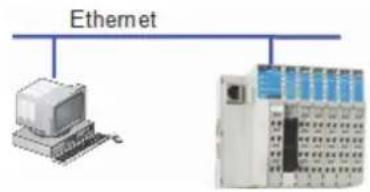
The MXIO Linux Library establishes a data tunnel using Modbus commands to communicate with the Ethernet I/O. Access is usually established using TCP port number 502.
flowchart
graph TD
    A["Ethernet"] --> B["Computer"]
    A --> C["Industrial Control Unit"]
ioLogik 4000 remote I/O
IP: 192.168.8.1
Port: 502
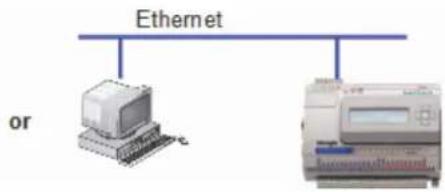
ioLogik E2000 Ethernet I/O
IP: 192.168.8.1
Port: 502
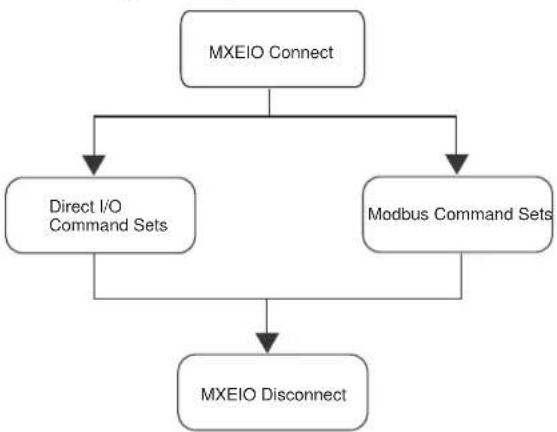
Three steps are required to access remote I/O data using the MXIO Linux Library.
- Use MXEIO_Connect to connect to the Ethernet I/O using IP:Port (e.g., 192.168.8.1:502). MXEIO_Connect should return a handle.
- Use the handle to access the desired I/O point with Modbus commands or direct I/O commands.
- To finish the operation, use MXEIO_Disconnect to release Windows system resources.
Program Flow I.
Connecting to a Single Ethernet I/O
flowchart
graph TD
    A["MXEIO Connect"] --> B["Direct I/O Command Sets"]
    A --> C["Modbus Command Sets"]
    B --> D["MXEIO Disconnect"]
    C --> D
Connecting to Multiple Ethernet I/O
Before multiple Ethernet I/O can be accessed over the network, make sure that each I/O has a unique IP address.
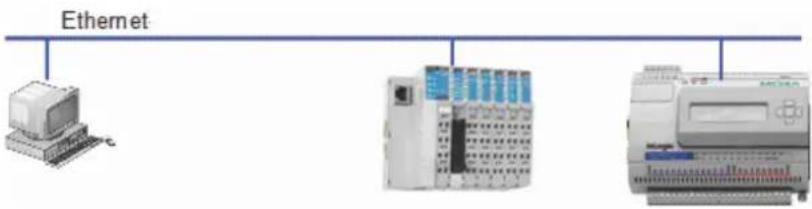
ioLogik 4000 remote I/O
IP: 192.168.8.1
Port: 502
ioLogik E2000 Ethernet I/O
IP: 192.168.8.2
Port: 502
Each Ethernet I/O needs a unique handle in order to be accessed. Use MXEIO_Connect to obtain the handle for each Ethernet I/O.
Program Flow II.
Connecting to Multiple Ethernet I/O.
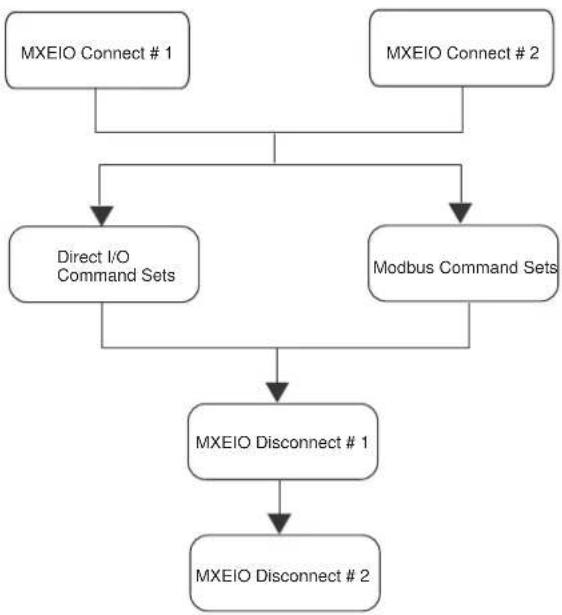
flowchart
graph TD
    A["MXEIO Connect # 1"] --> C["Direct I/O Command Sets"]
    B["MXEIO Connect # 2"] --> C
    C --> D["Modbus Command Sets"]
    D --> E["MXEIO Disconnect # 1"]
    E --> F["MXEIO Disconnect # 2"]
Connecting to a Single Serial I/O
ioLogik 4000 and R2000 I/O can be used in RS-485, RS-232 control networks. For access to I/O over RS-485 or RS-232, please pay attention to the following:
- Your computer must be equipped with an RS-232 or RS-485 communication port.
● Make sure that the baudrate and communication parameters for the computer and the I/O are identical.
● Make sure that the I/O is running under Modbus/RTU
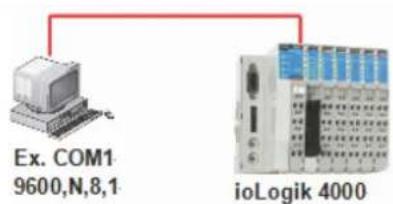
ioLogik 4000 remote I/O ID: 10
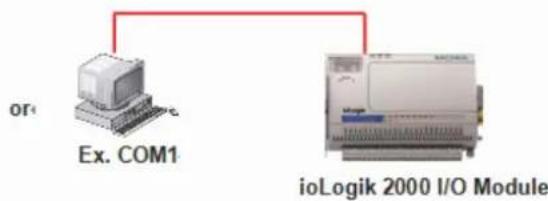
ioLogik E2000 Ethernet I/O ID: 10
Four steps are required to access remote I/O data using the MXIO Linux Library.:
- Use MXSIO_OpenCommport to open the COM port and connect to the serial I/O.
- Use MXSIO_Connect to connect to the serial I/O using the Unit ID (e.g., 10). MXSIO_Connect should return a handle.
- Use the handle to access the desired I/O point with Modbus command sets or direct I/O command sets.
- To finish the operation, use MXSIO_Disconnect and MXSIO_CloseCommport to release Windows system resources.
Program Flow III.
Connecting Single RS-485 I/O.
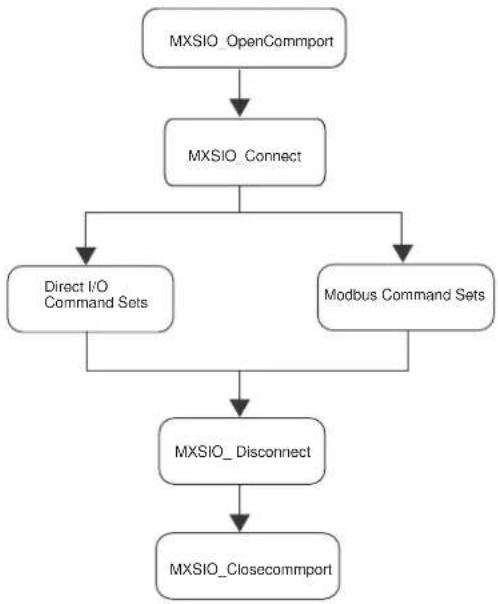
flowchart
graph TD
    A["MXSIO_OpenCommport"] --> B["MXSIO_Connect"]
    B --> C["Direct I/O Command Sets"]
    B --> D["Modbus Command Sets"]
    C --> E["MXSIO_Disconnect"]
    D --> E
    E --> F["MXSIO_Closecommport"]
Connecting to Multiple RS-485 I/O
In most real world applications, multiple RS-485 I/O are often connected to the same network. One RS-485 network can support up to 32 nodes.
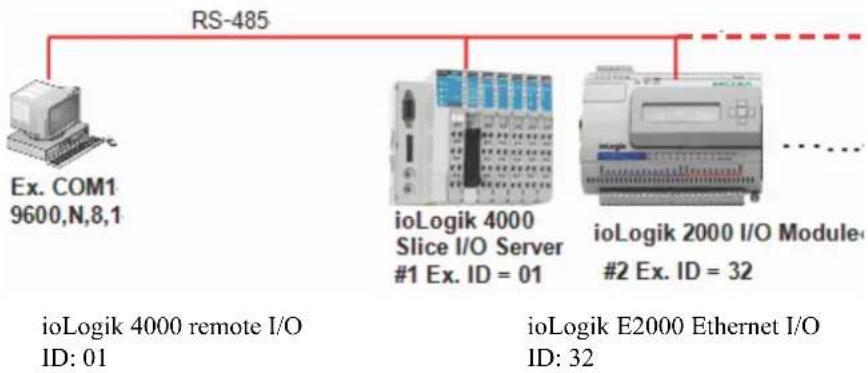
flowchart
graph TD
    A["Ex. COM1\n9600,N,8,1"] --> B["RS-485"]
    B --> C["iologik 4000\nSlice I/O Server\n#1 Ex. ID = 01"]
    B --> D["iologik 2000 I/O Module\n#2 Ex. ID = 32"]
    C --> E["ioLogik 4000 remote I/O\nID: 01"]
    D --> F["ioLogik E2000 Ethernet I/O\nID: 32"]
Each serial I/O requires a unique handle. Make sure each serial I/O server already has its own handle before accessing the I/O points.
Program Flow IV.
Connecting Multiple Serial I/O.
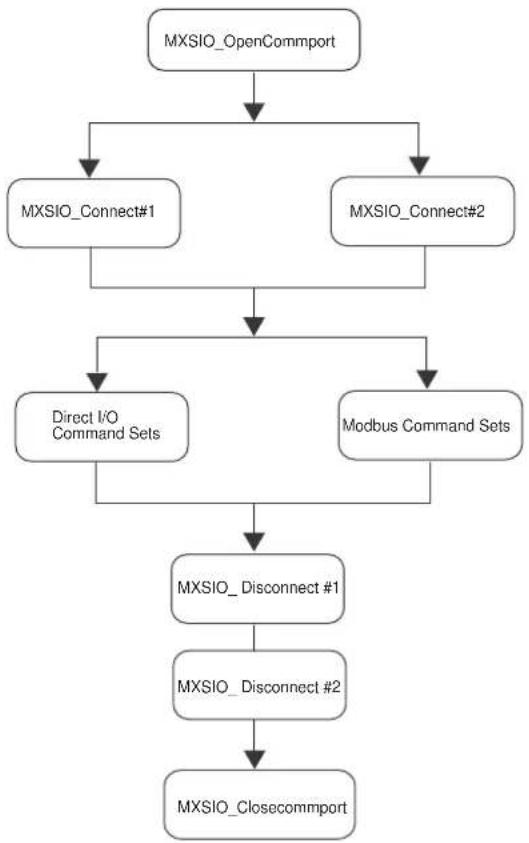
flowchart
graph TD
    A["MXSIO_OpenCommport"] --> B["MXSIO_Connect#1"]
    A --> C["MXSIO_Connect#2"]
    B --> D["Direct I/O Command Sets"]
    C --> D
    D --> E["MXSIO_Disconnect #1"]
    E --> F["MXSIO_Disconnect #2"]
    F --> G["MXSIO_Closecommport"]
Connecting to the ioLogik E2000 and Attached RS-485 I/O
It is possible to combine Ethernet and RS-485 connections, as shown in the following figure.
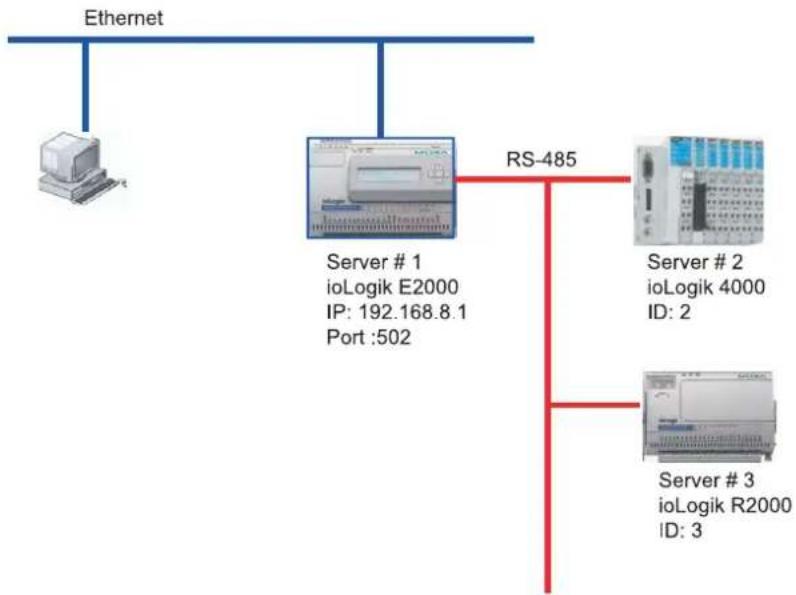
flowchart
graph TD
    A["Ethernet"] --> B["Server # 1\nioLogik E2000\nIP: 192.168.8.1\nPort :502"]
    A --> C["Server # 2\nioLogik 4000\nID: 2"]
    A --> D["Server # 3\nioLogik R2000\nID: 3"]
    B --> E["RS-485"]
    C --> E
    D --> E
Program Flow V.
Connecting to the ioLogik E2000 Ethernet I/O and Attached RS-485 I/O.
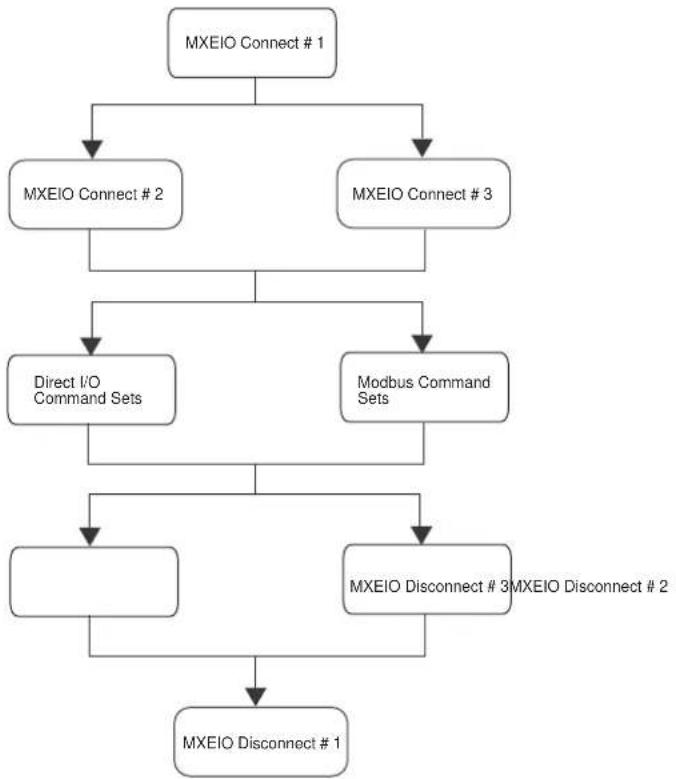
flowchart
graph TD
    A["MXEIO Connect # 1"] --> B["MXEIO Connect # 2"]
    A --> C["MXEIO Connect # 3"]
    B --> D["Direct I/O Command Sets"]
    C --> E["Modbus Command Sets"]
    D --> F["MXEIO Disconnect # 3"]
    E --> G["MXEIO Disconnect # 2"]
    F --> H["MXEIO Disconnect # 1"]
    G --> H
Modbus Command Sets vs. Direct I/O Command Sets
The MXIO Library offers two options for accessing I/O data from ioLogik 4000, E2000, and R2000 I/O.
Modbus Command Sets
ioLogik 4000, E2000, and R2000 I/O use Modbus/TCP and Modbus/RTU to communicate with host computers. The MXIO Library includes Modbus command sets that use the Modbus protocol data format to access I/O data. This is a good choice if you are already familiar with the Modbus protocol and prefer using the Modbus data structure.
Direct I/O Command Sets
As an alternative to the complex data structure of Modbus, the MXIO library also provides direct I/O command sets for a more intuitive method of obtaining I/O data. With direct I/O command sets, each I/O point or channel can be accessed using the physical slot number and channel number. This allows users to obtain I/O data quickly and easily.
The MXIO API is organized into five types of commands:
□ System Command Sets
RS-485/RS-232 I/O Connect Commands
➢ Ethernet I/O Connect Commands
➢ General Commands
▶ Special Commands for ioLogik E2000, R2000
▶ Special Commands for ioLogik 4000
Modbus Command Sets
☐ Direct I/O Command Sets
▶ Digital Input Commands
Digital Input Commands for ioLogik E2000, R2000
Digital Input / Output Mode Commands for ioLogik E2000
Counter Commands for ioLogik E2000, R2000
▶ Digital Output Commands
➢ Digital Output Commands for ioLogik E2000, R2000
➢ Digital Output Commands for ioLogik 4000
➢ Pulse Output Commands for ioLogik E2000, R2000
▶ Analog Input Commands
➢ Analog Input Commands for ioLogik E2000, R2000
➢ Analog Output Commands
➢ Analog Output Commands for ioLogik E2000, R2000
➢ Analog Output Commands for ioLogik 4000
▶ RTD Commands
➢ Thermocouple Commands
□ Click&Go Logic Commands
☐ Active I/O Message Commands
System Command Sets
RS-485/RS-232 I/O Connect Commands
| Function Name |
| MXSIO_OpenCommport |
| MXSIO_CloseCommport |
| MXSIO_Connect |
| MXSIO_Disconnect |
Ethernet I/O Connect Commands
| Function Name |
| MXEIO_Init |
| MXEIO_Exit |
| MXEIO_Connect |
| MXEIO_Disconnect |
| MXEIO_CheckConnection |
General Commands
| Function Name |
| MXIO_GetDllVersion |
| MXIO_GetDllBuildDate |
| MXIO_GetModuleType |
| MXIO_ReadFirmwareRevision |
| MXIO_ReadFirmwareDate |
| MXIO_Restart |
| MXIO_Reset |
Special Commands for ioLogik E2000, R2000
| Function Name |
| Module2K_GetSafeStatus |
| Module2K_ClearSafeStatus |
Special Commands for ioLogik 4000
| Function Name |
| Adp4K_ReadFirmwareRevision |
| Adp4K_ReadStatus |
| Adp4K_ClearStatus |
| Adp4K_ReadFirmwareDate |
| Adp4K_ReadSlotAmount |
| Adp4K_ReadAlarmedSlot |
| Adp4K_ReadAlarmedSlot |
Modbus Command Sets
| Function Name |
| MXIO_ReadCoils |
| MXIO_WriteCoils |
| MXIO_ReadRegs |
| MXIO_WriteRegs |
Direct I/O Command Sets
Digital Input Commands
| Function Name |
| DI_Rcads |
| DI_Read |
Digital Input Commands for ioLogik E2000, R2000
| Function Name |
| DI2K_GetModes |
| DI2K_SetModes |
| DI2K_GetMode |
| DI2K_SetMode |
| DI2K_GetFilters |
| DI2K_SetFilters |
| DI2K_GetFilter |
| DI2K_SetFilter |
Digital Input / Output Mode Commands for ioLogik E2000
| Function Name |
| DIO2K_GetIOMode |
| DIO2K_SetIOMode |
| DIO2K_GetIOModes |
| DIO2K_SetIOModes |
Counter Commands for ioLogik E2000, R2000
| Function Name |
| Cnt2K_Reads |
| Cnt2K_Clears |
| Cnt2K_Read |
| Cnt2K_Clear |
| Cnt2K_GetOverflows |
| Cnt2K_ClearOverflows |
| Cnt2K_GetOverflow |
| Cnt2K_ClearOverflow |
| Cnt2K_GetFilters |
| Cnt2K_SetFilters |
| Cnt2K_GetFilter |
| Cnt2K_SetFilter |
| Cnt2K_GetStartStatuses |
| Cnt2K_SetStartStatuses |
| Cnt2K_GetStartStatus |
| Cnt2K_SetStartStatus |
| Cnt2K_GetTriggerTypes |
| Cnt2K_SetTriggerTypes |
| Cnt2K_GetTriggerType |
| Cnt2K_SetTriggerType |
| Cnt2K_GetPowerOnValues |
| Cnt2K_SetPowerOnValues |
| Cnt2K_GetPowerOnValue |
| Cnt2K_SetPowerOnValue |
| Cnt2K_GetSafeValues |
| Cnt2K_SetSafeValues |
| Cnt2K_GetSafeValue |
| Cnt2K_SetSafeValue |
Digital Output Commands
| Function Name |
| DO_Reads |
| DO_Rcad |
| DO_Writes |
| DO_Write |
| DO_GetSafeValues |
| DO_SetSafeValues |
| DO_GetSafeValue |
| DO_SetSafeValue |
Digital Output Commands for ioLogik E2000, R2000
| Function Name |
| DO2K_GetModes |
| DO2K_SetModes |
| DO2K_GetMode |
| DO2K_SetMode |
| DO2K_GetPowerOnValues |
| DO2K_SetPowerOnValues |
| DO2K_GetPowerOnValue |
| DO2K_SetPowerOnValue |
Digital Output Commands for ioLogik 4000
| Function Name |
| DO4K_GetSafeActions |
| DO4K_SetSafeActions |
| DO4K_GetSafeAction |
| DO4K_SetSafeAction |
Pulse Output Commands for ioLogik E2000, R2000
| Function Name |
| Pulse2K_GetSignalWidths |
| Pulse2K_SetSignalWidths |
| Pulse2K_GetSignalWidth |
| Pulse2K_SetSignalWidth |
| Pulse2K_GetSignalWidths32: Only for ioLogik E2260 |
| Pulse2K_SctSignalWidths32: Only for ioLogik E2260 |
| Pulse2K_GetSignalWidth32: Only for ioLogik E2260 |
| Pulse2K_SctSignalWidth32: Only for ioLogik E2260 |
| Pulse2K_GetOutputCounts |
| Pulse2K_SetOutputCounts |
| Pulse2K_GetOutputCount |
| Pulse2K_SetOutputCount |
| Pulse2K_GetStartStatuses |
| Pulse2K_SetStartStatuses |
| Pulse2K_GetStartStatus |
| Pulse2K_SetStartStatus |
| Pulse2K_GetPowerOnValues |
| Pulse2K_SctPowerOnValues |
| Pulse2K_GetPowerOnValue |
| Pulse2K_SctPowerOnValue |
| Pulse2K_GetSafeValues |
| Pulse2K_SetSafeValues |
| Pulse2K_GetSafeValue |
| Pulse2K_SetSafeValue |
Analog Input Commands
| Function Name |
| AI_Reads |
| AI_Read |
| AI_ReadRaws |
| AI_ReadRaw |
Analog Input Commands for ioLogik E2000, R2000
| Function Name |
| AI2K_ReadMins |
| AI2K_ReadMinRaws |
| AI2K_RcsetMins |
| AI2K_ReadMin |
| AI2K_ReadMinRaw |
| AI2K_ResetMin |
| AI2K_ReadMaxs |
| AI2K_ReadMaxRaws |
| AI2K_ResetMaxs |
| AI2K_ReadMax |
| AI2K_ReadMaxRaw |
| AI2K_RcsetMax |
| AI2K_GetRanges |
| AI2K_SetRanges |
| AI2K_GctRange |
| AI2K_SetRange |
Analog Output Commands
| Function Name |
| AO_Reads |
| AO_Writes |
| AO_Read |
| AO_Write |
| AO_ReadRaws |
| AO_WriteRaws |
| AO_ReadRaw |
| AO_WriteRaw |
| AO_GetSafeValues |
| AO_SetSafeValues |
| AO_GetSafeValue |
| AO_SetSafeValue |
| AO_GetSafeRaws |
| AO_SetSafeRaws |
| AO_GetSafeRaw |
| AO_SetSafeRaw |
Analog Output Commands for ioLogik E2000, R2000
| Function Name |
| AO2K_GetRanges |
| AO2K_SctRanges |
| AO2K_GetRange |
| AO2K_SetRange |
| AO2K_GetPowerOnValues |
| AO2K_SetPowerOnValues |
| AO2K_GetPowerOnValue |
| AO2K_SetPowerOnValue |
| AO2K_GetPowerOnRaws |
| AO2K_SctPowerOnRaws |
| AO2K_GetPowerOnRaw |
| AO2K_SctPowerOnRaw |
Analog Output Commands for ioLogik 4000
| Function Name |
| AO4K_GetSafeActions |
| AO4K_SetSafeActions |
| AO4K_GetSafeAction |
| AO4K_SetSafeAction |
RTD Commands
| Function Name |
| RTD_Reads |
| RTD_Read |
| RTD_ReadRaws |
| RTD_ReadRaw |
| RTD2K_ResetMin |
| RTD2K_ResctMins |
| RTD2K_ResetMax |
| RTD2K_ResctMaxs |
| RTD2K_ReadMinRaw |
| RTD2K_ReadMinRaws |
| RTD2K_ReadMaxRaw |
| RTD2K_ReadMaxRaws |
| RTD2K_ReadMin |
| RTD2K_ReadMins |
| RTD2K_ReadMax |
| RTD2K_ReadMaxs |
| RTD2K_GetStartStatus |
| RTD2K_SetStartStatus |
| RTD2K_GetStartStatuses |
| RTD2K_SetStartStatuses |
| RTD2K_GetSensorType |
| RTD2K_SetSensorType |
| RTD2K_GetSensorTypes |
| RTD2K_SetSensorTypes |
| RTD2K_GetEngUnit |
| RTD2K_SetEngUnit |
| RTD2K_GetEngUnits |
| RTD2K_GetMathPar |
| RTD2K_SetMathPar |
| RTD2K_GetMathPars |
| RTD2K_SetMathPars |
Thermocouple Commands
| Function Name |
| TC_Reads |
| TC_Read |
| TC_ReadRaws |
| TC_ReadRaw |
Click&Go Logic Commands
| Function Name |
| Logic2K_GetStartStatus |
| Logic2K_SetStartStatus |
Active I/O Message Commands
| Function Name |
| Message2K_Start |
| Message2K_Stop |
System commands include functions that initialize the connection between a host computer and the I/O. In addition, system commands include functions for obtaining hardware and status information of the I/O itself.
The following topics are covered:
☐ RS-232/RS-485 I/O Connect Commands
☐ Ethernet I/O Connect Commands
□ General Commands
☐ Special Commands for ioLogik E2000, R2000
☐ Special Commands for ioLogik 4000
RS-232/RS-485 I/O Connect Commands
| MXSIO_OpenCommport | This function opens the local COM port of the host computer with communication parameters. |
| C/C++ | int MXSIO_OpenCommport (char *szCommport,DWORD dwBaudrate,BYTE bytDataFormat,DWORD dwTimeout,int * hCommport); |
| Arguments | szCommport: Name of the common port, e.g., “ttyM0”.dwBaudrate: Baudrate, from 4,800 to 115,200 bps. Does not support 1200 or 2400 bps.bytDataFormat: Transmission data format.bit_cnt (bit 0, 1) = 0x00 = bit_50x01 = bit_60x02 = bit_70x03 = bit_8stop_cnt (bit 2) = 0x00 = stop_10x04 = stop_2parity (bit 3, 4, 5) = 0x00 = none0x08 = odd0x18 = even0x28 = mark0x38 = spacedwTimeout: Timeout in milliseconds for serial adapter communicationhCommport: Handle of the opened COM port. |
| Return Value | Succeeded MXIO_OK.Fail Refer to Return Codes. |
| MXSIO_CloseCommport | This closes the COM port; the COM port handle will be invalid. |
| C/C++ | int MXSIO_CloseCommport ( int hCommport); |
| Arguments | hCommport: Handle of the opened COM port. |
| Return Value | Succeed MXIO_OK. |
| Fail Refer to Return Codes. | |
| MXSIO_Connect | Based on the COM port handle or ioLogik E2000 handle, users must use this function to establish an I/O device handle for each RS-485 or RS-232 I/O. A COM port handle can connect one RS-232 I/O or up to 32 RS-485 I/O. |
| C/C++ | int MXSIO_Connect ( int hCommport, BYTE bytUnitID, BYTE bytTransmissionMode, int *hConnection); |
| Arguments | hCommport: I/O over serial interface will get a serial handle. I/O server over Ethernet interface will get an Ethernet handle.For more details, please see the Program Flow IV and Program Flow V in Chapter 2.bytUnitID: Modbus unit ID of the I/O, from 01 to 99.bytTransmissionMod Modbus transmission format.ex: 0: RTU mode1: ASCIINote that the protocol settings must agree with the hardware settings on the ioLogik 4000 I/O, and the ioLogik R2000 only supports RTU. |
| Return Value | hConnection: Handle of the I/O device connection.Succeed MXIO_OK.Fail Refer to Return Codes. |
mode.
| MXSIO_Disconnect | This will disconnect the RS-485/232 I/O. The I/O handle will be invalid. |
| C/C++ArgumentsReturn Value | int MXSIO_Disconnect ( int hConnection);hConnection: Handle of the I/O device connection.Succeed MXIO_OK.Fail Refer to Return Codes. |
Ethernet I/O Connect Commands
| MXEIO_Init | Initiate the socket, only for windows OS. |
| C/C++ArgumentsReturn Value | int MXEIO_Init ();NoneSucced MXIO_OK.Fail Refer to Return Codes. |
| MXEIO_Exit | To terminates use of the socket, only for windows OS. |
| C/C++ArgumentsReturn Value | int MXEIO_Exit ();NoneNone. |
| MXEIO_Connect | This function establishes a connection to the port of the Ethernet I/O. Once a connection is established, a handle will be returned for additional functions. |
| C/C++ | int MXEIO_Connect (char *szIP,WORD wPort,DWORD dwTimeOut,int * hConnection); |
| Arguments | szIP: IP address of the Ethernet I/O to be connected.wPort: TCP port number of Ethernet I/O.Please use 502 for the ioLogik 4000 and E2000.dwTimeOut: Timeout value in milliseconds for establishing a network connection with the ioLogik Ethernet adapter.hConnection: Handle of the I/O device connection. |
| Return Value | Succeed MXIO_OK.Fail Refer to Return C o d e s . |
| MXEIO_Disconnect | This will close the connection with the Ethernet I/O; the handle will be invalid. |
| C/C++ArgumentsReturn Value | int MXEIO_Disconnect (int hConnection);hConnection: Handle of the connection.Succeed MXIO_OK.Fail Refer to Return Codes. |
| MXEIO_CheckConnection | This establishes a connection to the port of the Ethernet I/O. Once the connection is established, a handle will be returned for additional functions. |
| C/C++ | int MXEIO_CheckConnection(inth Connection,DWORD dwTimeOut,BYTE *bytStatus); |
| Arguments | hConnection: Handle of the I/O connection.dwTimeOut: Timeout value in milliseconds for network connection.bytStatus Connection status.0: Check connection ok.1: Check connection fail.2: Check connection timeout. |
| Return Value | Succeed MXIO_OK.Fail Refer to Return Codes . |
General Commands
| MXIO_GetDllVersion | This will get the DLL version. |
| C/C++ | int MXIO_GetDllVersion (); |
| Arguments | None |
| Return Value | Succeed The DLL version. Version 2.0.0.0 is expressed as value 0x2000. |
| MXIO_GetDllBuildDate | This will get the DLL release date. |
| C/C++ArgumentsReturn Value | int MXIO_GetDllBuildDate();NoneSucceed Return the DLL release date. If the value is 0x20071001, then the date is 2007/10/01. |
| MXIO_GetModuleType | This function reports the model name of the network adapter and I/O modules. |
| C/C++ | int MXIO_GetModuleType ( int hConnection, BYTE bytSlot, WORD * wType); |
| Arguments | hConnection: I/O handle for a connection.bytSlot: Slot number of the I/O to be checked, from 0 to 32. The ioLogik 4000 network adapter's slot number is always 0. This parameter is inactive for ioLogik E2000 and R2000 I/O.wType: A pointer to the model name. For the model name NA-4010, the value would be 0x4010Refer to the Product Model and ID Reference Table for more information. |
| Return Value | Succeed MXIO_OK.Fail Refer to Return Codes . |
| MXIO_ReadFirmwareRevision | This function reports the firmware revision for the ioLogik 4000 (network adapter), E2000, or R2000. |
| C/C++ | int MXIO_ReadFirmwareRevision ( int hConnection, BYTE bytRevision[ ] ); |
| Arguments | hConnection: I/O handle for a connection.bytRevision: Stores the firmware revisionbytRevision[0] = major (A)bytRevision[1] = minor (B)bytRevision[2] = release (C)bytRevision[3] = build (D)format is A.B.C.D |
| Return Value | Succeed MXIO_OK.Fail R cfer to Return Codes. |
| MXIO_ReadFirmwareDate | This function reports the firmware release date for the ioLogik 4000 (network adapter), E2000, or R2000. | |
| C/C++ | int MXIO_ReadFirmwareDate ( int hConnection, WORD wDate[ ] ); | |
| Arguments | hConnection: | I/O handle for a connection. |
| wDate: | Firmware release date. For a firmware release date of July 5, 2005, Word 0 = 0x0705 and Word 1 = 0x2005. | |
| Return Value | Succeeded | MXIO_OK. |
| Fail | Refer to Return Codes. | |
| MXIO_Restart | This function is used to restart the I/O. | |
| C/C++ | int MXIO_Restart ( int hConnection); | |
| Arguments | hConnection: I/O handle for a connection. | |
| Return Value | Succeed MXIO_OK. | |
| Fail Refer to Return Codes. | ||
| MXIO_Reset | This function is used to reset the I/O. |
| C/C++ | int MXIO_Reset ( int hConnection); |
| Arguments | hConnection: I/O handle for a connection. |
| Return Value | Succeed MXIO_OK. |
| Fail Refer to Return Codes. |
Special Commands for ioLogik E2000, R2000
| Module2K_GetSafeStatus | This function code is used to get the safe status of an ioLogik E2000 or R2000 I/O. |
| C/C++ | int Module2K_GetSafeStatus ( int hConnection, WORD * wStatus); |
| Arguments | hConnection: The handle for a connection.wStatus: A pointer to the specific module's safe status. The values are:0: Normal.1: Safe mode. |
| Return Value | Succeed MXIO_OK.Fail Refer to Return C o d e s . |
| Module2K_ClearSafeStatus | This function code is used to get the safe status of an ioLogik E2000 or R2000 I/O. |
| C/C++ArgumentsReturn Value | int Module2K_ClearSafeStatus ( int hConnection);hConnection: The handle for a connection.Succeed MXIO_OK.Fail Refer to Return Codes. |
Special Commands for ioLogik 4000
| Adp4K_ReadFirmwareRevision | This function code is used to read the firmware revision. |
| C/C++ | int Adp4K_ReadFirmwareRevision ( int hConnection, WORD * wRevision); |
| Arguments | hConnection: The handle for an I/O connection.wRevision: Stores the firmware revision. For revision 1.01, the value will be 0X0101. |
| Return Value | Succeed MXIO_OK.Fail Refer to Return Codes. |
| Adp4K_ReadStatus | This function code is used to read the status of the ioLogik 4000 adapter. |
| C/C++ | int Adp4K_ReadStatus ( int hConnection,WORD *wBusStatus,WORD *wFPStatus,WORD *wEWStatus,WORD *wESStatus,WORD *wECStatus); |
| Arguments | hConnection: The handle for an I/O connection.wBusStatus: Stores the bus status in numerical format.The values are:0: Normal Operation.1: Bus Standby.2: Bus Communication Fault.3: Slot Configuration Failed.4: No Expansion Slot.wFPStatus: Stores the field power status in numerical format. The values are:0: 24 VDC Field Power On.1: 24 VDC Field Power Off.wEWStatus: Stores the Watchdog status in numerical format. The values are:0: No Error.1: Watchdog activated.wESStatus: Stores the Modbus Setup Error status in numeric data format, supported by NA-4020 & NA-4021 only.0: No Error.1: Modbus Setup Error.wECStatus: Stores the Modbus Checksum Error status, supported by NA-4020 & NA-4021 only.0: No Error.1: Three continuous CRC/LRC checksum errors have occurred since last restart, last clear counters operation, or last power-up. |
| Return Value | Succeed MXIO_OK. |
| Adp4K_ClearStatus | This function code is used to clear the status of the ioLogik 4000 adapters. |
| C/C++ArgumentsReturn Value | int Adp4K_ClearStatus ( int hConnection);hConnection: The handle for an I/O connection.Succeed MXIO_OK.Fail Refer to Return Codes. |
| Adp4K_ReadFirmwareDate | This function code is used to read the firmware release date. |
| C/C++ | int Adp4K_ReadFirmwareDate ( int hConnection, WORD wDate[ ]); |
| Arguments | hConnection: The handle for a connection.wDate: An array that stores the firmware release date. For a firmware release date of July 5, 2005, wDate[0] will be 0X0705 and wDate[1] will be 0X2005. |
| Return Value | Succeed MXIO_OK.Fail Refer to Return Codes. |
| Adp4K_ReadSlotAmount | This function code is used to read the number of expansion slots. |
| C/C++ | int Adp4K_ReadSlotAmount ( int hConnection, WORD *wAmount); |
| Arguments | hConnection: The handle for a connection.wAmount: A pointer to the number of expansion slots. |
| Return Value | Succeed MXIO_OK.Fail Refer to Return Codes. |
| Adp4K_ReadAlarmedSlot | This function code is used to read the number of expansion slots. |
| C/C++ | int Adp4K_ReadAlarmedSlot ( int hConnection,DWORD *dwAlarm); |
| Arguments | hConnection: The handle for a connection.dwAlarm: A pointer to the Alarm slot list. The corresponding bit represents slot position.The wAlarm bit 0 is represented by the first slot and bit 31 is represented by the last slot.The values are:0: Normal slot.1: Alarm slot. |
| Return Value | Succeed MXIO_OK.Fail Refer to Return Codes. |
Four basic Modbus commands are provided in the Modbus command set. However, you must refer to the Modbus reference table in ioAdmin to extract data from the Modbus packet.
| MXIO_ReadCoils | This function reads the on/off status for a contiguous group of coils on the same I/O. |
| C/C++ | int MXIO_ReadCoils ( int hConnection, BYTE bytCoilType, WORD wStartCoil, WORD wCount, BYTE bytCoils[ ]); |
| Arguments | hConnection: Handle for the I/O connection.bytCoilType: Coil type to be read.1: read coils (output bit).2: read discrete (input bit).wStartCoil: Specifies the starting coil address to be read.The address is beginning at 0.wCount: The number of coils to be read.bytCoils: An array that stores the status of coils; eachbyte holds eight coil values. Bit 0 of 1st byte represents 1st coil status. |
| Return Value | Succeed MXIO_OK.Fail Refer to Return Codes. |
| MXIO_WriteCoils | This function code is used to write the contiguous status of an I/O coils. |
| C/C++ | int MXIO_WriteCoils ( int hConnection,WORD wStartCoil,WORD wCount,BYTE bytCoils[ ]); |
| Arguments | hConnection: Handle for the I/O connection.wStartCoil: Specifies the starting coil to be written. The address is beginning at 0.wCount: The number of coils to be written.bytCoils: An array that stores the coil value; each byte holds eight coil values. |
| Return Value | Succeed MXIO_OK.Fail Refer to Return C o d e s . |
| MXIO_ReadRegs | This function code is used to read the contents of a contiguous block of the I/O holding registers. |
| C/C++ | int MXIO_ReadRegs ( int hConnection, BYTE bytRegisterType, WORD wStartRegister, WORD wCount, WORD wRegister[ ]); |
| Arguments | hConnection: The handle for an I/O connection.bytRegisterType: Coil type to be read. The meaning for a value in an entity is as follows:3: read holding registers (output word).4: read input register (input word).wStartRegister: Specifies the starting register address. The address is beginning at 0.wCount: The number of coils to be read.wRegister: An array that stores the register values. |
| Return Value | Succeed MXIO_OK.Fail Refer to Return Codes. |
| MXIO_WriteRegs | This function code is used to write the contents of a contiguous block of the I/O holding registers. |
| C/C++ | int MXIO_WriteRegs ( int hConnection,WORD wStartRegister,WORD wCount,WORD wRegister[ ]); |
| Arguments | hConnection: The handle for an I/O connection.wStartRegister: Specifics the starting register address. The address begins at 0.wCount: The number of coils to be written.wRegister: An array that stores the register values. |
| Return Value | Succeed MXIO_OK.Fail Refer to Return Codes. |
Direct I/O command sets provide an intuitive way to access the data for each channel.
The following topics are covered in this chapter:
Digital Input Commands
☐ Digital Input Commands for ioLogik E2000, R2000
☐ Digital Input / Output Mode C ommands for ioLogik E2000
☐ Counter Commands for ioLogik E2000, R2000
Digital Output Commands
☐ Digital Output Commands for ioLogik E2000, R2000
☐ Digital Output Commands for ioLogik 4000
☐ Pulse Output Commands for ioLogik E2000, R2000
☐ Analog Input Commands
☐ Analog Input Commands for ioLogik E2000, R2000
☐ Analog Output Commands
☐ Analog Output Commands for ioLogik E2000, R2000
☐ Analog Output Commands for ioLogik 4000
□ RTD Commands
☐ Thermocouple Commands
□ Click&Go Logic Commands
□ Active I/O Message Commands
Digital Input Commands
| DI_Reads | This function code is used to read the status of a group of contiguous D/I channels. |
| C/C++ | int DI_Reads ( int hConnection, BYTE bytSlot, BYTE bytStartChannel, BYTE bytCount, DWORD * dwValue); |
| Arguments | hConnection: The handle for an I/O connection.bytSlot: Slot number of the I/O module, from 1 to 32.This parameter is inactive for the ioLogik E2000 and R2000.bytStartChannel: Specifies the starting channel.bytCount: The number of channels to read.dwValue: A pointer to the contiguous D/I channel's values; each bit holds the value of one channel.A bit value of 0 represents the digital input status of the start channel. A bit value of 1 represents the second digital input channel's status. The values of the unused bits are random. |
| Return Value | Succeed MXIO_OK.Fail Refer to Return C o d e s . |
| DI_Read | This function code is used to read the status of a specific D/I channel. |
| C/C++ | int DI_Read ( int hConnection, BYTE bytSlot, BYTE bytChannel, BYTE *bytValue); |
| Arguments | hConnection: The handle for an I/O connection.bytSlot: Slot number of the I/O module, from 1 to 32.This parameter is inactive for the ioLogik E2000 and R2000.bytChannel: The desired channel.bytValue: A pointer to a specific D/I channel's status. |
| Return Value | Succeed MXIO_OK.Fail Refer to Return C o d e s . |
Digital Input Commands for ioLogik E2000, R2000
| DI2K_GetModes | This function code is used to get the mode of contiguous D/I channels. |
| C/C++ | int DI2K_GetModes ( int hConnection, BYTE bytStartChannel, BYTE bytCount, WORD wMode[ ]); |
| Arguments | hConnection: The handle for an I/O connection.bytStartChannel: Specifies the starting channel.bytCount: The number of channels to read.wMode: An array that stores the modes of the contiguous D/I channels. wMode[0] represents the value of the starting channel. The values are:0: D/I Mode.1: Counter Mode. |
| Return Value | Succeed MXIO_OK.Fail Refer to Return C o d e s . |
| DI2K_SetModes | This function code is used to set the mode of contiguous D/I channels. |
| C/C++ | int DI2K_SetModes ( int hConnection, BYTE bytStartChannel, BYTE bytCount, WORD wMode[ ]); |
| Arguments | hConnection: The handle for an I/O connection.bytStartChannel: Specifies the starting channel.bytCount: The number of channels to set.wMode: An array that stores the modes of the contiguous D/I channels. wMode [0] represents the value of the starting channel. The values are:0: D/I Mode.1: Counter Mode. |
| Return Value | Succeed MXIO_OK.Fail Refer to Return Codes. |
| DI2K_GetMode | This function code is used to get the mode of a specific D/I channel. |
| C/C++ | int DI2K_GetMode ( int hConnection, BYTE bytChannel, WORD * wMode); |
| Arguments | hConnection: The handle for an I/O connection.bytChannel: The desired channel.wMode: A pointer to the mode of the desired D/I channel. The values are:0: D/I Mode.1: Counter Mode. |
| Return Value | Succeed MXIO_OK.Fail Refer to Return C o d e s . |
| DI2K_SetMode | This function code is used to set the mode of a specific D/I channel. |
| C/C++ | int DI2K_SetMode ( int hConnection, BYTE bytChannel, WORD wMode); |
| Arguments | hConnection: The handle for an I/O connection.bytChannel: The desired channel.wMode: A pointer to the mode of the desired D/I channel. The values are:0: D/I Mode.1: Counter Mode. |
| Return Value | Succeed MXIO_OK.Fail Refer to Return Codes. |
| DI2K_GetFilters | This function code is used to get the filter of contiguous D/I channels. |
| C/C++ | int DI2K_GetFilters ( int hConnection, BYTE bytStartChannel, BYTE bytCount, WORD wFilter[ ]); |
| Arguments | hConnection: The handle for an I/O connection.bytStartChannel: Specifies the starting channel.bytCount: The number of channels to read.wFilter: An array that stores the filter values of the contiguous D/I channels. wFilter [0] represents the value of the starting channel. |
| Return Value | Succeed MXIO_OK.Fail Refer to Return Codes. |
| DI2K_SetFilters | This function code is used to set the filter of contiguous D/I channels. |
| C/C++ | int DI2K_SetFilters ( int hConnection, BYTE bytStartChannel, BYTE bytCount, WORD wFilter[ ]); |
| Arguments | hConnection: The handle for an I/O connection.bytStartChannel: Specifies the starting channel.bytCount: The number of channels to set.wFilter: An array that stores the filter values of the contiguous D/I channels. wFilter [0] represents the value of the starting channel. |
| Return Value | Succeed MXIO_OK.Fail Refer to Return Codes. |
| DI2K_GetFilter | This function code is used to get the filter of a specific D/I channel. |
| C/C++ | int DI2K_GetFilter ( int hConnection, BYTE bytChannel, WORD * wFilter); |
| Arguments | hConnection: The handle for an I/O connection.bytChannel: The desired channel.wFilter: A pointer to the filter value of the desired D/I channel. |
| Return Value | Succeed MXIO_OK.Fail Refer to Return Codes. |
| DI2K_SetFilter | This function code is used to set the filter of a specific D/I channel. |
| C/C++ | int DI2K_GetFilter ( int hConnection, BYTE bytChannel, WORD wFilter); |
| Arguments | hConnection: The handle for an I/O connection.bytChannel: The desired channel.wFilter: A pointer to the filter value of the desired D/I channel. |
| Return Value | Succeed MXIO_OK.Fail Refer to Return C o d e s . |
Counter Commands for ioLogik E2000, R2000
| Cnt2K_Reads | This function code is used to read the counter values of contiguous D/I channels in Counter mode. |
| C/C++ | int Cnt2K_Reads ( int hConnection, BYTE bytStartChannel, BYTE bytCount, DWORD dwValue[ ]); |
| Arguments | hConnection: The handle for an I/O connection.bytStartChannel: Specifies the starting channel.bytCount: The number of channels to read.dwValue: An array that stores the counter values of the contiguous channels, dwValue[0] represents the value of the starting channel. |
| Return Value | Succeed MXIO_OK.Fail Refer to Return Codes . |
| Cnt2K_Clears | This function code is used to clear the counter values of contiguous D/I channels in Counter mode. |
| C/C++ | int Cnt2K_Clears ( int hConnection, BYTE bytStartChannel, BYTE bytCount); |
| Arguments | hConnection: The handle for an I/O connection.bytStartChannel: Specifies the starting channel.bytCount: The number of channels to clear. |
| Return Value | Succeed MXIO_OK.Fail Refer to Return Codes . |
| Cnt2K_Read | This function code is used to read the counter value of a specific D/I channel in Counter mode. |
| C/C++ | int Cnt2K_Read ( int hConnection, BYTE bytChannel, DWORD * dwValue); |
| Arguments | hConnection: The handle for an I/O connection.bytChannel: The desired channel.dwValue: A pointer to the counter value of the desired channel. |
| Return Value | Succeed MXIO_OK.Fail Refer to Return Codes . |
| Cnt2K_Clear | This function code is used to clear the counter value of a specific D/I channel in Counter mode. |
| C/C++ | int Cnt2K_Clear ( int hConnection, BYTE bytChannel); |
| Arguments | hConnection: The handle for an I/O connection.bytChannel: The desired channel. |
| Return Value | Succeeded MXIO_OK.Fail Refer to Return Codes. |
| Cnt2K_GetOverflows | This function code is used to get the overflow statuses of contiguous D/I channels in Counter mode. |
| C/C++ | int Cnt2K_GetOverflows ( int hConnection, BYTE bytStartChannel, BYTE bytCount, DWORD * dwStatus); |
| Arguments | hConnection: The handle for an I/O connection.bytStartChannel: Specifies the starting channel.bytCount: The number of channels to read.dwStatus: A pointer to the overflow status of the contiguous channels; each bit holds the status.A bit value of 0 represents the status of the start channel. A bit value of 1 represents the second channel's status. The values are :0: Normal1: Overflow |
| Return Value | Succeeded MXIO_OK.Fail Refer to Return Codes. |
| Cnt2K_ClearOverflows | This function code is used to clear the overflow statuses of contiguous D/I channels in Counter mode. |
| C/C++ | int Cnt2K_ClearOverflows ( int hConnection, BYTE bytStartChannel, BYTE bytCount); |
| Arguments | hConnection: The handle for an I/O connection.bytStartChannel: Specifics the starting channel.bytCount: The number of channels to clear. |
| Return Value | Succeed MXIO_OK.Fail Refer to Return Codes . |
| Cnt2K_GetOverflow | This function code is used to get the overflow status of a specific D/I channel in Counter mode. |
| C/C++ | int Cnt2K_GetOverflow( int hConnection, BYTE bytChannel, BYTE * bytStatus); |
| Arguments | hConnection: The handle for an I/O connection.bytChannel: The desired channel.bytStatus: A pointer to the overflow status of the desired channel. The values are :0: Normal1: Overflow |
| Return Value | Succeed MXIO_OK.Fail Refer to Return Codes . |
| Cnt2K_ClearOverflow | This function code is used to clear the overflow status of a specific D/I channel in Counter mode. |
| C/C++ | int Cnt2K_ClearOverflow ( int hConnection, BYTE bytChannel); |
| Arguments | hConnection: The handle for an I/O connection.bytChannel: The desired channel. |
| Return Value | Succeed MXIO_OK.Fail Refer to Return Codes. |
| Cnt2K_GetFilters | This function code is used to get the filter value of contiguous D/I channels in Counter mode. |
| C/C++ | int Cnt2K_GetFilters ( int hConnection, BYTE bytStartChannel, BYTE bytCount, WORD wFilter[ ]); |
| Arguments | hConnection: The handle for an I/O connection.bytStartChannel: Specifies the starting channel.bytCount: The number of channels to read.wFilter: An array that stores the filter values for the contiguous D/I channels. |
| Return Value | Succeed MXIO_OK.Fail Refer to Return Codes . |
| Cnt2K_SetFilters | This function code is used to set the filter values of contiguous D/I channels in Counter mode. |
| C/C++ | int Cnt2K_SetFilters ( int hConnection, BYTE bytStartChannel, BYTE bytCount, WORD wFilter[ ]); |
| Arguments | hConnection: The handle for an I/O connection.bytStartChannel: Specifies the starting channel.bytCount: The number of channels to set.wFilter: An array that stores the filter values for the contiguous D/I channels. |
| Return Value | Succeed MXIO_OK.Fail Refer to Return Codes . |
| Cnt2K_GetFilter | This function code is used to get the filter value of a specific D/I channel in Counter mode. |
| C/C++ | int Cnt2K_GetFilter ( int hConnection, BYTE bytChannel, WORD * wFilter); |
| Arguments | hConnection: The handle for an I/O connection.bytChannel: The desired channel.wFilter: A pointer to the filter value. |
| Return Value | Succeed MXIO_OK.Fail Refer to Return Codes . |
| Cnt2K_SetFilter | This function code is used to set the filter value of a specific D/I channel in Counter mode. |
| C/C++ | int Cnt2K_SetFilter ( int hConnection, BYTE bytChannel, WORD wFilter); |
| Arguments | hConnection: The handle for an I/O connection.bytChannel: The desired channel.wFilter: Stores the filter value. |
| Return Value | Succeed MXIO_OK.Fail Refer to Return Codes . |
| Cnt2K_GetStartStatuses | This function code is used to get the start statuses of contiguous D/I channels in Counter mode. |
| C/C++ | int Cnt2K_GetStartStatuses ( int hConnection, BYTE bytStartChannel, BYTE bytCount, DWORD * dwStatus); |
| Arguments | hConnection: The handle for an I/O connection.bytStartChannel: Specifies the starting channel.bytCount: The number of channels to read.dwStatus: A pointer to the start statuses of the contiguous D/I channels; each bit holds the start status of one channel. A bit value of 0 represents the status of the start channel. A bit value of 1 represents the second channel's status. The values are :0: stop1: start |
| Return Value | Succeed MXIO_OK.Fail Refer to Return Codes. |
| Cnt2K_SetStartStatuses | This function code is used to set the start statuses of contiguous D/I channels in Counter mode. |
| C/C++ | int Cnt2K_SetStartStatuses ( int hConnection, BYTE bytStartChannel, BYTE bytCount, DWORD dwStatus); |
| Arguments | hConnection: The handle for an I/O connection.bytStartChannel: Specifies the starting channel.bytCount: The number of channels to set.dwStatus: A pointer to the start statuses of the contiguous D/I channels; each bit holds the start status of one channel. A bit value of 0 represents the status of the start channel. A bit value of 1 represents the second channel's status. The values are :0: stop1: start |
| Return Value | Succeed MXIO_OK.Fail Refer to Return Codes. |
| Cnt2K_GetStartStatus | This function code is used to get the start status of a specific D/I channel in Counter mode. |
| C/C++ | int Cnt2K_GetStartStatus ( int hConnection, BYTE bytChannel, BYTE * bytStatus); |
| Arguments | hConnection: The handle for an I/O connection.bytChannel: The desired channel.bytStatus: A pointer to the start status of the desired channel. The values are :0 : stop1 : start |
| Return Value | Succeed MXIO_OK.Fail Refer to Return Codes . |
| Cnt2K_SetStartStatus | This function code is used to set the start status of a specific D/I channel in Counter mode. |
| C/C++ | int Cnt2K_SetStartStatus ( int hConnection, BYTE bytChannel, BYTE bytStatus); |
| Arguments | hConnection: The handle for an I/O connection.bytChannel: The desired channel.bytStatus: A pointer to the start status of the desired channel. The values are :0: stop1: start |
| Return Value | Succeed MXIO_OK.Fail Refer to Return Codes . |
| Cnt2K_GetTriggerTypes | This function code is used to get the trigger types of contiguous D/I channels in Counter mode. |
| C/C++ | int Cnt2K_GetTriggerTypes ( int hConnection, BYTE bytStartChannel, BYTE bytCount, DWORD * dwType); |
| Arguments | hConnection: The handle for an I/O connection.bytStartChannel: Specifics the starting channel.bytCount: The number of channels to read.dwType: A pointer to the triggers types; each bit holdsthe trigger type of one channel. A bit value of 0 represents the trigger type of the start channel.A bit value of 1 represents the second channel's trigger type. The values are :0: LoToHi1: HiToLo |
| Return Value | Succeed MXIO_OK.Fail Refer to Return C o d e s . |
| Cnt2K_SetTriggerTypes | This function code is used to set the trigger types of contiguous D/I channels in Counter mode. |
| C/C++ | int Cnt2K_SetTriggerTypes ( int hConnection, BYTE bytStartChannel, BYTE bytCount, DWORD dwType); |
| Arguments | hConnection: The handle for an I/O connection.bytStartChannel: Specifies the starting channel.bytCount: The number of channels to set.dwType: Stored the trigger types of the contiguous channels; each bit holds the trigger type of one channel. A bit value of 0 represents the trigger type of the start channel. A bit value of 1 represents the second channel’s trigger type.The values are :0: LoToHi1: HiToLo |
| Return Value | Succeed MXIO_OK.Fail Refer to Return Codes. |
| Cnt2K_GetTriggerType | This function code is used to get the trigger type of a specific D/I channel in Counter mode. |
| C/C++ | int Cnt2K_GetTriggerType ( int hConnection, BYTE bytChannel, BYTE * bytType); |
| Arguments | hConnection: The handle for an I/O connection.bytChannel: The desired channel.bytType: A pointer to the trigger type for a specific channel. The values are:0 : LoToHi1 : HiToLo |
| Return Value | Succeed MXIO_OK.Fail Refer to Return Codes . |
| Cnt2K_SetTriggerType | This function code is used to set the trigger type of a specific D/I channel in Counter mode. |
| C/C++ | int Cnt2K_SetTriggerType ( int hConnection, BYTE bytChannel, BYTE bytType); |
| Arguments | hConnection: The handle for an I/O connection.bytStartChannel: Specifies the starting channel.bytCount: The desired channel.bytType: Stores the trigger type for the desired channel.The values are:0 : LoToHi1 : HiToLo |
| Return Value | Succeed MXIO_OK.Fail Refer to Return Codes. |
| Cnt2K_GetPowerOnValues | This function code is used to get the power on values of contiguous D/I channels in Counter mode. |
| C/C++ | int Cnt2K_GetPowerOnValues ( int hConnection, BYTE bytStartChannel, BYTE bytCount, DWORD * dwValue); |
| Arguments | hConnection: The handle for an I/O connection.bytStartChannel: Specifies the starting channel.bytCount: The number of channels to read.dwValue: A pointer to the power on values; each bit holds the power on value of one channel. A bit value of 0 represents the power on value of the start channel. A bit value of 1 represents the second channel's power on value. The values are:0: OFF1: ON |
| Return Value | Succeed MXIO_OK.Fail Refer to Return Codes. |
| Cnt2K_SetPowerOnValues | This function code is used to set the power on values of contiguous D/I channels in Counter mode. |
| C/C++ | int Cnt2K_SetPowerOnValues ( int hConnection, BYTE bytStartChannel, BYTE bytCount, DWORD dwValue); |
| Arguments | hConnection: The handle for an I/O connection.bytStartChannel: Specifies the starting channel.bytCount: The number of channels to set.dwValue: Stored the power on values for the contiguous channels; each bit holds the power on value of one channel. A bit value of 0 represents the power on value of the start channel. A bit value of 1 represents the second channel's power on value. The values are:0: OFF1: ON |
| Return Value | Succeed MXIO_OK.Fail Refer to Return Codes. |
| Cnt2K_GetPowerOnValue | This function code is used to get power on values when specific D/I channel in Counter mode. |
| C/C++ | int Cnt2K_GetPowerOnValue ( int hConnection, BYTE bytChannel, BYTE * bytValue); |
| Arguments | hConnection: The handle for an I/O connection.bytChannel: The desired channel.bytValue: A pointer to the power on value for specifie channel. The values are:0: OFF1: ON |
| Return Value | Succeed MXIO_OK.Fail Refer to Return Codes . |
| Cnt2K_SetPowerOnValue | This function code is used to set the power on value of a specific D/I channel in Counter mode. |
| C/C++ | int Cnt2K_SetPowerOnValue ( int hConnection, BYTE bytChannel, BYTE bytValue); |
| Arguments | hConnection: The handle for an I/O connection.bytChannel: The desired channel.bytValue: Stores the power on value for the desired channel. The values are:0: OFF1: ON |
| Return Value | Succeed MXIO_OK.Fail Refer to Return Codes . |
| Cnt2K_GetSafeValues | This function code is used to get the safe values of contiguous D/I channels in Counter mode. |
| C/C++ | int Cnt2K_GetSafeValues ( int hConnection, BYTE bytStartChannel, BYTE bytCount, DWORD * dwValue); |
| Arguments | hConnection: The handle for an I/O connection.bytStartChannel: Specifies the starting channel.bytCount: The number of channels to read.dwValue: A pointer to the safe values; each bit holds the safe value of one channel. A bit value of 0 represents the safe value of the start channel.A bit value of 1 represents the second channel’s safe value. The values are:0: OFF1: ON |
| Return Value | Succeed MXIO_OK.Fail Refer to Return Codes . |
| Cnt2K_SetSafeValues | This function code is used to set the safe values of contiguous D/I channels in Counter mode. |
| C/C++ | int Cnt2K_SetSafeValues ( int hConnection, BYTE bytStartChannel, BYTE bytCount, DWORD dwValue); |
| Arguments | hConnection: The handle for an I/O connection.bytStartChannel: Specifies the starting channel.bytCount: The number of channels to set.dwValue: Stored the safe values of the contiguous channels; each bit holds the safe value of one channel. A bit value of 0 represents the safe value of the start channel. A bit value of 1 represents the second channel’s safe value.The values are:0: OFF1: ON |
| Return Value | Succeeded MXIO_OK.Fail Refer to Return Codes. |
| Cnt2K_GetSafeValue | This function code is used to get the safe value of a specific D/I channel in Counter mode. |
| C/C++ | int Cnt2K_GetSafeValue ( int hConnection, BYTE bytChannel, BYTE * bytValue); |
| Arguments | hConnection: The handle for an I/O connection.bytChannel: The desired channel.bytValue: A pointer to the safe value of the desired channel. The values are:0: OFF1: ON |
| Return Value | Succeed MXIO_OK.Fail Refer to Return Codes . |
| Cnt2K_SetSafeValue | This function code is used to set the safe value of a specific D/I channel in Counter mode. |
| C/C++ | int Cnt2K_SetSafeValue ( int hConnection, BYTE bytChannel, BYTE bytValue); |
| Arguments | hConnection: The handle for an I/O connection.bytChannel: The desired channel.bytValue: Stored the safe value for the desired channel.The values arc:0: OFF1: ON |
| Return Value | Succeed MXIO_OK.Fail Refer to Return Codes. |
Digital Output Commands
| DO_Reads | This function code is used to read the output statuses of contiguous D/O channels. |
| C/C++ | int DO_Reads ( int hConnection, BYTE bytSlot, BYTE bytStartChannel, BYTE bytCount, DWORD * dwValue); |
| Arguments | hConnection: The handle for an I/O connection.bytSlot: Slot number of the I/O module, from 1 to 32.This parameter is inactive for the ioLogik E2000 and R2000.bytStartChannel: Specifies the starting channel.bytCount: The number of channels to read.dwValue: A pointer to the statuses of the contiguous D/O channels; each bit holds the value of one channel. A bit value of 0 represents the digital output status of the start channel. A bit value of 1 represents the status of the second digital output channel. The values of the unused bits are random. |
| Return Value | Succeed MXIO_OK.Fail Refer to Return C o d e s . |
| DO_Read | This function code is used to read the output status of a specific D/O channel. |
| C/C++ | int DO_Read ( int hConnection, BYTE bytSlot, BYTE bytChannel, BYTE *bytValue); |
| Arguments | hConnection: The handle for an I/O connection.bytSlot: Slot number of the I/O module, from 1 to 32.This parameter is inactive for the ioLogik E2000 and R2000.bytChannel: The desired channel.bytValue: A pointer to the output value of the desired channel. |
| Return Value | Succccd MXIO_OK.Fail Refer to Return Codes. |
| DO_Writes | This function code is used to write the output statuses of contiguous D/O channels. There may not contiguous channels if you use ioLogik E2212 DIO channels. Please make sure they are contiguous channels or “ILLEGAL_DATA_VALUE” will be return. |
| C/C++ | int DO_Writes ( int hConnection, BYTE bytSlot, BYTE bytStartChannel, BYTE bytCount, DWORD dwValue); |
| Arguments | hConnection: The handle for an I/O connection.bytSlot: Slot number of the I/O module, from 1 to 32.This parameter is inactive for the ioLogik E2000 and R2000.bytStartChannel: Specifies the starting channel.bytCount: The number of channels to be written.dwValue: Stores the channel statuses of the contiguous D/O channels; each bit holds the status of one channel. A bit value of 0 represents the digital output status of the start channel. A bit value of 1 represents the second digital output channel’s status. The values of the unused bits are random. |
| Return Value | Succeed MXIO_OK.Fail Refer to Return Codes. |
| DO_Write | This function code is used to write the output status for a specific D/O channel. |
| C/C++ | int DO_Write ( int hConnection, BYTE bytSlot, BYTE bytChannel, BYTE bytValue); |
| Arguments | hConnection: The handle for an I/O connection.bytSlot: Slot number of the I/O module, from 1 to 32.This parameter is inactive for the ioLogik E2000 and R2000.bytChannel: The desired channel.bytValue: Stores the output status of the desired channel.1 represents ON, 0 represents OFF. |
| Return Value | Succeed MXIO_OK.Fail Refer to Return C o d e s . |
| DO_GetSafeValues | This function code is used to get the output safe values of contiguous D/O channels. |
| C/C++ | int DO_GetSafeValues ( int hConnection, BYTE bytSlot, BYTE bytStartChannel, BYTE bytCount, DWORD * dwValue); |
| Arguments | hConnection: The handle for an I/O connection.bytSlot: Slot number of the I/O module, from 1 to 32.This parameter is inactive for the ioLogik E2000 and R2000.bytStartChannel: Specifics the starting channel.bytCount: The number of channels to read.dwValue: A pointer to the safe values of the contiguous D/O channels; each bit holds the value of one channel. A bit value of 0 represents the digital output status of the start channel. A bit value of 1 represents the status of the second digital output channel. The values of the unused bits are random. |
| Return Value | Succeed MXIO_OK.Fail Refer to Return C o d e s . |
| DO_SetSafeValues | This function code is used to set the safe values of contiguous D/O channels. |
| C/C++ | int DO_SetSafeValues ( int hConnection,BYTE bytSlot,BYTE bytStartChannel,BYTE bytCount,DWORD dwValue); |
| Arguments | hConnection: The handle for an I/O connection.bytSlot: Slot number of the I/O module, from 1 to 32.This parameter is inactive for the ioLogik E2000 and R2000.bytStartChannel: Specifies the starting channel.bytCount: The number of channels to set.dwValue: A pointer to the safe values of the contiguous D/O channels; each bit holds the value of one channel. A bit value of 0 represents the digital output status of the start channel. A bit value of 1 represents the status of the second digital output channel. |
| Return Value | Succeed MXIO_OK.Fail Refer to Return Codes. |
| DO_GetSafeValue | This function code is used to get the safe value for a specific D/O channel. |
| C/C++ | int DO_GetSafeValue ( int hConnection, BYTE bytSlot, BYTE bytChannel, BYTE bytValue); |
| Arguments | hConnection: The handle for an I/O connection.bytSlot: Slot number of the I/O module, from 1 to 32.This parameter is inactive for the ioLogik E2000 and R2000.bytChannel: The desired channel.bytValue: Stores the safe value of the desired D/O channel.1 represents ON, 0 represents OFF. |
| Return Value | Succeed MXIO_OK.Fail Refer to Return C o d e s . |
| DO_SetSafeValue | This function code is used to set the safe value for a specific D/O channel. |
| C/C++ | int DO_SetSafeValue ( int hConnection, BYTE bytSlot, BYTE bytChannel, BYTE bytValue); |
| Arguments | hConnection: The handle for an I/O connection.bytSlot: Slot number of the I/O module, from 1 to 32.This parameter is inactive for the ioLogik E2000 and R2000.bytChannel: The desired channel.bytValue: Stores the safe value of the desired channel. 1represents ON, 0 represents OFF. |
| Return Value | Succeed MXIO_OK.Fail Refer to Return C o d e s . |
Digital Output Commands for ioLogik E2000, R2000
| DO2K_GetModes | This function code is used to get the mode of contiguous D/O channels. |
| C/C++ | int DO2K_GetModes ( int hConnection, BYTE bytStartChannel, BYTE bytCount, WORD wMode[ ]); |
| Arguments | hConnection: The handle for an I/O connection.bytStartChannel: Specifies the starting channel.bytCount: The number of channels to read.wMode: An array that stores the modes of contiguous D/O channels. The values are:0: D/O mode1: Pulse mode |
| Return Value | Succeed MXIO_OK.Fail Refer to Return C o d e s . |
| DO2K_SetModes | This function code is used to set the modes of contiguous D/O channels. |
| C/C++ | int DO2K_SetModes ( int hConnection, BYTE bytStartChannel, BYTE bytCount, WORD wMode[ ]); |
| Arguments | hConnection: The handle for an I/O connection.bytStartChannel: Specifies the starting channel.bytCount: The number of channels to set.wMode: An array that stores the modes of contiguous D/O channels. The values are:0: D/O mode1: Pulse mode |
| Return Value | Succeeded MXIO_OK.Fail Refer to Return Codes. |
| DO2K_GetMode | This function code is used to get the mode of a specific D/O channel. |
| C/C++ | int DO2K_GetMode( int hConnection, BYTE bytChannel, BYTE * wMode); |
| Arguments | hConnection: The handle for an I/O connection.bytChannel: The desired channel.wMode: A pointer to the mode of tthe desired D/O channel. The values are:0: D/O mode1: Pulse mode |
| Return Value | Succeed MXIO_OK.Fail R efer to Return Codes. |
| DO2K_SetMode | This function code is used to set the mode for a specific D/O channel. |
| C/C++ | int DO2K_SetMode ( int hConnection, BYTE bytChannel, WORD wMode); |
| Arguments | hConnection: The handle for an I/O connection.bytChannel: The desired channel.wMode: A pointer to the mode of the desired D/O channel. The values are:0: D/O mode1: Pulse mode |
| Return Value | Succeed MXIO_OK.Fail Refer to Return C o d e s . |
| DO2K_GetPowerOnValues | This function code is used to get the power on values of contiguous D/O channels. |
| C/C++ | int DO2K_GetPowerOnValues ( int hConnection, BYTE bytStartChannel, BYTE bytCount, DWORD * dwValue); |
| Arguments | hConnection: The handle for an I/O connection.bytStartChannel: Specifies the starting channel.bytCount: The number of channels to read.dwValue: A pointer to the power on values of the contiguous D/O channels; each bit holds the value of one channel. A bit value of 0 represents the power on status of the start channel. A bit value of 1 represents the status of the second digital output channel. The values of the unused bits are random. |
| Return Value | Succeed MXIO_OK.Fail Refer to Return Codes. |
| DO2K_SetPowerOnValues | This function code is used to set the power on values of contiguous D/O channels. |
| C/C++ | int DO2K_SetPowerOnValues ( int hConnection, BYTE bytStartChannel, BYTE bytCount, DWORD dwValue); |
| Arguments | hConnection: The handle for an I/O connection.bytStartChannel: Specifics the starting channel.bytCount: The number of channels to set.dwValue: Stores the power on values of contiguous D/O channels; each bit holds the value of one channel. A bit value of 0 represents the power on status of the start channel. A bit value of 1 represents the status of the second digital output channel. The values of the unused bits are random. |
| Return Value | Succeeded MXIO_OK.Fail Refer to Return Codes. |
| DO2K_GetPowerOnValue | This function code is used to get the power on value for a specific D/O channel. |
| C/C++ | int DO2K_GetPowerOnValue ( int hConnection, BYTE bytChannel, BYTE * bytValue); |
| Arguments | hConnection: The handle for an I/O connection.bytChannel: The desired channel.bytValue: A pointer to the power on value of the desired D/O channel. |
| Return Value | Succeed MXIO_OK.Fail Refer to Return C o d e s . |
| DO2K_SetPowerOnValue | This function code is used to set the power on value for a specific D/O channel. |
| C/C++ | int DO2K_SetPowerOnValue ( int hConnection, BYTE bytChannel, BYTE bytValue); |
| Arguments | hConnection: The handle for an I/O connection.bytChannel: The desired channel.bytValue: Stores the power on value of a specific D/O channel. |
| Return Value | Succeed MXIO_OK.Fail Refer to Return Codes . |
Digital Input/Output Commands for ioLogik E2000
| DIO2K_GetIOMode | This function code is used to get specific channel's DI/DO mode. |
| C/C++ | int DIO2K_GetIOMode ( int hConnection, BYTE bytChannel, BYTE *hConnection: The handle for an I/O connection. |
| Arguments | bytChannel: The specific channel to be get.bytMode: A pointer that stores the specific channel's DI/DO mode. The values are :0 : INPUT DI mode1 : OUTPUT DO mode |
| Return Value | Succeed MXIO_OKFail Refer to Return Codes. |
bytM
| DIO2K_SetIOMode | This function code is used to set specific channel's DI/DO mode.This function will take effect after restart the device. |
| C/C++ | int DIO2K_SetIOMode ( int hConnection, BYTE bytChannel, BYTE bytMode); |
| Arguments | hConnection: The handle for an I/O connection.bytChannel: The specific channel to be set.bytMode: A pointer that stores the specific channel's DI/DO mode. The values are: |
| Return Value | 0 : INPUT DI mode1 : OUTPUT DO modeSucceed MXIO_OKFail Refer to Return Codes. |
| DIO2K_GetIOModes | This function code is used to get contiguous channel's DI/DO mode. |
| C/C++ | int DIO2K_GetIOModes ( int hConnection, BYTE BYTE DWORD * |
| Arguments | hConnection: The handle for an I/O connection.bytStartChannel: Specifics the starting channel.bytCount: The number of channels to be set.dwStatus: A pointer that stores the contiguous channel's DI/DO mode; each bit holds one channel status.A bit value of 0 represents the status of the start channel. A bit value of 1 represents the second channel's status. The values are :0 : INPUT DI mode1 : OUTPUT DO mode |
| Return Value | Succeed MXIO_OKFail Refer to Return Codes. |
bytSta
bytCo
dv
| DIO2K_SetIOModes | This function code is used to set contiguous channel's DI/DO mode.This function will take effect after restart the device. |
| C/C++ | int DIO2K_SetIOModes ( int hConnection, BYTE bytStartChannel, BYTE bytCount,DWORD dwMode); |
| Arguments | hConnection: The handle for an I/O device connection.bytStartChannel: Specifics the starting channel.bytCount: The number of channels to be set.dwMode: A pointer that stores the contiguous channel's DI/DO mode; each bit holds one channel status.A bit value of 0 represents the status of the start channel. A bit value of 1 represents the second channel's status. The values are :0 : INPUT DI mode1 : OUTPUT DO mode |
| Return Value | Succeed MXIO_OKFail R efer to Return Codes. |
Digital Output Commands for ioLogik 4000
| DO4K_GetSafeActions | This function code is used to get the safe actions of contiguous D/O channels. |
| C/C++ | int DO4K_GetSafeActions ( int hConnection, BYTE bytSlot, BYTE bytStartChannel, BYTE bytCount, WORD wAction[ ]); |
| Arguments | hConnection: The handle for an I/O connection. bytSlot: Slot number of the I/O module, from 1 to 32. bytStartChannel: Specifies the starting channel. bytCount: The number of channels to read. wAction: An array that stores the safe actions of contiguous D/O channels. The values are: 0: Safe Value 1: Hold last state |
| Return Value | Succeed MXIO_OK. Fail Refer to Return Codes. |
| DO4K_SetSafeActions | This function code is used to set the safe actions of contiguous D/O channels. |
| C/C++ | int DO4K_SetSafeActions ( int hConnection, BYTE bytSlot, BYTE bytStartChannel, BYTE bytCount, WORD wAction[ ]); |
| Arguments | hConnection: The handle for an I/O connection. bytSlot: Slot number of the I/O module, from 1 to 32.bytStartChannel: Specifies the starting channel.bytCount: The number of channels to set.wAction: An array that stores the safe actions of contiguous D/O channels. The values are:0: Safe Value1: Hold last state |
| Return Value | Succeed MXIO_OK. Fail Refer to Return Codes. |
| DO4K_GetSafeAction | This function code is used to get the safe action for a specific D/O channel. |
| C/C++ | int DO4K_GetSafeAction ( int hConnection, BYTE bytSlot, BYTE bytChannel, WORD * wAction); |
| Arguments | hConnection: The handle for an I/O connection. bytSlot: Slot number of the I/O module, from 1 to 32. bytChannel: The desired channel. wAction: A pointer to the safe action for the desired D/O channel. The values are: 0: Safe Value 1: Hold last state |
| Return Value | Succeed MXIO_OK. Fail Refer to Return C o d e s . |
| DO4K_SetSafeAction | This function code is used to set the safe action for a specific channel. |
| C/C++ | int DO4K_GetSafeAction ( int hConnection, BYTE bytSlot, BYTE bytChannel, WORD wAction); |
| Arguments | hConnection: The handle for an I/O connection. bytSlot: Slot number of the I/O module, from 1 to 32. bytChannel: The desired channel. wAction: Stores the safe action for the desired D/O channel. The values arc: 0: Safe Value 1: Hold last state |
| Return Value | Succeed MXIO_OK. Fail Refer to Return Codes. |
Pulse Output Commands for ioLogik E2000, R2000
| Pulse2K_GetSignalWidths | This function code is used to get the Hi/Lo signal widths of contiguous pulse output channels. |
| C/C++ | int Pulse2K_GetSignalWidths ( int hConnection, BYTE bytStartChannel, BYTE bytCount, WORD wHiWidth[ ], WORD wLoWidth[ ]); |
| Arguments | hConnection: The handle for an I/O connection.bytStartChannel: Specifies the starting channel.bytCount: The number of channels to read.wHiWidth: An array that stores the Hi signal widthsof the contiguous pulse output channels;wHiWidth[0] represents the Hi signalwidth of the starting channel. |
| Return Value | Succeed MXIO_OK.Fail Refer to Return Codes. |
| Pulse2K_SetSignalWidths | This function code is used to set the Hi/Lo signal widths of contiguous pulse output channels. |
| C/C++ | int Pulse2K_SetSignalWidths ( int hConnection, BYTE bytStartChannel, BYTE bytCount, WORD wHiWidth[ ], WORD wLoWidth[ ]); |
| Arguments | hConnection: The handle for an I/O connection.bytStartChannel: Specifies the starting channel.bytCount: The number of channels to set.wHiWidth: An array that stores the Hi signal widthsof the contiguous pulse output channels;wHiWidth[0] represents the Hi signalwidth of the starting channel.wLoWidth: An array that stores the Lo signal widthsof the contiguous pulse output channels;wLoWidth[0] represents the Lo signalwidth of the starting channel. |
| Return Value | Succeed MXIO_OK.Fail Refer to Return Codes. |
| Pulse2K_GetSignalWidth | This function code is used to get the Hi/Lo signal width for a specific pulse channel. |
| C/C++ | int Pulse2K_GetSignalWidth ( int hConnection, BYTE bytChannel, WORD *wHiWidth, WORD *wLoWidth); |
| Arguments | hConnection: The handle for an I/O connection.bytChannel: The desired channel.wHiWidth: A pointer to the Hi signal width of the desired channel.wLoWidth: A pointer to the Lo signal width of the desired channel. |
| Return Value | Succeed MXIO_OK.Fail Refer to Return Codes . |
| Pulse2K_SetSignalWidth | This function code is used to set the Hi/Lo signal width for a specific pulse channel. |
| C/C++ | int Pulse2K_SetSignalWidth ( int hConnection, BYTE bytChannel, WORD wHiWidth, WORD wLoWidth); |
| Arguments | hConnection: The handle for an I/O connection.bytChannel: The desired channel.wHiWidth: A pointer to the Hi signal width of the desired channel.wLoWidth: A pointer to the Lo signal width of the desired channel. |
| Return Value | Succeed MXIO_OK.Fail Refer to Return Codes. |
| Pulse2K_GetSignalWidths32 | This function code is used to get the contiguous pulse channel's Hi/Lo signal width (32 bits).The function code is designed for the ioLogik E2260 only. |
| C/C++ | int Pulse2K_GetSignalWidths32(int hConnection,BYTE bytStartChannel,BYTE bytCount,DWORD dwHiWidth[DWORD dwLoWidth[ |
| Visual Basic | Declare Function Pulse2K_GetSignalWidths32 Lib “MXIO.dll”(ByVal hConnection As Long, ByVal bytStartChannel AsByte, ByVal bytCount As Byte, iHiWidth As Long, iLoWidthAs Long) As Long |
| Arguments | hConnection: The handle for an I/O connection.bytStartChannel: Specifics the starting channel.bytCount: The number of channels to get.dwHiWidth: An array that stores the contiguous pulse channel’s Hi signal width,dwHiWidth[0] represents the Hi signal width of the starting channel.dwLoWidth: An array that stores the contiguous plulse channel’s Lo signal width ,dwLoWidth[0] represents the Lo signal width of the starting channel. |
| Return Value | Succeed MXIO_OK.Fail Refer to Return Codes. |
],);
| Pulse2K_SetSignalWidths32 | This function code is used to set the contiguous pulse channel's Hi/Lo signal width (32 bits).The function code is designed for the ioLogik E2260 only. |
| C/C++ | int Pulse2K_SetSignalWidths32(int hConnection,BYTE bytStartChannel,BYTE bytCount,DWORD dwHiWidth[DWORD dwLoWidth[ |
| Visual Basic | Declare Function Pulse2K_SetSignalWidths32 Lib “MXIO.dll”(ByVal hConnection As Long, ByVal bytStartChannel AsByte, ByVal bytCount As Byte, iHiWidth As Long, iLoWidthAs Long) As Long |
| Arguments | hConnection: The handle for an I/O connection.bytStartChannel: Specifies the starting channel.bytCount: The number of channels to get.dwHiWidth: An array that stores the contiguous pulse channel’s Hi signal width,dwHiWidth[0] represents the Hi signal width of the starting channel.dwLoWidth: An array that stores the contiguous plulse channel’s Lo signal width ,dwLoWidth[0] represents the Lo signal width of the starting channel. |
| Return Value | Succeed MXIO_OK.Fail Refer to Return Codes. |
1, );
| Pulse2K_GetSignalWidth32 | This function code is used to get the Hi/Lo signal width (32 bits) for a specific pulse channel.The function code is designed for the ioLogik E2260 only. |
| C/C++ | int Pulse2K_GetSignalWidth32(int hConnection,BYTE bytChannel,DWORD *dwHiWidth,DWORD *dwLoWidth); |
| Visual Basic | Declare Function Pulse2K_GetSignalWidth32 Lib “MXIO.dll”(ByVal hConnection As Long, ByVal bytChannel As Byte,iHiWidth As Long, iLoWidth As Long) As Long |
| Arguments | hConnection: The handle for an I/O connection.bytChannel: The specific channel to get.dwHiWidth: A pointer that stores the specific pulse channel’s Hi signal width.dwLoWidth: A pointer that stores the specific pulse channel’s Lo signal width. |
| Return Value | Succeed MXIO_OK.Fail Refer to Return Codes . |
| Pulse2K_GetSignalWidth32 | This function code is used to set the Hi/Lo signal width (32 bits) for a specific pulse channel.The function code is designed for the ioLogik E2260 only. |
| C/C++ | int Pulse2K_SetSignalWidth32(int hConnection,BYTE bytChannel,DWORD dwHiWidth,DWORD dwLoWidth); |
| Visual Basic | Declare Function Pulse2K_SetSignalWidth32 Lib “MXIO.dll”(ByVal hConnection As Long, ByVal bytChannel As Byte,iHiWidth As Long, iLoWidth As Long) As Long |
| Arguments | hConnection: The handle for an I/O connection.bytChannel: The specific channel to get.dwHiWidth: Store the specific pulse channel’s Hisignal width.dwLoWidth: Store the specific pulse channel’s Lo signal width. |
| Return Value | Succeed MXIO_OK.Fail Refer to Return Codes . |
| Pulse2K_GetOutputCounts | This function code is used to get the output count. |
| C/C++ | int Pulse2K_GetOutputCounts ( int hConnection, BYTE bytStartChannel, BYTE bytCount, DWORD dwOutputCounts[ ]); |
| Arguments | hConnection: The handle for an I/O connection.bytStartChannel: Specifies the starting channel.bytCount: The number of channels to read.dwOutputCounts: An array that stores the output count,dwOutputCounts[0] represents the pulse output count of the starting channel. |
| Return Value | Succeed MXIO_OK.Fail Refer to Return Codes . |
| Pulse2K_SetOutputCounts | This function code is used to set the output counts for contiguous pulse output channels. |
| C/C++ | int Pulse2K_SetOutputCounts ( int hConnection, BYTE bytStartChannel, BYTE bytCount, DWORD dwOutputCounts[ ]); |
| Arguments | hConnection: The handle for an I/O connection.bytStartChannel: Specifics the starting channel.bytCount: The number of channels to set.dwOutputCounts: An array that stores the output counts of the contiguous pulse output channels; dwOutputCounts[0] represents the pulse output count of the starting channel. |
| Return Value | Succeed MXIO_OK.Fail Refer to Return Codes. |
| Pulse2K_GetOutputCount | This function code is used to get the output count for a specific pulse channel. |
| C/C++ | int Pulse2K_GetOutputCount ( int hConnection, BYTE bytChannel, DWORD * dwOutputCount); |
| Arguments | hConnection: The handle for an I/O connection.bytChannel: The desired channel.dwOutputCount: A pointer to the output count for the desired channel. |
| Return Value | Succeed MXIO_OK.Fail Refer to Return Codes. |
| Pulse2K_SetOutputCount | This function code is used to set the output count for a specific pulse channel. |
| C/C++ | int Pulse2K_SetOutputCount ( int hConnection, BYTE bytChannel, DWORD dwOutputCount); |
| Arguments | hConnection: The handle for an I/O connection.bytChannel: The desired channel.dwOutputCount: A pointer to the output count for the desired channel. |
| Return Value | Succeed MXIO_OK.Fail Refer to Return Codes . |
| Pulse2K_GetStartStatuses | This function code is used to get the start statuses of contiguous pulse channels. |
| C/C++ | int Pulse2K_GetStartStatuses ( int hConnection, BYTE bytStartChannel, BYTE bytCount, DWORD * dwStatus); |
| Arguments | hConnection: The handle for an I/O connection.bytStartChannel: Specifies the starting channel.bytCount: The number of channels to read.dwStatus: An point that stores the start statuses for the contiguous pulse channels; each bit holds the value of one channel. A bit value of 0 represents the start status of the start channel. A bit value of 1 represents the status of the second pulse channel. The values are:0: stop1: start |
| Return Value | Succeed MXIO_OK.Fail Refer to Return Codes. |
| Pulse2K_SetStartStatuses | This function code is used to set the start statuses of contiguous pulse channels. |
| C/C++ | int Pulse2K_SetStartStatuses ( int hConnection, BYTE bytStartChannel, BYTE bytCount, DWORD dwStatus); |
| Arguments | hConnection: The handle for an I/O connection.bytStartChannel: Specifies the starting channel.bytCount: The number of channels to set.dwStatus: Stores the start statuses of the contiguous pulse channels; each bit holds the value of one channel. A bit value of 0 represents the start status of the start channel. A bit value of 1 represents the status of the second pulse channel. The values are :0: stop1: start |
| Return Value | Succeed MXIO_OK.Fail Refer to Return Codes. |
| Pulse2K_GetStartStatus | This function code is used to get the start status for a specific pulse channel. |
| C/C++ | int Pulse2K_GetStartStatus ( int hConnection, BYTE bytChannel, BYTE * bytStatus); |
| Arguments | hConnection: The handle for an I/O connection.bytChannel: The desired channel.bytStatus: A pointer to the start status of the desired channel. The values are :0: stop1: start |
| Return Value | Succeed MXIO_OK.Fail Refer to Return C o d e s . |
| Pulse2K_SetStartStatus | This function code is used to set the start status for a specific pulse channel. |
| C/C++ | int Pulse2K_SetStartStatus ( int hConnection, BYTE bytChannel, BYTE bytStatus); |
| Arguments | hConnection: The handle for an I/O connection.bytChannel: The desired channel.bytStatus: Stores the start status of the desired channel.The values are :0: stop1: start |
| Return Value | Succeed MXIO_OK.Fail Refer to Return C o d e s . |
| Pulse2K_GetPowerOnValues | This function code is used to get the power on values for contiguous pulse channels. |
| C/C++ | int Pulse2K_GetPowerOnValues ( int hConnection, BYTE bytStartChannel, BYTE bytCount, DWORD * dwValue); |
| Arguments | hConnection: The handle for an I/O connection.bytStartChannel: Specifies the starting channel.bytCount: The number of channels to read.dwValue: A pointer to the power on values of the contiguous pulse channels; each bit holds the value of one channel. A bit value of 0 represents the power on value of the start channel. A bit value of 1 represents the value of the second pulse channel. The values are:0: stop1: start |
| Return Value | Succeed MXIO_OK.Fail Refer to Return Codes. |
| Pulse2K_SetPowerOnValues | This function code is used to set the power on values of contiguous pulse channels. |
| C/C++ | int Pulse2K_SetPowerOnValues ( int hConnection, BYTE bytStartChannel, BYTE bytCount, DWORD dwValue); |
| Arguments | hConnection: The handle for an I/O connection.bytStartChannel: Specifies the starting channel.bytCount: The number of channels to set.dwValue: Stores the power on values for the contiguous channels; each bit holds the value of one channel. A bit value of 0 represents the power on value of the start channel. A bit value of 1 represents the value of the second pulse channel. The values are:0: stop1: start |
| Return Value | Succeeded MXIO_OK.Fail Refer to Return Codes. |
| Pulse2K_GetPowerOnValue | This function code is used to get the power on value for a specific pulse channel. |
| C/C++ | int Pulse2K_GetPowerOnValue ( int hConnection, BYTE bytChannel, BYTE * bytValue); |
| Arguments | hConnection: The handle for an I/O connection.bytChannel: The desired channel.bytValue: A pointer to the power on value of the desired channel. The values are:0: stop1: start |
| Return Value | Succeed MXIO_OK.Fail Refer to Return C o d e s . |
| Pulse2K_SetPowerOnValue | This function code is used to set the power on value for a specific pulse channel. |
| C/C++ | int Pulse2K_SetPowerOnValue ( int hConnection, BYTE bytChannel, BYTE bytValue); |
| Arguments | hConnection: The handle for an I/O connection.bytChannel: The desired channel.bytValue: Stores the power on value for the desired channel. The values are:0: stop1: start |
| Return Value | Succeed MXIO_OK.Fail Refer to Return Codes. |
| Pulse2K_GetSafeValues | This function code is used to get the safe values of contiguous pulse channels. |
| C/C++ | int Pulse2K_GetSafeValues ( int hConnection, BYTE bytStartChannel, BYTE bytCount, DWORD * dwValue); |
| Arguments | hConnection: The handle for an I/O connection.bytStartChannel: Specifies the starting channel.bytCount: The number of channels to read.dwValue: A pointer to the safe values for the contiguous channels; each bit holds the value of one channel. A bit value of 0 represents the safe value of the start channel. A bit value of 1 represents the value of the second pulse channel. The values are:0: stop1: start |
| Return Value | Succeed MXIO_OK.Fail Refer to Return Codes. |
| Pulse2K_SetSafeValues | This function code is used to set the safe value. |
| C/C++ | int Pulse2K_SetSafeValues ( int hConnection, BYTE bytStartChannel, BYTE bytCount, DWORD dwValue); |
| Arguments | hConnection: The handle for an I/O connection.bytStartChannel: Specifies the starting channel.bytCount: The number of channels to set.dwValue: Stores the safe value, each bit holds the valueof one channel. A bit value of 0 represents thesafe value of the start channel. A bit value of 1represents the value of the second pulsechannel. The values are:0: stop1: start |
| Return Value | Succeed MXIO_OK.Fail Refer to Return Codes. |
| Pulse2K_GetSafeValue | This function code is used to get the safe value for a specific pulse channel. |
| C/C++ | int Pulse2K_GetSafeValue( int hConnection, BYTE bytChannel, BYTE * bytValue); |
| Arguments | hConnection: The handle for an I/O server connection.bytChannel: The desired channel.bytValue: A pointer to the specific pulse channel's power on value. The values are:0: stop1: start |
| Return Value | Succeed MXIO_OK.Fail Refer to Return C odc s . |
| Pulse2K_SetSafeValue | This function code is used to set the safe value for a specific pulse channel. |
| C/C++ | int Pulse2K_SetSafeValue ( int hConnection, BYTE bytChannel, BYTE bytValue); |
| Arguments | hConnection: The handle for an I/O connection.bytChannel: The desired channel.bytValue: Stores the specific pulse channel's power on value. The values are:0: stop1: start |
| Return Value | Succeed MXIO_OK.Fail Refer to Return Codes . |
Analog Input Commands
| AI_Reads | This function code is used to read the values of contiguous analog input channels. |
| C/C++ | int AI_Reads ( int hConnection, BYTE bytSlot, BYTE bytStartChannel, BYTE bytCount, double dValue[ ]); |
| Arguments | hConnection: The handle for an I/O connection.bytSlot: Slot number of the I/O module, from 1 to 32.This parameter is inactive for the ioLogik E2000 and R2000.bytStartChannel: Specifies the starting channel.bytCount: The number of channels to read.dValue: An array that stores the values of the contiguous A/I channels; dValue[0] represents the value of the starting channel. The unit is Vdc for the voltage module, and mA for the current module. |
| Return Value | Succeed MXIO_OK.Fail Refer to Return Codes. |
| AI_Read | This function code is used to read the value of a specific analog input channel. |
| C/C++ | int AI_Read ( int hConnection, BYTE bytSlot, BYTE bytChannel, double * dValue); |
| Arguments | hConnection: The handle for an I/O connection.bytSlot: Slot number of the I/O module, from 1 to 32.This parameter is inactive for the ioLogik E2000 and R2000.bytChannel: The desired channel.dValue: A pointer to the value of the desired analog input channel. The unit is VDC for the voltage module, and mA for the current module. |
| Return Value | Succeed MXIO_OK.Fail Refer to Return C o d e s . |
| AI_ReadRaws | This function code is used to read the raw data values of contiguous analog input values. |
| C/C++ | int AI_ReadRaws ( int hConnection,BYTE bytSlot,BYTE bytStartChannel,BYTE bytCount,WORD wValue[ ]); |
| Arguments | hConnection: The handle for an I/O connection.bytSlot: Slot number of the I/O module, from 1 to 32.This parameter is inactive for the ioLogik E2000 and R2000.bytStartChannel: Specifies the starting channel.bytCount: The number of channels to read.wValue: An array that stores the raw data values of the contiguous A/I channels; wValue[0] represents the value of the starting channel. |
| Return Value | Succeed MXIO_OK.Fail R efer to Return Codes. |
| AI_ReadRaw | This function code is used to read the raw data value of a specific analog input channel. |
| C/C++ | int AI_ReadRaw ( int hConnection, BYTE bytSlot, BYTE bytChannel, WORD * wValue); |
| Arguments | hConnection: The handle for an I/O connection.bytSlot: Slot number of the I/O module, from 1 to 32.This parameter is inactive for the ioLogik E2000 and R2000.bytChannel: The desired channel.wValue: A pointer to raw data value of the desired analog input channel. |
| Return Value | Succeed MXIO_OK.Fail Refer to Return C o d e s . |
Analog Input Commands for ioLogik E2000, R2000
| AI2K_ReadMins | This function code is used to read the minimize values of contiguous A/I channels. |
| C/C++ | int AI2K_ReadMins ( int hConnection, BYTE bytStartChannel, BYTE bytCount, double dValue[ ]); |
| Arguments | hConnection: The handle for an I/O connection.bytStartChannel: Specifies the starting channel.bytCount: The number of channels to read.dValue: An array that stores the minimize values of contiguous A/I channels; dValue[0] represents the value of the starting channel. The unit is VDC for the voltage module, and mA for the current module. |
| Return Value | Succeed MXIO_OK.Fail R efer to Return Codes. |
| AI2K_ReadMinRaws | This function code is used to read the minimize raw data values of contiguous A/I channels. |
| C/C++ | int AI2K_ReadMinRaws ( int hConnection, BYTE bytStartChannel, BYTE bytCount, WORD wValue[ ]); |
| Arguments | hConnection: The handle for an I/O connection.bytStartChannel: Specifies the starting channel.bytCount: The number of channels to read.wValue: An array that stores the minimize raw data values of the contiguous A/I channels;wValue[0] represents the value of the starting channel. |
| Return Value | Succeed MXIO_OK.Fail Refer to Return C o d e s . |
| AI2K_ResetMins | This function code is used to reset the minimize values of contiguous A/I channels. |
| C/C++ | int AI2K_ResetMins ( int hConnection, BYTE bytStartChannel, BYTE bytCount, |
| Arguments | hConnection: The handle for an I/O connection.bytStartChannel: Specifies the starting channel.bytCount: The number of channels to be reset. |
| Return Value | Succeed MXIO_OK.Fail Refer to Return C o d e s . |
| AI2K_ReadMin | This function code is used to read the minimize value for a specific A/I channel. |
| C/C++ | int AI2K_ReadMin ( int hConnection, BYTE bytChannel, double * dValue); |
| Arguments | hConnection: The handle for an I/O connection.bytChannel: The desired channel.dValue: A pointer to the minimize value of the desired A/I channel. The unit is VDC for the voltage module, and mA for the current module. |
| Return Value | Succeed MXIO_OK.Fail Refer to Return C o d e s . |
| AI2K_ReadMinRaw | This function code is used to read the minimize raw data value for a specific A/I channel. |
| C/C++ | int AI2K_ReadMinRaw( int hConnection, BYTE bytChannel, int * iValue); |
| Arguments | hConnection: The handle for an I/O connection.bytChannel: The desired channel.iValue: A pointer to the minimize raw data value for the desired channel. |
| Return Value | Succeed MXIO_OK.Fail Refer to Return C o d e s . |
| AI2K_ResetMin | This function code is used to reset the minimize value for a specific A/I channel. |
| C/C++ | int AI2K_ResetMin ( int hConnection, BYTE bytChannel, |
| Arguments | hConnection: The handle for an I/O server connection.bytChannel: The desired channel. |
| Return Value | Succeed MXIO_OK.Fail Refer to Return Codes. |
| AI2K_ReadMaxs | This function code is used to read the maximize values for contiguous A/I channels. |
| C/C++ | int AI2K_ReadMaxs ( int hConnection, BYTE bytStartChannel, BYTE bytCount, double dValue[ ]); |
| Arguments | hConnection: The handle for an I/O connection.bytStartChannel: Specifies the starting channel.bytCount: The number of channels to read. |
| dValue: An array that stores the maximize values for contiguous A/I channels; dValue[0] represents the value of the starting channel. The unit is VDC for the voltage module, and mA for the current module. | |
| Return Value | Succeed MXIO_OK. |
| Fail Refer to Return Codes. | |
| AI2K_ReadMaxRaws | This function code is used to read the maximize raw data values for contiguous A/I channels. |
| C/C++ | int AI2K_ReadMaxRaws ( int hConnection, BYTE bytStartChannel, BYTE bytCount, WORD wValue[ ]); |
| Arguments | hConnection: The handle for an I/O connection.bytStartChannel: Specifies the starting channel.bytCount: The number of channels to read.wValue: An array that stores the maximize raw data values for the contiguous A/I channels;wValue[0] represents the value of the starting channel. |
| Return Value | Succeed MXIO_OK.Fail Refer to Return C o d e s . |
| AI2K_ResetMaxs | This function code is used to reset the maximize values of contiguous A/I channels. |
| C/C++ | int AI2K_ResetMaxs ( int hConnection, BYTE bytStartChannel, BYTE bytCount, |
| Arguments | hConnection: The handle for an I/O connection.bytStartChannel: Specifies the starting channel.bytCount: The number of channels to be reset. |
| Return Value | Succeeded MXIO_OK.Fail Refer to Return Codes. |
| AI2K_ReadMax | This function code is used to read the maximize value for a specific A/I channel. |
| C/C++ | int AI2K_ReadMax ( int hConnection, BYTE bytChannel, double * dValue); |
| Arguments | hConnection: The handle for an I/O connection.bytChannel: The specific channels to be read.dValue: A pointer to the maximize value of the desired A/I channel. The unit is VDC for the voltage module, and mA for the current module. |
| Return Value | Succeed MXIO_OK.Fail Refer to Return C o d e s . |
| AI2K_ReadMaxRaw | This function code is used to read the maximize raw data value for a specific A/I channel. |
| C/C++ | int AI2K_ReadMaxRaw ( int hConnection, BYTE bytChannel, WORD * wValue); |
| Arguments | hConnection: The handle for an I/O connection.bytChannel: The desired channel.wValue: A pointer to the raw data value of the desired A/I channel. |
| Return Value | Succeed MXIO_OK.Fail Refer to Return C o d e s . |
| AI2K_ResetMax | This function code is used to reset the maximize value for a specific A/I channel. |
| C/C++ | int AI2K_ResetMin ( int hConnection, BYTE bytChannel, |
| Arguments | hConnection: The handle for an I/O connection.bytChannel: The desired channel. |
| Return Value | Succeed MXIO_OK.Fail Refer to Return Codes. |
| AI2K_GetRanges | This function code is used to get the ranges of contiguous A/I channels. |
| C/C++ | int AI2K_GetRanges ( int hConnection, BYTE bytStartChannel, BYTE bytCount, WORD wRange[ ]); |
| Arguments | hConnection: The handle for an I/O connection.bytStartChannel: Specifies the starting channel.bytCount: The number of channels to read.wRange: An array that stores the ranges of the contiguous A/I channels; wRange[0] represents the value of the starting channel. The values are:00: ±150mV01: ±500mV02: ±5V03: ±10V04: 0-20mA05: 4-20mAOthers: return Illegal Data Value |
| Return Value | Succeed MXIO_OK.Fail Refer to Return C o d e s . |
| AI2K_SetRanges | This function code is used to set the ranges of contiguous A/I channels. |
| C/C++ | int AI2K_SetRanges ( int hConnection, BYTE bytStartChannel, BYTE bytCount, WORD wRange[ ]); |
| Arguments | hConnection: The handle for an I/O connection.bytStartChannel: Specifies the starting channel.bytCount: The number of channels to set.wRange: An array that stores the ranges of the contiguous A/I channels; wRange[0] represents the value of the starting channel. The values are:00: ±150mV01: ±500mV02: ±5V03: ±10V04: 0-20mA05: 4-20mAOthers: return Illegal Data Value |
| Return Value | Succeed MXIO_OK.Fail Refer to Return Codes. |
| AI2K_GetRange | This function code is used to get the range for a specific A/I channel. |
| C/C++ | int AI2K_GetRange ( int hConnection, BYTE bytChannel, WORD * wRange); |
| Arguments | hConnection: The handle for an I/O connection.bytChannel: The desired channel.wRange: A pointer to the range of the desired A/I channel. The values are:00: ±150mV01: ±500mV02: ±5V03: ±10V04: 0-20mA05: 4-20mAOthers: return Illegal Data Value |
| Return Value | Succeed MXIO_OK.Fail Refer to Return Codes. |
| AI2K_SetRange | This function code is used to set the range for a specific A/I channel. |
| C/C++ | int AI2K_SetRange ( int hConnection, BYTE bytChannel, WORD wRange); |
| Arguments | hConnection: The handle for an I/O connection.bytChannel: The desired channel.wRange: Stores the range of the desired A/I channel. The values are:00: ±150mV01: ±500mV02: ±5V03: ±10V04: 0-20mA05: 4-20mAOthers: return Illegal Data Value |
| Return Value | Succeed MXIO_OK.Fail Refer to Return Codes. |
Analog Output Commands
| AO_Reads | This function code is used to read the values of contiguous analog output channels. |
| C/C++ | int AO_Reads ( int hConnection, BYTE bytSlot, BYTE bytStartChannel, BYTE bytCount, double dValue[ ]); |
| Arguments | hConnection: The handle for an I/O connection.bytSlot: Slot number of the I/O module, from 1 to 32.This parameter is inactive for the ioLogik E2000 and R2000.bytStartChannel: Specifies the starting channel.bytCount: The number of channels to read.dValue: An array that stores the values of contiguous analog output channels. dValue[0] represents the value of the starting channel. The unit is Vdc for the voltage channel and mA for the current channel. |
| Return Value | Succeed MXIO_OK.Fail Refer to Return Codes. |
| AO_Writes | This function code is used to write the values of contiguous analog output channels. |
| C/C++ | int AO_Writes ( int hConnection, BYTE bytSlot, BYTE bytStartChannel, BYTE bytCount, double dValue[ ]); |
| Arguments | hConnection: The handle for an I/O connection.bytSlot: Slot number of the I/O module, from 1 to 32.This parameter is inactive for the ioLogik E2000 and R2000.bytStartChannel: Specifics the starting channel.bytCount: The number of channels to write.dValue: An array that stores the values of contiguous channel outputs. dValue [0] represents the value of the starting channel. The unit is VDC for the voltage channel and mA for the current channel. |
| Return Value | Succeed MXIO_OK.Fail Refer to Return Codes. |
| AO_Read | This function code is used to read the value for a specific analog output channel. |
| C/C++ | int AO_Read ( int hConnection, BYTE bytSlot, BYTE bytChannel, double * dValue); |
| Arguments | hConnection: The handle for an I/O connection.bytSlot: Slot number of the I/O module, from 1 to 32.This parameter is inactive for the ioLogik E2000 and R2000.bytChannel: The desired channel.dValue: A pointer to the value of the desired analogoutput channel. The unit is VDC for the voltage channel and mA for the current channel. |
| Return Value | Succeed MXIO_OK.Fail Refer to Return C o d e s . |
| AO_Write | This function code is used to write the status for a specific analog output channel. |
| C/C++ | int AO_Write ( int hConnection, BYTE bytSlot, BYTE bytChannel, double dValue); |
| Arguments | hConnection: The handle for an I/O connection.bytSlot: Slot number of the I/O module, from 1 to 32.This parameter is inactive for the ioLogik E2000 and R2000.bytChannel: The desired channel.dValue: Stores the value of the desired channel. The unit is VDC for the voltage channel and mA for the current channel. |
| Return Value | Succeed MXIO_OK.Fail Refer to Return C o d e s . |
| AO_ReadRaws | This function code is used to read the raw data values of contiguous analog output channels. |
| C/C++ | int AO_ReadRaws ( int hConnection, BYTE bytSlot, BYTE bytStartChannel, BYTE bytCount, WORD wValue[ ]); |
| Arguments | hConnection: The handle for an I/O connection.bytSlot: Slot number of the I/O module, from 1 to 32.This parameter is inactive for the ioLogik E2000 and R2000.bytStartChannel: Specifies the starting channel.bytCount: The number of channels to read.wValue: An array that stores the raw data values for the contiguous analog output channels. wValue [0] represents the value of the starting channel. |
| Return Value | Succeed MXIO_OK.Fail Refer to Return Codes. |
| AO_WriteRaws | This function code is used to write the raw data values for contiguous analog output channels. |
| C/C++ | int AO_WriteRaws ( int hConnection, BYTE bytSlot, BYTE bytStartChannel, BYTE bytCount, WORD wValue[ ]); |
| Arguments | hConnection: The handle for an I/O connection.bytSlot: Slot number of the I/O module, from 1 to 32.This parameter is inactive for the ioLogik E2000 and R2000.bytStartChannel: Specifies the starting channel.bytCount: The number of channels to write.wValue: An array that stores raw data values for the contiguous analog output channels. wValue[0] represents the value of the starting analog output channel. |
| Return Value | Succeed MXIO_OK.Fail Refer to Return C o d e s . |
| AO_ReadRaw | This function code is used to read the raw data value of a specific analog output channel. |
| C/C++ | int AO_ReadRaw ( int hConnection, BYTE bytSlot, BYTE bytChannel, WORD * wValue); |
| Arguments | hConnection: The handle for an I/O connection.bytSlot: Slot number of the I/O module, from 1 to 32.This parameter is inactive for the ioLogik E2000 and R2000.bytChannel: The desired channel.wValue: A pointer to the raw data value of the desired analog output channel. |
| Return Value | Succeed MXIO_OK.Fail Refer to Return C o d e s . |
| AO_WriteRaw | This function code is used to write the raw data value of a specific analog output channel. |
| C/C++ | int AO_WriteRaw ( int hConnection, BYTE bytSlot, BYTE bytChannel, WORD wValue); |
| Arguments | hConnection: The handle for an I/O connection.bytSlot: Slot number of the I/O module, from 1 to 32.This parameter is inactive for the ioLogik E2000 and R2000.bytChannel: The specific channel to be written.wValue: Stores the raw data value for the desired analog output channel. |
| Return Value | Succeed MXIO_OK.Fail Refer to Return C o d e s . |
| AO_GetSafeValues | This function code is used to get the safe values of contiguous analog output channels. |
| C/C++ | int AO_GetSafeValues ( int hConnection, BYTE bytSlot, BYTE bytStartChannel, BYTE bytCount, Double dValue[ ]); |
| Arguments | hConnection: The handle for an I/O connection.bytSlot: Slot number of the I/O module, from 1 to 32.This parameter is inactive for the ioLogik E2000 and R2000.bytStartChannel: Specifics the starting channel.bytCount: The number of channels to read.dValue: An array that stores the safe values for the contiguous A/O channels. dValue[0] represents the value of the starting channel.The unit is Vdc for the voltage channel and mA for the current channel. |
| Return Value | Succeed MXIO_OK.Fail Refer to Return Codes . |
| AO_SetSafeValues | This function code is used to set the safe values for contiguous A/O channels. |
| C/C++ | int AO_SetSafeValues ( int hConnection, BYTE bytSlot, BYTE bytStartChannel, BYTE bytCount, Double dValue[ ]); |
| Arguments | hConnection: The handle for an I/O connection.bytSlot: Slot number of the I/O module, from 1 to 32.This parameter is inactive for the ioLogik E2000 and R2000.bytStartChannel: Specifics the starting channel.bytCount: The number of channels to set.dValue: An array that stores the safe values for the contiguous A/O channels. dValue[0] represents the value of the starting analog output channel. The unit is VDC for the voltage channel and mA for the current channel. |
| Return Value | Succeed MXIO_OK.Fail Refer to Return Codes. |
| AO_GetSafeValue | This function code is used to get the safe value for a specific A/O channel. |
| C/C++ | int AO_GetSafeValue ( int hConnection, BYTE bytSlot, BYTE bytChannel, double * dValue); |
| Arguments | hConnection: The handle for an I/O connection.bytSlot: Slot number of the I/O module, from 1 to 32.This parameter is inactive for the ioLogik E2000 and R2000.bytChannel: The desired channel.dValue: A pointer to the safe value of the desired A/O channel. The unit is VDC for the voltage channel and mA for the current channel. |
| Return Value | Succeed MXIO_OK.Fail Refer to Return Codes . |
| AO_SetSafeValue | This function code is used to set the safe value for a specific A/O channel. |
| C/C++ | int AO_SetSafeValue ( int hConnection, BYTE bytSlot, BYTE bytChannel, double dValue); |
| Arguments | hConnection: The handle for an I/O connection.bytSlot: Slot number of the I/O module, from 1 to 32.This parameter is inactive for the ioLogik E2000 and R2000.bytChannel: The desired channel.dValue: Stores the safe value of the desired A/O channel. The unit is Vdc for the voltage channel and mA for the current channel. |
| Return Value | Succeed MXIO_OK.Fail Refer to Return C o d e s . |
| AO_GetSafeRaws | This function code is used to get the raw safe values of contiguous analog output channels. |
| C/C++ | int AO_GetSafeRaws ( int hConnection, BYTE bytSlot, BYTE bytStartChannel, BYTE bytCount, WORD wValue[ ]); |
| Arguments | hConnection: The handle for an I/O connection.bytSlot: Slot number of the I/O module, from 1 to 32.This parameter is inactive for the ioLogik E2000 and R2000.bytStartChannel: Specifies the starting channel.bytCount: The number of channels to read.wValue: An array that stores the raw safe values of the contiguous A/O channels. wValue[0] represents the value of the starting channel. |
| Return Value | Succeed MXIO_OK.Fail Refer to Return Codes. |
| AO_SetSafeRaws | This function code is used to set safe values for contiguous A/O channels in raw data format. |
| C/C++ | int AO_GetSafeRaws ( int hConnection, BYTE bytSlot, BYTE bytStartChannel, BYTE bytCount, WORD wValue[ ]); |
| Arguments | hConnection: The handle for an I/O connection.bytSlot: Slot number of the I/O module, from 1 to 32.This parameter is inactive for the ioLogik E2000 and R2000.bytStartChannel: Specifies the starting channel.bytCount: The number of channels to write.wValue: An array that stores safe values in raw data format for the contiguous A/O channels.wValue[0] represents the value of the starting analog output channel. |
| Return Value | Succeed MXIO_OK.Fail R refer to Return Codes. |
| AO_GetSafeRaw | This function code is used to get the safe value for a specific A/O channel in raw data format. |
| C/C++ | int AO_GetSafeRaw ( int hConnection, BYTE bytSlot, BYTE bytChannel, WORD * wValue); |
| Arguments | hConnection: The handle for an I/O connection.bytSlot: Slot number of the I/O module, from 1 to 32.This parameter is inactive for the ioLogik E2000 and R2000.bytChannel: The desired channel.wValue: A pointer to the safe value for the desired channel in raw data format. |
| Return Value | Succeed MXIO_OK.Fail Refer to Return C o d e s . |
| AO_SetSafeRaw | This function code is used to set the safe value for a specific A/O channel in raw data format. |
| C/C++ | int AO_SetSafeRaw ( int hConnection, BYTE bytSlot, BYTE bytChannel, WORD wValue); |
| Arguments | hConnection: The handle for an I/O connection.bytSlot: Slot number of the I/O module, from 1 to 32.This parameter is inactive for the ioLogik E2000 and R2000.bytChannel: The desired channel.wValue: Stores the safe value for the desired channel in raw data format. |
| Return Value | Succeed MXIO_OK.Fail Refer to Return C o d e s . |
Analog Output Commands for ioLogik E2000, R2000
| AO2K_GetRanges | This function code is used to get the ranges of contiguous A/O channels. |
| C/C++ | int AO2K_GetRanges ( int hConnection, BYTE bytStartChannel, BYTE bytCount, WORD wRange[ ]); |
| Arguments | hConnection: The handle for an I/O connection.bytStartChannel: Specifies the starting channel.bytCount: The number of channels to read.wRange: An array that stores theranges of the contiguous A/O channels. wRange[0] represents the value of the starting channel. The values are:0: 0-10 VDC1: 4-20 mA0xff: disableOthers : return Illegal Data Value |
| Return Value | Succeed MXIO_OK.Fail Refer to Return C o d e s . |
| AO2K_SetRanges | This function code is used to set the ranges of contiguous A/O channels. |
| C/C++ | int AO2K_SetRanges ( int hConnection, BYTE bytStartChannel, BYTE bytCount, WORD wRange[ ]); |
| Arguments | hConnection: The handle for an I/O connection.bytStartChannel: Specifies the starting channel.bytCount: The number of channels to set.wRange: An array that stores the ranges of the contiguous A/O channels. wRange[0] represents the value of the starting channel. The values are:0: 0-10 VDC1: 4-20 mAOthers : return Illegal Data Value |
| Return Value | Succeed MXIO_OK.Fail Refer to Return C o d e s . |
| AO2K_GetRange | This function code is used to get the range of a specific A/O channel. |
| C/C++ | int AO2K_GetRange ( int hConnection, BYTE bytChannel, WORD * wRange); |
| Arguments | hConnection: The handle for an I/O connection.bytChannel: The desired channel.wRange: A pointer to the range of the desired A/O channel. The values are:0: 0-10 VDC1: 4-20 mA0xff: disableOthers : return Illegal Data Value |
| Return Value | Succeed MXIO_OK.Fail Refer to Return Codes. |
| AO2K_SetRange | This function code is used to set the range for a specific A/O channel. |
| C/C++ | int AO2K_SetRange ( int hConnection, BYTE bytChannel, WORD wRange); |
| Arguments | hConnection: The handle for an I/O connection.bytChannel: The desired channel.wRange: Stores the specific A/O channel's range. The values are:0: 0-10 VDC1: 4-20 mAOthers: return Illegal Data Value |
| Return Value | Succeed MXIO_OK.Fail Refer to Return C o d e s . |
| AO2K_GetPowerOnValues | This function code is used to get the power on values of contiguous A/O channels. |
| C/C++ | int AO2K_GetPowerOnValues ( int hConnection, BYTE bytStartChannel, BYTE bytCount, double dValue[ ]); |
| Arguments | hConnection: The handle for an I/O connection.bytStartChannel: Specifies the starting channel.bytCount: The number of channels to read.dValue: An array that stores the power on values for the contiguous A/O channels. dValuc[0] represents the value of the starting channel. The unit is Vdc for the voltage channel and mA for the current channel. |
| Return Value | Succeed MXIO_OK.Fail Refer to Return Codes. |
| AO2K_SetPowerOnValues | This function code is used to set the power on values of contiguous A/O channels. |
| C/C++ | int AO2K_SetPowerOnValues ( int hConnection, BYTE bytStartChannel, BYTE bytCount, double dValue[ ]); |
| Arguments | hConnection: The handle for an I/O connection.bytStartChannel: Specifies the starting channel.bytCount: The number of channels to set.dValue: An array that stores the power on value for the contiguous A/O channels. dValue[0] represents the value of the starting channel. The unit is Vdc for the voltage channel and mA for the current channel. |
| Return Value | Succeed MXIO_OK.Fail Refer to Return Codes. |
| AO2K_GetPowerOnValue | This function code is used to get the power on value for a specific channel. |
| C/C++ | int AO2K_GetPowerOnValue ( int hConnection, BYTE bytChannel, double * dValue); |
| Arguments | hConnection: The handle for an I/O connection.bytChannel: The desired channel.dValue: A pointer to the power on value for the desired A/O channel. The unit is Vdc for the voltage channel and mA for the current channel. |
| Return Value | Succeed MXIO_OK.Fail Refer to Return C o d e s . |
| AO2K_SetPowerOnValue | This function code is used to set the power on value for a specific channel. |
| C/C++ | int AO2K_SetPowerOnValue ( int hConnection, BYTE bytChannel, double dValue); |
| Arguments | hConnection: The handle for an I/O server connection.bytChannel: The desired channel.dValue: Stores the power on value for the desired A/O channel. The unit is Vdc for the voltage channel and mA for the current channel. |
| Return Value | Succeed MXIO_OK.Fail Refer to Return Codes. |
| AO2K_GetPowerOnRaws | This function code is used to get the power on values of contiguous A/O channels in raw data format. |
| C/C++ | int AO2K_GetPowerOnRaws ( int hConnection, BYTE bytStartChannel, BYTE bytCount, WORD wValue[ ]); |
| Arguments | hConnection: The handle for an I/O connection.bytStartChannel: Specifies the starting channel.bytCount: The number of channels to read.wValue: An array that stores the power on values of the contiguous A/O channels in raw data format. wValue[0] represents the value of the starting channel. |
| Return Value | Succeed MXIO_OK.Fail Refer to Return C o d e s . |
| AO2K_SetPowerOnRaws | This function code is used to set the power on values of contiguous A/O channels in raw data format. | |
| C/C++ | int AO2K_SetPowerOnRaws ( int hConnection, BYTE bytStartChannel, BYTE bytCount, WORD wValue[ ]); | |
| Arguments | hConnection: The handle for an I/O connection.bytStartChannel: Specifies the starting channel.bytCount: The number of channels to set.wValue: An array that stores the power on values of contiguous A/O channels in raw data format. wValue [0] represents the value of the starting channel. | |
| Return Value | Succeed MXIO_OK.Fail Refer to Return Codes. | |
| AO2K_GetPowerOnRaw | This function code is used to get the power on value of a specific analog output channel in raw data format. |
| C/C++ | int AO2K_GetPowerOnRaw ( int hConnection, BYTE bytChannel, WORD * wValue); |
| Arguments | hConnection: The handle for an I/O connection.bytChannel: The desired channel.wValue: A pointer to the power on value for the desired channel in raw data format. |
| Return Value | Succed MXIO_OK.Fail Refer to Return C o d e s . |
| AO2K_SetPowerOnRaw | This function code is used to set the power on value of a specific analog output channel in raw data format. |
| C/C++ | int AO2K_SetPowerOnRaw ( int hConnection, BYTE bytChannel, WORD wValue); |
| Arguments | hConnection: The handle for an I/O connection.bytChannel: The desired channel.wValue: Stores the power on value for the desired channel in raw data format. |
| Return Value | Succed MXIO_OK.Fail Refc r to Return C o d e s . |
Analog Output Commands for ioLogik 4000
| AO4K_GetSafeActions | This function code is used to get the safe actions of contiguous A/O channels. |
| C/C++ | int AO4K_GetSafeActions ( int hConnection, BYTE bytSlot, BYTE bytStartChannel, BYTE bytCount, WORD wAction[ ]); |
| Arguments | hConnection: The handle for an I/O connection. bytSlot: Slot number of the I/O module, from 1 to 32.bytStartChannel: Specifies the starting channel.bytCount: The number of channels to read.wAction: An array that stores the safe actions of the contiguous A/O channels. wAction[0] represents the value of the starting channel. The values are:0: Safe value1: Hold last state2: Low Limit3: High Limit |
| Return Value | Succeed MXIO_OK.Fail Refer to Return Codes. |
| AO4K_SetSafeActions | This function code is used to set the safe actions of contiguous A/O channels. |
| C/C++ | int AO4K_SetSafeActions ( int hConnection, BYTE bytSlot, BYTE bytStartChannel, BYTE bytCount, WORD wAction[ ]); |
| Arguments | hConnection: The handle for an I/O connection. bytSlot: Slot number of the I/O module, from 1 to 32.bytStartChannel: Specifies the starting channel.bytCount: The number of channels to set.wAction: An array that stores thesafe actions for the contiguous A/O channels. wAction[0] represents the value of the starting channel. The values are:0: Safe value1: Hold last state2: Low Limit3: High Limit |
| Return Value | Succeed MXIO_OK. Fail Refer to Return Codes. |
| AO4K_GetSafeAction | This function code is used to get the safe action for a specific analog output channel. |
| C/C++ | int AO4K_GetSafeAction ( int hConnection, BYTE bytSlot, BYTE bytChannel, WORD * wAction); |
| Arguments | hConnection: The handle for an I/O connection. bytSlot: Slot number of the I/O module, from 1 to 32.bytChannel: The desired channel.wAction: A pointer to the safe action of the desired A/O channel. The values are:0: Safe value1: Hold last state2: Low Limit3: High Limit |
| Return Value | Succeed MXIO_OK.Fail Refer to Return C o d e s . |
| AO4K_SetSafeAction | This function code is used to set the safe action for a specific channel. |
| C/C++ | int AO4K_GetSafeAction ( int hConnection, BYTE bytSlot, BYTE bytChannel, WORD wAction); |
| Arguments | hConnection: The handle for an I/O connection. bytSlot: Slot number of the I/O module, from 1 to 32.bytChannel: The desired channel.wAction: Stores the safe action of the desired A/O channel. The values are:0: Safe value1: Hold last state2: Low Limit3: High Limit |
| Return Value | Succeed MXIO_OK.Fail Refer to Return C o d e s . |
RTD Commands
| RTD_Reads | This function code is used to read the temperature values for contiguous channels. |
| C/C++ | int RTD_Reads ( int hConnection, BYTE bytSlot, BYTE bytStartChannel, BYTE bytCount, double dValue[ ]); |
| Arguments | hConnection: The handle for an I/O connection.bytSlot: Slot number of the I/O module, from 1 to 32.This parameter is inactive for the ioLogik E2000 and R2000.bytStartChannel: Specifies the starting channel.bytCount: The number of channels to read.dValue: An array that stores the temperature values of the contiguous channels. dValue[0] represents the start channel.When dValue is 0x8000, it means the sensor is not wired correctly, or the measured value is out of range. When using the RTD module for Resistance Input, the unit is Ohm. When the operating mode is temperature sensor, the unit is C or F, depending on the setting. Use the ioAdmin utility to check the current settings for the desired channels. |
| Return Value | Succeed MXIO_OK.Fail Refer to Return Codes. |
| RTD_Read | This function code is used to read the temperature value for a specific channel. |
| C/C++ | int RTD_Read ( int hConnection, BYTE bytSlot, BYTE bytChannel, double * dValue); |
| Arguments | hConnection: The handle for an I/O connection.bytSlot: Slot number of the I/O module, from 1 to 32.This parameter is inactive for the ioLogik E2000 and R2000.bytChannel: The desired channel.dValue: A pointer to the temperature value of the desired channel.When dValue is 0x8000, it means the sensor is not correctly wired or the measured value is out of range.When using the RTD module for Resistance Input, the unit is Ohm. When the operating mode is temperature sensor, the unit is C or F, depending on the setting. Use the ioAdmin utility to check the current settings for the desired channels. |
| Return Value | Succeed MXIO_OK.Fail Refer to Return Codes. |
| RTD_ReadRaws | This function code is used to read the temperatures for contiguous channels in raw data format. |
| C/C++ | int RTD_ReadRaws ( int hConnection, BYTE bytSlot, BYTE bytStartChannel, BYTE bytCount, WORD wValue[ ]); |
| Arguments | hConnection: The handle for an I/O server connection.bytSlot: Slot number of the I/O module, from 1 to 32.This parameter is inactive for the ioLogik E2000 and R2000.bytStartChannel: Specifics the starting channel.bytCount: The number of channels to read.wValue: An array that stores the temperature values of the contiguous channels in raw data format.wValue [0] represents the start channel.When wValue is 0x8000, it means the sensor is not wired correctly, or the measured value is out of range.When using the RTD module for Resistance Input 1~2000Ω, 100 mΩ/1count.When using the RTD module for Resistance Input 1~327Ω, 10 mΩ/1count.When using the RTD module for Resistance Input 1~620Ω, 20 mΩ/1count.When the operating mode is temperature sensor, 0.1°C (°F)/1count, depending on the setting. Use the ioAdmin utility to check the current settings for the desired channels. |
| Return Value | Succed MXIO_OK.Fail Refer to Return Codes. |
| RTD_ReadRaw | This function code is used to read the temperature value of a specific channel in raw data format. |
| C/C++ | int RTD_ReadRaw ( int hConnection, BYTE bytSlot, BYTE bytChannel, WORD * wValue); |
| Arguments | hConnection: The handle for an I/O connection.bytSlot: Slot number of the I/O module, from 1 to 32.This parameter is inactive for the ioLogik E2000 and R2000.bytChannel: The desired channel.wValue: A pointer to the temperature value of the desired channel. When wValue is 0x8000, it means the sensor is not wired correctly, or the measured value is out of range.When using the RTD module for Resistance Input 1~2000Ω, 100 mΩ/1count.When using the RTD module for Resistance Input 1~327Ω, 10 mΩ/1count.When using the RTD module for Resistance Input 1~620Ω, 20 mΩ/1count.When the operating mode is temperature sensor, 0.1°C(°F)/1count, depending on the setting. Use the ioAdmin utility to check the current settings for the desired channels. |
| Return Value | Succeed MXIO_OK.Fail Refer to Return C o d e s . |
| RTD2K_ResetMin | This function code is used to reset the RTD input minimize value for a specific channel. |
| C/C++ | int RTD2K_ResetMin ( int hConnection, BYTE bytChannel); |
| Arguments | hConnection: The handle for an I/O device connection.bytChannel: The specific channel to be reset. |
| Return Value | Succeed MXIO_OK.Fail Refer to Return C o d e s . |
| RTD2K_ResetMins | This function code is used to reset contiguous RTD channel's minimize value. |
| C/C++ | int RTD2K_ResetMins (int hConnection, BYTE bytStartChannel, BYTE bytCount); |
| Arguments | hConnection: The handle for an I/O device connection.bytStartChannel: Specifies the starting channel.bytCount: The number of channels to be reset. |
| Return Value | Succeed MXIO_OK. Fail Refer to Return Codes. |
| RTD2K_ResetMax | This function code is used to reset the RTD input maximize value for a specific channel. |
| C/C++ | int RTD2K_ResetMax ( int hConnection, BYTE bytChannel); |
| Arguments | hConnection: The handle for an I/O device connection.bytChannel: The specific channel to be reset. |
| Return Value | Succeed MXIO_OK.Fail Refer to Return Codes |
| RTD2K_ResetMaxs | This function code is used to reset contiguous RTD channel's maximize value. | |
| C/C++ | int RTD2K_ResetMaxs(int hConnection, BYTE ytStartChannel, BYTE bytCount); | |
| Arguments | hConnection: The handle for an I/O device connection.bytStartChannel: Specifics the starting channel.bytCount: The number of channels to be reset. | |
| Return Value | Succeed MXIO_OK.Fail Refer to Return Codes. | |
| RTD2K_ReadMinRaw | This function code is used to read the RTD input minimize raw data for a specific channel. | |
| C/C++ | int RTD2K_ReadMinRaw (int hConnection, BYTE bytChannel, WORD * | |
| Arguments | hConnection: The handle for an I/O device connection.bytChannel : The specific channel to be read.iValue: An point that stores the specific RTD channel's minimize raw data. | |
| Return Value | Succeed MXIO_OK.Fail Refer to Return Codes. | |
iValue);
| RTD2K_ReadMinRaws | This function code is used to read contiguous RTD channel's minimize raw data. | |
| C/C++ | int RTD2K_ReadMinRaws ( int hConnection, BYTE bytStartChannel) | |
| BYTE | bytStartChannel | |
| BYTE | bytCount, WORD wValue[ | |
| Arguments | hConnection: The handle for an I/O device connection.bytStartChannel: Specifies the starting channel.bytCount: The number of channels to be read.wValue: An array that stores the contiguous RTD channel's minimize raw data, wValue[0] represents the value of the starting channel. | |
| Return Value | Succeed | MXIO_OK. |
| Fail | Refer to Return Codes. | |
1);
| RTD2K_ReadMaxRaw | This function code is used to read the RTD input maximize raw data for a specific channel. |
| C/C++ | int RTD2K_ReadMaxRaw ( int hConnection, BYTE bytChannel, WORD * |
| Arguments | hConnection: The handle for an I/O device connection.bytChannel : The specific channel to be read.wValue: An point that stores the specific RTD channel's maximize raw data. |
| Return Value | Succeed MXIO_OK.Fail Refer to Return Codes. |
wValue);
| RTD2K_ReadMaxRaws | This function code is used to read contiguous RTD channel's maximize raw data. |
| C/C++ | int RTD2K_ReadMaxRaws ( int hConnection, BYTE BYTE WORD |
| Arguments | hConnection: The handle for an I/O device connection.bytStartChannel: Specifies the starting channel.bytCount: The number of channels to be read.wValue: An array that stores the contiguous RTD channel's maximize raw data, wValue[0] represents the value of the starting channel. |
| Return Value | Succeed MXIO_OK. Fail Refer to Return Codes. |
bytStartCha bytCount, wValue[
| RTD2K_ReadMin | This function code is used to read the RTD input minimize value for a specific channel. | |
| C/C++ | int RTD2K_ReadMin( int hConnection, BYTE double bytChannel, *dValue); | |
| Arguments | hConnection: The handle for an I/O device connection.bytChannel: The specific channel to be read.dValue: A pointer that stores the specific channel RTD input minimize value to be read. The unit is Ω for the Ohm, °C for Celsius and °F for Fahrenheit. | |
| Return Value | Succeed MXIO_OK.Fail Refer to Return Codes. | |
| RTD2K_ReadMins | This function code is used to read contiguous RTD channel's minimize value. | |
| C/C++ | int RTD2K_ReadMins ( int hConnection, BYTE bytStartChannel, BYTE bytCount, double dValue[ | |
| Arguments | hConnection: The handle for an I/O device connection.bytStartChannel: Specifies the starting channel.bytCount: The number of channels to be read.dValue: An array that stores the contiguous RTD channel's minimize value , dValue[0] represents the value of the starting channel.The unit isΩ for the Ohm, °C for Celsius and °F for Fahrenheit. | |
| Return Value | Succeed MXIO_OK.Fail Refer to Return Codes. | |
| RTD2K_ReadMax | This function code is used to read the RTD input maximize value for a specific channel.. |
| C/C++ | int RTD2K_ReadMax ( int hConnection, BYTE bytChannel, double *dValue); |
| Arguments | hConnection : The handle for an I/O device connection. bytChannel : The specific channel to be read. dValue: A pointer that stores the specific channel RTD input maximize value to be read. The unit is Ω for the Ohm, °C for Celsius and °F for Fahrenheit. |
| Return Value | Succeed MXIO_OK. Fail Refer to Return Codes. |
| RTD2K_ReadMaxs | This function code is used to read contiguous RTD channel's maximize value. |
| C/C++ | int RTD2K_ReadMaxs ( int hConnection, BYTE bytStartChannel, BYTE bytCount, double dValue[ |
| Arguments | hConnection: The handle for an I/O device connection.bytStartChannel: Specifies the starting channel.bytCount: The number of channels to be read.dValue: An array that stores the contiguous RTD channel's maximize value , dValue[0] represents the value of the starting channel.The unit is Ω for the Ohm, °C for Celsius and °F for Fahrenheit. |
| Return Value | Succeed MXIO_OK.Fail Refer to Return Codes. |
);
| RTD2K_GetStartStatus | This function code is used to get specific channel's start status. |
| C/C++ | int RTD2K_GetStartStatus ( int hConnection, BYTE bytChannel, BYTE * |
| Arguments | hConnection: The handle for an I/O device connection.bytChannel: The specific channel to be get.bytStatus: A pointer that stores the specific RTD channel's start status. The values are :0 : stop1 : start |
| Return Value | Succeed MXIO_OK.Fail Refer to Return Codes. |
bytStatus);
| RTD2K_SetStartStatus | This function code is used to set specific channel's start status. |
| C/C++ | int RTD2K_SetStartStatus ( int hConnection, BYTE bytChannel, BYTE bytStatus); |
| Arguments | hConnection: The handle for an I/O device connection.bytChannel: The specific channel to be set.bytStatus: A pointer that stores the specific RTD channel's start status. The values are :0 : stop1 : start |
| Return Value | Succeed MXIO_OK.Fail Refer to Return Codes. |
| RTD2K_GetStartStatuses | This function code is used to get contiguous channel's start status. |
| C/C++ | int RTD2K_GetStartStatuses ( int hConnection, BYTE BYTE DWORD * |
| Arguments | hConnection: The handle for an I/O device connection.bytStartChannel: Specifics the starting channel.bytCount: The number of channels to be get.dwStatus: A pointer that stores the contiguous RTD channel's start status; each bit holds one channel status. A bit value of 0 represents the status of the start channel. A bit value of 1 represents the second channel's status. The values are :0 : stop1 : start |
| Return Value | Succeed MXIO_OK.Fail Refer to Return Codes. |
bytStartCha bytCount, dwStatu
| RTD2K_SetStartStatuses | This function code is used to set contiguous channel's start status. |
| C/C++ | int RTD2K_SetStartStatuses ( int hConnection, BYTE BYTE DWORD |
| Arguments | hConnection: The handle for an I/O device connection.bytStartChannel: Specifies the starting channel.bytCount: The number of channels to be set.dwStatus: A pointer that stores the contiguous count channel's start status; each bit holds one channel status. A bit value of 0 represents the status of the start channel. A bit value of 1 represents the second channel's status. The values are :0 : stop1 : start |
| Return Value | Succeed MXIO_OK.Fail Refer to Return Codes. |
dwStatus
| RTD2K_GetSensorType | This function code is used to get the sensor type for a specific RTD channel. | |
| C/C++ | int RTD2K_GetSensorType ( int hConnection, BYTE WORD * wSensorType ); | |
| Arguments | hConnection: The handle for an I/O device connection.bytChannel : The specific channel to be get.wSensorType: A pointer that stores the specific RTD channel's sensor type. The values for normal channels arc:0=PT501=PT1002=PT2003=PT5004=PT10005=JPT1006=JPT2007=JPT5008=JPT10009=NI10010=NI20011=NI50012=NI100013=NI12014=310 Ohm15=620 Ohm16=1250 Ohm17=2500 OhmOthers : return Illegal Data ValueThe values for virtual channels arc:20=AVG21=DIVOthers : return Illegal Data Value | |
| Return Value | Succeed MXIO_OK.Fail Refer to Return Codes. | |
| RTD2K_SetSensorType | This function code is used to set the sensor type for a specific RTD channel. | |
| C/C++ | int RTD2K_SetSensorType ( int hConnection, BYTE WORD | |
| Arguments | hConnection: The handle for an I/O device connection.bytChannel : The specific channel to be set.wSensorType: A pointer that stores the specific RTD channel's sensor type. The values for normal channels are:0=PT501=PT1002=PT2003=PT5004=PT10005=JPT1006=JPT2007=JPT5008=JPT10009=NI10010=NI20011=NI50012=NI100013=NI12014=310 Ohm15=620 Ohm16=1250 Ohm17=2500 OhmOthers : return Illegal Data ValueThe values for virtual channels are:20=AVG21=DIVOthers : return Illegal Data Value | |
| Return Value | Succeed MXIO_OK.Fail Refer to Return Codes. | |
| RTD2K_GetSensorTypes | This function code is used to get contiguous RTD channel's sensor type. | |
| C/C++ | int RTD2K_GetSensorTypes ( int hConnection, BYTE BYTE WORD | |
| Arguments | hConnection: The handle for an I/O device connection.bytStartChannel: Specifies the starting channel.bytCount: The number of channels to be get.wSensorType: An array that stores the contiguous RTD channel's sensor type, wSensorType[0] represents the value of the starting channel.The values for normal channel are:0=PT501=PT1002=PT2003=PT5004=PT10005=JPT1006=JPT2007=JPT5008=JPT10009=NI10010=NI20011=NI50012=NI100013=NI12014=310 Ohm15=620 Ohm16=1250 Ohm17=2500 OhmOthers : return Illegal Data ValueThe values for virtual channels are:20=AVG21=DIVOthers : return Illegal Data Value | |
| Return Value | Succeed MXIO_OK.Fail Refer to Return Codes. | |
| RTD2K_SetSensorTypes | This function code is used to set contiguous RTD channel's sensor type. | |
| C/C++ | int RTD2K_SetSensorTypes ( int hConnection, BYTE BYTE WORD | |
| Arguments | hConnection: The handle for an I/O device connection.bytStartChannel: Specifies the starting channel.bytCount: The number of channels to be set.wSensorType: An array that stores the contiguous RTD channel's sensor type, wSensorType[0] represents the value of the starting channel.The values for normal channel are:0=PT501=PT1002=PT2003=PT5004=PT10005=JPT1006=JPT2007=JPT5008=JPT10009=NI10010=NI20011=NI50012=NI100013=NI12014=310 Ohm15=620 Ohm16=1250 Ohm17=2500 OhmOthers : return Illegal Data ValueThe values for virtual channels are:20=AVG21=DIVOthers : return Illegal Data Value | |
| Return Value | Succeed Fail | MXIO_OK.Refer to Return Codes. |
| RTD2K_GetEngUnit | This function code is used to get the engineering unit for a specific RTD channel. |
| C/C++ | int RTD2K_GetEngUnit ( int hConnection, BYTEWORD * wEngUnit ); |
| Arguments | hConnection: The handle for an I/O device connection.bytChannel : The specific channel to be get.wEngUnit: A pointer that stores the specific RTD channel's engineering unit. The values for normal channels are:0=Celsius1=Fahrenheit2=OhmOthers_: return Illegal Data ValueThe values for virtual channels are:0=Celsius1=FahrenheitOthers_: return Illegal Data Value |
| Return Value | Succeed MXIO_OK.Fail Refer to Return Codes. |
| RTD2K_SetEngUnit | This function code is used to set the engineering unit for a specific RTD channel. |
| C/C++ | int RTD2K_SetEngUnit ( int hConnection, BYTE WORD |
| Arguments | hConnection: The handle for an I/O device connection.bytChannel : The specific channel to be set.wEngUnit: A pointer that stores the specific RTD channel's engineering unit. The values for normal channels are:0=Celsius1=Fahrenheit2=OhmOthers_: return Illegal Data ValueThe values for virtual channels are:0=Celsius1=FahrenheitOthers_: return Illegal Data Value |
| Return Value | Succeed MXIO_OK.Fail Refer to Return Codes. |
wEngUnit)
| RTD2K_GetEngUnits | This function code is used to get contiguous RTD channel's engineering unit. |
| C/C++ | int RTD2K_GetEngUnits ( int hConnection, BYTE BYTE WORD |
| Arguments | hConnection: The handle for an I/O device connection.bytStartChannel: Specifies the starting channel.bytCount: The number of channels to be gets.wEngUnit: An array that stores the contiguous RTD channel's engineering unit, wEngUnit[0] represents the value of the starting channel.The values for normal channel are:0=Celsius1=Fahrenheit2=OhmOthers_: return Illegal Data ValueThe values for virtual channels are:0=Celsius1=FahrenheitOthers_: return Illegal Data Value |
| Return Value | Succeed MXIO_OK.Fail Refer to Return Codes. |
| RTD2K_SetEngUnits | This function code is used to get contiguous RTD channel's engineering unit. |
| C/C++ | int RTD2K_SetEngUnits ( int hConnection, BYTE BYTE WORD |
| Arguments | hConnection: The handle for an I/O device connection.bytStartChannel: Specifies the starting channel.bytCount: The number of channels to be set.wEngUnit: An array that stores the contiguous RTD channel's engineering unit, wEngUnit[0] represents the value of the starting channel.The values for normal channel are: 0=Celsius1=Fahrenheit2=OhmOthers_: return Illegal Data ValueThe values for virtual channels are: 0=Celsius1=FahrenheitOthers_: return Illegal Data Value |
| Return Value | Succeed MXIO_OK.Fail Refer to Return Codes. |
| RTD2K_GetMathPar | This function code is used to get the math parameter for a specific RTD channel. |
| C/C++ | int RTD2K_GetMathPar ( int hConnection, BYTE WORD |
| Arguments | hConnection: The handle for an I/O device connection.bytChannel : The specific channel to be get.wMathPar: A pointer that stores the specific RTD channel's math parameter. For AVG,Bit 0 of high byte represents the first channel and Bit 1 of high byte represents the second channel.For DEV,the High-Byte as subtrahend and Low-Byte as minuend.Exp : AVG( b'0000-0000 b'0010-0011) = ch5+ch1+ch0Exp : DEV( b'0000-0100 b'0010-0000) = ch2-ch6 |
| Return Value | Succeed MXIO_OK.Fail Refer to Return Codes. |
| RTD2K_SetMathPar | This function code is used to set the math parameter for a specific RTD channel. |
| C/C++ | int RTD2K_SetMathPar ( int hConnection, BYTE WORD |
| Arguments | hConnection: The handle for an I/O device connection.bytChannel : The specific channel to be set.wMathPar: A pointer that stores the specific RTD channel's math parameter. For AVG, Bit 0 of high byte represents the first channel and Bit 1 of high byte represents the second channel.For DEV,the High-Byte as subtrahend and Low-Byte as minuend.Exp : AVG( b'0000-0000 b'0010-0011) = ch5+ch1+ch0Exp : DEV( b'0000-0100 b'0010-0000) = ch2-ch6 |
| Return Value | Succeed MXIO_OK.Fail Refer to Return Codes. |
| RTD2K_GetMathPars | This function code is used to get contiguous RTD channel's math parameter. |
| C/C++ | int RTD2K_GetMathPars ( int hConnection, BYTE BYTE WORD |
| Arguments | hConnection: The handle for an I/O device connection.bytStartChannel: Specifies the starting channel.bytCount: The number of channels to be gets.wMathPart: An array that stores the contiguous RTD channel's math parameter, wMathPar[0] represents the value of the starting channel.The values are :For AVG,Bit 0 of high byte represents the first channel and Bit 1 of high byte represents the second channel.For DEV,High-Byte as subtrahend and Low-Byte as minuend.Exp: AVG( b'0000-0000 b'0010-0011) = ch5+ch1+ch0Exp: DEV( b'0000-0100 b'0010-0000) = ch2-ch6 |
| Return Value | Succeed MXIO_OK.Fail Refer to Return Codes. |
| RTD2K_SetMathPars | This function code is used to set contiguous RTD channel's math parameter. |
| C/C++ | int RTD2K_SetMathPars ( int hConnection, BYTE BYTE WORD |
| Arguments | hConnection: The handle for an I/O device connection.bytStartChannel: Specifies the starting channel.bytCount: The number of channels to be sets.wMathPart: An array that stores the contiguous RTD channel's math parameter, wMathPar[0] represents the value of the starting channel.The values are :For AVG,Bit 0 of high byte represents the first channel and Bit 1 of high byte represents the second channel.For DEV,High-Byte as subtrahend and Low-Byte as minuend.Exp : AVG( b'0000-0000 b'0010-0011) = ch5+ch1+ch0Exp : DEV( b'0000-0100 b'0010-0000) = ch2-ch6 |
| Return Value | Succeed MXIO_OK.Fail Refer to Return Codes. |
Thermocouple Commands
| TC_Reads | This function code is used to read the temperature values for contiguous channels. | |
| C/C++ | int TC_Reads ( int BYTE bytSlot, BYTE bytStartChannel, BYTE bytCount, double dValue[ ]); | |
| Arguments | hConnection: The handle for an I/O connection. | |
| bytSlot: Slot number of the I/O module, from 1 to 32. This parameter is inactive for the ioLogik E2000 and R2000. | ||
| bytStartChannel: Specifies the starting channel. | ||
| bytCount: The number of channels to read. | ||
| dValue: An array that stores the temperature values of the contiguous channels. dValue[0] represents start channel 0. When dValue is 0x8000, it means the sensor is not correctly wired. When the operating mode of the TC module is voltage input, the unit is μv. Use ioAdmin to check the I/O module settings. | ||
| Return Value | Succeed MXIO_OK. | |
| Fail Refer to Return Codes. | ||
| TC_Read | This function code is used to read the temperature value of a specific channel. | |
| C/C++ | int TC_Read ( int hConnection, BYTE bytSlot, BYTE bytChannel, double * dValue); | |
| Arguments | hConnection: The handle for an I/O connection.bytSlot: Slot number of the I/O module, from 1 to 32.This parameter is inactive for the ioLogik E2000 and R2000.bytChannel: The desired channel.dValue: Stores the temperature value of the desired channel. When dValue is 0x8000, it means the sensor is not wired correctly. When the operating mode of the TC module is voltage input, the unit is μv. Use ioAdmin to check the I/O module settings. | |
| Return Value | Succeed MXIO_OK.Fail Refer to Return Codes. | |
| TC_ReadRaws | This function code is used to read the temperature value of contiguous channels in raw data format. |
| C/C++ | int TC_ReadRaws ( int hConnection,BYTE bytSlot,BYTE bytStartChannel,BYTE bytCount,WORD wValue[ ]); |
| Arguments | hConnection: The handle for an I/O connection.bytSlot: Slot number of the I/O module, from 1 to 32.This parameter is inactive for the ioLogik E2000 and R2000.bytStartChannel: Specifics the starting channel.bytCount: The number of channels to read.wValue: An array that stores the temperature values of the contiguous channels in raw data format.wValue[0] represents start channel 0. When wValue is 0x8000, it means the sensor is not correctly wired. When the operating mode is temperature sensor, 0.1°C (°F). When the operating mode of the TC module is -78.0 ~ 78.0 mV, 10 uV/count. When the operating mode of the TC module is -32.7 ~ 32.7 mV, 1uV/count. When the operating mode of the TC module is -65.5 ~ 65.5 mV, 2uV/count. Use ioAdmin to check the I/O module settings. |
| Return Value | Succeed MXIO_OK.Fail Refer to Return Codes. |
| TC_ReadRaw | This function code is used to read the temperature value of a specific channel in raw data format. |
| C/C++ | int TC_ReadRaw ( int hConnection, BYTE bytSlot, BYTE bytChannel, WORD * wValue); |
| Arguments | hConnection: The handle for an I/O connection.bytSlot: Slot number of the I/O module, from 1 to 32.This parameter is inactive for the ioLogik E2000 and R2000.bytChannel: The desired channel.wValue: A pointer to the temperature value to read.When wValue is 0x8000, it means the sensor is not correctly wired. When the operating mode is temperature sensor, 0.1°C (°F). When the operating mode of the TC module is -78.0 ~ 78.0 mV, 10uV/count. When the operating mode of the TC module is -32.7 ~ 32.7 mV, 1uV/count. When the operating mode of the TC module is -65.5 ~ 65.5 mV, 2uV/count. Use ioAdmin to check the I/O module settings. |
| Return Value | Succeed MXIO_OK.Fail Refer to Return C o d e s . |
Click&Go logic commands are for ioLogik E2000 Ethernet I/O only. These commands involve the activation of Click&Go logic on an ioLogik E2000 I/O.
| Logic2K_GetStartStatus | This function code is used to verify activation of Click&Go logic on an ioLogik E2000 Ethernet I/O. |
| C/C++ | int Logic2K_GetStartStatus ( int hConnection, WORD * wStatus); |
| Arguments | hConnection: The handle for an I/O connection.wStatus: A pointer to the I/O Click&Go Logic activation status. The values are :0: Click&Go logic is not activated1: Click&Go logic is activated |
| Return Value | Succeed MXIO_OK.Fail Refer to Return Codes. |
| Logic2K_SetStartStatus | This function code is used to activate or deactivate Click&Go logic on an ioLogik E2000 Ethernet I/O. |
| C/C++ | int Logic2K_SetStartStatus ( int hConnection, WORD wStatus); |
| Arguments | hConnection: The handle for an I/O connection.bytChannel: The desired channel.wStatus: Stores the I/O Click&Go logic activation status. The values arc:0: Click&Go logic is not activated1: Click&Go logic is activated |
| Return Value | Succeed MXIO_OK.Fail Refer to Return Codes. |
Active I/O message commands are for ioLogik E2000 Ethernet I/O only. These commands manage active I/O messages that are received from an ioLogik E2000.
| Message2K_Start | This function code is used to start receiving active I/O messages from an ioLogik E2000 Ethernet I/O. |
| C/C++ | int Message2K_Start ( int iProtocol,WORD wPort,pfnCALLBACK iProcAddress); |
| Callback Function | Void FunctionName ( BYTE bytData[],WORD wSize); |
| Arguments | iProtocol: Transmission protocol.1: TCP2: UDPwPort: TCP or UDP port number.iProcAddress: Callback function, which is called after receiving an active I/O message from an ioLogik E2000 Ethernet I/O.bytData: An array that stores the message.wSize: Array size. |
| Return Value | Succeed MXIO_OK.Fail Refer to Return Codes. |
| Message2K_Stop | This function code is used to stop receiving active I/O messages from an ioLogik E2000 Ethernet I/O. | |
| C/C++ | int Message2K_Stop( int iProtocol); | |
| Arguments | iProtocol: Transmission protocol.1: TCP2: UDP | |
| Return Value | Succeed MXIO_OK.Fail Refer to Return C o d e s . | |
| Return Value Value Description | ||
| MXIO_OK 0 Function call was successful. | ||
| ILLEGAL_FUNCTION | 1001 | The function code received in the query is not an allowable action for the server (or slave). |
| ILLEGAL_DATA_ADDRESS | 1002 | The data address received in the query is not an allowable address for the server (or slave). |
| ILLEGAL_DATA_VALUE | 1003 | A value contained in the query data field is not an allowable value for the server (or slave). |
| SLAVE_DEVICE_FAILURE | 1004 | An unrecoverable error occurred while the server (or slave) was attempting to perform the requested action. |
| SLAVE_DEVICE_BUSY | 1006 | Specialized use in conjunction with programming commands. The server (or slave) is engaged in processing a long-duration program command. The client (or master) should retransmit the message later when the server (or slave) is free. |
| EIO_TIME_OUT | 2001 | The following situation may cause an EIO_TIME_OUT:1. Open socket timeout.2. Send command to the I/O server timeout.3. I/O response timeout. |
| EIO_INIT_SOCKETS_FAIL | 2002 | An error occurred when the Windows system couldn't complete SOCKET INIT. |
| EIO_CREATING_SOCKET_ERROR | 2003 | An error occurred when the Windows system couldn't initiate Socket. |
| EIO_RESPONSE_BAD | 2004 | The data received from Ethe incorrect. |
| EIO_SOCKET_DISCONNECT 2005 The network connection from host computer is down. | ||
| PROTOCOL_TYPE_ERROR | 2006 | Protocol type |
| SIO_OPEN_FAIL 3001 Open COM port failure. | ||
| SIO_TIME_OUT | 3002 | Unable to communicate to the COM port in the designated time. |
rnet I/O server is
error.
| SIO_CLOSE_FAIL 3003 Unable to close the COM port. | |
| SIO_PURGE_COMM_FAIL 3004 Purge COM port error | |
| SIO_FLUSH_FILE_BUFFERS_FAIL 3005 Flush file buffers error | |
| SIO_GET_COMM_STATE_FAIL 3006 Get COM port status error | |
| SIO_SET_COMM_STATE_FAIL 3007 Set COM port status error | |
| SIO_SETUP_COMM_FAIL 3008 Setup COM port error | |
| SIO_SET_COMM_TIME_OUT_FAIL 3009 Set COM port read timeout and write timeout fail | |
| SIO_CLEAR_COMM_FAIL 3010 Clear COM port | |
| SIO_RESPONSE_BAD 3011 The data is incorrect. | |
| SIO_TRANSMISSION_MODE_ERROR 3012 Modbus transmission parameter error while calling MXSIO_Connect(). | |
| SIO_BAUDRATE_NOT_SUPPORT 3013 Baudrate is not supported. | |
| PRODUCT_NOT_SUPPORT 4001 The I/O module is not supported by this version of MXIO DLL. | |
| HANDLE_ERROR 4002 Handle error. | |
| SLOT_OUT_OF_RANGE 4003 Slot out of f | |
| CHANNEL_OUT_OF_RANGE 4004 Channel out of range. | |
| COIL_TYPE_ERROR 4005 Coil type error. | |
| REGISTER_TYPE_ERROR 4006 Register type error. | |
| FUNCTION_NOT_SUPPORT 4007 Function is not supported for designated I/O module. | |
| OUTPUT_VALUE_OUT_OF_RANGE 4008 The output value is out of the output range. | |
| INPUT_VALUE_OUT_OF_RANGE 4009 The input value is out of the input range. |
range.
The MXIO DLL library is designed for use by the ioLogik line of remote I/O, including the ioLogik 4000, E2000 and R2000. A list of supported products is provided below. To support new I/O modules, you must upgrade to this version of the MXIO library.
ioLogik 4000
| Module ID | Model Name | Network Adapter |
| 0x4010 | NA-4010 | Ethernet network adapter Modbus/TCP |
| 0x4020 | NA-4020 | RS-485 network adapter Modbus/RTU |
| 0x4021 | NA-4021 | RS-232 network adapter Modbus/RTU |
| Digital Input | ||
| 0x1400 | M-1400 | 4 DI, sink, 24 VDC, RTB |
| 0X1401 | M-1401 | 4 DI, source, 24 VDC, RTB |
| 0x1410 | M-1410 | 4 DI, sink, 48 VDC, RTB |
| 0x1411 | M-1411 | 4 DI, source, 48 VDC, RTB |
| 0x1800 | M-1800 | 8 DI, sink, 24 VDC, RTB |
| 0x1801 | M-1801 | 8 DI, source, 24 VDC, RTB |
| 0x1600 | M-1600 | 16 DI, sink, 24 VDC, RTB |
| 0x1601 | M-1601 | 16 DI, source, 24 VDC, 20 pin |
| 0x1450 | M-1450 | 4 DI, 110 VAC, RTB |
| 0x1451 | M-1451 | 4 DI, 220 VAC, RTB |
| Digital Output | ||
| 0x2400 | M-2400 | 4 DO, sink, MOSFET, 24 VDC, 0.5A, RTB |
| 0x2401 | M-2401 | 4 DO, source, MOSFET, 24 VDC, 0.5A, RTB |
| 0x2800 | M-2800 | 8 DO, sink, MOSFET, 24 VDC, 0.5A, RTB |
| 0x2801 | M-2801 | 8 DO, source, MOSFET, 24 VDC, 0.5A, RTB |
| 0x2600 | M-2600 | 16 DO, sink, MOSFET, 24 VDC, 0.3A, 20 pin |
| 0x2601 | M-2601 | 16 DO, source, MOSFET, 24 VDC, 0.3A, 20 pin |
| 0x2402 | M-2402 | 4 DO, sink, MOSFET, diag., 24 VDC, 0.5A, RTB |
| 0x2403 | M-2403 | 4 DO, source, MOSFET, diag., 24 VDC, 0.5A, RTB |
| 0x2404 | M-2404 | 4 DO, sink, MOSFET, diag., 24 VDC, 2.0A, RTB |
| 0x2405 | M-2405 | 4 DO, source, MOSFET, diag., 24 VDC, 2.0A, RTB |
| 0x2250 | M-2250 | 2 DO, relay, 230 VAC, 24 VDC, 2.0A, RTB |
| 0x2254 | M-2254 | 2 DO, Triac, 12 to 125 AC, 0.5A, RTB |
| Analog Input | ||
| 0x3400 | M-3400 | 4 AI, current, 0 to 20 mA, 12 bit, RTB |
| 0x3401 | M-3401 | 4 AI, current, 0 to 20 mA, 14 bit, RTB |
| 0x3402 | M-3402 | 4 AI, current, 4 to 20 mA, 12 bit, RTB |
| 0x3403 | M-3403 | 4 AI, current, 4 to 20 mA, 14 bit, RTB |
| 0x3410 | M-3410 | 4 AI, voltage, 0 to 10V, 12 bit, RTB |
| 0x3411 | M-3411 | 4 AI, voltage, 0 to 10V, 14 bit, RTB |
| 0x3412 | M-3412 | 4 AI, voltage, -10 to 10V, 12 bit, RTB |
| 0x3413 | M-3413 | 4 AI, voltage, -10 to 10V, 14 bit, RTB |
| 0x3414 | M-3414 | 4 AI, voltage, 0 to 5V, single-ended,12 bit, RTB |
| 0x3415 | M-3415 | 4 AI, voltage, 0 to 5V, single-ended,14 bit, RTB |
| 0x6200 | M-6200 | 2 AI, RTD: PT100, JPT100 300 Ohm, RTB |
| 0x6201 | M-6201 | 2 AI, thermocouple: 30 mV(1 uV/bit), RTB |
| Analog Output | ||
| 0x4201 | M-4201 | 2 AO, 0 to 20 mA, 12 bit, RTB |
| 0x4202 | M-4202 | 2 AO, 4 to 20 mA, 12 bit, RTB |
| 0x4210 | M-4210 | 2 AO, voltage, 0 to 10V, 12 bit, RTB |
| 0x4211 | M-4211 | 2 AO, voltage, -10 to 10V, 12 bit, RTB |
| 0x4212 | M-4212 | 2 AO, voltage, 0 to 5V, 12 bit, RTB |
ioLogik E2000 and R2000
| Module ID | Model Name | Remote I/O |
| 0x2210 | E2210 | Active Ethernet I/O with 12DI, 8DO |
| 0x2240 | E2240 | Active Ethernet I/O with 8AI, 2AO |
| 0x2110 | R2110 | Remote I/O with 12DI, 8DO |
| 0x2140 | R2140 | Remote I/O with 8AI, 2AO |
| 0x2212 | E2212 | Active Ethernet I/O with 8DI, 8DO, 4DIO |
| 0x2260 | E2260 | Active Ethernet I/O with 6RTD, 4DO |