
RK-1UTB - Under-table case Kramer - Free user manual and instructions
Find the device manual for free RK-1UTB Kramer in PDF.


| Product Type | Under the Table Enclosure |
| Brand | Kramer |
| Model | RK-1UTB |
| Dimensions | 19-inch (W) x 7-inch (D) x 1U (H) |
| Weight | 1.2 kg (2.65 lbs) approx. |
| Power Input | Mains power via rear power socket (6.3A) |
| Power Outputs | Three USA power sockets for peripheral devices |
| Mounting Capacity | One half-19" 1U unit or combination of 1/4-19" and 1/8-19" units |
| Optional Inserts | Wall plate inserts (e.g., WRR, W-H) and blank panels (PNL-BLANK/1/2U-19", PNL-BLANK/1/4U-19", PNL-BLANK/1/8U-19") |
| Function | Mounts Kramer devices under a wooden table or podium top |
| Mounting Method | Six M4.2x16 wood screws through rim screw holes (3 each side) |
| TOOL Mounting Area | Underside with screw holes for Kramer TOOL units |
| Included Accessories | 10 M3x5 screws, six 4x3/8" screws |
| Compatible Power Adapters | 12V, 500mA; 5.2V, 2A DC; larger adapters fit with Kramer 12V desktop power supply |
| Warranty | 7 years for labor and parts (first purchaser) |
| Cleaning | Use a dry cloth; disconnect power before cleaning |
| Safety | Disconnect power before servicing; use only recommended cables |
| Certifications | EN-50081, EN-50082, FCC Part 15, CE |
Frequently Asked Questions - RK-1UTB Kramer
User questions about RK-1UTB Kramer
0 question about this device. Answer the ones you know or ask your own.
Ask a new question about this device
Download the instructions for your Under-table case in PDF format for free! Find your manual RK-1UTB - Kramer and take your electronic device back in hand. On this page are published all the documents necessary for the use of your device. RK-1UTB by Kramer.
USER MANUAL RK-1UTB Kramer
Kramer Electronics, Ltd.

USER MANUAL
Model:
RK-1UTB
Under the Table Enclosure
Contents
1 Introduction 1
2 Getting Started 1
3 Overview 2
3.1 Recommendations for Best Performance 3
4 Your Kramer RK-1UTB Under the Table Enclosure 4
5 Install the Kramer RK-1UTB Under the Table Enclosure 5
5.1 Mount the Kramer devices on the RK-1UTB 5
5.1.1 Installing the Required Kramer Inserts 5
5.1.2 Mounting the Kramer TOOL 5
5.2 Securing the RK-1UTB Enclosure to the Table 6
5.3 Installing the Cables 7
5.4 Mounting Units that do not have Underside Screw Holes 7
5.5 Connecting a Blank Panel to the RK-1UTB 8
6 Technical Specifications 9
Figures
Figure 1: RK-1UTB Under a Table 2
Figure 2: RK-1UTB Under the Table Enclosure 4
Figure 3: RK-1UTB Under the Table Enclosure – Underside 6
Figure 4: Securing the RK-1UTB to the Underneath of the Table 6
Figure 5: Mounting a half-19" unit via Screws on the RK-1UTB Side Panel 8
Figure 6: RK-1UTB Rack Adapter – Connecting a Blank Panel 8
Tables
Table 1: Using the RK-1UTB 3
Table 2: RK-1UTB Blank Panels – Part Numbers 3
Table 3: RK-1UTB Under the Table Enclosure Features 4
Table 4: Technical Specifications of the RK-1UTB 9
1 Introduction
Welcome to Kramer Electronics! Since 1981, Kramer Electronics has been providing a world of unique, creative, and affordable solutions to the vast range of problems that confront the video, audio, presentation, and broadcasting professional on a daily basis. In recent years, we have redesigned and upgraded most of our line, making the best even better! Our 1,000-plus different models now appear in 11 groups ^1 that are clearly defined by function.
Congratulations on purchasing your Kramer RK-1UTB Under the Table Enclosure, a furniture-mounted adapter which is ideal for boardrooms, conference and training rooms!
The package includes the following items:
• RK-1UTB Under the Table Enclosure
• Additional mechanical parts (screws, nuts and so on)
- This user manual ^2
2 Getting Started
We recommend that you:
- Unpack the equipment carefully and save the original box and packaging materials for possible future shipment
• Review the contents of this user manual
3 Overview
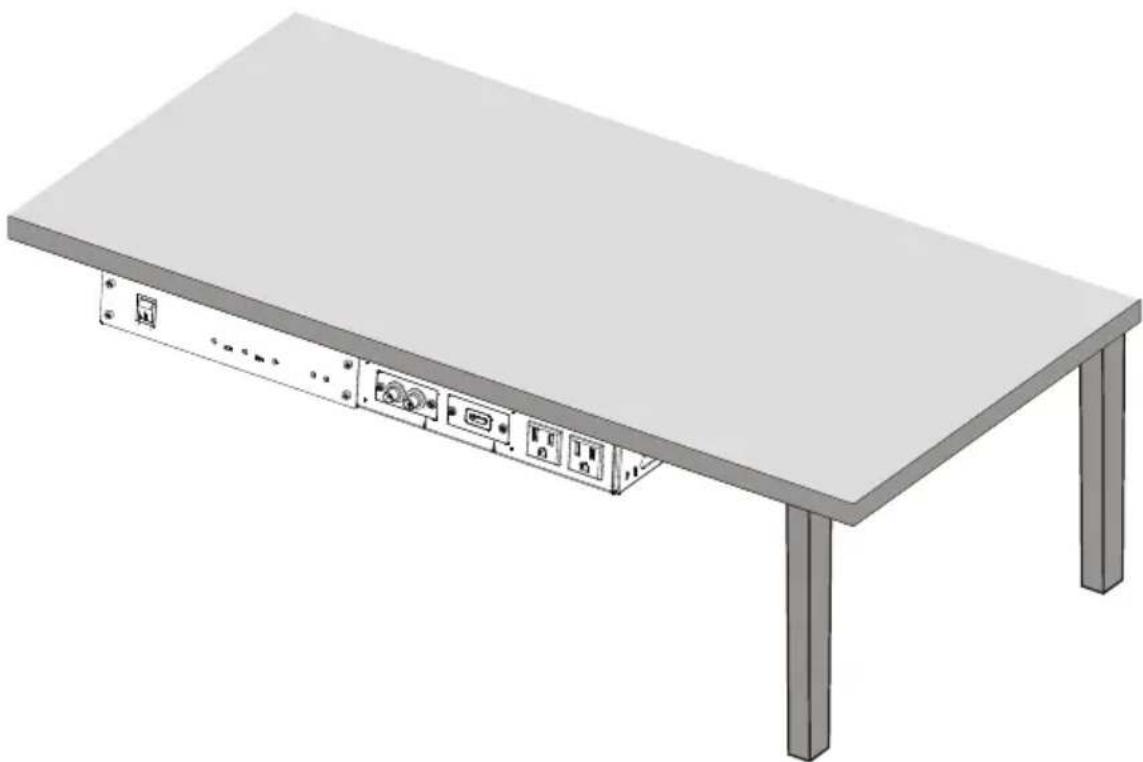
The RK-1UTB is an under the table enclosure that is easily installed underneath a wooden table or podium top. The unit is sturdy, cost-effective, and easy to install.
The RK-1UTB:
- Lets you install one half-19" 1U unit or a combination of 1/4-19" 1U units and 1/8-19" 1U units. The examples in Table 1 illustrate how different products can be combined
• Includes three USA power sockets - Lets you install up to two wall plate inserts, according to your requirements ^1
natural_image
3D rendering of a flat table with four vertical supports and internal connectors (no text or symbols visible)Figure 1: RK-1UTB Under a Table
Table 1: Using the RK-1UTB
| Mounting Kramer products ^1 on the RK-1UTB | For example: |
| 1/2 | One VP-100A unit |
| 1/4 1/4 | Two 104B units |
| 1/4 1/8 1/8 | One 104B unitOne PS-1DVI unitOne PT-1PS unit |
| 1/8 1/8 1/8 1/8 | Four PS-1DVI units |
The RK-1UTB does not have to be entirely full with mounted units. You can use the optional blank panels defined in Table 2 to fill the empty spaces.
Table 2: RK-1UTB Blank Panels – Part Numbers
| Blank Panel Description | Part Number |
| PNL-BLANK/1/2U-19" | 60-900013 |
| PNL-BLANK/1/4U-19" | 60-900014 |
| PNL-BLANK/1/8U-19" | 60-900015 |
3.1 Recommendations for Best Performance
We recommend that you:
• Have a Philips screwdriver available
- Disconnect the mains voltage and all cables connected to each machine that is being mounted in the rack adapter before proceeding with the installation
- Connect only good quality connection cables, thus avoiding interference, deterioration in signal quality due to poor matching, and elevated noise levels (often associated with low quality cables)
- Avoid interference from neighboring electrical appliances and position your rack adapter on the rack away from moisture, excessive sunlight and dust
4 Your Kramer RK-1UTB Under the Table Enclosure
Figure 2 and Table 3 define the RK-1UTB:

Figure 2: RK-1UTB Under the Table Enclosure
Table 3: RK-1UTB Under the Table Enclosure Features
| # | Feature | Function |
| 1 R | m Screw Holes | For fixing the RK-1UTB under the table (3 on each side) |
| 2 | TOOL Mounting Area | Space for mounting a Kramer TOOL ^1 . Underside includes a set of screw holes that are suitable for the units to be mounted. |
| 3 | Kramer Insert (see section 5.1.1) | A blank cover that can be replaced with a Kramer insert as required |
| 4 | ||
| 5 | Power Socket | Connect to power a peripheral device ^2 |
| 6 | Power Socket | Connect to power a peripheral device ^2 |
| 7 | Power Socket (6.3A) | Connect to the mains power |
| 8 | Power Socket | Connect to power the Kramer machine ^2 |
5 Install the Kramer RK-1UTB Under the Table Enclosure
To install the RK-1UTB you have to:
- Mount the Kramer devices on the RK-1UTB (see section 5.1)
- Attach the RK-1UTB under the table (see section 5.2)
• Install the cables (see section 5.3)
This section also describes how to:
- Mount units that do not have underside screw holes (see section 5.4)
- Connect a blank panel (optional) (see section 5.5)
5.1 Mount the Kramer devices on the RK-1UTB
The example illustrated in Figure 1, shows the Kramer VP-100A (a half-19" unit) with these two wall plate inserts: the WRR and W-H.
5.1.1 Installing the Required Kramer Inserts
To mount a Kramer insert or connector module, do the following:
- Unscrew the two screws that fasten the blank plate to the connecting surface and remove the blank plate.
- Place the required Kramer insert over the opening, insert the two screws to fix the Kramer insert in place, and tighten them.
5.1.2 Mounting the Kramer TOOL
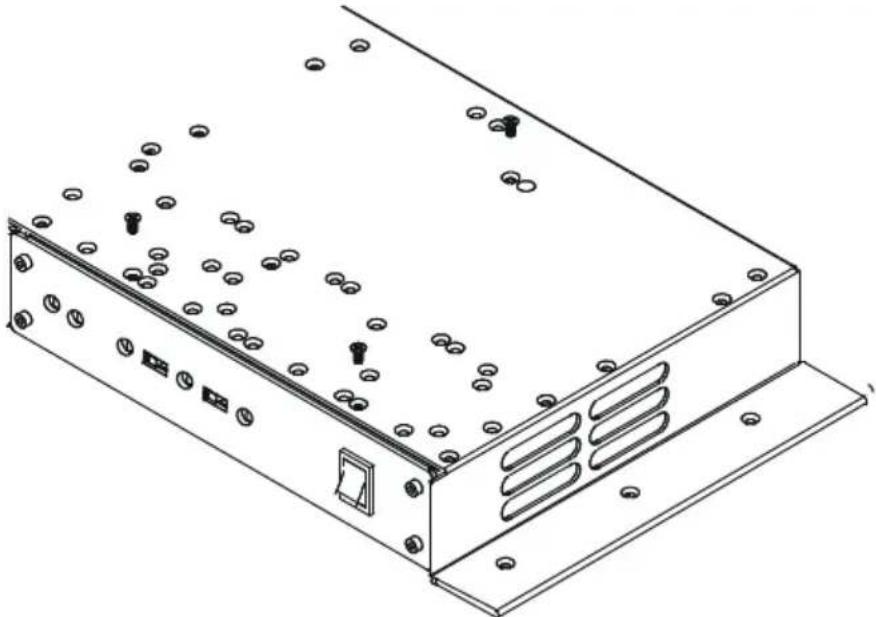
The RK-1UTB underside TOOL mounting area includes a set of screw holes that are suitable for any combination of units to be mounted.
To mount a unit on the RK-1UTB, as illustrated in Figure 2, do the following:
- Place the first unit on the rack (for example, the Kramer VP-100A).
- Hold both the VP-100A and the RK-1UTB with your hands and turn them upside down.
- Insert the appropriate amount of screws through the holes on the RK-1UTB that fit the holes on the underside of the VP-100A, using the M3x5 screws supplied with the unit (as illustrated in Figure 3).
- Tighten the screws.
- Rotate the RK-1UTB horizontally with the unit connected ^1 .
natural_image
Technical line drawing of a server rack with mounting flanges and screw holes (no text or symbols)Figure 3: RK-1UTB Under the Table Enclosure – Underside
5.2 Securing the RK-1UTB Enclosure to the Table
To install the RK-1UTB underneath the table, as illustrated in Figure 4, do the following:
- Place the unit to the underside of the table and mark the correct location.
- Insert the six M4.2X16 wood screws into the six rim screw holes (three on each side) and fix the RK-1UTB to the table.

natural_image
Line drawing of a server rack with multiple ports and indicator lights (no text or symbols)Figure 4: Securing the RK-1UTB to the Underneath of the Table
5.3 Installing the Cables
To install the cables, do the following:
- Connect the cables on the rear side of the unit.
- Connect the Kramer machine (for example, the VP-100A) to the power socket.
The RK-1UTB can accommodate 12V, 500mA, 5.2V and 2A DC power adapters. If the machine installed requires a larger size power adapter, we recommend using the Kramer 12V desktop power supply with a DC plug ^1 which fits easily into the rear side of the RK-1UTB enclosure.
- Connect other devices to the power sockets on the front panel.
- Connect the rear side power socket to the mains power.
The RK-1UTB is ready for use.
5.4 Mounting Units that do not have Underside Screw Holes
Some Kramer machines do not have screw holes on the underside, which fit the holes on the RK-1UTB. These machines (for example, the VP-5xl ^2 ) are connected via the screw holes on the sides of the RK-1UTB.
To mount the VP-5xl on the RK-1UTB as illustrated in Figure 5, do the following:
- Unscrew the two M3x6 screws from the side panel of the unit, which will be attached to the side panel of the RK-1UTB.
- Place the VP-5xl on the rack, adjacent to the inner side panel of the RK-1UTB.
- Insert the two M3x6 screws through the holes on the side panel of the RK-1UTB that fit the holes on the side panel of the unit.
- Tighten the screws.

Figure 5: Mounting a half-19" unit via Screws on the RK-1UTB Side Panel
5.5 Connecting a Blank Panel to the RK-1UTB
You can connect a blank panel ^1 to the RK-1UTB to cover any empty spaces, as the example in Figure 6 illustrates:
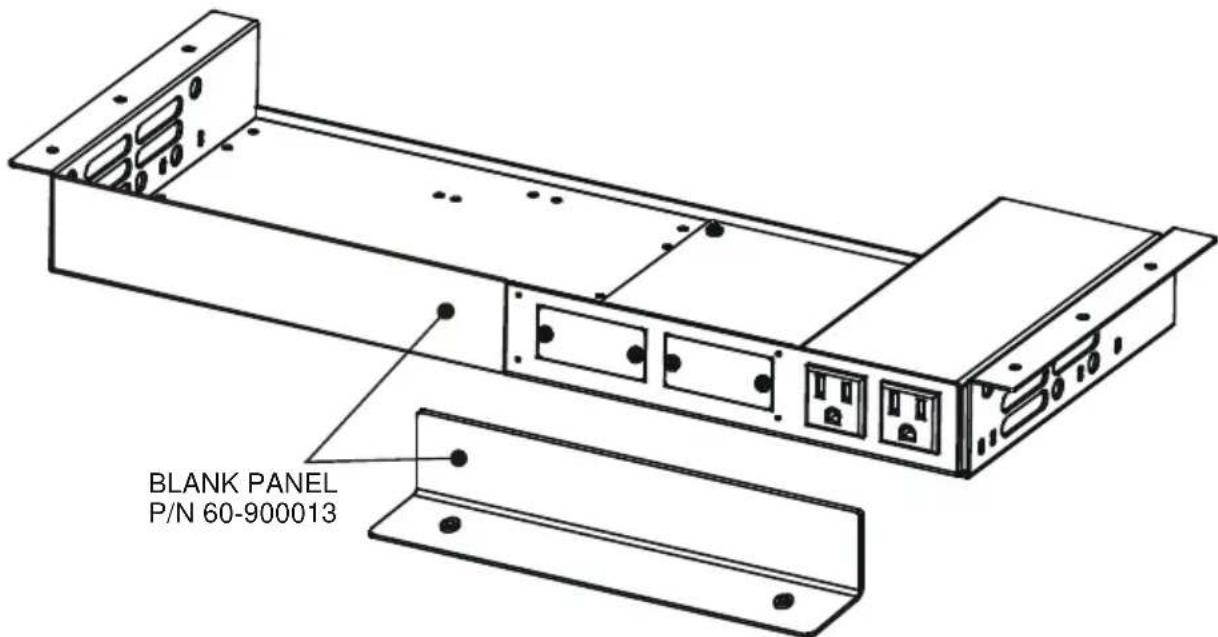
Figure 6: RK-1UTB Rack Adapter - Connecting a Blank Panel
6 Technical Specifications
Table 4 includes the technical specifications:
Table 4: Technical Specifications ^1 of the RK-1UTB
| DIMENSIONS: | 19-inch (W), 7-inch (D) 1U (H) |
| WEIGHT: | 1.2kg (2.65lbs) approx. |
| ACCESSORIES: | 10 M3x5 screws; six 4X3/8" screws |
| OPTIONS: | Blank panels ^2 |
LIMITED WARRANTY
Kramer Electronics (hereafter K_in ) represents this product free from defects in material and workmanship under the following terms.
HOWLONG IS THE WARRANTY
Labor and parts are warranted for seven years from the date of the first customer purchase.
WHO IS PROTECTED?
Only the first purchase customer may enforce this warranty.
WHAT IS COVERED AND WHAT IS NOT COVERED
Except as below, this warranty covers all defects in material or workmanship in this product. The following are not covered by the warranty:
-
Any product which is not distributed by Kramer, or which is not purchased from an authorized Kramer dealer. If you are uncertain as to whether a dealer is authorized, please contact Kramer at one of the agents listed in the Web site www.kramerelectronics.com.
-
Any product, on which the serial number has been defaced, modified or removed, or on which the WARRANTY VOID IF TAMPERED installed on them is interfered with.
-
Damage, deterioration or malfunction resulting from:
i) Accident, misuse, abuse, neglect, fire, water, lightning or other acts of nature
ii) Product modification, or failure to follow instructions supplied with the product
iii) Repair or attempted repair by anyone not authorized by Kramer
iv) Any shipment of the product (claims must be presented to the carrier)
v) Removal or installation of the product
vi) Any other cause, which does not relate to a product defect
vii) Cartons, equipment enclosures, cables or accessories used in conjunction with the product
WHAT WE WILL PAY FOR AND WHAT WE WILL NOT PAY FOR
We will pay labor and material expenses for covered items. We will not pay for the following:
-
Removal or installations charges.
-
Costs of initial technical adjustments (set-up), including adjustment of user controls or programming. These costs are the responsibility of the Kramer dealer from whom the product was purchased.
-
Shipping charges.
HOW YOU CAN GET WARRANTY SERVICE
- To obtain service on you product, you must take or ship it prepaid to any authorized Kramer service center.
-
Whenever warranty service is required, the original dated invoice (or a copy) must be presented as proof of warranty coverage, and should be included in any shipment of the product. Please also include in any mailing a contact name, company, address, and a description of the problem(s).
-
For the name of the nearest Kramer authorized service center, consult your authorized dealer.
LIMITATION OF IMPLIED WARRANTIES
All implied warranties, including warranties of merchantability and fitness for a particular purpose, are limited in duration to the length of this warranty.
EXCLUSION OF DAMAGES
The liability of Kramer for any effective products is limited to the repair or replacement of the product at our option. Kramer shall not be liable for:
- Damage to other property caused by defects in this product, damages based upon inconvenience, loss of use of the product, loss of time, commercial loss; or:
- Any other damages, whether incidental, consequential or otherwise. Some countries may not allow limitations on how long an implied warranty lasts and/or do not allow the exclusion or limitation of incidental or consequential damages, so the above limitations and exclusions may not apply to you.
This warranty gives you specific legal rights, and you may also have other rights, which vary from place to place.
NOTE: All products returned to Kramer for service must have prior approval. This may be obtained from your dealer.
This equipment has been tested to determine compliance with the requirements of:
EN-50081: "Electromagnetic compatibility (EMC);
generic emission standard.
Residential, commercial and light industry"
EN-50082: "Electromagnetic compatibility (EMC) generic immunity standard.
Part 1: Residential, commercial and light industry environment".
CFR-47: FCC* Rules and Regulations:
Part 15: "Radio frequency devices
Subpart B Unintentional radiators"
CAUTION!
Servicing the machines can only be done by an authorized Kramer technician. Any user who makes changes of modifications to the unit without the expressed approval of the manufacturer will void user authority to operate the equipment.
Use the supplied DC power supply to feed power to the machine.
☒ Please use recommended interconnection cables to connect the machine to other components.
* FCC and CE approved using STP cable (for twisted pair products)
For the latest information on our products and a list of Kramer distributors, visit our Web site: www.kramerelectronics.com, where updates to this user manual may be found.
We welcome your questions, comments and feedback.

Caution
Safety Warning:
Disconnect the unit from the power supply before opening/servicing.

C €
- Kramer Electronics, Ltd.
- USER MANUAL
- Contents
- Figures
- Tables
- Introduction
- Getting Started
- Overview
- The RK-1UTB:
- Recommendations for Best Performance
- Your Kramer RK-1UTB Under the Table Enclosure
- Install the Kramer RK-1UTB Under the Table Enclosure
- Mount the Kramer devices on the RK-1UTB
- Installing the Required Kramer Inserts
- Mounting the Kramer TOOL
- Securing the RK-1UTB Enclosure to the Table
- Installing the Cables
- Mounting Units that do not have Underside Screw Holes
- Connecting a Blank Panel to the RK-1UTB
- Technical Specifications
- LIMITED WARRANTY
- HOWLONG IS THE WARRANTY
- WHO IS PROTECTED?
- WHAT IS COVERED AND WHAT IS NOT COVERED
- WHAT WE WILL PAY FOR AND WHAT WE WILL NOT PAY FOR
- HOW YOU CAN GET WARRANTY SERVICE
- LIMITATION OF IMPLIED WARRANTIES
- EXCLUSION OF DAMAGES
- CAUTION!
- Safety Warning:
Brand : Kramer
Model : RK-1UTB
Category : Under-table case