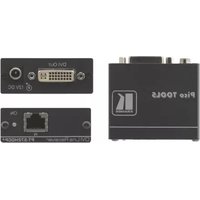
SID-DVI - AV extender Kramer - Free user manual and instructions
Find the device manual for free SID-DVI Kramer in PDF.


Pick your language and provide your email: we'll send you a specifically translated version.
| Product Type | Audio/Video Extender |
| Brand | Kramer |
| Model | SID-DVI |
| Video Input | 1 x DVI-D (single link) |
| Video Output | 1 x DVI-D (single link) |
| Max Resolution | 1920 x 1200 @ 60 Hz |
| Transmission Distance | Up to 50 m (164 ft) over CAT6 cable |
| Power Supply | 5V DC, 1A (adapter included) |
| Power Consumption | 2.5W typical |
| Dimensions (W x D x H) | 120 mm x 70 mm x 25 mm |
| Net Weight | 0.25 kg |
| Enclosure | Metal with black finish |
| Operating Temperature | 0 °C to 40 °C |
| Humidity Range | 10% to 90% RH (non-condensing) |
| Mounting | Standalone or wall mountable (bracket optional) |
| Maintenance | Wipe the exterior with a soft, dry cloth |
| Safety | Do not expose to water or excessive heat |
| Spare Parts & Repairability | No user-replaceable parts; contact Kramer authorized service |
| General Information | Plug-and-play; no software drivers required |
Frequently Asked Questions - SID-DVI Kramer
What is the Kramer SID-DVI used for?
The Kramer SID-DVI is an AV extender designed to transmit DVI video signals over long distances using CAT5/CAT6 twisted pair cables. It is ideal for presentations, digital signage, and home theater setups.
What video signal types does the SID-DVI support?
It supports DVI-D single link signals, including resolutions up to 1920x1200 at 60 Hz. It does not support analog VGA signals.
What is the maximum transmission distance?
With a high-quality CAT6 cable, the SID-DVI can transmit video up to 50 meters (164 feet) without signal degradation. For longer distances, additional extenders may be required.
Does the SID-DVI require an external power source?
Yes, it requires a 5V DC power adapter (included) for each unit (transmitter and receiver). The power consumption is typically 2.5W per unit.
How do I install the Kramer SID-DVI?
Connect the DVI source (e.g., PC) to the transmitter's DVI input, connect the transmitter to the receiver via CAT5/6 cable, then connect the receiver's DVI output to the display. Ensure both units are powered on. The extender is plug-and-play and requires no configuration.
Is the SID-DVI compatible with HDCP?
The SID-DVI supports HDCP pass-through for encrypted content, but this only works if both the source and display are HDCP-compliant. For non-HDCP content, it will pass any DVI signal.
What should I do if there is no video output?
First, verify that all cables are securely connected and the power adapters are plugged in. Check that the DVI source is set to output a supported resolution. Try a different CAT5/6 cable. If the problem persists, test the units with another DVI device to isolate the issue.
Can the SID-DVI extend audio signals?
No, the SID-DVI is designed for video signals only. To extend audio, you would need a separate audio extender or a model that supports audio embedding.
Does the SID-DVI support hot plugging?
Yes, the SID-DVI supports hot plugging, allowing you to connect or disconnect the DVI cable while the devices are powered on without damaging the equipment.
How should I clean and maintain the SID-DVI?
To clean the unit, use a soft, dry cloth to wipe the exterior. Avoid using liquids or aerosol cleaners. Regularly check the ventilation openings for dust and ensure the device is not exposed to moisture or extreme temperatures.
User questions about SID-DVI Kramer
0 question about this device. Answer the ones you know or ask your own.
Ask a new question about this device
No questions yet. Be the first to ask one.
Download the instructions for your AV extender in PDF format for free! Find your manual SID-DVI - Kramer and take your electronic device back in hand. On this page are published all the documents necessary for the use of your device. SID-DVI by Kramer.
USER MANUAL SID-DVI Kramer

Manual assistant
Powered by Anthropic
Waiting for your message
Product information
Brand : Kramer
Model : SID-DVI
Category : AV extender