
URK1U - NAS Black Box - Free user manual and instructions
Find the device manual for free URK1U Black Box in PDF.


| Product Type | Universal Rail Kit for 19-inch racks (1U, 2U, 3U) |
| Model | URK1U |
| Height (URK1U) | 1.73 in (4.4 cm) |
| Width | 19 in (48.3 cm) |
| Minimum Depth | 29 in (73.7 cm) |
| Maximum Depth | 38 in (96.5 cm) |
| Weight Capacity (URK1U) | 55 lb (25 kg) |
| Weight (URK1U) | 6 lb (2.74 kg) |
| Compatibility | All 19-inch cabinets and racks; fits 1U to 3U equipment |
| Included Components | 4 front/rear rails, 2 adjustment brackets, 1 rear crossbar/cable manager, 16 M5 flat-head screws, 16 M5 flange nuts, 1 open-end wrench, user manual |
| Optional Shelf | Available (URKS) for holding additional equipment |
| Warranty | Lifetime guarantee |
| Installation | Tool-free depth adjustment; requires screws (not included) for rack attachment |
| Recommended Use | Mounting rack servers, switches, SAN, NAS devices |
| Technical Support | Free 24/7 support: 724-746-5500 or blackbox.com |
Frequently Asked Questions - URK1U Black Box
User questions about URK1U Black Box
0 question about this device. Answer the ones you know or ask your own.
Ask a new question about this device
Download the instructions for your NAS in PDF format for free! Find your manual URK1U - Black Box and take your electronic device back in hand. On this page are published all the documents necessary for the use of your device. URK1U by Black Box.
USER MANUAL URK1U Black Box
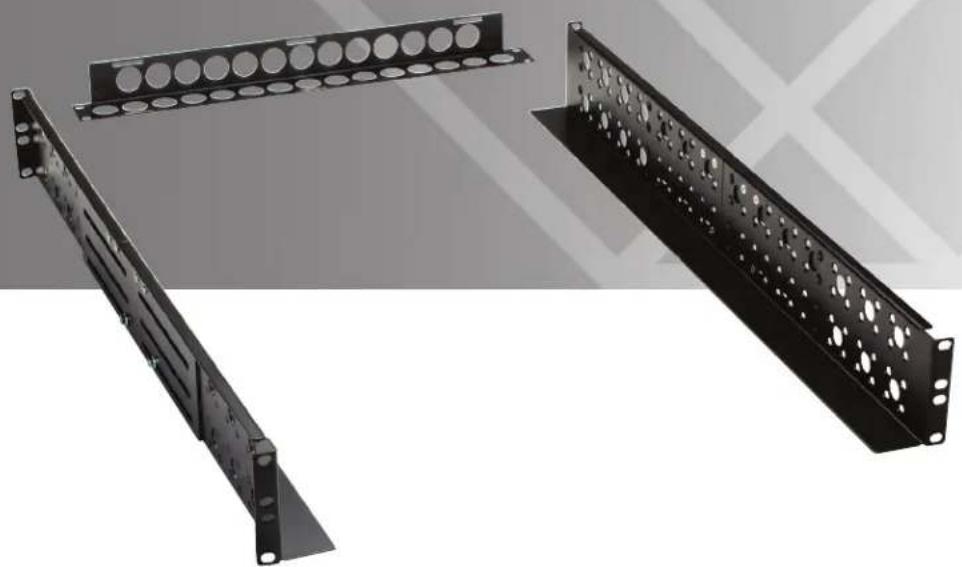
Rackmount servers, switches, and more with this flexible and economical kit.
Almost any 1U to 3U piece of rack equipment will work with this rail kit.
Trademarks Used in this Manual
Black Box and the Double Diamond logo are registered trademarks of BB Technologies, Inc.
Any other trademarks mentioned in this manual are acknowledged to be the property of the trademark owners.
We're here to help! If you have any questions about your application or our products, contact Black Box Tech Support at 724-746-5500 or go to blackbox.com and click on "Talk to Black Box." You'll be live with one of our technical experts in less than 30 seconds.
Table of Contents
- Specifications....4
- Overview 5
2.1 Description 5
2.2 Features 5
2.3 What's Included 5
- Installation....6
- Troubleshooting....9
4.1 Contacting Black Box....9
4.2 Shipping and Packaging 9
1. Specifications
Height — URK1U: 1.73" (4.4 cm);
URK2U: 3.46" (8.8 cm);
URK3U: 5.24" (13.3 cm)
Width — 19" (48.3 cm)
Minimum Depth — 29" (73.7 cm)
Maximum Depth to Adjust — 38" (96.5 cm)
Weight — URK1U: 6 lb. (2.74 kg);
URK2U: 9.03 lb. (4.1 kg);
URK3U: 9.2 lb. (4.18 kg)
Weight Capacity — URK1U: 55 lb. (25 kg);
URK2U: 100 lb. (45.5 kg);
URK3U: 215 lb. (98 kg)
2. Overview
2.1 Description
Black Box Universal Rail Kit is one of the most flexible and economical mount kits for any cabinet and rack. Adjustable and universally compatible, this kit is a cost-effective solution to mounting rack format servers, switches, SAN, and NAS devices. This product replaces lost, broken, or incorrectly fitting rails without any loss of "U" space in the rack. Almost any 1U to 3U piece of rack equipment will work with this rail kit.
In addition, there's one optional shelf (URKS) can be attached to Universal Rail Kit that enables users to hold any equipment/devices.
Three models are available:
• Universal Rail Kit, 1U (URK1U)
• Universal Rail Kit, 2U (URK2U)
• Universal Rail Kit, 3U (URK3U)
An optional shelf is also available:
• Universal Rail Kit, Shelf (URKS)
2.2 Features
- Compatible with all 19" cabinets and racks.
• 1U, 2U, and 3U versions available. - Support up to 55 lb. (25 kg) for 1U version, 100 lb. (45.5 kg) for 2U version, 215 lb. (98 kg) for 3U version
- Easy to install and adjust the depth of the rail
- Guaranteed for life!
2.3 What's Included
For Universal Rail Kit (URK1U, URK2U, URK3U):
• (4) front/rear rails
• (2) adjustment brackets
• (1) rear crossbar/cable manager
• (16) M5 flat-head screws
• (16) M5 flange nuts
• (1) open-end wrench
- This user manual
For Universal Rail Kit, Shelf (URKS):
• (2) shelves for Universal Rail Kit
• (8) M5 flat-head screws
• (8) M5 flange nuts
- This user manual
3. Installation
Figure 3-1 shows the 1U version as an example. 2U and 3U versions are similar.
Before you assemble and install the Universal Rail Kit, make sure that you have all the components shown in Figure 3-1.
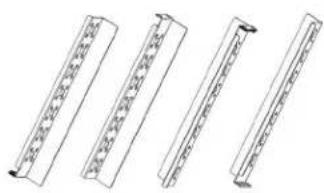
(4) front/rear rails

(2) adjustment brackets

(1) rear crossbar/cable manager

(16) M5 flat-head screws

(16) M5 flange nuts
Figure 3-1. Rail kit components.
Installation Steps
STEP 1: Using 16 screws and nuts, attach the front rail to the rear bracket. Hand-tighten the connection with an open-end wrench.
NOTE: Do not fasten the screws and nuts tightly, so that the depth of the rail can be adjusted when installing it in a cabinet or rack.

Figure 3-2. Connect the front rails to the rear brackets.
STEP 2: Using screws (not included), attach two front fixed rails to the rack.

Figure 3-3. Connect the two front rails to the rack.
STEP 3: Attach two rear fixed rails to the rack using screws (not included). The rear cable manager can be in the same place as the fixed rail if needed. Fasten all the screws and nuts after adjusting the depth.

Figure 3-4. Connect the rear fixed rails to the rack.
STEP 4: Attach the shelf (optional) to the Universal Rail Kit via the screws and nuts mentioned in STEP 1.

Figure 3-5. Connect the shelf to the rail kit.
4. Troubleshooting
4.1 Contacting Black Box
If you determine that your Universal Rail Kit is malfunctioning, do not attempt to alter or repair the unit. It contains no user-serviceable parts. Contact Black Box Technical Support at 724-746-5500 or info@blackbox.com.
Before you do, make a record of the history of the problem. We will be able to provide more efficient and accurate assistance if you have a complete description, including:
- the nature and duration of the problem.
- when the problem occurs.
- the components involved in the problem.
- any particular application that, when used, appears to create the problem or make it worse.
4.2 Shipping and Packaging
If you need to transport or ship your Universal Rail Kit:
- Package it carefully. We recommend that you use the original container.
- If you are returning the unit, make sure you include everything you received with it. Before you ship for return or repair, contact Black Box to get a Return Authorization (RA) number.
Black Box Tech Support: FREE! Live. 24/7.
Tech support the way it should be.

Great tech support is just 30 seconds away at 724-746-5500 or blackbox.com.

BLACK BOX®
NETWORK SERVICES
About Black Box
Black Box provides an extensive range of networking and infrastructure products. You'll find everything from cabinets and racks and power and surge protection products to media converters and Ethernet switches all supported by free, live 24/7 Tech support available in 30 seconds or less.
© Copyright 2012. Black Box Corporation. All rights reserved. Black Box ® and the Double Diamond logo are registered trademarks of BB Technologies, Inc. Any third-party trademarks appearing in this manual are acknowledged to be the property of their respective owners.

- RACKMOUNT SERVERS, SWITCHES, AND MORE WITH THIS FLEXIBLE AND ECONOMICAL KIT
- TRADEMARKS USED IN THIS MANUAL
- TABLE OF CONTENTS
- SPECIFICATIONS
- OVERVIEW
- 2.1 DESCRIPTION
- 2.2 FEATURES
- 2.3 WHAT'S INCLUDED
- INSTALLATION
- INSTALLATION STEPS
- TROUBLESHOOTING
- 4.1 CONTACTING BLACK BOX
- 4.2 SHIPPING AND PACKAGING
- BLACK BOX TECH SUPPORT: FREE! LIVE. 24/7
- BLACK BOX®
- NETWORK SERVICES
- ABOUT BLACK BOX
Brand : Black Box
Model : URK1U
Category : NAS