E Series RIC - Hi-Fi System Starkey - Free user manual and instructions
Find the device manual for free E Series RIC Starkey in PDF.


User questions about E Series RIC Starkey
0 question about this device. Answer the ones you know or ask your own.
Ask a new question about this device
Download the instructions for your Hi-Fi System in PDF format for free! Find your manual E Series RIC - Starkey and take your electronic device back in hand. On this page are published all the documents necessary for the use of your device. E Series RIC by Starkey.
USER MANUAL E Series RIC Starkey
RIC (Receiver-In-Canal)
OPERATIONS MANUAL
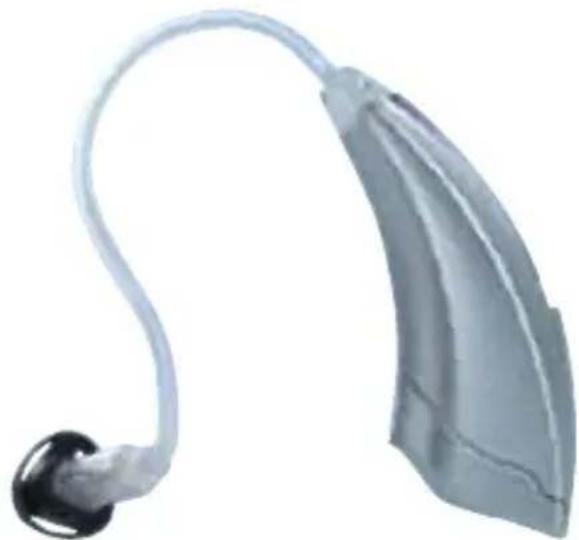
natural_image
3D rendered image of a medical device with a curved tube and black earpiece (no text or symbols visible)
series™
Overview
Features, Controls and Identification 2
Preparation
Batteries 4
Battery Indicators 6
Insertion and Removal
Instant Fit Earbud 8
Custom Eartip 9
Operation
On & Off 10
Multimemory Settings 11
Directional Settings 12
Telephone Use 13
T^2 (touch-tone) Function 16
Self Check.... 18
Reminder 19
Summary of Settings 20
Hearing System Care
Instrument Care 22
Service and Repair 24
Troubleshooting Guide 25
Tips for Better Communication
For You 26
For Your Family and Friends 27
FDA Information
Required Information 28
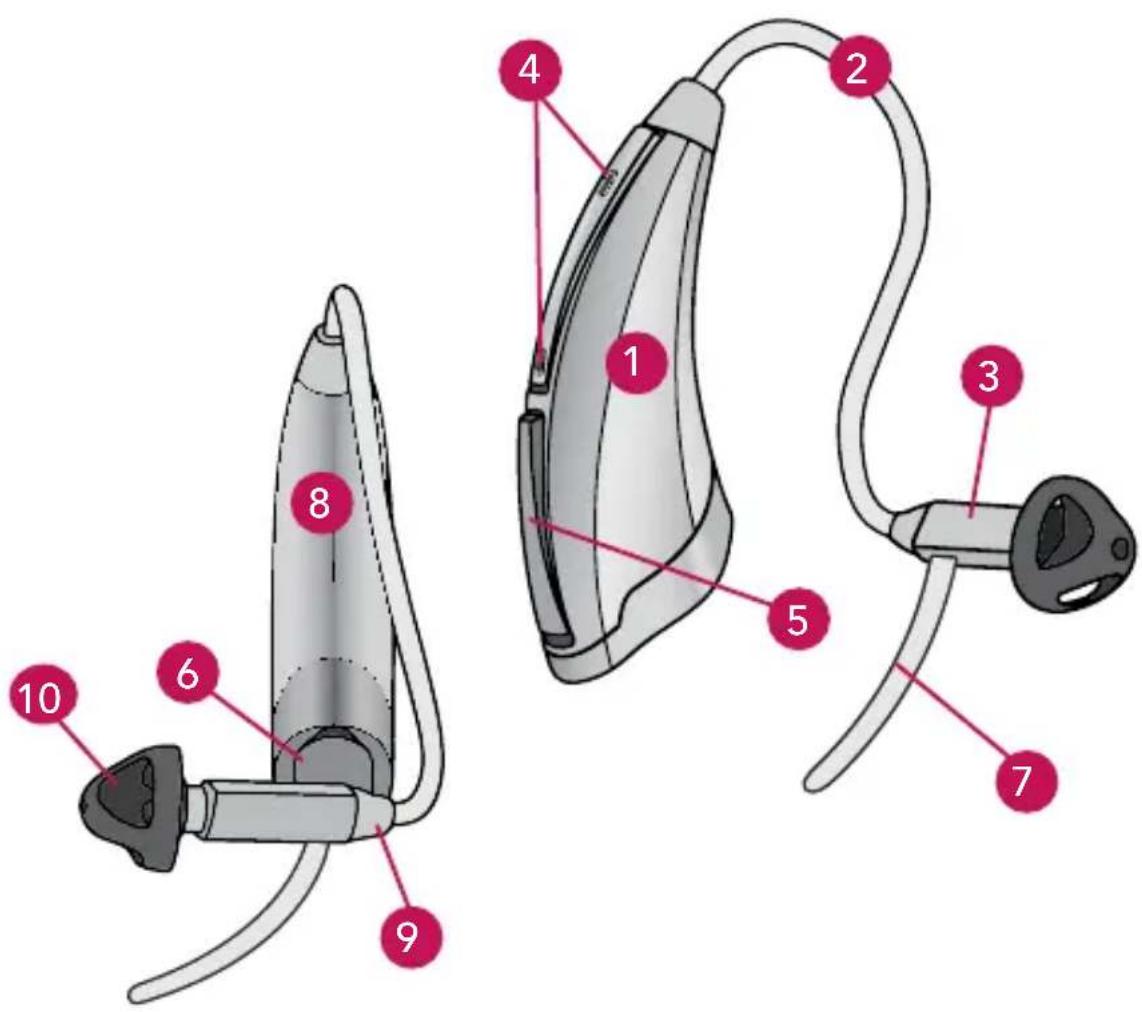
Features, Controls and Identification
Your hearing system controls include:
- Hearing Instrument
- Cable
- Receiver
- Microphone(s)
- Multimemory Button
- Battery Compartment (on/off control) Location of serial number
- Retention Lock
- Location of manufacturer's name and model name
- Location of left/right side indicator
- Instant Fit Earbud
- Custom Earmold (optional)
- RIC Custom Power Earmold (optional)
natural_image
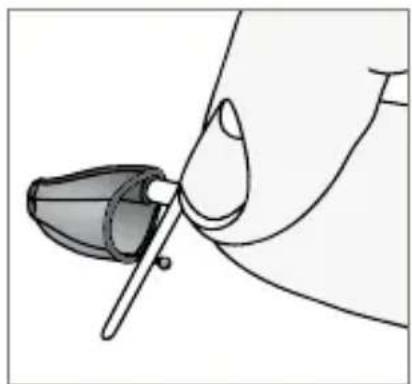
Illustration of a hand holding a pen or tool, with no visible text or symbols11
natural_image
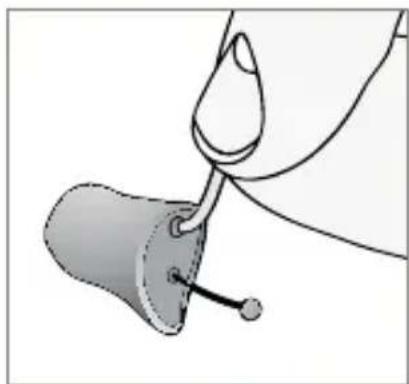
Illustration of a hand holding a small object with a droplet and a pointed tip, no text or symbols present12
Batteries
Your hearing system uses a battery as its power source. This battery size can be identified by the brown (312) color code on the packaging.
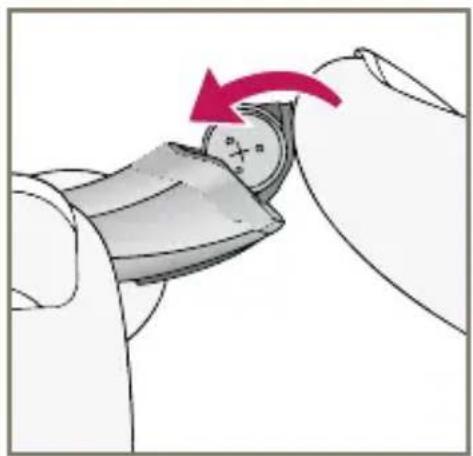
To insert or replace the battery:
- Use the nail grip on the battery door.
- Remove the tab from the new battery.
- Open the battery door gently and remove the old battery.
- Line up the battery's plus "+" sign (flat side of the battery) with the "+" on the battery door.
- Close the battery door.
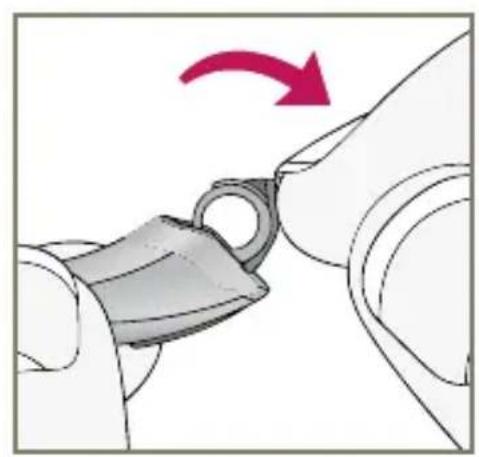
natural_image
Illustration of a mechanical component being inserted into a housing, with a red arrow indicating rotation (no text or symbols)1
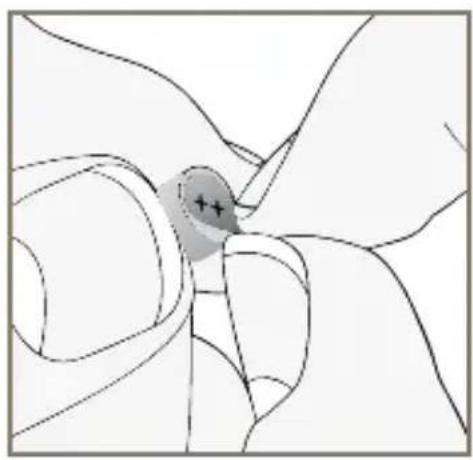
natural_image
Diagram of a hand holding a small object with a shaded circular area marked with '+' symbols (no text or labels present)2
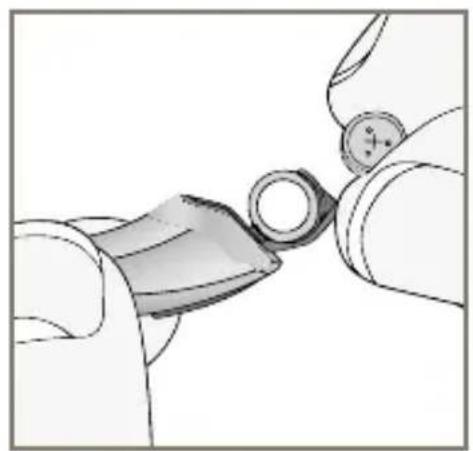
natural_image
Close-up of hands holding a small mechanical component with a circular end (no visible text or symbols)3
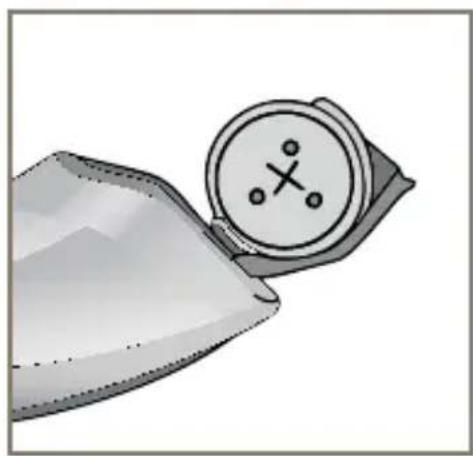
natural_image
Illustration of a wristwatch with a circular dial and cross symbol (no text or labels)4
natural_image
Illustration of a hand holding a small object with a red arrow indicating rotation (no text or symbols)5
Battery Indicators
An indicator will sound when the battery's voltage is low. You have approximately 10 minutes* to replace the battery. A different indicator will sound just before the battery stops working.
* Actual time between low battery indicator and shut down will vary depending on environmental noise levels and brand of battery used.
Helpful Hints
- NEVER FORCE THE DOOR SHUT; this could result in serious damage; if the door will not close securely, check that the battery is inserted correctly
- Do not open the battery door too far or damage is likely to occur
- Dispose of used batteries immediately in the proper waste or recycling container
- Because batteries can vary in size and performance, your hearing care professional is your best source for lifespan estimates and verification that you are using the proper size and type
Warnings
Batteries are dangerous if swallowed. To help prevent the accidental ingestion of batteries:
⚠️ Keep out of reach of children and pets
Check your medications before taking them – batteries have been mistaken for pills
⚠️ Never put batteries in your mouth, as they can easily be swallowed
National Button Battery Ingestion Hotline: 202-625-3333
Insertion and Removal of Instant Fit Earbud
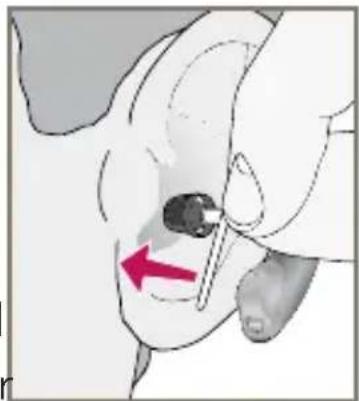
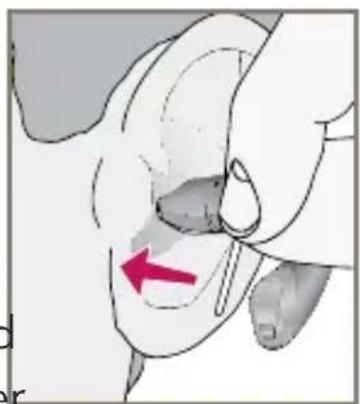
To insert the Instant Fit Earbud
- Hold the cable at the bend in front of the receiver with your thumb and forefinger. Gently insert the receiver into your ear canal.
- Carefully place the hearing instrument behind your ear wrapping it over the top of your ear.
- Place the lock inside the bowl of your ear.
To remove the Instant Fit Earbud
- Remove the lock from the bowl of your ear.
- Remove the hearing instrument from behind your ear.
- Grasp the receiver with your thumb and forefinger. Gently pull out of your ear canal.
Do not pull with the hearing system case as this may damage the connection.
natural_image
Medical illustration showing a hand holding a needle inserted into a patient's abdomen, with a red arrow indicating the insertion direction (no text or symbols present)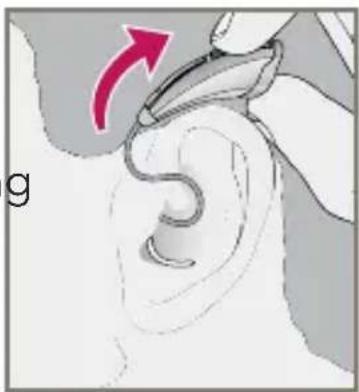
natural_image
Illustration of a hand holding a small ear with a red arrow indicating direction (no text or symbols)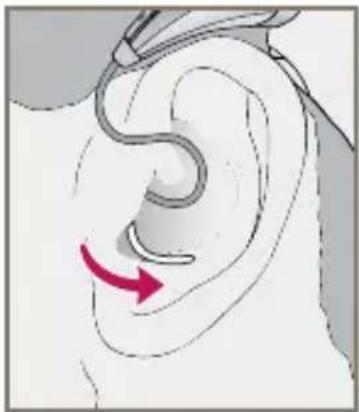
natural_image
Illustration of a human ear with a curved tube and a red arrow indicating motion or direction (no text or symbols)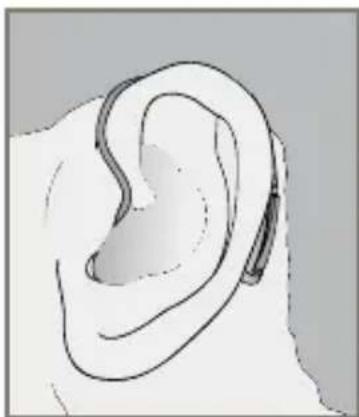
natural_image
Line drawing of a human ear with a small attached device (no text or symbols)Insertion and Removal of Custom Eartip
To insert the Custom Eartip
- Hold the cable at the bend in front of the receiver with your thumb and forefinger. Gently insert the receiver into your ear canal.
- Carefully place the hearing instrument behind your ear wrapping it over the top of your ear.
- Place the lock inside the bowl of your ear.
To remove the Custom Eartip
- Remove the lock from the bowl of your ear.
- Remove the hearing instrument from behind your ear.
- Grasp the receiver with your thumb and forefinger. Gently pull out of your ear canal.
Do not pull with the hearing system case as this may damage the connection.
natural_image
Medical illustration showing a hand holding a needle inserted into a catheter, with a red arrow indicating the insertion point (no text or symbols present)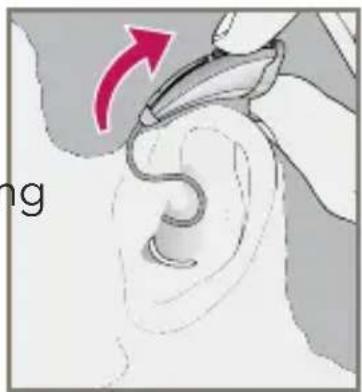
natural_image
Illustration of a hand holding a small ear with a red arrow indicating direction (no text or symbols)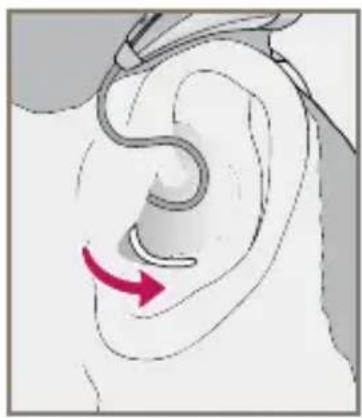
natural_image
Illustration of a human ear with a curved tube and a red arrow indicating motion or direction (no text or symbols)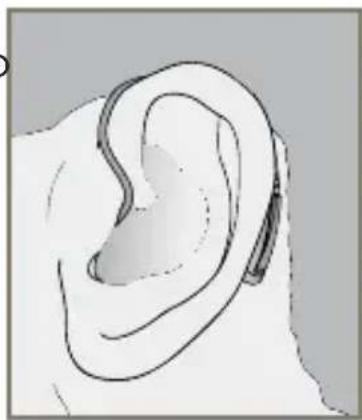
natural_image
Line drawing of a human ear with a small device attached (no text or symbols)Helpful Hints
- Minor irritation and inflammation may occur as your ear becomes accustomed to having an object in it; if so, please contact your hearing care professional.
- If an actual allergic reaction occurs, alternative earmold materials are available; contact your hearing care professional.
- Severe swelling, discharge from the ear, excessive wax, or other unusual conditions warrant immediate consultation with a physician.
On & Off
To turn ON:
Insert a battery and completely close the battery door.
To turn OFF:
Open the battery door until the battery is no longer touching the battery contacts.
Multimemory Settings
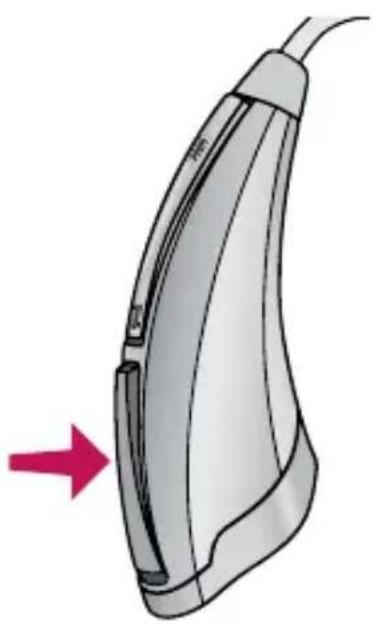
Your hearing care professional can set up to four hearing programs for you. These additional programs are accessed by pressing the Multimemory button inward.
When you press the
Multimemory button, you may
hear a speech indicator or a tone
series indicating the device has changed to the next program. Your hearing instrument has been set up with the following indicators and environments:
natural_image
Illustration of a medical or electrocardiogram device with a red arrow pointing to its side (no text or symbols present)| Program | Tone | Speech | Environment | |
| 1 | 1 | Tone | “One” | Normal |
| 2 | 2 | Tones | “Two” | |
| 3 | 3 | Tones | “Three” | |
| 4 | 4 | Tones | “Four” |
Directional Settings
Your hearing system has directional microphones to help improve speech understanding in noisy situations.
Your hearing system has been set up with the following directional settings:
| Program | Directional Setting | ||
| 1 Automatic Manual Off | |||
| 2 Automatic Manual Off | |||
| 3 Automatic Manual Off | |||
| 4 Automatic Manual Off | |||
When the directional microphones are activated automatically (automatic), the hearing instrument will continually monitor the environment and gradually adjust to the appropriate mode to optimize speech intelligibility. When the directional microphones are activated by pushing the Multimemory button (manual), the hearing instrument optimizes speech when you select the directional memory.
Ask your hearing care professional about your particular directional settings.
Telephone Use
Your hearing system has a telephone feature that enables you to comfortably use the telephone without removing your hearing instrument.
My telephone feature is:
□ Automatic Telephone Response (ATR)
□ Automatic Telecoil (Autocoil)
□ Manual Telecoil (Program #____)
ATR or Autocoil:
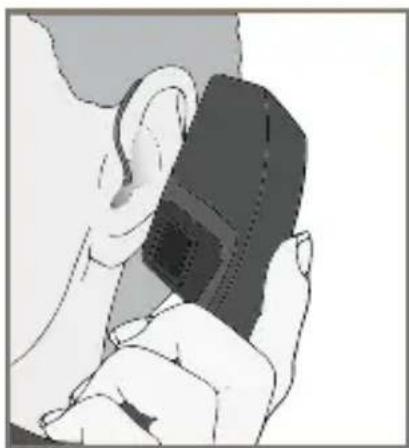
Place the telephone handset in a normal position and then shift slightly back. When correctly positioned, you will hear an indicator for the automatic activation of the telephone program. When finished, the hearing system will automatically return to the previous setting.
Telecoil and Manual Switching
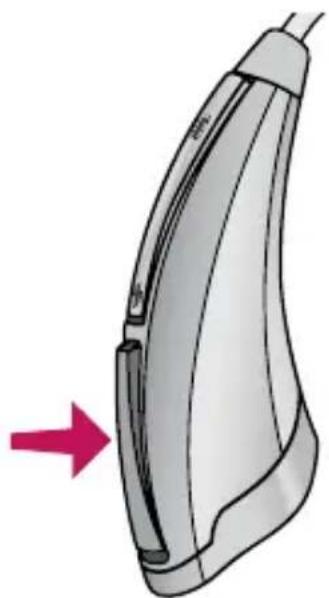
Hearing instruments with a manual telecoil allow you to switch the devices to telephone mode when needed.
Manually switched telecoils are activated by choosing the telecoil setting using the Multimemory button.
natural_image
Illustration of a hairless iron shaver with a red arrow pointing to the side (no text or symbols)General Telephone Use
Some hearing instruments work best by holding the phone close to, but not fully covering your ear. In some instances, if you encounter whistling (feedback), tilt the receiver at an angle until the whistling stops. Your hearing professional can give instructions and techniques for your specific needs.
natural_image
Illustration of a person holding a small object, possibly a device or device, with no visible text or symbols.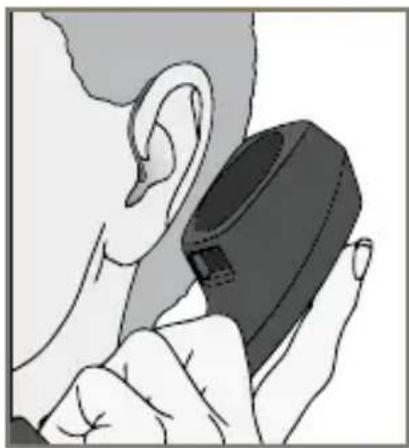
natural_image
Illustration of a person holding a medical device with a black cap (no text or symbols visible)Some hearing aid users have reported a buzzing sound in their hearing aids when they are using cell phones, indicating that the cell phone and hearing aid may not be compatible. According to the ANSI C63.19 standard (ANSI C63.19-2006 American National Standard Methods of Measurement of Compatibility Between Wireless Communications Devices and Hearing Aids), the compatibility of a particular hearing aid and cell phone can be predicted by adding the rating for the hearing aid immunity to the rating for the cell phone emissions. For example, the sum of a hearing aid rating of 2 (M2) and a telephone rating of 3 (M3) would result in a combined rating of 5. Any combined rating that equals at least 5 would provide “normal use”; a combined rating of 6 or greater would indicate “excellent performance.”
The immunity of this hearing aid is at least M2. The equipment performance measurements, categories and system classifications are based upon the best information available but cannot guarantee that all users will be satisfied.
NOTE: The performance of individual hearing aids may vary with individual cell phones. Therefore, please try this hearing aid with your cell phone or, if you are purchasing a new phone, be sure to try it with your hearing aid prior to purchase. For additional guidance, please ask your cell phone provider for the booklet entitled “Hearing Aid Compatibility with Digital Wireless Cell Phones.”
T^2 (touch-tone) Function
☐ My hearing instrument has T^2 capability. Please read the section below.
☐ My hearing instrument does not have T^2 capability. See page 18.
You may use a cell phone, cordless telephone, or corded telephone to adjust your hearing system. The telephone MUST "beep" when the keys are pressed for this function to work. If your telephone does not "beep" when the keys are pressed, consult your telephone operator's manual or contact your telephone service provider.
- Hold the phone approximately 3 inches from the ear
- Press ** to "wake" T ^2 (a tone series indicates that it is ready for a command)
- Press the telephone key that corresponds to the desired function
- T^2 will "sleep" after 20 seconds
Use the following keypad buttons to remotely adjust your hearing aid settings.
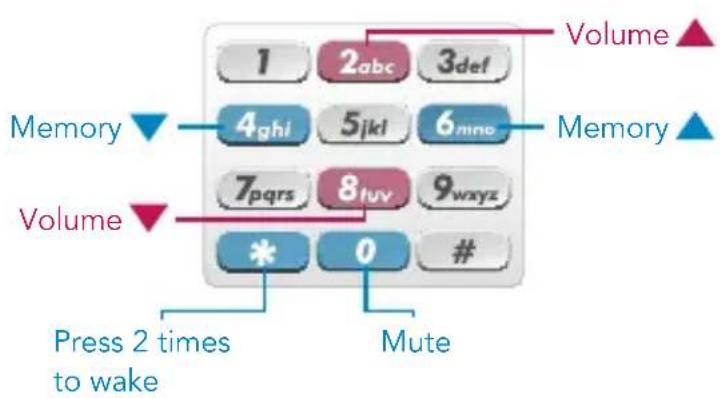
flowchart
graph TD
    A["1"] --> B["2abc"]
    B --> C["3def"]
    D["4ghi"] --> E["5jkl"]
    E --> F["6mine"]
    G["7pqrs"] --> H["8tuv"]
    H --> I["9wxyz"]
    J["*"] --> K["0"]
    L["#"] --> M["Mute"]
    N["Press 2 times to wake"] --> O["Volume ▲"]
    P["Memory ▼"] --> Q["Volume ▲"]
    R["Volume ▼"] --> S["Volume ▲"]

natural_image
Illustration of a person applying lip oil to their mouth (no text or symbols)Troubleshooting Guide
| SYMPTOM POSSIBLE CAUSES SOLUTIONS | ||
| Hearing system not responding to telephone command | Telephone keys not emitting beep tones | Consult telephone operator's manual to enable beep tones |
| T^2 not unlocked prior to command | Press ** and listen for unique T^2 indicator | |
| Telephone too far from hearing system | Bring telephone closer to hearing system microphone | |
| Incorrect key command | Press ** to wake then press 2 or 8 to increase or decrease volume or 4 or 6 to change programs if device has multiple programs | |
| Hearing system responded but won't respond to later command | T^2 automatically "sleeps" 20 seconds after last command | Press ** to wake then press key that corresponds to desired action |
self Check
Some hearing systems can run a diagnostic test of their own performance. This feature is called Self Check. Your hearing care professional will check the box below if this feature is activated.
☐ My Self Check feature is activated.
My Self Check indicator is a:
☐ Speech Indicator ("Good"/"Make Appointment")
□ Tone Indicator
To perform the Self Check:
- Open and close the battery door three times.
- Place the hearing system in your ear.
- Listen for the status indicator.
- Schedule an appointment with your hearing care professional, if needed.
Reminder
Some hearing systems have been programmed with a Reminder indicating that it is time to schedule an appointment. Your hearing care professional will check the box below if this feature is activated.
☐ My Reminder feature is activated.
My Reminder indicator is a:
Speech Indicator ("Make Appointment")
☐one Indicator
The Reminder will occur automatically. When you hear the Reminder indicator, please contact your hearing care professional.
Summary of Settings
| Environment | Directional Setting | |
| Program 1 Normal | ☐ Off☐ Automatic☐ Manual | |
| Program 2 | ☐ Off☐ Automatic☐ Manual | |
| Program 3 | ☐ Off☐ Automatic☐ Manual | |
| Program 4 | ☐ Off☐ Automatic☐ Manual | |
| Low Battery — — | ||
| Battery End of Life — — | ||
| Self Check — — | ||
| Reminder — — | ||
| Volume Control — — |
| Indicator Type | |
| □ Yes□ No | □ Speech ("One")□ 1 Tone |
| □ Yes□ No | □ Speech ("Two")□ 2 Tones□ Tone Series |
| □ Yes□ No | □ Speech ("Three")□ 3 Tones□ Tone Series |
| □ Yes□ No | □ Speech ("Four")□ 4 Tones□ Tone Series |
| □ Yes□ No | □ Speech ("Battery")□ Tone Series |
| □ Yes□ No | □ Speech ("Shutdown")□ Sustained Tone |
| □ Yes□ No | □ Speech ("Good"/"Make Appointment")□ Tone Series |
| □ Yes□ No | □ Speech("Make Appointment")□ Tone Series |
| □ Yes□ No | □ Optimal VC□ Minimum VC□ Maximum VC |
Instrument Care
Do your best to keep your hearing instrument clean at all times. Heat, moisture and foreign substances can result in poor performance.
- Use a cleaning brush or soft cloth to clean debris from around the switches, microphone, and battery compartment; inspect the receiver, Instant Fit Earbud/Custom Earmold and Wax Guard regularly
- Never use water, solvents, cleaning fluids or oil to clean your instrument
Your hearing care professional can provide further information on additional maintenance procedures for your hearing system if needed.
Helpful Hints
- When not wearing your hearing system, open the battery door to allow any moisture to evaporate
- When not in use, remove the batteries completely; place your hearing system in the storage container and store:
- In a dry, safe place
- Away from direct sunlight or heat to avoid extreme temperatures
- Where you can easily find them
- Safely out of reach of pets and children
- Do not take apart your hearing instruments or insert the cleaning tools inside them
Service and Repair
If, for any reason, your hearing system does not operate properly, do NOT attempt to fix it yourself. Not only are you likely to violate any applicable warranties or insurance, you could easily cause further damage.
Should your hearing system fail or perform poorly, check the guide on the next page for possible solutions. If problems continue, contact your hearing care professional for advice and assistance. He or she is able to solve many common problems right in his or her office or clinic.
Troubleshooting Guide
| SYMPTOM POSSIBLE CAUSES | SOLUTIONS | |
| Not Loud Enough | Low battery Replace battery | |
| Blocked earmold/tubing/earbud | Clean or replace Wax Guard as needed | |
| Hearing change | Contact your hearing care professional | |
| Debris buildup | Clean both microphone and receiver with brush | |
| Inconsistent Performance | Low battery Replace battery | |
| Blocked earmold/tubing/earbud | Clean or replace Wax Guard as needed | |
| Unclear, Distorted Performance | Low battery Replace battery | |
| Blocked earmold/tubing/earbud | Clean or replace Wax Guard as needed | |
| Defective hearing instrument | Contact your hearing care professional | |
| Dead | Low battery Replace battery | |
| Blocked earmold/tubing | Clean or replace Wax Guard as needed | |
| Crimped tubing | Contact your hearing care professional | |
Your hearing care professional will recommend an appropriate schedule to help you adapt to your new hearing system. It will take practice, time and patience for your brain to adapt to the new sounds that your hearing system provides. Hearing is only part of how we share thoughts, ideas and feelings. Reading lips, facial expressions and gestures can help the learning process and add to what amplification alone may miss.
Please review the following simple communication tips:
For You
- Move closer to and look at the speaker
- Sit face-to-face in a quiet room
- Try different locations to find the best place to listen
- Minimize distractions
- Background noises may be frustrating at first; remember, you have not heard them for a while
- Let others know what you need; keep in mind that people cannot “see” your hearing loss
• Develop realistic expectations of what your hearing instruments can and cannot do
- Better hearing with hearing instruments is a learned skill combining desire, practice and patience
For Your Family and Friends
Your family and friends are also affected by your hearing loss. Request that they:
- Get your full attention before beginning to speak
- Look at you or sit face-to-face in a quiet room
- Speak clearly and at a normal rate and level; shouting can actually make understanding more difficult
- Rephrase rather than repeat the same words; different words may be easier to understand
- Minimize distractions while speaking
Required Information
The following additional information is provided in compliance with U.S. Food and Drug Administration (FDA) regulations:
WARNING TO HEARING AID DISPENSERS. A hearing aid dispenser should advise a prospective hearing aid user to consult promptly with a licensed physician (preferably an ear specialist) before dispensing a hearing aid if the hearing aid dispenser determines through inquiry, actual observation, or review of any other available information concerning the prospective user, that the prospective user has any of the following conditions:
i. Visible congenital or traumatic deformity of the ear.
ii. History of active drainage from the ear within the previous 90 days.
iii. History of sudden or rapidly progressive hearing loss within the previous 90 days.
iv. Acute or chronic dizziness.
v. Unilateral hearing loss of sudden or recent onset within the previous 90 days.
vi. Audiometric air-bone gap equal to or greater than 15 decibels at 500 Hertz (Hz), 1,000 Hz and 2,000 Hz.
vii. Visible evidence of significant cerumen accumulation or a foreign body in the ear canal.
viii. Pain or discomfort in the ear.
RF IMMUNITY LEVEL. This hearing aid has a cell phone immunity rating of M3/T3. A hearing aid compatible cell phone must carry a rating of M2 or higher to work with this hearing aid. Please consult your cell phone specification for the cell phone immunity rating.
IMPORTANT NOTICE FOR PROSPECTIVE HEARING AID USERS.
Good health practice requires that a person with a hearing loss have a medical evaluation by a licensed physician (preferably a physician who specializes in diseases of the ear) before purchasing a hearing aid. Licensed physicians who specialize in diseases of the ear are often referred to as otolaryngologists, otologists, or otorhynolaryngologists. The purpose of the medical evaluation is to assure that all medically treatable conditions that may affect hearing are identified and treated before the hearing aid is purchased.
Following the medical evaluation, the physician will give you a written statement that states that your hearing loss has been medically evaluated and that you may be considered a candidate for a hearing aid. The physician will refer you to an audiologist or hearing aid dispenser, as appropriate, for a hearing aid evaluation.
The audiologist or hearing aid dispenser will conduct a hearing aid evaluation to assess your ability to hear with and without a hearing aid. The hearing aid evaluation will enable the audiologist or dispenser to select and fit a hearing aid to your individual needs.
If you have reservations about your ability to adapt to amplification, you should inquire about the availability of a trial-rental or purchase-option program. Many hearing aid dispensers now offer programs that permit you to wear a hearing aid for a period of time for a nominal fee after which you may decide if you want to purchase the hearing aid.
Federal law restricts the sale of hearing aids to those individuals who have obtained a medical evaluation from a licensed physician. Federal law permits a fully informed adult to sign a waiver statement declining the medical evaluation for religious or personal beliefs that preclude consultation with a physician. The exercise of such a waiver is not in your best health interest and its use is strongly discouraged.
A hearing aid will not restore normal hearing and will not prevent or improve a hearing impairment resulting from organic conditions. Use of a hearing aid is only part of hearing habilitation and may need to be supplemented by auditory training and instruction in lip reading. In most cases infrequent use of a hearing aid does not permit a user to attain full benefit from it.
CHILDREN WITH HEARING LOSS. In addition to seeing a physician for a medical evaluation, a child with a hearing loss should be directed to an audiologist for evaluation and rehabilitation since hearing loss may cause problems in language development and the educational and social growth of a child. An audiologist is qualified by training and experience to assist in the evaluation and rehabilitation of a child with a hearing loss.
Starkey World Headquarters
6700 Washington Avenue South
Eden Prairie, MN 55344
Wm. F. Austin House, Bramhall Technology Park
Pepper Road, Hazel Grove, Stockport SK7 5BX
United Kingdom
www.starkey.com

Experience more.
A global hearing technology company headquartered in Eden Prairie, Minnesota, U.S.A.
Starkey Laboratories, Inc. 6700 Washington Avenue South Eden Prairie, MN 55344-3476 800.328.8602
www.starkey.com