
Rocket MF-591 - Cellphone ZTE - Free user manual and instructions
Find the device manual for free Rocket MF-591 ZTE in PDF.


| Product Type | Mobile Broadband USB Stick (Laptop Stick) |
| Brand | ZTE |
| Model | Rocket MF-591 |
| Carrier | T-Mobile |
| Power Source | USB port (powered by computer) |
| SIM Card | Pre-inserted micro-SIM; user-replaceable |
| Memory Card Support | microSD (not included; supports expandable storage) |
| Software | T-Mobile Connection Manager (pre-installed on device) |
| Network | T-Mobile Mobile Broadband (prepaid; 3G/4G) |
| Activation | Requires account creation via web browser after software installation |
| Pass System | Prepaid time/usage passes; redeemable via store or online |
| Data Usage Monitoring | Check remaining time/usage at my.t-mobile.com |
| Refill | Automatic redirect to purchase page when pass expires |
| Operating System Compatibility | Windows (AutoRun.exe); MAC (double-click drive) |
| Data Speed | Variable; impacted by network conditions and traffic |
| Usage Restrictions | Data only; no voice, messaging, or Wi-Fi; domestic use only; no roaming |
Frequently Asked Questions - Rocket MF-591 ZTE
User questions about Rocket MF-591 ZTE
0 question about this device. Answer the ones you know or ask your own.
Ask a new question about this device
Download the instructions for your Cellphone in PDF format for free! Find your manual Rocket MF-591 - ZTE and take your electronic device back in hand. On this page are published all the documents necessary for the use of your device. Rocket MF-591 by ZTE.
USER MANUAL Rocket MF-591 ZTE
This is the cover art for 2 booklets: Getting Started & Having Fun. The booklets are side by side saddle-stich binding (or perfect-bound).

GET STARTED
This guide helps you get started. If you need additional information on features and services, please select one of these helpful options:
■ On the T-Mobile Connection Manager screen, click Menu > Help.
■ Visit www.t-mobile.com.
■ Call 1-877-778-2106 for assistance.
TABLE OF CONTENTS
Installation & Setup 1
Insert SIM Card 1
Insert Memory Card 2
Install the T-Mobile Connection Manager ... 3
Activate Laptop Stick and
Create an Account 4
Mobile Broadband Pass 5
Purchase a Pass 5
Redeem a Pass or PIN 5
Time & Usage Amount 6
Refills 6
Additional Information 7
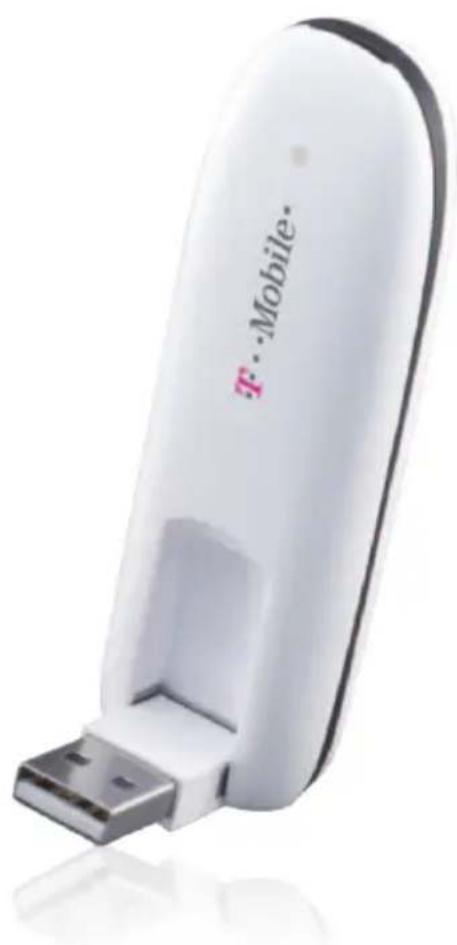
INSTALLATION & SETUP
Insert the SIM card
Your Subscriber Identity Module (SIM) card is pre-inserted in your laptop stick. If you need to re-insert the SIM card:
- Slide the back cover in the direction as shown to remove.
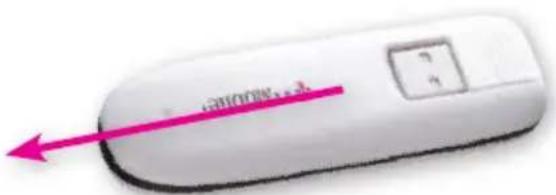
- Insert the SIM card into the SIM card slot as shown, and replace the back cover.

Insert the memory card
Your laptop stick supports a microSD memory card (not included with your purchase).
NOTE: Do not remove your memory card while it is in use. Removing the memory card while in use may corrupt the data stored on your memory card and damage the memory card or your laptop stick.
-
Remove the back cover.
-
Insert the memory card into the memory card slot, as shown, and replace the back cover. Press in until it clicks into place.
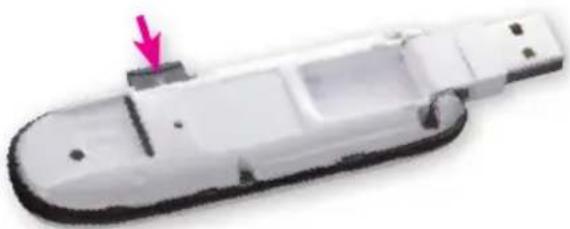
Install the T-Mobile Connection Manager
Insert your laptop stick in a USB port on your computer. Follow the on-screen instructions to install the Connection Manager.
NOTE: If your computer does not install the Connection Manager, go to My Computer > webConnect Mg and double-click AutoRun.exe. If you are using a MAC, double-click the drive exposed on your desktop and double-click AutoRun.exe.
Go to the next section of this guide for details on how to activate your laptop stick and create an account.
Activate laptop stick and create an account
Open the Connection Manager. You will automatically be connected to the T-Mobile Broadband network. Once you are connected to the T-Mobile Broadband network, open a Web browser.
If your laptop stick has already been activated
You will be asked to create an account on the T-Mobile Web page. This account is specific to your Mobile Broadband service and is not the same as any existing account created for voice service.
If your laptop stick has not been activated
Follow the on-screen instructions to activate your laptop stick. After activation, you will see a confirmation page, and you will be asked to reconnect to the T-Mobile network.
To reconnect, open the Connection Manager and click Connect. Open a Web browser and follow the instructions on the Web page to create your prepaid Mobile Broadband account.
MOBILE BROADBAND PASS
Once you have successfully activated your laptop stick and created your account, you can purchase your Pass in order to browse the Internet.
Purchase a Pass
-
Log in to your Mobile Broadband account on the T-Mobile Web page.
-
Select the option to purchase a Pass.
-
Follow the instructions on the screen.
Once you have purchased your Pass, you can browse the Web.
Redeem a Pass or PIN
You can redeem a Pass that you have already purchased from a store. To redeem, follow the instructions on the Pass that was given to you at the store.
TIME & USAGE AMOUNT
You can view the time and usage amount on your Pass by logging into your my.t-mobile.com. Remember your username is your device's phone number, which you can find by clicking Menu > Phone Number on the Connection Manager.
REFILLS
After you have used up your Pass, you will be re-directed to a T-Mobile Web page where you can purchase a new Pass.
NOTE: You can have only one active Pass at a time. When your current Pass expires, you will be able to purchase another Pass.
-
Insert your laptop stick in a USB port on your computer.
-
Open the Connection Manager.
-
Click Connect.
-
Open a Web browser
-
Select the option to purchase a Pass.
-
Follow the instructions on the screen.
ADDITIONAL INFORMATION
Data Usage: You will be charged for all data sent by or to you through the network, regardless of whether received. Data speed is variable and may be impacted by network conditions and traffic. Your data session, or service may be slowed, suspended, terminated or restricted if you use your service in a way that interferes with or impacts our network or ability to provide quality service to other users. You may not use your device for the prohibited uses. T-Mobile is not responsible for any third party content or Web site you access using your device. T-Mobile cannot guarantee the security of any Internet communications.
No Commitment Mobile Broadband:
Does not require a commitment to a long-term contract. Pass required to use service. Service available for time period and/or usage amount provided by Pass. For time period, a day is 12:00 a.m. to 11:59 p.m., based on time zone associated with your mobile broadband account phone number. Usage rounded up to the nearest KB each session; 1024KB = 1MB. Only one Pass may be active at a time. Data only; service does not include voice, messaging, or Wi-Fi services. Domestic only; no international or domestic roaming. Devices sold for use
on T-Mobile service are to be activated on that service, not transferred for resale, modification, or export.
Coverage: Coverage not available everywhere. See Terms and Conditions (including arbitration provision) at www.T-Mobile.com for additional details. T-Mobile and the magenta color are registered trademarks of Deutsche Telekom AG. Rocket is a trademark of T-Mobile USA, Inc. ©2011 T-Mobile USA, Inc.
- GET STARTED
- TABLE OF CONTENTS
- INSTALLATION & SETUP 1
- MOBILE BROADBAND PASS 5
- TIME & USAGE AMOUNT 6
- REFILLS 6
- ADDITIONAL INFORMATION 7
- INSTALLATION & SETUP
- INSERT THE SIM CARD
- INSERT THE MEMORY CARD
- INSTALL THE T-MOBILE CONNECTION MANAGER
- ACTIVATE LAPTOP STICK AND CREATE AN ACCOUNT
- IF YOUR LAPTOP STICK HAS ALREADY BEEN ACTIVATED
- IF YOUR LAPTOP STICK HAS NOT BEEN ACTIVATED
- MOBILE BROADBAND PASS
- PURCHASE A PASS
- REDEEM A PASS OR PIN
- TIME & USAGE AMOUNT
- REFILLS
- ADDITIONAL INFORMATION
- NO COMMITMENT MOBILE BROADBAND
Brand : ZTE
Model : Rocket MF-591
Category : Cellphone