Khuno - Pan Krom - Free user manual and instructions
Find the device manual for free Khuno Krom in PDF.


User questions about Khuno Krom
0 question about this device. Answer the ones you know or ask your own.
Ask a new question about this device
Download the instructions for your Pan in PDF format for free! Find your manual Khuno - Krom and take your electronic device back in hand. On this page are published all the documents necessary for the use of your device. Khuno by Krom.
USER MANUAL Khuno Krom
natural_image
Line drawing of a computer mouse with a textured handle and abstract internal components (no text or symbols)QuickGuide Installation
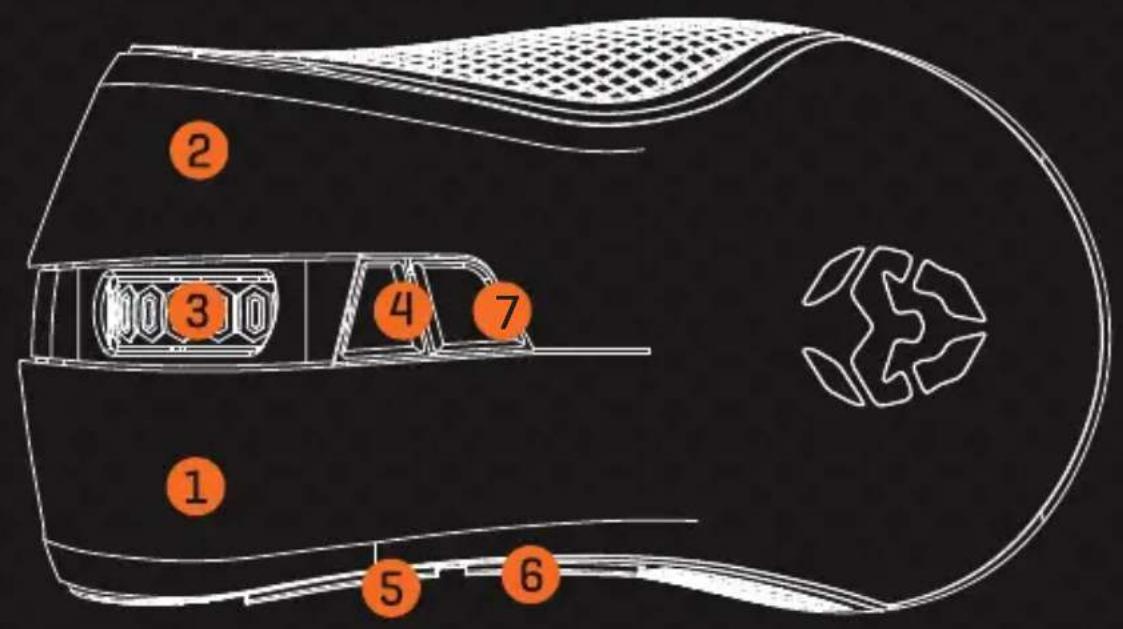
DEFAULT BUTTON ASSIGNMENT
1] Left button
2] Right button
3] Scroll wheel
4] DPI button
5] Forward button
6] Backward button
7] LED mode button: Standard Mode; Neon Mode; Ripple Mode; Color Cycle; LED Off
* Install the software to assign different functions to each button
SYSTEM REQUIREMENTS
- Operation System:
Windows XP / Vista / 7 / 8 / 10
- Free USB 2.0 / 3.0 port
- Software installation
- 50MB free hard disk space
KROM KHUNO FULL MANUAL
Please, download the Complete User manual from our website:
- Go to the website www.kromgaming.com
- Once into the product sheet, go to menu [downloads] and click on "MANUAL"
- Following "MANUAL" link, you can download the Complete Manual.
KROM KHUNO SOFTWARE
Please, download the software from our website:
www.kromgaming.com
SOFTWARE INSTALLATION
- Plug USB connector of KROM KHUNO to a USB port of your PC
- Download the driver from Krom site.
2.1 Go to the website www.kromgaming.com
2.2 Into the product sheet, on menu [downloads] click on "DRIVERS"
2.3 In this link you can download the Software.
- Double click "setup.exe" to start the installation program.
- Select the folder to save the software and click "next" to continue.
- Installation run automatically: click "finish" to complete the installation.
SPECIFICATIONS
- Sensor: Optical PixArt PMW 3310
- Resolution: 400 to 5000 dpi
- Buttons: 7
- Polling rate: 500 - 1000 Hz
-
Internal Memory: 16 Kb
-
Speed: 130 inches / sec
- Plug: USB
- Dimensions: 131 x 68 x 41 mm
- Cable lenght: 1.8 m ± 10 cm
- Weight: 150 ± 5 g
WARRANTY
Who the warranty Protects:
This warranty is valid to the original purchaser only.
What the warranty protects:
For your warranty claims, please contact Krom gaming overseas distribution partners in your country. Find the distribution partner list at www.kromgaming.com
Warranty: 2 years from purchasing date. [Depending on the laws of each country]
URL: www.kromgaming.com
E-mail: support@kromgaming.com
What the warranty does not cover:
- Any product, on which the serial number has been defaced, modified or removed.
- Accident, misuse, neglect, fire, water, lightning, or other acts of nature, unauthorized product modification, or failure to follow instructions supplied with the product.
- Repair or attempted repair by anyone not authorized by Krom gaming.
- Damage to or loss of any programs, data or removable storage media.
- Software or data loss occurring during repair or replacement.
- Any damage of the product due to shipment.
- Removal or installation of the product.
- External causes, such as electric power fluctuations or failure.
- Use of supplies or parts not meeting kromgaming's specifications.
- Normal wear and tear.
- Any other cause which does not relate to a product defect.
If you have any questions regarding technical problems please contact us via our website:
WWW.KROMGAMING.COM
KROM reserves the right for any modifications in text and/or images.

natural_image
Abstract orange geometric pattern on black background (no text or symbols)KROM
www.kromgaming.com