1051L - Range hood BROAN - Free user manual and instructions
Find the device manual for free 1051L BROAN in PDF.


| Product Type | Range Hood |
| Brand | Broan |
| Model | 1051L |
| Installation Type | Under Cabinet |
| Width | 30 inches (76.2 cm) |
| Depth | 17 inches (43.2 cm) |
| Height | 6 inches (15.2 cm) |
| Weight | 18 lbs (8.2 kg) |
| Power Supply | 120 V, 60 Hz |
| Fan Speeds | 2 speeds |
| Max Airflow | 240 CFM |
| Lighting | Incandescent, 60W max |
| Filter Type | Aluminum mesh, washable |
| Ducting | 6 inch round, vertical or horizontal |
| Controls | Rocker switches for fan and light |
| Noise Level | 6.5 sones at high speed |
| Energy Star Rated | No |
| Safety Certification | UL listed |
| Maintenance | Clean filters monthly; replace if damaged |
| Warranty | 1 year limited |
Frequently Asked Questions - 1051L BROAN
User questions about 1051L BROAN
0 question about this device. Answer the ones you know or ask your own.
Ask a new question about this device
Download the instructions for your Range hood in PDF format for free! Find your manual 1051L - BROAN and take your electronic device back in hand. On this page are published all the documents necessary for the use of your device. 1051L by BROAN.
USER MANUAL 1051L BROAN
natural_image
Line drawing of a refrigerator with front panel and side door (no text or symbols)MODELS 1050 & 1051

natural_image
Line drawing of a single refrigerator with front panel and side door (no text or symbols)MODELS 1050L & 1051L MODEL1052

natural_image
Line drawing of a modern refrigerator with front panel and side door (no text or symbols)
text_image
OPTIONAL CUTTING BOARD BAG STORAGE COMPARTMENT KEY LOCK SWITCH AIR FRESHENER PANEL AIR FRESHENER (NOT INCLUDED) RAM DRAWER SAFETY LATCH (MODELS 1050L & 1051L ONLY) "HANDS FREE" DRAWER OPENING PEDAL (MODELS 1050 & 1051 ONLY) REMOTE DRAWER CONTAINER LATCH LEG LEVELERSSAVE THESE INSTRUCTIONS
IMPORTANT SAFEGUARDS. READ ALL INSTRUCTIONS CAREFULLY BEFORE OPER- ATING COMPACTOR.
Basic precautions should always be taken when using an electrical appliance – including the following:
- Close supervision is necessary when any appliance is operated near children. Do not allow the appliance to be used as a toy, or to run unattended at any time. Turn key to "OFF" and remove it to lock the compactor. Store the key out of reach to prevent children or others from operating or tampering with the compactor.
- Do not push trash into compactor drawer with hands or feet. Trash might contain broken glass, sharp pieces of metal, etc., which would cause injury.
- Do not compact volatile material. Paint, oily rags, lighter fluid cans, and paint thinner cans could combust spontaneously and cause an explosion and/or fire.
- Do not compact aerosol cans or any other containers still holding toxic chemicals, insecticides, or combustible contents. Fumes may be released which are hazardous to health.
- Do not compact lighted cigarettes, cigars, or other hot or burning items.
- Do not overload the compactor.
- Be careful when removing and carrying bag. Broken glass or other sharp objects may pierce bag.
- Do not operate this unit with an extension cord.
- Use only Broan approved accessories.
- Do not touch moving parts.
- Do not take this appliance apart. Incorrect reassembly can cause electrical shock when operated.
- Do not operate with a damaged power cord, plug, motor, or after damage of any kind. Have the compactor examined, and all repairs made, by an authorized serviceman.
- This compactor is FOR HOUSE-HOLD USE ONLY. Use it only as described in this manual.
- Unplug the appliance from outlet before servicing.
GROUNDING INSTRUCTIONS TO REDUCE THE RISK OF ELECTRIC SHOCK.
IMPORTANT — Please read carefully.
Fig. 1

natural_image
Simple line drawing of a plug and socket with an open socket (no text or symbols)FOR PERSONAL SAFETY, THIS APPLIANCE MUST BE PROPERLY GROUNDED. The power cord on this appliance is equipped with a three-prong (grounding) plug which mates with a standard three-prong (grounded) receptacle. (Fig. 1)
If there is a two-prong outlet located where you will install the compactor, it is your responsibility to have it replaced with a properly grounded three-prong wall receptacle.
DO NOT, UNDER ANY CIRCUM-STANCES, CUT OR REMOVE THE THIRD (GROUND) PRONG FROM THE POWER CORD PLUG.
The GREEN (or GREEN & YELLOW) conductor in the cord is the grounding wire. Never connect the GREEN (or GREEN & YELLOW) wire to a live terminal.
A 120 volt, 60 Hz., A.C., 15 amp fused and grounded electrical supply is required (time-delay fuse or circuit breaker is recommended). It is recommended that a SEPARATE CIRCUIT serving only this appliance be provided.
DO NOT USE AN EXTENSION CORD WITH THIS APPLIANCE.
INSTALLATION
Your Broan Compactor has been designed to require minimum space without loss of capacity whether free-standing or built-in.
FREE-STANDING
The unit should usually be placed where the bulk of trash is generated — kitchen, utility room, or garage.
LEVELERS
Your compactor has four adjustable levelers which allow you to adjust for uneven floors and also trim the unit up to fit the under-counter installation snugly.
To level the unit, tip the compactor to one side and turn the levelers out only far enough to properly level the unit. Do the same on the other side, until the unit sits level on the floor. Check the unit from front to back, and side to side.
For proper operation, the compactor must be level with all four legs properly adjusted. For proper drawer pedal operation, the unit must be level.
UNDER-COUNTER INSTALLATION
text_image
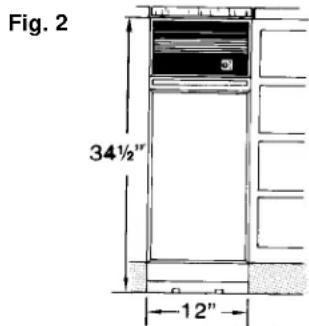
Fig. 2 34½" 12"Your compactor has been designed to require a minimum of space whether free-standing or built-in. Only 12" wide x 20" deep, your compactor is smaller than most on the market. (Fig. 2)
To install compactor under counter, use Figure 2 to determine the cutout size. Back up compactor with a 2 x 4 to prevent unit from shifting backwards due to repeated closing of compactor drawer. The power outlet should be installed per electrical code near the center of the opening or unit, and 15" to 18" from the floor.
The bag storage compartment allows you to store bags and air fresheners conveniently. The swing open storage compartment door allows easy access to bags, etc.
IMPORTANT: Make sure compactor can be easily removed (slid out) from under counter in case service is ever necessary. DO NOT fasten compactor to cabinets, countertop, or floor. Do not install flooring material after compactor is placed under the counter of the flooring may later interfere with the compactor being able to be removed from under counter.
Fig. 3
text_image
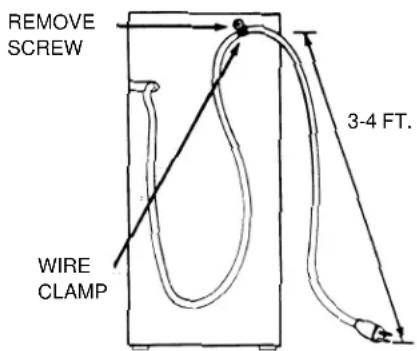
REMOVE SCREW WIRE CLAMP 3-4 FT.For free-standing unit, remove wire clamp to obtain additional cord length if necessary. (Fig. 3)
Remove top right back panel screw, slip wire clamp off cord, and replace screw.
WHAT YOUR COMPACTOR DOES
Your compactor compresses household trash up to 1/12 of its original volume. The compactor will take normal household trash including milk cartons, glass and plastic bottles, containers and jars, tin cans, wrappings, boxes, food wastes, etc.
HOW YOUR COMPACTOR WORKS
When you start the compactor, an electrically powered ram moves down into the compactor drawer, compresses the trash and then returns to the "UP" position and shuts off automatically.
NOTE: The ram travels about 2/3 of the way down into the container. Because of this, the container must be at least 1/3 full before you notice any compressing.
KEY LOCK SWITCH
The key lock switch on your compactor is provided for your protection as a safety measure. When the key switch is in the "OFF" position, the compactor will not operate. Lock your compactor, and remove the key for safekeeping to keep children from operating the unit or to prevent anyone from tampering with it.
NOTE: Opening the drawer during operation will stop the unit. If the compactor is stopped during its cycle, it will always move back UP when restarted.
DRAWER SAFETY LATCH (MODELS 1050L & 1051L ONLY)
The drawer latches automatically when closed. To unlatch the drawer, move the lever to the left and pull on the handle.
HANDS-FREE DRAWER OPENING (MODELS 1050 & 1051 ONLY)
For proper operation, be sure compactor is level. Adjust the level legs as necessary.
Quickly depress foot pedal and immediately remove foot. Drawer will open for easy access to trash container.
AIR FRESHENER
Your Compactor is equipped with Air Freshener Panel, which can hold a solid air freshener, such as a Stick-UP® Air Freshener package.
Simply open the air freshener and fasten it to the panel.
OPTIONAL CUTTING BOARD KIT (MODEL 1004)
You can order an optional cutting board, Model 1004, from your Broan Distributor, or write Broan Mfg. Co., Inc., Hartford, WI 53027.
The cutting board rests on the top of the compactor, and features non-marring rubber feet and a gravy groove on the top.
To keep your wood cutting board from warping, apply a thin coat of vegetable oil after detergent washing.
COLOR MATCHING
Your Broan Compactor is equipped with a convenient color matching feature in the door panel. Each compactor (except Model 1052) has one reversible color panel finish in black/almond (Models 1050 & 1050L) or black/white (Models 1051 & 1051L). The main door panel behind the reversible color panel is black.
To remove and install the color panel on your compactor:
- Remove drawer and set it on its back, with the door panels facing up. (See section "DRAWER REMOVAL", page 7.)
For Models 1052, 1050L & 1051L use instructions 6 thru 9 only.
Fig. 4

text_image
DRAWER PEDAL RETAINER CAP- With a commonhead screwdriver pry off the retainer cap on each end of the drawer pedal. (Fig. 4)
Fig. 5

natural_image
Illustration of a hand using a tool to lift a mechanical component (no text or symbols visible)- With a small Phillips head screw-driver or 8 penny nail, push the drawer pedal hinge pin out of one end of the drawer. (Fig. 5)
Fig. 6

natural_image
Illustration of hands using a tool to adjust or install a mechanical component (no text or symbols visible)- Pull the pin completely out of the pedal, and lift the pedal spring out of its notch in the pedal. (Fig. 6)
- Lift the drawer pedal off of the compactor drawer.
text_image
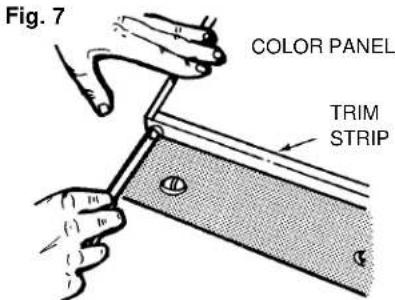
Fig. 7 COLOR PANEL TRIM STRIP- Remove the two screws holding the trim strip to the bottom of the door, and remove the trim strip (Fig. 7)
- Slide the color panel out.
- Choose the color you want to show.
- Slide the color panel back into place, and reinstall the trim strip.

text_image
Fig. 8 HINGE BRACKET- Reinstall pedal by matching it up and sliding hinge pin through one hinge bracket. (Fig. 8)

text_image
Fig. 9 PEDAL SPRING- Use a needle nose pliers to hold the pedal spring, slip it over the end of the hinge pin and slide the pin through. (Fig. 9) Push pin through second hinge bracket and then the rest of the way through the pedal.
- Replace the retainer caps on each end of the drawer pedal.
DECORATIVE PANEL INSTALLATION
A decorative panel insert can be installed in place of the colored door panel and corrugated spacer.
Remove drawer assembly, foot pedal, trim strips, color panel and corrugated spacer following instructions under "Color Matching."
Panels over 1/4" thick:
OPTION #1:
Make sure panel fits inside the chrome door trim. Inside dimensions of chrome trim are approximately 11-5/16" x 20-1/2".
- Drill holes through the door for the screw size being used.
- Screw the panel to door.
- Reinstall trim strip, foot pedal, and slide door assembly back into compactor.
OPTION #2:
Start with a panel 11-11/16" x 20-7/8". Use a router to cut 3/16" wide edges, 3/32" thick, all around. Carefully bend tabs of side door trim 90° to provide clearance. Slide panel under chrome door trim. Carefully bend tabs back to their original position. Replace trim strip, foot pedal and drawer assembly.
Panels 1/4" or thinner:
Cut decorative panel to 11-11/16" x 20-7/8". Carefully bend tabs of side door trim 90° to provide clearance. Slide panel under chrome door trim. Depending on the thickness of your panel, you may need to use the original colored panel or cardboard to space the decorative panel out tight against the door trim. Carefully bend tabs back to their original position. Replace trim strip and door assembly.
IMPORTANT: If compact has yet to be delivered to job site, reinstall drawer assembly. Run compactor so ram extends down into the drawer, against the cardboard filler. This will prevent damage to the mechanism during delivery.
Do not ship or deliver compactor on its back. If it cannot be delivered upright, it is preferable to ship it on its side.
BAG INSTALLATION
Your compactor has been furnished with reinforced polyethylene bags.
They are ready to be installed.
DO NOT use plastic bags other than those which have been designed for use in your compactor. Unauthorized bags may become caught in the mechanism requiring you to pay service charges which cannot be covered by the warranty.
If you unable to find the proper bags locally, please call 1-800-558-1711 or write: Broan Mfg. Co., Inc., 926 W. State Street, Hartford, WI 53027 requesting the name and location of the nearest source.
natural_image
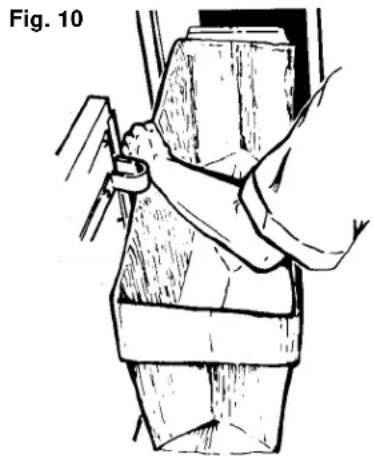
Illustration of a person using a tool on a mechanical component, labeled 'Fig. 10' (no text or symbols on the diagram itself)With the drawer extended to the second stop, release the container latch and swing open door. Then slide bag into drawer from front to back. Starting at the back of the drawer, fold bag over top rim of drawer on all sides. (Fig. 10)
text_image
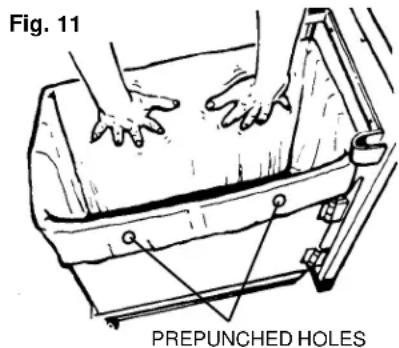
Fig. 11 PREPUNCHED HOLESPress the bag into all corners of the drawer and smooth the bottom. (Fig. 11)
Fig. 12

text_image
DRAWER BUTTONSSmooth and shape the bag carefully — this will prevent the bag from being torn by the ram during compaction. Using buttons on side of drawer, button your bag in place by using the prepunched holes in the side of the bag. Figure 12 shows the bag installed.
NOTE: If you have difficulty installing the bag, remove drawer completely from unit by lifting front of drawer slightly and pulling forward (place on rug or other surface to protect floor). This will clear back of container from housing for easier installation of bag.
Fig. 13
text_image
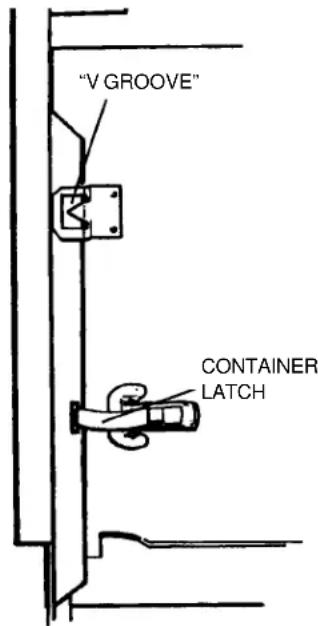
"V GROOVE" CONTAINER LATCHBag is locked between door flange and drawer. When door is closed and latched properly, door guide "V" will be snug in "V" groove in drawer flange. (Fig. 13)
Failure to align "V" properly or to latch drawer to door will cause compactor to stall with ram down. This condition can be corrected by turning the key to the start position. The ram should return to its normal position and stop. If necessary, push in on front of drawer to engage interlock. Relatch the drawer and begin compacting.
COMPACTING
After properly installing a new bag, the compactor is ready to use.
FOR BEST RESULTS
ALWAYS FILL THE BAG COMPLETELY BEFORE OPERATING THE COMPACTOR FOR THE FIRST TIME. DOING SO WILL MINIMIZE BAG PULL-UP AND TEARING.
Close drawer completely. Rotate key past "ON" to "START" position. Hold in "START" momentarily and release back to "ON" position. Motor will start and compaction will proceed.
CAUTION: DO NOT FORCE KEY WHEN TURNING. It should always rotate easily. Forcing may break key and damage switch.
The ram travels downward into the drawer compacting the trash; at the bottom of the ram stroke, the unit automatically reverses and retracts upward out of the drawer. Total cycle time is a little over a minute. At the top of the stroke, the unit automatically shuts itself off and the compactor is ready to receive more trash.
Although it is not necessary to compact until the drawer is full or nearly so, it is suggested that for maximum compaction, you start the compactor each time a significant amount of trash is added.
At full stroke, the ram does not travel all the way to the bottom of the container. Trash in the bottom 1/3 of the container will be crushed during subsequent compacting.
Glass bottles can make a loud noise when they break during compaction. This is normal. Bottles do not always break during the first cycle. Breaking glass and associated noise may occur several cycles later depending on type and volume of trash.
Bottles and large cans compact best when laid flat near the center of the drawer.
Place a couple of folded sheets of newspaper, or a large grocery bag on top of the load to be compacted when:
-
Compacting large or several glass bottles or jars (or any items that might shatter). This will help prevent glass fragments and particles from flying out of drawer into mechanism.
-
Compacting unwrapped messy food waste. This will help keep the power ram clean.
There are certain types of trash that create exceptionally strong odors such as raw meat, fish, grapefruit rinds, personal hygiene items, and disposable diapers. You may not wish to put such items into your compactor.
If the compactor will not be used for an extended period of time, such as during vacation, remove the bag to prevent a build-up of undesirable odor.
CAUTION
DO NOT COMPACT AEROSOL CANS OR ANY OTHER CONTAINERS STILL HOLDING OR WHICH HELD TOXIC CHEMICALS, INSECTICIDES, OR COMBUSTIBLE CONTENTS. FUMES MAY BE RELEASED THAT ARE HAZARDOUS TO HEALTH OR MAY RESULT IN FIRE OR EXPLOSION.
NEVER PUSH TRASH INTO THE CONTAINER WITH HANDS OR FEET. Trash might contain broken glass, sharp pieces of metal, etc., which could cause injury. Never compact flammable materials in your compactor.
Do not put paint, oily rags, lighter fluid cans, paint thinner cans, etc., in your compactor. Doing so could result in spontaneous combustion causing a fire and/or explosion.
TO STOP THE COMPACTOR
The unit may be stopped at any time by turning the key to "OFF" or opening the drawer. If the unit is stopped, the ram will always move back to the up position when restarted again.
BAG REMOVAL
- Open drawer to first stop.
- Unhook container latch from door catch. Swing door open.
- Unbutton bag from drawer and close by twisting bag. Fasten with twist tie provided.
Fig. 14
natural_image
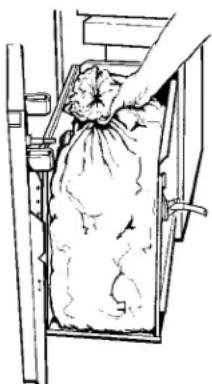
Line drawing of a hand placing a bag into a container with a side arm (no text or symbols)- Use a twist-tie to secure the top of the bag. Pull upward and forward — tipping the bag toward you. A full compacted bag of trash is easily removed in this fashion. (Fig. 14)
MAINTENANCE AND CLEANING
Your compactor has been designed with easy access for cleaning when required.
The interior and exterior of the cabinet are finished with a durable baked-on enamel finish.
Do not use harsh or gritty cleanser or scouring pads which may mar the finish. Use a high-grade wax cleaner on these surfaces.
TO REMOVE DRAWER AND CLEAN INTERIOR
- Pull out drawer until it stops.
- Lift up on drawer slightly and then pull out drawer to second stop.
- Lift drawer up and out of compactor.
- Vacuum and clean cabinet base, track channels, and drawer, particularly in corners.
- Wash the cabinet interior with normal mild household cleaners.
WARNING: Glass fragments may be lying in bottom of cabinet — to avoid injury, use care in cleaning.
RAM CLEANING
- After removing drawer as described above, ram can be removed.
Fig. 15

text_image
FRONT- Remove bolt in center of ram with 1/2" wrench. (Fig. 15)
CAUTION:
WATCH FOR GLASS FRAGMENTS
Fig. 16
text_image
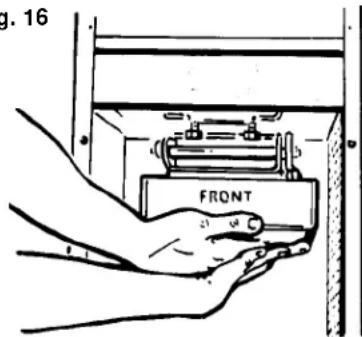
J. 16 FRONT- Place hand on ram face, supporting its entire length. (Fig. 16)
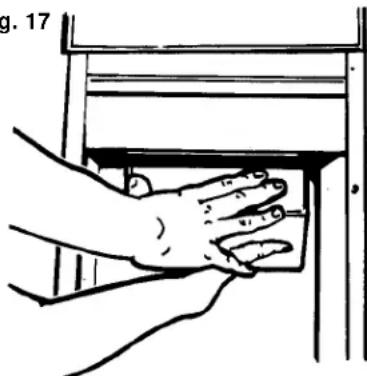
Fig. 17
natural_image
Line drawing of a hand pressing down on a mechanical component (no text or symbols)-
With other hand, press back on front of ram, sliding it until it releases. (Fig. 17)
-
To replace ram, slide ram into grooves on mechanism and slide forward until it snaps into position.
-
Replace center bolt with 1/2" wrench.
Ram should be cleaned with normal, mild household cleaners.
HANDY HINTS
Before you call for service, check these handy hints which may save you the cost of a service call:
- Is electric cord plugged in securely?
- Has a house fuse blown or a circuit breaker tripped?
- Is the drawer pushed firmly shut?
- Is the key switch in the "ON" position?
- Did you hold the key switch in "START" long enough to start the compaction cycle?
- If drawer is difficult to close, check to see if any trash has fallen behind the container preventing safety switch closure.
- The motor has an automatic thermal cutout. If you have compacted repeatedly, this protector may have opened the circuit. Wait a few minutes and the cutout will reclose automatically.
- The container must be at least 1/2" full of trash before any appreciable
amount of compacting will be apparent as the ram does not travel all the way to the bottom of the container. Trash in the bottom 1/3 of the container will be crushed during subsequent compacting.
- On rare occasions, a large can placed near the outer edge of the container may become wrapped around the edge of the ram. This could interfere with the opening of the door. To correct, simple grasp door handle and move the drawer back and forth until the stuck can becomes dislodged.
- Grease from mechanism may drop into the drawer or be found on the front of the bag early in the life of your compactor. This is not cause for alarm.
- In the unlikely event that the actuator (on the inside of the door) breaks off, the compactor will not operate.
DO NOT ATTEMPT TO OPERATE COMPACTOR IN ANY OTHER MANNER. A replacement actuator can be ordered from your dealer, local service center, or Broan Mfg. Co., Inc., Hartford, WI 53027 (414) 673-4340.
- To obtain service, provide the unit model number, serial number and nature of any defect in the product or part. The model number, serial number and all other data is shown on the model plate, which is located inside of the bag storage compartment, behind the flip-down door. When requesting warranty service, evidence of the original purchase date must be presented. To obtain the name of the warranty service center serving your location, contact the dealer who sold you your compactor or write Broan Mfg. Co., Inc., Hartford, WI 53027 (Telephone 414-673-4340).
BROAN ONE YEAR LIMITED WARRANTY
Broan warrants to the original consumer purchaser of its products that such products will be free from defects in materials or workmanship for a period of one year from the date of original purchase. THERE ARE NO OTHER WARRANTIES, EXPRESS OR IMPLIED, INCLUDING, BUT NOT LIMITED TO, IMPLIED WARRANTIES OF MERCHANTABILITY OR FITNESS FOR A PARTICULAR PURPOSE.
During this one-year period, Broan will, at its option, repair or replace, without charge, any product or part which is found to be defective under normal use and service.
THIS WARRANTY DOES NOT EXTEND TO FLUORESCENT LAMP STARTERS AND TUBES. This warranty does not cover (a) normal maintenance and service or (b) any products or parts which have been subject to misuse, negligence, accident, improper maintenance or repair (other than by Broan), faulty installation or installation contrary to recommended installation instructions.
The duration of any implied warranty is limited to the one-year period as specified for the express warranty. Some states do not allow limitation on how long an implied warranty lasts, so the above limitation may not apply to you.
BROAN'S OBLIGATION TO REPAIR OR REPLACE, AT BROAN'S OPTION, SHALL BE THE PURCHASER'S SOLE AND EXCLUSIVE REMEDY UNDER THIS WARRANTY. BROAN SHALL NOT BE LIABLE FOR INCIDENTAL, CONSEQUENTIAL OR SPECIAL DAMAGES ARISING OUT OF OR IN CONNECTION WITH PRODUCT USE OR PERFORMANCE. Some states do not allow the exclusion or limitation of incidental or consequential damages, so the above limitation or exclusion may not apply to you.
This warranty gives you specific legal rights, and you may also have other rights, which vary from state to state. This warranty supersedes all prior warranties.
To qualify for warranty service, you must (a) notify Broan at the address stated below or telephone: 1-800-637-1453, (b) give the model number and part identification and (c) describe the nature of any defect in the product or part. At the time of requesting warranty service, you must present evidence of the original purchase date.
BROAN MFG. CO., INC., 926 West State Street, Hartford, WI 53027