SMT-7800 (Freesat) - TV Decoder SAMSUNG - Free user manual and instructions
Find the device manual for free SMT-7800 (Freesat) SAMSUNG in PDF.


User questions about SMT-7800 (Freesat) SAMSUNG
0 question about this device. Answer the ones you know or ask your own.
Ask a new question about this device
Download the instructions for your TV Decoder in PDF format for free! Find your manual SMT-7800 (Freesat) - SAMSUNG and take your electronic device back in hand. On this page are published all the documents necessary for the use of your device. SMT-7800 (Freesat) by SAMSUNG.
USER MANUAL SMT-7800 (Freesat) SAMSUNG
Contact Samsung Electronics U.K. If you have any questions or comments relating to Samsung products, please contact the SAMSUNG customer care center. Tel : 0330 SAMSUNG (0330 7267864) Web : www.samsung.ocm/uk
SAMSUNG
Part No. GL68-00414A(Ed.01)
The purpose of Safety Concerns is to ensure users' safety and to prevent property losses. Please read this document carefully for proper use.

COPYRIGHT
This guide is proprietary to SAMSUNG Electronics Co., Ltd. and is protected by copyright.
No information contained herein may be copied, translated, transcribed or duplicated for any commercial purposes or disclosed to third parties in any form without the prior written consent of SAMSUNG Electronics Co., Ltd.
TRADEMARKS
Product names mentioned in this document may be trademarks and/or registered trademarks of their respective companies.
This guide may be changed for product improvement, standardization or other technical reasons without prior notice.
For further information on the updated guide or the contents contained in the guide, please contact your Authorized Samsung Reseller.

Correct disposal of batteries in this product
(Appliace in the European Union and other European countries with separate, factory return systems.) This ranking on the factory, manual or preparing industries that the better idea in this product should not be disposed of with other households outside the end of then working life. Where marked, the chemical symbols Hg, Cd or Ph Ind care that the history contains memory, cadmium or lead above the extended levels in HD Directive 2006/88. It contains are, nor properly disposed or, these substances can cause harm to human health or the environment.
o protect natural resources and to promote material reuse, please separate barriers from other types of waste and recycle them through your local, free battery return system.

Correct Disposal of This Product (Waste Electrical & Electronic Equipment)
(Aciclable in the European Union and other European countries with aspects or better systems)
The making on the product accessories or literature in states that the product and the electronic accessories (e.g. charger, heater). Utilization should not be exposed or with other household waste of the end of their working life. To present it possible from the environment of human health from uncontrolled waste disposal, please separate these forms from other types of creams and organies from responsibility to promote the sustainable use of material resources.
Household users should convert either the retailer where they purchased this product, or the local government store, for clear of where and now they can take these items for environmental sale recycling.
Business users should contact the exporter and check the terms and conditions of the product versus: This product and the electronic accessories should not be mixed with other commercial waste for space.
Information in this document is proprietary to SAMSUNG Electronics Co., Ltd.
No information contained here may be copied, translated, transcribed or duplicated by any form without the prior written consent of SAMSUNG.
Information in this document is subject to change without notice.

The purpose of the Safety Concerns section is to ensure the safety of users and prevent property damage. Please read this document carefully for proper use.
Conventions

Warning
Provides information or instructions that you should follow in order to avoid personal injury or fatality.

Caution
Provides information or instructions that you should follow in order to avoid a service failure or damage to your Set Top Box (STB).

Note
Indicates additional information for reference.

Checks
Provides the operator with checkpoints for stable system operation.
Symbols

Warning or Caution
Indication of a general caution

Restriction
Indication for prohibiting an action with a product

Instruction
Indication demanding a specific action

WARNING
Power

Insert the power plug firmly.

Do not touch the main body, power cable, or power plug with wet hands.

Do not connect multiple devices to a single outlet simultaneously.

If video/audio cable generates heat after connection, pull out the power plug and contact customer service immediately.
Installation/Maintenance

Install the product in an area with good ventilation.

Do not install in humid or dusty areas, and avoid installing near heating devices.

Keep flammable substances or sprays away from the Set Top Box (STB).


Do not cover the top.

Pull out the power plug during thunderstorms or when not used for a prolonged period of time.

Pull out the power plug at once and contact customer service if unusual noise, smell or smoke is emitted.
General

Check if the coaxial cable is correctly grounded before connecting to the STB.

Class 1 LED Product.

This product complies with 21 CFR Chapter 1, subchapter J.

CAUTION
Power

Connect your TV to the Set Top Box (STB) after powering off the TV and the STB by pulling out the power plugs.

Before connecting the power source, a permanent protective earth connection to the cable distribution should be made.

The socket outlet should be installed near the equipment and easily accessible.
Installation/Maintenance

Install the product correctly complying with the instructions in the user guide.

Do not place any metal items such as pins, paper clips or coins on the top of the product.

Do not spray water directly on the unit and do not use chemicals such as wax, mosquito spray, alcohol or detergent.

Risk of electric shock, DO NOT OPEN.

Ensure the product is placed on a stable surface.

Wipe the product with a soft and dry cloth when cleaning.

Do not disassemble, repair, or modify.

Connect two coaxial cables from the LNBs both to SAT IN 1 and SAT IN 2 on the back of your STB.

Do not insert any items into the product.

Cautions regarding data loss (HDD management)
-
When handling, take care not to damage the data in the hard disc.
-
Hard discs are vulnerable to problems caused by the external environment or to impact during use, so take care not to damage the device.
-
Take care not to move the set-top box while the power is on, or to subject it to impact, as this may damage the data.
-
Situations where the hard disc and data may be damaged
-
The hard disc and data may be damaged if subjected to shock while moving the set-top box or during installation.
- The hard disc and data may be damaged when the set-top box is reset (reconfigured) or if there is a power outage while the hard disc is running.
- Data may be irrecoverable for a variety of several reasons (e.g. a virus infection).
- The hard disc and data may be damaged by turning the power off while recording or playing.
- Files may be damaged or bad sectors may result if the set-top box is subjected to shock or moved while the hard disc is operating.
TABLE OF CONTENTS
SAFETY CONCERNS 1
Conventions....1
Symbols......1
WARNING....2
CAUTION ....3
BEFORE USE 6
freesat+ HD digital TV recorder....6
Key Functions ....6
Package Contents....7
Names and Functions....8
Touch Pad and Front Panel....8
Rear Panel....10
Remote Control 11
TV Operation Setting with a Remote Control....12
INSTALLATION
14
Installation Environment....14
Peripheral Device Connection.... 15
Connection to a TV with an HDMI Port 16
Connection to a TV with a SCART Port....17
Connection to a VCR with a SCART Port ....18
Connection to a TV/VCR with a Composite Port....19
Connection to a Digital Audio Receiver or Amplifier....20
Connection to an Audio Receiver or Amplifier....21
Connection to Satellite Dish....22
Network Connection ....23
USB Connection....24
HOW TO USE THE PRODUCT 25
Installation Wizard 25
Using the Basic Functions.... 29
Using the Main Functions 32
Main Menu.... 34
Guide....35
Channel....37
Library 39
Media 44
Samsung WebTV....48
Settings....50
Settings → Channel....50
Settings → Sound....52
Settings → Picture....54
Settings → Language ....56
Settings → Library / Media....57
Settings → System....58
TROUBLESHOOTING 61
ANNEX 63
TV Manufacturer Numbers.... 63
Open Source Announcement 72
freesat+ HD digital TV recorder
freesat+ HD digital TV recorder (SMT-S7800) provides high quality video and audio broadcasting and interactive services.
Key Functions
HD Video Display (High Definition)
Supports high-resolution video output of up to 1080p, enabling you to enjoy clear and sharp video.
Electronic Program guide (EPG)
Using the EPG, you can check the programme information and broadcasting schedule of a desired channel, and schedule the programmes to watch.
You can record programmes and set up scheduled recordings.
You can search the programme by Day/Time/Category/Search Text.
Time shifting
As the channel you are watching is recorded, you can watch missed portions of the live programmes.
You can pause live TV programme for a certain amount of time, and resume it to watch. The STB allows maximum 120 minutes of recording for time shifting.
Recording
You can record live TV or radio programmes on the Hard Disk Drive (HDD).
You can record a maximum of two programmes at a time.
Library
You can pause, play, rewind and forward for recorded contents.
Package Contents
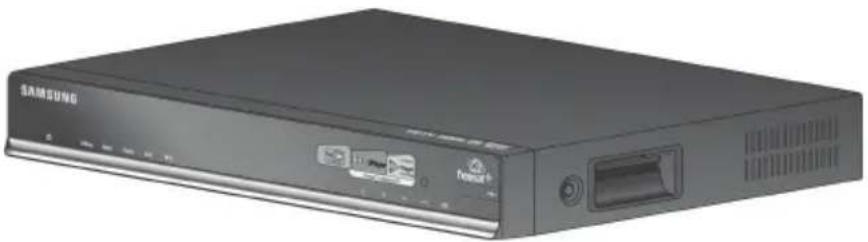
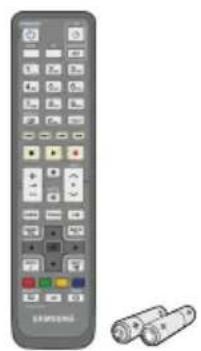
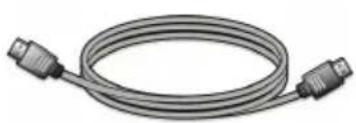
Please make sure the following items are contained in your product package box.
natural_image
Exterior view of a black rectangular electronic device with ports and ventilation slots (no visible text or symbols)SMT-S7800
natural_image
Front view of a gray remote control with multiple function keys and a separate cylindrical device (no visible text or symbols)Remote Control & Batteries (AAA x 2)
natural_image
Coiled cable with two connectors (no text or symbols visible)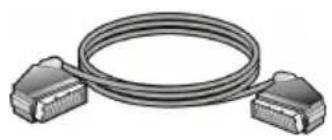
natural_image
Illustration of a coiled cable with two connectors (no text or symbols)HDMI Cable SCART Cable

Video/Audio Cable
natural_image
Two blank rectangular objects with a diagonal line crossing them (no text or symbols)User Guide/Quick Start Guide
Names and Functions
This section describes the name and function of the parts.
Touch Pad and Front Panel
This section describes the touch pad and front panel.
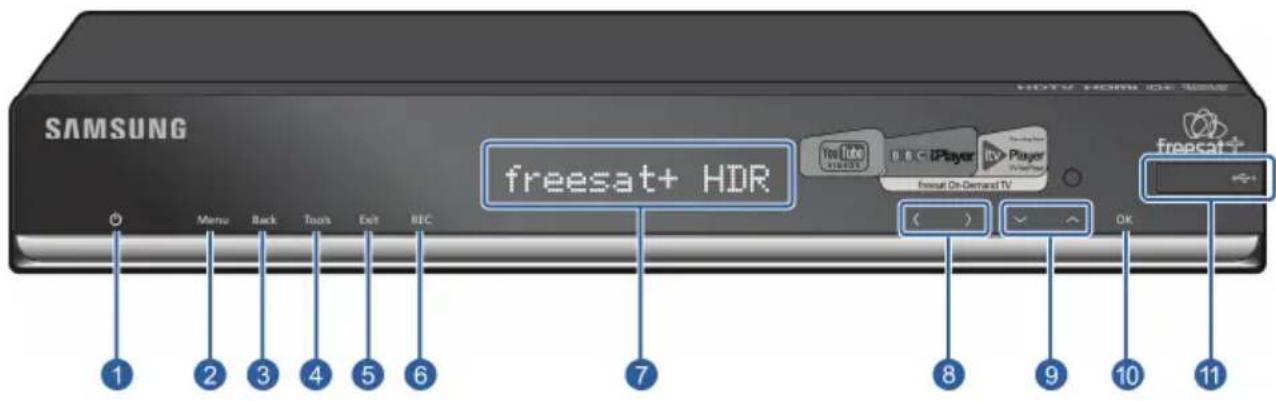
Name Description
| 1 Power Change the STB state to standby or active mode. - Active Mode: The STB is in operation mode and you can get broadcasting. - Low Power Standby Mode: The STB stops running, all the services are suspended except Blue LED. (No Front Display, No TV Service, No Cooling FAN) | |
| 2 Menu Display the main menu. | |
| 3 Back Return to the previous menu. | |
| 4 Tools Takes you to the ‘Tools’ Menu. | |
| 5 Exit Exit the menu and channel guide. | |
| 6 REC Records programmes on HDD. | |
| 7 Display screen Displays the programme information, etc. | |
| 8 < / > | Enter time shift mode and move the menu in horizontal direction. |
| 9 √ / ∧ | Change the channel and move the menu in vertical direction. |
| 10 OK | Select the menu and function. |
| 11 USB | Connect to a USB storage device. |

When you press the STANDBY button ( 🔊 ) whilst the STB is in Active Mode, the STB will switch to Active Standby Mode. After a period of 5 minutes, the STB will switch to Low Power Standby Mode.
During normal operation every day, the STB will switch momentarily from Low Power Standby Mode to Upgrade Mode for a moment. In this mode, the STB will automatically check for upgrades that are being broadcasted.

When you press the STANDBY button ( 🔊 ) whilst the STB is Low Power Standby Mode, the STB will switch to Active Mode.
Rear Panel
This section describes the names and functions of the ports on the rear panel.
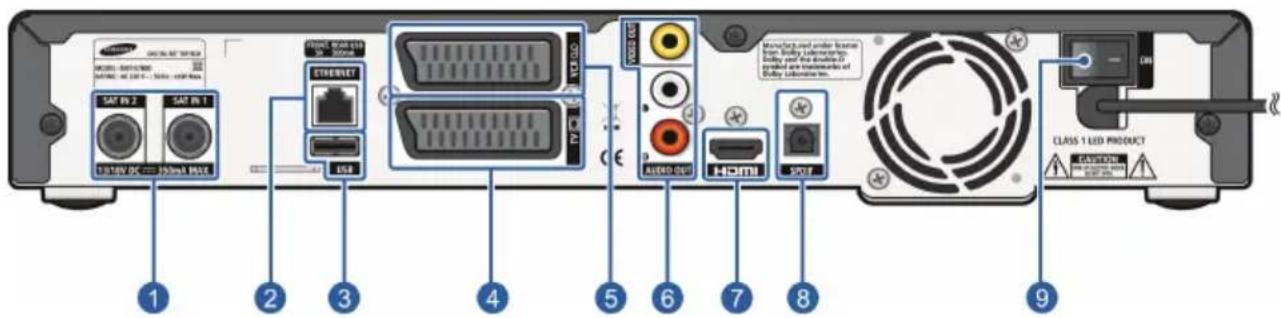
Name Description
| 1 SAT IN1 / SAT IN2 A port which connects an LNB to an STB with a coaxial cable. | |
| 2 ETHERNET A LAN port which connects a LAN cable. | |
| 3 USB A port which is connected to a USB storage device. | |
| 4 TV SCART A TV SCART output port which is connected to a TV with a SCART cable. | |
| 5 VCR SCART A VCR SCART output port which is connected to a VCR with a SCART cable. | |
| 6 VIDEO/AUDIO OUT (L, R) | A Video/Audio output port which is connected to a normal analogue TV, VCR, Radio, etc. with a video/audio cable. |
| 7 HDMI OUT An HDMI output port which is connected to a TV with a standard HDMI cable. | |
| 8 SPDIF A digital audio output port, which is connected to an audio system with an SPDIF port with an optical cable. | |
| 9 Power on/off switch Switch for turning the STB power on/off. | |

You need two cables for a freesat+ installation so that you can watch one channel and record another.
You also need a satellite dish with a multiple LNB (which is the protruding antenna of the dish).
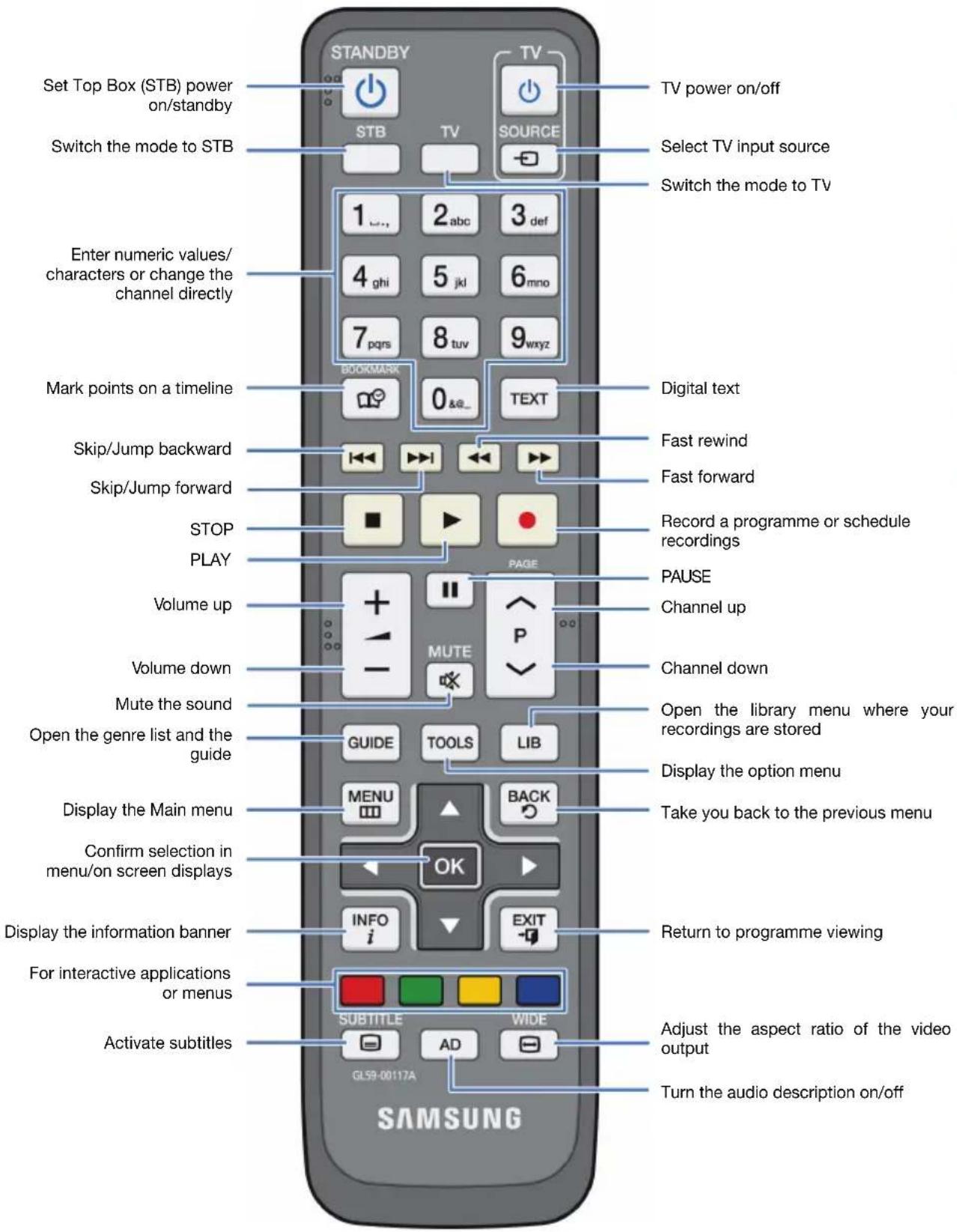
Remote Control
This section describes the function of each button on the remote control.

Loading batteries in the Remote Control
Alkaline batteries, not standard batteries, should be used for the remote control to ensure longer use. If you use standard batteries, it may cause problems in operating the remote control.
- Two identical and new batteries should be used for the remote control.
- When the remote control is not used for a long time, remove the batteries.
TV Operation Setting with a Remote Control
You can operate the TV with a remote control. There are two ways to programme the remote control.
Using Automatic Code Search
1 Turn on the TV.
2 Press and hold the TV button (☐) for more than 5 seconds until the LED on the remote control blinks.
3 Press and release the Programme Up button ( ) until the TV turns off.
4 If the TV turns off, press and release the OK button (OK).
Entering TV Manufacturer Number
1 Check the 'TV manufacturer number' in the 'Annex' to see the relevant 3-digit TV manufacturers number, and turn on the TV. (See page 63).
2 Press and hold the TV button (☐) for more than 5 seconds until the LED on the remote control blinks.
3 Enter the 3-digit number, and then the LED will blink.
- If you get no response, try the automatic code search in the previous page.
4 If the TV turns off, press and release the OK button (OK), then the LED blinks three time.

- A limited number of TVs made by other manufacturers may be controlled by the remote control, and some functions may not work.
- If you leave the remote control with no battery (or a flat battery) for a long time, your TV settings may be deleted.
- When a connected device is an integrated TV model (VCR, DVDP), take care when using the remote control because it may operate both of simultaneously.
- If the configuration number does not work, try another number.
This section describes how to install the STB (SMT-S7800).
Installation Environment
The table below shows the installation environment for the STB.
| Item Description | |
| Operating Temperature 0-40°C | |
| Operating Humidity 20–80% (40°C) | |
| Rated Voltage, Frequency AC 230 V +/- | 15%, 50 Hz |
| Rated Power Consumption Max. 40 W | |
| Broadcasting Rx Frequency 950 ~ 2150 | MHz channel 8Mhz |

When Using and Installing the Product:
The product must be used under the specified environment. Otherwise, it may damage or shorten the life of the product.

When Connecting an STB to Peripherals
- Ask a service technician to check if the TV or VCR power supply where an STB will be connected is properly grounded. If not, there is a risk of fire.
- If excessive heat is produced from cables after connecting the video/audio cables, contact your service centre. It may cause a fire.

If the STB is stored at a low temperature, HDD-related functions might not work properly. This is not a malfunction. You need to boot the system at room temperature, wait about half an hour, and then reboot it again.
Peripheral Device Connection
This section describes how to connect cables and peripheral devices to the STB. Typical device connections are shown in the following figure.
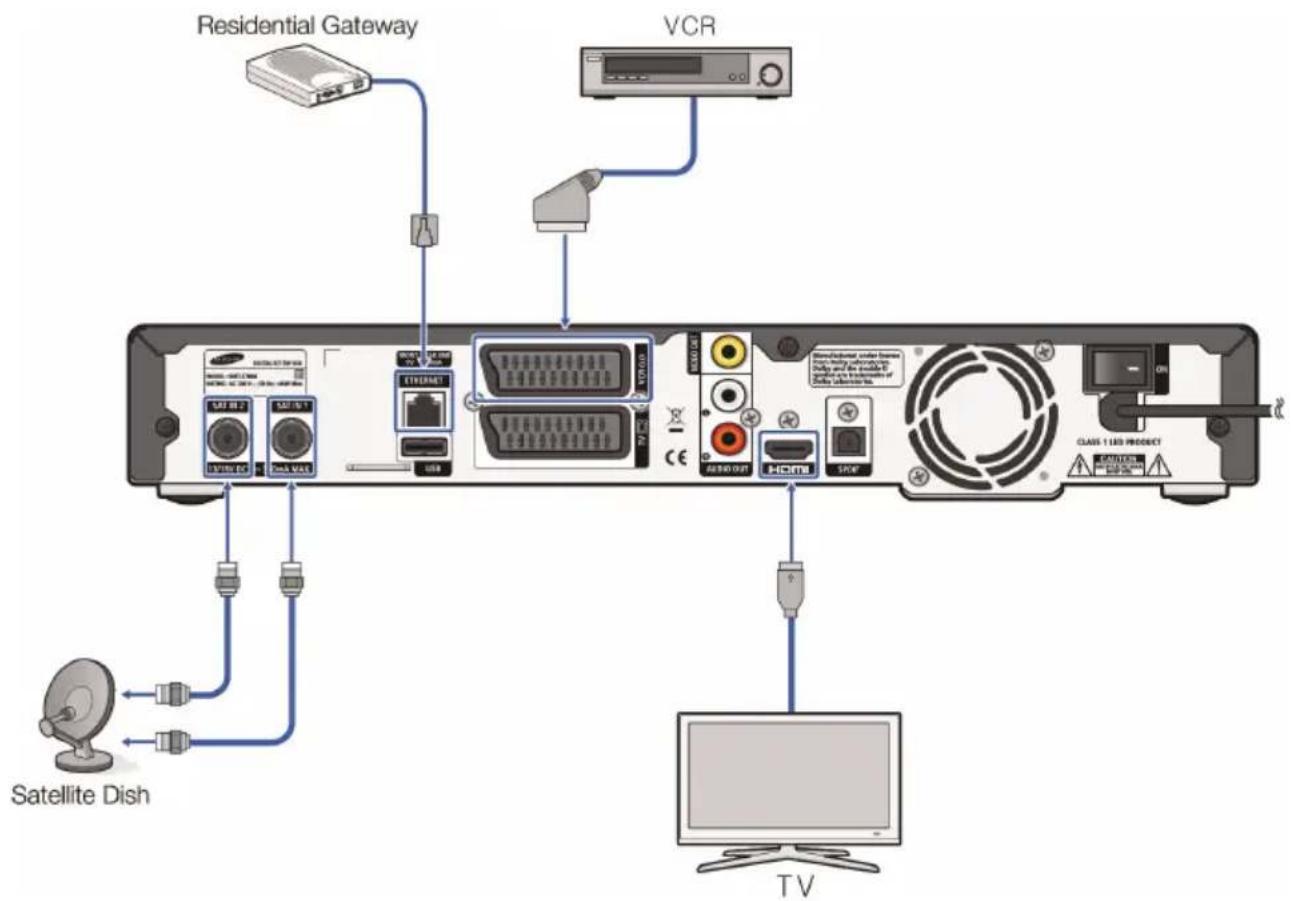
(The product image may differ from the actual product.)

You need two cables for a freesat+ installation so that you can watch one channel and record another.
You also need a satellite dish with a multiple LNB (which is the protruding antenna of the dish).
Connection to a TV with an HDMI Port
This section describes how to connect the STB to a TV with an HDMI port.
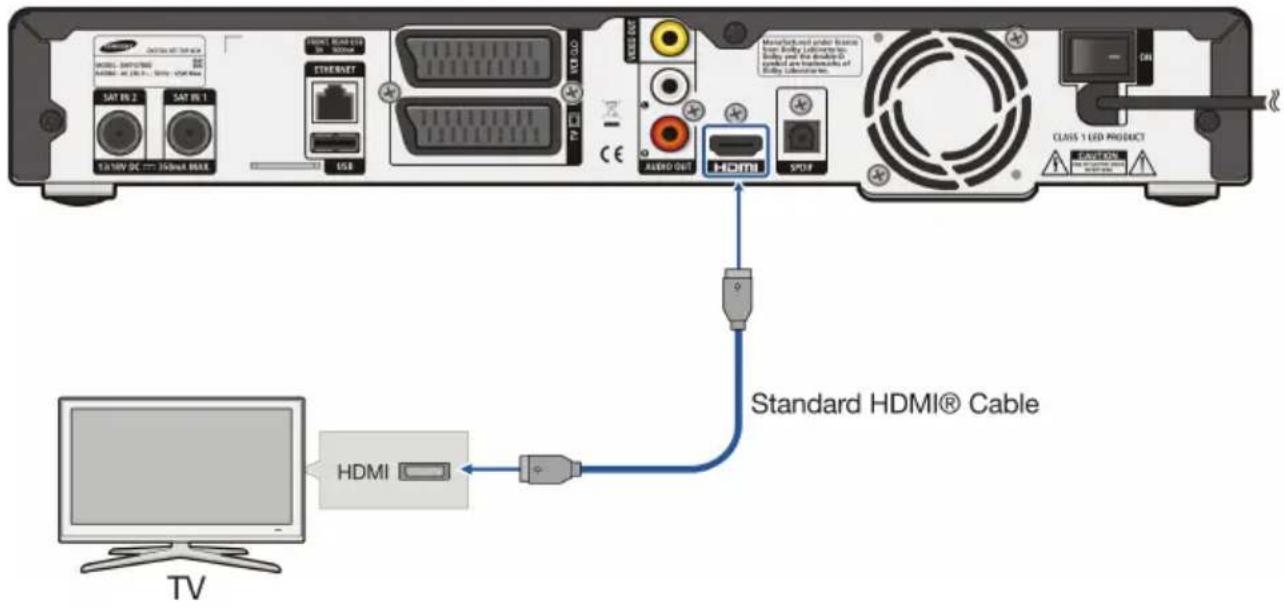
Connect the HDMI port on the rear of the STB to the HDMI port of the TV by using a standard HDMI® cable.

High Definition Multimedia Interface (HDMI)
The SMT-S7800 incorporates HDMI® technology.
The HDMI port is a video-audio integrated port to provide high-definition images by connecting an STB to a HD TV. Connect it to the HDMI port on a HD TV.
Connection to a TV with a SCART Port
This section describes how to connect the STB to a TV with a SCART port.
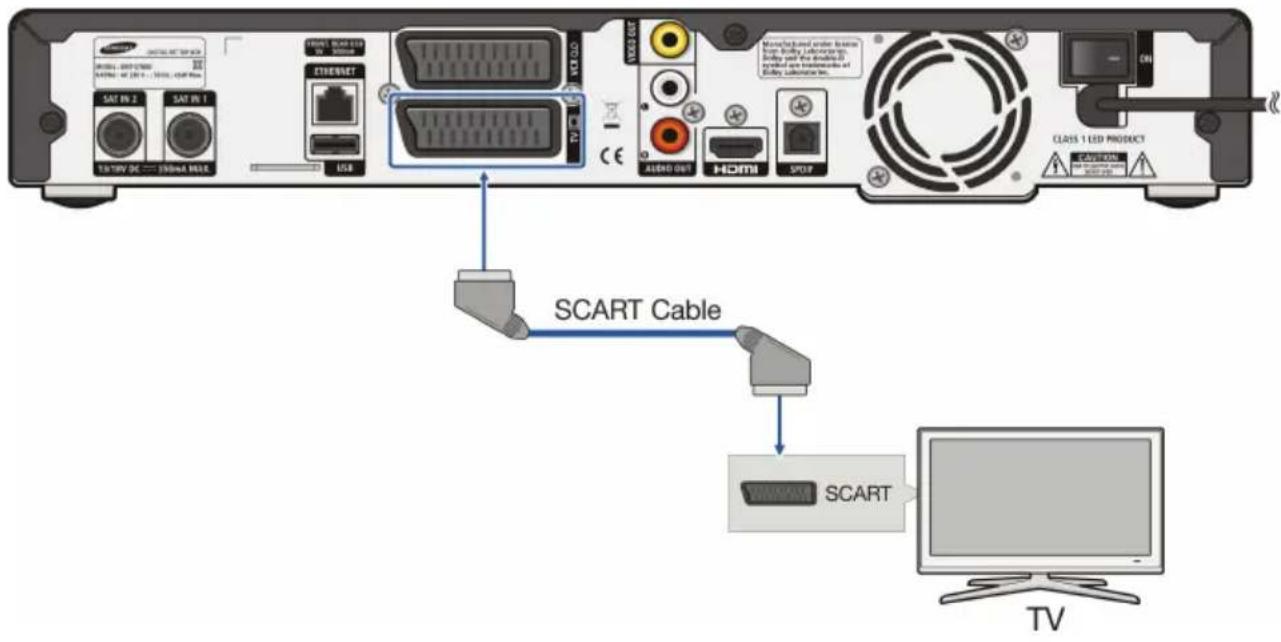
Connect the TV SCART port on the rear of the STB to the SCART port of the TV by using a SCART cable.
Connection to a VCR with a SCART Port
This section describes how to connect a VCR to a STB with a SCART cable.
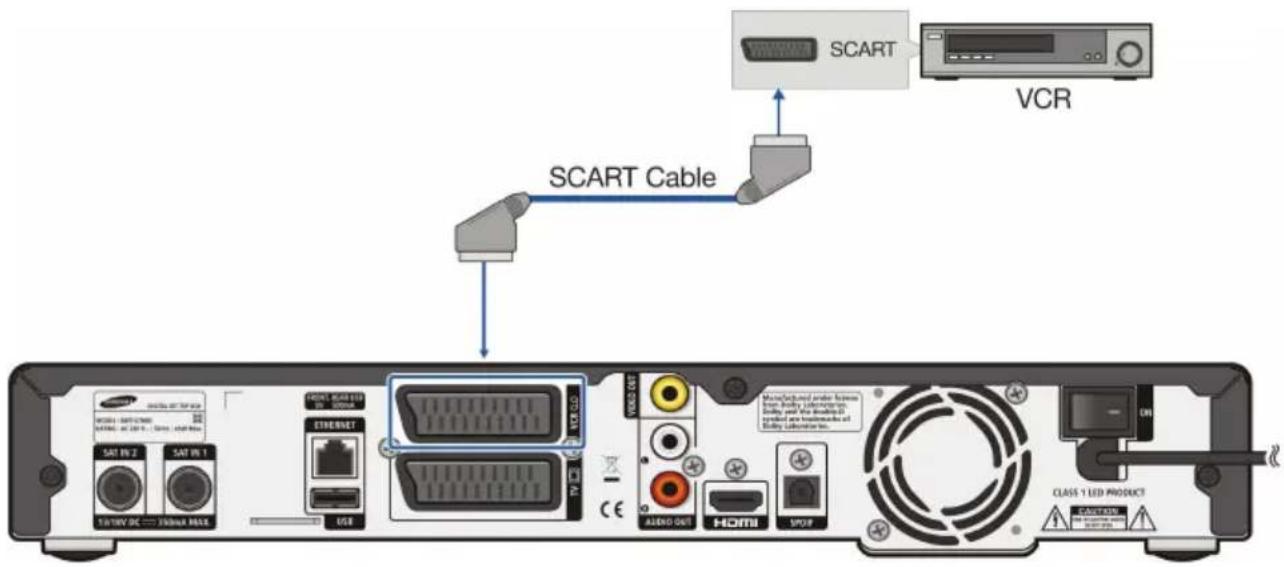
Connect the VCR SCART port of the STB to the SCART port of the VCR by using a SCART cable.

When Connecting to a VCR:
When connecting to a VCR, power off both the VCR and the STB and pull out both power plugs before connecting. You can also do the connection by referring to the VCR's User Manual.
- VCR may not record programmes including anti-record signals properly.
Connection to a TV/VCR with a Composite Port
This section describes how to connect the STB to either a TV or VCR with a Composite (VIDEO/AUDIO OUT) port.
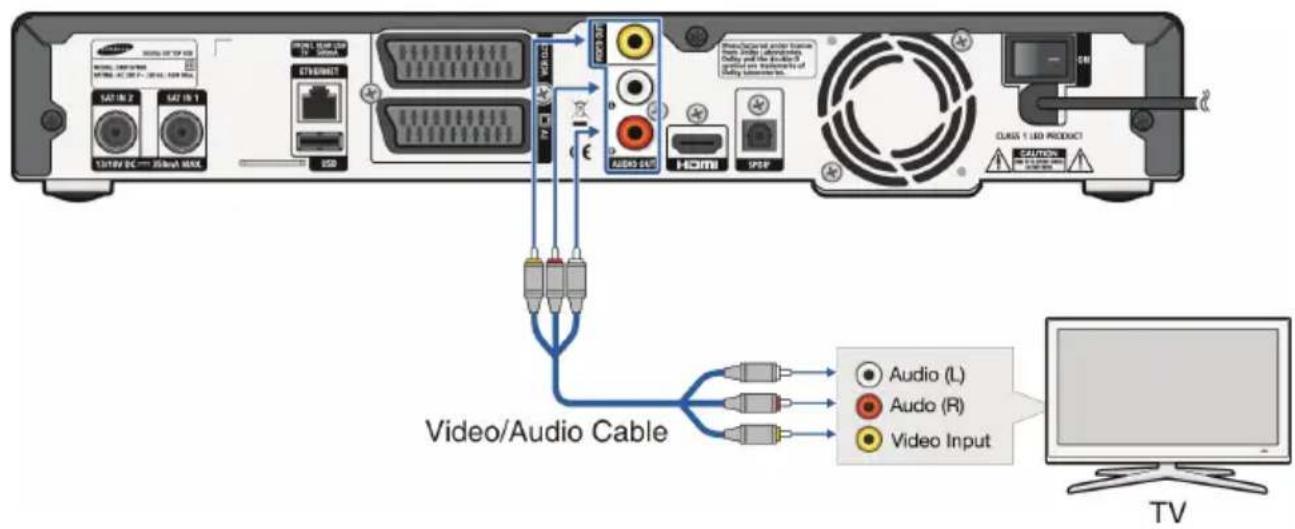
Video Connection
Using a video cable, connect the VIDEO OUT port on the rear panel of the STB to the VIDEO IN port of the TV/VCR.
Audio Connection
Using an audio cable, connect the AUDIO OUT (L/R) ports on the rear panel of the STB to the AUDIO IN (L/R) ports of the TV/VCR.
Be sure to match audio ports with plugs of the same colour.
Connection to a Digital Audio Receiver or Amplifier
This section describes how to connect a digital audio amplifier or home theatre system that has a Dolby Digital decoding function.
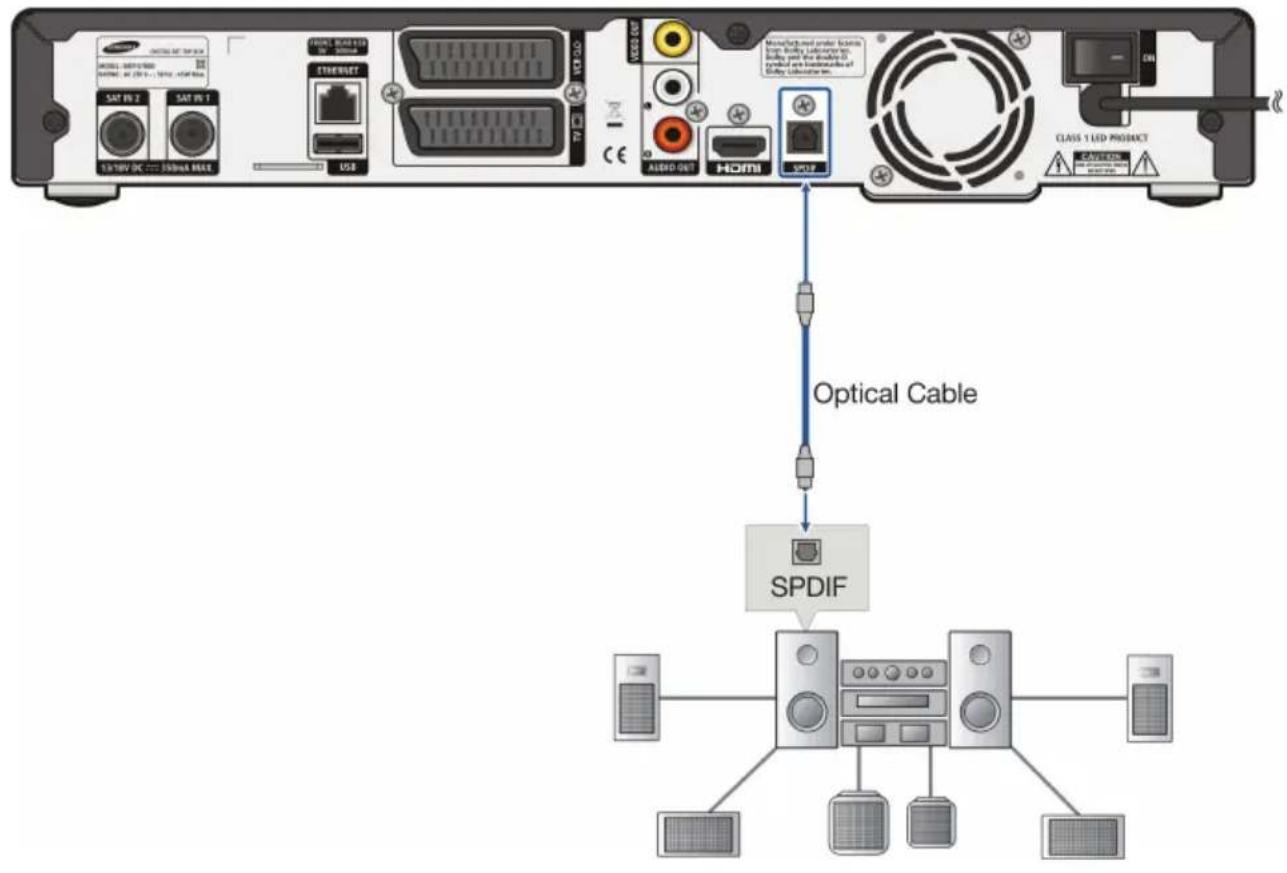
Using an optical cable for digital audio, connect the DIGITAL AUDIO OUT port at the rear of the body to the DIGITAL AUDIO IN (SPDIF) port of a Dolby Digital audio receiver or amplifier.

When Connecting to a Dolby Digital Audio Receiver or Amplifier:
- Even when a Dolby Digital amplifier is connected to a digital voice output port, connect the voice output port to the voice input port of the TV, for when the TV speaker is used.
- When digital voice output is used, adjust the volume of the digital amplifier, not of the receiver.
Connection to an Audio Receiver or Amplifier
This section describes how to connect an audio receiver or amplifier.
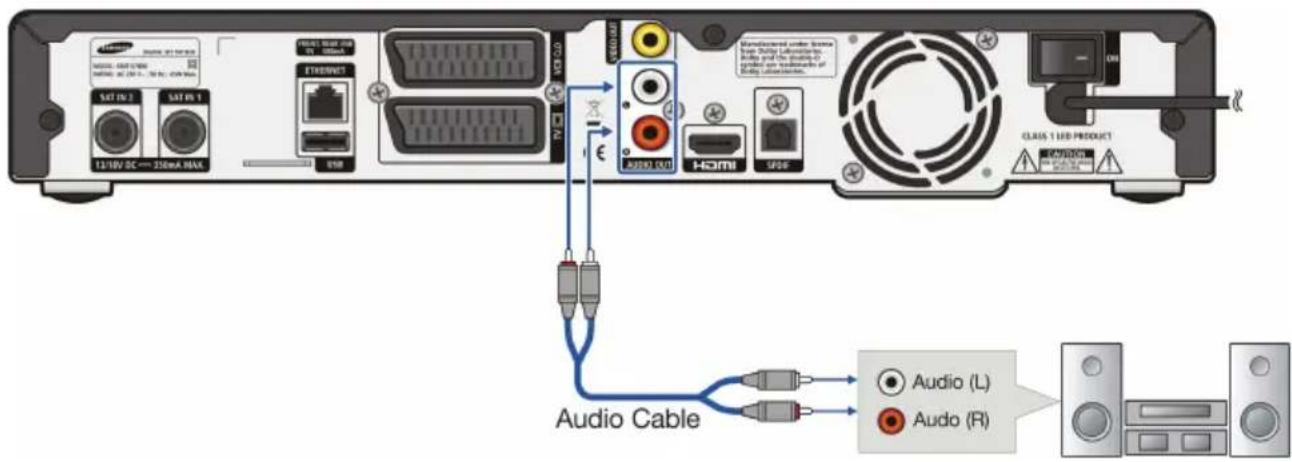
Using the audio cable, connect the AUDIO port at the rear of the STB to the AUDIO port of an audio receiver or amplifier.
Connection to Satellite Dish
The freesat service requires a satellite dish. Existing dishes may be suitable, (see http://www.freesat.co.uk for more information).
If you do not have a satellite dish installed, please ask your dealer to recommend a local dish installation engineer.
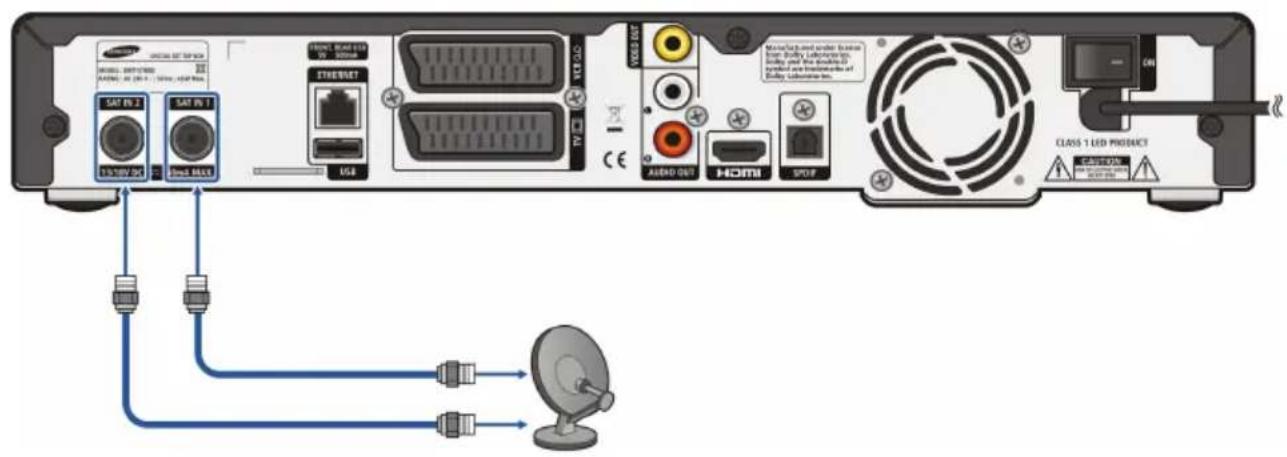
Connect two coaxial cables from the LNBs both to SAT IN 1 and SAT IN 2 on the back of your receiver. All cable connectors should only be tightened with your fingers; do not use any kind of wrench to tighten the connectors.
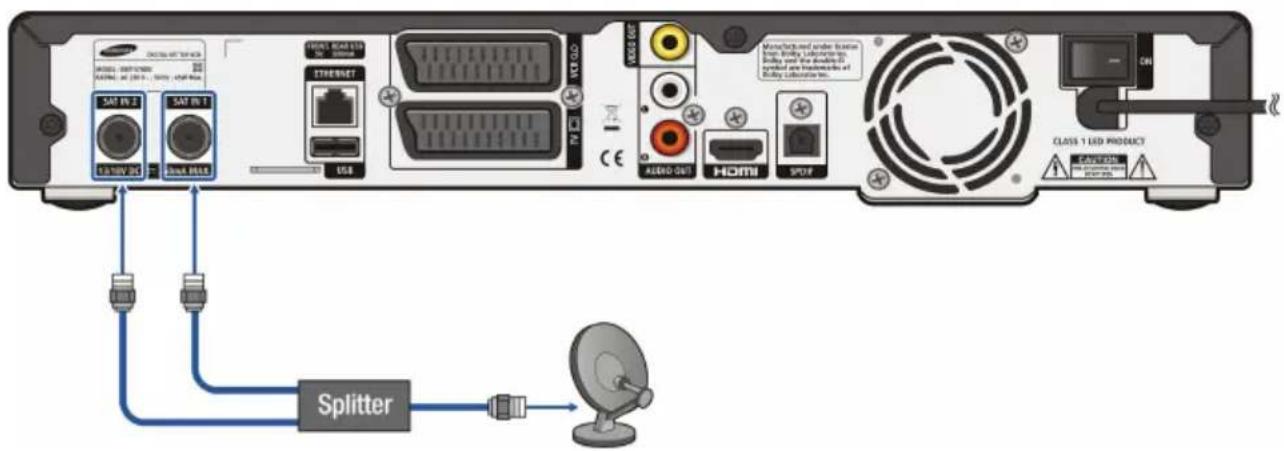

If you want to connect through a splitter:
- Use a splitter with DC pass on SAT IN 1.
- Only a limited number of frequencies can be turned simultaneously.

You need two cables for a freesat+ installation so that you can watch one channel and record another.
You also need a satellite dish with a multiple LNB (which is the protruding antenna of the dish).
Network Connection
This section describes how to connect a residential gateway.
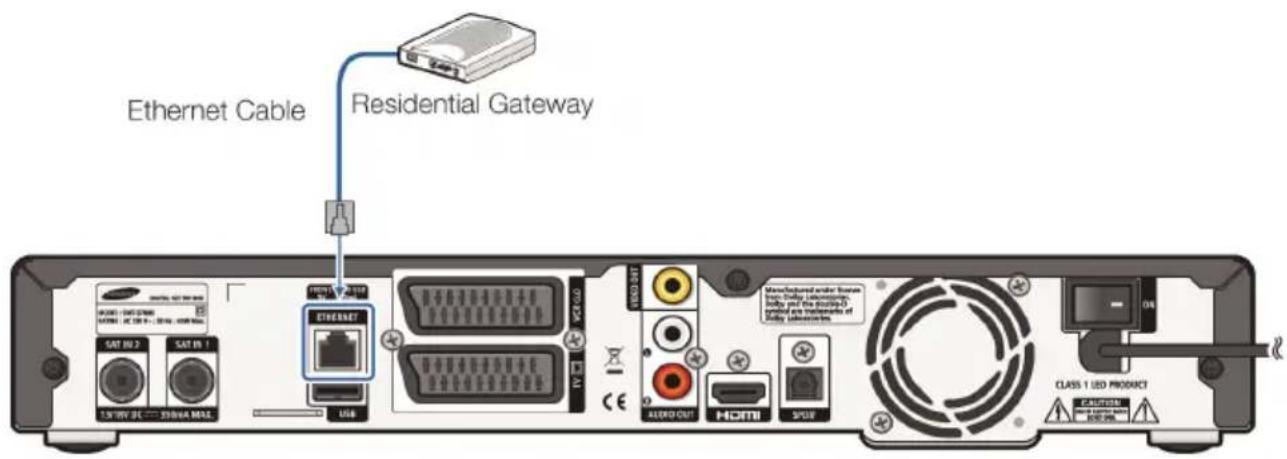
Connect the ETHERNET port on the rear panel of the STB with the residential gateway using an Ethernet cable.


Ethernet cable
A shielded Ethernet cable is recommended.
USB Connection
This section describes how to connect a USB storage device.
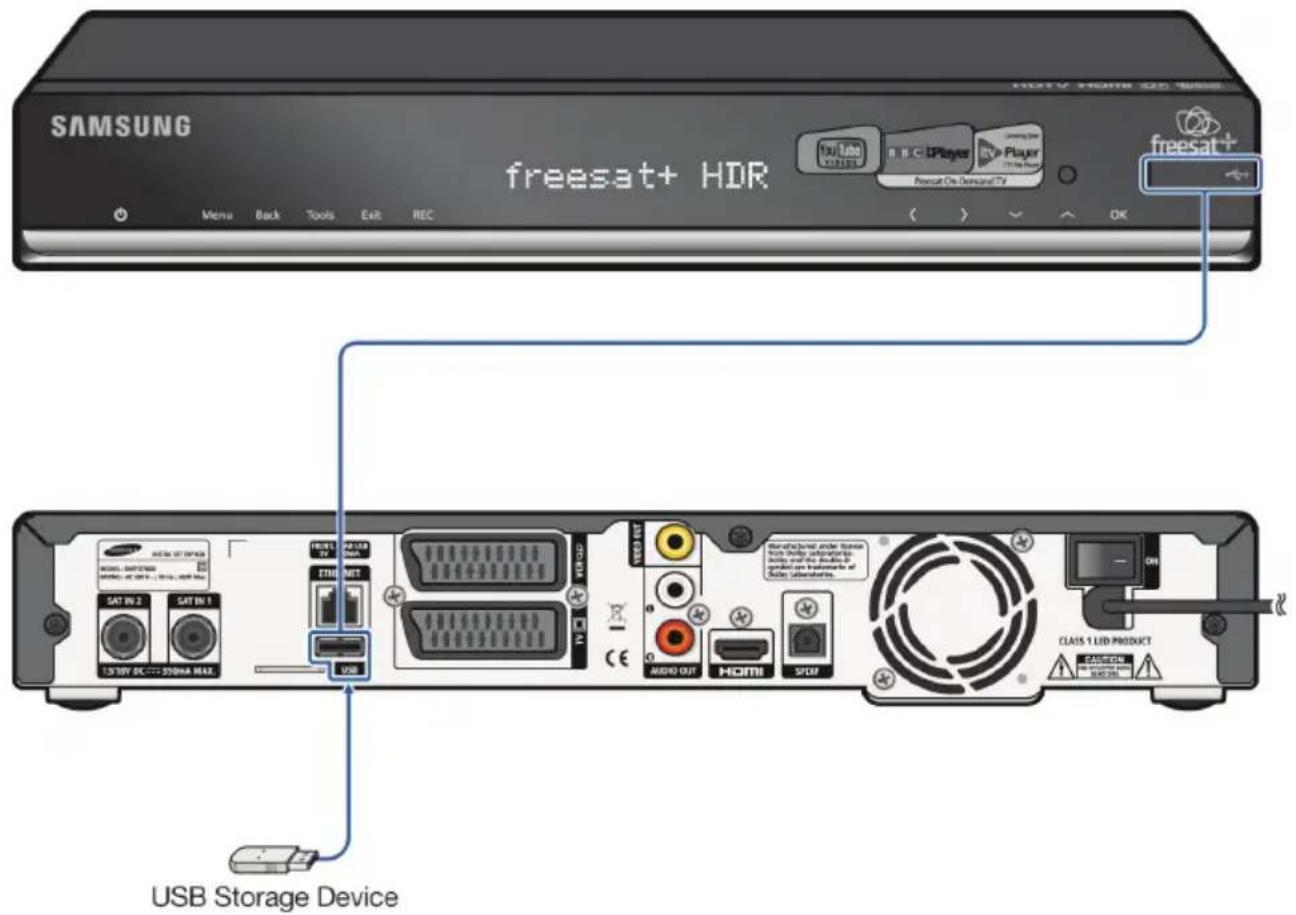
Connect the USB storage device containing photos, music and/or movie files to the USB port at the front/rear of the product.

The External HDD device is not supported.
The USB HUB is not supported.
HOW TO USE THE PRODUCT
Installation Wizard
Before you can view the television programmes, you must run the installation wizard that starts when the Set Top Box (STB) is first powered up.
Step 1
When the product is connected to the TV for the first time the product will display the initial User Settings screen. User Settings allows you to set the language, screen ratio, display format and resolution. Press the Navigation Left/Right buttons (◀ /▶) to choose the options. Select the [Next] button and press the OK button (OK) on the remote control.
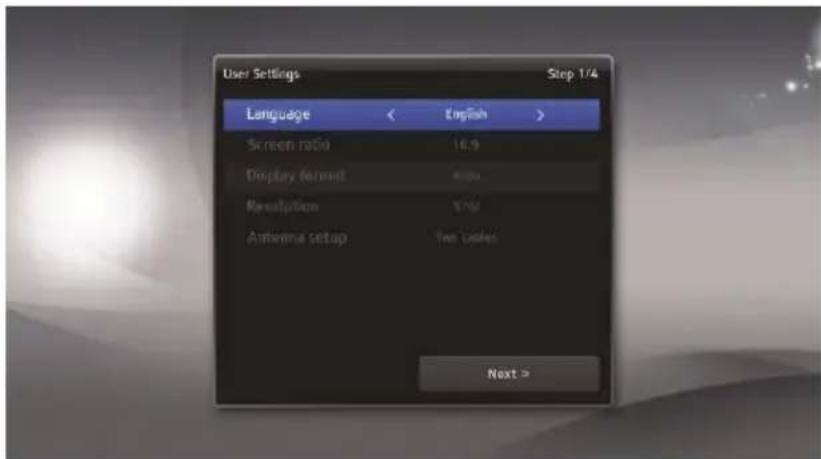

Setting 'Screen ratio' and 'Resolution' is dependent on the type of TV you have. A dish with only one LNB can be supported by choosing "SAT IN 1" for "Antenna setup".
Step 2
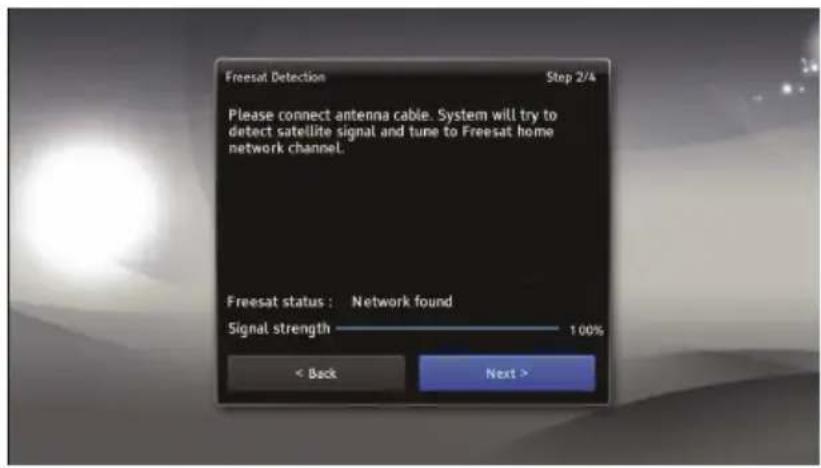
Check the cables are connected. If the cables are connected correctly, the signal strength will be displayed.
Select the [Next] button and press the OK button (OK) on the remote control.
Step 3
Enter your full postcode using the numeric buttons on the remote control. To use the on screen keyboard press the Green button on the remote control. Select the [Next] button and press the OK button (OK) after entering your postcode.
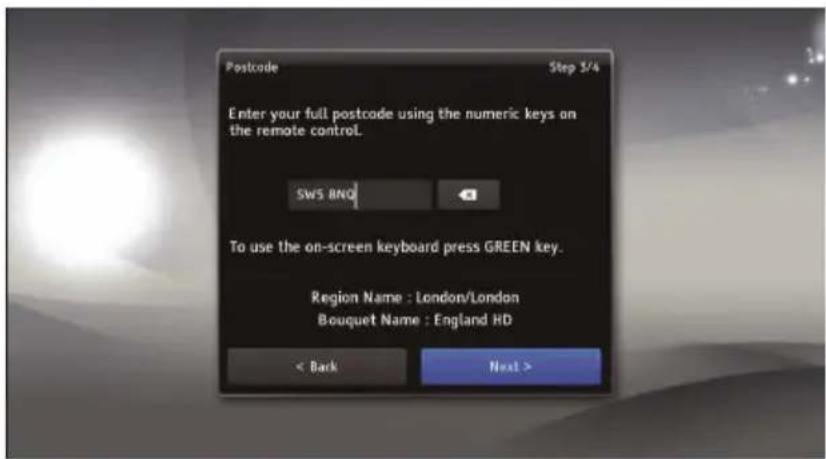

Space is required between the first and second part of your post code.
Step 4
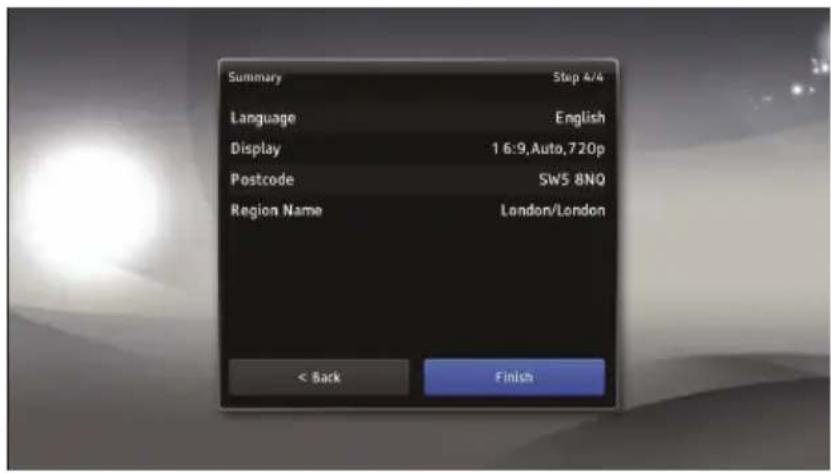
You will see a summary screen after set-up is complete. Select the [Finish] button and press the OK button (OK) to complete the installation.
Step 5
The STB will carry out a channel scan in order to find all the freesat channels.
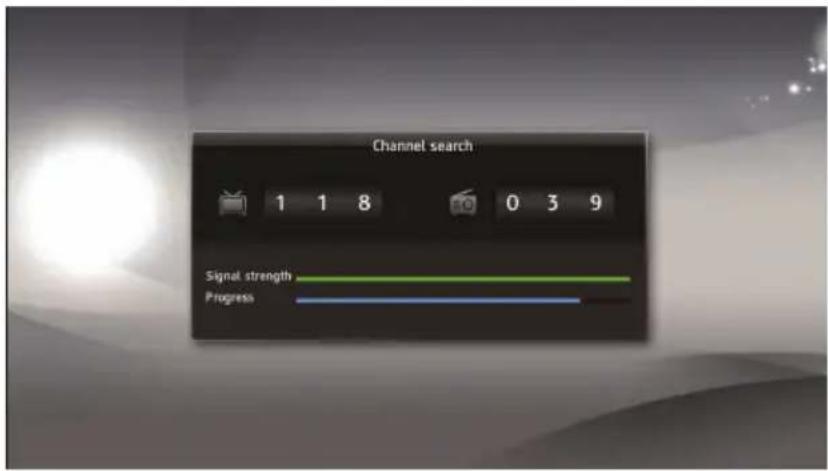
Step 6
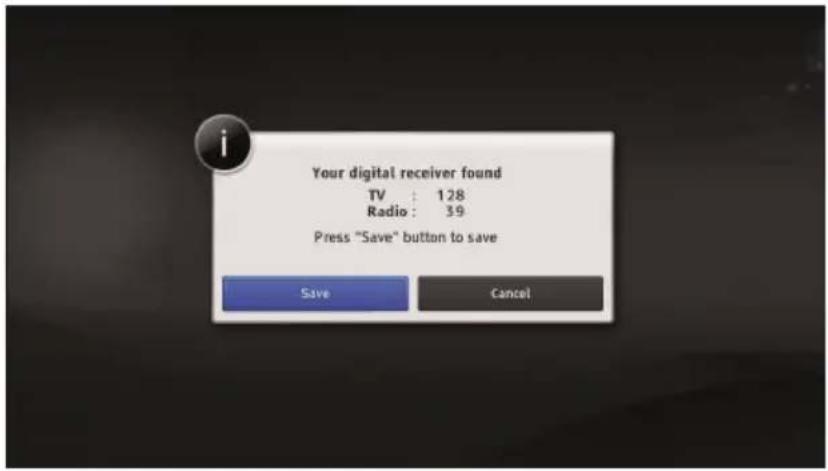
After successful scanning, a results screen will be shown indicating the numbers of TV and radio channels found. Select the [Save] button and press the OK button (OK) to confirm.
Final
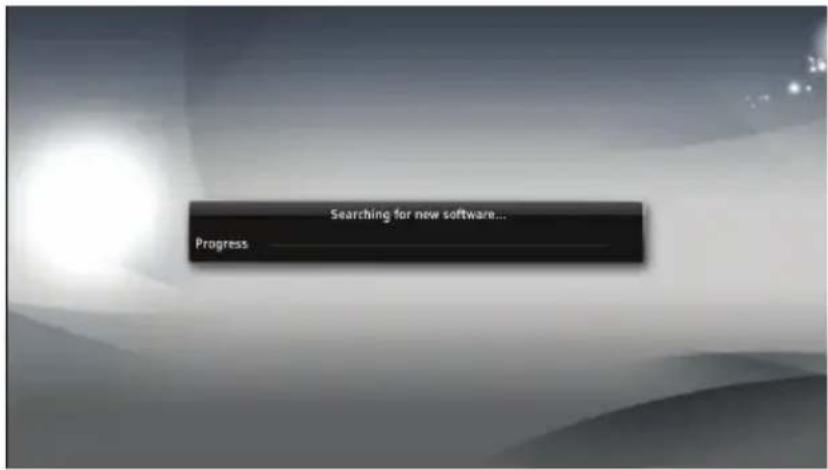
The STB software will be updated if a new software is available.
Using the Basic Functions
Display icons
| Icon Definition | Icon | Definition | |
 | Favourite channel | AAC+ | AAC+ sound |
| [T2D2] | Lock channel | DD | Dolby Digital Sound |
| [6HKW] | HD channel | DD+ | Dolby Digital Plus Sound |
 | HD simulcast | AD | Audio description |
 | Paid channel | Subtxt | DVB Subtitle |
| [272T] | Parental Lock | TXT | Digital text |
 | Watch timer |  | Protected library |
| Serie record timer New recording |  | ||
 | Record Timer | [BHKK] | 4:3 Screen Ratio |
 | Subtitle available | [BYZT] | 14:9 Screen Ratio |
 | Audio stereo | [T0C4] | 16:9 Screen Ratio |
| [4TST] | Audio mono |  | Guidence |
| AAC sound Recording in progress | [977X] | ||
Service Information
Changing to another screen or pressing the INFO button (INFO i) displays channel information on the screen.
- You can see the details of a programme, time etc.
Information Banner
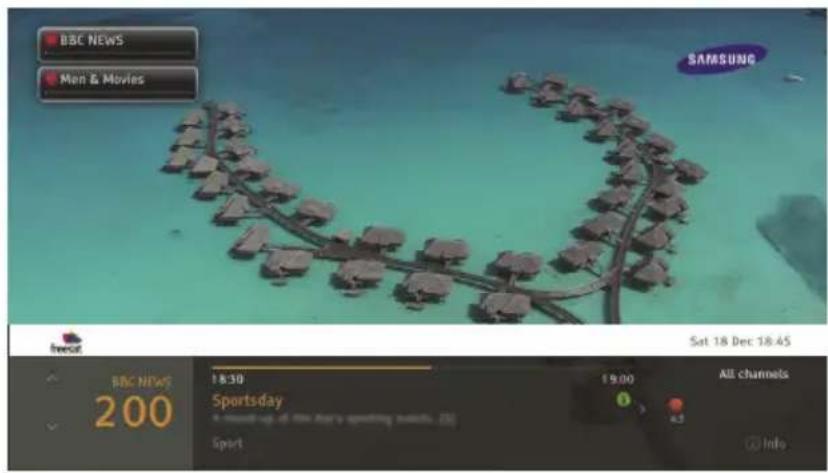
You can see the information banner by pressing the INFO button ( INFO i ) once whilst watching a programme.
![Channel change Start time Current programme progress Programme time End time Current time and date Channel list name Sas 18 Dec 18:45 BBC NEWS 200 18:30 Sportday A round-up of the day's sporting events. [S] Sport 19:00 All channels Channel number Current programme name Programme descriptions Next programme Video format Information icons](/content/2026/06/1188598/images/b78fb869dcf06acf6f00faca794e19fab26aa45c9beb56929cf9e6016e1ec674.jpg)
- You can see the next programmes on the current channel and another channel using the Navigation buttons.
- You can confirm the current programme's status (channel, title, broadcast time and record setting).
Changing Channels
You can move for channels by using the PROGRAMME ↙ ∧ button (P).
Volume Control/Mute
You can adjust the volume using the VOLUME button ( + - - ).
To turn off the sound, press the MUTE button ( ).
When it is pressed again, sound is turned on.
Channel List / Favourite Channel
Pressing the OK button (OK) on the remote control displays the channel list on the screen.
- Pressing the Yellow button allows you to set a favourite channel.
Guide
You can see the Electronic Programme Guide (EPG) for all channels.
Press the GUIDE button (GUIDE) on the remote control whilst watching a programme and select the channel genre.
To see the programme information, follow the below steps
- On [Channel Genre], select the channel genre using the Navigation button on the remote control.
- Press the OK button (OK).
Using the Main Functions
Time shifting
The STB automatically saves the previous minutes of the channel being watched or the radio channel being listened to. (Maximum 120 minutes) This time shifting mode makes it possible to stop live mode, rewind and review a programme that was recorded moments before.
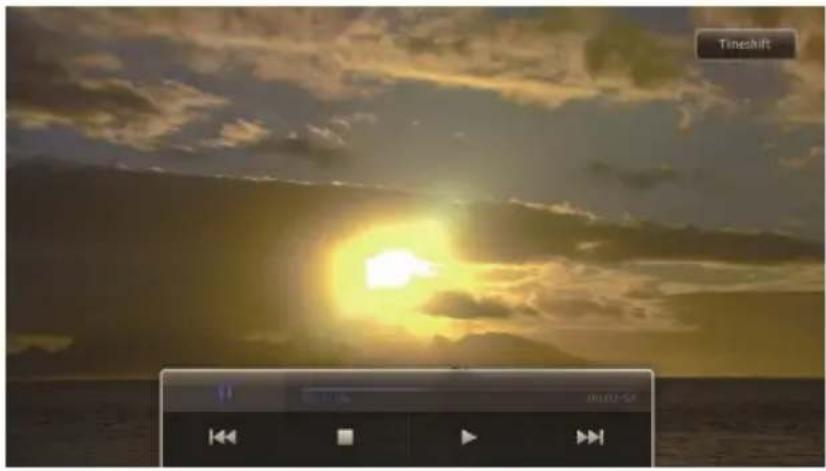
To pause a programme, press the Pause button (☐).
To resume the current programme, press the Play (▶) or Pause button (■). To go back to the live programme, press the Stop button (■).
Tick Modes
| Mode Remote Control Speed | ||
| Fast Rewind |  | x1, x2, x4, x8, x16, x32, x64 |
| Fast Forward |  | x1, x2, x4, x8, x16, x32, x64 |
| Slow Rewind | [WZBX] → ↔ | x1/2, x1/4, x1/8, x1/25 |
| Slow Forward |  → ▶ → ▶ | x1/2, x1/4, x1/8, x1/25 |
Jump Modes
| Mode Remote Control Description | ||
| Jump Backward | Jump backward by 15 seconds. | |
| Jump Forward | Jump forward by 60 seconds. | |
Seek Modes (only when play banner is displayed.)
| Mode Remote Control Description | ||
| Seek Backward | Time seek backward. | |
| Seek Forward | Time seek forward. | |
Video Recording
To record TV channels and Radio channels, press the Record button ( ).
You can record a programme not only whilst watching the desired programme, but also after selecting the desired programme from the information banner, the TV guide or the Search menu.
- You can simultaneously record 2 programmes.
- Programmes to be recorded display a red icon in the information banner and the channel ist.
- If the programme is to be broadcasted at a later time or day, the STB will automatically book it, and will record it when it is broadcasted.
- You can see the recorded programmes list in the Library List by pressing the MENU button (MENU) and select the [Library] category.
- Press the Stop button ( ■ ) or Record button ( ● ) in the programme you are recording to stop video recording.
- You can delete a booked programme in the Library List.

Watching a 3rd channel
When 2 recordings are in progress from the 2 different transport streams you can watch another programme from them.
Main Menu
If you press the MENU button (MENU) whilst watching the live TV, the main menu screen is displayed as follows:
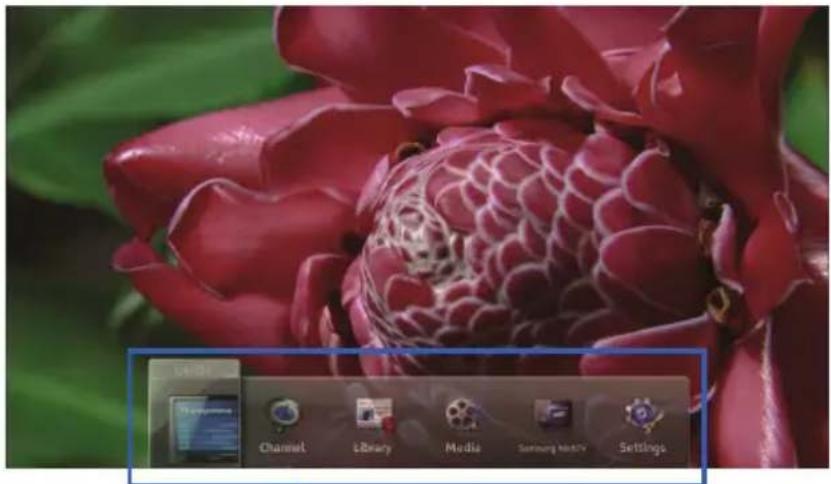
Main Menu
Guide/ Channel / Library/Media/
Samsung WebTV / Settings
- Select a desired item by using the Left/Right button. (◀, ▶).
- When a desired menu is found, press the OK button (OK) to move to the selected menu screen.

Before Using the Product
The information contained in this chapter may be subject to change by a programme provider without prior written notice.
Guide
Channel Genre
'Channel Genre' allows you to view channels by genre. (e.g. News & Sports, Entertainment, Music, Radio, etc)
To use ‘Channel Genre’, follow these steps:
- Press the MENU button (MENU) on the remote control.
- Select the [Guide] category and press the OK button (OK) on the remote control.
Or
- Press the GUIDE button (GUIDE) on the remote control.
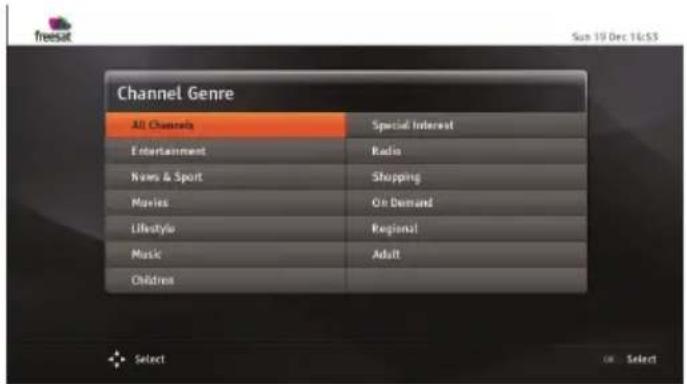
Guide
You can see the Electronic Programme Guide (EPG) for all channels, which displays the programme list per channel, programme details, etc.
Press the GUIDE button (GUIDE) on the remote control whilst watching a programme and select the channel genre.
To see the programme information, follow the steps below
-
On [Channel Genre], select the channel genre using the Navigation buttons on the remote control.
-
Press the OK button (OK).
The Colour buttons on the remote control operate the functions displayed at the bottom of the screen:
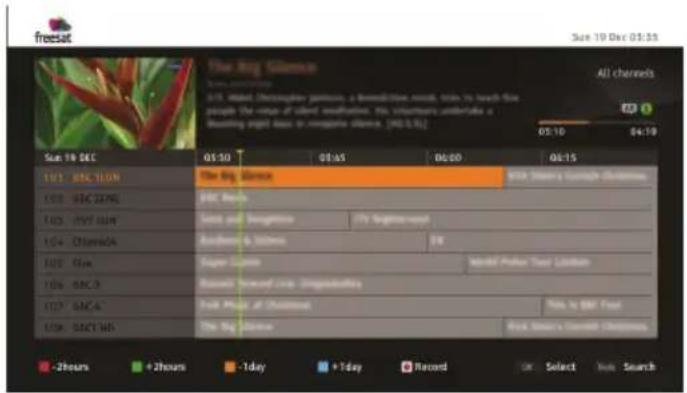
Jump back /forward two hours using the Red or Green button, or one day using the Yellow or Blue button.
Search by Day/Time/Category/Search Text using the TOOLS button (TOOLS).
- Press the TOOLS button (TOOLS) on the remote control
- In the pop-up you can choose:
- [Day], [Time], [Category] by pressing the Left/Right buttons (

Guide (continued)
- You can search by text.
- Select the Search Text option, press the OK button (OK).
- Using the Left/Right/Up/Down buttons (◀, ▶, ) input the search text.
- Confirm using the OK button (OK).
Select a channel programme using the Navigation buttons and then press the OK button (OK) to watch the channel in a small screen.
You can record programmes by selecting your desired programme from the programme guide and pressing the Record button ( □ ) on your remote control.
Press the OK button (OK) on your remote control for watching desired programme.
When the start time for the scheduled programme arrives, the recording channel is not displayed automatically. Pressing the Record button ( ) again cancels the scheduling. You can view the list of scheduled programmes from [Main Menu] → [Library] → [Timer]
Search by Day/Time/Category/Search Text using the TOOLS button (TOOLS).
- You can set two types of "Timer":
- Select the desired programme from the programme list.
- Press the Record button ( ● ) on the remote control for record timer.
- Press the OK button (OK) on the remote control for watch timer.
- To the right of the chosen programme, the "record" or "watch" icon will be visible.
- If there is a "Timer" conflict appropriate information will be displayed.
- In the case of "Watch" timer, when the programme is starting, a pop-up with this information will be displayed on the screen.
In the case of "Record", you can choose if you want to record "Series", or "Once".
"Series" can be used if the programme is part of a series.
- Pressing the Record button (☐), or OK button (☐) again on the programme cancels the timer.
Channel
Channel
You can see the pop-up window of the channel list.
- Pressing the OK button (OK) on the remote control displays the channel list on the screen.
- Pressing the Left/Right buttons (◀), ) allows you to navigate between
channel lists (All Channels, Entertainment, News & Sport, FAV, etc)
- Pressing the Yellow button allows you to create a favourite channel list, and the Red button to lock/unlock the current channel.
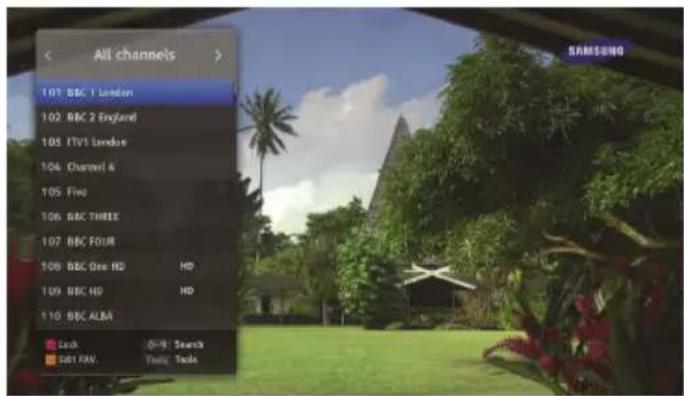

You can use the following features by selecting the TOOLS button (TOOLS).
Sort by name: Sort channel list by name.
Sort by number: Sort channel list by channel number.
Delete service : Delete selected channel.
Channel (continued)
Favourite Channel
Set channels you watch frequently as Favourites. To show all favourite channels, press the Navigation buttons (◀) or (▶) on the channel list.
To add a favourite list, follow these steps:
- Pressing the Yellow button allows you to create a favourite channel.
- Select [Create new FAV. List].
- Confirm with the OK button (OK).
- Using the Left/Right/Up/Down buttons

FAV. name.
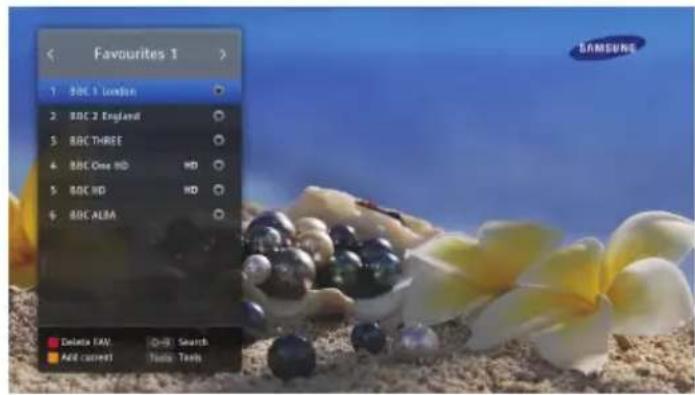
- Confirm using [Save] option.
- Choose channels by pressing the OK button (OK) on the left side of the menu. If you chose all necessary channel to new FAV, press BACK button (BACK). Chosen channels will be available on the new FAV. list.

You can use the following features by selecting the TOOLS button (TOOLS).
Sort by name: Sort channel list by name.
Sort by number: Sort channel list by channel number.
Rename list: Rename favourite list.
Renumber: Renumber channels on your favourite list.
Delete FAV.list : Delete selected favourite list.
Library
Contents
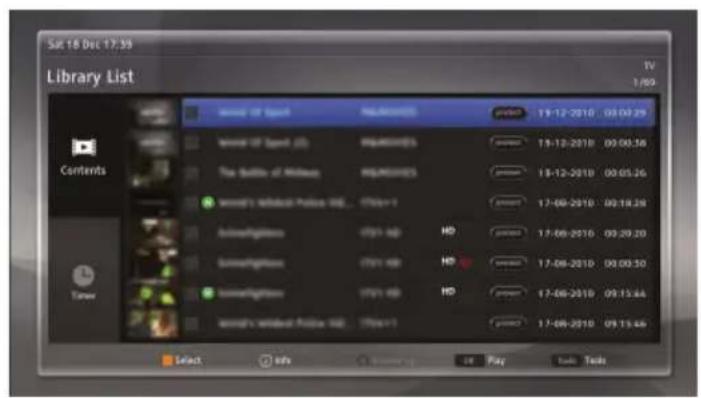
You can see a list of the TV programmes that you have recorded and are recording.
- Pressing the INFO button (INFO i) on the remote control displays the programme information of the selected recording.
- Pressing the OK button (OK) on the remote control will playback the selected content.
Bookmarks
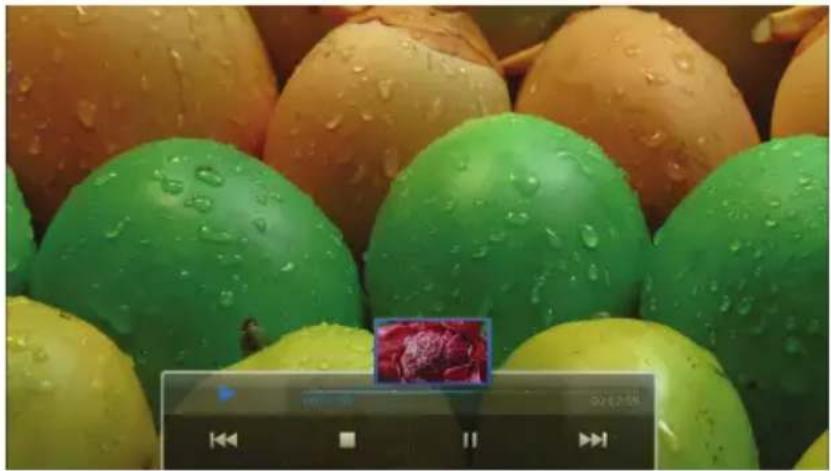
- Press the BOOKMARK button ( BOOKMARK ) whilst watching a recording.
- If you want to navigate through bookmarks, press the TOOLS button (TOOLS) whilst watching the recording in bookmarks
- Using the Left/Right buttons ( , ) navigate through bookmarks.
- Press OK button (OK) to choose the selected bookmark position.
natural_image
Close-up of green and yellow fruits with water droplets, displayed in a video player interface (no text or symbols on the fruits themselves)To pause a programme, press the Pause button (☐).
To resume the current programme, press the Play (▶) or Pause button (☐).
To go back to the live programme, press the Stop button (☐).
Library (continued)
Tick Modes
| Mode Remote Control Speed | ||
| Fast Rewind |  | x1, x2, x4, x8, x16, x32, x64 |
| Fast Forward |  | x1, x2, x4, x8, x16, x32, x64 |
| Slow Rewind |  → →  | x1/2, x1/4, x1/8, x1/25 |
| Slow Forward |  → →  | x1/2, x1/4, x1/8, x1/25 |
Jump Modes
| Mode Remote Control Description | ||
| Jump Backward |  | Jump backward by 15 seconds. |
| Jump Forward |  | Jump forward by 60 seconds. |
Seek Modes (only when play banner is displayed.)
| Mode Remote Control Description | ||
| Seek Backward |  | Time seek backward. |
| Seek Forward |  | Time seek forward. |
To delete the recording, following step:
- Select the programme by pressing the Yellow button.
- Press the TOOLS button (TOOLS) on the remote control.
- Select [Delete] on tools pop up window.
To move a recording programme, follow these steps:
- Select the programme by pressing the Yellow button.
- Press the TOOLS button (TOOLS) on the remote control.
- Select [Move] on the tools pop-up window.
- Press the Green to create a new folder.
- Press the Red button to see the main folders.
- Press the Yellow button to Move a file.
To create a new folder, follow these steps:
- Press the TOOLS button (TOOLS) on the remote control.
- Select [New folder].
-
Press the OK button (OK).
-
Input the name of the folder using the Left/Right/Up/Down (◀, ▼) buttons.
- Confirm with the OK button (OK).
Library (continued)
To lock record, follow these steps:
- Select the programme. (Only one programme at a time.)
- Press the TOOLS button (TOOLS) on the remote control.
- Select [Lock] on the tools pop-up window.
- Enter your PIN code.
- Confirm with the OK button (OK).
To unlock record, follow these steps:
- Select a locked programme. (Only one programme at a time.)
- Press the TOOLS button (TOOLS) on the remote control.
- Select [Unlock] on the tools pop-up window.
- Enter your PIN code.
- Confirm with the OK button (OK).
To protect record, follow these steps:
- Select the programme. (Only one programme at a time.)
- Press the TOOLS button (TOOLS) on the remote control.
- Select [Protect] on the tools pop-up window.
- Enter your PIN code.
- Confirm with the OK button (OK).
Note that the [HDD auto-eraser] option will be not available for this file.
To unprotect record, follow these steps:
- Select a protected programme. (Only one programme at a time.)
- Press the TOOLS button (TOOLS) on the remote control.
- Select [Unprotect] on the tools pop-up window.
- Enter your PIN code.
- Confirm with the OK button.
Note that the [HDD auto-eraser] option will be available for this file.
To sort records, follow these steps:
- Press the TOOLS button (TOOLS).
- Select [Sort].
- Press the OK button (OK).
- Choose the sorting mode.
- Choose the sorting order.
- Confirm with the OK button (OK).
Library (continued)
To select all records, follow these steps:
- Press the TOOLS button (TOOLS).
- Select [Select All].
- Press the OK button (OK).
To deselect all records, follow these steps:
- Press the TOOLS button (TOOLS).
- Select [Deselect All].
- Confirm with the OK button (OK).
Timer
You can see the list of the recording programmes and the scheduled recording programmes.
To delete a recording programme or a scheduled recording programme, follow these steps:
- Select the programme by pressing the Yellow button
- Press the TOOLS button (TOOLS) on the remote control.
- Select [Delete] in the tools pop-up window.
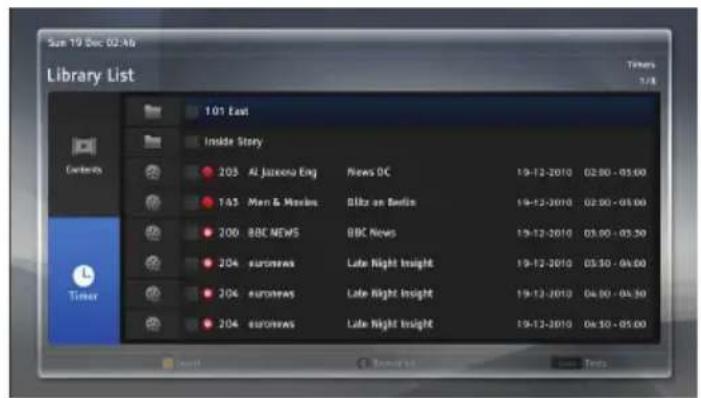
To multiple delete scheduled recordings, follow these steps:
- Select the programmes by pressing the Yellow button
- Press the TOOLS button (TOOLS) on the remote control.
- Select [Delete] on the tools pop-up window.
- Confirm with the OK button (OK).
To sort scheduled recording programmes, follow these steps:
- Press the TOOLS button (TOOLS) on the remote control.
- Select [Sort] on the tools pop-up window.
- Confirm with the OK button (OK).
Library (continued)
To select all records, follow these steps:
- Press the TOOLS button (TOOLS).
- Select [Select All].
- Confirm with the OK button (OK).
To deselect all records, follow these steps:
- Press the TOOLS button (TOOLS).
- Select [Deselect All].
- Confirm with the OK button (OK).
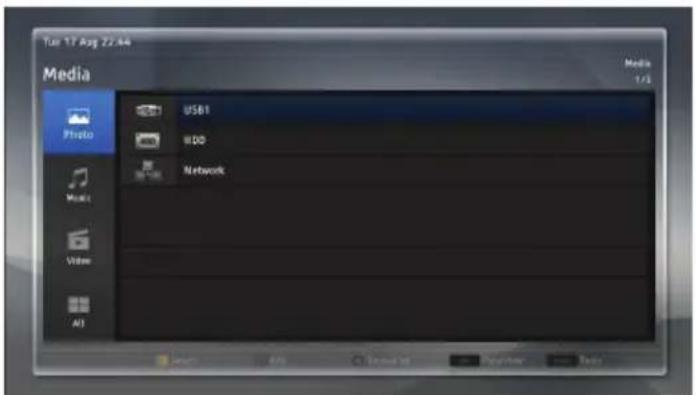
Media
Make sure that the USB storage device or network is connected correctly before using the Media Menu.
Supporting
▶ Only use USB devices that have been formatted with the FAT16/32.
▶ The Standard JPEG/MP3/AVI(XviD) format only is supported.
▶ Read, delete, copy and move are supported.

- Before connecting your device to the product, please back up your files to prevent them from damage or loss of data. SAMSUNG is not responsible for any data file damage or data loss.
- The External HDD device is not supported.
- The USB HUB is not supported
- The Copy-protection or Digital Rights Management (DRM) file is not supported.
- Certain types of USB Digital camera and audio devices may not be compatible with this product.
- If you are using the USB extension cable for this purpose, you may encounter a problem such as unrecognised USB devices or a failure to read internal files.
- In standby mode, USB device is not recognised.
- Do not disconnect the USB device whilst it is loading.
If the problem of the unrecognised USB device persists or the internal file list is corrupt or a certain file could not be played, connect the USB device to the PC and format it in a proper file system, then check it again.
Media (continued)
USB
You can play contents using a USB storage device.
To connect a USB storage device device, follow these steps:
- Turn on your product.
- Connect the USB storage device containing photos, music and/or movie files to the USB port at the front/rear of the product.
- When the USB storage device is connected to the product, you can see the USB directory on the Media screen.
HDD
You can play contents from an HDD.
- When the HDD is ready, you can see HDD directory on the Media screen.
Network
You can play contents which are in your PC by using the contents sharing server with Windows Media Player11 or Windows Media Player12.
- When the network is available, you can see Network directory on the Media screen.

In network device, additional functionality (Delete, Copy, Move, etc) is not supported.
JPEG/MP3/AVI(XviD) format only are supported.
Media (continued)
Photo / Music / Video / All
Photo category
You can see a thumbnail of image files.
When you select an image file you can see a slideshow.
Only standard JPEG files are supported.
Music category
Only standard MP3 files are supported.
Video category
Only standard XviD files are supported.
All category
You can see all files on the available media.
You can see additional information by pressing the INFO button on the remote control if a file has additional information.
To delete the files, follow these steps:
- Select the files by pressing the Yellow button.
- Press the TOOLS button (TOOLS) on the remote control.
- Select [Delete] on the tools pop-up window.
- Confirm with the OK button (OK).
To move files, follow these steps:
- Select files by pressing the Yellow button
- Press the TOOLS button (TOOLS) on the remote control.
-
Select [Move] on the tools pop-up window.
-
Press the Green button to create a new folder.
- Press the Red button to see main folders.
- Press the Yellow button to move files.
Media (continued)
To create a new folder, follow these steps:
- Press the TOOLS button (TOOLS).
- Select [New Folder].
- Confirm with the OK button (OK).
-
Confirm with the OK button (OK).
-
Input the name of the folder using the Left/Right/Up/Down ( ▼, ▶, ▲, ▼) buttons.
To sort files, follow these steps:
- Press the TOOLS button (TOOLS).
- Select [Sort].
- Press the OK button (OK).
- Choose sorting mode.
- Choose sorting order.
- Confirm with the OK button (OK).
To select all records, follow these steps:
- Press the TOOLS button (TOOLS).
- Select [Select All].
- Confirm with the OK button (OK).
Samsung WebTV
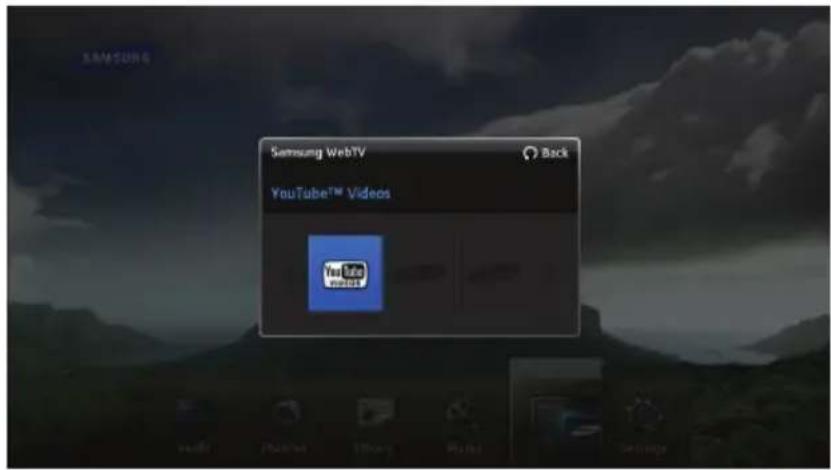
YouTube™
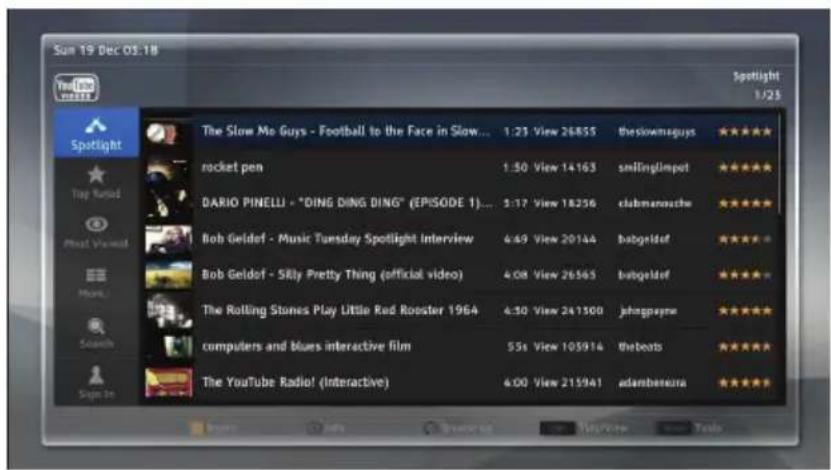
You can see the YouTube™ Spotlight, Top Rated, Most Viewed, and More contents list and search YouTube™ content.
To view further content sign into your YouTube™ account.
To do this, you must create a YouTube™ account first.
- After sign-in, you can see Uploads, Favourites, Playlists and Subscriptions.
Samsung WebTV (continued)

You can use the following features by selecting the TOOLS button (TOOLS).
Settings: Set the option 'play next video when current video ends' and 'filter videos that may not be suitable for minors'.
Set Geography: You can see videos that include the geographical location you select.
After sign-in,
- Add to Favourites : add a video to your favourites list.
- Add to Subscriptions : add a video to your subscriptions list.
- Rate : allows you to rate videos
- Flag Video : add a complaint about a video.
* Some content may be not supported because of product limitations.
* SAMSUNG does not warrant continuous availability of service.
Settings
You can set Set Top Box (STB) options.
- You can change the options listed below
[Channel], [Sound], [Picture], [Language], [Library/Media], [System] - CI Plus (Coming soon)
All options are displayed according to the CI manufacturer.
Settings → Channel
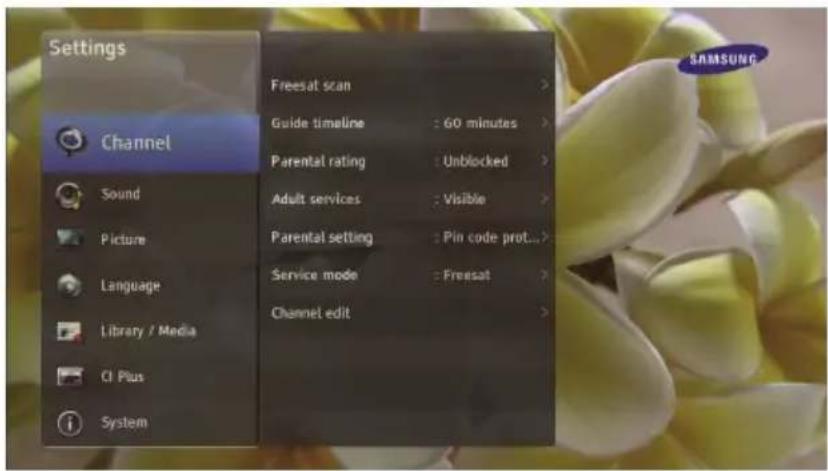
Freesat scan
You can scan freesat channels. Enter your full postcode using the numeric buttons on the remote control. To use an on-screen keyboard, press the Green button on the remote control.
When recording is in progress you cannot use this functionality.
- Select the [Start] button and press the OK button (OK) to start scanning.
- Wait until the scan is completely finished.
- Select the [Save] button and press the OK button (OK) to apply the scan.
Guide timeline
You can set a Guide timeline value
- 60 minutes
- 120 minutes
- 240 minutes
Settings → Channel (continued)
Parental rating
You can set the Parental rating value.
- You can choose one from: Adult Only, Unblocked
Adult service
You can choose whether to use Adult Services.
- Visible
- Hidden
Parental setting
You can choose whether to protect your PIN code or not.
- Pin code protected
- Not protected
- The default PIN code is 0000.
Service mode
You can choose whether to use Freesat mode or not.
When recording is in progress you cannot use this functionality.
- If you choose 'Non Freesat' you can scan the channels manually.
Channel edit
Select a service from the left-hand part of the menu.
Move the cursor to the right menu.
Select an alternative service from the right-hand part of the menu and press the OK button (OK).
The selected channel will be replaced by the original one.
Settings → Sound
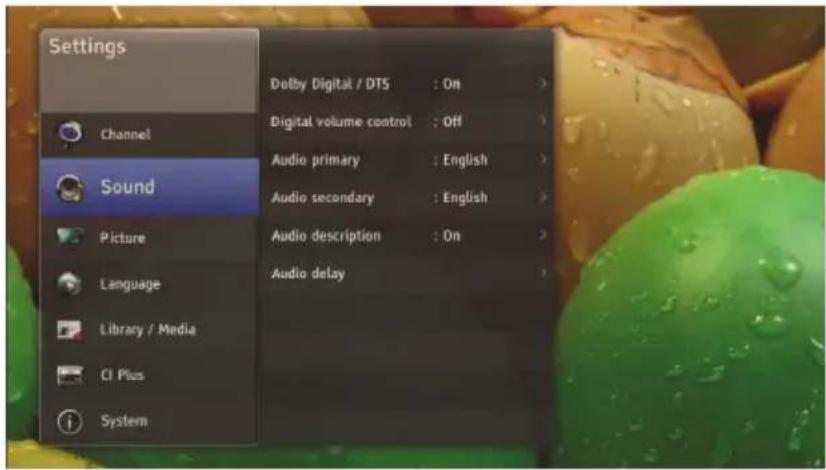
Dolby Digital / DTS
Allows you to enable/disable the Dolby Digital Sound, which is available when the programme provider supports Dolby Digital Sound.
- The default setting is Off.
Following table is created based on HDMI/SPDIF audio output.
| Dolby Digital/ DTS | Digital volume control | Input audio format | Output audio format | Volume control on STB |
| On | Off | Dolby Digital / Dolby Digital Plus | Dolby Digital / Dolby Digital Plus | Not Available |
| HE AAC | DTS | Not Available | ||
| Other audio formats (e.g. DTS, MPEG) | PCM | Not Available | ||
| On | On | All audio formats | PCM | Available |
| Off | Off | All audio formats | PCM | Available |
| Off | On | All audio formats | PCM | Available |
Digital volume control
Allows you to control the volume of digital output by using remote controller.
Settings → Sound (continued)
Audio primary
You can change the language for the Audio primary.
- Select the default language for the Audio primary using the Up/Down button ( ▲, ▼)
Audio secondary
You can change the language for the Audio secondary, which is available if an Audio secondary service is provided by the programme provider.
- Select the default language for the Audio secondary using the Up/Down button ( ▲, ▼).
Audio description
You can choose whether to use Audio description.
Audio delay
You can set Audio delay manually. You can set the time difference to the speaker output of a home theatre.
- The Left/Right button (◀, ▶) is used to adjust the time.
Settings → Picture
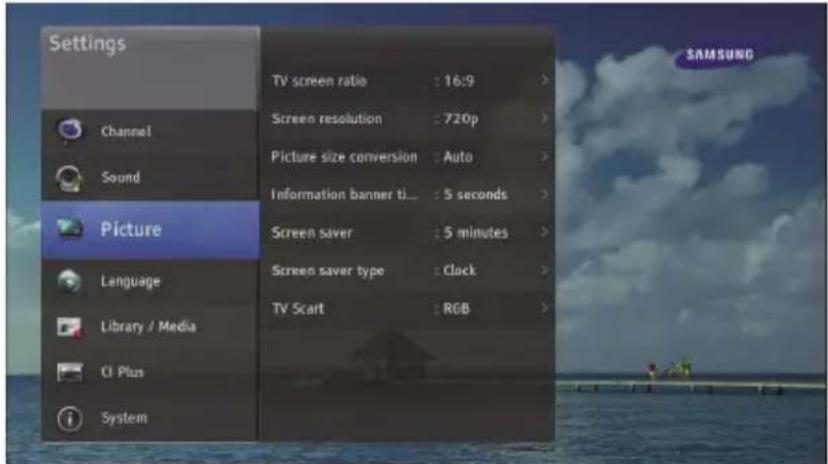
TV screen ratio
You can change the TV screen ratio.
Allows you to change the screen output ratio.
- 4:3 and 16:9 ratios are available.
Screen resolution
You can change the screen resolution.
- Auto, Use TV's feature, 576p, 720p, 1080i, 1080p 50Hz
Picture size conversion
Allows you to change the screen output type.
| TV screen ratio | Picture size conversion |
| 4:3 Auto, 16:9 Letter box, 14:9 Letter box, Centre Cut Out | |
| 16:9 | Auto, 4:3 Pillar box, 14:9 Pillar box, 16:9 Centre Cut Out |
Settings → Picture (continued)
Information banner timeout
Allows you to change the display time for the service information that appears at the top of the screen when you change channels or press the INFO button ( INFO i ).
Screen saver
You can set the time delay for the screen saver.
- If there is no input from the remote control for a given period of time, the menu window disappears. Enter the required no-input time.
Screen saver type
You can choose the type of screen saver.
- If you choose 'slideshow' for the screen saver, you need to select the picture directory to be used for the slideshow.
TV Scart
You can choose the Scart output type.
- The default setting is RGB.
Settings → Language
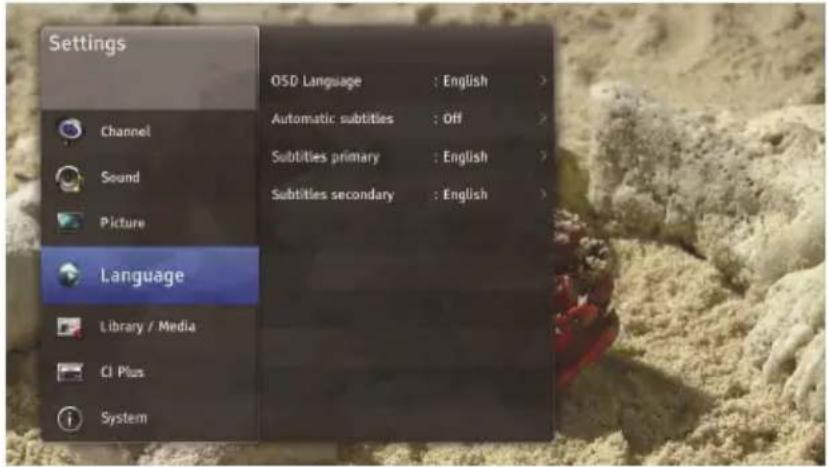
OSD Language
On Screen Display (OSD) is used to change the language of the menu screen.
Automatic subtitles
Allows you to enable/disable subtitles.
-To enable them, select On.
Subtitles primary
Allows you to change the primary language for the subtitles.
Subtitles secondary
Allows you to change the secondary language for the subtitles.
- Subtitles are available when a secondary language service is provided by the programme provider.
Settings → Library / Media
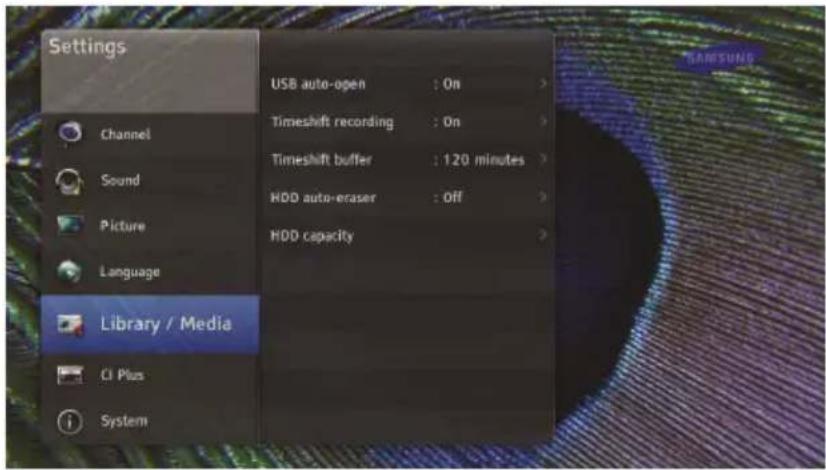
USB auto-open
Allows you to automatically open the Media when the USB storage device is connected.
Time shift recording
Allows you to switch time shift recording auto-start on/off when you change channel.
Time shift buffer
Allows you to set the time shift buffer duration.
- 30 minutes, 60 minutes, 120 minutes
HDD auto-eraser
Allows you to erase the oldest recorded programme from the library automatically. Immediately after the HDD free space goes below 15% (low disk space level), auto-eraser starts erasing unprotected recordings. After each erase, the free space level is checked and if it is over 15%, auto-eraser stops working.
- PROTECT/UNPROTECT can be chosen from TOOLS button (TOOLS).
- The default setting is Off.
HDD capacity
Displays the HDD usage information.
- You can format the HDD using the format button.
Settings → System
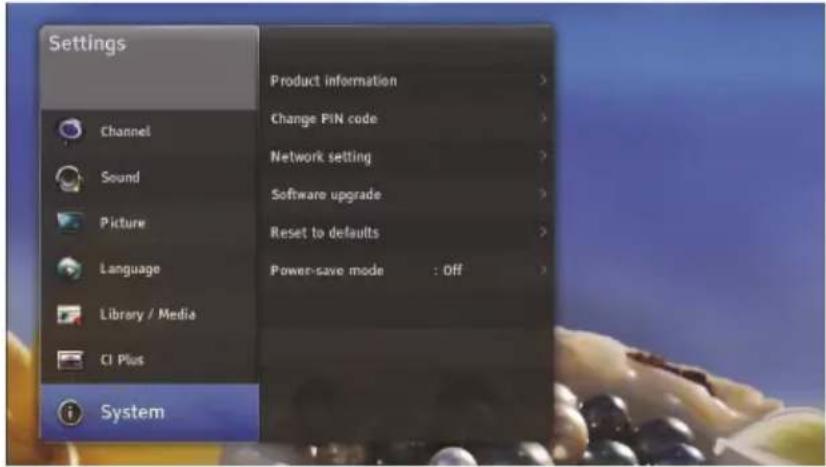
Product information
Displays information on the product.
- You can check the Brand ID, Product ID, Firmware version, Software version, Serial number and Last SW update information.
Change PIN code
Change PIN Code allows you to change the current password.
To change the password use the following steps:
- Select [Change PIN code] and press the OK button (OK).
- Enter the current PIN code using the numeric buttons.
- Enter the New PIN code and enter again in [Confirm new PIN code].
- The default PIN code is 0000.
Network setting
Use the Automatic IP/DNS configuration when connecting your product to a network that supports DHCP.
To set up Network automatically use the following steps:
- Connect your product to your LAN.
- Press the MENU button (MENU) on the remote control, and select [Settings], [System], [Network setting].
- Set IP Configuration to [Automatic].
- Automatic acquires and enters the required internet values automatically.
- Select the OK button (OK).
- A pop-up will appear to let you know if the IP configuration was a success or if it failed.
Settings → System (continued)
Use the Manual IP/DNS configuration when connecting your product to a network that requires a static IP address.
To set up the Network manually use the following steps:
- Connect your product to your LAN.
- Press the MENU button (MENU) on the remote control and select [Settings], [System], [Network setting]
- Set IP Configuration to [Manual].
- Enter the IP Address, Subnet Mask, Gateway, and DNS Server values. Use the number buttons on your remote control to enter numbers and Navigation buttons to move from one entry field to another.
- Select the OK button (OK).
- A pop-up will appear to let you know if the IP configuration was a success or if it failed.
Software upgrade
Software upgrade allows you to update the system software to maintain the highest performance of the product.
When recording is in progress you cannot use this functionality.
To update software, follow these steps:
[Automatic Update]
- Select [Auto] and select the [Search] button and press the OK button (OK) on the remote control.
- When new software is detected, download the software immediately.
- If there is no new software to upgrade, a popup will appear.
[Manual Update]
- Select [Manual] using the Navigation buttons on the remote control.
- Select the appropriate values for Satellite, Frequency, Transponder, Symbol Rate, Polarity, FEC, Modulation and PID.
- Select the [Search] button and press the OK button (OK) on the remote control.
- When new software is detected, download the software immediately.
- If there is no new software to upgrade, a popup will appear.
![SAMSUNG SMT-7800 (Freesat) - [Manual Update] - 1](/content/2026/06/1188598/images/a2ed82e1c439c7b5d94088375692670d39c0630509cafac26ec581c4385674c2.jpg)
Automatic or manual software update is only available in freesat mode.
Settings → System (continued)
[USB Update]
- Insert a USB storage device which has a new software in its root directory.
- Select [From USB] and select the [Search] button and press the OK button (OK) on the remote control.
- When new software is detected, the software will be updated.
- The STB will reboot after the upgrade is completed.
![SAMSUNG SMT-7800 (Freesat) - [USB Update] - 1](/content/2026/06/1188598/images/df48fd019bc1cbbd09d88394fb0705c9b07825c2186ba4fb9204ecced3f4fbcd.jpg)
You can find USB-upgradable software at the following web site if available : www.samsung.com/uk
Software upgrade using the USB port must be performed with a USB flash memory stick only.
Please be careful not to disconnect the power or remove the USB drive until upgrade is complete.
Reset to defaults
[Reset to defaults] enables you to restore the product to the factory default.

Please note that once you perform a 'Reset to defaults', all data such as the channel setting, channel list and all user configured data will be deleted.
To reset to the defaults, follow these steps:
- Press the MENU button (MENU) and Select [Setting].
- Select [System] and [Reset to defaults].
- Enter the PIN code.
- The default PIN code is 0000.
-
Select [Reset to defaults] using the Navigation buttons and press the OK button (OK).
-
When factory reset is completed the product will restart and the [User Settings] window will appear on the screen.
Power-save mode (additional)
Allows you to turn on/off an additional power-save mode option.
If there is no interaction more than 3 hours between users and the STB in the period of midnight \~ 5 A.M., the STB with the option turned on goes from live mode to standby mode.

Please refer to the pages 8\~9 for the active standby mode and low-power standby mode.
TROUBLESHOOTING
This section describes how to handle the problems that may occur whilst using the STB.
If the STB operates abnormally, first check the following:
If the problem persists, contact your local service centre.

Screen
Trouble Solution
Nothing appears on the TV screen.
- Check if the TV and STB are powered on.
- Check the connection status of the cable between TV and STB.
- Check if the TV input is set to an external input mode.
- Press the STANDBY button ( ⏻ ) to check if the STB is in standby mode.
The menu screen is not displayed.
- Power on the STB and then press the MENU button (MENU) on the remote control.
- If pressing the MENU button (MENU) still does not display the menu screen properly, contact your local service centre.

Remote Control
Trouble Solution
The remote control does not work.
- Check if the remote control is suitable for the STB.
- Replace the batteries with new ones and check if the remote control works normally.
- Check if the batteries are inserted correctly.
- Check if there is an obstacle between the STB and the remote control.
- Operate the remote control nearer to the STB to see if it works normally.
Trouble Solution
| The TV produces no audio. 1. Check the connection status of the cable between the audio port of the TV/audio system and the AUDIO OUT port at the rear of the STB.2. If the cable is connected normally, check if the MUTE function is enabled. If the MUTE function is enabled, press theMUTEbutton ( [IMAGE] ) on the remote control to disable it. | |
| I cannot remember the password for the STB. | The default password for the STB is ‘0000’.If you cannot remember the password, contact your local service centre. You can specify a new password after initialising it. |
TV Manufacturer Numbers
The TV manufacturers and associated numbers that can be supported by a remote control are listed in the table below.
Manufacturer Setting Numbers Manufacturer Setting Numbers
| SAMSUNG 001 002 003 004 005 006 007 008 009 010 | ASUKA 050 076 123 378 379 | ||
| 050 066 076 102 195 217 365 379 421 | |||
| A.R. SYSTEMS | 049 152 | ATLANTIC | 049 050 071 113 152 236 379 |
| ACCENT 049 152 ATORI 195 | |||
| ACEC | 112 | AUCHAN | 107 425 |
| ACURA | 195 | AUDIOSONIC | 049 074 076 152 182 195 213 379 421 |
| ADMIRAL | 065 076 163 171 190 307 324 369 466 481 | AUDIOTON | 050 076 379 421 |
| ADYSON | 379 | AUSIND | 090 407 |
| AGASHI | 076 379 | AUTOVOX | 050 071 078 079 080 083 090 156 236 324 379 407 413 449 468 470 |
| AGEF | 324 | AWA | 018 049 131 152 195 226 320 379 426 433 |
| AIKO | 049 076 102 141 152 172 195 225 379 | AYOMI | 411 |
| AIWA | 377 459 | BAIRD | 074 102 182 209 218 379 409 |
| AKAI | 049 050 055 066 076 102 107 123 139 141 150 152 172 182 195 209 225 379 428 433 437 471 475 | BANG & OLUFSEN | 324 483 |
| AKIBA | 049 123 152 380 378 | BARCO | 107 371 480 |
| AKITO | 049 106 152 | BASIC LINE | 049 107 123 195 226 378 |
| AKURA | 049 076 123 195 378 426 470 | BASTIDE | 379 |
| ALARON | 042 379 | BAUR | 049 107 150 152 172 247 249 357 414 454 470 475 |
| ALBA | 018 049 050 107 123 134 163 168 195 225 232 379 413 421 457 | BEKO | 152 241 421 433 460 |
| ALBIRAL | 371 | BEON | 049 152 163 |
| ALCYON | 407 | BEST | 213 421 |
| ALLORGAN | 050 094 236 379 | BESTAR | 049 152 226 421 |
| ALLSTAR | 049 152 | BINATONE | 379 |
| AMPLIVISION | 113 379 421 425 | BLACKSTAR | 413 |
| AMSTRAD | 012 049 076 123 131 152 172 195 225 426 476 | BLACKTRON | 378 |
| ANAM | 049 152 195 | BLACKWAY | 378 |
| ANAM NATIONAL | 049 152 | BLAUPUNKT | 057 060 113 247 249 345 451 454 481 |
| ANGLO | 076 195 | BLUE SKY | 049 123 152 195 217 232 378 380 457 |
| ANITECH | 049 076 152 195 407 | BLUE STAR | 378 |
| ANSONIC | 045 049 107 112 152 195 210 226 391 413 421 | BONDSTEC 413 | |
| ARC EN CIEL | 074 182 186 424 453 463 | BOOTS | 050 106 379 |
| ARCAM | 379 424 | BPL | 049 152 378 |
| ARISTONA | 049 050 065 079 112 152 160 | BRADFORD | 162 |
| ARTHUR MARTIN | 107 127 136 139 153 307 425 | BRANDT | 014 074 182 186 218 424 436 452 462 |
| ASA | 020 065 078 080 091 146 171 197 307 324 375 408 449 | BRANT ELECTRONIC | 074 453 463 |
| ASBERG | 049 152 407 | BRANT ELECTRONIQUE | 074 182 186 453 |
| ASORA | 195 | BRINKMANN | 049 152 163 |
| ASTRA | 195 | BRIONVEGA | 049 065 083 152 167 172 324 356 476 |
Manufacturer Setting Numbers Manufacturer Setting Numbers
| BRITANNIA | 379 | DENKO | 076 |
| BROTHER | 076 | DENON | 126 |
| BRUNS | 065 324 | DERWENT | 105 |
| BSR | 094 107 110 139 168 | DESMET | 049 113 152 |
| BTC | 123 | DIGATRON | 049 |
| BUSH 018 049 076 094 106 107 123 134 139 142 172193 195 209 217 225 226 232 307 378 379 457458 470 480 | DIGILINE 049 152 | ||
| BUSH(UK) | 107 168 | DIXI | 049 152 195 379 413 |
| CAPSONIC | 049 076 152 380 | DORIC | 104 105 |
| CARREFOUR | 018 177 | DREAN | 049 152 |
| CASCADE | 049 064 152 195 | DTS | 195 |
| CASIO | 049 152 | DUAL | 049 050 107 139 152 156 168 182 243 379 414417 424 468 470 |
| CATHAY | 049 152 | DUAL TEC | 040 050 168 195 379 |
| CCE | 049 152 379 | DUMONT | 045 065 080 102 139 146 324 375 379 449 469 |
| CENTURION | 049 152 DUMONT- | 020 045 078 091 104 | |
| CENTURY | 065 163 324 411 413 481 | FINLUX | |
| DUX | 049 112 152 | ||
| CGE | 011 090 093 094 107 139 142 163 168 346 348369 407 413 421 480 | DYNATRON | 049 152 |
| CIHAN | 217 | ELBE | 049 107 123 152 172 210 243 369 391 411 421435 |
| CIMLINE | 123 134 195 | ELBIT | 217 |
| CITY | 195 | ELCIT | 045 046 062 065 104 107 150 168 324 413 |
| CLARIVOX | 049 125 163 | ELCIT | 045 046 062 065 104 107 150 168 324 413 |
| CLATRONIC | 045 049 076 113 123 152 195 225 379 407 413421 | ELECTA 076 378 | |
| CMS HIGHTEC | 379 | ELECTRO TECH | 195 |
| COMTEL | 125 217 | ELEKTA | 076 378 |
| CONCORDE | 195 | ELG | 049 152 |
| CONDOR | 045 049 050 113 152 163 195 210 378 379 413421 467 | ELIN | 020 049 107 139 152 172 195 379 470 479 |
| CONTEC | 018 131 195 320 379 | ELITE | 049 123 152 467 |
| CONTINENTALEDISON | 014 074 182 186 232 424 453 462 463 | ELMAN 045 168 | |
| COSMEL | 195 213 | ELTA | 195 076 379 |
| CROSLEY065 090 093 094 104 107 139 324 346 348 407 413469 481 | EMERSON | 012 042 049 065 113 152 225 324 378 413 475481 | |
| CROWN | 049 152 163 170 195 209 232 407 421 470 | ERRES | 049 112 152 |
| CRYSTAL | 477 | ESC | 049 152 |
| CSELECTRONICS | 123 379 413 | ESTELE | 310 |
| CTC | 413 | ETRON | 049 107 139 152 195 |
| CTC CLATRONIC | 045 | EURO-FEEL | 076 |
| CURTIS MATHES | 126 190 | EUROMANN | 049 076 152 379 421 |
| CYBERTRON | 123 | EUROPA | 049 152 |
| DAENYK | 042 | EUROPHON | 045 046 049 050 068 107 120 152 168 379 413 |
| DAEWOO | 049 123 152 193 195 226 379 456 464 | EXPERT | 071 107 236 425 |
| DAINICHI | 123 379 | EXQUISIT | 049 152 413 |
| DANSAI | 049 076 141 152 195 379 | FAMILY LIFE | 049 152 |
| DANSETTE | 426 | FENNER | 152 195 226 |
| DANTAX | 421 | FERGUSON | 049 050 074 076 080 082 102 103 182 218 247409 411 436 452 472 |
| DATSURA | 209 | FIDELITY | 049 050 076 107 152 225 307 379 475 |
| DAWA | 049 152 | FILSAI | 050 379 |
| DAYTON | 049 152 195 226 | FINLANDIA | 033 139 172 197 209 307 375 470 474 |
| DE GRAAF | 107 139 209 307 479 | FINLUX | 020 042 045 049 078 080 090 091 102 104 107139 146 152 163 197 210 324 375 379 407 408428 429 437 449 469 |
| DECCA | 049 102 106 120 217 | FIRST LINE | 045 049 094 102 107 134 139 152 191 195 209210 226 379 411 413 457 470 |
| DECCA(UK) | 046 049 050 102 106 131 152 379 | FISHER | 018 041 050 065 069 102 104 107 139 156 172209 320 324 379 408 414 421 470 |
| DEITRON | 049 152 | FLINT | 049 102 123 152 380 |
Manufacturer Setting Numbers Manufacturer Setting Numbers
| FNR 045 HEM | A | 195 379 | ||
| FORMENTI | 049 090 | 107 113 139 307 324 379 407 467 469480 481 | HEMMERMANN | 150 470 |
| FORMENTI-PHOENIX | 050 104 113 307 HIFIVOX | 074 182 186 424 453 463 | ||
| FORTRESS | 190 324 | HIGASHI | 050 | |
| FRABA | 049 152 421 | HIGHLINE | 049 076 152 | |
| FRIAC | 045 049 152 195 HIKON | A | 123 | |
| FRONTECH | 066 076 139 195 307 379 413 466 470 477 | HINARI | 012 018 042 049 066 094 107 123 134 139 195209 232 307 | |
| FUJITSU | 042 045 071 102 107 195 236 379 | HISAWA | 123 378 380 425 | |
| FUJITSUGENERAL | 195 379 HIT | 324 | ||
| FUNAI | 042 076 094 | HITACHI | 018 020 033 049 050 074 086 099 102 104 107110 126 127 139 150 152 162 168 171 182 186218 238 307 379 466 469 470 472 479 | |
| GALAXI | 045 049 152 | HITACHI FUJIAN | 013 | |
| GALAXIS | 045 049 152 163 421 | HITSU | 123 195 380 | |
| GALERIA | 124 | HORNYPHON | 049 112 152 | |
| GBC | 104 107 139 168 195 226 480 | HOSHAI | 123 380 | |
| GE | 074 182 218 378 | HUANYU | 193 226 379 | |
| GEANT CASINO | 107 425 | HYGASHI | 379 | |
| GEC | 049 102 104 107 120 152 171 172 307 379 470 | HYPER | 050 168 195 379 413 | |
| GEC(UK) | 046 050 102 107 150 162 | HYPERSONIC | 172 | |
| GELOSO | 062 104 107 139 168 171 195 226 307 413 469481 | HYPSON | 049 076 152 217 378 379 380 425 | |
| GENERAL | 064 074 182 | IBERIA | 049 152 | |
| GENERALTECHNIC | 195 | ICE | 049 076 123 152 195 225 379 | |
| GENEXXA | 049 123 152 307 426 466 | ICES | 123 379 | |
| GOLDHAND | 379 | IMPERIAL | 011 049 090 093 094 107 142 152 163 168 307346 348 369 407 413 421 470 480 | |
| GOLDLINE | 213 | INDIANA | 049 152 | |
| GOODMANS | 018 042 049 076 102 134 139 141 152 182 193195 218 225 226 232 379 428 450 456 464 | INGELEN | 090 104 136 139 153 162 171 198 232 435 466 | |
| GORENJE | 421 | INGERSOLL | 195 | |
| GPM | 123 | INNO HIT | 046 049 050 066 102 123 152 195 217 379 407413 | |
| GRADIENTE | 049 152 170 177 | INNOVATION | 049 152 | |
| GRAETZ | 049 090 104 136 139 152 153 162 171 172 198225 307 466 469 475 | INTERACTIVE | 210 | |
| GRANADA | 013 018 033 041 049 102 104 105 112 120 152171 172 198 209 218 238 241 307 379 407 425470 471 472 474 | INTERBUY | 076 195 413 | |
| GRANADA (UK) | 046 050 090 107 139 162 307 | INTERFUNK | 049 065 067 074 090 104 107 112 139 150 152153 172 182 307 324 413 421 453 463 466 475 | |
| GRANDIN | 049 107 113 123 152 195 378 380 425 435 | INTERNAL | 049 152 | |
| GRONIC | 045 379 | INTERVISION | 045 049 055 076 107 123 152 225 232 378 379380 413 421 | |
| GRUNDIG | 049 080 090 152 232 247 249 407 454 455 | IR | 346 | |
| HALIFAX | 076 379 | IRRADIO | 049 066 090 123 152 195 407 413 | |
| HAMPTON | 379 | ISUKAI | 049 123 152 378 | |
| HANIMEX | 094 | ITC | 379 480 | |
| HANSEATIC | 018 049 050 094 104 107 113 152 172 195 241324 378 379 391 421 455 467 470 475 | ITS | 049 076 123 152 225 378 379 | |
| HANTAREX | 045 046 049 152 195 | ITT | 042 090 107 134 139 150 157 162 171 172 193197 198 209 307 375 428 466 469 470 471 475479 | |
| HANTOR | 049 152 | ITT-NOKIA | 042 090 104 107 134 136 139 150 153 162 171172 193 197 198 209 307 375 470 428 433 435437 | |
| HARLEYDAVIDSON | 042 | ITV | 076 049 152 413 | |
| HARWOOD | 049 152 195 426 JE | AN | 018 | |
| HAUPPAUGE | 049 152 | JEC | 141 | |
| HAVERMY | 190 | JET POINT | 365 | |
| HCM | 049 076 123 152 163 195 378 379 426 | JVC | 018 103 123 170 182 225 409 433 439 465 | |
Manufacturer Setting Numbers Manufacturer Setting Numbers
| KAISUI | 049 050 123 152 195 378 379 380 |
| KAMOSONIC | 050 |
| KAMP | 379 |
| KAPSCH | 071 107 172 236 466 |
| KARCHER 020 045 049 050 068 076 107 152 195 217 378 421 435 | |
| KATHREIN | 455 |
| KAWASHO | 379 |
| KB ARISTOCRAT | 107 |
| KENDO | 045 049 055 134 152 172 210 413 421 435 476 |
| KENNEDY | 071 079 104 107 139 236 369 480 |
| KINGSLEY | 379 |
KLARMAX 371 MAXIMAL 139
| KNEISSEL | 049 152 210 243 369 391 411 421 435 |
| KOLSTER | 045 049 152 470 |
| KONKA KRAKING | 411 049 123 152 225 |
| KONTAKT | 232 |
| KORPEL | 049 152 |
| KORTING | 065 094 113 324 421 |
| KOSMOS | 049 152 |
| KOTRON | 076 426 |
| KOYODA | 195 |
| KRAKING | 411 MERCUR |
| KRIESLER | 050 065 079 112 152 160 |
| KTV | 050 379 |
| KURO | 445 |
| KYOSHU | 076 163 426 |
| LECSON | 049 152 |
| LEMAIR | 210 |
| LENCO | 049 107 152 195 226 |
LENOIR 050 195
| LESA | 413 |
| LEYCO | 049 076 094 102 152 |
| LG(GOLDSTAR) | 049 050 055 107 139 152 168 172 182 195 219 379 413 414 421 460 501 502 503 504 505 506 507 |
| LIESENK &TTER | 049 112 152 345 |
| LIFE | 440 441 443 444 |
| LIFETEC | 049 076 123 152 195 226 440 441 443 444 |
LLOYD_S 195
| LOEWE | 035 049 089 120 152 324 391 421 |
| LOEWE OPTA | 035 046 049 065 120 144 152 213 324 |
| LOGIK | 131 225 |
| LOGIX | 195 |
| LUMA | 071 107 110 152 171 172 195 210 226 236 307 |
| LUMATRON | 049 076 107 152 172 236 379 |
| LUX MAY | 049 152 195 |
| LUXOR | 042 050 090 107 127 139 150 172 197 209 307 375 428 429 470 472 473 475 |
| LYCO | 076 |
| MAAZ | 371 |
| MADISON | 049 152 |
| MAGNADYNE | 045 046 062 065 104 107 120 139 150 168 324 413 469 |
MAGNAFON 045 046 050 068 090 120 379 407 481
| MAGNAVOX | 018 042 049 152 |
| MAGNUM | 440 441 443 444 |
| MANDOR | 076 |
| MANESTH 076 094 113 134 141 152 379 467 | |
| MANHATTAN | 049 195 |
| MARANTZ | 049 152 455 |
| MARELLI | 324 |
| MARK | 049 152 195 226 379 |
| MASUDA | 123 195 225 |
| MATSUI | 012 018 041 049 050 094 100 102 106 107 131 134 141 150 152 171 195 209 218 225 232 247 307 379 380 470 |
MAXWELL 371
| MEDIATOR | 049 112 152 |
| MEDION | 049 152 195 217 457 |
| MEGAS | 435 |
| MEGATRON | 126 |
| MELECTRONIC | 020 049 074 152 182 193 195 197 210 226 375 379 408 413 428 429 466 470 |
| MELVOX | 425 |
| MEMOREX | 099 195 217 |
| MEMPHIS | 102 125 195 213 |
| Y | 049 152 195 |
METZ 049 065 067 070 092 247 324 412 420 454 481
| MICROMAXX | 049 152 195 |
| MICROSTAR | 440 441 443 444 |
| MINERVA | 080 090 232 247 249 407 454 |
| MINOKA | 049 152 426 470 |
| MITSUBISHI | 013 018 049 065 105 131 152 157 190 247 324 454 |
| MIVAR | 046 050 058 072 081 090 120 379 391 407 414 421 434 |
| MONACO | 195 |
| MORGAN_S | 049 152 |
| MOTION | 407 |
MOTOROLA 190
| MTC | 152 379 421 470 |
| MTEC | 106 |
| MULTISTAND ARD | 045 |
| MULTITEC | 049 152 195 |
| MULTITECH | 045 046 049 050 120 152 195 379 407 413 421 470 |
| MURPHY | 102 104 105 107 171 307 379 |
| MURPHY (UK) | 162 |
| MUSIKLAND | 123 |
| MYRYAD | 455 |
| NAD | 172 209 475 |
| NAIKO | 049 152 |
| NAKIMURA | 049 152 226 |
| NAONIS | 040 071 079 110 171 |
| NAT | 085 151 |
| NATIONAL | 033 085 104 |
| NEC | 018 049 113 131 152 177 195 226 379 380 |
Manufacturer Setting Numbers Manufacturer Setting Numbers
| NECKERMANN | 011 049 050 065 107 139 152 163 210 247 |
| 249 307 324 357 379 413 421 455 470 481 | |
| NEDIATOR | 152 |
| NEI | 049 125 152 225 477 |
NESCO 042 413 PAUZ
| NETSAT | 049 152 |
| NETWORK | 213 |
| NEUFUNK | 049 152 195 435 |
| NEW TECH | 049 050 152 182 195 379 |
NEW WORLD 123
| NICAMAGIC | 379 |
| NIKKAI | 018 049 076 102 123 125 139 141 152 195 213 379 066 |
NOBLEX 049 076 152
| NOBLIKO | 045 050 080 090 379 407 |
| NOGAMATIC | 074 182 186 424 453 463 |
| NOKIA | 090 104 107 134 136 139 150 153 157 162 |
| 171 172 193 197 198 209 226 307 375 428 | |
| 429 433 437 465 470 475 478 479 |
NORDMENDE 049 074 083 150 152 182 186 218 247 307 424 453 463 469 481
NOVATRONIC 020 049 152 226
| OCEANIC | 086 094 104 107 108 109 139 172 209 425 |
| 466 469 475 | |
| OCEANIC (F) | 150 |
ODEON 076
OKANO 049 076 102 152 421
| OMEGA | 076 |
| ONCEAS | 050 |
ONWA 123 225
OPERA 049 152
| OPTIMUS | 099 |
| OPTONICA | 190 |
ORBIT 049 152
| ORION | 012 042 045 049 076 094 113 131 134 139 |
| 150 152 191 195 216 366 367 426 467 | |
| ORLINE | 049 123 152 |
ORMENTIPHOPENIX 104
ORMOND 195
OSAKA 066
OSAKI 049 066 076 102 106 123 152 226 379 426
| OSIO | 049 152 |
| OSO | 123 |
OSUME 018 102 123
OTAKE 450
| OTTO VERSAND | 018 049 050 074 094 104 107 113 134 139 |
| 152 172 190 218 247 249 357 362 379 413 | |
| 414 454 455 467 469 470 480 481 |
P.T ACTRON 217
PAEL 050 379
| PALLADIUM | 049 107 152 163 210 247 324 357 379 413 421 470 |
PALSONIC 049 055 076 152 379 426
PANAMA 049 076 152 195 379 413
PANASONIC 016 049 099 104 107 139 151 152 172 396
420 466 469 481
PANAVISION 049 152 210
PATHE CINEMA 107 113 379 391 411 425 467 470 480 481
PATHE CINEMA (F) 050 168
PATHE MARCONI 014 074 182 186 424 453 462 463
| PAUSA | 195 |
| A | 195 |
PERDIO 049 102 107 113 152 467
PERFEKT 049 152
PERSHIN 425
PHILCO 011 016 049 065 090 093 094 104 107 126
142 152 163 168 324 346 348 369 407 413
421 480 481
PHILEX 471
PHILHARMONIC 379
PHILIPS 014 049 050 065 079 089 112 152 160 182
193 216 217 220 226 247 249 324 427 455
482
PHOENIX 049 050 102 104 107 113 152 324 379 421
PHONOLA 049 050 065 079 112 152 160 324 379
PILOT 049 152
PIONEER 049 074 152 172 182 209 218 307 421 427 466
PLANTRÓN 049 076 152 195
PLAYSONIC 379
POLICOM 074
POPPY 195
PORTLAND 226
POWERPOINT 232
PRANDONIPRINCE 046 090 120 171 172 307 407 413
PRECISION 379
PREMIER 142
PRIMA 076 195 307
PRINCE 046 171
PRINZ 102 470
PROFEX 107 139 195 407 475
PROFI-TRÔNIC 045 049 152
PROLINE 049 102 112 191 366 436
PROSONIC 049 085 151 152 195 225 226 379 421
PROTECH 045 049 076 125 139 152 163 195 379 413
457 470 477 480
PROVISION 049 152
PYE 050 065 079 112 152 160 226 324
PYMI 049 112 152 195 226 324
QUADRA VISION I 425
QUASAR 045 046 068 099 413
QUELLE 018 020 049 050 074 076 078 080 090 091
094 113 131 139 146 150 152 153 172 195
247 249 320 345 346 348 357 379 408 413
449 451 454 470 475 480 481
QUESTA 018
RADIALVA 049 074 107 123 152
RADIOLA 014 049 050 065 079 112 152 160
RADIOMARELL 045 046 062 065 104 105 150 152 168 324 413
RADIONETTE 020 150
RADIOSHACK 049 152
RADIOTONE 049 076 152 163 195 421 426
RANK ARENA 018
RCA 190 218 436
Manufacturer Setting Numbers Manufacturer Setting Numbers
| RECOR | 049 152 |
| RECTILIGNE | 049 152 |
| REDIFFUSION | 018 059 104 105 139 171 172 307 471 475 |
| REDIFFUSION (UK) | 150 162 | SILVA 049 | 152 379 |
| REDSTAR | 049 152 |
| REFLEX | 049 152 |
| REOC | 460 |
| REVOX | 049 152 421 |
| REX | 040 071 079 107 110 152 171 210 236 243 |
| 307 413 466 |
| RFT | 076 102 241 324 391 421 |
| RHAPSODY | 379 |
R-LINE 049 152 SOGER
| ROADSTAR | 049 076 123 152 163 195 |
| ROBOTRON | 065 324 SONAW |
| RODEX | 049 152 |
| ROWA | 458 |
| ROWSONIC | 050 |
| ROYAL LUX | 421 426 |
| RTF | 065 |
| SABA | 046 065 074 077 107 120 139 172 182 186 |
| 218 307 324 424 436 452 453 463 466 469 | |
| 481 |
| SACCS 411 | SOUND & |
| SAGEM | 378 380 435 |
| SAISHO | 012 050 076 107 131 134 195 307 379 477 |
| SALORA | 033 107 127 136 139 150 153 171 172 198 |
| 209 307 466 470 472 474 475 479 |
| SAMBERS | 045 046 068 090 120 407 481 |
| SANDRA | 379 |
| SANELA | 411 |
| SANSUI | 049 152 225 |
| SANTON | 195 |
| SANYO | 018 020 041 049 050 065 102 107 131 152 |
| 195 198 209 320 379 391 408 421 481 | |
| SAVE | 049 152 |
| SBR | 049 112 152 |
| SCHAUB LORENZ | 090 104 136 139 153 162 171 198 307 433 |
| 469 470 475 |
| SCHNEIDER | 014 040 049 050 065 069 079 104 107 112 |
| 123 139 152 156 160 168 172 182 195 225 | |
| 243 307 379 382 413 414 417 457 468 470 | |
| SCOTT | 042 |
| SEARS | 042 |
| SEG | 018 045 049 050 076 107 152 172 195 232 |
| 379 413 407 457 480 |
| SEI | 012 045 049 094 107 139 152 236 324 357 |
| 469 470 481 |
| SEI SINUDYNE | 446 |
| SELECO | 040 071 079 107 110 152 171 172 210 236 |
| 243 307 369 466 476 |
| SENCORA | 195 |
| SENTRA | 123 | 139 | 141 | 195 |
| SERINO | 380 435 |
| SHARP | 018 094 170 190 320 362 |
SHORAI 042 094 TAND
| SIAM | 049 152 |
| SIAREM | 045 046 065 104 107 120 139 324 469 481 |
| SIEMENS | 018 | 049 | 066 | 113 | 152 | 247 | 249 | 307 | 320 | 345 |
| 451 | 454 | 469 | 481 |
| SIERA | 050 065 079 112 152 160 |
| SIERRA | 049 112 152 |
| SIESTA | 421 |
| SILVER | 018 042 049 076 152 172 |
| SINGER | 045 049 065 104 152 195 324 369 413 425 |
| SINUDYNE | 012 045 065 094 104 107 134 139 150 152 172 |
| 210 216 236 324 357 366 367 469 470 481 |
| SKANTIC | 307 472 473 |
| SKY | 049 152 |
| SKYOTO | 107 |
| SKYWORTH | 448 |
| A | 113 |
| SOLAVOX | 066 102 107 139 172 307 466 471 |
| A | 123 |
| SONITRON | 209 379 421 |
| SONNECLAIR | 049 152 |
| SONOKO | 049 050 076 152 195 378 379 |
| SONOLOR | 107 139 172 209 357 425 466 |
| SONTEC | 049 094 152 421 |
| SONY | 018 045 131 211 346 357 358 370 |
| 045 | 123 | 226 |
VISION
Manufacturer Setting Numbers Manufacturer Setting Numbers
| TEAC 049 076 152 163 195 217 378 380 426 457458 470 | ULTRA | 409 | |
| TEC 040 050 064 168 195 213 218 243 379 413480 | ULTRAVOX 045 049 050 065 104 107 139 152 226 324379 413 471 | ||
| TECH LINE | 049 152 195 | UNIC LINE | 049 152 |
| TECHICA 123 UNITED 49 152 | |||
| TECHNEMA | 113 467 | UNIVERSUM | 011 012 018 020 049 074 076 094 107 131152 163 172 195 197 210 213 247 320 345346 357 375 379 407 408 413 421 428 429437 454 470 480 |
| TECHNICS | 099 | UNIVOX | 049 107 152 213 324 411 |
| TECHNOL ACE | 042 | UTAX | 050 |
| TEDELEX | 379 | VEGAVOX | 163 |
| TEIRON | 195 | VESTEL | 049 107 125 152 379 |
| TEKNIKA | 042 | VEXA | 152 195 |
| TELEAVIA | 014 074 182 186 218 424 453 462 463 | VICTOR | 170 |
| TELECOR | 049 107 123 152 379 | VIDEO SYSTEM | 049 152 |
| TELEFUNKEN | 049 064 074 082 152 182 186 187 218 230346 348 424 436 452 453 463 | VIDEOLOGIQUE | 123 379 |
| TELEFUSION | 049 152 | VIDEOSAT | 413 447 |
| TELEGAZI | 049 076 107 123 152 | VIDEOSYSTEM | 049 152 |
| TELEMEISTER | 049 113 152 467 | VIDEOTECHNIC | 113 226 379 |
| TELESONIC | 049 152 | VIDEOTON | 107 472 |
| TELESTAR | 049 152 | VIDIKRON | 045 |
| TELETECH | 049 152 195 213 413 | VIDTECH | 018 |
| TELETON | 018 067 071 107 236 379 470 | VIPER | 213 |
| TELEVIDEON | 050 104 107 113 379 | VISIOLA | 379 |
| TELEVISO | 425 | VISION | 049 113 152 467 |
| TEMCO | 094 | VISOREX | 442 |
| TEMPEST | 049 152 195 | VISTAR | 172 236 |
| TENNESSEE | 049 152 | VOLTEC | 074 |
| TENSAI | 020 050 055 094 113 123 152 195 225 226379 413 450 467 | VORTEC | 152 |
| TESMET | 439 | VOXSON | 049 065 090 152 163 171 307 324 407 466 |
| TETUNG | 046 | WALTHAM | 049 152 163 182 307 379 472 |
| TEVION | 049 152 195 | WATSON | 049 107 113 123 152 195 247 467 |
| TEXET | 050 123 195 226 379 | WATT RADIO | 045 050 068 104 107 139 150 379 470 480 |
| TEXET | 050 123 195 226 379 | WEGA | 018 049 139 152 324 |
| THOMSON | 014 024 049 064 074 134 152 182 186 218230 424 436 453 462 463 470 | WEGA COLOR | 065 088 |
| THOMSON | 014 024 049 064 074 134 152 182 186 218230 424 436 453 462 463 470 | WEGAVOX 195 | |
| THORN | 049 102 103 106 141 152 218 226 346 348408 409 411 454 464 470 475 | WELTBLICK | 113 152 |
| THORN | 049 102 103 106 141 152 218 226 346 348408 409 411 454 464 470 475 | WESTINGHOUSE | 094 152 |
| THORNFERGUSON | 074 076 080 082 103 218 357 358 375 | WESTON | 168 |
| TOKAI | 049 102 107 152 195 213 226 379 | WHARFEDALE | 049 152 |
| TOKYO | 141 379 | WHITE | 045 |
| TOMASHI | 123 378 WHITE | 049 050 113 152 213 379 467 | |
| WESTINGHOUSE | |||
| TOSHIBA | 018 045 128 141 369 379 | WINCO | 426 |
| TOWADA | 045 379 470 480 | WINDSTAR | 378 |
| TOYODA | 195 | XRYPTON | 049 152 |
| TRAKTON | 076 | YAMISHI | 049 123 152 378 379 380 |
| TRANSCONTINENS | 046 049 152 171 307 379 | YOKAN | 049 152 |
| TRANSONIC | 049 152 380 458 | YOKO | 049 050 076 123 152 195 379 413 421 477 |
| TRANSTEC | 379 | YORX | 123 |
| TRIDENT | 379 | ZANUSSI | 040 071 079 110 152 171 236 307 379 |
| UHER | 049 069 071 080 090 113 152 163 226 236307 407 414 421 467 | ZOPPAS | 040 071 079 110 171 307 |
Product Specifications
Design and specifications are subject to change without prior notice.
| Item Description | |
| Model Name | SMT-S7800 |
| Receiver | DVB-S/S2 |
| Input Connector Type F-Type IEC female in accordance with IEC 169-24 | |
| Input Impedance 75 Ω | |
| Broadcasting Rx Frequency 950 ~ 2150 MHz | |
| Broadcasting Rx Level -25 ~ -65 dBm (average power) | |
| LNB Power & Polarization | -25 ~ -65 dBm (average power)Vertical: +13.3V(+14.3V at high voltage)Horizontal: +18.3V(+19.3V at high voltage)LNB Rating:LNB 1IN – Max, 13/18V 250mALNB 2 IN – Max, 13/18V 250mA |
| 22KHz Tone | Frequency: 22 ± 4KHzAmplitude: 0.7 ± 0.2V |
| Type of Broadcasting Rx Modulation QPSK, 8PSK | |
| Input Symbol Rate | DVB-S: 2 ~ 45MS/sDVB-S2: 10 ~ 30MS/s(QPSK, 8PSK) |
| Channels Bandwidth 7 and 8 Mhz | |
| Output Connector Type IEC male in accordance with IEC 60169-2 | |
| Audio Output Port | Stereo (left/right): 1 portDigital Audio (SPDIF): 1 port |
| Video/Audio Concurrent Output Port | HDMI output: 1 portSCART: 2 ports (TV/VCR) |
| USB USB 2.0: 2 ports (front/rear) | |
| Rated Voltage, Frequency AC 230 V ± 15%, 50 Hz | |
| Rated Power Consumption Max. 40 W | |
| Operating Temperature 0~40°C | |
| Operating Humidity | 20~80% (40°C) |
| Dimensions (mm) | 360 (L) × 270 (W) × 50 (H) |
| Weight | 2,495 g |
Dolby Logo Usage Approval
Manufactured under license from Dolby Laboratories.
Dolby and the double-D symbol are trademarks of Dolby Laboratories.
DVB Product Notice
DVB and the DVB logos are trademarks of the DVB Project.
HDMI Product Notice

HIGH-DEFINITION MULTIMEDIA INTERFACE
HDMI, the HDMI Logo, and High-Definition Multimedia Interface are trademarks or registered trademarks of HDMI Licensing LLC in the United States and other countries.
ACCESS Product Notice
This product contains NetFront Living Connect of ACCESS CO., LTD.
This product contains NetFront Media Player of ACCESS CO., LTD.
© 2008 ACCESS CO., LTD. All rights reserved.
ACCESS, the ACCESS logo and NetFront are registered trademarks or trademarks of ACCESS CO., LTD. in the United States, Japan and/or other countries.
Open Source Announcement
Some software components of this product incorporate source code covered under the GNU General Public License (GPL), the GNU Lesser General Public License (LGPL) etc.
Acknowledgement:
The software included in this product contains copyrighted software that is licensed under the GPL/LGPL. You may obtain the complete Corresponding Source code from us for a period of three years after our last shipment of this product by sending email to: vdswmanager@samsung.com or oss.request@samsung.com
If you want to obtain the complete Corresponding Source code in the physical medium such as CD-ROM, the cost of physically performing source distribution may be charged.
You may also find a copy of the source at http://opensource.samsung.com/
This offer is valid to anyone in receipt of this information.
Below is the list of components covered under GNU General Public License, the GNU Lesser General Public License.
| Component | License | Component | License |
| Linux Kernel GPL 2.0 Curl MIT License | |||
| Busybox GPL 2.0 Expat MIT License | |||
| Binutils | GPL | 2.0 | FreeType FreeType |
| U-Boot GPL 2.0 zlib zlib/libpng License | |||
| G Lib C LGPL 2.1 libpng zlib/libpng License | |||
| FFmpeg LGPL 2.1 TinyXml zlib/libpng License | |||
| TagLib | LGPL 2.1 | OpenSS | OpenSSL Combined License |
| JPEG | JPEG License |
GNU GENERAL PUBLIC LICENSE
Version 2, June 1991
Copyright (C) 1989, 1991 Free Software Foundation, Inc.
51 Franklin St, Fifth Floor, Boston, MA 02110-1301 USA
Everyone is permitted to copy and distribute verbatim copies of this license document, but changing it is not allowed.
Preamble
The licenses for most software are designed to take away your freedom to share and change it. By contrast, the GNU General Public License is intended to guarantee your freedom to share and change free software--to make sure the software is free for all its users. This General Public License applies to most of the Free Software Foundation's software and to any other program whose authors commit to using it. (Some other Free Software Foundation software is covered by the GNU Library General Public License instead.) You can apply it to your programs, too.
When we speak of free software, we are referring to freedom, not price. Our General Public Licenses are designed to make sure that you have the freedom to distribute copies of free software (and charge for this service if you wish), that you receive source code or can get it if you want it, that you can change the software or use pieces of it in new free programs; and that you know you can do these things.
To protect your rights, we need to make restrictions that forbid anyone to deny you these rights or to ask you to surrender the rights. These restrictions translate to certain responsibilities for you if you distribute copies of the software, or if you modify it. For example, if you distribute copies of such a program, whether gratis or for a fee, you must give the recipients all the rights that you have. You must make sure that they, too, receive or can get the source code. And you must show them these terms so they know their rights.
We protect your rights with two steps:
(1) copyright the software, and (2) offer you this license which gives you legal permission to copy, distribute and/or modify the software. Also, for each author's protection and ours, we want to make certain that
everyone understands that there is no warranty for this free software.
If the software is modified by someone else and passed on, we want its recipients to know that what they have is not the original, so that any problems introduced by others will not reflect on the original authors' reputations.
Finally, any free program is threatened constantly by software patents.
We wish to avoid the danger that redistributors of a free program will individually obtain patent licenses, in effect making the program proprietary. To prevent this, we have made it clear that any patent must be licensed for everyone's free use or not licensed at all.
The precise terms and conditions for copying, distribution and modification follow.
TERMS AND CONDITIONS FOR COPYING, DISTRIBUTION AND MODIFICATION
0) This License applies to any program or other work which contains a notice placed by the copyright holder saying it may be distributed under the terms of this General Public License. The “Program”, below, refers to any such program or work, and a “work based on the Program” means either the Program or any derivative work under copyright law: that is to say, a work containing the Program or a portion of it, either verbatim or with modifications and/or translated into another language. (Hereinafter, translation is included without limitation in the term “modification”). Each licensee is addressed as “you”.
Activities other than copying, distribution and modification are not covered by this License; they are outside its scope. The act of running the Program is not restricted, and the output from the Program is covered only if its contents constitute a work based on the Program (independent of having been made by running the Program). Whether that is true depends on what the Program does.
1) You may copy and distribute verbatim copies of the Program's source code as you receive it, in any medium, provided that you conspicuously and appropriately publish on each copy an appropriate copyright notice and disclaimer of warranty; keep intact all the notices that refer to this License and to the absence of any warranty; and give any other recipients of the Program a copy of this License along with the Program. You may charge a fee for the physical act of transferring a copy, and you may at your option offer warranty protection in exchange for a fee.
2) You may modify your copy or copies of the Program or any portion of it, thus forming a work based on the Program, and copy and distribute such modifications or work under the terms of Section 1 above, provided that you also meet all of these conditions:
a) You must cause the modified files to carry prominent notices stating that you changed the files and the date of any change.
b) You must cause any work that you distribute or publish, that in whole or in part contains or is derived from the Program or any part thereof, to be licensed as a whole at no charge to all third parties under the terms of this License.
c) If the modified program normally reads commands interactively when run, you must cause it, when started running for such interactive use in the most ordinary way, to print or display an announcement including an appropriate copyright notice and a notice that there is no warranty (or else, saying that you provide a warranty) and that users may redistribute the program under these conditions, and telling the user how to view a copy of this License. (Exception: if the Program itself is interactive but does not normally print such an announcement, your work based on the Program is not required to print an announcement.)
These requirements apply to the modified work as a whole.
If identifiable sections of that work are not derived from the Program, and can be reasonably considered independent and separate works in themselves, then this License, and its terms, do not apply to those sections when you distribute them as separate works. But when you distribute the same sections as part of a whole which is a work based on the Program, the distribution of the whole must be on the terms of this License, whose permissions for other licensees extend to the entire whole, and thus to each and every part regardless of who wrote it.
Thus, it is not the intent of this section to claim rights or contest your rights to work written entirely by you; rather, the intent is to exercise the right to control the distribution of derivative or collective works based on the Program.
In addition, mere aggregation of another work not based on the Program with the Program (or with a work based on the Program) on a volume of a storage or distribution medium does not bring the other work under the scope of this License.
3) You may copy and distribute the Program (or a work based on it, under Section 2) in object code or executable form under the terms of Sections 1 and 2 above provided that you also do one of the following:
a) Accompany it with the complete corresponding machine-readable source code, which must be distributed under the terms of Sections 1 and 2 above on a medium customarily used for software interchange; or,
b) Accompany it with a written offer, valid for at least three years, to give any third party, for a charge no more than your cost of physically performing source distribution, a complete machine-readable copy
of the corresponding source code, to be distributed under the terms of Sections 1 and 2 above on a medium customarily used for software interchange; or,
c) Accompany it with the information you received as to the offer to distribute corresponding source code. (This alternative is allowed only for noncommercial distribution and only if you received the program in object code or executable form with such an offer, in accord with Subsection b above.) The source code for a work means the preferred form of the work for making modifications to it. For an executable work, complete source code means all the source code for all modules it contains, plus any associated interface definition files, plus the scripts used to control compilation and installation of the executable. However, as a special exception, the source code distributed need not include anything that is normally distributed (in either source or binary form) with the major components (compiler, kernel, and so on) of the operating system on which the executable runs, unless that component itself accompanies the executable.
If distribution of executable or object code is made by offering access to copy from a designated place, then offering equivalent access to copy the source code from the same place counts as distribution of the source code, even though third parties are not compelled to copy the source along with the object code.
4) You may not copy, modify, sublicense, or distribute the Program except as expressly provided under this License. Any attempt otherwise to copy, modify, sublicense or distribute the Program is void, and will automatically terminate your rights under this License. However, parties who have received copies, or rights, from you under this License will not have their licenses terminated so long as such parties remain in full compliance.
5) You are not required to accept this License, since you have not signed it. However, nothing else grants you permission to modify or distribute the Program or its derivative works. These actions are prohibited by law if you do not accept this License. Therefore, by modifying or distributing the Program (or any work based on the Program), you indicate your acceptance of this License to do so, and all its terms and conditions for copying, distributing or modifying the Program or works based on it.
6) Each time you redistribute the Program (or any work based on the Program), the recipient automatically receives a license from the original licensor to copy, distribute or modify the Program subject to these terms and conditions. You may not impose any further restrictions on the recipients' exercise of the rights granted herein. You are not responsible for enforcing compliance by third parties to this License.
7) If, as a consequence of a court judgment or allegation of patent infringement or for any other reason (not limited to patent issues), conditions are imposed on you (whether by court order, agreement or otherwise) that contradict the conditions of this License, they do not excuse you from the conditions of this License. If you cannot distribute so as to satisfy simultaneously your obligations under this License and any other pertinent obligations, then as a consequence you may not distribute the Program at all. For example, if a patent license would not permit royalty-free redistribution of the Program by all those who receive copies directly or indirectly through you, then the only way you could satisfy both it and this License would be to refrain entirely from distribution of the Program.
If any portion of this section is held invalid or unenforceable under any particular circumstance, the balance of the section is intended to apply and the section as a whole is intended to apply in other circumstances.
It is not the purpose of this section to induce you to infringe any patents or other property right claims or to contest validity of any such claims; this section has the sole purpose of protecting the integrity of the free software distribution system, which is implemented by public license practices. Many people have made generous contributions to the wide range of software distributed through that system in reliance on consistent application of that system; it is up to the author/donor to decide if he or she is willing to distribute software through any other system and a licensee cannot impose that choice.
This section is intended to make thoroughly clear what is believed to be a consequence of the rest of this License.
8) If the distribution and/or use of the Program is restricted in certain countries either by patents or by copyrighted interfaces, the original copyright holder who places the Program under this License may add an explicit geographical distribution limitation excluding those countries, so that distribution is permitted only in or among countries not thus excluded. In such case, this License incorporates the limitation as if written in the body of this License.
9) The Free Software Foundation may publish revised and/or new versions of the General Public License from time to time. Such new versions will be similar in spirit to the present version, but may differ in detail to address new problems or concerns.
Each version is given a distinguishing version number. If the Program specifies a version number of this License which applies to it and “any later version”, you have the option of following the terms and conditions either of that version or of any later version published by the Free Software Foundation. If the Program does not specify a version number of this License, you may choose any version ever published by the Free Software Foundation.
10) If you wish to incorporate parts of the Program into other free programs whose distribution conditions are different, write to the author to ask for permission. For software which is copyrighted by the Free Software Foundation, write to the Free Software Foundation; we sometimes make exceptions for this. Our decision will be guided by the two goals of preserving the free status of all derivatives of our free software and of promoting the sharing and reuse of software generally.
NO WARRANTY
11) BECAUSE THE PROGRAM IS LICENSED FREE OF CHARGE, THERE IS NO WARRANTY FOR THE PROGRAM, TO THE EXTENT PERMITTED BY APPLICABLE LAW. EXCEPT WHEN OTHERWISE STATED IN WRITING THE COPYRIGHT HOLDERS AND/OR OTHER PARTIES PROVIDE THE PROGRAM "AS IS" WITHOUT WARRANTY OF ANY KIND, EITHER EXPRESSED OR IMPLIED, INCLUDING, BUT NOT LIMITED TO, THE IMPLIED WARRANTIES OF MERCHANTABILITY AND FITNESS FOR A PARTICULAR PURPOSE. THE ENTIRE RISK AS TO THE QUALITY AND PERFORMANCE OF THE PROGRAM IS WITH YOU. SHOULD THE PROGRAM PROVE DEFECTIVE, YOU ASSUME THE COST OF ALL NECESSARY SERVICING, REPAIR OR CORRECTION.
12) IN NO EVENT UNLESS REQUIRED BY APPLICABLE LAW OR AGREED TO IN WRITING WILL ANY COPYRIGHT HOLDER, OR ANY OTHER PARTY WHO MAY MODIFY AND/OR REDISTRIBUTE THE PROGRAM AS PERMITTED ABOVE, BE LIABLE TO YOU FOR DAMAGES, INCLUDING ANY GENERAL, SPECIAL, INCIDENTAL OR CONSEQUENTIAL DAMAGES ARISING OUT OF THE USE OR INABILITY TO USE THE PROGRAM (INCLUDING BUT NOT LIMITED TO LOSS OF DATA OR DATA BEING RENDERED INACCURATE OR LOSSES SUSTAINED BY YOU OR THIRD PARTIES OR A FAILURE OF THE PROGRAM TO OPERATE WITH ANY OTHER PROGRAMS), EVEN IF SUCH HOLDER OR OTHER PARTY HAS BEEN ADVISED OF THE POSSIBILITY OF SUCH DAMAGES.
END OF TERMS AND CONDITIONS
How to Apply These Terms to Your New Programs
If you develop a new program, and you want it to be of the greatest possible use to the public, the best way to achieve this is to make it free software which everyone can redistribute and change under these terms.
To do so, attach the following notices to the program. It is safest to attach them to the start of each source file to most effectively convey the exclusion of warranty; and each file should have at least the “copyright” line and a pointer to where the full notice is found.
This program is free software; you can redistribute it and/or modify it under the terms of the GNU General Public License as published by the Free Software Foundation; either version 2 of the License, or(at your option) any later version.
This program is distributed in the hope that it will be useful, but WITHOUT ANY WARRANTY; without even the implied warranty of MERCHANTABILITY or FITNESS FOR A PARTICULAR PURPOSE. See the GNU General Public License for more details.
You should have received a copy of the GNU General Public License along with this program; if not, write to the Free Software Foundation, Inc., 51 Franklin St, Fifth Floor, Boston, MA 02110-1301 USA.
Also add information on how to contact you by electronic and paper mail.
If the program is interactive, make it output a short notice like this when it starts in an interactive mode:
Gnomovision version 69, Copyright (C) year name of author Gnomovision comes with ABSOLUTELY NO WARRANTY; for details type 'show w'. This is free software, and you are welcome to redistribute it under certain conditions; type 'show c' for details.
The hypothetical commands ‘show w’ and ‘show c’ should show the appropriate parts of the General Public License. Of course, the commands you use may be called something other than ‘show w’ and ‘show c’; they could even be mouse-clicks or menu items--whatever suits your program. You should also get your employer (if you work as a programmer) or your school, if any, to sign a “copyright disclaimer” for the program, if necessary. Here is a sample; alter the names:
Yoyodyne, Inc., hereby disclaims all copyright interest in the program ‘Gnomovision’ (which makes passes at compilers) written by James Hacker.
This General Public License does not permit incorporating your program into proprietary programs. If your program is a subroutine library, you may consider it more useful to permit linking proprietary
applications with the library. If this is what you want to do, use the GNU Lesser General Public License instead of this License
GNU LESSER GENERAL PUBLIC LICENSE
Version 2.1, February 1999
Copyright (C) 1991, 1999 Free Software Foundation, Inc.
51 Franklin Street, Fifth Floor, Boston, MA 02110-1301 USA
Everyone is permitted to copy and distribute verbatim copies of this license document, but changing it is not allowed.
[This is the first released version of the Lesser GPL. It also counts as the successor of the GNU Library Public License, version 2, hence the version number 2.1.]
Preamble
The licenses for most software are designed to take away your freedom to share and change it. By contrast, the GNU General Public Licenses are intended to guarantee your freedom to share and change free software--to make sure the software is free for all its users.
This license, the Lesser General Public License, applies to some specially designated software packages--typically libraries--of the Free Software Foundation and other authors who decide to use it. You can use it too, but we suggest you first think carefully about whether this license or the ordinary General Public License is the better strategy to use in any particular case, based on the explanations below.
When we speak of free software, we are referring to freedom of use, not price. Our General Public Licenses are designed to make sure that you have the freedom to distribute copies of free software (and charge for this service if you wish); that you receive source code or can get it if you want it; that you can change the software and use pieces of it in new free programs; and that you are informed that you can do these things.
To protect your rights, we need to make restrictions that forbid distributors to deny you these rights or to ask you to surrender these rights. These restrictions translate to certain responsibilities for you if you distribute copies of the library or if you modify it.
For example, if you distribute copies of the library, whether gratis or for a fee, you must give the recipients all the rights that we gave you. You must make sure that they, too, receive or can get the source code.
If you link other code with the library, you must provide complete object files to the recipients, so that they can relink them with the library after making changes to the library and recompiling it. And you must show them these terms so they know their rights.
We protect your rights with a two-step method: (1) we copyright the library, and (2) we offer you this license, which gives you legal permission to copy, distribute and/or modify the library.
To protect each distributor, we want to make it very clear that there is no warranty for the free library. Also, if the library is modified by someone else and passed on, the recipients should know that what they have is not the original version, so that the original author's reputation will not be affected by problems that might be introduced by others.
Finally, software patents pose a constant threat to the existence of any free program. We wish to make sure that a company cannot effectively restrict the users of a free program by obtaining a restrictive license from a patent holder. Therefore, we insist that any patent license obtained for a version of the library must be consistent with the full freedom of use specified in this license.
Most GNU software, including some libraries, is covered by the ordinary GNU General Public License.
This license, the GNU Lesser General Public License, applies to certain designated libraries, and is quite different from the ordinary General Public License. We use this license for certain libraries in order to permit linking those libraries into non-free programs.
When a program is linked with a library, whether statically or using a shared library, the combination of the two is legally speaking a combined work, a derivative of the original library. The ordinary General Public License therefore permits such linking only if the entire combination fits its criteria of freedom. The Lesser General Public License permits more lax criteria for linking other code with the library.
We call this license the “Lesser” General Public License because it does Less to protect the user's freedom than the ordinary General Public License. It also provides other free software developers Less of an advantage over competing non-free programs. These disadvantages are the reason we use the ordinary General Public License for many libraries. However, the Lesser license provides advantages in certain special circumstances.
For example, on rare occasions, there may be a special need to encourage the widest possible use of a certain library, so that it becomes a de-facto standard. To achieve this, non-free programs must be allowed to use the library. A more frequent case is that a free library does the same job as widely used non-free libraries. In this case, there is little to gain by limiting the free library to free software only, so we use the Lesser General Public License.
In other cases, permission to use a particular library in non-free programs enables a greater number of people to use a large body of free software. For example, permission to use the GNU C Library in non-free programs enables many more people to use the whole GNU operating system, as well as its variant, the GNU/Linux operating system.
Although the Lesser General Public License is Less protective of the users' freedom, it does ensure that the user of a program that is linked with the Library has the freedom and the wherewithal to run that program
using a modified version of the Library.
The precise terms and conditions for copying, distribution and modification follow. Pay close attention to the difference between a “work based on the library” and a “work that uses the library”. The former contains code derived from the library, whereas the latter must be combined with the library in order to run.
TERMS AND CONDITIONS FOR COPYING, DISTRIBUTION AND MODIFICATION
0) This License Agreement applies to any software library or other program which contains a notice placed by the copyright holder or other authorized party saying it may be distributed under the terms of this Lesser General Public License (also called "this License"). Each licensee is addressed as "you".
A “library” means a collection of software functions and/or data prepared so as to be conveniently linked with application programs (which use some of those functions and data) to form executables.
The “Library”, below, refers to any such software library or work which has been distributed under these terms. A “work based on the Library” means either the Library or any derivative work under copyright law: that is to say, a work containing the Library or a portion of it, either verbatim or with modifications and/or translated straightforwardly into another language. (Hereinafter, translation is included without limitation in the term “modification”.)
“Source code” for a work means the preferred form of the work for making modifications to it. For a library, complete source code means all the source code for all modules it contains, plus any associated interface definition files, plus the scripts used to control compilation and installation of the library.
Activities other than copying, distribution and modification are not covered by this License; they are outside its scope. The act of running a program using the Library is not restricted, and output from such a program is covered only if its contents constitute a work based on the Library (independent of the use of the Library in a tool for writing it). Whether that is true depends on what the Library does and what the program that uses the Library does.
1) You may copy and distribute verbatim copies of the Library's complete source code as you receive it, in any medium, provided that you conspicuously and appropriately publish on each copy an appropriate copyright notice and disclaimer of warranty; keep intact all the notices that refer to this License and to the absence of any warranty; and distribute a copy of this License along with the Library.
You may charge a fee for the physical act of transferring a copy, and you may at your option offer warranty protection in exchange for a fee.
2) You may modify your copy or copies of the Library or any portion of it, thus forming a work based on the Library, and copy and distribute such modifications or work under the terms of Section 1 above, provided that you also meet all of these conditions:
a) The modified work must itself be a software library.
b) You must cause the files modified to carry prominent notices stating that you changed the files and the date of any change.
c) You must cause the whole of the work to be licensed at no charge to all third parties under the terms of this License.
d) If a facility in the modified Library refers to a function or a table of data to be supplied by an application program that uses the facility, other than as an argument passed when the facility is invoked, then you must make a good faith effort to ensure that, in the event an application does not supply such function or table, the facility still operates, and performs whatever part of its purpose remains meaningful. (For example, a function in a library to compute square roots has a purpose that is entirely well-defined independent of the application. Therefore, Subsection 2d requires that any application-supplied function or table used by this function must be optional: if the application does not supply it, the square root function must still compute square roots.) These requirements apply to the modified work as a whole. If identifiable sections of that work are not derived from the Library, and can be reasonably considered independent and separate works in themselves, then this License, and its terms, do not apply to those sections when you distribute them as separate works.
But when you distribute the same sections as part of a whole which is a work based on the Library, the distribution of the whole must be on the terms of this License, whose permissions for other licensees extend to the entire whole, and thus to each and every part regardless of who wrote it. Thus, it is not the intent of this section to claim rights or contest your rights to work written entirely by you; rather, the intent is to exercise the right to control the distribution of derivative or collective works based on the Library. In addition, mere aggregation of another work not based on the Library with the Library (or with a work based on the Library) on a volume of a storage or distribution medium does not bring the other work under the scope of this License.
3) You may opt to apply the terms of the ordinary GNU General Public License instead of this License to a given copy of the Library. To do this, you must alter all the notices that refer to this License, so that they refer to the ordinary GNU General Public License, version 2, instead of to this License. (If a newer version than version 2 of the ordinary GNU General Public License has appeared, then you can specify that version instead if you wish.) Do not make any other change in these notices. Once this change is made in a given copy, it is irreversible for that copy, so the ordinary GNU General Public License applies to all subsequent copies and derivative works made from that copy.
This option is useful when you wish to copy part of the code of the Library into a program that is not a library.
4) You may copy and distribute the Library (or a portion or derivative of it, under Section 2) in object code or executable form under the terms of Sections 1 and 2 above provided that you accompany it with the complete corresponding machine-readable source code, which must be distributed under the terms of Sections 1 and 2 above on a medium customarily used for software interchange.
If distribution of object code is made by offering access to copy from a designated place, then offering equivalent access to copy the source code from the same place satisfies the requirement to distribute the source code, even though third parties are not compelled to copy the source along with the object code.
5) A program that contains no derivative of any portion of the Library, but is designed to work with the Library by being compiled or linked with it, is called a "work that uses the Library". Such a work, in isolation, is not a derivative work of the Library, and therefore falls outside the scope of this License.
However, linking a “work that uses the Library” with the Library creates an executable that is a derivative of the Library (because it contains portions of the Library), rather than a “work that uses the library”.
The executable is therefore covered by this License. Section 6 states terms for distribution of such executables.
When a “work that uses the Library” uses material from a header file that is part of the Library, the object code for the work may be a derivative work of the Library even though the source code is not. Whether this is true is especially significant if the work can be linked without the Library, or if the work is itself a library. The threshold for this to be true is not precisely defined by law.
If such an object file uses only numerical parameters, data structure layouts and accessors, and small macros and small inline functions (ten lines or less in length), then the use of the object file is unrestricted, regardless of whether it is legally a derivative work. (Executables containing this object code plus portions of the Library will still fall under Section 6.)
Otherwise, if the work is a derivative of the Library, you may distribute the object code for the work under the terms of Section 6. Any executables containing that work also fall under Section 6, whether or not they are linked directly with the Library itself.
6) As an exception to the Sections above, you may also combine or link a “work that uses the Library” with the Library to produce a work containing portions of the Library, and distribute that work under terms of your choice, provided that the terms permit modification of the work for the customer’s own use and reverse engineering for debugging such modifications.
You must give prominent notice with each copy of the work that the Library is used in it and that the Library and its use are covered by this License. You must supply a copy of this License. If the work during execution displays copyright notices, you must include the copyright notice for the Library among them, as well as a reference directing the user to the copy of this License. Also, you must do one of these things:
a) Accompany the work with the complete corresponding machine-readable source code for the Library including whatever changes were used in the work (which must be distributed under Sections 1 and 2 above); and, if the work is an executable linked with the Library, with the complete machine-readable "work that uses the Library", as object code and/or source code, so that the user can modify the Library and then relink to produce a modified executable containing the modified Library. (It is understood that the user who changes the contents of definitions files in the Library will not necessarily be able to recompile the application to use the modified definitions.)
b) Use a suitable shared library mechanism for linking with the Library. A suitable mechanism is one that (1) uses at run time a copy of the library already present on the user's computer system, rather than copying library functions into the executable, and (2) will operate properly with a modified version of the library, if the user installs one, as long as the modified version is interface-compatible with the version that the work was made with.
c) Accompany the work with a written offer, valid for at least three years, to give the same user the materials specified in Subsection 6a, above, for a charge no more than the cost of performing this distribution.
d) If distribution of the work is made by offering access to copy from a designated place, offer equivalent access to copy the above specified materials from the same place.
e) Verify that the user has already received a copy of these materials or that you have already sent this user a copy. For an executable, the required form of the “work that uses the Library” must include any data and utility programs needed for reproducing the executable from it. However, as a special exception, the materials to be distributed need not include anything that is normally distributed (in either source or binary form) with the major components (compiler, kernel, and so on) of the operating system on which the executable runs, unless that component itself accompanies the executable.
It may happen that this requirement contradicts the license restrictions of other proprietary libraries that do not normally accompany the operating system. Such a contradiction means you cannot use both them and the Library together in an executable that you distribute.
7) You may place library facilities that are a work based on the Library side-by-side in a single library together with other library facilities not covered by this License, and distribute such a combined library, provided that the separate distribution of the work based on the Library and of the other library facilities is otherwise permitted, and provided that you do these two things:
a) Accompany the combined library with a copy of the same work based on the Library, uncombined with any other library facilities. This must be distributed under the terms of the Sections above.
b) Give prominent notice with the combined library of the fact that part of it is a work based on the
Library, and explaining where to find the accompanying uncombined form of the same work.
8) You may not copy, modify, sublicense, link with, or distribute the Library except as expressly provided under this License. Any attempt otherwise to copy, modify, sublicense, link with, or distribute the Library is void, and will automatically terminate your rights under this License. However, parties who have received copies, or rights, from you under this License will not have their licenses terminated so long as such parties remain in full compliance.
9) You are not required to accept this License, since you have not signed it. However, nothing else grants you permission to modify or distribute the Library or its derivative works. These actions are prohibited by law if you do not accept this License. Therefore, by modifying or distributing the Library (or any work based on the Library), you indicate your acceptance of this License to do so, and all its terms and conditions for copying, distributing or modifying the Library or works based on it.
10) Each time you redistribute the Library (or any work based on the Library), the recipient automatically receives a license from the original licensor to copy, distribute, link with or modify the Library subject to these terms and conditions. You may not impose any further restrictions on the recipients' exercise of the rights granted herein. You are not responsible for enforcing compliance by third parties with this License.
11) If, as a consequence of a court judgment or allegation of patent infringement or for any other reason (not limited to patent issues), conditions are imposed on you (whether by court order, agreement or otherwise) that contradict the conditions of this License, they do not excuse you from the conditions of this License. If you cannot distribute so as to satisfy simultaneously your obligations under this License and any other pertinent obligations, then as a consequence you may not distribute the Library at all. For example, if a patent license would not permit royalty-free redistribution of the Library by all those who receive copies directly or indirectly through you, then the only way you could satisfy both it and this License would be to refrain entirely from distribution of the Library. If any portion of this section is held invalid or unenforceable under any particular circumstance, the balance of the section is intended to apply, and the section as a whole is intended to apply in other circumstances.
It is not the purpose of this section to induce you to infringe any patents or other property right claims or to contest validity of any such claims; this section has the sole purpose of protecting the integrity of the free software distribution system which is implemented by public license practices. Many people have made generous contributions to the wide range of software distributed through that system in reliance on consistent application of that system; it is up to the author/donor to decide if he or she is willing to distribute software through any other system and a licensee cannot impose that choice. This section is intended to make thoroughly clear what is believed to be a consequence of the rest of this License.
12) If the distribution and/or use of the Library is restricted in certain countries either by patents or by copyrighted interfaces, the original copyright holder who places the Library under this License may add an explicit geographical distribution limitation excluding those countries, so that distribution is permitted only in or among countries not thus excluded. In such case, this License incorporates the limitation as if written in the body of this License.
13) The Free Software Foundation may publish revised and/or new versions of the Lesser General Public License from time to time. Such new versions will be similar in spirit to the present version, but may differ in detail to address new problems or concerns.
Each version is given a distinguishing version number. If the Library specifies a version number of this License which applies to it and “any later version”, you have the option of following the terms and conditions either of that version or of any later version published by the Free Software Foundation. If the Library does not specify a license version number, you may choose any version ever published by the Free Software Foundation.
14) If you wish to incorporate parts of the Library into other free programs whose distribution conditions are incompatible with these, write to the author to ask for permission. For software which is copyrighted by the Free Software Foundation, write to the Free Software Foundation; we sometimes make exceptions for this. Our decision will be guided by the two goals of preserving the free status of all derivatives of our free software and of promoting the sharing and reuse of software generally.
NO WARRANTY
15) BECAUSE THE LIBRARY IS LICENSED FREE OF CHARGE, THERE IS NO WARRANTY FOR THE LIBRARY, TO THE EXTENT PERMITTED BY APPLICABLE LAW. EXCEPT WHEN OTHERWISE STATED IN WRITING THE COPYRIGHT HOLDERS AND/OR OTHER PARTIES PROVIDE THE LIBRARY "AS IS" WITHOUT WARRANTY OF ANY KIND, EITHER EXPRESSED OR IMPLIED, INCLUDING, BUT NOT LIMITED TO, THE IMPLIED WARRANTIES OF MERCHANTABILITY AND FITNESS FOR A PARTICULAR PURPOSE. THE ENTIRE RISK AS TO THE QUALITY AND PERFORMANCE OF THE LIBRARY IS WITH YOU. SHOULD THE LIBRARY PROVE DEFECTIVE, YOU ASSUME THE COST OF ALL NECESSARY SERVICING, REPAIR OR CORRECTION.
16) IN NO EVENT UNLESS REQUIRED BY APPLICABLE LAW OR AGREED TO IN WRITING WILL ANY COPYRIGHT HOLDER, OR ANY OTHER PARTY WHO MAY MODIFY AND/OR REDISTRIBUTE THE LIBRARY AS PERMITTED ABOVE, BE LIABLE TO YOU FOR DAMAGES, INCLUDING ANY GENERAL, SPECIAL, INCIDENTAL OR CONSEQUENTIAL DAMAGES ARISING OUT OF THE USE OR INABILITY TO USE THE LIBRARY (INCLUDING BUT NOT LIMITED TO LOSS OF DATA OR DATA BEING RENDERED INACCURATE OR LOSSES SUSTAINED BY YOU OR THIRD PARTIES OR A FAILURE OF THE LIBRARY
TO OPERATE WITH ANY OTHER SOFTWARE), EVEN IF SUCH HOLDER OR OTHER PARTY HAS BEEN ADVISED OF THE POSSIBILITY OF SUCH DAMAGES.
END OF TERMS AND CONDITIONS
How to Apply These Terms to Your New Libraries
If you develop a new library, and you want it to be of the greatest possible use to the public, we recommend making it free software that everyone can redistribute and change. You can do so by permitting redistribution under these terms (or, alternatively, under the terms of the ordinary General Public License).
To apply these terms, attach the following notices to the library. It is safest to attach them to the start of each source file to most effectively convey the exclusion of warranty; and each file should have at least the “copyright” line and a pointer to where the full notice is found.
one line to give the library's name and an idea of what it does. Copyright (C) year name of author
This library is free software; you can redistribute it and/or modify it under the terms of the GNU Lesser General Public License as published by the Free Software Foundation; either version 2.1 of the License, or (at your option) any later version.
This library is distributed in the hope that it will be useful, but WITHOUT ANY WARRANTY; without even the implied warranty of MERCHANTABILITY or FITNESS FOR A PARTICULAR PURPOSE. See the GNU Lesser General Public License for more details.
You should have received a copy of the GNU Lesser General Public License along with this library; if not, write to the Free Software Foundation, Inc., 51 Franklin Street, Fifth Floor, Boston, MA 02110-1301 USA.
Also add information on how to contact you by electronic and paper mail.
You should also get your employer (if you work as a programmer) or your school, if any, to sign a “copyright disclaimer” for the library, if necessary. Here is a sample; alter the names:
Yoyodyne, Inc., hereby disclaims all copyright interest in the library ‘Frob’ (a library for tweaking knobs) written by James Random Hacker.
Signature of Ty Coon, 1 April 1990 Ty Coon, President of Vice
That's all there is to it!
The MIT License
Permission is hereby granted, free of charge, to any person obtaining a copy of this software and associated documentation files (the "Software"), to deal in the Software without restriction, including without limitation the rights to use, copy, modify, merge, publish, distribute, sublicense, and/or sell copies of the Software, and to permit persons to whom the Software is furnished to do so, subject to the following conditions:
The above copyright notice and this permission notice shall be included in all copies or substantial portions of the Software.
THE SOFTWARE IS PROVIDED "AS IS", WITHOUT WARRANTY OF ANY KIND, EXPRESS OR IMPLIED, INCLUDING BUT NOT LIMITED TO THE WARRANTIES OF MERCHANTABILITY, FITNESS FOR A PARTICULAR PURPOSE AND NONINFRINGEMENT. IN NO EVENT SHALL THE AUTHORS OR COPYRIGHT HOLDERS BE LIABLE FOR ANY CLAIM, DAMAGES OR OTHER LIABILITY, WHETHER IN AN ACTION OF CONTRACT, TORT OR OTHERWISE, ARISING FROM, OUT OF OR IN CONNECTION WITH THE SOFTWARE OR THE USE OR OTHER DEALINGS IN THE SOFTWARE.
LICENSE ISSUES
The OpenSSL toolkit stays under a dual license, i.e. both the conditions of the OpenSSL License and the original SSLeay license apply to the toolkit. See below for the actual license texts. Actually both licenses are BSD-style Open Source licenses. In case of any license issues related to OpenSSL please contact openssl-core@openssl.org.
OpenSSL License
Copyright (c) 1998-2004 The OpenSSL Project. All rights reserved.
Redistribution and use in source and binary forms, with or without modification, are permitted provided that the following conditions are met:
1) Redistributions of source code must retain the above copyright notice, this list of conditions and the following disclaimer.
2) Redistributions in binary form must reproduce the above copyright notice, this list of conditions and the following disclaimer in the documentation and/or other materials provided with the distribution.
3) All advertising materials mentioning features or use of this software must display the following acknowledgment:
"This product includes software developed by the OpenSSL Project for use in the OpenSSL Toolkit. (http://www.openssl.org/)
4) The names "OpenSSL Toolkit" and "OpenSSL Project" must not be used to endorse or promote products derived from this software without prior written permission. For written permission, please contact openssl-core@openssl.org.
5) Products derived from this software may not be called "OpenSSL" nor may "OpenSSL" appear in their names without prior written permission of the OpenSSL Project.
6) Redistributions of any form whatsoever must retain the following acknowledgment:
"This product includes software developed by the OpenSSL Project for use in the OpenSSL Toolkit (http://www.openssl.org/)
THIS SOFTWARE IS PROVIDED BY THE OpenSSL PROJECT "AS IS" AND ANY EXPRESSED OR IMPLIED WARRANTIES, INCLUDING, BUT NOT LIMITED TO, THE IMPLIED WARRANTIES OF MERCHANTABILITY AND FITNESS FOR A PARTICULAR PURPOSE ARE DISCLAIMED. IN NO EVENT SHALL THE OpenSSL PROJECT OR ITS CONTRIBUTORS BE LIABLE FOR ANY DIRECT, INDIRECT, INCIDENTAL, SPECIAL, EXEMPLARY, OR CONSEQUENTIAL DAMAGES (INCLUDING, BUT NOT LIMITED TO, PROCUREMENT OF SUBSTITUTE GOODS OR SERVICES; LOSS OF USE, DATA, OR PROFITS; OR BUSINESS INTERRUPTION) HOWEVER CAUSED AND ON ANY THEORY OF LIABILITY, WHETHER IN CONTRACT, STRICT LIABILITY, OR TORT (INCLUDING NEGLIGENCE OR OTHERWISE) ARISING IN ANY WAY OUT OF THE USE OF THIS SOFTWARE, EVEN IF ADVISED OF THE POSSIBILITY OF SUCH DAMAGE.
This product includes cryptographic software written by Eric Young (eay@cryptsoft.com). This product includes software written by Tim Hudson (tjh@cryptsoft.com).
The FreeType Project LICENSE
2006-Jan-27
Copyright 1996-2002, 2006 by David Turner, Robert Wilhelm, and Werner Lemberg
Introduction
The FreeType Project is distributed in several archive packages; some of them may contain, in addition to the
FreeType font engine, various tools and contributions which rely on, or relate to, the FreeType Project.
This license applies to all files found in such packages, and which do not fall under their own explicit license. The license affects thus the FreeType font engine, the test programs, documentation and makefiles, at the very least.
This license was inspired by the BSD, Artistic, and IJG (Independent JPEG Group) licenses, which all encourage inclusion and use of free software in commercial and freeware products alike. As a consequence, its main points are that:
o We don't promise that this software works. However, we will be interested in any kind of bug reports. (as is' distribution)
o You can use this software for whatever you want, in parts or full form, without having to pay us. ('royalty-free' usage)
o You may not pretend that you wrote this software. If you use it, or only parts of it, in a program, you must acknowledge somewhere in your documentation that you have used the FreeType code. ('credits') We specifically permit and encourage the inclusion of this software, with or without modifications, in commercial products. We disclaim all warranties covering The FreeType Project and assume no liability related to The FreeType Project.
Finally, many people asked us for a preferred form for a credit/disclaimer to use in compliance with this license. We thus encourage you to use the following text:
“”
Portions of this software are copyright ?
Project (www.freetype.org). All rights reserved.
“”
Please replace
Legal Terms
0. Definitions
Throughout this license, the terms `package', `FreeType Project', and `FreeType archive' refer to the set of files originally distributed by the authors (David Turner, Robert Wilhelm, and Werner Lemberg) as the `FreeType Project', be they named as alpha, beta or final release.
'You' refers to the licensee, or person using the project, where 'using' is a generic term including compiling the project's source code as well as linking it to form a 'program' or 'executable'. This program is referred to as 'a program using the FreeType engine'.
This license applies to all files distributed in the original FreeType Project, including all source code, binaries and documentation, unless otherwise stated in the file in its original, unmodified form as distributed in the original archive. If you are unsure whether or not a particular file is covered by this license, you must contact us to verify this.
The FreeType Project is copyright (C) 1996-2000 by David Turner, Robert Wilhelm, and Werner Lemberg. All rights reserved except as specified below.
1. No Warranty
THE FREETYPE PROJECT IS PROVIDED 'AS IS' WITHOUT WARRANTY OF ANY KIND, EITHER EXPRESS OR IMPLIED, INCLUDING, BUT NOT LIMITED TO, WARRANTIES OF MERCHANTABILITY AND FITNESS FOR A PARTICULAR PURPOSE. IN NO EVENT WILL ANY OF THE AUTHORS OR COPYRIGHT HOLDERS BE LIABLE FOR ANY DAMAGES CAUSED BY THE USE OR THE INABILITY TO USE, OF THE FREETYPE PROJECT.
2. Redistribution
This license grants a worldwide, royalty-free, perpetual and irrevocable right and license to use, execute, perform, compile, display, copy, create derivative works of, distribute and sublicense the FreeType Project (in both source and object code forms) and derivative works thereof for any purpose; and to authorize others to exercise some or all of the rights granted herein, subject to the following conditions:
o Redistribution of source code must retain this license file ('FTL.TXT') unaltered; any additions, deletions or changes to the original files must be clearly indicated in accompanying documentation. The copyright notices of the unaltered, original files must be preserved in all copies of source files.
o Redistribution in binary form must provide a disclaimer that states that the software is based in part of the work of the FreeType Team, in the distribution documentation. We also encourage you to put an URL to the FreeType web page in your documentation, though this isn't mandatory.
These conditions apply to any software derived from or based on the FreeType Project, not just the unmodified files. If you use our work, you must acknowledge us. However, no fee need be paid to us.
3. Advertising
Neither the FreeType authors and contributors nor you shall use the name of the other for commercial, advertising, or promotional purposes without specific prior written permission.
We suggest, but do not require, that you use one or more of the following phrases to refer to this software in your documentation or advertising materials: 'FreeType Project', 'FreeType Engine', 'FreeType library', or 'FreeType Distribution'.
As you have not signed this license, you are not required to accept it. However, as the FreeType Project is copyrighted material, only this license, or another one contracted with the authors, grants you the right to use, distribute, and modify it. Therefore, by using, distributing, or modifying the FreeType Project, you indicate that
you understand and accept all the terms of this license.
4. Contacts
There are two mailing lists related to FreeType:
o freetype@nongnu.org
Discusses general use and applications of FreeType, as well as future and wanted additions to the library and distribution. If you are looking for support, start in this list if you haven't found anything to help you in the documentation.
o freetype-devel@nongnu.org
Discusses bugs, as well as engine internals, design issues, specific licenses, porting, etc.
Our home page can be found at
http://www.freetype.org


natural_image
National flag of the Union of the United Kingdom (no text or symbols)UNITED KINGDOM
This Samsung product is warranted for the period of twelve (12) months from the original date of purchase, against defective materials and workmanship. In the event that warranty service is required, you should return the product to the retailer from whom it was purchased.
However, Samsung Authorised Dealers and Authorised Service Centres in other EC Countries will comply with the warranty on the terms issued to purchasers in the country concerned. In case of difficulty, details of our Authorised Service Centres are available from:
Samsung Electronics U.K. Ltd. Customer Support Centre PO Box 479 Gateshead, NE9 9BJ United Kingdom United Kingdom
Tel : 0330 SAMSUNG (0330 7267864)
Fax:0330 7260001
Web : www.samsung.com/uk
■ WARRANTY CONDITIONS
-
The warranty is only valid if, when warranty service is required, the warranty card is fully and properly completed and is presented with the original invoice or sales slip or confirmation, and the serial number on the product has not been defaced.
-
Samsung's obligations are limited to the repair or, at its discretion, replacement of the product or the defective part.
-
Warranty repairs must be carried out by Authorised Samsung Dealers or Authorised Service Centres.
No re-imbursement will be made for repairs carried out by non Samsung Dealers and, any such repair work and damage to the products caused by such repair work will not be covered by this warranty.
-
This product is not considered to be defective in materials nor workmanship by reason that it requires adaptation in order to conform to national or local technical or safety standards in force in any Country other than the one for which the product was originally designed and manufactured. This warranty will not cover, and no re-imbursement will be made for such adaptation nor any damage which may result.
-
This warranty covers none of the following: a) a) Periodic check ups, maintenance and repair or replacement of parts due to normal wear and tear. b) Cost relating to transport, removal or installation of the product. c) Misuse, including the failure to use this product for its normal purposes or incorrect installation. d) Damage caused by Lightning, Water, Fire, Acts of God, War, Public Disturbances, incorrect mains voltage, improper ventilation or any other cause beyond the control of Samsung.
-
This warranty is valid for any person who legally acquired possession of the product during the warranty period.
-
The consumers statutory rights in any applicable national legislation whether against the retailer arising from the purchase contract or otherwise are not affected by this warranty. Unless there is national legislation to the contrary, the rights under this warranty are the consumers sole rights and Samsung, its subsidiaries and distributors shall not be liable for indirect or consequential loss or any damage to records, compact discs, videos or audio taper or any other related equipment or material.
SAMSUNG ELECTRONICS (U.K.) LTD