
Elipta 220004 - Coffee maker MORPHY RICHARDS - Free user manual and instructions
Find the device manual for free Elipta 220004 MORPHY RICHARDS in PDF.


| Product Type | 2-Slice Toaster |
| Brand | Morphy Richards |
| Model | Elipta 220004 |
| Dimensions (Approx.) | 30 x 20 x 20 cm |
| Weight (Approx.) | 1.5 kg |
| Power | 850 W |
| Voltage | 230V ~ 50Hz |
| Browning Control | Adjustable, with settings for different toast preferences |
| Cancel Button | Interrupts toasting at any time |
| Frozen Button | Defrosts and toasts frozen bread with extended cycle |
| Re-heat Button | Reheats cold toast without further browning |
| Bread Slots | 2 slots, suitable for various bread types and sizes |
| Carriage Lever | Manual push-down to start toasting |
| Cable Storage | Underneath unit for tidy cord management |
| Crumb Tray | Removable, must be cleaned regularly to prevent fire hazard |
| Safety Features | Auto shut-off (pop-up), hot surface warning, earthed plug |
| Warranty | 1 year standard, extended to 2 years if registered within 28 days |
| Spare Parts Availability | Contact Morphy Richards helpline for spares |
| Cleaning Instructions | Unplug and cool; empty crumb tray; wipe exterior with damp cloth; do not immerse |
| Usage Notes | Wait 30 seconds between toasts for consistent browning; adjust setting for single slice |
Frequently Asked Questions - Elipta 220004 MORPHY RICHARDS
User questions about Elipta 220004 MORPHY RICHARDS
0 question about this device. Answer the ones you know or ask your own.
Ask a new question about this device
Download the instructions for your Coffee maker in PDF format for free! Find your manual Elipta 220004 - MORPHY RICHARDS and take your electronic device back in hand. On this page are published all the documents necessary for the use of your device. Elipta 220004 by MORPHY RICHARDS.
USER MANUAL Elipta 220004 MORPHY RICHARDS
The use of any electrical appliance requires the following common sense safety rules. Please read these instructions carefully before using the product.
- This appliance can be used by children aged from 8 years and above and persons with reduced physical, sensory or mental capabilities, or lack of experience and knowledge, if they have been given supervision or instruction concerning the use of the appliance in a safe way and understand the hazards involved.
• Children shall not play with the appliance. - Cleaning and user maintenance shall not be made by children without supervision.
- Keep the appliance and its cord out of reach of children.
- If the supply cable is damaged, it must be replaced by the manufacturer, its service agent or similarly qualified persons in order to avoid a hazard.
- The bread may burn, therefore do not use the appliance near or below combustible material such as curtains.
- This appliance is not intended to be operated by means of an external timer or separate remote control system.
Mains cable
- Do not let the cable run across a cooker or hot area which might damage the cable.
Personal safety
- Do watch your appliance during use.
- Only use for intended purpose.
- WARNING: Do not touch the top of the appliance or other hot parts during or after use, use handles or knobs.
- WARNING: Do not wrap the cable around the main body of the appliance during or after use.
- WARNING: Do not insert oversize foods, metal, foil packages or utensils into the toaster.
- WARNING: Do not attempt to dislodge food when the appliance is plugged in and never insert cooking utensils into the slots.
- IMPORTANT: Do not place bread or other items on top of the slots as this may damage the appliance and creates a fire hazard.
Precautions
- Never use the appliance when it is empty (when there is no bread inside) except on first use.
-
Do not use very thin or broken slices of bread.
-
Do not insert other foods that may drip during the cooking process. In addition to making the cleaning procedure more difficult, these may cause fires.
- Clean the crumb tray regularly: crumbs can smoke or burn.
- Do not insert (by force) foods that are too big for the slots.
- Do not insert forks or other utensils into the toaster in order to remove bread. As well as damaging the toaster, there is a high risk of electric shock.
Electrical requirements
Should the fuse in the mains plug require changing, a 13 amp BS1362 fuse must be fitted.
WARNING: This appliance must be earthed.
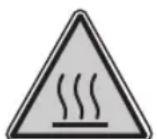
CAUTION! HOT SURFACE
- Run cold water over the affected area immediately.
- Do not stop to remove clothing.
- Seek medical advice quickly.
PLEASE BE AWARE OF HOT SURFACES
HANDLE WITH CARE
Treating scalds
TT44872 MUK Rev 4 12/14
Registering your 2 year guarantee
Your standard one year guarantee is extended for an additional 12 months when you register the product within 28 days of purchase with Morphy Richards. If you do not register the product with Morphy Richards within 28 days, your product is guaranteed for 1 year. To validate your 2 year guarantee register with us online at
www.morphyrichards.co.uk
Or call our customer registration line
UK 0344 871 0242
IRE 1800 409 119
N.B. Each qualifying product needs to be registered with Morphy Richards individually.
Please note that the 2 year guarantee is only available in the UK and Ireland. Please refer to the one year guarantee for more information.
Your 1 year guarantee
It is important to retain the retailer's receipt as proof of purchase. Staple your receipt to this back cover for future reference.
Please quote the following information if the product develops a fault. These numbers can be found on the base of the product.
Model no.
Serial no.
All Morphy Richards products are individually tested before leaving the factory. In the unlikely event of any appliance proving to be faulty within 28 days of purchase, it should be returned to the place of purchase for it to be replaced.
If the fault develops after 28 days and within 12 months of original purchase, you should contact the Helpline number quoting Model number and Serial number on the product, or write to Morphy Richards at the address shown.
You may be asked to return a copy of proof of purchase.
Subject to the exclusions set out below (see Exclusions), the faulty appliance will then be repaired or replaced as appropriate and dispatched usually within 7 working days of receipt.
If, for any reason, this item is replaced or repaired during the 1 year guarantee period, the guarantee on the new item will be calculated from original purchase date. Therefore it is vital to retain your original till receipt or invoice to indicate the date of initial purchase.
To qualify for the 1 year guarantee, the appliance must have been used according to the instructions supplied. For example, crumb trays should have been emptied regularly.
Exclusions
Morphy Richards shall not be liable to replace or repair the goods under the terms of the guarantee where:
1 The fault has been caused or is attributable to accidental use, misuse, negligent use or used contrary to the manufacturer's recommendations or where the fault has been caused by power surges or damage caused in transit.
2 The appliance has been used on a voltage supply other than that stamped on the products.
3 Repairs have been attempted by persons other than our service staff (or authorised dealer).
4 T he appliance has been used for hire purposes or non domestic use.
5 The appliance is second hand.
6 M orphy Richards reserves the right not to carry out any type of servicing under the guarantee at its discretion
7 Plastic filters for all Morphy Richards kettles and coffee makers are not covered by the guarantee.
8 Batteries and damage from leakage are not covered by the guarantee.
- This guarantee does not confer any rights other than those expressly set out above and does not cover any claims for consequential loss or damage. This guarantee is offered as an additional benefit and does not affect your statutory rights as a consumer. Morphy Richards products are intended for household use only. See usage limitations within the location safety instructions.
Disclaimer
Morphy Richards has a policy of continuous improvement in product quality and design. The company, therefore reserves the right to change the specification of its models at any time.
For electrical products sold within the European Community. At the end of the electrical products useful life, it should not be disposed of with household waste.
Please recycle where facilities exist. Check with your Local Authority or retailer for recycling advice in your country
IF YOU ARE HAVING A PROBLEM WITH ONE OF OUR PRODUCTS, CALL OUR HELPLINE:
UK: 0344 871 0944 EIRE: 1800 409 119 SPARES: 0344 873 0710
morphy richards
The After Sales Division Morphy Richards Ltd Mexborough, South Yorkshire, England, S64 8AJ
Helplines (office hours) UK 0344 871 0944 Spare Parts 0344 873 0710 Republic of Ireland 1800 409 119 www.morphyrichards.com
CE
TT44872 MUK Rev 4
morphy richards®
smart ideas for your home
ELIPTA 2 Slice Toaster

i Please read and keep these instructions for future use
For competitions, product hints and tips and more join us at

www.morphyrichards.co.uk/blog

www.facebook.com/morphyrichardsuk

@loveyourmorphy
Product overview
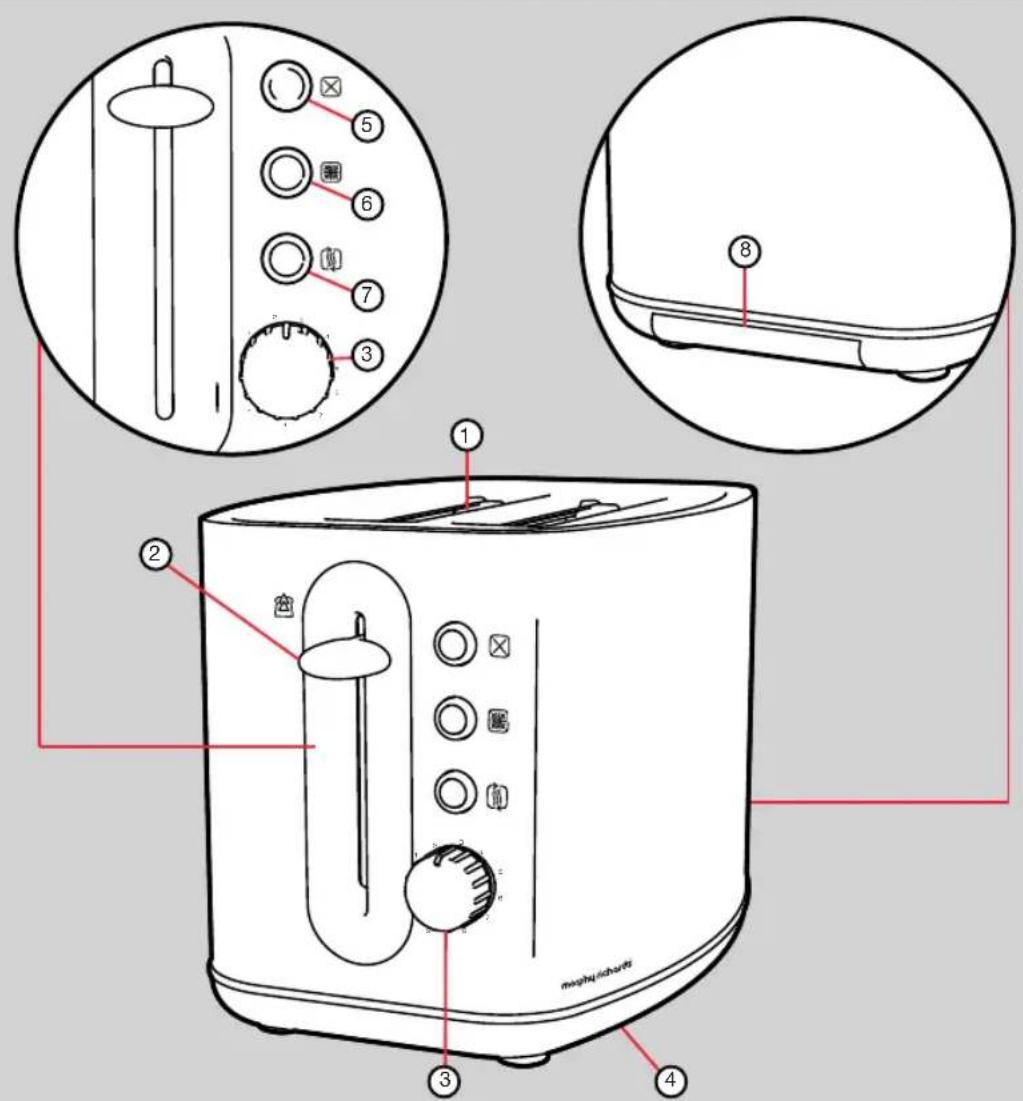
Features
(1) Bread Slots
(2) Bread Carriage Lever
(3) Browning Control
(4) Cable Storage (underneath)
(5) Cancel Button
(6) Frozen Button
(7) Re-heat Button
(8) Crumb Tray
Using your toaster
natural_image
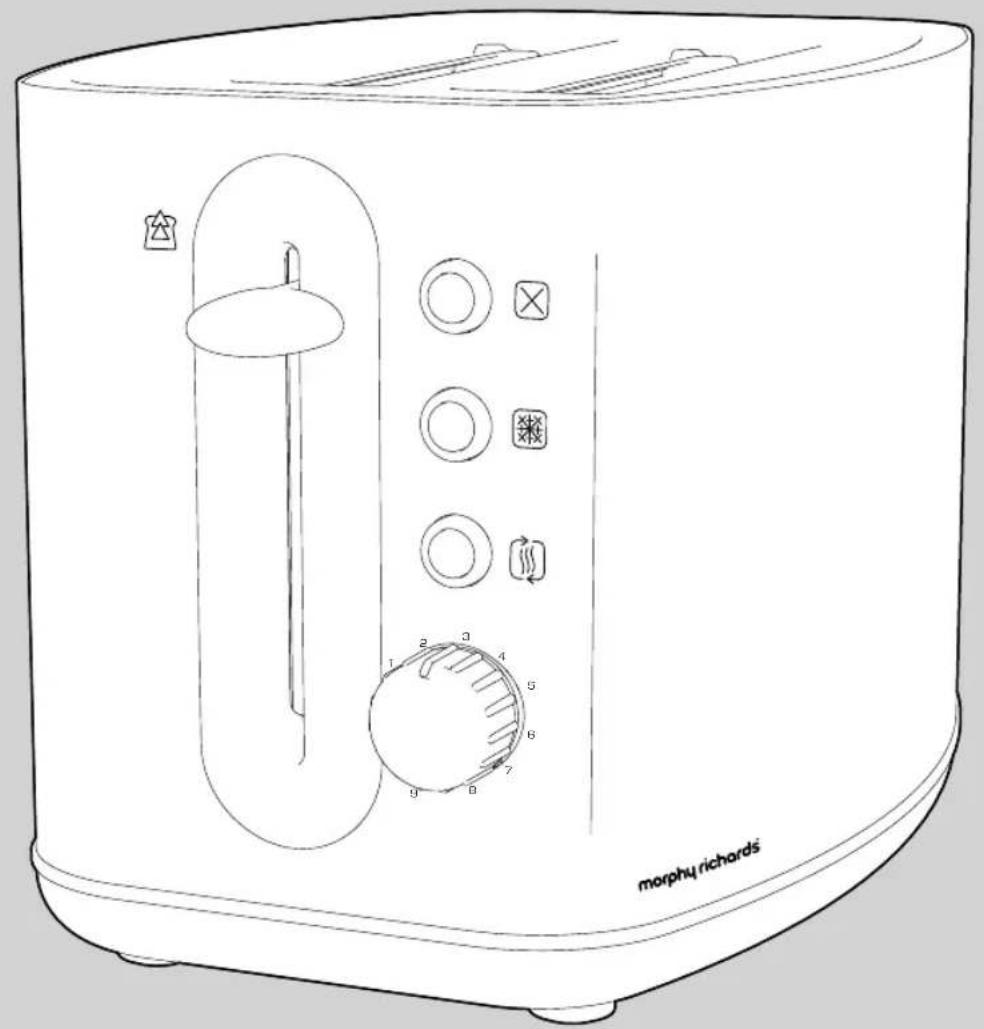
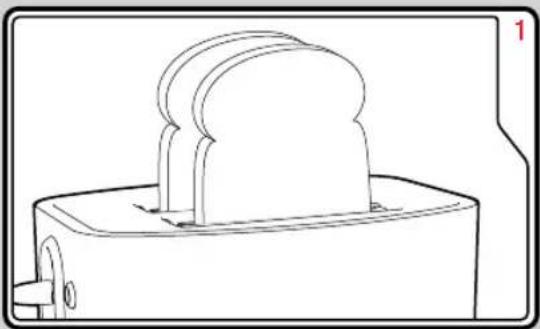
Line drawing of a toaster with three blades and a base, no text or symbols presentPlace the sliced bread into the Bread Slots (1).
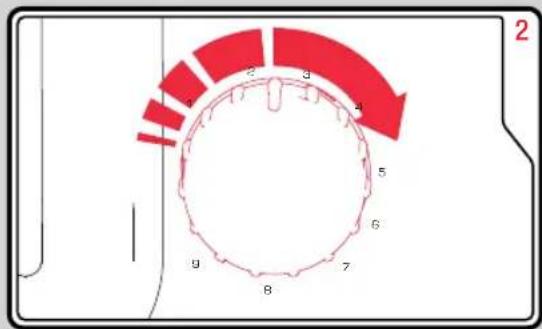
Adjust the Browning Control(s) (3) to the desired setting.
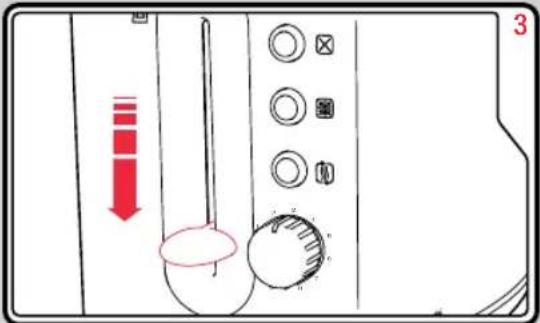
Depress the relevant Bread Carriage Lever (2). The toaster will begin toasting the bread.
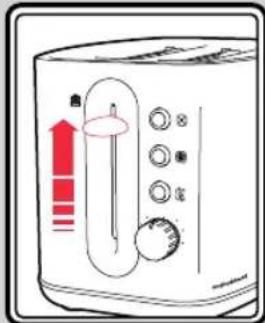
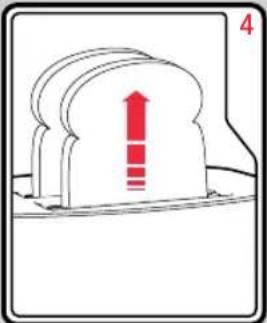
When completed, the Bread Carriage Levers will automatically rise and lift the toast from the toaster.
Before first use Additional featu
- Before using the toaster for the first time operate the toaster without bread.
- As with all new electric heating elements, your toaster emits a 'new' smell when it is first switched on. This is quite normal and not a cause for concern.
Cancel Button
If you wish to interrupt the toasting process, press the Cancel Button (5).
Frozen Button
To toast frozen bread, do not adjust the Browning Control (3) from your normal setting. Place the frozen bread in the Bread Slots (1), depress the relevant Bread Carriage Lever (2) and press the Frozen Button (6). The button will illuminate and the toaster will operate for a longer period defrosting and toasting the bread.
Re-heat Button
If your toast has popped up and gone cold, the toaster offers a re-heat facility. To use, depress the relevant Bread Carriage Lever (2), and press the Re-heat Button (7) immediately. The button will illuminate and the toaster will operate for a short period reheating the bread.
natural_image
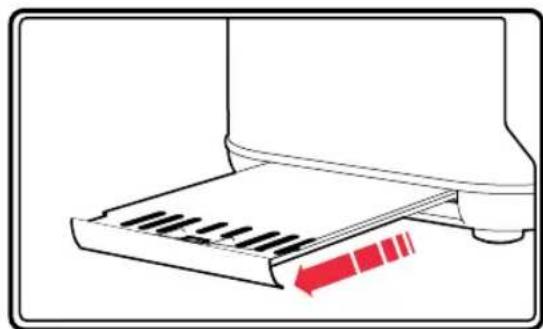
Illustration of a printer with a red arrow indicating compression or dislocation (no text or symbols present)WARNING: Crumbs will accumulate in the Crumb Tray (8) and could catch fire if not emptied regularly.
- When the appliance has cooled down completely, tap the sides of the case lightly to dislodge any crumbs lodged in the appliance chamber and remove the Crumb Tray.
- Empty the Crumb Tray and replace them.
Never operate the appliance without the Crumb Tray fitted.
Hints and tips
- In order to achieve uniform browning, we recommend you wait a minimum of 30 seconds between each toasting, so that the control can be automatically reset.
- If toasting one slice only, you may need to adjust the Browning Control (3) to a slightly lower setting. You will also notice a slight variation in toast colour on one side of a single slice.
- When toasting 2 slices it is recommended they are of equal size and freshness.
• Stale bread toasts more rapidly than fresh bread. Therefore, the Browning Control should be set at a lower setting than usual. - All sorts of bread can be used as well as teacakes, small rolls etc. Slices should not however be so thick as to cause burning or jamming within the Bread Slots (1).
- If the bread in your toaster becomes jammed disconnect your toaster at the socket, allow it to cool, then remove the bread.
- Allow the toaster to cool fully before putting away.
- Should some toast remain blocked in the toaster, remove the plug from the mains, wait for the toaster to cool down until it is safe to touch, then turn the toaster over and shake it gently.
Contact usRemoving the Crum
Helpline
If you are having a problem with your appliance, please call our Helpline, as we are more likely to be able to help than the store you purchased the item from.
Please have the product name, model number and serial number to hand when you call to help us deal with your enquiry quicker.
UK Helpline: 0344 871 0944
IRE Helpline: 1800 409 119
Spares: 0344 873 0710
Talk To Us
If you have any questions or comments, or want some great tips or recipe ideas to help you get the most out of your products, join us online:
Blog: www.morphyrichards.co.uk/blog
Facebook: www.facebook.com/morphyrichardsuk
Twitter: www.twitter.com/loveyourmorphy
Website: www.morphyrichards.com
- Mains cable
- Personal safety
- Precautions
- Electrical requirements
- CAUTION! HOT SURFACE
- PLEASE BE AWARE OF HOT SURFACES
- HANDLE WITH CARE
- Treating scalds
- Registering your 2 year guarantee
- www.morphyrichards.co.uk
- UK 0344 871 0242
- IRE 1800 409 119
- Your 1 year guarantee
- Exclusions
- Disclaimer
- morphy richards
- morphy richards®
- ELIPTA 2 Slice Toaster
- Features
- Using your toaster
- Before first use Additional featu
- Cancel Button
- Frozen Button
- Re-heat Button
- Hints and tips
- Contact usRemoving the Crum
- Helpline
- Talk To Us
Brand : MORPHY RICHARDS
Model : Elipta 220004
Category : Coffee maker