
SI4060N - Heating SWAN - Free user manual and instructions
Find the device manual for free SI4060N SWAN in PDF.


| Product Type | Steam Generator Iron |
| Model | SI4060N |
| Brand | Swan |
| Power Supply | 220-240V ~ 50Hz |
| Power Consumption | 2000-2400W |
| Water Tank Capacity | Approx. 1.2 L (fill to MAX level) |
| Steam Rate Settings | Low, Medium, High |
| Temperature Settings | Synthetic, Wool/Silk, Cotton (marked on dial) |
| Automatic Shut-Off | Yes, after 10 minutes of inactivity |
| Safety Features | Low water indicator, descaling indicator, overheat protection, auto shut-off |
| Dimensions (approx.) | 30 x 15 x 25 cm (iron on base) |
| Weight (approx.) | 1.5 kg |
| Cord Length | Approx. 1.8 m |
| Soleplate Material | Stainless steel or ceramic (not specified, assume stainless) |
| Anti-Calc System | Yes, descaling indicator and manual descaling |
| Fabric Settings | Low temp for synthetics, medium for wool/silk, high for cotton |
| Dry Ironing | Yes |
| Steam Burst | Yes, via steam release button |
| Vertical Steaming | Yes, for hanging garments |
| Water Level Indicator | Low water indicator with buzzer |
| Cleaning and Maintenance | Wipe soleplate with damp cloth; descale with vinegar solution; drain water tank |
| Accessories Included | Water tank, thermal insulating cushion, cord clamps |
| Warranty | 2 years (UK and Eire only) |
| CE Marking | Yes, conforms to EU directives |
Frequently Asked Questions - SI4060N SWAN
User questions about SI4060N SWAN
0 question about this device. Answer the ones you know or ask your own.
Ask a new question about this device
Download the instructions for your Heating in PDF format for free! Find your manual SI4060N - SWAN and take your electronic device back in hand. On this page are published all the documents necessary for the use of your device. SI4060N by SWAN.
USER MANUAL SI4060N SWAN


When using any electrical appliance, basic safety precautions should always be followed including the following:
- Always ensure that the voltage on the rating label corresponds to the mains voltage in your home
- Incorrect operation and improper use can damage the appliance and cause injury to the user.
-
This appliance can be used by children aged from 8 years and above, and persons with reduced, physical, sensory or mental capabilities or lack of experience or knowl edge if they have been given supervision or instruction concerning use of the appliance in a safe way and understand the hazards involved. Children shall not play with the appliance. Cleaning and user maintenance shall not be made by children without supervision.
-
Keep the iron and its cord out of the reach of children when it is energised or cooling down
-
Check the power cord and plug regularly for any damage. If the cord or the plug is damaged, it must be replaced by the manufacturer or qualified person in order to avoid an electrical hazard.
-
Do not use the appliance if it has been dropped or damaged in any way. In case of damage, take the unit in for examination and/or repair by an authorised service agent.
-
Never immerse the unit in water or any other liquid for cleaning purposes.
-
Remove the plug from the socket by gripping the plug. Do not pull on the cord to disconnect the appliance from the mains. Unplug the unit when not in use or before cleaning. The iron should not be left unattended during use.
-
The use of accessory attachments that are not recommended or supplied by the manufacturer may result in injuries, fire or electric shock.
-
Do not let the cord hang over the edge of a table or counter. Ensure that the cord is not in a position where it can be pulled on inadvertently.
-
Do not allow the cord to touch hot surfaces and do not place on or near a hot gas or electric burner or in a heated oven.
-
Do not use the appliance on a gas or electric cooking top or over or near an open flame.
-
Use of an extension cord with this appliance is not recommended. However, if it is necessary to use an extension lead, ensure that the lead is suited to the power consumption of the appliance to avoid overheating of extension cord, appliance or plug point. Do not place the extension cord in a position where it can be pulled on by children or animals or tripped over.
-
This appliance is not suitable for outdoor use. Do not use the appliance for anything other than its intended use.
-
Do not carry the appliance by the power cord.
-
Do not leave the appliance unattended during use.
-
Always operate the appliance on a smooth, even, stable surface. Do not place the unit on a hot surface. The iron should be placed on it's own base only.
-
The manufacture does not accept responsibility for any damage or injury caused by improper or incorrect use, or for repairs carried out by unauthorised personnel.
-
In case of technical problems, switch off the product and do not attempt to repair it yourself. Return the appliance to an authorised service facility for examination, adjustment or repair. Always insist on the use of original spare parts. Failure to comply with the above mentions precautions and instructions, could affect the safe operation of this product

Surfaces are likely to get hot during use

Parts Important Safeguards

Fabric Setting Guide
| Temperature Setting | •SYNTHETIC | ••WOOL SILK | •••COTTON | |
| Fabric | Synthetics, Silk, Nylon, | Wool Silk | Cotton Wool | |
| Ironing Instruction | Dry Ironing | Steam iron on the wrong side of the fabric. | Steam Ironing | |
| Steam Selection | ||||
Specification
Model No. SI4060N
220-240V\~50Hz
2000-2400W





How to Use
Before first use
Remove any stickers, protective foil or storage cover from the soleplate.
Filling the Tank
Grasp the water tank's handle with the hand and press the trigger with one finger, then you can take out of the water tank for filling with water. Open the filler cap and fill the tank with clean water, taking care not to exceed the MAX water level. After filling, close the cap and return the tank to the iron base. Ensure it "clicks" into place.
Power up
Plug in the appliance and press the Power switch until the power indicator is illuminated. The low steam rate indicator will flash. To switch off press and hold the power switch fro 3 seconds, both the power indicator and low rate steam indicator will be extinguished, and the appliance will be disconnected from the power supply.
Steam rate control buttons
The steam rate can be selected low, medium or high with the two steam rate control buttons (see the schematic illustration of Control panel). Whichever is selected, its indicator will flash, after a few minutes, the indicator will stay on. At this time, the appliance can produce steam, you can use the steam for ironing.
Temperature dial
Turn the dial to set ironing temperature according to the chart on previous page.
Temperature indicator
When the iron is heating up, the temperature indicator will be illuminated. Once the iron has reached the selected temperature, it will extinguish. The temperature indicator will be cycled on and off as the iron maintains the selected temperature during ironing.
Steam release button
After pressing down the Power switch and choosing the desired steam rate, press the steam button to release steam. Release the steam button to stop the steam - easy!
Low water indicator
If the water in the tank falls below a minimum level, the indicator will be illuminated, following with two sounds of buzzer, the steam generator stops working. It prompts you to add water to the tank.
Descaling indicator
If the descaling indicator illuminates, it indicates the steam generator needs descaling. When the system ensures the mineral deposits have been removed, the indicator will be extinguished.
Power save feature
The appliance will automatically switch off if no steam is released from the soleplate within 10 minutes.

Control Panel

Ironing Tips
Always check first whether a label with ironing instructions is attached to the article.
The iron heats up quicker than it cools down, therefore, you should start ironing the articles requiring the lowest temperature such as those made of synthetic fibres.
If the fabric consists of various kinds of fibres, you must always select the lowest ironing temperature to iron the composition of those fibres.
Silk and other fabrics that are likely to become shiny should be ironed on the inner side.
Velvet and other textures that rapidly become shiny should be ironed in one direction with light pressure applied. Always keep the iron moving at any given moment.
Pure woollen fabrics (100% wool) may be ironed with the iron set a steam position. Preferably set steam button to the maximum position and use a dry cloth as a mat.
Note: when ironing woolen fabrics, shining of the fabric may occur. So it is suggested that you should turn the article inside out and iron the reverse side.
NEVER TOUCH THE SOLEPLATE DURING USE. NEVER DIRECT STEAM AT PEOPLE OR BODY PARTS



Cleaning and Maintainance
AFTER IRONING
Before cleaning, disconnect the power outlet and let the appliance cool down FULLY.
- Wipe flakes and any other deposits on the soleplate with a damp cloth or a non-abrasive (liquid) cleaner. NOTE: Do not use chemical, steel, wooden or abrasive cleaners to scrape the soleplate.
- Clean the upper part of iron and thermal insulating cushion with a soft damp cloth. Dry thoroughly
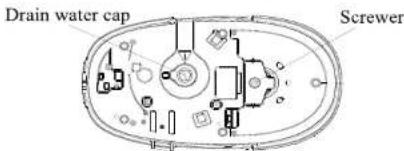
- To remove the mineral deposits collecting inside the steam generator, firstly put the iron horizontally on a level surface, then tilt the steam generator and unscrew the drain water cap with the attached screwer, and then drain the steam generator.
WARNING: To avoid a risk of scald, make sure the steam generator has cooled down completely before unscrewing the drain water cap. - After draining, screw the drain water cap light and put the steam generator right way up again
- If you don't plan to use the steam generator for a long time, pour out the water in the tank, and store the iron on the thermal insulating cushion.
- Wind the steam supply hose and power cord around the cord winding groove and secure it by the cord clamps.
DESCALING
To clear the iron of limescale build up put 2 x tablespoons (50ml) of vinegar into 1 litre of water. Mix thoroughly and add to the water tank. Operate the steam function of the iron for about 10 minutes (don't iron garments) to clear limescale build-up from internal components.
After descaling, empty the tank and rinse out. Drain any water from the base as directed above.
Bottom of steam generator

BS Plug Wiring
The wires in the mains lead are coloured in accordance with the following code:
BLUE NEUTRAL
BROWN
GREEN/YELLOW EARTH
As the colours of the wire in the mains lead of this appliance may not correspond with the colour markings identifying the terminals on your plug, proceed as follows: The wire which is coloured BLUE must be connected to the terminal which is marked with the letter N or coloured black. The wire which is coloured BROWN must be connected to the terminal which is marked with the letter L or coloured red. The wire which is coloured GREEN YELLOW must be connected to the terminal which is marked with the letter E or (earth symbol) and is coloured GREEN or GREEN YELLOW. WARNING: THIS APPLIANCE MUST BE EARTHED
WEEE Directive
Disposal of Unit

Disposal instructions for Swan items in accordance with the WEEE directive. Appliances bearing the symbol shown here may not be disposed of in domestic rubbish. You are required to dispose of old electrical and electronic appliances like this separately. Please visit www.recyclemore.co.uk, or www.recyclenow.co.uk for access to information about the recycling of electrical items. The WEEE directive, introduced in August 2006, states that all electrical items must be recycled, rather than taken to landfill. Please arrange to take this appliance to your local Civic Amenity site for recycling, once it has reached the end of its life.
Declaration of EC Conformity
We Swan Products Ltd Declare that this product conforms to all the following product legislation. In accordance with the following directive(s):
2004/108/EEC. The Electromagnetic Compatibility Directive
2006/95EC. The LVD directive (Low Voltage Directive)
2002/95/EC. The RoHS. Directive. (Restriction of Hazardous substances Directive)
Kev Stewart Product Manager

Two Year Warranty
This product is guaranteed for 2 years from the date of original purchase. If any defect arises due to faulty materials of workmanship the faulty products must be returned to the place of purchase. Refunds or replacement is at the discretion of the store.
The following conditions apply:
The product must be returned to the retailer with proof of purchase. The product must be installed and used in accordance with the instructions contained in this instruction guide. It must be used only for domestic purposes. It does not cover wear and tear, damage, misuse or consumable parts. Swan Products Ltd has limited liability consequential loss or damage. This guarantee is valid in the UK and Eire Only.
- HOW TO USE
- BEFORE FIRST USE
- FILLING THE TANK
- POWER UP
- STEAM RATE CONTROL BUTTONS
- TEMPERATURE DIAL
- TEMPERATURE INDICATOR
- STEAM RELEASE BUTTON
- LOW WATER INDICATOR
- DESCALING INDICATOR
- POWER SAVE FEATURE
- IRONING TIPS
- CLEANING AND MAINTAINANCE
- AFTER IRONING
- DESCALING
- BS PLUG WIRING
- WEEE DIRECTIVE
- DISPOSAL OF UNIT
- DECLARATION OF EC CONFORMITY
- TWO YEAR WARRANTY
- THE FOLLOWING CONDITIONS APPLY
Brand : SWAN
Model : SI4060N
Category : Heating