
DGE2403SC - Hot plate Avanti - Free user manual and instructions
Find the device manual for free DGE2403SC Avanti in PDF.


| Product Type | Gas Range with Electric Oven (Dual Fuel) |
| Brand | Avanti |
| Model | DGE2403SC |
| Fuel Type | Natural Gas or LP/Propane (field convertible) |
| Burners | 4 gas burners: 1 Auxiliary (3,500 BTU), 2 Semi-Rapid (6,000 BTU each), 1 Triple-Ring (12,000 BTU) |
| Oven Type | Multifunction electric oven with self-cleaning |
| Oven Functions | Convection, Traditional, Ventilated Double Broil, Broil, Ventilated Broil, Defrost, Self-Cleaning |
| Temperature Range | 120°F to 480°F (50°C to 250°C) |
| Ignition | Electronic ignition (spark) |
| Controls | Knobs for burners and oven functions, electronic programmer with digital display |
| Self-Cleaning | Pyrolytic self-cleaning cycle, door locks automatically during cycle |
| Oven Light | 25W, E14, 120V, 60Hz, high temperature (300°C) bulb |
| Electrical Requirements | 120V, 60 Hz, properly grounded |
| Gas Manifold Pressure | Natural Gas: 4.0" W.C.P.; LP/Propane: 11.0" W.C.P. |
| Drawer | Storage drawer with safety catch |
| Warranty | 1 year parts and labor (90 days for rental/commercial); 30 days on glass and finish |
| Manual Pages | 56 pages (English and Spanish) |
Frequently Asked Questions - DGE2403SC Avanti
User questions about DGE2403SC Avanti
0 question about this device. Answer the ones you know or ask your own.
Ask a new question about this device
Download the instructions for your Hot plate in PDF format for free! Find your manual DGE2403SC - Avanti and take your electronic device back in hand. On this page are published all the documents necessary for the use of your device. DGE2403SC by Avanti.
USER MANUAL DGE2403SC Avanti
for residential use only
DGE 2403 SC
- USERS OPERATING INSTRUCTIONS IMPORTANT - PLEASE READ AND FOLLOW


ENGLISH ESPAÑOL
IMPORTANT - PLEASE READ AND FOLLOW
√ Before beginning, please read these instructions completely and carefully.
√ Do not remove permanently affixed labels, warnings, or plates from the product. This may void the warranty.
√ Please observe all local and national codes and ordinances.
√ Please ensure that this product is properly grounded.
√ The installer should leave these instructions with the consumer who should retain for local inspector's use and for future reference.
Installation must conform with local codes or in the absence of codes, the National Fuel Gas Code ANSIZ223.1 - latest edition. Electrical installation must be in accordance with the National Electrical Code, ANSI/NFPA70 - latest edition and/or local codes. IN CANADA: Installation must be in accordance with the current CAN/CGA-B149.1 National Gas Installation Code or CAN/CGA-B149.2, Propane Installation Code and/or local codes. Electrical installation must be in accordance with the current CSA C22.1 Canadian Electrical Codes Part 1 and/or local codes.
INSTALLATION IN MANUFACTURED (MOBILE) HOME: The installation must conform with the Manufactured Home Construction and Safety Standard, Title 24 CFR, Part 3280 [formerly the Federal Standard for Mobile Home Construction and Safety, Title 24, HUD (Part 280)] or, when such standard is not applicable, the Standard for Manufactured Home Installations, ANSI/NCSBCS A225.1, or with local codes where applicable.
INSTALLATION IN RECREATIONAL PARK TRAILERS: The installation must conform with state or other codes or, in the absence of such codes, with the Standard for Recreational Park Trailers, ANSI A119.5.
Installation of any gas-fired equipment should be made by a licensed plumber. A manual gas shut-off valve must be installed in the gas supply line ahead of the appliance in the gas stream for safety and ease of service.
If an external electrical source is utilized, the appliance, when installed, must be electrically grounded in accordance with local codes or, in the absence of local codes, with the national Electrical Code, ANSI/NFPA 70.
This range is supplied with a protective film on steel and aluminium parts. This film must be removed before installing/using the appliance.



WARNING
- ALL RANGES CAN TIP
• INJURY TO PERSON COULD RESULT - INSTALL ANTI-TIP DEVICE PACKED WITH RANGE
• SEE INSTALLATION INSTRUCTIONS
WARNING: IF THE INFORMATION IN THIS MANUAL IS NOT FOLLOWED EXACTLY, A FIRE OR EXPLOSION MAY RESULT CAUSING PROPERTY DAMAGE, PERSONAL INJURY, OR DEATH.
√ Do not store or use gasoline or other flammable vapors and liquids in the vicinity of this or any other appliance.
√ WHAT TO DO IF YOU SMELL GAS:
- Do not try to light any appliance.
- Do not touch any electrical switch; do not use any phone in your building.
- Immediately call your gas supplier from a neighbor's phone. Follow the gas supplier's instructions.
- If you cannot reach your gas supplier, call the fire department.
√ Installation and service must be performed by a qualified installer, service agency, or the gas supplier.
Dear Customer,
Thank you for having purchased and given your preference to our product.
The safety precautions and recommendations reported below are for your own safety and that of others. They will also provide a means by which to make full use of the features offered by your appliance.
Please preserve this booklet carefully. It may be useful in future, either to yourself or to others in the event that doubts should arise relating to its operation.
This appliance must be used only for the task it has explicitly been designed for, that is for cooking foodstuffs. Any other form of usage is to be considered as inappropriate and therefore dangerous.
The manufacturer declines all responsibility in the event of damage caused by improper, incorrect or illogical use of the appliance.
GENERAL INFORMATION

WARNING!!
- This appliance shall not be used for space heating. This information is based on safety considerations.
- All openings in the wall behind the appliance and in the floor under the appliance shall be sealed.
- Keep appliance area clear and free from combustible materials, gasoline, and other flammable vapors.
- Do not obstruct the flow of combustion and ventilation air.
- Disconnect the electrical supply to the appliance before servicing.
- When removing appliance for cleaning and/or service;
A. Shut off gas at main supply.
B. Disconnect AC power supply.
C. Disconnect gas line to the inlet pipe.
D. Carefully remove the range by pulling outward.
CAUTION: Range is heavy; use care in handling.
7. Electrical Requirement
Electrical installation should comply with national and local codes.
8. Air Supply and Ventilation
The installer must refers to local/national codes.
9. Gas Manifold Pressure
Natural gas - 4.0" W.C.P.
LP/Propane - 11.0" W.C.P.
- The misuse of oven door (e.g. stepping, sitting, or leaning on them) can result in potential hazards and/or injuries.
- When installing or removing the range for service, a rolling lift jack should be used. Do not push against any of the edges of the range in an attempt to slide it into or out of the installation. Pushing or pulling a range (rather than using a lift jack) also increases the possibility of bending the leg spindles or the internal coupling connectors.

WARNING!!
ELECTRICAL GROUNDING INSTRUCTIONS
The range must be electrically grounded in accordance with local codes or, in the absence of local codes, with the National Electrical Code, ANSI/NFPA No. 70-latest edition. Installation should be made by a licensed electrician.
FOR PERSONAL SAFETY, THIS APPLIANCE MUST BE PROPERLY GROUNDED.
If an external electrical source is utilized, the installation must be electrically grounded in accordance with local codes or, in the absence of local codes, with the national Electrical Code, ANSI/NFPA 70.
REPLACEMENT PARTS
Only authorized replacement parts may be used in performing service on the range. Replacement parts are available from factory authorized parts distributors. Contact the nearest AVANTI parts distributor in your area.
IMPORTANT PRECAUTIONS AND RECOMMENDATIONS
After having unpacked the appliance, check to ensure that it is not damaged.
In case of doubt, do not use it and consult your supplier or a professionally qualified technician.
Packing elements (i.e. plastic bags, polystyrene foam, nails, packing straps, etc.) should not be left around within easy reach of children, as these may cause serious injuries.
The packaging material is recyclable and is marked with the recycling symbol ⬆.
√ Do not attempt to modify the technical characteristics of the appliance as this may become dangerous to use.
√ Do not carry out cleaning or maintenance operations on the appliance without having previously disconnected it from the electric power supply.
√ After use, ensure that the knobs are in OFF position.
√ Do not allow children or other incapable people to use the appliance without supervision.
√ During and after use of the range, certain parts will become very hot. Do not touch hot parts.
√ Keep children away from the range when it is in use.
√ This range is supplied with a protective film on steel and aluminium parts. This film must be removed before installing/using the appliance.
√ Fire risk! Do not store flammable material in the oven, and in the drawer.
√ Make sure that electrical cables connecting other appliances in the proximity of the range cannot come into contact with the hob or become entrapped in the oven door.
√ Do not line the oven walls with aluminium foil. Do not place shelves, grill-pan, pans or other cooking utensils on the base of the oven chamber.
√ The manufacturer declines all liability for injury to persons or damage to property caused by incorrect or improper use of the appliance.
√ To avoid any possible hazard, the appliance must be installed by qualified personnel only. Any repairs by unqualified persons may result in electric shock or short circuit. In order to avoid possible injuries to your body or to the appliance, do not attempt any repairs by yourself. Such work should be carried out by qualified service personnel only.
√ Danger of burns! The oven and cooking accessories may become very hot during operation. Make sure children are kept out of reach and warn them accordingly. To avoid burns use kitchen clothes and gloves when handling hot parts or utensils.
√ Stand away from the range when opening oven door. Hot air or steam which escapes can cause burns to hands, face, and/or eyes.
√ Never clean the oven with a high-pressure steam cleaning device, as it may provoke a short circuit.
√ This appliance is intended for use in your household. Never use the appliance for any other purpose!
√ If you should decide not to use this appliance any longer (or decide to substitute an older model), before disposing of it, it is recommended that it be made inoperative in an appropriate manner in accordance to health and environmental protection regulations, ensuring in particular that all potentially hazardous parts be made harmless, especially in relation to children who could play with old appliances. Remove the door before disposal to prevent entrapment.
IMPORTANT PRECAUTIONS AND RECOMMENDATIONS FOR USE OF ELECTRICAL APPLIANCES
Use of any electrical appliance implies the necessity to follow a series of fundamental rules. In particular:
√ Never touch the appliance with wet hands or feet;
√ Do not operate the appliance barefooted;
√ Do not allow children or disabled people to use the appliance without your supervision.
The manufacturer cannot be held responsible for any damages caused by improper, incorrect or unreasonable use of the appliance.
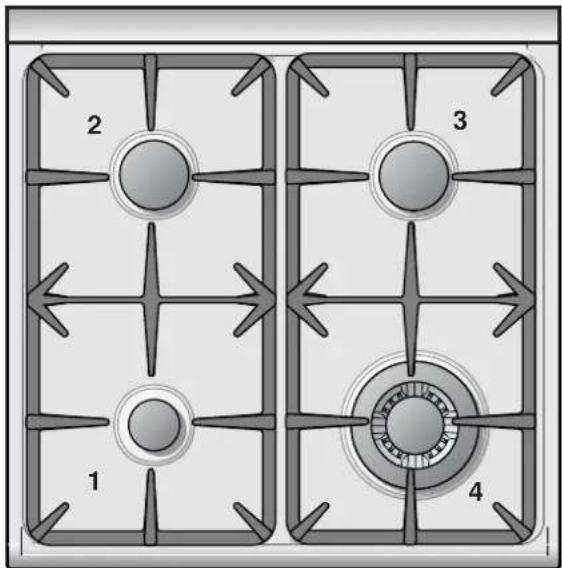
Fig. 1.1
COOKING HOB
- Auxiliary burner (AUX) - 3500 BTU/hr
- Left semi-rapid burner (SR) - 6000 BTU/hr
- Right semi-rapid burner (SR) - 6000 BTU/hr
- Triple-ring burner (TR) - 12000 BTU/hr
Note:
- The electric gas-lighting device is incorporated into the knobs.
CAUTION:
If the burner is accidentally extinguished, turn the gas off at the control knob and wait at least 1 minute before attempting to relight.
CAUTION:
Gas appliances produce heat and humidity in the environment in which they are installed.
Ensure that the cooking area is well ventilated following national/local codes.
CONTROL PANEL
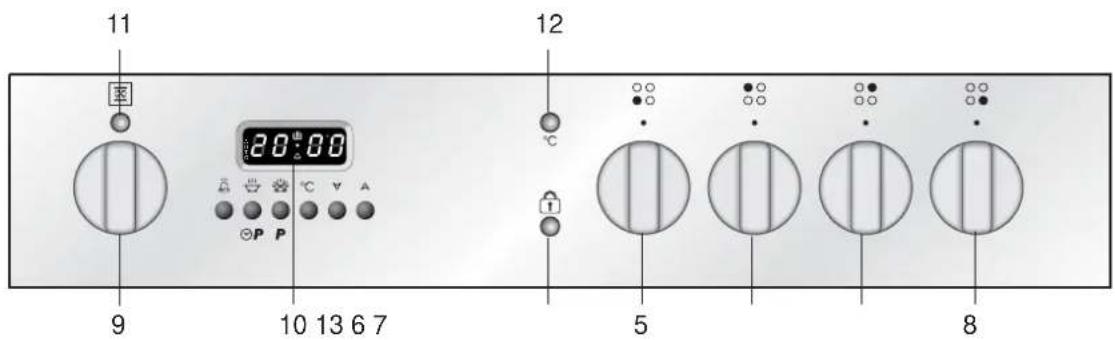
CONTROLS DESCRIPTION
Cooking hob controls:
- Front left burner (1) control knob
- Rear left burner (2) control knob
○ ○ ● ○ - Rear right burner (3) control knob
● ○ ○ ○ - Front right burner (4) control knob
○● ○○
○ ○ ○ ●
Oven controls:
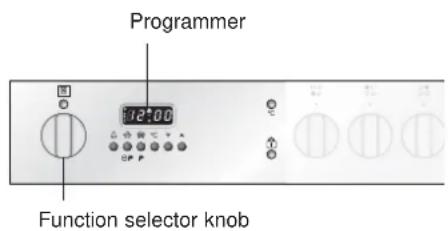
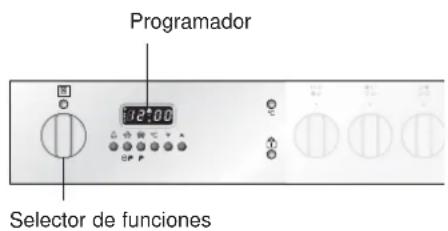
- Function selector knob
- Electronic programmer
- Line pilot light
- Temperature pilot light
- Door locked pilot light
GAS BURNERS
Gas flow to the burners is adjusted by turning the knobs (illustrated in fig. 2.1) which control the valves.
Turning the knob so that the symbol printed on itself points to the symbols printed on the control panel achieves the following functions:
OFF = closed valve
★ H = maximum rate
LO = m inimum rate
The maximum aperture position permits rapid boiling of liquids, whereas the minimum aperture position allows simmer warming of food or maintaining boiling conditions of liquids.
Toreduce the gas flow to minimum, rotate the knob further anti-clockwise to point the indicator towards the position.
Other intermediate operating adjustments can be achieved by positioning the indicator between the maximum and minimum aperture positions, and never between the maximum aperture and 0.05
N.B. When the range is not being used, set the gas knobs to their positions and also close the gas shut-off valve placed on the main gas supply line.
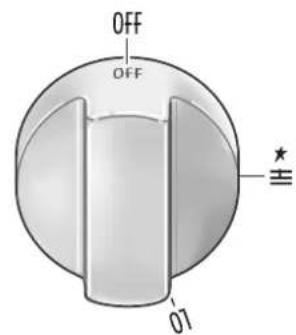
Fig. 2.1
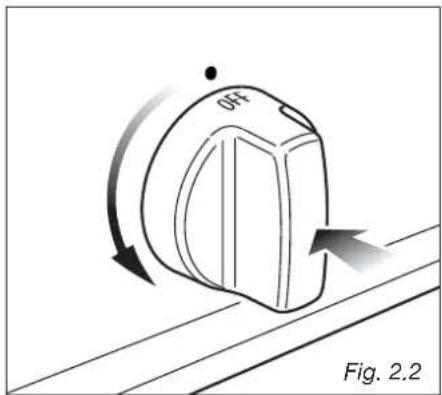
In order to light the burner, you must:
1 - Turn the knob in an anti-clockwise direction up to the passion (maximum rate), push in and hold the knob until the flame has been lit (fig. 2.2).
The sparks produced by the lighter situated inside the relative burner will light the flame.
In the event that the local gas supply conditions makes it difficult to light the burner in position, try again with the knob in position.
If there is no mains electrical supply, bring a lighted match close to the burner.
2 - Adjust the gas valve to the desired position.
Tore-light the burner, return the knob to the position and repeat the operations for lighting.
Caution!
The range becomes very hot during operation.
Keep children well out of reach.
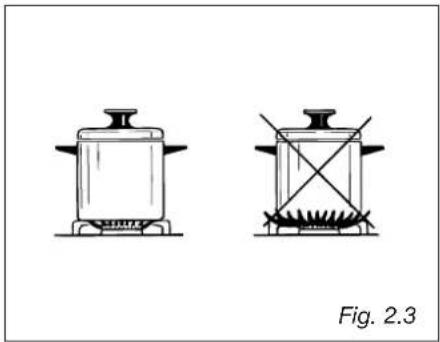
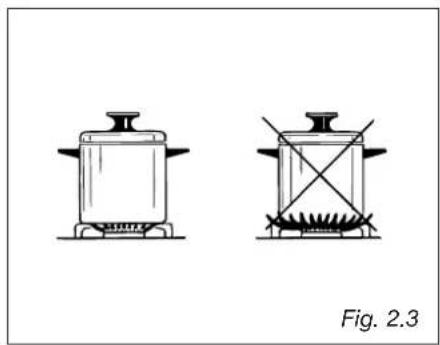
CHOICE OF BURNER (fig. 2.3)
The symbols printed on the panel beside the gas knobs indicate the correspondence between the knob and the burner.
The most suitable burner is to be chosen according to the diameter and volume capacity of the container to be warmed.
It is important that the diameter of the pots or pans suitably match the heating potential of the burners in order not to jeopardise the efficiency of the burners, bringing about a waste of gas fuel.
A small diameter pot or pan placed on a large burner does not necessarily mean that boiling conditions are reached quicker.
| DIAMETERS OF PANS WHICH MAY BE USED ON THE HOB BURNERS |
| BURNER MINIMUM MAX. |
| Auxiliary 12 cm (4" 23/32) 14 cm (5" 1/2) |
| Semirapid 16 cm (6" 19/64) 24 cm (9" 7/16) |
| Triple-ring 26 cm (10" 15/64) 28 cm (11" 1/64) |
| Wok pans max 36 cm (14" 11/64) |
| Do not use pans with concave or convex bases |
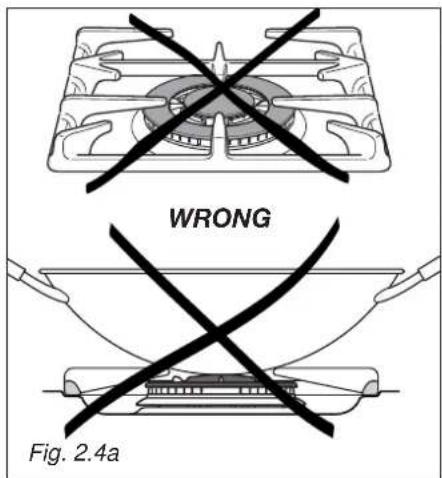
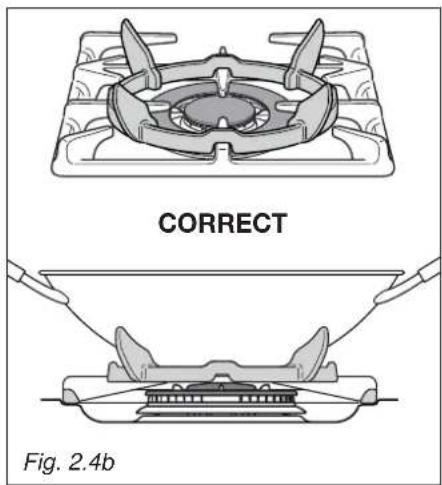
CORRECT USE OF TRIPLE-RING BURNER (Fig. 2.4a - 2.4b)
The flat-bottomed pans are to be placed directly onto the pan-support.
When using a WOK you need to place the supplied stand in the burner to avoid any faulty operation of the triple-ring burner (Fig. 2.4a - 2.4b).
IMPORTANT:
The special grille for wok pans (fig. 2.4b) MUST BE PLACED ONLY over the pan-rest for the triple-ring burner.

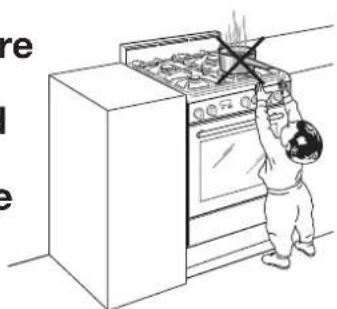
Make sure that the handles of cookware do not stick out over the edge of the cooker, to avoid them being knocked over by accident. This also makes it more difficult for children to reach the cooking vessels.
GENERAL FEATURES
This oven has special operating features.
5 different functions can be used to satisfy all cooking needs; it also has a self cleaning function which can clean the oven cavity at high temperature, a defrost function and an oven light function.
These functions are managed by an electronic programmer which keeps the temperature set constant by means of a probe inside the oven cavity.
The oven has the following heating elements:
- Lower heating element (double) 500+1300 W
- Upper heating element 1000 W
- Grill heating element 2000 W
Attention: the oven door becomes very hot during operation.
Keep children away.
VERY IMPORTANT
The oven shall be used always with the door closed.
USING THE OVEN FOR THE FIRST TIME
- Put in the shelf and the tray.
- Switch the oven on empty (on a cooking function – NOT SELF CLEANING) at maximum power for about 2 hours to remove traces of grease and smells from the components.
- When the oven has cooled down and unplugging the range, clean the inside of the oven with a cloth soaked in water and neutral detergent and dry it perfectly.
WARNING:
The door is hot, use the handle.
OPERATING PRINCIPLES
Heating and cooking in the multifunction self cleaning oven takes place as follows:
• b y normal convection
The heat is produced by the upper and lower heating elements.
• b y semi-forced convection
The heat produced by the upper and lower heating elements is distributed throughout the oven by the fan.
- by radiation
The heat is radiated by the infra red grill element.
- by radiation and fan
The radiated heat from the infra red grill element is distributed throughout the oven by the fan.
• by double radiation and fan
The fan distributes the heat radiated by the grill heating element and the upper heating element in the oven.
- by ventilation
The food is defrosted by using the fan only function without heat.
- by self cleaning
The heat produced by the heating elements cleans the internal oven cavity removing all residue of grease.
THIS IS NOT A COOKING FUNCTION
NOTES ON OVEN WORKING
A cooling fan starts automatically when selecting a cooking or self cleaning mode. It stops when turning the selector knob to OFF or light or defrosting position and th inside oven cavity temperature drops below 100 °C (212 °F).
The purpose of this fan is to reduce the temperature inside/outside the appliance.
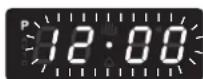
Note: The first time the oven is used or after a black-out the programmer must be started by pressing keys 2 and 3 simultaneously. See the chapter on the use of the electronic programmer.

P P
![graph TD A["OFF"] --> B["OFF"] B --> C["P"] C --> D["X"] D --> E["X1"] E --> F["X2"] F --> G["X3"] G --> H["X4"] H --> I["X5"] I --> J["X6"] J --> K["X7"] K --> L["X8"] L --> M["X9"] M --> N["X10"] N --> O["X11"] O --> P["X12"] P --> Q["X13"] Q --> R["X14"] R --> S["X15"] S --> T["X16"] T --> U["X17…](/content/2026/06/1188127/images/16104557e6d2f3caf04abf06b785d90dc209a1e93bcd7c22a7748d5813bcdbd1.jpg)
Fig. 3.1
SELECTING THE FUNCTIONS (fig. 3.1)
The cooking function is selected by turning the function selector knob and matching the mark with the symbol printed on the print.
Important: In all cooking functions the oven must always be used with the DOOR CLOSED.

If the door stays open "door" appears on the programmer display and after five minutes an audible warning sounds for 30 seconds and "door" flashes.
To silence the audible warning press any programmer pushbutton.
NOTE: The heating elements work even with the door open and this signal just indicates that energy is being wasted and the control panel/knobs are excessively heated.

OVEN LIGHT
On turning the knob to this position only the oven lamp lights up.
The lamp is always on in all the cooking functions (not for the self cleaning).

DEFROSTING FROZEN FOODS (this is not a cooking function)
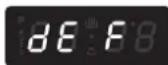
Only the fan and the oven lamp switch on. Defrosting takes place by fan, without heating. The electronic programmer shows dEF
Recommended for:
To rapidly defrost frozen foods; 2.2 lb (1 kg) requires about one hour.
The defrosting times vary according to the quantity and type of foods to be defrosted.

CONVECTION COOKING WITH VENTILATION
The upper and lower heating elements and the fan switch on. The heat from the top and the bottom is diffused by fan convection. The temperature can be set between 120 °F (50 °C) and 480 °F (250 °C).
On selecting this function the electronic programmer starts cooking with a pre-heating temperature set at 320 °F (180 °C). To vary the temperature see the “Setting the cooking” chapter.
Recommended for:
For foods of large volume and quantity which require the same internal and external

TRADITIONAL CONVECTION COOKING
The upper and lower heating elements switch on.
The heat is diffused by natural convection and the temperature must be set between 120 °F (50 °C) and 480 °F (250 °C). On selecting this function the electronic programmer starts cooking with a pre-heating temperature set at 350 °F (200 °C). To vary the temperature see the “Setting the cooking” chapter.
Recommended for:
For foods which require the same cooking temperature both internally and externally, i.e. roasts, spare ribs, meringue, etc.

VENTILATED COOKING WITH DOUBLE BROIL
The infrared element, the upper heating element and the fan switch on. The heat is mainly diffused by radiation and the fan distributes it in the whole oven. The temperature can be set between 120 °F (50 °C) and 480 °F (250 °C).
On selecting this function the electronic programmer starts cooking with a pre-heating temperature set at 480 °F (240 °C). To vary the temperature see the “Setting the cooking” chapter.
Recommended for:
Meats which are to be cooked at a high temperature but which must remain tender. Fish remains more tender; turn it once during cooking.

BROILING
The infrared heating element switches on.
The heat is diffused by radiation. The temperature can be set between 120 °F (50 °C) and 480 °F (250 °C). On selecting this function the electronic programmer starts cooking with a pre-heating temperature set at 480 °F (210 °C). To vary the temperature see the "Setting the cooking" chapter.
Recommended for:
Intense broiling action for cooking with the broiler; browning, crisping, "au gratin", toasting, etc. For correct use see the "Grilling" chapter.

VENTILATED BROILING
The infrared heating element and the fan switch on. The heat is mainly diffused by radiation and the fan distributes it in the whole oven.
The temperature can be set between 120 °F (50 °C) and 480 °F (250 °C).
On selecting this function the electronic programmer starts cooking with a pre-heating temperature set at 480 °F (220 °C). To vary the temperature see the "Setting the cooking" chapter.
Recommended for:
For grill cooking when a fast outside browning is necessary to keep the juices in, i. e. veal steak, steak, hamburger, etc. For correct use see the "Fan grilling" chapter.

SELF CLEANING FUNCTION
IMPORTANT NOTES:
This is not a cooking function but is only used to clean the oven.
Before starting the self cleaning cycle:
- Take all the accessories out of the oven (drip tray and shelves).
- Clean any traces of liquid which have overflowed.
- Close the oven door and make sure that it is closed properly.
If there are cracks or flaws on the oven door glass (inside/outside) or if the gaskets are ruined or worn or if the door does not close perfectly, unplug the appliance and contact the AVANTI Service Centre.
GENERAL INFORMATION
- In this function the residual cooking greases on the inside walls of the oven cavity are pulverised by the high temperature. The fumes produced during this process are filtered by a special catalyst in the upper part of the appliance.
- Smells and fumes produced during self cleaning are not a cause of alarm. Adequate ventilation should however be provided in the room where the oven is installed, e.g. by opening a window.
- Do not wait for the oven to be very greasy before performing this cleaning. It should not be performed after every cooking, either, but only when the level of dirt justifies it (on average 1 – 2 times a month depending on oven use).
- For safety reasons (high temperature of the oven cavity), when the self cleaning starts the oven door is automatically locked by an electronic device (after about 30 seconds on the control panel the pilot light with key symbol lights up). The door can no longer be opened and is only unlocked at the end of the cleaning cycle or, stopping the cycle, when the oven cavity has cooled to a temperature lower than 570°F (300 °C).
- When the self cleaning function starts an internal fan starts automatically to cool the oven walls. It only stops at the end of the cycle, when the oven cavity temperature has dropped below 212 °F (100 °C).
- The procedures for starting, stopping and completing the self cleaning cycle and dealing with any problems are described in the following chapters:
- "How to start the self cleaning cycle"
- "Problems on starting and during the self cleaning cycle"
- "How to stop the self cleaning cycle"
- "What to do when the self cleaning cycle has finished"
- "Abnormal situations and/or operating problems"
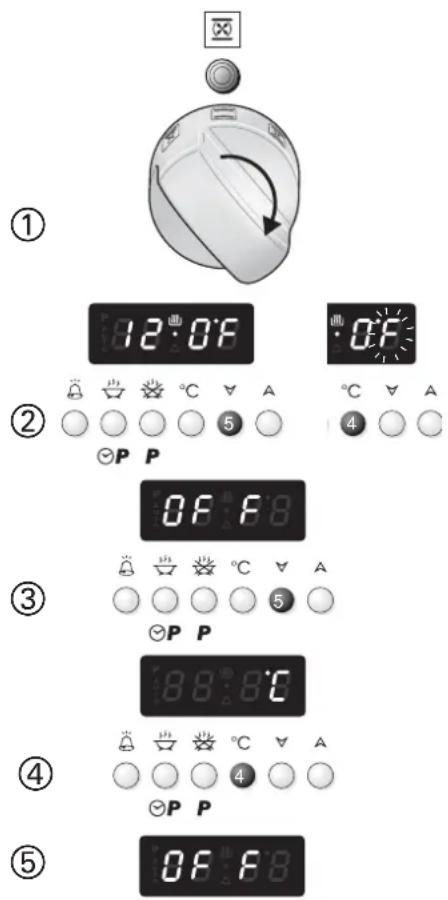
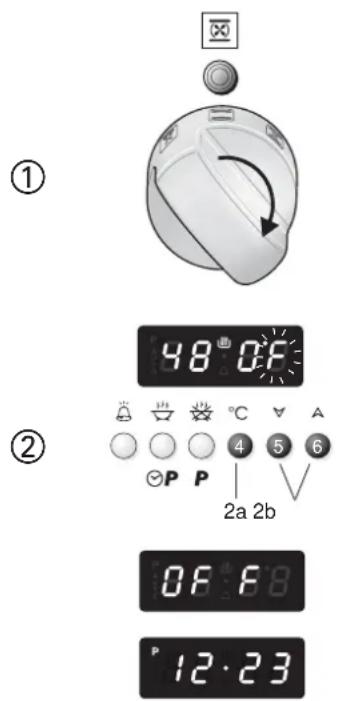
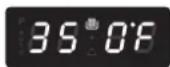
SELECTING °F/°C ON THE DISPLAY
- Turn the oven selector knob to a cooking function (i.e. convection cooking).
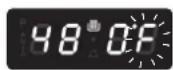
- Press key 5 on the programmer to reduce a temperature until you reach the minimum value (120 °F/50 °C). If °F/°C is not flashing on the display press key 4 of the programmer before pressing key 5.
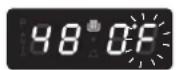
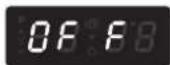
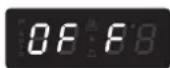
- With °F/°C flashing on the display press key 5 again (if °F/°C is not flashing press key 4 before pressing key 5) until OFF appears on the display.
- Keep key 4 pressed for about 3/5 seconds until the display changes from °C to °F or vice versa. During selection °C or °F is flashing.
- When OFF appears again on the display turn the selector knob to OFF position; the selection to °C or °F has been completed.
SETTING THE COOKING (ONLY FOR THE COOKING FUNCTIONS)
The temperature set is shown on the electronic programmer display and can be varied, with 5 °F (5 °C) intervals, by means of the programmer keys.
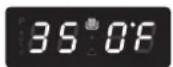
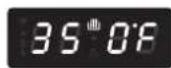
During the cooking the oven temperature ( ° F or ° C) is measured by a sensor inside the cavity and is shown on the programmer display until setted temperature is reached. If setted temperature is less than inside oven temperature, the display shows the setted temperature.
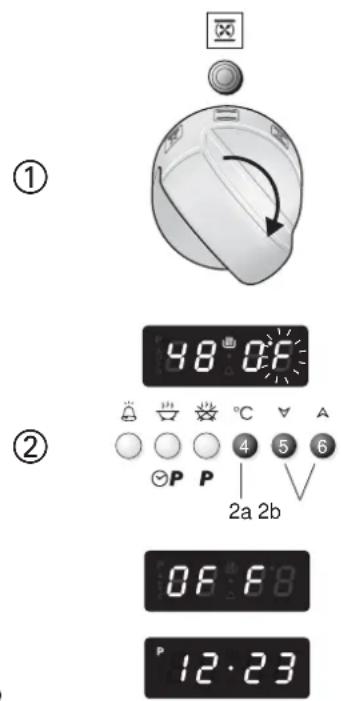
1. SELECTING THE COOKING FUNCTION
Turn the selector knob to the cooking function required
The pre-set temperature appears on the programmer display. °F or °C flashes on the display for 3 seconds. The heating elements start cooking immediately.
2. SETTING THE COOKING TEMPERATURE
The temperature can be changed when °F or °C is flashing on the display
2a. If °F or °C is not flashing press key 4 of the programmer.
2b. Press key 6 to increase the temperature or key 5 to reduce it.
The maximum temperature which can be set is 480\ °F ( 250\ °C ) while the minimum temperature is 120\ °F ( 50\ °C ).
Note: When °F or °C becomes steady the value shown on the display indicates the oven cavity temperature until setted temperature is reached. If setted temperature is less than inside oven temperature, the display shows the setted temperature.
Caution: If a temperature below the minimum value (120 °F or 50 °C) is set the system switches off automatically and OFF appears.
In this case repeat the procedure from point 2.
3. SWITCHING OFF
Turn the selector knob to position OFF (oven OFF). The programmer display shows the time.
HOW TO START THE SELF CLEANING CYCLE
Important: the self cleaning cycle must only be performed with the oven empty; so, before starting the cycle take all the accessories (shelves, drip tray, ...) out of the oven cavity and dry any traces of overflowed liquid.
Do not use any degreasing products (e.g. degreasing sprays, detergents, etc.).
- Close the oven door (if it is open or not closed properly the self cleaning cycle will not start).
-
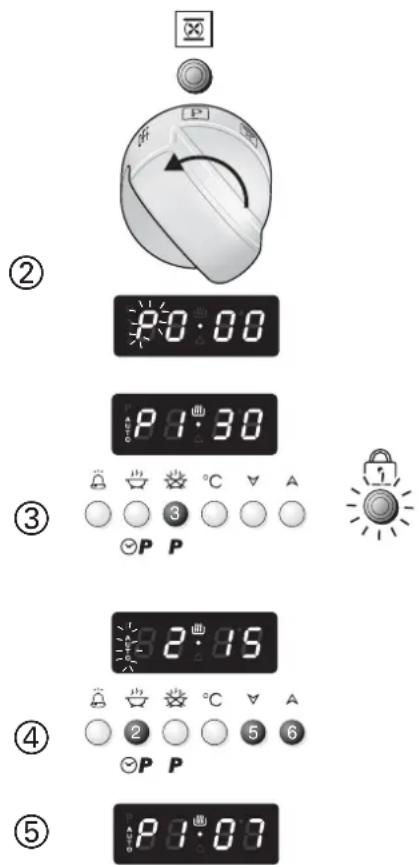
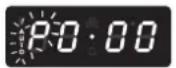
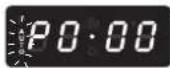
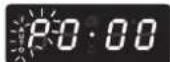
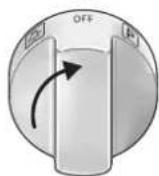
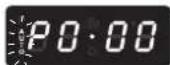
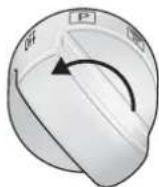
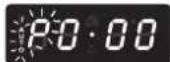
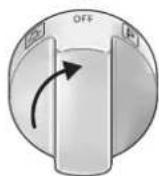
Turn the oven selector knob to the self cleaning position (P); P0-00 appears on the electronic programmer display with the letter P flashing.
-
Press pushbutton 3 on the programmer to start the cycle.
This combined confirmation operation offers greater safety when there are children; in fact turning the knob to the self cleaning function has no effect if key 3 of the programmer is not then pressed.
- P1·30 (self cleaning time, 1 hour and 30 minutes) appears and the door is locked after about 30 seconds;
- On the control panel the pilot light with the key lights up to indicate that the door is locked.
- To increase the self cleaning cycle time (max 5 hours) press key 2 of the programmer then key 6. To go backwards to the minimum of 1 hour and 30 minutes press key 2 then key 5.
- During the setting AUTO flashes and P disappears.
- The self cleaning cycle starts immediately and is completed in the programmed time.
- Throughout the self cleaning cycle the programmer displays the time (hours and min-
VERY IMPORTANT:
The self cleaning cycle only starts with the oven door closed. If the door is open or not closed properly the oven CANNOT perform the self cleaning cycle; electronic safety devices prevent the self cleaning cycle from starting.
PROBLEMS ON STARTING AND DURING THE SELF CLEANING CYCLE
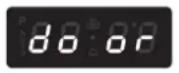


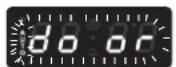

1. Steady door
The function selector has been turned to the self cleaning position with the oven door open or not perfectly closed. Or the door has been opened before the cycle has been started with confirmation from key 3
What to do:
Close the door and repeat previous cycle.
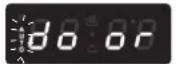
- If after 5 minutes the door has not been closed door flashes and an audible signal sounds for 30".
What to do:
Close the door, press any programmer key to silence the audible signal and repeat the operations to start the cycle.
2. door with AUTO flashing
The oven door has been opened after the self cleaning cycle has started (before locking the door). The self cleaning cycle is zeroed.
What to do:
- Close the door. P0·00 appears on the electronic programmer display with the letter P and AUTO flashing.
- Turn the function selector to OFF and repeat the operations to start the cycle.
- If after 5 minutes the door has not been closed door flashes and an audible signal sounds for 30".
What to do:
Close the door, press any programmer key to silence the audible signal and repeat the operations to start the cycle.
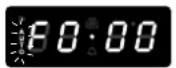
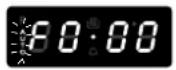
3. F0.00 with AUTO flashing
The self cleaning cycle has been stopped and then started again when it was quite a way through. The message is displayed after about 10 minutes and the self cleaning cycle is zeroed.
What to do:
- Put the switch to OFF.
- Wait for at least 15 minutes.
- Repeat the operations to start the self cleaning cycle.
- If after several attempts the message continues contact the AVANTI Service Centre.
Caution: It is advisable not to stop the self cleaning cycle and then start it again when it is quite a way through.
HOW TO STOP THE SELF CLEANING CYCLE
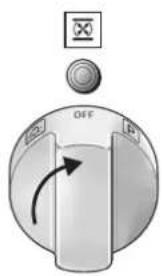
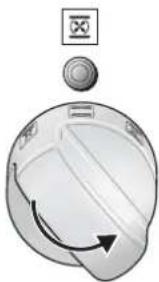
1. Turn the function selector to OFF (oven OFF)
- If the oven cavity temperature is higher than 570 °F (300 °C)
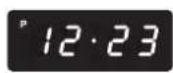
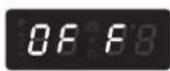
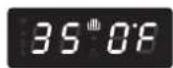
1a. The time of day appears steadily on the programmer display.
1b. When the oven cavity temperature drops below 570 °F (300 °C):
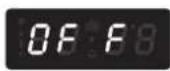
- OFF appears on the programmer display again
- the key pilot light goes out
- the door unlocks and can be opened
- If the oven cavity temperature is lower than 570 °F
1c. The time appears on the programmer display
1d. After a technical time:
- the key pilot light goes out
- the door unlocks and can be opened
IMPORTANT: Wait for the oven to cool down completely before starting a cooking function.
ACCIDENTAL INTERRUPTION OF THE SELF CLEANING CYCLE
2. The function selector has been turned to any cooking function
- If the oven cavity temperature is higher than 570 °F (300 °C)
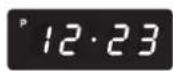
2a. The time of day appears steadily on the programmer display.
2b. When the oven cavity temperature drops below 570 °F (300 °C):
OFF appears on the programmer display
- when key pilot light goes out (after some minutes) the door unlocks and can be opened
2c. To reset normal conditions turn the function selector to OFF (oven OFF). The time appears on the programmer display.
- If the oven cavity temperature is lower than 570 °F (300 °C)
2d. Pre-set temperature of the selected function appears on the programmer display.
2e. After a technical time:
- the key pilot light goes out
- the door unlocks and can be opened
2f. To reset normal conditions turn the function selector to OFF (oven OFF). The time appears on the programmer display.
IMPORTANT: Wait for the oven to cool down completely before starting a cooking function.
①
1a
1b
②
2a
2b
3d
WHAT TO DO WHEN THE SELF CLEANING CYCLE HAS FINISHED
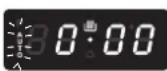
- P0.00 with AUTO flashing.
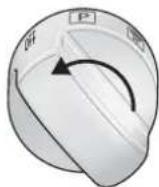
Wait for the oven to cool down and the door to unlock.
The self cleaning cycle has finished. P0.00 will remain until the door is unlocked. The door remains locked until the cavity temperature has dropped below 570 °F (300°C).
- The light with the key symbol goes out (when the temperature has dropped below 570 °F - 300 °C).
AUTO and the letter P flash.
The door is unlocked and can be opened.
- Turn the function selector knob to OFF (oven OFF).
The time appears on the programmer display.
-
Wait for the oven to cool down completely.
-
Remove the pulverised dirt.
Open the oven door and remove the residue of pulverised dirt inside the oven with a damp cloth.
IMPORTANT: Before switching the oven on again in any function wait for the appliance to cool down completely.
①
×
②
[NO TEXT]
The image is too blurry to recognize any text content.
③
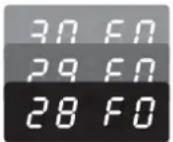
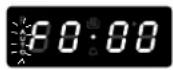

ABNORMAL SITUATIONS AND/OR OPERATION PROBLEMS
during cooking or the self cleaning cycle.
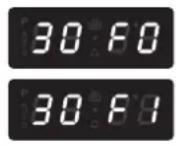
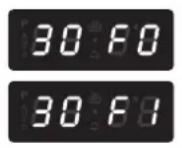
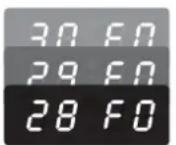
1. 30 F0 or 30 F1 appear during the cooking or self cleaning cycle
Oven temperature sensor broken or not working properly. The cooling fan stays on and if the self cleaning cycle is in progress the door remains locked.
What to do:
- Turn the oven function selector to OFF (oven OFF). A30 minute countdown will start. If the selector is turned and then returned to OFF the count will start again from 30.
- Wait for the countdown to finish.
The fan switches off and the door, if locked, unlocks. - Disconnect the oven from the mains and contact the AVANTI After-Sales Service Centre because the oven can no longer be used.
Caution: If the function selector is not turned to OFF (oven OFF), the cooling fan will continue to work and the oven door, if locked, remains locked.
2. F0.00 appears during the self cleaning cycle
This indicates a temperature sensor measurement error during the self cleaning cycle. This may be due to the self cleaning cycle being stopped and started again when it was quite a way through.
What to do:
- Turn the oven selector knob to OFF (oven OFF).
- Wait for at least 15 minutes before repeating the operations to start the self cleaning cycle.
- If the message is still given after several attempts call the AVANTI After-Sales Service.
3. Display OFF - Oven not working properly.
What to do:
- Turn the function selector to OFF (oven OFF)
- Wait for the oven to cool down completely so that the door opens
- Switch the range off for a few seconds.
If after this procedure the display is still off:
4. Disconnect the range from the mains.
5. Call the AVANTI Service Centre. The range must not be used.
COOKING ADVICE
STERILIZATION
Sterilization of foods to be conserved, in full and hermetically sealed jars, is done in the following way:
a. Turn the switch to position .
b. Set the thermostat knob to position 350 °F (175 °C) and preheat the oven.
c. Fill the grill pan with hot water.
d. Set the jars into the grill pan making sure they do not touch each other and the door and set the thermostat knob to position 260 °F (130 °C).
When sterilization has begun, that is, when the contents of the jars start to bubble, turn off the oven and let cool.
REGENERATION
Turn the switch to position and set the temperature to 300 °F (150 °C).
Bread becomes fragrant again if wet with a few drops of water and put into the oven for about 10 minutes.
ROASTING
Toobtain classical roasting, it is necessary to remember:
– the pre-set temperature should be maintained
– that the cooking time depends on the quantity and the type of foods.
COOKING DIFFERENT DISHES AT THE SAME TIME
The MULTIFUNCTION oven at positions ☐ the function selector can cook various different foods at the same time. Fish, cakes and meat can be cooked together without the smells and flavours mixing.
The only precautions required are the following:
- The cooking temperatures must be as close as possible with a maximum difference of 70 - 80°F (20-25 °C) between the different foods.
- D different dishes must be placed in the oven at different times according to the cooking time required for each one. This type of cooking obviously provides a considerable saving on time and energy.
VENTILATED BROILING AND "AU GRATIN"
Broiling may be done by selecting ☑ with the function selector knob, because the hot air completely envelops the food that is to be cooked.
Set the temperature if a temperature different from the pre-set one is required.
Introduce the food to be cooked, positioning the grill pan as close to the infra-red element as possible.
Close the door and let the oven operate until broiling is done.
Adding a few dabs of butter before the end of the cooking time gives the golden "au gratin" effect.
Broiling with the oven door closed.
IMPORTANT: Use always special handles supplied with the appliance to insert/remove the grill-pan from the oven (see next page)
BROILING
Set the function selector knob to position ☐
Set the temperature if a temperature different from the pre-set one is required.
Leave to warm up for approximately 5 minutes with the door closed.
Introduce the food to be cooked, positioning the grill pan as close to the infra-red element as possible.
Broiling with the oven door closed.
IMPORTANT: Use always special handles supplied with the appliance to insert/remove the grill-pan from the oven (see next page)

WARNING!!
KEEP ATTENTION MOST IMPORTANT
It is advisable to handle the oven accessories using oven gloves.
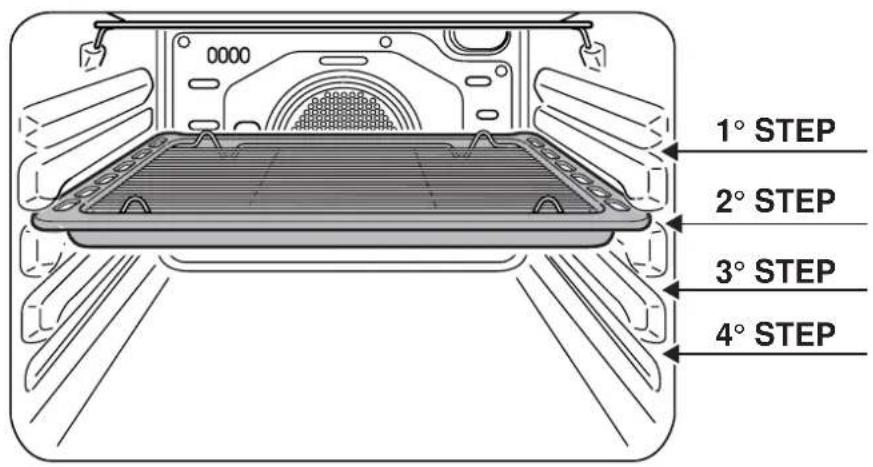
Fig. 3.2
USING THE GRILL PAN FOR BROILING
- Set the function selector knob to broil position as explained in the preceding paragraphs and let the broil element preheat for about 5 minutes with the door closed.
- Place the food to be cooked above the grill-pan grid.
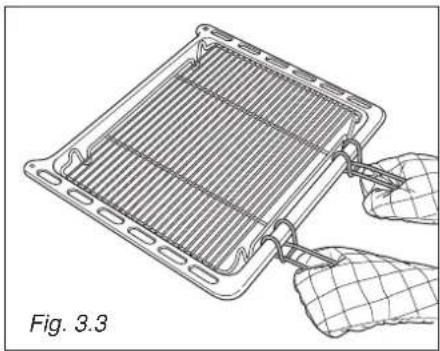
- Introduce the grill-pan (tray + grid) in the oven (fig. 3.3) and insert it on the first or second level from the top (fig. 3.2).
Do not broil without using the grill pan.
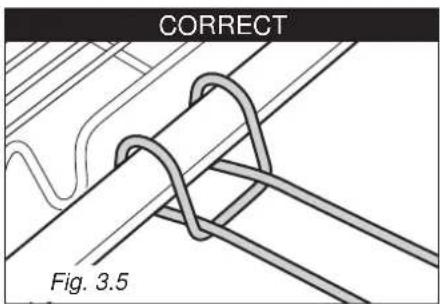
Important: Use always special handles supplied with the appliance to insert/remove the grill-pan from the oven (figs. 3.3, 3.4, 3.5).

The electronic programmer is a device which groups together the following functions:
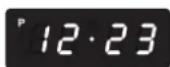
- 12 hours clock with illuminated display (P on the display for PM time indication).
- T imer (up to 23 hours and 59 minutes).
– Program for semi-automatic oven cooking.
– Program for automatic oven cooking. - Management of the cooking functions. The programmer can manage setting the temperature in the various cooking functions.
- Management of the self cleaning function.
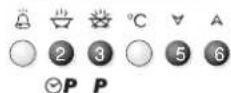
Description of the pushbuttons:

Timer (1)

Cooking time or self cleaning time (2)

End of cooking time or allowance to start self cleaning cycle (3)

Setting oven temperature (4)

Countdown of the figures of all the functions or of the temperature to be set (5)

Advance of the figures of all the functions or of the temperature to be set (6).
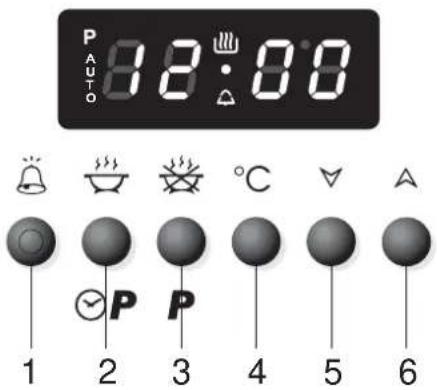
Fig. 4.1
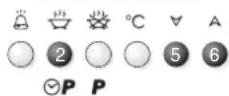
Description of the light symbols:
AUTO Indicates that a program has been set

Indicates that the heating elements are working

Indicates that the timer is working
P Indicates PM time
ON SWITCHING ON FOR THE FIRST TIME OR AFTER A BLACK-OUT
After the appliance has been connected to the mains or after there has been a black-out the programmer must be activated so that it can work.
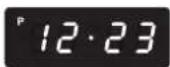
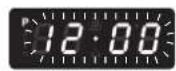
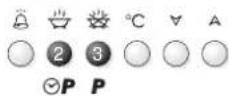
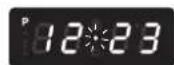
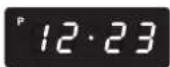
12:00 flashes on the display.
- Press keys 2 and 3 at the same time. The programmer starts to work.
SETTING THE TIME
The programmer has an electronic clock (12 hours) with luminous figures which indicate hours and minutes.
Note: Setting the clock will zero any programmes in progress or set.
-
Press pushbuttons 2 and 3 at the same time.
-
Press pushbuttons 5 or 6 until the exact time is set. During this phase the dot between hours and minutes will flash on the display. If the plus or minus keys are kept pressed for a few seconds, the figures will scroll more quickly.
P on the display indicates PM time.
AUDIBLE SIGNAL
The intermittent audible signal, duration 30 seconds, sounds when the timer or semi-automatic or automatic cooking have reached the end of the time set. It also sounds to signal that the door is open (see oven use chapters).
Tosilence the audible signal press any of the programmer keys

TIMER
The timer function is only used to count the time and does not influence oven operation or any programmes which are in progress or set.
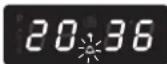
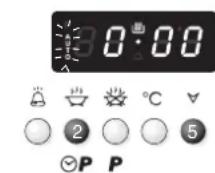
- Press pushbutton 1. The bell symbol will start to flash.
- Press keys 5 or 6 to set the time required.
- The countdown starts immediately. The bell symbol stops flashing and the time appears again.
- To see the countdown press pushbutton 1. The time will be indicated in hours and minutes; the seconds are only indicated for the last minute.
- At the end of the countdown an audible signal sounds and the bell symbol on the display flashes.
Press any pushbutton to stop the audible signal.
IMPORTANT WARNING: This function is only an electronic alarm and does not switch OFF the oven. Remember to turn OFF manually the selector knob at the end of the countdown.
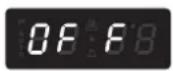
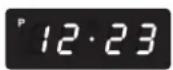
SEMI-AUTOMATIC COOKING
Start immediate cooking and switch the oven off automatically after the programmed cooking time.
Setting
- Set the cooking function by turning the oven selector to the function required.
- The cooking temperature appears on the display. To change it proceed as described in the Setting the cooking chapter
- Press pushbutton 2. AUTO starts to flash and 0.00 appears.
- Press pushbuttons 5 or 6 to set the cooking time (cooking time in hours and minutes: set it to ten minutes less than the time required because the stored heat will complete the cooking).
- On the display AUTO becomes steady and the cooking programme starts.
During cooking
- During the cooking cycle, the display shows the oven temperature measured by the probe or pre-setted temperature.
Press key 2 to display the time remaining until the end of cooking.
The cooking time and temperature can be varied at any time, as described above.
At the end of cooking
-
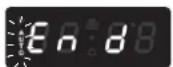
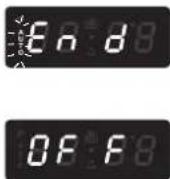
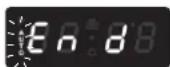
End appears on the display, AUTO flashes and the audible signal sounds. The cooking cycle has finished and the oven is OFF.
-
Press any programmer pushbutton to stop the audible signal.
-
OFF appears (oven OFF).
-
Turn the function selector to OFF (oven OFF).
-
The programmer display shows the time.
Note: At the end of the programme always turn the function selector knob to OFF (oven OFF).
AUTOMATIC COOKING
Start cooking at the programmed time and switch the oven off automatically after the programmed cooking time.
Setting
- Set the cooking function by turning the oven selector to the function required.
- The cooking temperature appears on the display. To change it proceed as described in the Setting the cooking chapter.
- Press pushbutton 2. AUTO starts to flash and 0.00 appears.
- Press pushbuttons 5 or 6 to set the cooking time (cooking time in hours and minutes: set it to ten minutes less than the time required because the stored heat will complete the cooking).
- On the display AUTO becomes steady and the cooking programme starts.
- Press pushbutton 3 (AUTO starts to flash).
- Press pushbuttons 5 or 6 to set the time when the cooking should finish. The values set must be correct; e.g. if it is 08:00 a cooking time of 3 hours, ending at 10:00, cannot be set. In this case the programmer automatically sets the end of cooking time for 11:00.
- On the display AUTO becomes steady and the time appears again. The cooking symbol goes out.
Starting cooking
- The pan symbol lights up. The oven switches on and the cooking cycle set starts.
During cooking
- During the cooking cycle, the display shows the oven temperature measured by the probe or pre-setted temperature.
Press key 2 to display the length of cooking set.
Press key 3 to display when the cooking will finish.
The cooking time, end of cooking time and cooking temperature can be varied at any time, as described above.
At the end of cooking
- End appears on the display, AUTO flashes and the audible signal sounds. The cooking cycle has finished and the oven is OFF.
- Press any pushbutton to stop the audible signal.
- OFF appears (oven OFF).
- Turn the function selector to OFF (oven OFF).
- The programmer display shows the time.
Note: At the end of the programme always turn the function selector knob to OFF (oven OFF).
IMPORTANT: During AUTOMATIC COOKING PROGRAM the oven light is always on, also before starting (heating elements on or cycling) of the programmed cooking.
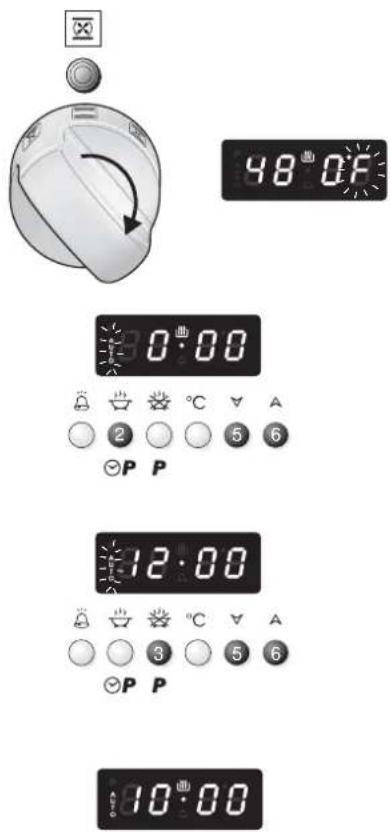
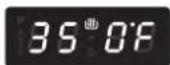
CANCELLING A SET PROGRAMME
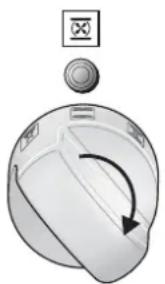
To cancel any programme just turn the function selector to OFF (oven OFF).
Note: if during a set programme the function selector is turned to OFF (oven OFF), SELF CLEANING or oven lighting, the programme is cancelled.
EXAMPLES OF PROGRAMMING AUTOMATIC COOKING
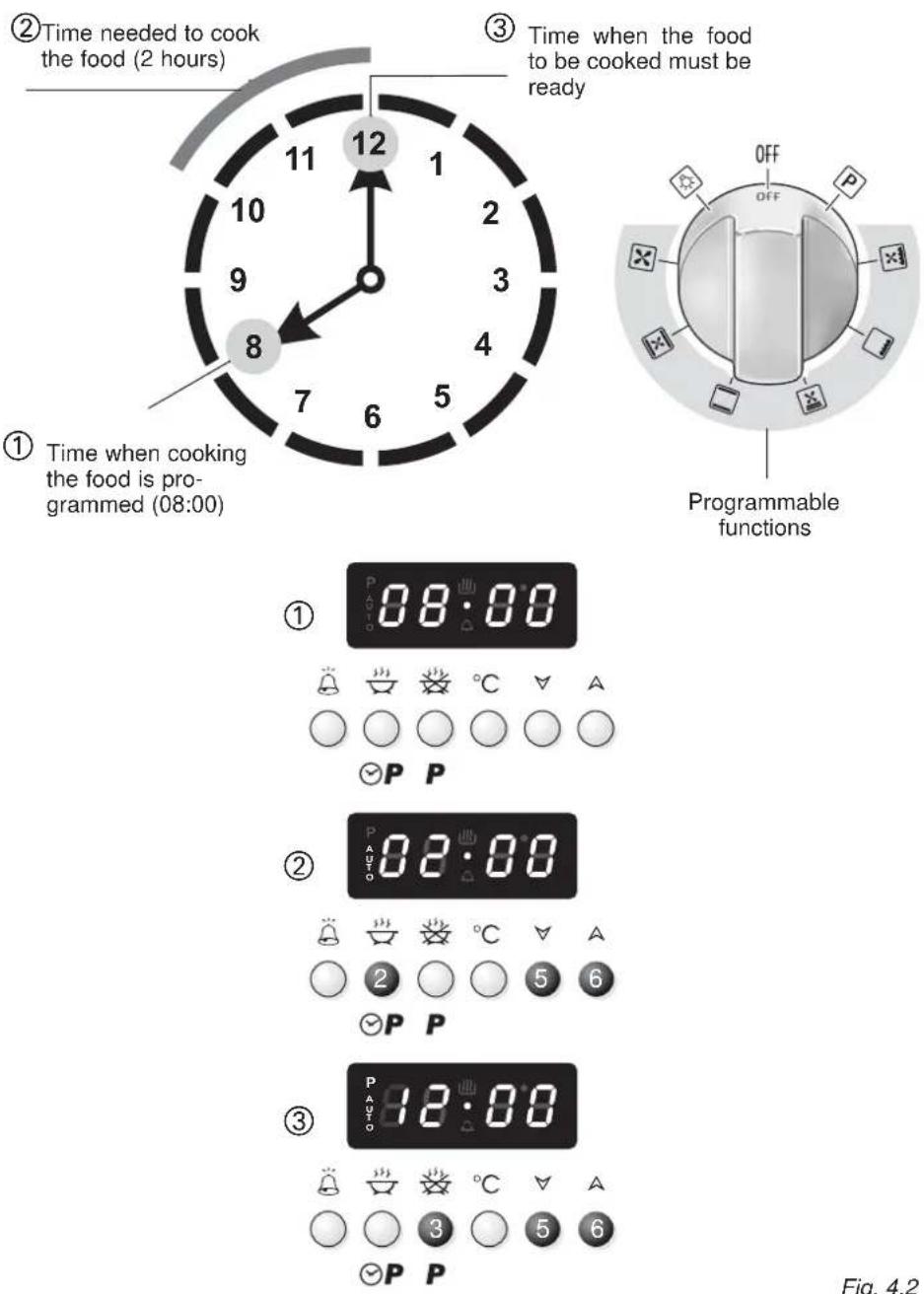
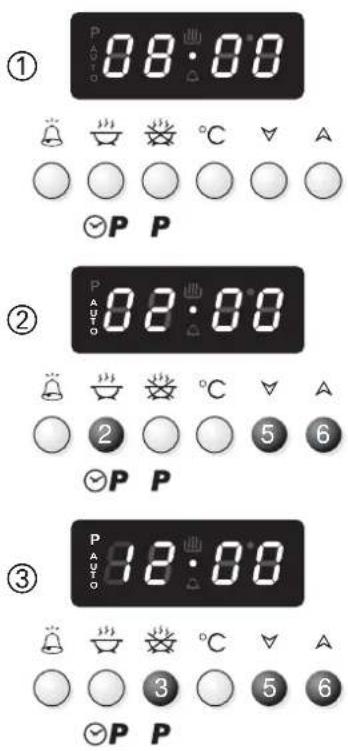
Fig. 4.2
GENERAL RECOMANDATION
√ Important: Before any operation of cleaning and maintenance disconnect the appliance from the electrical supply.
√ It is advisable to clean when the appliance is cold and especially for cleaning the enamelled parts.
√ Avoid leaving alkaline or acidic substances (lemon juice, vinegar, etc.) on the surfaces.
√ Avoid using cleaning products with a chlorine or acidic base.
The oven must always be cleaned after every use, using suitable products and keeping in mind that its operation for 30 minutes on the highest temperature eliminates most grime reducing it to ashes.
ENAMELLED PARTS
√ All the enamelled parts must be cleaned with a sponge and soapy water only or other non-abrasive products.
Dry preferably with a chamois leather.
STAINLESS STEEL SURFACES WITH ANTI-FINGERPRINT TREATMENT (COATED)
CAUTION
√ The STAINLESS STEEL front surfaces used in this range are protected with a Special Lacquer to reduce finger-print marks.
To avoid damaging this lacquer, do not clean the stainless steel with abrasive cleaners or abrasive cloths or scouring pads.
ONLY SOAP/WARM WATER MUST BE USED TO CLEAN THE STAINLESS STEEL SURFACES.
STAINLESS STEEL SURFACES (UNCOATED)
The hob + sides are made from uncoated stainless steel. Can be cleaned with an appropriate stainless steel cleaner.
INSIDE OF OVEN
This must be cleaned regularly.
With the oven warm, wipe the inside walls with a cloth soaked in very hot soapy water or another suitable product.
BURNERS AND GRIDS
√ These parts can be removed and cleaned with appropriate products.
√ After cleaning, the burners and their flame distributors must be well dried and correctly replaced.
√ It is very important to check that the burner flame distributor and the cap has been correctly positioned - failure to do so can cause serious problems.
√ In appliances with electric ignition keep the electrode clean so that the sparks always strike.
√ Note: To avoid damage to the electric ignition do not use it when the burners are not in place.
WARNING VERY IMPORTANT
Before any operation of maintenance disconnect the appliance from the electrical mains supply.
Do not use steam jet cleaners because the humidity could infiltrate into the appliance making it dangerous.
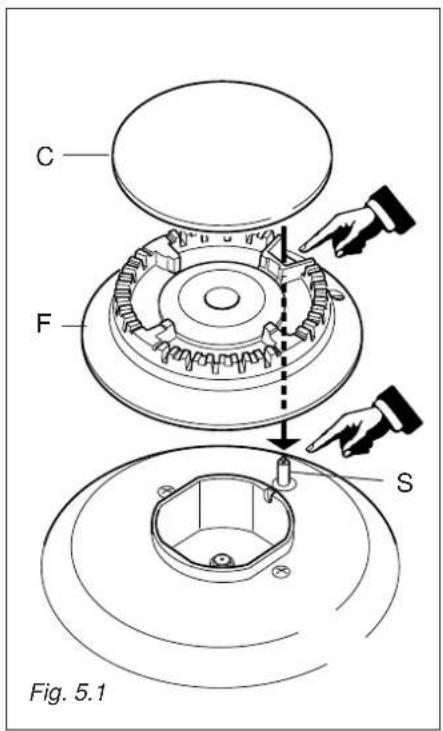
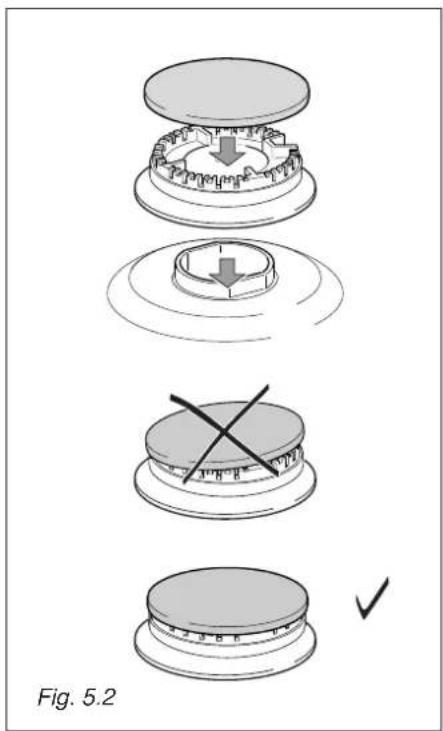
CORRECT REPLACEMENT OF THE BURNERS
It is very important to check that the burner flame spreader "F" and the cap "C" have been correctly positioned (see figs. 5.1 and 5.2).
Failure to do so can cause serious problems.
In appliances with electric ignition, check that the electrode "S" (fig. 5.1) is always clean to ensure trouble-free sparking.
The ignition plug must be very carefully cleaned.
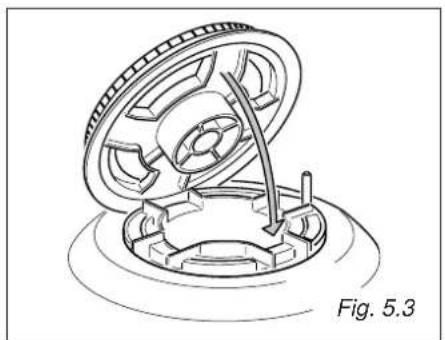
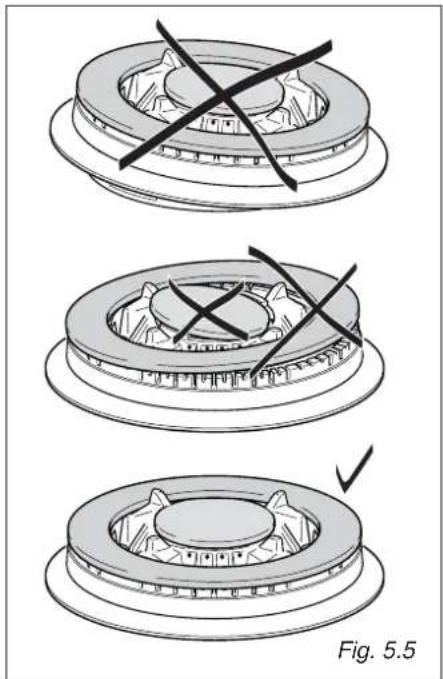
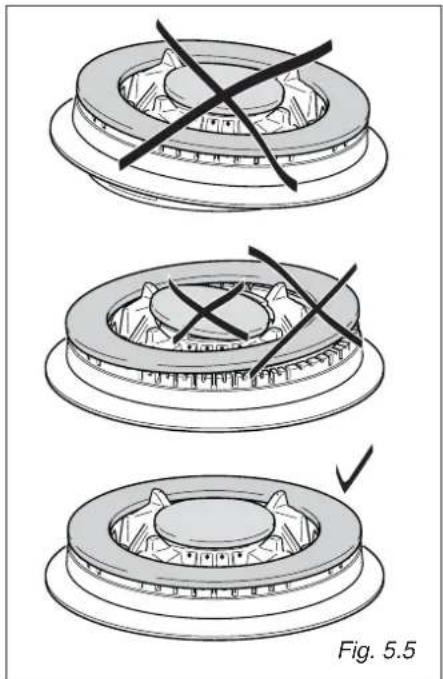
CORRECT POSITION OF TRIPLE RING BURNER
The triple ring burner must be correctly positioned (see fig. 5.3); the burner rib must be fitted in their housing as shown by the arrow.
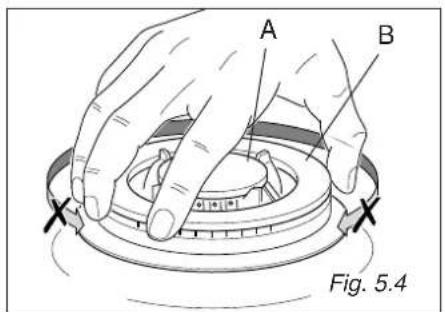
The burner correctly positioned must not rotate (fig. 5.4).
Then position the cap A and the ring B (fig. 5.4 - 5.5).
OVEN SHELF INSTALLATION AND REMOVAL
GAS VALVES
√ In the event of operating faults in the gas valves, call the AVANTI Service Department.
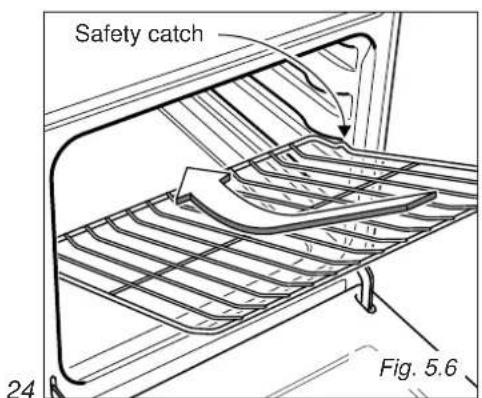
The oven shelves are provided with a security block to prevent accidental extraction.
They must be inserted operating as per figure 5.6.
Topull them out remove shelf in the inverse order.
Keep attention to insert the shelves correctly (see side figure).
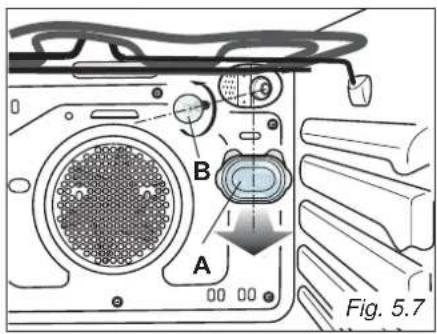
REPLACING THE OVEN LIGHT (fig. 5.7)
Before any maintenance is started involving electrical parts of the appliance, it must be disconnected from the power supply.
- Let the oven cavity and the heating elements cool down;
– Switch off the electrical supply; - Remove the protective cover (fig. 5.7);
- Unscrew and replace the bulb with a new one suitable for high temperatures (300°C) having the following specifications: 120V, 60 Hz, 25W, E14
- Refit the protective cover
NOTE: Oven bulb replacement is not covered by your guarantee
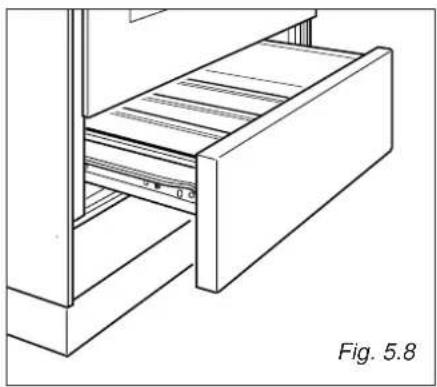
DRAWER
The drawer (fig. 5.8) comes out like a normal drawer. A safety catch stops it from sliding out.
Toremove the drawer open and lift it.
Do not store flammable material in the oven or in the drawer.
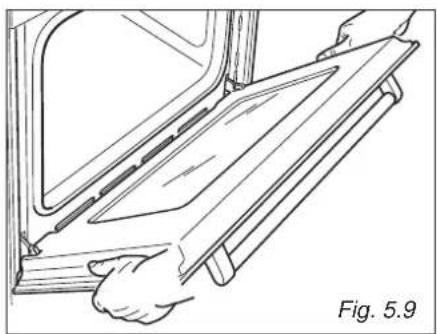
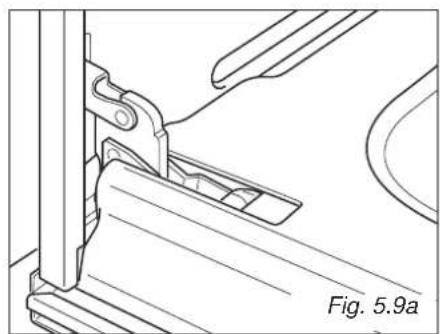
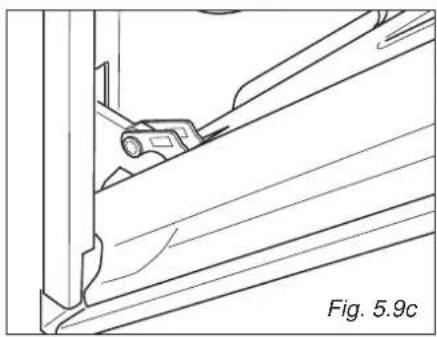
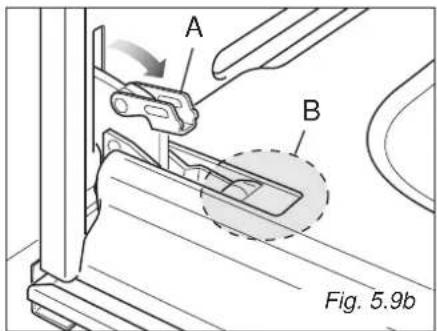
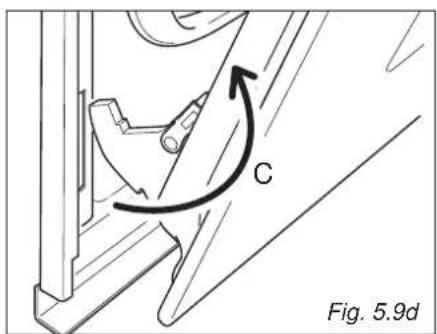
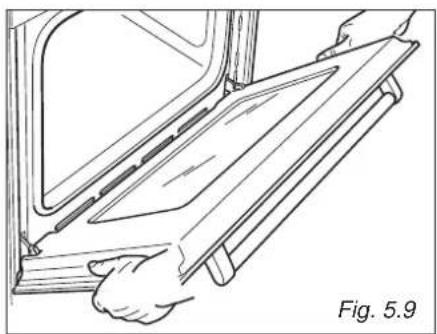
REMOVING THE OVEN DOOR
The oven door can easily be removed as follows:
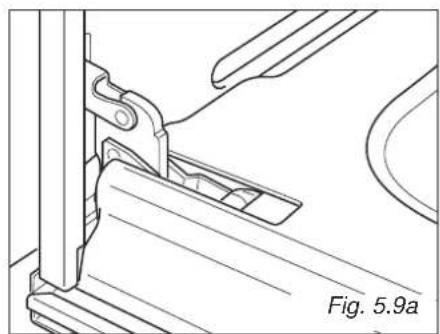
- Open the door to the full extent (fig. 5.9a).
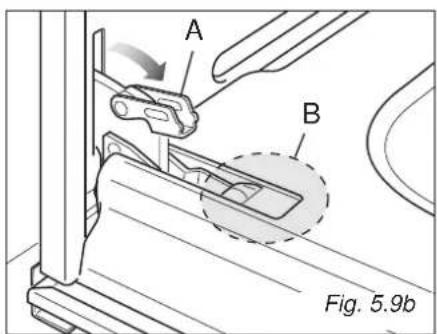
- Open the lever "A" completely on the left and right hinges (fig. 5.9b).
– Hold the door as shown in fig. 5.9.
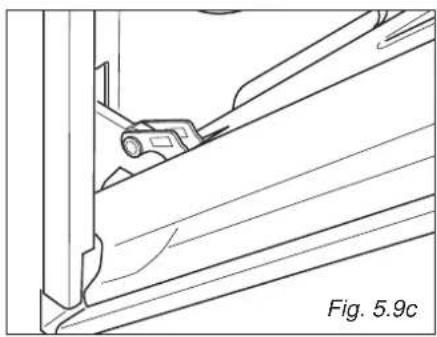
- Gently close the door (fig. 5.9) until left and right hinge levers "A" are hooked to part "B" of the door (fig. 5.9b)
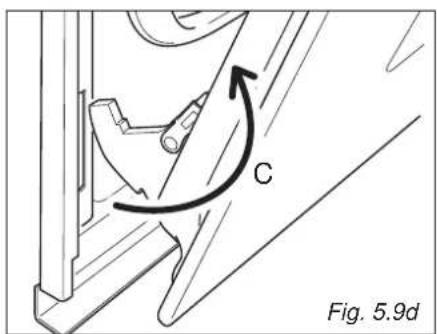
- Withdraw the hinge hooks from their location following arrow "C" (fig. 5.9d).
- Rest the door on a soft surface.
- To replace the door, repeat the above steps in reverse order.
DO'S AND DO NOT'S
- Do always use the oven with the door closed.
- Do read the user instructions carefully before using the range for first time.
- Do allow the oven to heat for about two hours, before using for the first time, in order to expel any smell from the new oven insulation, without the introduction of food.
- Do clean your oven regularly.
- Do remove spills as soon as they occur.
- Do always use oven gloves when removing food shelves and trays from the oven.
- Do not allow children near the range when in use.
- Do not allow fat or oils to build up in the oven base, or oven accessories.
- Do not place cooking utensils or plates directly onto the oven base.
- Do not place hot enamel parts in water. Leave them to cool first.
- Do not allow vinegar, coffee, milk, saltwater, lemon or tomato juice to remain in contact with enamel parts (i.e. inside the oven).
- Do not use abrasive cleaners or powders that will scratch the surface of the stainless steel and the enamel.
- Do not attempt to repair the internal workings of your range.
- Do remove the protective film before the first use.
- Fire risk! Do not store flammable material in the oven and in the drawer.
FOR YOUR SAFETY
Under no circumstances should any external covers be removed for servicing or maintenance except by suitably qualified personnel
WARRANTY - SELF CLEANING DUAL FUEL RANGE
| LENGTH OF WARRANTY WE WILL PAY FOR | |
| FULL ONE-YEAR WARRANTY FROM DATE OF PURCHASE ON ALL PARTS EXCEPT GLASS PARTS IN RENTAL OR COMMERCIAL USE, THE WARRANTY PERIOD IS 90 DAYS. | REPLACEMENT PARTS AND REPAIR LABOR TO CORRECT DEFECTS IN MATERIALS OR WORKMANSHIP.SERVICE MUST BE PROVIDED BY AN AUTHORIZED SERVICE COMPANY. |
| FULL 30-DAY WARRANTY FROM DATE OF PURCHASE ON GLASS PARTS AND FINISH OF PORCELAIN ENAMEL, PAINTED OR BRIGHT METAL FINISHED PARTS. | REPLACEMENT PARTS AND REPAIR LABOR TO CORRECT DEFECTS IN MATERIAL OR WORKMANSHIP.SERVICE MUST BE PROVIDED BY AN AUTHORIZED SERVICE COMPANY. |
| WE WILL NOT PAY FOR | |
| A. Service calls to:1. Correct the installation of your range.2. Instruct you how to use your range.3. Replace house fuses or correct house wiring.4. Replace owner-accessible light bulbs.B. Pickup and delivery. Your range is designed to be repaired in the home.C. Damage to your range caused by accident, misuse, fire, flood, acts of God, or use of products not mentioned in this manual.D. Repairs to parts or systems caused as a result of unauthorized modifications made to the appliance.E. Repairs when your range is used in other than normal, single-family household use. | |
AVANTI PRODUCTS SHALL NOT BE LIABLE FOR INCIDENTAL OR CONSEQUENTIAL DAMAGES.
Some states do not allow the exclusion or limitation of incidental or consequential damages, so this exclusion or limitation may not apply to you. This warranty gives you specific legal rights, and you may also have other rights that vary from state to state.
This warranty is not valid outside the Continental United States.
COCINA DE COMBUSTIBLE DOBLE
IMPORTANTE – LE ROGAMOS LEER Y RESPETAR LO SIGUIENTE
ENGLISH ESPAÑOL
IMPORTANTE - LEER CUIDADOSAMENTE

ADVERTENCIA

CARACTERÍSTICAS GENERALES
②
2a
2b
3d
①
×
②
[NO TEXT]
The image is too blurry to recognize any text content.
③

USAR LA BANDEJA RECOGE GRASA CON EL GRILL
The manufacturer cannot be held responsible for possible inaccuracies due to printing or transcription errors in the present booklet.
The manufacturer reserves the right to make all modifications to its products deemed necessary for manufacture or commercial reasons at any moment and without prior notice, without jeopardising the essential functional and safety characteristics of the appliances.
- DGE 2403 SC
- ENGLISH ESPAÑOL
- IMPORTANT - PLEASE READ AND FOLLOW
- WARNING
- WARNING: IF THE INFORMATION IN THIS MANUAL IS NOT FOLLOWED EXACTLY, A FIRE OR EXPLOSION MAY RESULT CAUSING PROPERTY DAMAGE, PERSONAL INJURY, OR DEATH
- DEAR CUSTOMER
- GENERAL INFORMATION
- ELECTRICAL REQUIREMENT
- AIR SUPPLY AND VENTILATION
- GAS MANIFOLD PRESSURE
- ELECTRICAL GROUNDING INSTRUCTIONS
- FOR PERSONAL SAFETY, THIS APPLIANCE MUST BE PROPERLY GROUNDED
- REPLACEMENT PARTS
- IMPORTANT PRECAUTIONS AND RECOMMENDATIONS
- IMPORTANT PRECAUTIONS AND RECOMMENDATIONS FOR USE OF ELECTRICAL APPLIANCES
- COOKING HOB
- NOTE
- CAUTION
- CONTROLS DESCRIPTION
- COOKING HOB CONTROLS
- OVEN CONTROLS
- GAS BURNERS
- CHOICE OF BURNER (FIG. 2.3)
- CORRECT USE OF TRIPLE-RING BURNER (FIG. 2.4A - 2.4B)
- IMPORTANT
- GENERAL FEATURES
- USING THE OVEN FOR THE FIRST TIME
- OPERATING PRINCIPLES
- NOTES ON OVEN WORKING
- SELECTING THE FUNCTIONS (FIG. 3.1)
- IMPORTANT: IN ALL COOKING FUNCTIONS THE OVEN MUST ALWAYS BE USED WITH THE DOOR CLOSED
- OVEN LIGHT
- DEFROSTING FROZEN FOODS (THIS IS NOT A COOKING FUNCTION)
- RECOMMENDED FOR
- CONVECTION COOKING WITH VENTILATION
- TRADITIONAL CONVECTION COOKING
- VENTILATED COOKING WITH DOUBLE BROIL
- BROILING
- VENTILATED BROILING
- SELF CLEANING FUNCTION
- IMPORTANT NOTES
- SELECTING °F/°C ON THE DISPLAY
- SETTING THE COOKING (ONLY FOR THE COOKING FUNCTIONS)
- SELECTING THE COOKING FUNCTION
- SETTING THE COOKING TEMPERATURE
- SWITCHING OFF
- HOW TO START THE SELF CLEANING CYCLE
- VERY IMPORTANT
- PROBLEMS ON STARTING AND DURING THE SELF CLEANING CYCLE
- STEADY DOOR
- DOOR WITH AUTO FLASHING
- F0.00 WITH AUTO FLASHING
- HOW TO STOP THE SELF CLEANING CYCLE
- TURN THE FUNCTION SELECTOR TO OFF (OVEN OFF)
- ACCIDENTAL INTERRUPTION OF THE SELF CLEANING CYCLE
- THE FUNCTION SELECTOR HAS BEEN TURNED TO ANY COOKING FUNCTION
- WHAT TO DO WHEN THE SELF CLEANING CYCLE HAS FINISHED
- ABNORMAL SITUATIONS AND/OR OPERATION PROBLEMS
- 30 F0 OR 30 F1 APPEAR DURING THE COOKING OR SELF CLEANING CYCLE
- WHAT TO DO
- F0.00 APPEARS DURING THE SELF CLEANING CYCLE
- DISPLAY OFF - OVEN NOT WORKING PROPERLY
- COOKING ADVICE
- STERILIZATION
- REGENERATION
- ROASTING
- COOKING DIFFERENT DISHES AT THE SAME TIME
- VENTILATED BROILING AND "AU GRATIN
- KEEP ATTENTION MOST IMPORTANT
- USING THE GRILL PAN FOR BROILING
- DESCRIPTION OF THE PUSHBUTTONS
- DESCRIPTION OF THE LIGHT SYMBOLS
- ON SWITCHING ON FOR THE FIRST TIME OR AFTER A BLACK-OUT
- SETTING THE TIME
- AUDIBLE SIGNAL
- TIMER
- SEMI-AUTOMATIC COOKING
- SETTING
- DURING COOKING
- AT THE END OF COOKING
- AUTOMATIC COOKING
- START COOKING AT THE PROGRAMMED TIME AND SWITCH THE OVEN OFF AUTOMATICALLY AFTER THE PROGRAMMED COOKING TIME
- STARTING COOKING
- CANCELLING A SET PROGRAMME
- EXAMPLES OF PROGRAMMING AUTOMATIC COOKING
- GENERAL RECOMANDATION
- ENAMELLED PARTS
- STAINLESS STEEL SURFACES WITH ANTI-FINGERPRINT TREATMENT (COATED)
- STAINLESS STEEL SURFACES (UNCOATED)
- INSIDE OF OVEN
- BURNERS AND GRIDS
- WARNING VERY IMPORTANT
- CORRECT REPLACEMENT OF THE BURNERS
- CORRECT POSITION OF TRIPLE RING BURNER
- OVEN SHELF INSTALLATION AND REMOVAL
- GAS VALVES
- REPLACING THE OVEN LIGHT (FIG. 5.7)
- DRAWER
- REMOVING THE OVEN DOOR
- DO'S AND DO NOT'S
- FOR YOUR SAFETY
- WARRANTY - SELF CLEANING DUAL FUEL RANGE
- AVANTI PRODUCTS SHALL NOT BE LIABLE FOR INCIDENTAL OR CONSEQUENTIAL DAMAGES
- COCINA DE COMBUSTIBLE DOBLE
- IMPORTANTE - LEER CUIDADOSAMENTE
- ADVERTENCIA
- CARACTERÍSTICAS GENERALES
- USAR LA BANDEJA RECOGE GRASA CON EL GRILL
Brand : Avanti
Model : DGE2403SC
Category : Hot plate